1
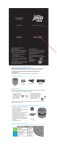
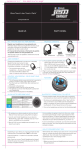
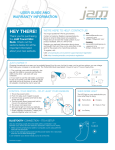
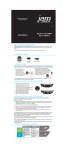
Controls
6. Volume Up
7. Forward Track
8. Battery Status Indicator
9. Power Button
1. Charging Port
2. Bluetooth® Indicator
3. Volume Down
4. Reverse Track
5. Play/Pause
2
3
1
4
5
6
7
8
9
Pairing the Jam Splash Speaker
To listen to your music over the Bluetooth® wireless connection, you need to
pair your device with the Jam Splash:
1. Make sure your device has Bluetooth® capability.
2. Press and hold power button for 5 seconds; indicator will begin to flash.
3. Follow the instructions of your device to pair the unit.
4. Pair your device by selecting JAM Splash from your Bluetooth® listings on
your device or selecting YES.
5. Press play on your device and use controls on the unit to adjust
desired volume.
NOTE:
•Once you have successfully paired your device, you may not need to repeat
the above steps.
•When pairing with a computer, please consult your computer manufacturer
for Bluetooth® pairing instructions and/or the latest Bluetooth® Drivers.
•Keep all non-water-resistant devices (phones, mp3 players, etc.) in a dry
place where they will not come in contact with water.
•A pairing code is not required.