1
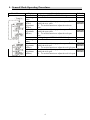
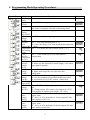
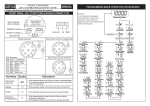
5. Programming Mode Operating Procedures
Block Charts
Display
Measuring
Status
Pass Code
(P.Cod)
Descriptions
Present value for measurement.
Press
to enter pass code.
Pass code is correct that will enter to parameter groups.
Pass code is wrong that will back to measuring status.
Press can select A/O setting page.
System
Setting
Page (SYS)
Input Type Pass
to modify the input type.
Setting
(tYPE)
Decimal
Pass
to select decimal point (0, 1).
Point
EX: if the value shows "0.0" that means the decimal point
Setting (dP) is 1 digit.
Temperature Pass
to modify the unit of linear-speed (℃/℉).
Unit Setting
(Unit)
Cold
Pass
can switch (on) or (off) cold junction
Junction
compensation.
Compensati
on (CJC)
Display
Pass
to modify display average (1~99).
Average
PS: Please use this function for stable display value when
Setting
input signal is unstable.
(AvG)
Pass Code Pass
to modify pass code (0~19999).
Setting
PS: Please don't forget the new pass code after
(CodE)
modification.
Key Lock Pass
to lock the keys, using key lock function only
Setting
can view the parameters, but cannot modify any values.
(LoCK)
PS: no (unlock) ,YES ("ENT" unlock , others lock).
A/O Setting Pass can select A/O setting page.
Page (AoP)
A/O Polarity Pass
To modify output is positive pole or negative
Setting
pole.
(PoLAr)
PS : Voltage output ,NO: positive pole output (0~+10V)
YES: positive & negative pole output (-10~+10V)
A/O Low
Pass
to adjust A/O low scale to correspond to the
Scale
display value.
Setting
EX : A/O is 0~10V, the display is 10.0 to output 0V, this
(AnLo)
value must be set for 10.0.
A/O Hi
Pass
to adjust A/O hi scale to correspond to the
Scale
display value.
Setting
EX : A/O is 0~10V, the display is 90.0 to output1 0V, this
(AnHi)
value must be set for 90.0.
5
Default