1
PINE s.r.l. www.pinesrl.com
•
MANGE3BEVA.doc
Regulate and tare the parameters for a correct transducers working.
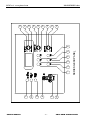
KEYS
FUNCTION
(11)
Choose measurements to be changed / Confirm new calibrations
(9) (10)
Move among the main-menu rows / Change values
Go to main-menu / Exit from set-up storing new data if user is in
main-menu
(8)
WARNING
IF DURING SET-UP NO KEY IS PRESSED WITHIN 60 SECONDS, AUTOMATIC EXIT
FROM SET-UP WILL OCCUR AND ALL CHANGES WILL BE LOST.
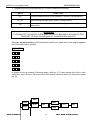
To enter set-up press key (11) until buzzer produces a beep and in the display appears
one of the main menu options.
MAIN MENU
P
t
r n
A
r
O P 1
O P 2
O P 3
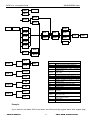
In regard to set-up scheme (following page), with key (11) user moves from left to right,
while with keys (9) and (10) he moves in the vertical sense; to return to main menu press
key (8).
ESC
rPn
AoF
S o1
Val.
SOA
USER’S MANUAL
rit
Val.
Aon
-8-
CM30 GE3B ALARM PANEL