1
About
FineSTRUCTURE is software to perform population assignment on genetics data. The correct
reference is: Lawson, Hellenthal, Myers and Falush 2011 “Inference of population structure using
dense genotype data”, (submitted to PloS Genetics), which contains the motivation and justification
behind the method. See www.paintmychromosomes.com for the most up to date information;
where this manual is at odds with the website, the website is likely to be correct.
Similar in concept to STRUCTURE (http://pritch.bsd.uchicago.edu/software.html)
fineSTRUCTURE assigns individuals to populations using a model for the expected variability.
The advantage of our approach is that very large numbers of SNPs (Single Nucleotide
Polymorphisms) can be used and these do not have to be in linkage equilibrium (in fact, it can be
better if they are not). However, to achieve this efficiency the data must be pre-processed either
using a linkage or no-linkage model, as described in the paper. Software to do this called
ChromoPainter is included with this package.
Software is available both for Windows and for Linux compatible operating systems. There is both
a command-line and GUI (Graphical User Interface) version of the software; the command line is
only available for Linux.
This software is Beta: please report all bugs to the author at [email protected].
Pipeline overview
0a. Obtain phased data.
0b. Run ChromoPainter to obtain a input coancestry matrix and c value.
1. Run fineSTRUCTURE to obtain an results MCMC sample file.
2. Run fineSTRUCTURE to obtain a results tree file containing a tree relating populations as
well as a 'best population assignment' from the MCMC file.
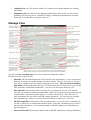
3. View the results in the GUI. (Steps 1 and 2 can be done through the GUI or command-line).
Getting Started
What you need
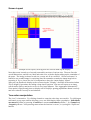
1. A genetics data set, processed into a “Coancestry matrix” of the form X_ij = the expected
number of “genetic elements” donated to individual i from individual j.
2. An estimate of the “inflation factor” c for this dataset.
3. Correctly installed/compiled Finestructure software.
Parts 1 and 2 should be output for your dataset by the included ChromoPainter software. Note that
a “genetic element” is a SNP when markers are considered as unlinked, or a contiguous segment of
DNA uninterupted by recombination in the case of linked markers. The inflation factor c computes
the “effective number of independent genetic elements” and therefore accounts for the differences
in these two models.
Installation
On Windows, simply unzip, and run “finegui” from its directory. The required DLL files should be
included. You can alternatively use the installer which will install it like any other program.