1
On Linux, a smooth installation procedure is not yet completed. You need to compile from source,
for which you need the libraries the code depends on.
For the command line program: You need the Gnu Scientific Library (GSL, package libgsl0-dev on
Ubuntu) and automake (package automake in Ubuntu), as well as the GCC c++ compiler (package
g++ on ubuntu). Then do the following, from the directory that you downloaded the code:
tar -xzvf finestructure-0.0.2GUI.tar.gz
cd finestructure-0.0.2
./configure
make
sudo make install # optional
# (check correct version. The GUI includes the command
# line version)
For the GUI: You need GSL, as well as wxwidgets (package wx2.8-headers on Ubuntu). After
doing the above, the following commands should work:
cd gui
./configure
make
sudo make install
# optional
If these fail, please feel free to contact the author for help. It is clear that there may be other
dependencies that are system specific, or configuration of the GUI Makefile that may require
attention on your system.
It should be possible to compile Finestructure for the Mac. If you succeed in doing this, or would
like assistance doing so, please get in touch with the author (as we have no Mac to test on).
GUI Example
An example dataset is provided, which is a simulated dataset of 150 regions of 5Mb (so 75Mb) of
dense genetic data as described in Lawson Et al (2011). The process of generating the input dataset
from “phase” file format is described in the manual for ChromoPainter. The resulting input file is a
N x N matrix where N=100 is the number of individuals in the sample.
Load a datafile
To load the dataset, start “Finegui” and go to “File->Manage Files” from the drop-down menu.
Under the “Raw data file” section, first select “Change file”. Using the dialog, select the file
“data_unlinked.chunkcounts.out” from the “examples” folder. Then select “Read file” in the same
section. This should read the raw data matrix into the main window (and also the correct value of
the inflation factor c).
Perform MCMC: generate the MCMC file
Choose a new file for MCMC by selecting in the “MCMC output file” section “Change file”; we
will use “unlinked_test.xml”. The default run length is sufficient for this simple dataset so press
“Generate Sample”. A progress box will appear; it takes roughly 1-2 minutes on a 2008 desktop
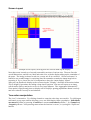
PC. When completed, the file is automatically read and the pairwise coincidence shown in the main
window.
Find optimal assignment: generate the tree file
Finding an optimal assignment is performed simultaneously with the tree building algorithm.