1
Factory Settings
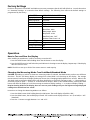
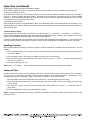
Each time the power is turned OFF and ON there are some parameters that the DFS will default to. Consult the section
on “Parameter Settings” to customize these default settings. The following chart reflects the default settings as
programmed by the factory:
PARAMETER
Display Update
DEFAULT FACTORY SETTING
0.125 seconds
Measuring Mode
True Peak
Auto Power Off
3 Minutes
Measurement Unit
English (Lb, Lb-I or oz-I)
Output
RS232
Baud Rate - 4800
Data Length - 8 bits
Stop Pulse - 2 bits
Data End Code - CrLF
Software Flow Control - off
External Trigger
Tare
Memory Mode
Single
Analog Output Mode On
Filter
Off
Operation
How to Tare and Zero the Display
After installing an attachment, it will be necessary to tare the DFS:
1. Press the RESET button while holding down the ON button to tare the display.
2. Press the RESET button by itself when the peak indicator is showing to zero the display. Repeat step 1 if the display
does not return to zero.
NOTE: The DFS can tare up to 50% of the remote sensor’s rated capacity.
Changing the Measuring Mode: True Peak Mode/Standard Mode
CAUTION: Depending on which of these two measuring modes is selected, the PEAK button performs two different
functions! The DFS will always display an average force when PEAK is not showing on the display. The average
measurement is based upon the display update rate chosen (see “Changing Display Update Time” section). When in the
True Peak mode, pressing the PEAK button will allow the display to scroll from average to peak “+” (compression or
clockwise torque) to peak “-” (tension or counterclockwise torque). When in the Standard mode, pressing the PEAK
button will allow the display to scroll from average to maximum display reading “+” to maximum display reading “-”.
Despite showing PEAK on the display, these are not true peak readings; they are the highest average displayed
readings since the DFS was last “tared”.
Instructions to change the Measuring Mode are as follows:
1. Press the PEAK button while holding down the ON button. The small display will exhibit “dSP”.
3. Press the PEAK button; the small display will read “PfS” and the main display will show “on” (True Peak) or “oFF”
(Standard).
3. Press the > button to toggle between “on” and “oFF”.
5