1
Panel & PLC
Error Code Tables
Appendix
A
In this Appendix...
Introduction................................................................................................................ A-2
C-more Micro Panel Error Code Table....................................................................... A-3
Modbus Protocols Error Code P499 Explanation...................................................... A-4
AutomationDirect CLICK........................................................................................... A-4
AutomationDirect DirectLOGIC - Modbus (Koyo)...................................................... A-4
Modicon Modbus RTU.............................................................................................. A-4
Entivity Modbus RTU................................................................................................. A-4
Productivity Error Code P499 Explanation................................................................ A-5
Do-more Error Code P499 Explanation..................................................................... A-6
DirectLOGIC Error Code P499 Explanation............................................................... A-7
DirectLOGIC – K-Sequence PLC Error Code Table..................................................... A-7
DirectLOGIC – DirectNET PLC Error Codes................................................................ A-7
Allen-Bradley Error Code P499 Explanation.............................................................. A-8
Allen-Bradley DF1 Protocol – PLC Error Code Tables................................................ A-9
Allen-Bradley DH485 Protocol – PLC Error Code Tables......................................... A-11
GE Error Code P499 Explanation............................................................................. A-13
GE SNPX Protocol – PLC Error Code Tables............................................................ A-14
Mitsubishi FX Protocol – PLC Error Codes............................................................... A-23
Mitsubishi Q / QnA Series – PLC Error Codes......................................................... A-23
Omron Error Code P499 Explanation...................................................................... A-25
U
L USLink Protocol – PLC Error Code Table................................................ A-26
C Host
Omron
R
Omron FINS Protocol – PLC Error Code Table........................................................ A-27
Siemens Error Code P499 Explanation.................................................................... A-30
Siemens PPI Protocol – PLC Error Code Table......................................................... A-31
Appendix A: Panel & PLC Error Code Tables
A
2
3
4
5
6
7
8
9
10
11
12
13
14
A
B
C
D
Introduction
The C-more® Micro panels are capable of communicating over RS232, RS422 and RS485
serial networks. They communicate with Productivity Series PAC’s, Do-more PLC’s, CLICK
PLC’s, all controllers in the Direct LOGIC family of PLCs utilizing various protocols, and
certain 3rd party PLCs. For a complete list of the supported PLCs and protocols, see the PLC
Drivers table in Chapter 6: PLC Communications.
As with any network communications, errors may occur. To simplify identification of the
possible cause of the error, we have provided tables listing these errors. If a C-more Micro
panel communications error, or other related data exchange error does occur, the error
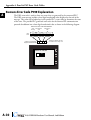
message will appear across the top of the display screen as shown in the example below. A
complete table of the panel generated errors, with their respective error codes, error messages,
and the possible causes of the error follows.
The C-more Micro panel also monitors any errors that are generated by the PLC that is
connected to it. If any of the PLC generated errors are detected, they are displayed across
the top of the panel’s display embedded as a hexadecimal value in error code P499. An
explanation of how the specific PLC error is identified in the panel error code P499 is shown
preceeding the specific manufacturer’s PLC error tables. How the hexadecimal error code
value is interpreted is slightly different between manufacturers, so it is important to check the
explanation at the beginning of each manufacturer’s tables. Since these errors are generated by
the PLC, refer to the PLC manufacturers documentation for further explanation.
If you have difficulty determining the cause of the error, please refer to Chapter 8:
Troubleshooting for some troubleshooting tips or contact our technical support group at
770-844-4200.
C-more Micro Panel Error Example
P001: PLC COM Time Out
Start
Stop
A-2
®
EA3-USER-M Hardware User Manual, 2nd Edition
Appendix A: Panel & PLC Error Code Tables
C-more Micro Panel Error Code Table
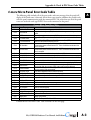
The following table includes all of the error codes and error messages that the panel will
display if the listed cause is detected. All of these errors involve problems that could result
with the panel communicating with the connected PLC. Be aware that not all of the panel
errors are used with each type of PLC that can be connected to the panel.
Error Code Error Message
P001
P002
P003
P004
P005
P006
P007
P008
P009
P010
P011
P012
P013
P014
P015
P016
P017
P019
P020
P021
P022
P023
P024
P025
P026
P027
P028
C-more Micro Panel Error Table
Cause
PLC Com Time Out
A timeout occurred after sending a request to the PLC.
A negative acknowledgement (NAK) control code has been generated during a read/write
NAK Received
request.
EOT Received
An end of transmission has been sent by PLC in response to a read/write/setbit request.
A Start of Text (STX) control code was not found in the data packet received from the
STX is Not Found
PLC.
Neither an End of Text (ETX) nor an End of Transmission Block (ETB) control code was
ETX/ETB NotFound
found in the data packet received from the PLC.
There was an incorrect Longitudinal Redundancy Check (LRC) control code in the
LRC Not Match
communications packet received from the PLC. This is an indication that the data in the
packet is corrupted.
There was an incorrect Cyclic Redundancy Check (CRC) control code in the
CRC Not Match
communications packet received from the PLC. This is an indication that the data in the
packet is corrupted.
Address NotMatch
The address value returned in the data packet from the PLC is incorrect.
Re.INV.FUN.Code
The function code returned in the data packet from the PLC is incorrect.
DataSizeNotMatch
There are an incorrect number of bytes found in the data packet returned from the PLC.
INV.Val.FUN.Code
There is an invalid value in the function code.
INVALID COMMAND
There was an invalid command sent to the PLC that wasn’t recognized by the PLC.
If the data packet does not include a negative acknowledgement (NAK - 0x15 value) in the
ENQ Received
defined packet field, then an enquiry (ENQ) control code error will be displayed.
This error will be displayed if after checking the Transaction ID Byte in the data packet,
TransID NotMatch
there is no match to what was requested.
Device Not Found
A PLC device designated as Device could not be found.
DataByte Com.Err
The data part of the packet received contains 0 bytes of data.
Out of Add.Range
The touch panel requested a file number larger than 255.
Parity Error
Parity error occurred.
Can’tOpenS.Port
Can’t open serial port
PLC# Not Match
PLC Number does not match
Can’t Reset DCB
Unable to reset the Data Communications Bit
Not Connected
Cable not connected properly
No Other Dev.
Cannot detect other devices
PollingListErr
Panel not in polling list
PLC Connection Time Out PLC Connection Time Out
Memory Error
Memory Type Incorrect
No Response
PLC failed to Respond: %PLC Node#%??
C-more Micro Panel Error Code Table continues on the next page.
EA3-USER-M Hardware User Manual, 2nd Edition
®
A
2
3
4
5
6
7
8
9
10
11
12
13
14
A
B
C
D
A-3
Appendix A: Panel & PLC Error Code Tables
C-more Micro Panel Error Code Table (cont’d)
(cont’d)
A Error Code Error Message C-more Micro Panel Error TableCause
2
3
4
5
6
7 Modbus Protocols Error Code P499 Explanation
The following table lists the errors that can be generated by the Modbus protocols:
AutomationDirect CLICK
8
AutomationDirect DirectLOGIC - Modbus (Koyo)
9
Modicon Modbus RTU
Entivity Modbus RTU
10
NOTE: The following errors can be generated from the designated PLC, are monitored by the C-more Micro panel,
and displayed on the panel’s screen as a hexadecimal value in panel error code P499, if active.
11
PLC Error Codes Modbus Protocols
12 Panel Error Code
Name
Meaning
P499 Hex Value
13
14
A
B
C
D
P500
Can’tWriteS.Port
P700
RD.Buff.MEM Full
P701
INV.PLC Address
A PLC generated error code with a hexadecimal value of XXXX has been returned from the
PLC. * See the explanation for error code P499 proceeding each set of PLC error code tables.
Data cannot be written to the Serial port.
Data was sent to the PLC via the Serial Port.
If this error shows on the Panel, it indicates a Hardware Problem.
There was an error while allocating memory for the read buffer. When this error is displayed, a
memory leak may have occurred.
Request to inaccessible memory from the HMI layer to the PLC protocol layer. This error is an
indication that there is a problem in the HMI layer.
P702
INV.FUN.Code
A Read/Write/SetBit request has been sent to an invalid memory area. This error is an indication that
there is a problem in the HMI layer.
P703
WRT.PLC.ReadOnly
A PLC Write request was made to the PLC’s Read-Only memory area.This error is an indication that
there is a problem in the HMI layer or the PLC protocol layer.
P499*
0x0001
0x0002
0x0003
0x0004
A-4
ErrCode Received ->
Recv .Err Code XXXX
The function code received in the query is not an allowable action for the server (or slave). This may
be because the function code is only applicable to newer devices and was not implemented in the unit
selected. It could also indicate that the server (or slave) is in the wrong state to process a request of this
type, for example because it is unconfigured and is being asked to return registered values.
The data address received in the query is not an allowable address for the server (or slave). More
specifically, the combination of reference number and transfer length is invalid. For a controller with 100
registers, the PDU addresses the first register as 0, and the last one as 99. If a request is submitted
ILLEGAL DATA with a starting register address of 96 and a quantity of registers of 4, then the request will successfully
ADDRESS
operate (address-wise at least) on registers 96, 97, 98, 99. If a request is submitted with a starting
register of 96 and a quantity of registers of 5, then the request will fail with Exception code 0x02 “Illegal
Data Address” since it attempts to operate on registers 96, 97, 98, 99 and 100, and there is no register
with address 100.
A value contained in the query data field is not an allowable value for server (or slave). This indicates a
in the structure of the remainder of a complex request, such as that the implied length is incorrect.
ILLEGAL DATA fault
It specifically does NOT mean that a data item submitted for storage in a register has a value outside
VALUE
the expectation of the application program, since the Modbus protocol is unaware of the significance of
any particular value of any particular register.
SLAVE DEVICE An unrecoverable error occurred while the server (or slave) was attempting to perform the requested
FAILURE
action.
ILLEGAL
FUNCTION
®
EA3-USER-M Hardware User Manual, 2nd Edition
Appendix A: Panel & PLC Error Code Tables
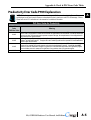
Productivity Error Code P499 Explanation
NOTE: The following errors can be generated from the designated PLC, are monitored by the C-more Micro panel
and displayed on the touch panel’s screen as a hexadecimal value in panel error code PLC-499 message, if active.
Please refer to the PLC manufacturer’s documentation for additional information.
Panel Error
Code
P499 Hex Value
0x0001
0x0002
0x0003
0x0004
PLC Error Codes for Productivity
Meaning
The function code received in the query is not an allowable action for the server (or slave). This may be because the
function code is only applicable to newer devices and was not implemented in the unit selected. It could also indicate that
the server (or slave) is in the wrong state to process a request of this type, for example because it is unconfigured and is
being asked to return registered values.
Address out of range. Check to make sure that the C-more Micro tag and System ID match the Productivity Programming
Software Tag Name and System ID. The project file in the Productivity system and the imported CSV into C-more Micro
must be in sync with each other.
A value contained in the query data field is not an allowable value for the server (or slave). This indicates a fault in the
structure of the remainder of a complex request, such as that the implied length is incorrect. It specifically does NOT
mean that a data item submitted for storage in a register has a value outside the expectation of the application program,
since the Modbus protocol is unaware of the significance of any particular value of any particular register.
An unrecoverable error occurred while the server (or slave) was attempting to perform the requested action.
EA3-USER-M Hardware User Manual, 2nd Edition
®
A
2
3
4
5
6
7
8
9
10
11
12
13
14
A
B
C
D
A-5
Appendix A: Panel & PLC Error Code Tables
A
2
3
4
5
6
7
8
9
10
11
12
13
14
A
B
C
D
Do-more Error Code P499 Explanation
NOTE: The following errors can be generated from the designated PLC, are monitored by the C-more Micro panel,
and displayed on the panel’s screen as a hexadecimal value in panel error code P499, if active.
Error Code
PLC Errors for Do-more
Description
Resolution
0x01
Unknown Command
Occurs when a message has been corrupted or protocol version is mismatched. Check versions and
update appropriately. If versions are correct, check cabling, routing and switches for bad packets.
0x02
Out of Sessions
0x03
Illegal Operation
Too many devices connected to the CPU. Reduce the number of devices connected.
Occurs when permission level is not sufficient for the operation performed by the panel. Increase the
permission level to correct the problem.
0x04
Invalid Session
Session number does match for sending device. Re-establish connection by power cycling or sending
updated project.
0x05
Out of Range
0x06
Invalid Argument
0x07
Program Update Active
0x08
No Token
Occurs when client attempts to update the project without first acquiring the program update token.
0x09
Occurs when client attempts to update the project while ST21 is true. This allows the customer to use
the program to preventthe project from being updated.
Invalid address exists. Ensure that address range is expanded and load configuration to the CPU.
Occurs when message cannot be parsed correctly. Could occur from noise or faulty wiring.
Wait until program update is complete.
0x0B
Program Update
Inhibited
System Configuration
Update Active
Invalid Mode
0x0C
Mode Change Active
0x0D
Mode Locked
Ensure that the switch on the CPU is in Term mode.
Occurs whena PLC mode change is attempted while a mode change is in progress. In some cases it
takes several scans for a mode change.
Occurs when mode change is attempted and keyswitch is not in Term.
0x0E
Invalid Password
Enter Do-more password in Password field of C-more Micro Panel Manager for this device.
0x0F
Resource Locked
Occurs whentrying to update a tag that is forced. Force must be removed in order to update the tag.
0x010
Doc Update Active
Occurs when someone attempts to access the documentation file while it is being written back to ROM.
0x011
Invalid Driver
Occurs when attempting to read driver data from a driver that doesn’t exist.
0x012
Invalid Driver Data
0x0A
0x013
A-6
Wait until System Configuration update is complete to continue communications.
Occurs when attempting to read a driver data type that isn’t valid.
when attempting to read or write to a module’s shared RAM and it fails. Usually occurs when
Shared RAM write failed Occurs
the module has gone bad.
®
EA3-USER-M Hardware User Manual, 2nd Edition
Appendix A: Panel & PLC Error Code Tables
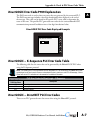
DirectLOGIC Error Code P499 Explanation
The P499 error code is used to show any errors that are generated by the connected PLC.
The P499 error message includes a four digit hexadecimal value displayed at the end of
the message. This value can be found in the specific PLC’s error tables to determine the
cause of the error. The possible PLC generated error codes for the various DirectLOGIC
communication protocols breakdown into a four digit hexadecimal value.
DirectLOGIC PLC Error Code Displayed Example:
P499: Recv. Err Code 0002
Start
Stop
DirectLOGIC – K-Sequence PLC Error Code Table
The following table lists the errors that can be generated by the DirectLOGIC PLC when
using the K-Sequence protocol.
NOTE: The following errors can be generated from the designated PLC, are monitored by the C-more Micro panel
and displayed on the touch panel’s screen as a hexadecimal value in panel error code PLC-499 message, if active.
Please refer to the PLC manufacturer’s documentation for additional information.
Panel Error Code
P499 Hex Value
01F8
020D
021C
PLC Error Codes for Direct Logic – K-Sequence
Description
Error setting value.
Error in key mode.
Password protected.
DirectLOGIC – DirectNET PLC Error Codes
There are no PLC generated errors that occur when using the DirectNET protocol.
EA3-USER-M Hardware User Manual, 2nd Edition
®
A
2
3
4
5
6
7
8
9
10
11
12
13
14
A
B
C
D
A-7
Appendix A: Panel & PLC Error Code Tables
A
2
3
4
5
6
7
8
9
10
11
12
13
14
A
B
C
D
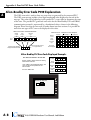
Allen-Bradley Error Code P499 Explanation
The P499 error code is used to show any errors that are generated by the connected PLC.
The P499 error message includes a four digit hexadecimal value displayed at the end of the
message. This value can be looked up in the specific PLC’s error tables to determine the cause
of the error. The possible PLC generated error codes for the Allen-Bradley DF1 and DH485
communication protocol is represented by a hexadecimal value as shown in the following
diagram. Please note that the error code is broken down into three sections. It is possible for
more than one type of PLC error to be displayed in this value.
AB DF1 Protocol Error Code P499 Breakdown
Remote
4-7 bits
16-bit
Word
Local
0-3 bits
AB DF1 Protocol – Multiple Error Code Examples
EXT STS
byte
Remote
4-7 bits
1 1 1 1 0 0 0 0 0 0 0 1 0 1 1 1
15 14 13 12 11 10 9 8 7 6 5 4 3 2 1 0
Local
0-3 bits
EXT STS
byte
P499 Error Code Message
Displayed Hexadecimal Value
A-8
F
0
1
7
Example of an EXT STS error
for a “Type mismatch.”
Example 1
Example 2
Example 3
F x
1 x
F x
x
x
+
x 0 x
+
x
x 1 x
+
x x 0 9
=
Error P499
Value Displayed F 0 0 9
x
Remote = 0x3000 = Remote node host is missing,
disconnected or shut down.
Local - 0x0200 = Cannot Guarantee Delivery; Link
Layer. The remote node specified does not
ACK Command
EXT STS = 0000 = None
3
Local
0-3 bits
x
EXT STS
byte
x
Error P499
Value
Displayed
3
x
2
+
x
x
x
x
x
0
0
0
0
=
P499: Recv. Err Code F017
Start
®
x
1 1 0 0
+
2
x
x
x 1 x
+
x
+
x 0 0
=
Allen-Bradley PLC Error Code Displayed Example:
Remote
4-7 bits
x
+
hex
Error Recieved = P499: Recv. Err Code 3200
x
Stop
EA3-USER-M Hardware User Manual, 2nd Edition
x
x 0 9
=
F 1 0 9
Appendix A: Panel & PLC Error Code Tables
Allen-Bradley DF1 Protocol – PLC Error Code Tables
The following PLC error tables cover possible errors that are detected by the panel from AllenBradley PLCs using the DF1 protocol. This includes full and half duplex communications
for the MicroLogix 1000, 1100. 1200, 1400 & 1500, SLC 5/03, /04, /05, ControlLogix,
CompactLogix and FlexLogix, and full duplex communications for the PLC5.
NOTE: The following errors can be generated from the designated PLC, are monitored by the C-more Micro panel
and displayed on the touch panel’s screen as a hexadecimal value in panel error code PLC-499 message, if active.
Please refer to the PLC manufacturer’s documentation for additional information.
PLC Errors for Allen-Bradley DF1 Protocol, Remote STS Errors (4-7 bits)
Panel Error Code
P499 Hex Value
0x0
0x10
0x20
0x30
0x40
0x50
0x60
0x70
0x80
0x90
0xA0
0xB0
0xC0
0xD0
0xE0
0xF0
Description
Success; no error.
Illegal command or format.
Host has a problem and will not communicate.
Remote node host is missing, disconnected, or shut down.
Host could not complete function due to hardware fault.
Addressing problem or memory protect rungs.
Function not allowed due to command protection selection.
Processor is in Program Mode.
Compatibility mode file missing or communication zone problem.
Remote node cannot buffer command.
Wait ACK (1775 KA buffer full).
Remote node problem due to download.
Wait ACK (1775 KA buffer full).
not used
not used
Error code in the EXT STS byte. See the error code table on the next page.
PLC Errors for Allen-Bradley DF1 Protocol, Local STS Errors (0-3 bits)
Panel Error Code
P499 Hex Value
0x0
0x1
0x2
0x3
0x4
0x5
0x6
0x7
0x8
Description
Success; no error.
DST node is out of buffer space.
Cannot guarantee delivery; link layer.
(The remote node specified does not ACK command.)
Duplicate token holder detected.
Local port is disconnected.
Application layer timed out waiting for response.
Duplicate node detected.
Station is offline.
Hardware fault.
PLC generated error code for the Allen-Bradley DF1 Protocol continue on the next page.
EA3-USER-M Hardware User Manual, 2nd Edition
®
A
2
3
4
5
6
7
8
9
10
11
12
13
14
A
B
C
D
A-9
Appendix A: Panel & PLC Error Code Tables
A
2
3
4
5
6
7
8
9
10
11
12
13
14
A
B
C
D
Allen-Bradley DF1 Protocol – PLC Error Code Tables (cont’d)
PLC Errors for Allen-Bradley DF1 Protocol, EXT STS Command Code for F0 Command
Panel Error Code
P499 Hex Value
A-10
0x0
0x1
0x2
0x3
0x4
0x5
0x6
0x7
0x8
0x9
0xA
0xB
0xC
0xD
0xE
0xF
0x10
0x11
0x12
0x13
0x14
0x15
0x16
0x17
0x18
0x19
0x22
0x23
0x24
0x1A
0x1B
0x1C
0x1D
0x1E
0x1F
Description
not used
A field has an illegal value.
Fewer levels specified in address than minimum for any address.
More levels specified in address than system supports.
Symbol not found.
Symbol is of improper format.
Address does not point to something usable.
File is wrong size.
Cannot complete request; situation has changed since start of the command.
Data or file size is too large.
Transaction size plus word address is too large.
Access denied; improper privilege.
Condition cannot be generated; resource is not available.
Condition already exists; resource is readily available.
Command cannot be executed.
Histogram overflow.
No access.
Illegal data type.
Invalid parameter or invalid data.
Address reference exists to deleted area.
Command execution failure for unknown reason;
possible PLC 3 histogram overflow.
Data conversion error.
Scanner not able to communicate with 1771 rack adapter.
Type mismatch.
1771 module response was not valid.
Duplicated label.
Remote rack fault.
Timeout.
Unknown error.
File is open; another node owns it.
Another node is the program owner.
Reserved
Reserved
Data table element protection violation.
Temporary internal problem.
®
EA3-USER-M Hardware User Manual, 2nd Edition
Appendix A: Panel & PLC Error Code Tables
Allen-Bradley DH485 Protocol – PLC Error Code Tables
The following PLC error code tables cover possible errors that are detected by the panel from
Allen-Bradley PLCs using the DH485 protocol. This includes all MicroLogix and SLC500
PLCs, and any communication connection using an Allen-Bradley AIC device using the
DH485 protocol.
NOTE: The following errors can be generated from the designated PLC, are monitored by the C-more Micro panel
and displayed on the touch panel’s screen as a hexadecimal value in panel error code PLC-499 message, if active.
Please refer to the PLC manufacturer’s documentation for additional information.
PLC Errors for Allen-Bradley DH485 Protocol, Remote STS Errors (4-7 bits)
Panel Error Code
P499 Hex Value
0x0
0x10
0x20
0x30
0x40
0x50
0x60
0x70
0x80
0x90
0xA0
0xB0
0xC0
0xD0
0xE0
0xF0
Description
Success; no error.
Illegal command or format.
Host has a problem and will not communicate.
Remote node host is missing, disconnected, or shut down.
Host could not complete function due to hardware fault.
Addressing problem or memory protect rungs.
Function not allowed due to command protection selection.
Processor is in Program Mode.
Compatibility mode file missing or communication zone problem.
Remote node cannot buffer command.
Wait ACK (1775 KA buffer full).
Remote node problem due to download.
Wait ACK (1775 KA buffer full).
not used
not used
Error code in the EXT STS byte. See the error code table on the next page.
PLC Errors for Allen-Bradley DH485 Protocol, Local STS Errors (0-3 bits)
Panel Error Code
P499 Hex Value
0x0
0x1
0x2
0x3
0x4
0x5
0x6
0x7
0x8
Description
Success; no error.
DST node is out of buffer space.
Cannot guarantee delivery; link layer.
(The remote node specified does not ACK command.)
Duplicate token holder detected.
Local port is disconnected.
Application layer timed out waiting for response.
Duplicate node detected.
Station is offline.
Hardware fault.
PLC generated error codes for the Allen-Bradley DH485 protocol continue on the next page.
EA3-USER-M Hardware User Manual, 2nd Edition
®
A
2
3
4
5
6
7
8
9
10
11
12
13
14
A
B
C
D
A-11
Appendix A: Panel & PLC Error Code Tables
A
2
3
4
5
6
7
8
9
10
11
12
13
14
A
B
C
D
Allen-Bradley DH485 Protocol – PLC Error Code Tables (cont’d)
PLC Errors for Allen-Bradley DH485 Protocol, EXT STS Command Code for F0 Command
Panel Error Code
P499 Hex Value
A-12
0x7
0xB
0xC
0xE
0x12
0x14
0x19
0x1A
0x1B
Description
Insufficient memory module size (0000h is returned).
Access denied; privilege violation.
Resource not available or cannot do.
CMD cannot be executed.
Invalid parameter.
Failure during processing.
Duplicate label.
File open by another node + owner’s local node address, 1 byte.
Program owned by another node + program owner’s local node address, 1 byte.
®
EA3-USER-M Hardware User Manual, 2nd Edition
Appendix A: Panel & PLC Error Code Tables
GE Error Code P499 Explanation
The P499 error code is used to show any errors that are generated by the connected PLC.
The P499 error message includes a four digit hexadecimal value displayed at the end of the
message. This value can be looked up in the specific PLC’s error tables to determine the cause
of the error. The possible PLC generated error codes for the GE 90-30, 90-70, Micro 90 and
VersaMax Micro SNPX communication protocols breakdown into a four digit hexadecimal
value.
GE Error Code P499 Message Example:
P499: Recv. Err Code 020C
Start
Stop
EA3-USER-M Hardware User Manual, 2nd Edition
®
A
2
3
4
5
6
7
8
9
10
11
12
13
14
A
B
C
D
A-13
Appendix A: Panel & PLC Error Code Tables
A
2
3
4
5
6
7
8
9
10
11
12
13
14
A
B
C
D
GE SNPX Protocol – PLC Error Code Tables
The following table lists the errors that can be generated by the GE 90-30, 90-70 and
VersaMax PLC when using the SNPX protocol.
NOTE: The following errors can be generated from the designated PLC, are monitored by the C-more Micro panel
and displayed on the touch panel’s screen as a hexadecimal value in panel error code PLC-499 message, if active.
Please refer to the PLC manufacturer’s documentation for additional information.
Panel Error Code
P499 Hex Value
A-14
No error
0x0002
0x0004
0x0005
0x0006
0x0007
0x000A
0x000B
PLC Errors for GE SNPX Protocol (Major)
Description
Successful completion. (This is the expected completion value in the COMMREQ Status Word.)
Insufficient Privilege. For Series 90-70 PLC, the minor error code contains the privilege level required for the service
request.
Protocol Sequence Error. The CPU has received a message that is out of order.
Service Request Error, the minor error code contains the specific error code.
Illegal Mailbox Type. Service request mailbox type is either undefined or unexpected.
The PLC CPU’s Service Request Queue is full. The master should retry later. It is recommended that the master wait
a minimum of 10 msec before sending another service request.
SNP DOS Driver Error. The minor error code contains the specific error code.
Illegal Service Request. The requested service is either not defined or not supported. (This value is returned in lieu of
the actual 01h value passed in the SNP error message, to avoid confusion with the normal successful COMMREQ
completion.)
0x000C
Local SNP/SNP-X Error. An error occurred within the SNP task in the CMM module in this PLC.
This error may occur in either an SNP master or an SNP slave. The minor error code contains the specific error code.
0x000D
Remote SNP Error. An error occurred within the SNP slave task in the CMM module in the remote PLC. The minor
error code contains the specific error code.
Autodial Error. An error occurred while attempting to send a command string to an attached external modem. The
minor error code contains the specific error code.
SNP-X slave error. An error occurred within the SNPX task in the remote slave device. The minor error code contains
the specific error code.
Port configurator error.
Problem with sending mail to the slave Service Request task.
(Series 90-70 PLC CPUs only)
Problem with getting mail from the slave Service Request task.
(Series 90-70 PLC CPUs only)
Slave SNP task timed out before receiving an SRP response.
(Series 90-70 PLC CPUs only)
Slave SNP task could not find the requested datagram connection.
(Series 90-70 PLC CPUs only)
Slave SNP task encountered an error in trying to write the datagram.
(Series 90-70 PLC CPUs only)
Slave SNP task encountered an error in trying to update the datagram.
(Series 90-70 PLC CPUs only)
0x000E
0x000F
0x0013
0x0050
0x0051
0x0055
0x0056
0x0057
0x0058
PLC generated error codes for the GE 90-30, 90-70 and VersaMax SNPX protocol continue
on the next page.
®
EA3-USER-M Hardware User Manual, 2nd Edition
Appendix A: Panel & PLC Error Code Tables
GE SNPX Protocol – PLC Error Code Tables (cont’d)
Panel Error Code
P499 Hex Value
PLC Errors for GE SNPX Protocol (Minor-Major) (cont’d)
Description
PLC Error 0x010C
PLC Error 0x010E
WAIT-type COMMREQ is not permitted; must use NOW AIT-type.
Not used
PLC Error 0x010F
The service request code in an X-Request message is unsupported or invalid at this time. This error may occur if an
SNP-X communication session has not been success fully established at the slave device.
PLC Error 0x020C
PLC Error 0x020E
PLC Error 0x030F
PLC Error 0x0313
PLC Error 0x040C
COMMREQ command is not supported.
The modem command string length exceeds 250 characters.
Insufficient privilege level in the slave PLC CPU for the requested SNP-X service.
Password protection at PLC CPU may be preventing the requested service.
Unsupported COMMREQ. These errors are only generated when there is no protocol currently being run on a port,
and the port receives a COMMREQ.
(The port may be disabled or an error has occurred in processing a new configuration).
SNP communication is not active. Must initiate a new SNP communication by sending an Attach or Long Attach
COMMREQ.
COMMREQ Data Block Length is too small.
Output command string data is missing or incomplete.
Invalid slave memory type in X-Request message.
Invalid COMMREQ length.
SNP slave did not respond to Attach message from master.
PLC Error 0x040E
Serial output timeout. The CMM module was unable to transmit the modem autodial output from the serial port. (May
be due to missing CTS signal when the CMM is configured to use hardware flow control.)
PLC Error 0x040F
PLC Error 0x0413
Invalid slave memory address or range in X-Request message.
Invalid COMMREQ status word location.
Unable to write SNP Status Word to local PLC memory;
may be due to invalid Status Word memory type or address.
Response was not received from modem. Check modem and cable.
Invalid data length in X-Request message.
Data length must be non-zero, and may not exceed decimal 1000 bytes.
Invalid COMMREQ data.
Master device memory type is not valid in this PLC.
Modem responded with BUSY.
Modem is unable to complete the requested connection. The remote modem is already in use; retry the connection
request at a later time.
X-Buffer data length does not match the service request in X-Request message.
The X-Buffer message length is obtained from the Next Message Length field in the X-Request message; the length
of the data within the buffer message is always the message length.
Master device memory address or length is zero.
Modem responded with NO CARRIER.
Modem is unable to complete the requested connection.
Check the local and remote modems and the telephone line.
Queue Full indication from Service Request Processor in slave PLC CPU.
The slave is temporarily unable to complete the service request.
The master should try again later. It is recommended that the master wait at least 10 msec before repeating the
X-Request.
PLC Error 0x020F
PLC Error 0x0213
PLC Error 0x030C
PLC Error 0x030E
PLC Error 0x050C
PLC Error 0x050E
PLC Error 0x050F
PLC Error 0x0513
PLC Error 0x060C
PLC Error 0x060E
PLC Error 0x060F
PLC Error 0x070C
PLC Error 0x070E
PLC Error 0x070F
PLC generated error codes for the GE 90-30, 90-70 and VersaMax SNPX protocol continued
on the next page.
EA3-USER-M Hardware User Manual, 2nd Edition
®
A
2
3
4
5
6
7
8
9
10
11
12
13
14
A
B
C
D
A-15
Appendix A: Panel & PLC Error Code Tables
A
2
3
4
5
6
7
8
9
10
11
12
13
14
A
B
C
D
GE SNPX Protocol – PLC Error Code Tables (cont’d)
Panel Error Code
P499 Hex Value
A-16
0x080C
0x080E
0x080F
PLC Errors for GE SNPX Protocol (Minor-Major) (cont’d)
Description
Unable to read or write master device memory locations specified in COMMREQ. Usually caused by invalid memory
address for this PLC. SNP message exchange may have taken place.
Modem responded with NO DIALTONE. Modem is unable to complete the requested connection. Check the modem
connections and the telephone line.
Service Request Processor response exceeds 1000 bytes;
the SNP-X slave device cannot return the data in an X-Response message.
(This error applies to CMM module only.)
0x090C
Master device memory data length exceeds maximum data size of CMM module (2048 bytes). Must use a smaller
data length. Use multiple COMMREQs if total data length exceeds this maximum value.
0x090E
0x0B0C
Modem responded with ERROR. Modem is unable to complete the requested command. Check the modem
command string and modem.
Slave device memory type is missing or not valid.
Modem responded with RING, indicating that the modem is being called by another modem. Modem is unable to
complete the requested command. Retry the modem command at a later time.
Slave device memory address is missing or zero.
0x0B0E
An unknown response was received from the modem. Modem is unable to complete the requested command. Check
the modem command string and modem. The modem response is expected to be either CONNECT or OK.
0x0C0C
COMMREQ Data Block Length is too small.
(When expected COMMREQ length is 6 words or less. An improper length may cause other minor error codes 6-11.)
0x0D0C
Invalid Diagnostic Status Word (DSW) starting word or length.
Invalid maximum SNP message data size.
Must be an even value from 42 to 2048.
Invalid Privilege Level. Must be 0 through 4 or -1.
Invalid Fault Table selector.
Must be 1 for I/O Fault Table, or 2 for PLC Fault Table.
Unexpected Service Request Processor error.
(This error applies to CMM module only; the unexpected SRP error code is saved in the Diagnostic Status Words in
the CMM module.)
Invalid Fault Table starting index.
Must be 1-32 for I/O Fault Table, or 1-16 for PLC.
Invalid fault count. Must be 1-32 for I/O Fault Table, or 1-16 for PLC Fault Table.
Invalid Set PLC Date/Time mode. Must be 1-4.
Invalid Set PLC Date/Time date, time, or day-of-week value.
Unable to retrieve master device PLC time/date from PLC CPU.
Requested service is not permitted in a Broadcast request. The master must direct the X-Request message to a
specific SNP-X slave device.
Invalid slave PLC type.
Must be 0 for Series 90-70, or 1 for Series 90-30 or Series 90-20.
Invalid datagram type.
Must be 01h for normal datagram, or 81h (129) for permanent datagram.
Missing or too many datagram point formats. Must be 1-32.
Invalid datagram point format data.
0x0A0C
0x0A0E
0x0E0C
0x0F0C
0x100C
0x100F
0x110C
0x120C
0x130C
0x140C
0x150C
0x150F
0x160C
0x170C
0x180C
0x190C
PLC generated error codes for the GE 90-30, 90-70 and VersaMax SNPX protocol continue
on the next page.
®
EA3-USER-M Hardware User Manual, 2nd Edition
Appendix A: Panel & PLC Error Code Tables
GE SNPX Protocol – PLC Error Code Tables (cont’d)
Panel Error Code
P499 Hex Value
0x1A0C
0x1B0C
PLC Errors for GE SNPX Protocol (Minor-Major) (cont’d)
Description
0x260C
Datagram area size is too small to include data for all specified point formats.
Invalid number of Control Program Names. Must be 1-8.
SNP-X Request exceeds maximum data size (1000 bytes).
Must use a smaller data length. Use multiple COMMREQs if necessary.
Invalid SNP-X communication session type.
Must be 0 for a single slave device, or 1 for multiple slave devices.
Illegal destination SNP ID specified for SNP-X slave. Must be 0-7 ASCII characters, plus a terminating null character
(00h). The Null SNP ID (eight bytes of 00h) may be used to specify any single device. The Broadcast SNP ID (eight
bytes of FFh) may be use to specify all slave devices on the serial link.
Destination SNP ID does not match SNP-X session type.
The Broadcast SNP ID is not permitted in a single-slave SNP-X session.
The Null SNP ID is not permitted in a multiple-slave SNP-X session.
Inactivity timeout (T3’). The SNP slave has not received any new SNP messages within the configured T3’ time
interval.
Invalid Message Type field in a received X-Request message.
The message type of an X-Request message must be 58h = ’X’.
A Parity error has occurred on an Attach, Attach Response, or Update Real–time Datagram message.
Communications have not been established.
Invalid Next Message Type or Next Message Length field in a received X Request message. If this request does not
use a buffer (0-2 bytes of data), the Next Message Type must be zero. If this request will be followed with a buffer
message (more than 2 byte.)), the Next Message Type must be 54h = ’T’, and the Next Message Length must
specify the length of the X-Buffer message. Valid X-Buffer message lengths are 9-1008 bytes (data length plus 8
bytes).
A BCC (Block Check Code) error has occurred on an Attach, Attach Response, or Update Realtime Datagram
message. Communications have not been established.
Invalid Message Type field in a received X-Buffer message.
The message type of an X-Buffer message must be 54h = ’T’.
A Framing or Overrun serial error has occurred on an Attach, Attach Response, or Update Realtime Datagram
message. Communications have not been established.
Invalid Next Message Type field in a received X-Buffer message. Since an X-Buffer message is never followed by
another message, the Next Message Type must always be zero.
An invalid SNP message type was received when an Attach, Attach Response, or Update Realtime Datagram
message was required. Communications have not been established.
An invalid next message length value was specified in an Attach, Attach Response, or Update Realtime Datagram
message. Communications have not been established.
An unexpected SNP message type was received when an Attach, Attach Response, or Update Realtime Datagram
was required. Communications have not been established.
0x270C
Another Break was received while SNP slave was waiting for an Attach or Update Realtime Datagram message.
0x1C0C
0x1D0C
0x1E0C
0x1F0C
0x200C
0x200F
0x210C
0x210F
0x220C
0x220F
0x230C
0x230F
0x240C
0x250C
0x280C
0x290C
An SNP message has been sent and retried the maximum number of times.
A maximum of two retries are permitted.
A retry is caused by a NAK from from the remote SNP device.
A received SNP message has been NAKed the maximum number of two times.
The NAKed message may be retransmitted a maximum of two times.
PLC generated error codes for the GE 90-30, 90-70 and VersaMax SNPX protocol continue
on the next page.
EA3-USER-M Hardware User Manual, 2nd Edition
®
A
2
3
4
5
6
7
8
9
10
11
12
13
14
A
B
C
D
A-17
Appendix A: Panel & PLC Error Code Tables
A
2
3
4
5
6
7
8
9
10
11
12
13
14
A
B
C
D
GE SNPX Protocol – PLC Error Code Tables (cont’d)
Panel Error Code
P499 Hex Value
A-18
0x2A0C
0x2B0C
0x2C0C
0x2D0C
0x2E0C
0x2F0C
0x300C
0x310C
0x320C
0x330C
0x340C
0x350C
0x360C
0x370C
0x380C
0x390C
0x400C
0x400D
0x400F
PLC Errors for GE SNPX Protocol (Minor-Major) (cont’d)
Description
An unknown message was received when an acknowledge (ACK or NAK) was required.
Sequence Error. An unexpected SNP message type was received.
Received SNP message contains bad next message length value.
Acknowledge timeout. An acknowledge (ACK or NAK) was not received within the configured T2 time interval. A
slave device may generate this error if the master device has aborted after maximum response NAKs and does not
NAK the next response retry.
Response timeout. The SNP Master did not receive an SNP Response message within the configured T5’ time
interval.
Buffer message timeout. An expected Text Buffer or Connection Data message was not received within the
configured T5’’ time interval.
Serial output timeout. The CMM module was unable to transmit a Break, an SNP message, or SNP acknowledge
(ACK or NAK) from the serial port. (May be due to missing CTS signal when the CMM module is configured to use
hardware flow control.)
SNP slave did not receive a response from the Service Request Processor in the PLC CPU.
COMMREQ timeout.
The COMMREQ did not complete within the configured time interval.
An SNP Request or Response was aborted prior to completion due to reception of a Break.
PLC backplane communications error
Invalid Piggyback Status data memory type or address.
Communications have not been established.
Invalid SNP Slave SNP ID. Must be a 0-7 ASCII characters, plus a terminating null character (00h). The Null SNP ID
(eight bytes of 00h) may be used to specify any single slave device.
The SNP master has received a response message containing an unexpected data length. Usually indicates a
problem with the remote SNP slave device. May occur when Series 90-70 commands (Task Memory or Program
Block Memory Read/Write) are issued to a Series 90-30 slave device.
Response code in received SNP-X response message does not match expected value. (Response code must equal
the request code +80h.)
SNP-X Response message exceeds maximum data size (decimal 1000 bytes).
Data in the Response is ignored.
A parity error has occurred on an X-Attach Response message when establishing a new SNP-X communication
session. Communications have not been established.
The requested service is not supported by the SNP slave.
Serial output timeout. The slave was unable to transmit an SNP-X message from the serial port. (May be due to
missing CTS signal when the CMM module is configured to use hardware flow control.)
PLC generated error codes for the GE Fanuc 90-30, 90-70 and VersaMax SNPX protocol
continue on the next page.
®
EA3-USER-M Hardware User Manual, 2nd Edition
Appendix A: Panel & PLC Error Code Tables
GE SNPX Protocol – PLC Error Code Tables (cont’d)
Panel Error Code
P499 Hex Value
0x410C
0x410D
0x410F
0x420C
0x420D
0x420F
0x430C
0x430D
0x430F
0x440C
0x440D
0x440F
0x450C
0x460C
0x500C
0x500F
0x510C
0x510F
0x520C
0x520F
PLC Errors for GE SNPX Protocol (Minor-Major) (cont’d)
Description
A framing or overrun error has occurred on an X-Attach Response message when establishing a new SNP-X
communication session.
Communications have not been established.
SNP slave on CMM module requires PLC CPU privilege level 2 to operate. The SNP slave has rejected a request to
change to a higher or lower privilege level.
An SNP-X request was aborted prior to completion due to reception of a Break.
A BCC (Block Check Code) error has occurred on an X-Attach Response message when establishing a new SNP-X
communication session.
Communications have not been established.
SNP Request or Response message exceeds maximum data length of the CMM module. (Total data length for
Mailbox and all following Buffer messages is 2048 bytes.) The master must use a smaller data length. Use multiple
requests if total data length exceeds the maximum value.
An X-Buffer message was received containing greater than 1000 bytes of data. The data is ignored.
An invalid message type was received when an X-Attach Response was required when establishing a new SNP-X
communication session.
Communications have not been established.
Improper Write Datagram message format. Series 90-70 slave devices use a different format for this message than
Series 90-30 or Series 90-20 slave devices. The master must use the proper message format for this SNP slave
device. (The SNP master in the CMMmodule sends this message as part of the Establish Datagram COMMREQ
command. The datagram has been partially established, but is not usable; the datagram should be cancelled by
using the Datagram ID returned by the COMMREQ.)
The SNP-X slave did not receive a response from the Service Request Processor in the PLC CPU.
An invalid next message type value was detected in an X-Attach Response message when establishing a new
SNP-X communication session.
Communications have not been established.
A datagram error occurred in a Series 90-70 slave device (dual-port error).
PLC backplane communications error.
An invalid response code was detected in an X-Attach Response message when establishing a new SNP-X
communication session.
Communications have not been established.
An expected X-Attach Response message was not received within the response timeout interval when establishing
a new SNP-X communication session. The master has retried the X-Attach message twice without receiving a
response.
Communications have not been established.
A parity error has occurred on an X-Attach Response message when re-establishing an existing SNP-X
communication session.
Communications have not been established.
A parity error has occurred in a received X-Attach message.
A framing or overrun error has occurred on an X-Attach Response message when re-establishing an existing SNP-X
communication session.
Communications have not been established.
A framing or overrun error has occurred in a received X-Attach message.
A BCC (Block Check Code) error has occurred on an X-Attach Response message when re-establishing an existing
SNP-X communication session.
Communications have not been established.
A BCC (Block Check Code) error has occurred in a received X-Attach message.
PLC generated error codes for the GE Fanuc 90-30, 90-70 and VersaMax SNPX protocol
continue on the next page.
EA3-USER-M Hardware User Manual, 2nd Edition
®
A
2
3
4
5
6
7
8
9
10
11
12
13
14
A
B
C
D
A-19
Appendix A: Panel & PLC Error Code Tables
A
2
3
4
5
6
7
8
9
10
11
12
13
14
A
B
C
D
GE SNPX Protocol – PLC Error Code Tables (cont’d)
Panel Error Code
P499 Hex Value
A-20
0x530C
0x530F
0x540C
0x540F
0x550C
0x550F
0x560C
0x600C
0x600F
0x610C
0x610F
0x620C
0x620F
0x630C
0x640C
0x650C
0x660C
0x700C
0x700F
0x710C
0x710F
0x720C
0x720F
0x730C
0x730F
0x740C
0x750C
0x760C
PLC Errors for GE SNPX Protocol (Minor-Major) (cont’d)
Description
An invalid message type was received when an X-Attach Response was required when re-establishing an existing
SNP-X communication session.
Communications have not been established.
An invalid Message Type was received when an X-Attach message was required. (For an X-Attach message, the
message type must be 58h = ’T’.)
An invalid Next Message Type value was detected in an X-Attach Response message when re-establishing an
existing SNP-X communication session.
Communications have not been established.
An invalid Next Message Type value was detected in a received X-Attach message. (For an X-Attach message, the
Next Message Length must be zero.)
An invalid response code was detected in an X-Attach Response message when re-establishing an existing SNP-X
communication session.
Communications have not been established.
An invalid request code was detected in a received X-Attach message.
An expected X-Attach Response message was not received within the response timeout interval when re-establishing
an existing SNP-X communication session. The master has retried the X-Attach message twice without receiving a
response. Communications have not been established.
A parity error has occurred on an X-Response message.
A parity error has occurred in a received X-Request message.
A framing or overrun error has occurred on an X-Response message.
A framing or overrun error has occurred in a received X-Request message.
A BCC (Block Check Code) error has occurred on an X-Response message.
A BCC (Block Check Code) error has occurred in a received X-Request message.
An invalid message type was received when an X-Response message was required.
An invalid next message type value was detected in an X-Response message.
An invalid response code was detected in an X-Response message.
An expected X-Response message was not received within the response time.
A parity error has occurred on an Intermediate Response message.
A parity error has occurred in a received X-Buffer message.
A framing or overrun error has occurred on an Intermediate Response message.
A framing or overrun error has occurred in a received X-Buffer message.
A BCC (Block Check Code) error has occurred on an Intermediate Response message.
A BCC(Block Check Code) error has occurred in a received X-Buffer message.
An invalid message type was received when an Intermediate Response message was required.
An expected X-Buffer message was not received.
An invalid next message type value was detected in an Intermediate Response message.
An invalid response code was detected in an Intermediate Response message.
An expected Intermediate Response message was not received within the response timeout interval.
PLC generated error codes for the GE Fanuc 90-30, 90-70 and VersaMax SNPX protocol
continue on the next page.
®
EA3-USER-M Hardware User Manual, 2nd Edition
Appendix A: Panel & PLC Error Code Tables
GE SNPX Protocol – PLC Error Code Tables (cont’d)
Panel Error Code
P499 Hex Value
PLC Errors for GE SNPX Protocol (Minor-Major) (cont’d)
Description
0x8D0A
0x8E0A
0x8F0A
Bad DOS Version. Must have DOS 2.0, or later, to support the SNP DOS Driver.
PC Serial port configured for SNP Master driver is not open; no communication can take place.
Out–of–Sequence SNP message. SNP message type received was not the type expected.
0x900A
Bad SNP BCC encountered. Transmission was aborted after maximum retries due to a bad Block Check Code.
0x910A
Bad SNP communication. Transmission was aborted after maximum retries due to serial errors (that is, parity,
overrun, or framing errors).
0x920A
No SNP communication. Either communication has been lost or a communication session has not been established.
0xC105
0xC205
0xC305
0xC405
0xC505
0xC605
0xC705
0xC805
0xC905
0xCA05
0xCB05
0xCC05
0xCD05
0xCE05
0xCF05
0xD005
0xD105
0xD205
0xD305
0xD405
0xD505
0xD605
0xD705
0xD805
0xD905
0xDA05
0xDB05
0xDC05
0xDD05
0xDE05
0xDF05
Invalid block state transition.
The OEM key is NULL (inactive).
Text length does not match traffic type.
Verify with FA Card or EEPROM failed.
No task–level Rack/Slot configuration to read or delete.
Control Program (CP) tasks exist but requestor not logged into main CP.
Passwords are set to inactive and cannot be enabled or disabled.
Password(s) already enabled and can not be forced inactive.
Login using non–zero buffer size required for block commands.
Device is write–protected.
A comm or write verify error occurred during save or restore.
Data stored on device has been corrupted and is no longer reliable.
Attempt was made to read a device but no data has been stored on it.
Specified device has insufficient memory to handle request.
Specified device is not available in the system (not present).
One or more PLC modules configured have unsupported revision.
Packet size or total program size does not match input.
Invalid write mode parameter.
User Program Module (UPM) read or write exceeded block end.
Mismatch of configuration checksum.
Invalid block name specified in datagram.
Total datagram connection memory exceeded.
Invalid datagram type specified.
Point length not allowed.
Transfer type invalid for this Memory Type selector.
Null pointer to data in Memory Type selector.
Invalid Memory Type selector in datagram.
Unable to find connection address.
Unable to locate given datagram connection ID.
Size of datagram connection invalid.
Invalid datagram connection address.
PLC generated error codes for the GE Fanuc 90-30, 90-70 and VersaMax SNPX protocol
continue on the next page.
EA3-USER-M Hardware User Manual, 2nd Edition
®
A
2
3
4
5
6
7
8
9
10
11
12
13
14
A
B
C
D
A-21
Appendix A: Panel & PLC Error Code Tables
A
2
3
4
5
6
7
8
9
10
11
12
13
14
A
B
C
D
GE SNPX Protocol – PLC Error Code Tables (cont’d)
Panel Error Code
P499 Hex Value
A-22
0xE005
0xE105
0xE205
0xE305
0xE405
0xE505
0xE605
0xE705
0xE805
0xE905
0xEA05
0xEB05
0xEC05
0xED05
0xEE05
0xEF05
0xF005
0xF105
0xF205
0xF305
0xF405
0xF505
0xF605
0xF705
0xF805
0xF905
0xFA05
0xFB05
0xFC05
0xFD05
0xFE05
0xFF05
PLC Errors for GE SNPX Protocol (Minor-Major) (cont’d)
Description
Service in process cannot login.
No I/O configuration to read or delete.
IOS could not delete configuration, or bad type.
CPU revision number does not match.
Memory Type for this selector does not exist.
DOS file area not formatted.
CPU model number does not match.
Configuration is not valid.
No user memory is available to allocate.
Memory Type selector not valid in context.
Not logged in to process service request.
Task unable to be deleted.
Task unable to be created.
VME bus error encountered.
Could not return block sizes.
Programmer is already attached.
Request only valid in stop mode.
Request only valid from programmer.
Invalid program cannot log in.
I/O configuration mismatch.
Invalid input parameter in request.
Invalid password.
Invalid sweep state to set.
Required to log in to a task for service.
Invalid Task Name referenced.
Task address out of range.
Cannot replace I/O module.
Cannot clear I/O configuration.
I/O configuration is invalid.
Unable to perform auto configuration.
No privilege for attempted operation.
Service Request Error has been aborted.
®
EA3-USER-M Hardware User Manual, 2nd Edition
Appendix A: Panel & PLC Error Code Tables
Mitsubishi FX Protocol – PLC Error Codes
Only errors as listed in the C-more Micro Panel Error Code Table shown on page A-3 can
occur when using the Mitsubishi FX protocol, there are no PLC generated errors.
Mitsubishi Q / QnA Series – PLC Error Codes
The following table lists the errors that can be generated by the Mitsubisht Q / QnA Series
PLC when using the Q / QnA protocol.
NOTE: The following errors can be generated from the designated PLC, are monitored by the C-more Micro panel
and displayed on the touch panel’s screen as a hexadecimal value in panel error code PLC-499 message, if active.
Please refer to the PLC manufacturer’s documentation for additional information.
Panel Error Code
P499 Hex Value
0x4000
0x4001
0x4002
0x4003
0x4004
0x4005
0x4006
0x4008
0x4010
0x4013
0x4021
0x4022
0x4023
0x4024
0x4025
0x4026
0x4027
0x4028
0x4029
0x402A
0x402B
0x402C
0x4030
0x4031
0x4032
0x4033
0x4034
PLC Error Codes for Mitsubishi Q / QnA and Q Series
Description
Serial communications checksum error. Check cable and grounding.
Unsupported request sent to PLC.
Unsupported request sent to PLC.
Global request sent to PLC that cannot be executed.
System protect switch is on and request was sent that cannot be executed.
Also PLC, may still be booting up.
Packet sent is too large according to size request in header.
Serial communications could not be initialized.
CPU busy or buffer full.
Request cannot be serviced while CPU is running. CPU must be stopped.
Request cannot be serviced while CPU is running. CPU must be stopped.
Drive memory does not exist.
File (ZR memory) does not exist.
File (ZR memory) name and File (ZR memory) number do not match.
File (ZR memory) inaccessible by user.
File (ZR memory) is locked by another device.
File (ZR memory) password required.
Specified range is out of File (ZR memory) range.
File (ZR memory) already exist.
Specified File (ZR memory) capacity cannot be retrieved.
Specified File (ZR memory) is abnormal.
The requested data cannot be executed in the specified drive memory.
The requested operation cannot be executed presently.
The specified data type does not exist. Check the CPUs allowable data types.
The specified address is out of range. The data type requested may need to be expanded in GX developer. The
CPU may not allow this data type.
Address qualification is incorrect.
Cannot write to system area.
Request cannot be executed because completion address for an instruction cannot be turned on.
A
2
3
4
5
6
7
8
9
10
11
12
13
14
A
B
C
D
PLC generated error codes for the Mitsubishi Q / QnA protocol continue on the next page.
EA3-USER-M Hardware User Manual, 2nd Edition
®
A-23
Appendix A: Panel & PLC Error Code Tables
A
2
3
4
5
6
7
8
9
10
11
12
13
14
A
B
C
D
Mitsubishi Q / QnA Series – PLC Error Codes (cont’d)
Panel Error Code
P499 Hex Value
A-24
0x4040
0x4041
0x4042
0x4043
0x4044
0x4050
0x4051
0x4052
0x4053
0x4080
0x4082
0x408B
0x40A0
0x40A1
0x40A2
0x40A3
0x40A4
0x40A5
0x40A6
0x4100
0x4101
0x4105
0x4106
0x4107
0x4110
0x4111
0x4A01
0x4A02
PLC Error Codes for Mitsubishi Q / QnA and Q Series
Description
Module doesn’t support request.
Request is out of module’s range.
Module cannot be accessed.
Address for specified module is incorrect.
Hardware problem exist for specified module.
Request cannot be executed because memory card protect switch is on.
Specified memory cannot be accessed.
Specified memory attribute is read only and cannot be written to.
Error occurred when writing to specified memory location.
Request data error. Check cabling and electrical noise.
Specified request is already being executed.
The remote request cannot be performed.
A block number out of range was specified.
The number of blocks requested exceeds the range of the PLC.
A step number was specified out of range.
Step range limit exceeded.
Specified sequence step number is out of range.
Specified SFC device is out of range.
Block specification and step specification are incorrect.
CPU module hardware fault.
Serial communication connection incorrect.
CPU module internal memory fault. Bad CPU.
CPU is in initialization. Wait until CPU is booted up.
Specified function not supported by this CPU. Check memory types for that CPU.
Specified function not supported because CPU is in Stop. Put CPU in Run.
System is not up yet. Wait until system is up before performing request.
The network number specified does not exist. Routing not supported in C-more.
Station number specified does not exist. Routing not supported in C-more.
®
EA3-USER-M Hardware User Manual, 2nd Edition
Appendix A: Panel & PLC Error Code Tables
Omron Error Code P499 Explanation
The P499 error code is used to show any errors that are generated by the connected PLC.
The P499 error message includes a four digit hexadecimal value displayed at the end of
the message. This value can be looked up in the specific PLC’s error tables to determine
the cause of the error. The possible PLC generated error codes for the Omron Host Link
communication protocols breakdown into a four digit hexadecimal value.
Omron Error Code P499 Message Example:
P499: Recv. Err Code 0016
Start
Stop
EA3-USER-M Hardware User Manual, 2nd Edition
®
A
2
3
4
5
6
7
8
9
10
11
12
13
14
A
B
C
D
A-25
Appendix A: Panel & PLC Error Code Tables
A
2
3
4
5
6
7
8
9
10
11
12
13
14
A
B
C
D
Omron Host Link Protocol – PLC Error Code Table
The following table lists the errors that can be generated by the Omron PLC when using the
Host Link protocol.
NOTE: The following errors can be generated from the designated PLC, are monitored by the C-more Micro panel
and displayed on the touch panel’s screen as a hexadecimal value in panel error code PLC-499 message, if active.
Please refer to the PLC manufacturer’s documentation for additional information.
Panel Error Code
P499 Hex Value
A-26
0x00
0x01
0x02
0x03
0x04
0x0B
0x0C
0x0D
0x10
0x11
0x12
0x13
0x14
0x15
0x16
0x18
0x19
0x20
0xA0
0xA1
0xA2
0xA3
0xA4
0xA5
0xA8
0xB0
PLC Error Codes for Omron Host Link
Description
Normal Completion.
Not executable in RUN mode.
Not executable in MONITOR mode.
Not executable with PROM mounted.
Address over (data overflow).
Not executable in PROGRAM mode.
Not executable in DEBUG mode.
Not executable in LOCAL mode.
Parity error.
Framing error.
Overrun.
FCS error.
Format error (parameter length error).
Entry number data error (parameter error, data code error, data length error).
Instruction not found.
Frame length error.
Not executable (due to Un-executable error clear, non-registration of I/O table, etc.).
I/O table generation impossible (unrecognized remote I/O unit, channel over, duplication of optical transmitting I/O
unit).
Abort due to parity error in transmit data under process.
Abort due to framing error in transmit data under process.
Abort due to overrun in transmit data under process.
Abort due to FCS error in transmit data under process.
Abort due to format error in transmit data under process.
Abort due to frame length error in transmit data under process.
Abort due to entry number data error in transmit data under process.
Un-executable due to program area capacity other than 16k bytes.
®
EA3-USER-M Hardware User Manual, 2nd Edition
Appendix A: Panel & PLC Error Code Tables
Omron FINS Protocol – PLC Error Code Table
The following table lists the errors that can be generated by the Omron PLC when using the
FINS protocol.
NOTE: The following errors can be generated from the designated PLC, are monitored by the C-more Micro panel
and displayed on the touch panel’s screen as a hexadecimal value in panel error code PLC-499 message, if active.
Please refer to the PLC manufacturer’s documentation for additional information.
Panel Error Code
P499 Hex Value
0x0000
0x0001
0x0101
0x0102
0x0103
0x0104
0x0105
0x0106
0x0201
0x0202
0x0203
0x0204
0x0205
0x0301
0x0302
0x0303
0x0304
0x0401
0x0402
0x0501
0x0502
0x0503
0x0504
0x1001
0x1002
0x1003
0x1004
0x1005
0x1101
0x1102
0x1103
PLC Error Codes for Omron FINS
Description
Normal Completion.
Service Canceled.
Local Error: Local node not in network.
Local Error: Token Timeout.
Local Error: Retries Failed.
Local Error: Too many send frames.
Local Error: Node address range error.
Local Error: Node Address Duplication.
Destination Node Error: Destination Node not in network.
Destination Node Error: Unit Missing.
Destination Node Error: Third Node missing.
Destination Node Error: Destination Node busy.
Destination Node Error: Response Timeout.
Controller Error: Communications Controller Error.
Controller Error: CPU Unit Error.
Controller Error: Controller Error.
Controller Error: Unit number Error.
Service Unsupported: Undefined Command.
Service Unsupported: Not supported by Model/Version.
Routing Table Error: Destination address setting error.
Routing Table Error: No routing tables.
Routing Table Error: Routing table error.
Routing Table Error: Too many delays.
Command Format Error: Command too long.
Command Format Error: Command too short.
Command Format Error: Elements/Data don’t match.
Command Format Error: Command format error.
Command Format Error: Header Error.
Parameter Error: Area classification missing.
Parameter Error: Access Size Error.
Parameter Error: Address range error.
PLC generated error codes for the Omron FINS protocol continue on the next page.
EA3-USER-M Hardware User Manual, 2nd Edition
®
A
2
3
4
5
6
7
8
9
10
11
12
13
14
A
B
C
D
A-27
Appendix A: Panel & PLC Error Code Tables
A
2
3
4
5
6
7
8
9
10
11
12
13
14
A
B
C
D
Omron FINS Protocol – PLC Error Code Table (cont’d)
Panel Error Code
P499 Hex Value
A-28
0x1104
0x1106
0x1109
0x110A
0x110B
0x110C
0x2002
0x2003
0x2004
0x2005
0x2006
0x2007
0x2101
0x2102
0x2103
0x2105
0x2106
0x2107
0x2108
0x2201
0x2202
0x2203
0x2204
0x2205
0x2206
0x2207
0x2208
0x2301
0x2302
0x2303
0x2401
0x2502
0x2503
0x2504
0x2505
0x2506
PLC Error Codes for Omron FINS
Description
Parameter Error: Address range exceeded.
Parameter Error: Program Missing.
Parameter Error: Relational Error.
Parameter Error: Duplicate Data Access.
Parameter Error: Response too long.
Parameter Error: Parameter Error.
Read Not Possible: Protected.
Read Not Possible: Table missing.
Read Not Possible: Data missing.
Read Not Possible: Program missing.
Read Not Possible: File missing.
Read Not Possible: Data mismatch.
Write Not Possible: Read Only.
Write Not Possible: Protected - cannot write data link table.
Write Not Possible: Cannot register.
Write Not Possible: Program missing.
Write Not Possible: File missing.
Write Not Possible: File name already exists.
Write Not Possible: Cannot change.
Not executable in current mode: Not possible during execution.
Not executable in current mode: Not possible while running.
Not executable in current mode: Wrong PLC mode (Program).
Not executable in current mode: Wrong PLC mode (Debug).
Not executable in current mode: Wrong PLC mode (Monitor).
Not executable in current mode: Wrong PLC mode (Run).
Not executable in current mode: Specified node not polling node.
Not executable in current mode: Step cannot be executed.
No such device: File device missing.
No such device: Missing memory.
No such device: Clock missing.
Cannot Start/Stop: Table missing.
Unit Error: Memory Error.
Unit Error: I/O setting Error.
Unit Error: Too many I/O points.
Unit Error: CPU bus error.
Unit Error: I/O Duplication.
PLC generated error codes for the Omron FINS protocol continue on the next page.
®
EA3-USER-M Hardware User Manual, 2nd Edition
Appendix A: Panel & PLC Error Code Tables
Omron FINS Protocol – PLC Error Code Table (cont’d)
Panel Error Code
P499 Hex Value
0x2507
0x2509
0x250A
0x250D
0x250F
0x2510
0x2601
0x2602
0x2604
0x2605
0x2606
0x2607
0x2608
0x2609
0x260A
0x260B
0x3001
0x4001
A
2
3
4
5
6
7
8
9
10
11
12
13
14
A
B
C
D
PLC Error Codes for Omron FINS
Description
Unit Error: I/O bus error.
Unit Error: SYSMAC BUS/2 error.
Unit Error: CPU Bus Unit Error.
Unit Error: SYSMAC BUS No. duplication.
Unit Error: Memory Error.
Unit Error: SYSMAC BUS terminator missing.
Command Error: No protection.
Command Error: Incorrect password.
Command Error: Protected.
Command Error: Service already executing.
Command Error: Service stopped.
Command Error: No execution right.
Command Error: Settings not complete.
Command Error: Necessary items not set.
Command Error: Number already defined.
Command Error: Error will not clear.
Access Right Error: No access right.
Abort: Service aborted.
EA3-USER-M Hardware User Manual, 2nd Edition
®
A-29
Appendix A: Panel & PLC Error Code Tables
A
2
3
4
5
6
7
8
9
10
11
12
13
14
A
B
C
D
Siemens Error Code P499 Explanation
A-30
The P499 error code is used to show any errors that are generated by the connected PLC.
The P499 error message includes a four digit hexadecimal value displayed at the end of the
message. This value can be looked up in the specific PLC’s error tables to determine the cause
of the error. The possible PLC generated error codes for the Siemens PPI communication
protocols breakdown into a four digit hexadecimal value as shown in the following diagram.
Siemens PPI Error Code P499 Breakdown
Relay
Main response
error flag
code
16-bit
Word
Sub response
code
0 0 0 0 0 0 0 0 0 0 0 0 0 1 1 0
15 14 13 12 11 10 9 8 7 6 5 4 3 2 1 0
P499 Error Code Message
Displayed Hexadecimal Value
0
0
0
6
hex
Example of a Siemens PPI error
for a “Address out of range.” error.
P499: Recv. Err Code 0006
Start
®
Stop
EA3-USER-M Hardware User Manual, 2nd Edition
Appendix A: Panel & PLC Error Code Tables
Siemens PPI Protocol – PLC Error Code Table
Panel Error Code
P499 Hex Value
0x0001
0x0003
0x0004
0x0005
0x0006
0x0007
0x000A
0x8000
0x8001
0x8101
0x8103
0x8104
0x8105
0x8106
0x8107
0x810A
0x8500
0x8702
0xD201
0xD202
0xD203
0xD204
0xD205
0xD206
0xD207
0xD209
0xD20E
0xD210
A
2
3
4
5
6
7
8
9
10
11
12
13
14
A
B
C
D
PLC PDU Header Errors for S7-200 PPI
Description
Hardware Fault.
Object access not allowed.
Context not supported.
Address out of range.
Address out of range.
Write Data size mismatch.
Object does not exist.
Function being used.
Action is not allowed in current mode.
Hardware fault.
Access not allowed.
Function not supported.
Address invalid.
Data Type not supported.
Data Type is not consistent with size.
Object does not exist.
PDU Size is incorrect.
Address is invalid.
Block name syntax error.
Error with function parameter.
Error with block type.
No linked block.
Object already exists.
Object already exists.
Block already used in EPROM.
Block does not exist.
No Block does not exist.
Block number incorrect.
EA3-USER-M Hardware User Manual, 2nd Edition
®
A-31