1
Specifications
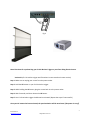
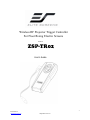
1. Size & Weight : W x H x D = 4.8” x 2” x 0.7” Weight = 0.09 lbs. 2. Maximum Control Distance : 80 Feet (25M) Control Type: ASK/FSK 3. Projector Output Support Trigger Voltage : 3‐15V 4. RF Spec. Frequency : 315Mhz, Power : Below 2 milli‐watts 5. Directions for use : a. Refer to the version number on the screen’s end cap sticker, or on the outside sticker of the packaging box to make sure your screen is compatible with the ZSP‐TR02. b. Use the wireless Radio Frequency Trigger Controller to synchronize the screen’s rise/drop with the projector’s power cycle, via a 5‐12 volt trigger. c. Connect the wireless RF Trigger Controller to the projector as shown in Fig.3 Location of version number on end cap sticker.
Fig. 1 Location of version number on packaging box sticker. Fig. 2 Rev.042511‐AS www.elitescreens.com [email protected] 2