1
USER MANUAL
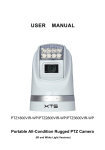
Rugged Weatherproof Mobile PTZ Camera
(IR and White Light Versions)
Built by Rugged Cams
http://www.ruggedcams.com/
TollFree – 866-301-2288
[email protected]
Tech Support Toll Free – 866-283-6003
[email protected]
Safety Notes
Thank You for Choosing Our Ruff-Ride Mobile PTZ Camera!
When you open the box:
1. Check that the packing and the contents are not visibly
damaged. Contact your Dealer or the Manufacturer immediately
if any parts are either missing or damaged.
2. Make sure the contents are all included as per the packing
list.
3. Do not attempt to use the device with missing or damaged
parts. Send the product back in its original packing if it is
damaged.
Table of Contents
Safety Notes..................................................................................................... 3
Features ......................................................................................................... 7
Functions ........................................................................................................ 8
Technical Data ............................................................................................. 10
Dip Switch .................................................................................................... 12
Initial Power On Test .................................................................................... 13
Installation Place .......................................................................................... 14
Fixed Mounts ................................................................................................ 15
Installation .................................................................................................... 16
Camera Cable Package ............................................................................... 16
Special Control Panel Commands ............................................................... 17
Operation ...................................................................................................... 18
The following important notes must be followed carefully to run
the camera and respective accessories in total safety. The
camera and relative accessories are called video system in this
section.
Before installing the camera, please read this manual carefully; when installing please follow the
installation instructions outlined in this manual. Please keep this manual for future use.
The following installation should be performed by qualified service personnel or system installers
in accordance with all local rules.
Before powering on the camera, please check the power voltage carefully. Make sure that you are
using the right power source.
Please route the power cable, video cable and control cable in a safe, protected manner.
Do not operate the camera beyond the specified temperature and humidity. The camera’s working
temperature range is between -45~+65. The ambient humidity range is less than 95炮.
When transporting, avoid any violent shaking of the camera.
To prevent electric shock, do not remove screws or covers of the camera. There are no selfserviceable parts inside. Refer to qualified service personnel for servicing.
Video cable and RS485 cable should be far away from any high voltage cables. Shielded and
independent wiring is necessary for video and control cables.
Never aim the lens of the camera at the sun or other extremely bright objects. Otherwise, it may
cause damage.
When cleaning the camera, please use a soft cloth. If the camera is very dirty, wipe it off gently
with a soft cloth moistened with a weak solution of water and a neutral kitchen detergent. Wring
all liquid from the cloth before wiping the camera, then wipe off all remaining dirt with a soft, dry
cloth. Use lens cleaning paper or cloths to clean the lens.
Do not move the camera module manually. Doing so could result in a malfunction of the camera.
Do not hold the camera module when carrying the video camera.
Make sure the camera is far away from any areas where
radiation, X-rays, strong electric waves, or magnetism is
generated.
RUFF-RIDE series camera is designed for fixed and mobile video
surveillance and inspection applications, such as marine, law
enforcement, army, border patrol, airport, oilfield etc.
It consists of: a high resolution 36X zoom module, powerful IR or
white lighting modules, precise PTZ system, optional damping
systems.
Ex-View HAD CCD Modules
The 36X SONY Ex-View HAD CCD module provides high resolution, quality video output.
Aux Lighting System
Powerful IR lighting or white lighting systems with ranges up to 120 meters. It ensures clear view
of details in distance up to 120 meters under total dark environments.
Full Aluminum PTZ Case
The case with high strength is full weather proof, suitable for various tough applications such as
rugged roads, sea, storm weather etc.
New Drive Mechanism
The PTZ camera employs new drive system with high precision and higher holding torque. It does
not generate offset during positioning of Pan and Tilt.
Easy Installation Mounts
The Vibration Dampener mount easily fixes the PTZ camera firmly onto a metal surface.
Meanwhile the user can easily carry the PTZ camera with the handle on the back side.
Features
Aluminum PTZ case with high strength, full weather proof;
IP index up to IP67;
Vibration damping system, for tough applications;
Powerful IR lighting module, range up to 120 meters, auto adjust with zooms (for IR Version only);
Powerful aux white lighting system, range up to 120 meters (for White Light Version only);
Hidden seamless window wiper with adjustable speed;
New design of drive system, PTZ positioning precision up to +/-0.050;
Camera address easily changeable via software;
Baud rate, protocol self-adaptive;
Digital image stabilization;
Image flip for stand / ceiling mount;
Video freeze;
Ex-View HAD CCD, 550TVL, 28X/36X zooms;
Wide Dynamic Range (WDR);
Day/night (ICR);
9~30V voltage input;
Auto power-off with low power supply.
Functions
Soft Address
The camera address can be programmed with built-in OSD menu or a preset command, and the
user does not need to dismount the camera from field or do any screw work.
Self-Adaption of Baud Rate and Protocol
The camera can automatically identify the protocol and baud rate of the controller and adapt the
camera setting accordingly, with no manual DIP Switch settings necessary.
Day/Night Function
The IR cut filter of camera module inside the camera can be removed by sending a special Prest
command, so that the camera can change from color to mono. The picture is clear even if the
illumination is as low as 0.01Lux.
Save/Call Preset
Preset function is that dome saves current horizontal angle and title angle of pan/tilt, zoom and
position parameters into memory. When necessary dome calls these parameters and adjusts
Pan/Tilt and camera to that position. User can save and call presets easily and promptly by using
keyboard controller or infrared controller. The camera supports up to 256 presets.
Zoom control
User can adjust zoom wide or tele by controller and get desired image.
Focus control
System defaults Auto Focus mode, that is, the lens and camera will automatically adjust the focus
to get the best image.
Focus can also be controlled manually from the controller if required. Press Focus Near or Focus
Far key to manually focus. Focus can be manual via keyboard or other controller, please refer to
control keyboard or other controller operation manual for detailed operation.
The camera will NOT auto focus in the following status.
Target is not in the center of image.
Targets are in near and far at the same time.
Target is of strong light object. Such as spotlight etc.
Target is behind the glass with water drop or dust.
Target moves too fast.
Large area target such as wall.
Target is too dark or vague.
IRIS control
System defaults Auto IRIS. Camera can adjust immediately according to the alteration of back
ground illumination so that a lightness steady image can be achieved.
You may adjust IRIS by controller to get required image brightness, and call back Auto IRIS by
controlling the joystick.
Auto White Balance
Camera can automatically adjust white balance (WB) according to the alteration of background
lightness to give a true color image.
Back Light Compensation (BLC)
If a bright backlight presents, the subjects in the picture may appear dark or as a silhouette.
Backlight compensation enhances objects in the center of the picture. The camera uses the center
of the picture to adjust the IRIS. If there is a bright light source outside this area, it will wash out to
white. The camera will adjust the IRIS so that the object in the sensitive area is properly exposed.
Auto Cruise
The preset position is programmed to be recalled in sequence. This feature is called auto cruise.
Auto, Random and Frame Scan
Auto Scan: Make the camera scan 360° ranging from the current position.
Random Scan: Make the camera scan 360º ranging from the current position, pause at every 108
º.
Frame Scan: Make the camera scan between two set positions.
Image Flip
Enable you to view image easily when PTZ is either installed
on roof of a car or is mounted on the ceiling.
Technical Data
Camera
Image Sensor
Effective Pixel
1/4” SONY EX-View
HAD CCD
PAL: 752(H)×582(V);
NTSC:768(H)×494(V)
Resolution
550 TVL
Video System
PAL/NTSC
Optical Zoom
Digital Zoom
Min Illumination
36X
28X
12X
0.01Lux
(Lights Off)
0.0015Lux
(Lights Off)
0Lux (Lights On)
0Lux (Lights On)
White Balance
Auto
Focus
Auto/Manual
Exposure
Auto/Manual
S/N Ratio
Not less than 50DB
BLC
On/Off
WDR(150X)
Yes
Image
Stabilization
On/Off
No
Digital Noise
Reduction
1~5 Steps
Day/Night
Yes
f=3.4mm~122.4mm
F1.6 to F4.5
57.8º (wide) to 1.7º
(tele)
Lens
View Angle
f=3.5mm~98 mm
F1.35 to F3.7
55.8º (wide) to 2.1º
(tele)
PTZ
Pan Range
360° continuous
Pan Speed
0.04° -90°/s, adjustable
Tilt Range
-15°~90° with auto flip
Tilt Speed
0.3° ~60°/s adjustable
Preset Speed
Pan: 120°/s; Tilt: 90°/s
Preset
256
Preset Precision
±0.05°
Light (for IR Version)
IR Wave Length
850nm
940nm
IR Lamp Power
(including driver)
30W
15W
IR Light Power
10W
5W
IR Range
120m
60m
IR Switch
Auto/Manual
Light (for White
Light Version)
Color
Temperature
Lamp Power
(including driver)
6500K
Brightness
2100LM
Range
120m
Switch
Manual
30W
General
Comm. Interface
RS-485
Protocol
PELCO-P / PELCO-D
Baud Rate
2400bps, 4800bps,
9600bps, 19200bps
(self-adaptive)
Address
0-255
Voltage
DC 9-30V
Power
20W (Defogger and
lights off)
40W (Defogger on and
lights off)
70W (Defogger and
lights on)
Working
Temperature
-45~+65
IP Index
IP67, TVS, Anti-Surge
Dimensions
Weight
Standard:
190(mm)×275(mm)
With Damper:
190(mm)×300(mm)
Standard: 4.9kg
Optional: 5.65kg (with
damper)
Table : Technical Data
This section contains detailed instructions for installing the
camera. These instructions assume that the installer has a good
knowledge of installation techniques and is capable of adopting
safe installation methods.
Dip Switch
The factory default is:
Camera
Protocol
Baud Rate
Address
1
Pelco D
9600bps
The camera can detect and auto program its protocol (Pelco D,
Pelco P) as well as baud rate (2400bps, 4800bps, 9600bps,
19200bps) as per the whole video system.
Only the camera address setting is necessary. There are two
ways to program camera address:
Soft address: via special preset functions (see Section 5.1 Special Control Panel Commands);
DIP Switch: The switches to configure these settings are located on the main board inside the
camera. See Fig. 1: DIP Switch.
Fig. : DIP Switch
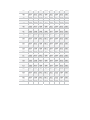
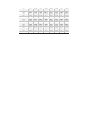
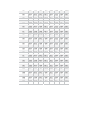
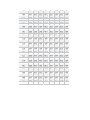
The setting list of the camera address is enclosed in Annex.
Initial Power On Test
To ensure the camera works well after installation, please power
on it for an initial test with the following steps:
1.Connect the camera with correct power supply;
2.Connect control cable, video cable;
3.Power on the camera;
When the camera is powered on, the LED indicators at the front
will be on.
1
2
Data (Flashing)
Power (Constantly
On)
Fig. : LED Indicators
The camera will run a calibration procedure on power up and
show the following messages on screen.
Fig. : On Screen Messages at Power Up
If the camera fails at initialization, the following message will
show on screen.
Please refer to the following code to check the failures:
PAN
FAIL
TILT
FAIL
CAM
FAIL
P/T
FAIL
T/Z
FAIL
P/T/Z
FAIL
Failure of pan initialization
Failure of tilt initialization
Failure of block camera
initialization
Failure of pan and tilt
initializations
Failure of tilt and block camera
initializations
Failure of pan, tilt and block
camera initializations
Installation Place
Make sure the installation place has enough space, support
strength to install the whole PTZ camera and its accessories.
Fixed Mounts
The fixed mount vibration damping system can be removed as
shown.
Fig. : Fixed Mounts (with and w/o damping system)
Installation
To set the baud rate, protocol and camera hard address:
1.Remove the PTZ bottom plate;
2.Set DIP Switch for baud rate, protocol and camera address;
3.Fix the bottom plate. Make sure the sealing is well installed.
Fig. : Bottom Plate
4.Take the installation plate out of packing and fix it to the target
place as per the plate dimensions with correct screws.
Fig. : Installation Plate
5.Put the camera onto the installation plate. Make sure three
installation bolts are in position with the fixing holes on the
plate. Rotate the camera clockwise.
Fig. : Mount the Installation Plate
6.Fix the camera to the installation plate with a screw.
Fig. : Fix the Installation Plate
Camera Cable Package
Connect the cable with the right pins as per following pictures.
Fig. : Cable Package
6Pin Cable: Pin
Definition
1
Video +
2
Power 3
Power +
4
RS485 5
RS485 +
6
Video There are two red marks each on the plug and socket. Please
match them during plugging.
Special Control Panel Commands
The camera can be programmed and operated using various
quick control panel commands.
Preset
Number
Function
20 ~ 80 General preset positions
Manual switch between color mode (with
GO TO 21
light off) and mono mode (with light on).
Auto switch between color mode (with IR
GO TO 22 off) and mono mode (with IR on), for IR
Version only.
GO TO 23 Turn on/off Wide Dynamic Range (WDR).
GO TO 24 Auto WDR.
Turn on/off Back Light Compensation
GO TO 25
(BLC).
GO TO 26 Turn on/off Image Flip;
Turn on/off Digital Noise Reduction (DNR,
GO TO 27
1-5steps).
GO TO 28 Turn on/off video freeze.
Turn on/off Digital Image Stabilization
GO TO 29
(DIS).
GO TO 30 Turn on low lights only (only for IR)
GO TO 31 Turn on high lights only (only for IR)
Turn on both low and high lights(only for
GO TO 32
IR)
Turn off both low and high lights (only for
GO TO 33
IR)
Fast wiper (Do not attempt to activate
GO TO 34
wiper when there is no water on the glass)
Defaul
t
Value
***
***
Off
Off
Off
Off
Off
Off
Off
***
***
***
***
GO TO 35
GO TO 36
GO TO 37
GO TO 38
GO TO 39
GO TO 40
GO TO 42
GO TO 43
GO TO 48
GO TO 49
GO TO 50
GO TO 51
GO TO 52
GO TO 53
GO TO 57
GO TO 58
Normal wiper (Do not attempt to activate
wiper when there is no water on the glass)
Turn off wiper
Turn On Heating/Defogging
Turn Off Heating/Defogging
Turn On/Off Digital Zoom
Turn On/Off On Screen Display
Set Left Boundary Of Frame Scan
Set Right Boundary Of Frame Scan
Turn On Random Scan (360° Scan, pause
at every 108°)
Turn On Frame Scan between two set
presets.
Turn On Cruise
Turn On Auto Scan(360° Scan)
Clear All Presets
Restore factory default and reboot the
camera
Turn On Screen Tips / Page Down Of
Screen Tips
Turn Off Screen Tips
***
***
Off
On
***
***
***
***
***
***
***
***
***
***
GO TO 59
GO TO 60
GO TO 61
GO TO 62
GO TO 63
GO TO 70
GO TO 71
GO TO 72
GO TO 73
PTZ Speed - Fast
PTZ Speed - Normal
PTZ Speed - Slow
Decrease The Camera Address By -1
Increase The Camera Address By +1
Turn on low lights only (only for white light
models)
Turn on high lights only (only for white light
models)
Turn on both low & high lights (only for
white light models)
Turn off both low & high lights (only for
white light models)
***
***
***
***
***
***
***
Table Special Commands
Operation
As the baud rate and protocol are self-adaptive, the PTZ
cameras may not response for seconds on power up. It is
recognizing the commands and adapting the setting.
IR / White Light
Auto Mode (For IR Version Only):
The default IR mode is auto. Auto mode can also be activated via
preset 22. At this mode, the commands of preset 30~33 are
disabled.
When the zoom module is in mono, the camera will automatically
turn on IR lights. The high beam and low beam will be turned
on/off as per the current zoom times.
When the module is in color mode, the camera will automatically
turn off IR lights.
Manual Mode:
Call Preset 21 to turn on the manual mode. The module will be
switched into color or mono mode. And lights can be controlled
via the commands of presets 30~33.
Image Freeze
Call Preset 28 to turn on/off the function. When it is on, during a
regular preset call (see following picture), the video will be frozen
at point A till Point B. At Point B, the video will be displayed
normally.
Fig. : Image Freeze
Defogging
Call Preset 37 to turn on the function. There will be
“DEFOGGING” flashing at top of the screen. When the fog is
cleared, turn off the function in time in case the camera
temperature is getting too high.
Call Preset 38 to turn off the function. The “DEFOGGING” at top
of the screen will disappear from the screen.
If the defogger is on, once temperature inside the camera
reaches +55 degree, the defogger will be turned off
automatically;
If the defogger is off, once temperature inside the camera is
lower than +10 degree, the defogger will be turned on
automatically.
Soft Address
The camera address can be changed via presets 62 and 63. The
new address will take effect after the camera is rebooted.
Digital Image Stabilization (DIS)
The function is off as default. It can be turned on/off by calling
preset 29.
It is used when the camera is used in a vibration environment, to
compensate the vibration in video.
Digital Noise Reduction
The function is off as default.
When the camera is in color mode, it is recommended to turn off
the function, or there will be video trails.
When the camera is in mono mode, call preset 27 to turn on/off
the function. There are 1~5 steps from low to high. The higher
the level is, the more video trails there are.
Wiper
For proper use of wiper, do not attempt to activate it when there
is no water on the glass.
Proble
ms
No
action
when
powere
d on
Abnor
mal
selftest
with
motor
noise
Normal
selftest but
no
images
Possible
Causes
Power
supply
failure
Wrong
connectio
n of the
power
Mechanic
al failure
Camera
inclined
Inadequat
e power
supply
Video
signal
failure
Wrong
connectio
n of the
video
Camera
damaged
Normal
selftest but
out of
control
Wrong
connectio
n of
RS485
cable
Solutions
Replace
power
supply
Check &
reconnect
the
cables
Repair
Reinstall
the
camera
Replace
the power
supply
Reinstall
camera
Check &
reconnect
the
cables
Replace
the
camera
Check
and
reconnect
the cable
Wrong
camera
address
set
Vague
image
Bad
connectio
n of the
video
Inadequat
e power
supply
PTZ
camera
out of
control
Self test
error
Wrong
connectio
n of
RS485
cable
Table Trouble Shooting
Check
and reset
the
Switches
Check
and
reconnect
the
cables
Replace
the power
supply
Restart
the
camera
Check
and
reconnect
the
cables
ADDRES
S
0
1
2
3
4
5
6
7
8
9
10
11
12
13
14
15
16
17
18
19
20
21
22
23
24
25
26
27
1
2
3
4
5
6
7
8
OFF
ON
OFF
ON
OFF
ON
OFF
ON
OFF
ON
OFF
ON
OFF
ON
OFF
ON
OFF
ON
OFF
ON
OFF
ON
OFF
ON
OFF
ON
OFF
ON
OFF
OFF
ON
ON
OFF
OFF
ON
ON
OFF
OFF
ON
ON
OFF
OFF
ON
ON
OFF
OFF
ON
ON
OFF
OFF
ON
ON
OFF
OFF
ON
ON
OFF
OFF
OFF
OFF
ON
ON
ON
ON
OFF
OFF
OFF
OFF
ON
ON
ON
ON
OFF
OFF
OFF
OFF
ON
ON
ON
ON
OFF
OFF
OFF
OFF
OFF
OFF
OFF
OFF
OFF
OFF
OFF
OFF
ON
ON
ON
ON
ON
ON
ON
ON
OFF
OFF
OFF
OFF
OFF
OFF
OFF
OFF
ON
ON
ON
ON
OFF
OFF
OFF
OFF
OFF
OFF
OFF
OFF
OFF
OFF
OFF
OFF
OFF
OFF
OFF
OFF
ON
ON
ON
ON
ON
ON
ON
ON
ON
ON
ON
ON
OFF
OFF
OFF
OFF
OFF
OFF
OFF
OFF
OFF
OFF
OFF
OFF
OFF
OFF
OFF
OFF
OFF
OFF
OFF
OFF
OFF
OFF
OFF
OFF
OFF
OFF
OFF
OFF
OFF
OFF
OFF
OFF
OFF
OFF
OFF
OFF
OFF
OFF
OFF
OFF
OFF
OFF
OFF
OFF
OFF
OFF
OFF
OFF
OFF
OFF
OFF
OFF
OFF
OFF
OFF
OFF
OFF
OFF
OFF
OFF
OFF
OFF
OFF
OFF
OFF
OFF
OFF
OFF
OFF
OFF
OFF
OFF
OFF
OFF
OFF
OFF
OFF
OFF
OFF
OFF
OFF
OFF
OFF
OFF
28
29
30
31
32
33
34
35
36
37
38
OFF
ON
OFF
ON
OFF
ON
OFF
ON
OFF
ON
OFF
OFF
OFF
ON
ON
OFF
OFF
ON
ON
OFF
OFF
ON
ON
ON
ON
ON
OFF
OFF
OFF
OFF
ON
ON
ON
ON
ON
ON
ON
OFF
OFF
OFF
OFF
OFF
OFF
OFF
ON
ON
ON
ON
OFF
OFF
OFF
OFF
OFF
OFF
OFF
OFF
OFF
OFF
OFF
ON
ON
ON
ON
ON
ON
ON
OFF
OFF
OFF
OFF
OFF
OFF
OFF
OFF
OFF
OFF
OFF
OFF
OFF
OFF
OFF
OFF
OFF
OFF
OFF
OFF
OFF
OFF
39
40
41
42
43
44
45
46
47
48
49
50
51
52
53
54
55
56
57
58
59
60
61
62
63
64
65
66
67
68
ON
OFF
ON
OFF
ON
OFF
ON
OFF
ON
OFF
ON
OFF
ON
OFF
ON
OFF
ON
OFF
ON
OFF
ON
OFF
ON
OFF
ON
OFF
ON
OFF
ON
OFF
ON
OFF
OFF
ON
ON
OFF
OFF
ON
ON
OFF
OFF
ON
ON
OFF
OFF
ON
ON
OFF
OFF
ON
ON
OFF
OFF
ON
ON
OFF
OFF
ON
ON
OFF
ON
OFF
OFF
OFF
OFF
ON
ON
ON
ON
OFF
OFF
OFF
OFF
ON
ON
ON
ON
OFF
OFF
OFF
OFF
ON
ON
ON
ON
OFF
OFF
OFF
OFF
ON
OFF
ON
ON
ON
ON
ON
ON
ON
ON
OFF
OFF
OFF
OFF
OFF
OFF
OFF
OFF
ON
ON
ON
ON
ON
ON
ON
ON
OFF
OFF
OFF
OFF
OFF
OFF
OFF
OFF
OFF
OFF
OFF
OFF
OFF
OFF
ON
ON
ON
ON
ON
ON
ON
ON
ON
ON
ON
ON
ON
ON
ON
ON
OFF
OFF
OFF
OFF
OFF
ON
ON
ON
ON
ON
ON
ON
ON
ON
ON
ON
ON
ON
ON
ON
ON
ON
ON
ON
ON
ON
ON
ON
ON
ON
OFF
OFF
OFF
OFF
OFF
OFF
OFF
OFF
OFF
OFF
OFF
OFF
OFF
OFF
OFF
OFF
OFF
OFF
OFF
OFF
OFF
OFF
OFF
OFF
OFF
OFF
OFF
OFF
OFF
OFF
ON
ON
ON
ON
ON
OFF
OFF
OFF
OFF
OFF
OFF
OFF
OFF
OFF
OFF
OFF
OFF
OFF
OFF
OFF
OFF
OFF
OFF
OFF
OFF
OFF
OFF
OFF
OFF
OFF
OFF
OFF
OFF
OFF
OFF
69
70
71
72
73
74
75
76
77
78
ON
OFF
ON
OFF
ON
OFF
ON
OFF
ON
OFF
OFF
ON
ON
OFF
OFF
ON
ON
OFF
OFF
ON
ON OFF OFF OFF
ON OFF OFF OFF
ON OFF OFF OFF
OFF ON OFF OFF
OFF ON OFF OFF
OFF ON OFF OFF
OFF ON OFF OFF
ON ON OFF OFF
ON ON OFF OFF
ON ON OFF OFF
ON
ON
ON
ON
ON
ON
ON
ON
ON
ON
OFF
OFF
OFF
OFF
OFF
OFF
OFF
OFF
OFF
OFF
79
80
81
82
83
84
85
86
87
88
89
90
91
92
93
94
95
96
97
98
99
100
101
102
103
104
105
106
107
108
ON
OFF
ON
OFF
ON
OFF
ON
OFF
ON
OFF
ON
OFF
ON
OFF
ON
OFF
ON
OFF
ON
OFF
ON
OFF
ON
OFF
ON
OFF
ON
OFF
ON
OFF
ON
OFF
OFF
ON
ON
OFF
OFF
ON
ON
OFF
OFF
ON
ON
OFF
OFF
ON
ON
OFF
OFF
ON
ON
OFF
OFF
ON
ON
OFF
OFF
ON
ON
OFF
ON
OFF
OFF
OFF
OFF
ON
ON
ON
ON
OFF
OFF
OFF
OFF
ON
ON
ON
ON
OFF
OFF
OFF
OFF
ON
ON
ON
ON
OFF
OFF
OFF
OFF
ON
ON
OFF
OFF
OFF
OFF
OFF
OFF
OFF
OFF
ON
ON
ON
ON
ON
ON
ON
ON
OFF
OFF
OFF
OFF
OFF
OFF
OFF
OFF
ON
ON
ON
ON
ON
OFF
ON
ON
ON
ON
ON
ON
ON
ON
ON
ON
ON
ON
ON
ON
ON
ON
OFF
OFF
OFF
OFF
OFF
OFF
OFF
OFF
OFF
OFF
OFF
OFF
OFF
OFF
OFF
OFF
OFF
OFF
OFF
OFF
OFF
OFF
OFF
OFF
OFF
OFF
OFF
OFF
OFF
OFF
ON
ON
ON
ON
ON
ON
ON
ON
ON
ON
ON
ON
ON
ON
ON
ON
ON
ON
ON
ON
ON
ON
ON
ON
ON
ON
ON
ON
ON
ON
ON
ON
ON
ON
ON
ON
ON
ON
ON
ON
ON
ON
ON
OFF
OFF
OFF
OFF
OFF
OFF
OFF
OFF
OFF
OFF
OFF
OFF
OFF
OFF
OFF
OFF
OFF
OFF
OFF
OFF
OFF
OFF
OFF
OFF
OFF
OFF
OFF
OFF
OFF
OFF
109
110
111
112
113
114
115
116
117
118
ON
OFF
ON
OFF
ON
OFF
ON
OFF
ON
OFF
OFF
ON
ON
OFF
OFF
ON
ON
OFF
OFF
ON
ON
ON
ON
OFF
OFF
OFF
OFF
ON
ON
ON
ON OFF
ON OFF
ON OFF
OFF ON
OFF ON
OFF ON
OFF ON
OFF ON
OFF ON
OFF ON
ON
ON
ON
ON
ON
ON
ON
ON
ON
ON
ON
ON
ON
ON
ON
ON
ON
ON
ON
ON
OFF
OFF
OFF
OFF
OFF
OFF
OFF
OFF
OFF
OFF
119
120
121
122
123
124
125
126
127
128
129
130
131
132
133
134
135
136
137
138
139
140
141
142
143
144
145
146
147
148
149
ON
OFF
ON
OFF
ON
OFF
ON
OFF
ON
OFF
ON
OFF
ON
OFF
ON
OFF
ON
OFF
ON
OFF
ON
OFF
ON
OFF
ON
OFF
ON
OFF
ON
OFF
ON
ON
OFF
OFF
ON
ON
OFF
OFF
ON
ON
OFF
OFF
ON
ON
OFF
OFF
ON
ON
OFF
OFF
ON
ON
OFF
OFF
ON
ON
OFF
OFF
ON
ON
OFF
OFF
ON
OFF
OFF
OFF
OFF
ON
ON
ON
ON
OFF
OFF
OFF
OFF
ON
ON
ON
ON
OFF
OFF
OFF
OFF
ON
ON
ON
ON
OFF
OFF
OFF
OFF
ON
ON
OFF
ON
ON
ON
ON
ON
ON
ON
ON
OFF
OFF
OFF
OFF
OFF
OFF
OFF
OFF
ON
ON
ON
ON
ON
ON
ON
ON
OFF
OFF
OFF
OFF
OFF
OFF
ON
ON
ON
ON
ON
ON
ON
ON
ON
OFF
OFF
OFF
OFF
OFF
OFF
OFF
OFF
OFF
OFF
OFF
OFF
OFF
OFF
OFF
OFF
ON
ON
ON
ON
ON
ON
ON
ON
ON
ON
ON
ON
ON
ON
ON
OFF
OFF
OFF
OFF
OFF
OFF
OFF
OFF
OFF
OFF
OFF
OFF
OFF
OFF
OFF
OFF
OFF
OFF
OFF
OFF
OFF
OFF
ON
ON
ON
ON
ON
ON
ON
ON
ON
OFF
OFF
OFF
OFF
OFF
OFF
OFF
OFF
OFF
OFF
OFF
OFF
OFF
OFF
OFF
OFF
OFF
OFF
OFF
OFF
OFF
OFF
OFF
OFF
OFF
OFF
OFF
OFF
OFF
OFF
OFF
ON
ON
ON
ON
ON
ON
ON
ON
ON
ON
ON
ON
ON
ON
ON
ON
ON
ON
ON
ON
ON
ON
150
151
152
153
154
155
156
157
158
OFF
ON
OFF
ON
OFF
ON
OFF
ON
OFF
ON
ON
OFF
OFF
ON
ON
OFF
OFF
ON
ON OFF
ON OFF
OFF ON
OFF ON
OFF ON
OFF ON
ON ON
ON ON
ON ON
ON
ON
ON
ON
ON
ON
ON
ON
ON
OFF
OFF
OFF
OFF
OFF
OFF
OFF
OFF
OFF
OFF
OFF
OFF
OFF
OFF
OFF
OFF
OFF
OFF
ON
ON
ON
ON
ON
ON
ON
ON
ON
159
160
161
162
163
164
165
166
167
168
169
170
171
172
173
174
175
176
177
178
179
180
181
182
183
184
185
186
187
188
ON
OFF
ON
OFF
ON
OFF
ON
OFF
ON
OFF
ON
OFF
ON
OFF
ON
OFF
ON
OFF
ON
OFF
ON
OFF
ON
OFF
ON
OFF
ON
OFF
ON
OFF
ON
OFF
OFF
ON
ON
OFF
OFF
ON
ON
OFF
OFF
ON
ON
OFF
OFF
ON
ON
OFF
OFF
ON
ON
OFF
OFF
ON
ON
OFF
OFF
ON
ON
OFF
ON
OFF
OFF
OFF
OFF
ON
ON
ON
ON
OFF
OFF
OFF
OFF
ON
ON
ON
ON
OFF
OFF
OFF
OFF
ON
ON
ON
ON
OFF
OFF
OFF
OFF
ON
ON
OFF
OFF
OFF
OFF
OFF
OFF
OFF
OFF
ON
ON
ON
ON
ON
ON
ON
ON
OFF
OFF
OFF
OFF
OFF
OFF
OFF
OFF
ON
ON
ON
ON
ON
ON OFF OFF
OFF ON OFF
OFF ON OFF
OFF ON OFF
OFF ON OFF
OFF ON OFF
OFF ON OFF
OFF ON OFF
OFF ON OFF
OFF ON OFF
OFF ON OFF
OFF ON OFF
OFF ON OFF
OFF ON OFF
OFF ON OFF
OFF ON OFF
OFF ON OFF
ON ON OFF
ON ON OFF
ON ON OFF
ON ON OFF
ON ON OFF
ON ON OFF
ON ON OFF
ON ON OFF
ON ON OFF
ON ON OFF
ON ON OFF
ON ON OFF
ON ON OFF
ON
ON
ON
ON
ON
ON
ON
ON
ON
ON
ON
ON
ON
ON
ON
ON
ON
ON
ON
ON
ON
ON
ON
ON
ON
ON
ON
ON
ON
ON
189
190
191
192
193
194
195
196
197
198
ON
OFF
ON
OFF
ON
OFF
ON
OFF
ON
OFF
OFF
ON
ON
OFF
OFF
ON
ON
OFF
OFF
ON
ON
ON
ON
OFF
OFF
OFF
OFF
ON
ON
ON
ON
ON
ON
OFF
OFF
OFF
OFF
OFF
OFF
OFF
ON
ON
ON
OFF
OFF
OFF
OFF
OFF
OFF
OFF
ON OFF
ON OFF
ON OFF
OFF ON
OFF ON
OFF ON
OFF ON
OFF ON
OFF ON
OFF ON
ON
ON
ON
ON
ON
ON
ON
ON
ON
ON
199
200
201
202
203
204
205
206
207
208
209
210
211
212
213
214
215
216
217
218
219
220
221
222
223
224
225
226
227
228
ON
OFF
ON
OFF
ON
OFF
ON
OFF
ON
OFF
ON
OFF
ON
OFF
ON
OFF
ON
OFF
ON
OFF
ON
OFF
ON
OFF
ON
OFF
ON
OFF
ON
OFF
ON
OFF
OFF
ON
ON
OFF
OFF
ON
ON
OFF
OFF
ON
ON
OFF
OFF
ON
ON
OFF
OFF
ON
ON
OFF
OFF
ON
ON
OFF
OFF
ON
ON
OFF
ON
OFF
OFF
OFF
OFF
ON
ON
ON
ON
OFF
OFF
OFF
OFF
ON
ON
ON
ON
OFF
OFF
OFF
OFF
ON
ON
ON
ON
OFF
OFF
OFF
OFF
ON
OFF
ON
ON
ON
ON
ON
ON
ON
ON
OFF
OFF
OFF
OFF
OFF
OFF
OFF
OFF
ON
ON
ON
ON
ON
ON
ON
ON
OFF
OFF
OFF
OFF
OFF
OFF
OFF
OFF
OFF
OFF
OFF
OFF
OFF
OFF
ON
ON
ON
ON
ON
ON
ON
ON
ON
ON
ON
ON
ON
ON
ON
ON
OFF
OFF
OFF
OFF
OFF
OFF
OFF
OFF
OFF
OFF
OFF
OFF
OFF
OFF
OFF
OFF
OFF
OFF
OFF
OFF
OFF
OFF
OFF
OFF
OFF
OFF
OFF
OFF
OFF
OFF
ON
ON
ON
ON
ON
ON
ON
ON
ON
ON
ON
ON
ON
ON
ON
ON
ON
ON
ON
ON
ON
ON
ON
ON
ON
ON
ON
ON
ON
ON
ON
ON
ON
ON
ON
ON
ON
ON
ON
ON
ON
ON
ON
ON
ON
ON
ON
ON
ON
ON
ON
ON
ON
ON
ON
ON
ON
ON
ON
ON
ON
ON
ON
ON
ON
229
230
231
232
233
234
235
236
237
238
ON
OFF
ON
OFF
ON
OFF
ON
OFF
ON
OFF
OFF
ON
ON
OFF
OFF
ON
ON
OFF
OFF
ON
ON OFF OFF
ON OFF OFF
ON OFF OFF
OFF ON OFF
OFF ON OFF
OFF ON OFF
OFF ON OFF
ON ON OFF
ON ON OFF
ON ON OFF
ON
ON
ON
ON
ON
ON
ON
ON
ON
ON
ON
ON
ON
ON
ON
ON
ON
ON
ON
ON
ON
ON
ON
ON
ON
ON
ON
ON
ON
ON
239
240
241
242
ON ON ON ON OFF
OFF OFF OFF OFF ON
ON OFF OFF OFF ON
OFF ON OFF OFF ON
ON
ON
ON
ON
ON
ON
ON
ON
ON
ON
ON
ON
243
ON
ON
OF
F
OF
F
ON
ON
ON
ON
244
OF
F
OF
F
ON
OF
F
ON
ON
ON
ON
245
ON
OF
F
ON
OF
F
ON
ON
ON
ON
246
OF
F
ON
ON
OF
F
ON
ON
ON
ON
247
ON
ON
ON
OF
F
ON
ON
ON
ON
248
OF
F
OF
F
OF
F
ON
ON
ON
ON
ON
249
ON
OF
F
OF
F
ON
ON
ON
ON
ON
250
OF
F
ON
OF
F
ON
ON
ON
ON
ON
251
ON
ON
OF
F
ON
ON
ON
ON
ON
OF
OF
ON
ON
ON
ON
ON
ON
252
F
F
253
ON
OF
F
ON
ON
ON
ON
ON
ON
254
OF
F
ON
ON
ON
ON
ON
ON
ON
ON
ON
ON
ON
ON
ON
ON
ON
255
Table : DIP Switch – Camera Address
Modification History
Revision
Date of
Release
Modified Contents
Ver 1.0
Jan 1st 2012
Official release of first version