1
The Interface
Mic Section
1
1
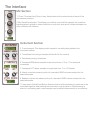
1. ‘Close', ‘Overhead' and ‘Room' rotary faders relate to the volume levels of each of the
microphone positions.
2. Mic Global/Local button. This allows you to either control all the samples' mic positions
together(when in global) or when clicked into Local, each note and it's related samples can
have a different mic balance.
1
2
Instrument Section
3
4
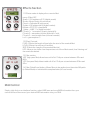
3. Current sample. This displays which sample is currently being edited in the
Instrument section.
5
4. Tune allows fine tuning of samples (hold shift for fine control)
5. Pan allows panning of samples
6 Transpose SEMI allows samples to be pitched from +12 to -12 in semitonal
increments.
6
7
7 Transpose OCT allows samples to be pitched from -2 to +2 Octaves.
8
9
8. Attack controls the attack portion of a standard ADSR volume envelope for the
selected sample.
10
9. Release controls the release portion of a standard ADSR volume envelope for the
selected sample.
10. Instrument Global/Local Button: Selects whether all the samples in a patch are to be
controlled together when altering the 'Instument' controls (when in Global setting) or
when in Local setting each notes samples can be edited independently of one another.