1
P527
User Manual
E3361
First Edition
October 2007
Copyright © 2007 ASUSTeK Computers, Inc. All Rights Reserved.
No part of this manual, including the products and software described in it, may be reproduced,
transmitted, transcribed, stored in a retrieval system, or translated into any language in any form or by any
means, except documentation kept by the purchaser for backup purposes, without the express written
permission of ASUS Telecom (“ASUS”).
Product warranty or service will not be extended if: (1) the product is repaired, modified or
altered, unless such repair, modification of alteration is authorized in writing by ASUS; or (2)
the serial number of the product is defaced or missing.
ASUS PROVIDES THIS MANUAL “AS IS” WITHOUT WARRANTY OF ANY KIND, EITHER
EXPRESS OR IMPLIED, INCLUDING BUT NOT LIMITED TO THE IMPLIED WARRANTIES OR
CONDITIONS OF MERCHANTABILITY OR FITNESS FOR A PARTICULAR PURPOSE. IN NO
EVENT SHALL ASUS, ITS DIRECTORS, OFFICERS, EMPLOYEES OR AGENTS BE LIABLE
FOR ANY INDIRECT, SPECIAL, INCIDENTAL, OR CONSEQUENTIAL DAMAGES (INCLUDING
DAMAGES FOR LOSS OF PROFITS, LOSS OF BUSINESS, LOSS OF USE OR DATA,
INTERRUPTION OF BUSINESS AND THE LIKE), EVEN IF ASUS HAS BEEN ADVISED OF THE
POSSIBILITY OF SUCH DAMAGES ARISING FROM ANY DEFECT OR ERROR IN THIS MANUAL
OR PRODUCT.
SPECIFICATIONS AND INFORMATION CONTAINED IN THIS MANUAL ARE FURNISHED
FOR INFORMATIONAL USE ONLY, AND ARE SUBJECT TO CHANGE AT ANY TIME WITHOUT
NOTICE, AND SHOULD NOT BE CONSTRUED AS A COMMITMENT BY ASUS. ASUS ASSUMES
NO RESPONSIBILITY OR LIABILITY FOR ANY ERRORS OR INACCURACIES THAT MAY
APPEAR IN THIS MANUAL, INCLUDING THE PRODUCTS AND SOFTWARE DESCRIBED IN IT.
Products and corporate names appearing in this manual may or may not be registered trademarks
or copyrights of their respective companies, and are used only for identification or explanation and
to the owners’ benefit, without intent to infringe.
Table of Contents
P527 specifications................................................................................ 9
Package contents................................................................................. 10
Chapter 1: Getting started
Getting to know your P527.................................................................. 12
Layout
...................................................................................................... 12
Device components description..................................................................... 14
Getting your device ready.................................................................... 16
Installing the SIM card and battery................................................................ 16
Charging the battery...................................................................................... 18
Starting up............................................................................................. 19
Powering your device..................................................................................... 19
Using the stylus.............................................................................................. 19
Calibrating P527............................................................................................ 20
Locking the keys and buttons........................................................................ 20
The Today screen................................................................................. 21
Status indicators............................................................................................ 22
Screen orientation.......................................................................................... 25
Start menu..................................................................................................... 26
ASUS Launcher..................................................................................... 27
Using the ASUS Launcher..................................................................................... 27
Chapter 2: Entering data
Using the Input Panel........................................................................... 30
Using the Block Recognizer........................................................................... 30
Using the On-screen keyboard...................................................................... 31
Using the Letter Recognizer.......................................................................... 32
Using XT9 input............................................................................................. 33
Using the Transcriber..................................................................................... 34
Writing and drawing on the screen..................................................... 35
Recording voice.................................................................................... 36
Using ActiveSync™.............................................................................. 38
Synchronizing via mini-USB........................................................................... 40
Synchronizing with Exchange Server................................................. 41
Setting the synchronization schedule............................................................ 43
Searching information.......................................................................... 44
Getting Help.......................................................................................... 45
Chapter 3: Phone features
Using phone.......................................................................................... 48
Phone pad...................................................................................................... 48
Adjusting the volume...................................................................................... 48
Making a call......................................................................................... 49
Using the alphanumeric keypad..................................................................... 49
Making calls from Contacts............................................................................ 51
Making calls from Call History........................................................................ 51
Using the Speed Dial..................................................................................... 52
Using Voice Commander............................................................................... 53
Receiving a call..................................................................................... 54
ASUS CallFilter..................................................................................... 55
Launching ASUS CallFilter............................................................................. 55
Using ASUS CallFilter.................................................................................... 57
Chapter 4: Wireless features
Using the Wireless Manager................................................................ 62
Using Bluetooth®.................................................................................. 63
Overview ...................................................................................................... 63
Activating Bluetooth in your device................................................................ 63
Turning on WiFi.............................................................................................. 67
Configuring wireless networks....................................................................... 68
Adding a wireless network............................................................................. 69
Setting a GPRS connection................................................................. 71
Connecting GPRS.......................................................................................... 74
Disconnecting GPRS..................................................................................... 75
Using the GPRS Tool..................................................................................... 76
Chapter 5: GPS features
GPS Catcher.......................................................................................... 78
Updating GPS data........................................................................................ 78
Setting GPS Catcher...................................................................................... 79
Travelog................................................................................................. 80
Turning GPS on............................................................................................. 80
Recording Travel Track.................................................................................. 81
Exporting Route............................................................................................. 84
Creating a New POI ...................................................................................... 87
Travelog Setting............................................................................................. 88
Location Courier................................................................................... 95
Using Location Courier.................................................................................. 95
External GPS......................................................................................... 98
Setting external GPS device.......................................................................... 98
Chapter 6: Multimedia features
Using the camera................................................................................ 101
Launching the camera................................................................................. 101
Camera mode screen.................................................................................. 103
Taking photos................................................................................................110
Video mode screen.......................................................................................111
Recording videos..........................................................................................116
Viewing pictures and videos..............................................................117
Viewing pictures and videos..........................................................................117
Chapter 7: Business features
Remote Presenter................................................................................119
Using the Remote Presenter.........................................................................119
Backup................................................................................................. 126
Backingup files............................................................................................. 126
Restoring files.............................................................................................. 128
Backup Setting............................................................................................. 130
Meeting Time Planner......................................................................... 131
Chapter 8: Special features
NewStation.......................................................................................... 133
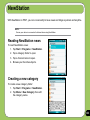
Reading NewStation news . ........................................................................ 133
Creating a new category ............................................................................. 133
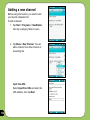
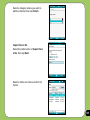
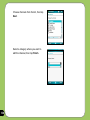
Adding a new channel . ............................................................................... 134
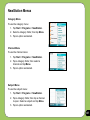
NewStation Menus....................................................................................... 137
FM Radio.............................................................................................. 138
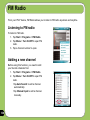
Listening to FM radio................................................................................... 138
Adding a new channel . ............................................................................... 138
Managing My Channel list............................................................................ 139
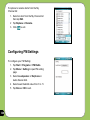
Configuring FM Settings.............................................................................. 140
Windows Live™.................................................................................. 141
Signing up.................................................................................................... 141
Setting ring tone................................................................................. 146
Adding ring tone to selection........................................................................ 146
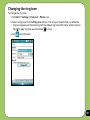
Changing the ring tone................................................................................. 147
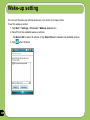
Wakeup setting................................................................................... 148
Mode switcher..................................................................................... 149
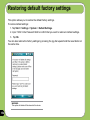
Restoring default factory settings.................................................... 152
Chapter 9: Device components status
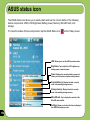
ASUS status icon................................................................................ 154
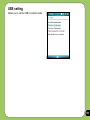
USB setting.................................................................................................. 155
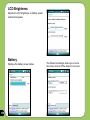
LCD Brightness............................................................................................ 156
Battery
.................................................................................................... 156
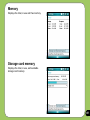
Memory .................................................................................................... 157
Storage card memory.................................................................................. 157
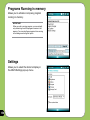
Programs Running in memory..................................................................... 158
Settings .................................................................................................... 158
Appendix
Notices................................................................................................. 160
RF Exposure information (SAR)........................................................ 164
Safety information.............................................................................. 166
Contact information............................................................................ 174
P527 specifications
Processor
TI OMAP 850
Operating System
Microsoft® Windows Mobile™ 6 Professional
Memory
128 MB NAND Flash ROM
64 MB SDRAM
Display
2.6-inch, 320 x 240 TFT Touchscreen Liquid Crystal Display (LCD) with
65,536 color and LED back-lighting
Frequency band
Quad-band GSM (850/900/1800/1900 MHz)
Integrated GSM/GPRS/EDGE and GPS with internal antenna
GPS
Built-in SiRF star III chipset
GPRS
Class B, Multislot class 10
Camera
2.0 mega-pixel Auto Focus camera
Connectivity
Bluetooth
USB
WLAN
Battery capacity
1300 mAh Lithium Ion
Expansion slot
MicroSD card slot
Audio
2.5 mm audio port
Built-in microphone and stereo output speaker
Weight
129g (with battery)
Dimension
113mm(L) x 58mm(W) x 15.4 mm(T)
Talk time*
4 hrs (*vary with different networking environment and scenario)
Standby time*
150 hrs (*vary with different networking environment and scenario)
: V2.0+EDR
: USB Client 1.1
: IEEE 802.11b+g
NOTE: Specifications are subject to change without notice.
Package contents
Check your P527 package for the following items:
P ASUS P527 device
P Protection case
P Battery
P Getting Started CD
P AC Adapter
P User Manual
P Mini-USB cable
P Quick Start Guide
P Headset
P Warranty Card
P Stylus
P microSD*
P Car cell phone charger*
P Bonus CD*
P Car Kit (PDA holder and windshield
suction pedestal)*
P Navigation CD & manual*
*Optional, depends on the area
NOTE:
• The Protection case is only for protective usage and not a body-worn accessory.
• If any of the above items is damaged or missing, contact your retailer.
CAUTION:
• To reduce risk of fire, use only correct battery type. Refer to “Installing the SIM card and battery” section for details.
• Do not attempt to disassemble or service the battery pack.
• Dispose of used batteries properly. Inquire from local authorities for proper disposal of battery.
10
Chapter
Getting started
1
• Getting to know your P527
• Getting your device ready
• Starting up
• The Today screen
11
Getting to know your P527
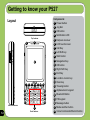
Components:
Layout
1 Power button
2 Jog dial
1
3 OK button
I
4 Notification LED
Top features
5 Earpiece receiver
6 LCD touch screen
5
4
7 Call Key
2
8 Left Soft key
3
9 Start button
10 Navigation Key
11 OK button
6
12 Right Soft Key
13 End Key
7
Left side features
12
8
9 10 11 12 13
14
16
19
15
18
20
21
22
17
Front features
14 Location courier key
15 Clear key
16 Travelog button
17 Alphanumeric keypad
18 Bluetooth Button
19 FM keypad
20
Message button
21 Mode switcher button
22 Voice Commander/Record button
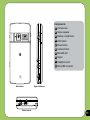
Components:
24
23
23 Camera lens
24 Stereo speaker
25 Battery compartment
26 Hold button
27 Reset button
26
28 Camera button
27
Reset
25
29 MicroSD slot
30 Stylus
31 Headphone slot
32 Mini-USB connector
MicroSD
28
29
30
Right side features
Rear features
32
31
Bottom features
13
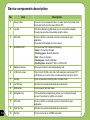
Device components description
No.
14
Item
Description
1
Power button
Press once to set suspend mode or to wake device from sleep mode.
Press and hold to turn the power ON or OFF.
2
Jog dial
This three-direction jog dial allows you to conveniently navigate
through menus without necessarily using the stylus.
3
OK button
Press to confirm a command or press to close/exit an open
application.
Press and hold to adjust the voice volume.
4
Notification LED
This multi-color LED notifies the following:
• Green - Phone fully charged.
• Flashing green - Network detected.
• Red - Phone is charging.
• Flashing red - Event notification.
• Flashing blue - Bluetooth® ,WiFi, or GPS is ON.
5
Earpiece receiver
Allows you to listen to incoming/outgoing calls.
6
LCD touch screen
This 2.6-inch, 65,536-color, 240 x 320-resolution, touchscreen TFT
LCD allows you to write, draw, or make selections using the stylus.
7
Call key
Press to receive an incoming call or to make a call.
8
Left Soft key
Performs the command indicated above the button.
9
Start button
Press to launch the Start menu.
10
Navigation key
This five-direction navigation key allows you to navigate through
menus. Press down to confirm a command.
11
OK button
Press to confirm a command or press to close/exit an open
application.
12
Right Soft key
Performs the command indicated above the button.
13
End key
Press to end a call or a GPRS connection.
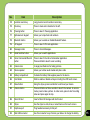
No.
Item
Description
14
Location courier key
Long press to launch Location courier key.
15
Clear key
Press to clear enter character to the left.
16
Travelog button
Press to launch Travelog application.
17
Alphanumeric keypad
Allows you to input text and numbers.
18
Bluetooth button
Allows you to enable or disable Bluetooth feature.
19
FM keypad
Press to launch FM radio application.
20
Message button
Press to check Messages.
21
Mode Switcher button
Allows you to switch applications.
22
Voice Commander/Record
button
Press to launch the Voice Commander application.
Press and hold to launch voice recording.
23
Camera lens
2-mega pixel fixed lens for taking pictures.
24
Stereo speaker
Allows you to listen audio media and phone calls.
25
Battery compartment
Contains the battery that supplies power to the device.
26
Hold button
Slide to enable or disable all keys including the LCD touch screen.
27
Reset button
Using the stylus, press reset button to soft-reset your device.
28
Camera button
Press and hold over three seconds to launch the camera. In camera
mode, press to take a picture. In video mode, press to start recording
video and press again to stop.
29
Micro-SD slot
Insert a Micro-SD storage card into this slot.
30
Stylus
Use the stylus to write, draw, or select items on the touch screen.
31
Earphone port
Plug headset accessory to this port
32
Mini-USB connector
Use this connector to synchronize your data or to charge the battery.
15
Getting your device ready
Installing the SIM card and battery
Before you can make a phone call using your P527, you need to install a Subscriber Identity
Module (SIM) card. A SIM card contains your phone number, subscriber details, phonebook,
and additional phone memory.
Your P527 comes with a rechargeable Lithium-Ion battery.
New batteries come partially discharged and should be fully charged before using them. They
generally do not reach their rated capacity until they have been charged and discharged at
least four (4) times. We recommend that new batteries be charged overnight even though
they may indicate that the charge is complete after a few hours. Sometimes charging may
stop during the initial charge and it is necessary to remove the battery for approximately
fifteen (15) minutes and then put it back on charge.
CAUTION:
Use only an ASUS qualified battery.
To install a SIM card and battery:
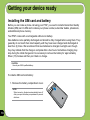
1. Remove the battery compartment cover.
NOTE:
When turned on, the device automatically turns off
after you open the battery compartment to prevent
data loss.
16
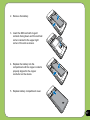
2. Remove the battery.
3. Insert the SIM card with its gold
contacts facing down and the notched
corner oriented to the upper right
corner of the slot as shown.
4. Replace the battery into the
compartment with its copper contacts
properly aligned to the copper
conductor on the device.
5. Replace battery compartment cover.
17
Charging the battery
The bundled battery pack is shipped partially charged. Charge the battery up to four (4) hours
before using for the first time.
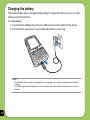
To charge battery:
1. Connect the AC adapter plug to the mini-USB connector at the bottom of the device.
2. Connect the AC power plug to a grounded wall socket or power strip.
NOTE:
• The notification LED turns red and charging battery icon appears on the status bar indicating that the battery is charging.
• If your battery gets totally discharged, you need to recharge it for at least twenty minutes before you can turn it
back on.
18
Starting up
Powering your device
Make sure that your P527 is fully-charged before starting the device for the first time.
To turn power on:
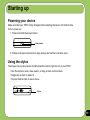
1. Press and hold the power button.
Power button
2. Follow onscreen instructions to align screen and set the local time zone.
Using the stylus
The stylus is a pen-like device found behind the bottom right corner of your P527.
• Use the stylus to write, draw, select, or drag an item on the screen.
• Single-tap an item to select it.
• Tap and hold an item to see a menu.
Stylus
19
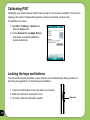
Calibrating P527
Calibrating your device ensures that the item you tap on the screen is activated. This involves
tapping in the center of targets that appear in various coordinates on the screen.
To calibrate your screen:
1. Tap Start > Settings > System tab
then tap Screen icon.
2. On the General tab tap Align Screen
then follow succeeding calibration
screen instructions.
Locking the keys and buttons
You can lock the keys and buttons of your device to avoid inadvertently dialing numbers or
launching any application. To lock the keys and buttons:
1. Locate the Hold button on the right side of your device.
2. Slide the hold button downward to lock.
Hold button
20
Reset
3. To unlock, slide the hold button upward.
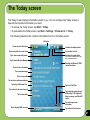
The Today screen
The Today screen displays information useful to you. You can configure the Today screen to
have all the important information you need.
• To access the Today screen, tap Start > Today.
• To personalize the Today screen, tap Start > Settings > Personal tab > Today.
The following describes the common information found on the today screen:
Status bar
Tap to open the Start menu
Tap to setup date, time, and alarm
Tap to view connectivity status
Tap to launch Wireless Manager
Tap to set user information
Indicates the battery status
Tap to adjust volume
Displays the signal status
(The icon shows no SIM card and no signal
When no SIM card is installed.)
Displays the Bluetooth® /WiFi
connection status
Tap to open messages
Tap to setup profile
Tap to read or make appointments
Tap to sign in Windows Live
Tap to launch Live search engine
Tap to setup tasks
Tap to set Call Filter
Tap to display device storage,
USB setting, LCD brightness,
battery, memory, and MicroSD
status
Tap to change screen
orientation
Tap to display ASUS Launcher
Tap to launch Contacts list
21
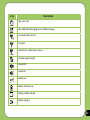
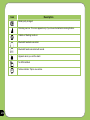
Status indicators
Refer to the table below for the Today screen icon status indicators.
Icon
Description
General Packet Radio Services (GPRS) available.
Connecting via GPRS.
Connected via GPRS.
Connecting with ActiveSync
ActiveSync connection not active.
ActiveSync synchronization in progress.
Synchronization error.
Call forwarded.
Call in progress.
Call on hold.
Missed call.
New Short Messaging Service (SMS) message.
22
Icon
Description
New voice mail.
New Multimedia Messaging Service (MMS) message.
No cellular phone service.
No signal.
Searching for cellular phone service.
Indicates signal strength.
Sound OFF.
Sound ON.
Battery low.
Battery extremely low.
Battery partially charged.
Battery charging.
23
Icon
Description
Battery fully charged.
Roaming service. This icon appears only if you have international roaming feature.
Vibrate or Meeting mode on.
Bluetooth headset connected.
Bluetooth head connected with sound.
Appears when you set the alarm
No SIM installed.
Notice indicator. Tap to view notice.
24
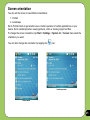
Screen orientation
You can set the screen to two different orientations:
1. Portrait
2. Landscape
Set to Portrait mode to get a better view or better operation of certain applications on your
device. Set to Landscape when viewing pictures, video or viewing longer text files.
To change the screen orientation, tap Start > Settings > System tab > Screen then select the
orientation you want.
You can also change the orientation by tapping the
icon.
Landscape mode
Portrait mode
25
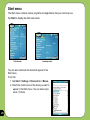
Start menu
The Start menu contains various programs and applications that you commonly use.
Tap Start to display the start menu items:
Portrait mode
Landscape mode
You can also customize the items that appear in the
Start menu.
To do this:
1. Tap Start > Settings > Personal tab > Menus.
2. Select the check boxes of the items you want to
appear in the Start menu. You can select up to
seven (7) items.
26
ASUS Launcher
ASUS Launcher is an alternative program that allows you to conveniently and quickly launch
applications, perform tasks, and change device settings.
You can run the Program from Start > Programs > ASUS Launcher, or tap ASUS Launcher
at the lower left corner of the Today screen.
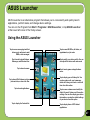
Using the ASUS Launcher
Tap to access messaging tools that
allows you to write/read e-mail,
MMS, or text messages.
Tap to launch Internet Explorer,
Messenger, and Windows Live.
Tap to launch camera.
Tap to launch File Explorer and view
pictures/video, or search for files.
Tap to launch applications.
Tap to display the Contacts list.
Tap to access MS Office, list tasks, set
appointments, or jot notes.
Tap to modify your device profile. You can
also adjust the device audio and sound.
Tap to launch games and applications
menu.
Tap to display your call history list. You
can also make a call, send a message,
delete call history, and check or reset call
timer from this section.
Tap to access submenus and modify the
Audio, Personal, System, and Connection
settings. You can also display your device
information or restore the default settings
of your device from this option.
Tap to display items of GPS related
applications.
27
28
Chapter
Entering data
2
• Using the Input Panel
• Writing and drawing on the screen
• Recording voice
• Using ActiveSync™
• Synchronizing with Exchange Server
• Searching information
• Getting Help
29
Using the Input Panel
When you start an application or select a field that requires text, symbols, or numbers, the
Input Panel icon appears on the menu bar. The Input Panel allows you to select various input
methods including: XT9, Block Recognizer, Keyboard, Letter Recognizer, and Transcriber.
Using the Block Recognizer
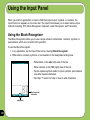
The Block Recognizer allows you to use a single stroke to write letters, numbers, symbols, or
punctuations, which are converted into typed text.
To use the Block Recognizer:
1. In an application, tap the Input Panel arrow, then tap Block Recognizer.
2. Write letters, numbers, symbols, or punctuations in the designated writing area.
• Write letters on the abc (left) area of the box.
• Write numbers on the 123 (right) area of the box.
• Tap the special symbols button to input symbols, punctuations
and other special characters.
• Tap Help “?” button for help on how to write characters.
Tap for special
characters
Input panel
30
Using the On-screen keyboard
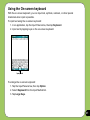
With the on-screen keyboard, you can input text, symbols, numbers, or other special
characters when input is possible.
To input text using the on-screen keyboard:
1. In an application, tap the Input Panel arrow, then tap Keyboard.
2. Input text by tapping keys on the on-screen keyboard.
Input panel
To enlarge the on-screen keyboard:
1. Tap the Input Panel arrow, then tap Option.
2. Select Keyboard from the Input Method list.
3. Tap Large Keys.
31
Using the Letter Recognizer
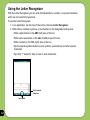
With the Letter Recognizer you can write individual letters, numbers, or special characters,
which are converted into typed text.
To use the Letter Recognizer:
1. In an application, tap the Input Panel arrow, then tap Letter Recognizer.
2. Write letters, numbers, symbols, or punctuations in the designated writing area.
• Write capital letters on the ABC (left) area of the box.
• Write lower case letters on the abc (middle) area of the box.
• Write numbers on the 123 (right) area of the box.
• Tap the special symbols button to input symbols, punctuations and other special
characters.
• Tap Help “?” button for help on how to write characters.
Tap for special
characters
Input panel
32
Using XT9 input
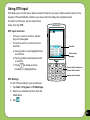
XT9 allows you to enter text in alpha-numeric format. As you key in alpha-numeric texts on the
keypad, XT9 automatically matches your input with most likely the completed word.
To switch to XT9 input, tap the Input Panel
arrow, then tap XT9.
XT9 input shortcuts
• To key in a word or number, tap the
keys on the keypad.
• To insert a word or number from the
word list:
a. Use jog dial to move highlighted bar
on word list.
b. Press jog dial to add selected word
or number.
c. Press
to delete previous character or highlighted text.
Word list
Tap to select a
language.
Press to delete character or
selected text to the left
Alpha-numeric keypad
XT9 Settings
To set XT9 according to your preference:
1. Tap Start > Programs > XT9 Settings.
2. Select your desired functions from the
listed items:
3. Tap
.
33
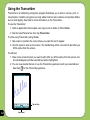
Using the Transcriber
Transcriber is a handwriting recognition program that allows you to write in cursive, print, or
mixed styles. It reliably recognizes not only written text but also numbers and symbols. Make
sure to write legibly. See Help for more information on the Transcriber.
To use the Transcriber:
1. Start an application that accepts user input, such as Notes or Word Mobile.
2. Tap the Input Panel arrow, then tap Transcriber.
To write using Transcriber (using Notes):
1. Tap screen to position the cursor where you want the text to appear.
2. Use the stylus to write on the screen. The handwriting will be converted to text after you
lift the stylus from the screen.
To edit text:
1. Draw a line across the text you want to edit. After you lift the stylus from the screen, the
line will disappear and the selected text will be highlighted.
2. You can now rewrite the text or use the Transcriber gestures to edit your selected text.
See Help
for the Transcriber gestures.
Tap for Help
34
Input panel
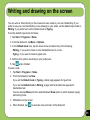
Writing and drawing on the screen
You can write or draw directly on the screen and save notes in your own handwriting. If you
prefer to use your own handwriting or use drawings in your notes, set the default input mode to
Writing. If you prefer text, set the default mode to Typing.
To set the default input mode for Notes:
1. Tap Start > Programs > Notes.
2. From the Notes list, tap Menu > Options.
3. In the Default mode: box, tap the down arrow and select any of the following:
• Writing - if you want to draw or enter handwritten text in a note.
• Typing - if you want to create a typed note.
4. Set the other options according to your preference.
5. Tap
when finished.
To write a note:
1. Tap Start > Programs > Notes.
2. From the Notes list, tap New.
If you set the Default mode to Typing, a blank page appears for typed text.
If you set the Default mode to Writing, a page with horizontal lines appears for
handwritten text.
You can also tap Menu and then select/deselect Draw option to switch between typing
and writing mode.
3. Write/Draw on the screen.
4. When finished, tap
to save the note and return to the Notes list.
35
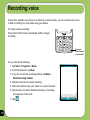
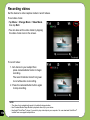
Recording voice
At any time, whether your phone is on stand-by or active mode, you can record sound, voice,
or add a recording to a note while using your device.
To create a voice recording:
Press and hold the Voice Commander button to begin
recording.
Press and
hold to launch
voice recorder
Or, you can do the following:
1. Tap Start > Programs > Notes.
2. From the Notes list, tap New.
3. If you do not see the recording toolbar, tap Menu >
View Recording Toolbar.
4. Tap the record icon to begin recording.
5. Place the receiver near your mouth or source of sound.
6. Tap the stop icon when finished recording. A recording
icon appears on the note.
7. Tap
36
.
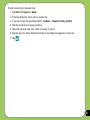
To add a recording to a saved note:
1. Tap Start > Programs > Notes.
2. From the Notes list, tap to open a saved note.
3. If you do not see the recording toolbar, tap Menu > View Recording Toolbar.
4. Tap the record icon to begin recording.
5. Place the receiver near your mouth or source of sound.
6. Tap the stop icon when finished recording. A recording icon appears on the note.
7. Tap
.
37
Using ActiveSync™
ActiveSync™ allows you to synchronize data in your device with data in your computer.
ActiveSync can also synchronize over a wireless or cellular network with Microsoft Exchange
Server, provided that your cellular phone service or company is running Microsoft Exchange
Server with Exchange ActiveSync. When synchronized directly with Exchange Server, you can
stay up to date even when your PC is turned off.
During synchronization, ActiveSync compares the data in your device with the data in your
computer or Exchange Server, and updates all data with recent changes.
You can select and synchronize data in the following locations using ActiveSync:
• Contacts
• Calendar
• Email
• Tasks
• Notes
• Favorites
• Files
• Media
You can also exchange data between your computer and device without synchronizing.
ActiveSync is already installed in your device, but before you can synchronize data with
your computer, you must first install ActiveSync in your computer. Install ActiveSync from the
Microsoft Getting Started CD that came with your device package.
After you have installed ActiveSync, set up a sync relationship between your device and your
computer. ActiveSync recognizes your device and automatically transfers the synchronization
settings you have in your device.
38
If you wish to synchronize your device with Exchange Server through your company or service
provider, obtain the name of the Exchange Server, user name, password, and domain name
from your network administrator before starting the Sync Setup Wizard.
To install and configure ActiveSync in your computer:
1. Insert the Microsoft Getting Started CD that came with your device package.
2. Follow succeeding screen instructions.
3. After the setup is complete, the Sync Setup Wizard automatically starts when you connect
your device to your computer. Follow screen instructions to complete the wizard.
4. From the Sync Setup Wizard, you can:
• Configure an Exchange Server connection to synchronize directly with an Exchange Server. Acquire from your network administrator the required parameters for input.
• Create a synchronization relationship between your computer and your device.
5. Select the information type that you want to synchronize.
6. After you finish the wizard, ActiveSync automatically synchronizes your device. You can
disconnect the device after the synchronization is complete.
NOTE:
• When connected, your device is automatically synchronized with your computer. ActiveSync synchronizes everytime you make a change on either the device or computer.
• You cannot use WLAN to synchronize database.
• Refer to your Windows® Mobile Help, for more information about ActiveSync synchronization.
39
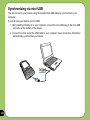
Synchronizing via mini-USB
You can connect to your device using the bundled mini-USB cable to synchronize to your
computer.
To synchronize your device via mini-USB:
1. After installing ActiveSync to your computer, connect the mini-USB plug to the mini-USB
connector at the bottom of the device.
2. Connect the other end of the USB cable to your computer. Upon connection, ActiveSync
automatically synchronizes your device.
40
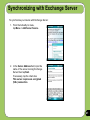
Synchronizing with Exchange Server
To synchronize your device with Exchange Server:
1. From the ActiveSync menu,
tap Menu > Add Server Source.
2. In the Server Address field, input the
name of the server running Exchange
Server then tap Next.
If necessary, tap the check box
This server requires an encrypted
(SSL) connection.
41
3. Input your name, password, and
domain then tap Next.
4. Tap the check boxes to select the data
items that you want to synchronize
with Exchange Server. To change the
available synchronization settings,
select a data item then tap Settings.
Tap Finish when done.
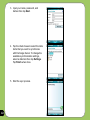
5. Start the sync process.
42
Setting the synchronization schedule
To set the synchronization with Exchange Server:
1. From the ActiveSync screen,
tap Menu > Schedule.
2. Refer to the table for input details.
Volume
Recommended setup
High
Select a shorter interval in the Peak times list.
Low
Select As items arrive option or a longer interval
in the Off-peak times list.
While roaming
Sending messages
Check Use above settings while roaming.
Check Send/Receive when I click Send.
43
Searching information
Using the search tool, you can search for files and other items stored in your device or the
external MicroSD card. You can search by file name or by words located in various applications
including the Calendar, Contacts, Excel Mobile, Word Mobile, Outlook Mobile, Help,
Messaging, Notes, all data and Tasks. You can also filter your search to files larger than 64 KB.
To search for a file or an item:
1. Tap Start > Programs > Search.
2. In Search for field, input the file name, word, or other information you want to search.
3. In Type field, select the data type to help you filter your search.
4. Tap Search. Found items are listed in Results.
5. In the Results list, tap the item with the information you need.
44
Getting Help
You can easily find Help for using any program on the device.
To get help for a program:
• From the Today screen or program, tap Start > Help.
A page will open with links to topics that explain how to use the program.
45
46
Chapter
Phone features
3
• Using the phone
• Making a call
• Receiving a call
• ASUS CallFilter
47
Using phone
Like a standard cellular phone, you can use your P527 to make and receive calls. You can also
keep a history of calls made and received, send SMS or MMS messages, take notes while
talking, call from Contacts, and copy data from installed SIM card to your device.
Phone pad
The phone pad allows you to easily dial and access the Contacts, Call History, Speed Dial, and
Phone settings. To launch the Phone pad, do any of the following:
• Tap Start > Phone.
• Press
.
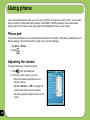
Adjusting the volume
To adjust the phone or device volume:
1. Tap
from the status bar.
2. From the volume menu, you can:
48
•Move the slider to adjust device or
phone volume.
• Tap On, Vibrate, or Off to change the system and ringer volume settings.
• Use the jog dial to adjust volume or set
mode.
Making a call
You can make a phone call using the phone pad. You can also make calls directly from the
Contacts, Call History, Speed Dial, or Voice Commander.
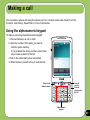
Using the alphanumeric keypad
To make a call using the alphanumeric keypad:
1. Ensure the device is not on hold.
2. Input the number of the party you want to
call then press Call key.
If you pressed the wrong number, press Clear
key to erase number to the left.
3. Talk to the called party when connected.
4. When finished, press End key to end the call.
Press to
end call
Press to
clear input to
the left
Press to call
dialled number
Alphanumeric
keypad
49
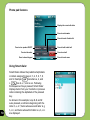
Phone pad features
Displays the current call status
Press to mute/unmute
Press to launch Contacts list
Press to turn speaker ON/OFF
Press to take notes
Press to launch keypad
Using Smart dialer
Smart Dialer utilizes the predefined alphabets
or letters assigned to keys 2, 3, 4, 5, 6, 7, 8,
and 9. Example:
has letters a, b, and
c.
has d, e, f; and so on. Following
the sequence of keys pressed, Smart Dialer
displays items from your Contacts or previous
calls containing the alphabets of the pressed
key.
50
As shown in the example, keys 3, 4, and 2
were pressed, so all items beginning with the
letter d, e, or f; items whose second letter is g,
h, or i; and items whose third letter is a, b, or c
are displayed.
Press to hold /unhold call
Press to end call
Press to launch menu
Making calls from Contacts
To make a call directly from Contacts:
1. Press the Right Soft key or from the Today screen, tap Contacts.
2. You can do any of the following to make a call:
• Tap name of contact, then from the Contacts screen, tap Call.
• Tap name of contact, then press the Call key.
• You can also tap and hold the contact, and from the shortcut menu tap Call Work,
Call Home, or Call Mobile.
• Tap Enter a name... then enter the name or number you want to call from
Contacts. Press the Call key to dial the highlighted item.
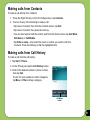
Making calls from Call History
To make a call from the call history:
1. Tap Start > Phone.
2. On the Phone pad, tap the Call History button.
3. Scroll to the desired contact or phone number,
then tap Call.
To look for more numbers in other categories,
tap Menu > Filter and tap a category.
Call History
button
51
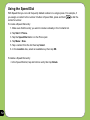
Using the Speed Dial
With Speed Dial you can call frequently dialled numbers in a single press. For example, if
you assign a contact to the number 2 button in Speed Dial, press and hold
to dial the
contact’s number.
To create a Speed Dial entry:
1. Make sure that the entry you want to create is already in the Contacts list.
2. Tap Start > Phone.
3. Tap the Speed Dial button on the Phone pad.
4. Tap Menu > New.
5. Tap a contact from the list then tap Select.
6. In the Location box, select an available key then tap OK.
To delete a Speed Dial entry:
• In the Speed Dial list, tap and hold an entry then tap Delete.
52
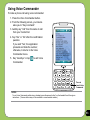
Using Voice Commander
To make a phone call using voice commander:
1. Press the Voice Commander button.
2. From the following screen, your device
asks you to “Say command.”
3. Audibly say “Call” then the name to call
from your Contact list.
4. Say “Yes” or “No” after the confirmation
question.
If you said “Yes”, the application
proceeds and dials the number;
otherwise, it returns to the Voice
Commander menu.
5. Say “Goodbye” or tap
Commander.
to exit Voice
Press to
launch Voice
Commander
NOTES:
To use Voice Commander while using a headset, press the answer button* on the headset then follow given
instructions. (* Answer button may not be available in some headset models.)
53
Receiving a call
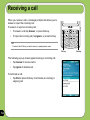
When you receive a call, a message prompts and allows you to
answer or reject the incoming call.
To answer or reject an incoming call:
• To answer a call tap Answer, or press Call key.
• To reject an incoming call, tap Ignore, or press End key.
TIP:
Press and hold Call key to switch receiver to speakerphone mode.
Call key
The following pop-up screen appears during an incoming call:
• Tap Answer to receive call or
• Tap Ignore to dismiss call.
To terminate a call:
• Tap End or press End key to terminate an incoming or
outgoing call.
54
End key
ASUS CallFilter
The ASUS CallFilter is a simple yet efficient utility that allows you to control all your incoming
calls. Using this utility, you can manage a list of telephone numbers from your Contacts list, Call
logs, Message number, or any unlisted telephone number that you want to accept or reject.
Launching ASUS CallFilter
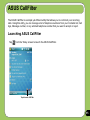
Tap
from the Today screen to launch the ASUS CallFilter.
Tap to launch CallFilter
55
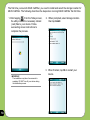
The first time you launch ASUS CallFilter, you need to install and select the storage location for
ASUS CallFilter. The following describes the steps when running ASUS CallFilter the first time.
1. After tapping
, from the Today screen,
the utility installs the necessary cabinet
(.cab) files to your device. Follow
succeeding screen instructions to
complete the process.
IMPORTANT:
The installation may take a few seconds to
complete. DO NOT turn off your device during
the installation process.
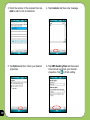
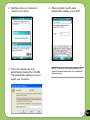
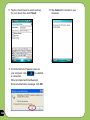
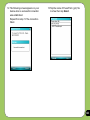
56
2. When prompted, select storage location
then tap Install.
3. When finished, tap Ok to restart your
device.
Using ASUS CallFilter
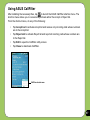
After installing the necessary files, tap
to launch the ASUS CallFilter shortcut menu. The
shortcut menu allows you to conveniently activate either the Accept or Reject list.
From the shortcut menu, do any of the following:
• Tap Accept List to activate Accept list and receive only incoming calls whose numbers
are in the Accept list.
• Tap Reject List to activate Reject list and reject all incoming calls whose numbers are
in the Reject list.
• Tap Edit to open the CallFilter utility screen.
• Tap Close to deactivate CallFilter.
CallFilter shortcut menu
57
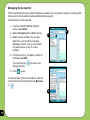
Managing the Accept list
The Accept list allows you to select telephone numbers you only want to accept. Incoming calls
that are not in the Accept list will automatically be rejected.
To add items in the Accept list:
1. From the ASUS CallFilter shortcut
menu, select Edit.
2. Select Accept List from Edit List box.
3. Select source of data. You can get
data from your Contacts, Call logs,
Message number, and you can select
any anonymous or key in a new
number.
2
3
4. From the list (e.g. Contacts), select an
item then tap Add.
You can also tap
Accept list item.
5. Click
to add a new
to exit.
To remove items from the Accept list, select a
contact from the Accept list then tap Remove
or
.
4
58
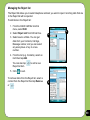
Managing the Reject list
The Reject list allows you to select telephone numbers you want to reject. Incoming calls that are
in the Reject list will be rejected.
To add items in the Reject list:
1. From the ASUS CallFilter shortcut
menu, select Edit.
2. Select Reject List from Edit List box.
3. Select source of data. You can get
data from your Contacts, Call logs,
Message number, and you can select
any anonymous or key in a new
number.
2
3
4. From the list (e.g. Contacts), select an
item then tap Add.
You can also tap
Reject list item.
5. Click
to add a new
to exit.
To remove items from the Reject list, select a
contact from the Reject list then tap Remove
or
.
4
59
60
Chapter
Wireless features
4
• Using the Wireless Manager
• Using Bluetooth®
• Using Wi-Fi
• Setting a GPRS connection
61
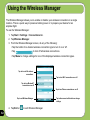
Using the Wireless Manager
The Wireless Manager allows you to enable or disable your wireless connections in a single
location. This is a quick way to preserve battery power or to prepare your device for an
airplane flight.
To use the Wireless Manager:
1. Tap Start > Settings > Connections tab.
2. Tap Wireless Manager.
3. From the Wireless Manager screen, do any of the following:
•Tap the button for a desired wireless connection type to turn it on or off.
•Tap
•Tap Menu to change settings for one of the displayed wireless connection types.
to turn off all wireless connections.
Tap to turn off all wireless
connections
Tap to turn Wi-Fi connection on or off
Tap to turn Bluetooth®
connection on or off
Tap to turn Phone connection on or off
Tap to exit Wireless Manager
4. Tap Exit or
62
to exit Wireless Manager.
Tap to disconnect cellular data or change
settings
Using Bluetooth®
Overview
Bluetooth® is a short-range wireless communications technology that allows devices with
Bluetooth capabilities to exchange data within a radius of about 10 meters (30 feet) without
requring a physical connection. With Bluetooth enabled in your device, you can:
• Connect and communicate (i.e. beam files, tasks, contacts) with other devices with
Bluetooth features.
• Use Bluetooth service. After you connect to another device or computer using
Bluetooth, you can use the services available on that device.
Activating Bluetooth in your device
Use the Wireless Manager to enable or disable Bluetooth in your device. You can access the
Wireless Manager by performing any of the following:
1. Launch the Wireless Manager. To do this, you can either:
• Tap Start > Settings > Connections tab > Wireless Manager.
• Tap the Wireless Manager icon from the Today screen.
2. From the Wireless Manager screen, tap Bluetooth.
Tap to launch
Wireless Manager
NOTES:
When not in use, deactivate Bluetooth in your device to
conserve battery power.
63
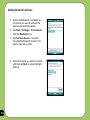
Adding Bluetooth devices
1. Ensure that Bluetooth is enabled on
the device you want to add and the
device is set as Discoverable.
2. Tap Start > Settings > Connections
then tap Bluetooth icon.
3. Tap Add new device... to search
for available Bluetooth devices. The
search may take a while.
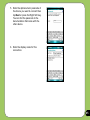
4. Select the device you want to connect
with then tap Next or press the Right
Soft key.
64
5. Enter the alphanumeric passcode of
the device you want to connect then
tap Next or press the Right Soft key.
You can find the passcode in the
documentation that came with the
other device.
6. Enter the display name for this
connection.
65
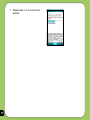
7. Repeat steps 3 - 6 to connect more
devices.
66
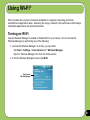
Using Wi-Fi®
Wi-Fi provides the very best connection available for computer networking and home
entertainment applications alike - delivering the range, bandwith, and performance that today’s
multimedia applications and products demand.
Turning on Wi-Fi
Use the Wireless Manager to enable or disable Wi-Fi in your device. You can access the
Wireless Manager by performing any of the following:
1. Launch the Wireless Manager. To do this, you can either:
• Tap Start > Settings > Connections tab > Wireless Manager.
• Tap the Wireless Manager icon from the Today screen.
2. From the Wireless Manager screen, tap Wi-Fi.
Tap to launch
Wireless Manager
67
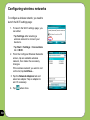
Configuring wireless networks
To configure a wireless network, you need to
launch the Wi-Fi settings page:
1. To launch the Wi-Fi settings page, you
can either:
• Tap Settings after selecting a
wireless network to connect your
device to.
• Tap Start > Settings > Connections
tab > Wi-Fi.
2. From the Configure Wireless Networks
screen, tap an available wireless
network, then make the necessary
changes.
If the wireless network you want is not
on the list, tap Add New....
3 Tap the Network Adapters tab and
select an adapter. Tap an adapter to
set it if necessary.
4. Tap
68
when done.
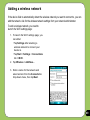
Adding a wireless network
If the device fails to automatically detect the wireless network you want to connect to, you can
add the network. Ask for the wireless network settings from your network administrator.
To add a wireless network, you need to
launch the Wi-Fi settings page:
1. To launch the Wi-Fi settings page, you
can either:
• Tap Settings after selecting a
wireless network to connect your
device to.
• Tap Start > Settings > Connections
tab > Wi-Fi.
2. Tap Wireless > Add New....
3. Enter a name for the network and
select an item from the Connects to:
drop-down menu, then tap Next.
69
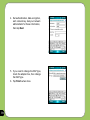
4. Set authentication, data encryption,
and network key. Ask your network
administrator for these information,
then tap Next.
5. If you need to change the EAP type,
check the adapter box, then change
the EAP type.
6. Tap Finish when done.
70
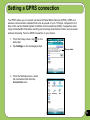
Setting a GPRS connection
Your P527 allows you to connect via General Packet Radio Service (GPRS). GPRS is a
wireless communication standard that runs at speeds of up to 115 kbps, compared to 9.6
kbps of the current Global System for Mobile Communications (GSM). It supports a wide
range of bandwidths that allows sending and receiving small bursts of data, such as email
and web browsing. To set a GPRS connection in your device:
1. From the Today screen, tap
status bar.
on the
2. Tap Settings on the message prompt.
Pop-up callout
3. From the Settings screen, select
the Connections tab then tap
Connections icon.
71
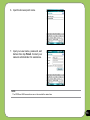
4. From the Connections screen, tap Add
a new modem connection.
5. Input a unique name for the connection
then select Cellular Line (GPRS) from
the modem list.
72
6. Input the Access point name.
7. Input your user name, password, and
domain then tap Finish. Contact your
network administrator for assistance.
NOTE:
The GPRS and USB connections can not be used at the same time.
73
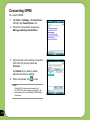
Connecting GPRS
To connect GPRS:
1. Tap Start > Settings > Connections
tab then tap Connections icon.
2. From the Connections screen, tap
Manage existing connections.
3. Tap and hold on an existing connection
then from the pop-up menu tap
Connect.
Tap Delete if you want to delete
selected connection setting.
4. When connected, tap
to exit.
NOTE:
• When WLAN is used simultaneously with
the GPRS, the latter will get signal priority. We
recommend not to use WLAN and GPRS at the
same time.
74
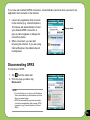
If you have set a default GPRS connection, it automatically connects when you launch an
application that connects to the Internet.
1. Launch any application that connects
to the Internet (e.g. Internet Explorer).
The device will automatically connect
your default GPRS connection. A
pop-up callout appears to display the
connection status.
Pop-up callout
2. When connected, you can start
browsing the Internet. If you are using
Internet Explorer, the default site will
be displayed.
Disconnecting GPRS
To disconnect GPRS:
1. Tap
from the status bar.
2. From the pop-up callout, tap
Disconnect.
NOTE:
• If your ActiveSync is set to sync with Exchange
Server automatically, synchronization will occur
after you connect again.
• GPRS will automatically reconnect everytime
you launch an application that requires GPRS
connection (e.g., Internet Explorer or Pocket MSN).
75
Using the GPRS Tool
The GPRS Tool allows you to conveniently select and connect to your GPRS service provider.
To connect via GPRS Tool:
1. Tap Start > Settings > Connections
tab then tap the Network Setting icon.
You can also tap
on the status bar
then tap Settings from the pop-up
callout.
2. From the Network Setting screen,
select your GPRS provider from the
list.
NOTE:
• Operators vary in different regions.
• The GPRS and USB connections cannot be used
at the same time.
76
Chapter
GPS features
5
• GPS Catcher
• Travelog
• Location Courier
• External GPS
77
GPS Catcher
The GPS Catcher allows you to download the GPS data so that the GPS data in your device is
up-to-date. The GPS data contains important information about the status of satellite, current
date and time for determining the satellite position.
Updating GPS data
To update GPS data:
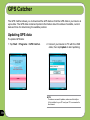
1. Tap Start > Programs > GPS Catcher.
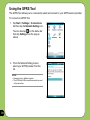
2. Connect your device to PC with the USB
cable, then tap Update to start updating.
NOTE:
To make a successful update, make sure ActiveSync
4.5 is installed in your PC and your PC is connected to
the Internet.
78
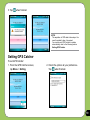
3. Tap
when finished.
NOTE:
The expiration of GPS data is three days. You
need to update it when it is expired.
You can also set GPS Catcher to update
automatically, refer to the following section
Setting GPS Catcher.
Setting GPS Catcher
To set GPS Catcher:
1. From the GPS Catcher screen,
tap Menu > Setting.
2. Check the options at your preference.
when finished.
Tap
79
Travelog
Travelog allows you to record your travel track and export the data to Google Earth placemark
files (kmz)
Turning GPS on
To turn GPS on:
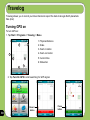
1. Tap Start > Programs > Travelog > Menu.
1. Physical distance
2
1
2. Scale
3. Zoom in button
4. Zoom out button
1
3
5. Current time
4
6. Status bar
6
5
2. Tap Turn On GPS to start searching for GPS signal.
80
Record
button
Pause
button
Recording Travel Track
To record travel track:
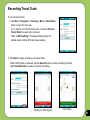
1. Tap Start > Programs > Travelog > Menu > New Route.
Enter a name for the route.
If you want to record the check point, check the Record
Check Point box and set an interval.
Refer to GPS setting in Travelog Setting section for
details about setting GPS and power saving.
2. Tap Start to begin recording your travel track.
When GPS signal is received, tap the Record button to start recording the track.
Tap Pause/Resume to pause or resume recording.
Waiting for GPS signal
Recording
81
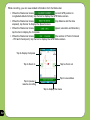
While recording, you can view related information from the Status bar.
• When the Status bar shows
(current GPS position in
Longitude/Latitude format), tap the bar to display the GPS Status screen.
• When the Status bar shows
elapsed), tap the bar to display the Speed screen.
(trip distance and the time
• When the Status bar shows
tap the bar to display the Compass.
(speed, elevation and direction),
• When the Status bar shows
(the number of Point of Interest
- POI and check point), tap the bar to display the GPS Status screen.
Tap to display Compass
Tap to Zoom in
Tap to pause or
resume recording
Tap to Zoom out
Tap to view status
Tap to display the menu
82
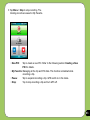
3. Tap Menu > Stop to stop recording. The
tracking records are saved in My Favorite.
•New POI:
Tap to create a new POI. Refer to the following section Creating a New
POI for details.
•My Favorite: Managing all the trip and POI data. This function is disabled while
recording a trip.
•Pause:
Tap to suspend recording a trip. GPS is still on in this mode.
•Stop:
Tap to stop recording a trip and turn GPS off.
83
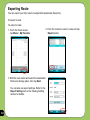
Exporting Route
You can export your trip route to Google Earth placemark files (kmz).
To export a route:
To export a route:
1. From the Track screen,
tap Menu > My Favorite.
2. From the route list, select a route and tap
Export button.
3. Edit the route name and select the destination
folder and storage place, then tap Next.
You can also set export settings. Refer to the
Export Setting item in the Travelog Setting
section for details.
84
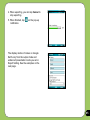
4. When exporting, you can tap Cancel to
stop exporting.
5. When finished, tap
notification.
on the pop-up
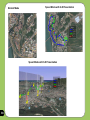
The display modes of routes on Google
Earth vary from the output mode and
enhanced presentation mode you set in
Export Setting. See the examples on the
next page.
85
Normal Mode
Speed Mode with 2-D Presentation
Speed Mode with 3-D Presentation
86
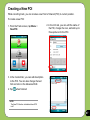
Creating a New POI
While recording track, you can create a new Point of Interest (POI) in current position.
To create a new POI:
1. From the Track screen, tap Menu >
New POI.
2. In the Info tab, you can edit the name of
the POI, change the icon, and add up to
three pictures for the POI.
3. In the Content tab, you can add description
to the POI. You can also change the text
font and color in the Advanced Edit.
4. Tap
when finished.
NOTE:
The New POI function is disabled when GPS
is off.
87
Travelog Setting
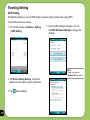
GPS Setting
GPS Setting allows you to set GPS mode and power saving mode while using GPS.
To set GPS and power saving:
1. From Track screen, tap Menu > Setting
> GPS Setting.
2. Current GPS setting is showed. You can
tap GPS Hardware Setting to change the
settings.
NOTE:
Refer to the section
External GPS for details.
3. Tap Power Saving Setting. Check the options and set values at your preference.
4. Tap
88
when finished.
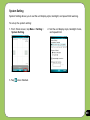
System Setting
System Setting allows you to set the unit display style, backlight, and speed limit warning.
To set up the system setting:
1. From Track screen, tap Menu > Setting >
System Setting.
3. Tap
2. Set the unit display style, backlight mode,
and speed limit.
when finished.
89
Export Setting
Export Setting includes Point Setting and Mode Setting.
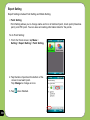
• Point Setting
Point Setting allows you to change name and icon of start/end point, check point (milestone
point), and POI point. You can also set marking-information label for the points.
To do Point Setting:
1. From the Track screen, tap Menu >
Setting > Export Setting > Point Setting.
2. Tap the tabs of points at the bottom of the
screen to set each point.
Tap Change to change an icon.
3. Tap
90
when finished.
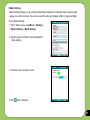
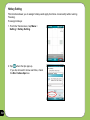
• Mode Setting
Mode Setting allows you to set the presentation features of exported data, such as digit
range, line color and size. You can also set the size and display effect of exported data.
To do Mode Setting:
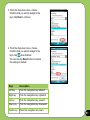
1. From Track screen, tap Menu > Setting > Export Setting > Mode Setting
2. Tap the name of mode to launch detailed mode setting.
3. Choose color and size for line.
4. Tap
when finished.
91
Hotkey Setting
This function allows you to assign hotkeys and apply functions conveniently while running
Travelog.
To assign hotkeys:
1. From the Track screen, tap Menu >
Setting > Hotkey Setting.
2. Tap
when the tips pop up.
If you do not want it show next time, check
the Don’t show tips box.
92
3. From the drop-down menu, choose
functions that you want to assign to the
keys. Tap Next to continue.
4. From the drop-down menu, choose
functions that you want to assign to the
keys. Tap
when finished.
You can also tap Reset button to restore
the settings to default.
Keys
Description
Left key
Push the navigation key leftward.
Right key
Push the navigation key rightward.
Up key
Push the navigation key upward.
Down key
Push the navigation key downward.
Center key
Press the navigation key down.
93
Reset All
This function allows you to reset Travelog
to its default settings to fix and recover
database.
To reset settings and recovery database :
1. From the Setting dialog, tap Reset All
button.
2. Tap Repair button to fix and recover the
database.
Tap Reset All button to reset all settings to
default, then tap Yes from the pop-up
window to confirm.
Check the Erase the database box if you
want to clear all the database.
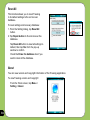
About
You can view version and copyright information of the Travelog application.
To view Travelog version and copyright:
From the Track screen, tap Menu >
Setting > About.
94
Location Courier
The Location Courier allows you to send your position through SMS messages to up to five
receivers at the same time. You can also set a timer to send SMS messages periodically.
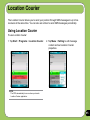
Using Location Courier
To use Location Courier:
1. Tap Start > Programs > Location Courier.
2. Tap Menu > Setting to edit message
content and set Location Courier
properties.
NOTE:
The GPS automatically turns on when you launch
Location Courier application.
95
96
3. Enter the number of the recipient then tap Add to add it to the Contacts list.
4. Tap Contents tab then enter message.
5. Tap Options tab then check your desired
properties.
6. Tap SMS Sending Rule tab then select
time interval and check your desired
to finish setting.
properties. Tap
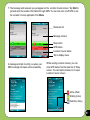
7. The message and receivers you set appear on the Location Courier screen. Tap Start to
get and send the location information through SMS. You can also turn on/off GPS or exit
the Location Courier application from Menu.
Receivers list
Message content
Stop button
GPS status
Location Courier status
Tap to display menu
A message prompts to notify you when your
SMS message has been sent successfully.
While running Location Courier, you can
view GPS status from the task bar of Today
screen. You can tap the status icon to open
Location Courier screen.
Active (Red)
Waiting (Lime)
DeActive (Gray)
97
External GPS
P527 allows you to use an external GPS device to receive GPS data. To use an external
device, you need to set connection between P527 and your external GPS device.
Setting external GPS device
To set an external GPS device:
1. Tap Start > Settings > System tab >
External GPS.
2. From the Programs tab, select a program
port.
NOTE:
The other GPS application in P527 will use
the same COM Port as you set here. Ensure
that this port is also available in the other GPS
applications.
98
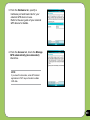
3. From the Hardware tab, specify a
hardware port and baud rate for your
external GPS device to use.
Refer to the user guide of your external
GPS device for details.
4. From the Access tab, check the Manage
GPS automatically (recommended)
check box.
NOTE:
If you clear this check box, some GPS related
application in P527 may not be able to obtain
GPS data.
99
Chapter
Multimedia features
• Using the camera
• Viewing pictures and videos
100
6
Using the camera
The built-in two-megapixel camera allows you to take photos and record audio/video clips.
Launching the camera
To start using the camera:
• Tap Start > Programs > Pictures and Videos > Camera icon or
• Press and hold the Camera button on the right side of your device.
Reset
Camera/shutter button
MicroSD
Camera button
NOTE:
• By default, the preview screen is set to landscape.
• After launching the camera, your device is set to camera mode by default.
• In camera mode, the camera button function as shutter button.
To exit the Camera:
• Tap the exit
icon on the camera screen.
101
Available capture modes
Your device camera can be set to two capture modes:
• Camera mode - Camera mode allows you to take photos, and save them to your device
or MicroSD. You can also configure the camera to match an environment, set picture
size, select magnification, adjust the picture quality, apply effects, and modify other
advanced settings.
• Video mode - Video mode enables you to record audio/video clips. Like in camera
mode, it also allows you to select the magnification, set the video size, apply some
effects, select target storage, and modify advanced video settings.
Supported formats
Using the camera mode or video mode, the images or video clip captured are stored in the
following formats:
• Still image (Camera mode) - JPEG (.jpg)
• Video (Video mode) - 3GP (.3gp), MPEG-4 (.mp4)
102
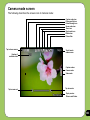
Camera mode screen
The following describes the screen icons in Camera mode:
Capture mode icon
Picture quality icon
Default storage icon
Scene mode icon
Timer icon
Burst mode icon
Effects icon
Picture Size
Tap to close camera
Number of
available shots
Tap to launch
camera menu
Capture modes:
Camera mode
Video mode
Tap to zoom out
Tap to zoom in
Tap to preview
Pictures and Videos
103
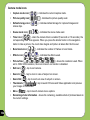
Camera mode icons
• Capture mode icon [
/
] - indicates the current capture mode.
• Picture quality icon [
/
/
• Default storage icon [
videos clips.
• Scene mode icon [
/
]- indicates the picture quality used.
/
] - indicates default storage for captured images and
/
] - indicates the scene mode used.
/
] - when the camera timer is enabled (5 seconds or 10 seconds), the
• Timer icon [
corresponding timer icon appears. When you press the shutter button or the navigation
button to take a picture, the count down begins and picture is taken after the time set.
• Burst mode icon [
/
• Effects icon [
/
/
] - indicates the number of frames in burst mode.
/
] - indicates the effects used.
• Picture Size [
/
/
/
/
/
] - shows the resolution used. When
set to 1600x1200 resolution, the zoom in/zoom out function is disabled.
• Exit icon [
] - tap to exit camera.
• Zoom In [
] - tap to zoom in view of subject on screen.
• Zoom Out [
] - tap to zoom out view of subject on screen.
• Thumbnails [
your images in thumbnails.
• Menu [
]- tap to launch Pictures and Video application and preview
] - tap to launch camera menu options.
• Remaining shots information - shows the remaining, available shots of pictures based on
the current settings.
104
Camera options menu
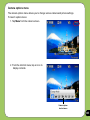
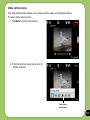
The camera options menu allows you to change various camera and picture settings.
To launch options menu:
1. Tap Menu from the camera screen.
2. From the shortcut menu, tap an icon to
display contents.
Camera options
shortcut menu
105
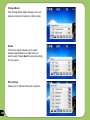
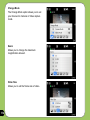
Change Mode
The Change Mode option allows you to set
capture mode into Camera or Video mode.
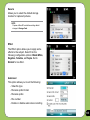
Scene
The Scene option allows you to select
presets appropriate for a night scene or
sports event. Select Auto to use best setting
for any scene.
Picture Size
Allows you to set the frame size of picture.
106
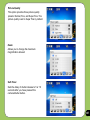
Picture Quality
This option provides three picture quality
presets: Normal, Fine, and Super Fine. The
picture quality is set to Super Fine by default.
Zoom
Allows you to change the maximum
magnification allowed.
Self-Timer
Sets the delay of shutter release to 5 or 10
seconds after you have pressed the
camera/shutter button.
107
Burst
Allows you to take 4 or 9 pictures in
succession with one press of the camera/
shutter button.
Frame
Allows you to set a frame.
NOTE:
Ensure that you have set the screen resolution to
320 x 240 before setting frame.
Effect
The Effect option allows you to apply some
effects to the subject. Select from the
following configuration options: Black-White,
Negative, Solarize, and Sepia. Set to
Normal for no effect.
108
Save to
Allows you to select the default storage for
captured pictures.
NOTE:
Prepare a MicroSD card before setting default
storage to Storage Card.
Advanced
This option allows you to set the following:
- Filename prefix format
- Filename prefix
- File number
- Date and time stamp
- Shutter sound
- Burst interval
109
Taking photos
After launching the camera, your device is set to Camera mode by default. If set otherwise,
tap Menu > Change Mode > Camera Mode then tap Exit.
You can also set to camera mode by tapping the camera mode icon on the screen.
To take a photo:
1. Aim device to your subject then
press camera/shutter button.
icon appears, make sure
2. When the
the device is stable and not shaking.
3. Repeat steps 1 to 2 to take more photos.
NOTE:
The image is automatically saved to the default storage location and can be viewed using the Pictures and Videos
application.
110
Video mode screen
The following describes the screen icons in Video mode:
Capture mode icon
Remaining video
recording time
Default storage icon
Effects icon
Video Size
Tap to close camera
Recording indicator
Green: Ready
Red: Recording
Tap to launch
video menu
Capture mode icons:
Camera mode
Video mode
Tap to zoom out
Tap to zoom in
Tap to launch Pictures
and Videos
111
Video mode icons
• Capture mode icon [
/
] - indicates the current capture mode.
• Default storage icon [
/
] - indicates default storage for captured video clips.
• Effects icon [
/
] - indicates the effects used.
• Video size [
/
/
/
] - shows the video size used.
• Exit icon [
] - tap to exit video.
• Zoom In [
] - tap to zoom in view of subject on screen.
• Zoom Out [
• Thumbnails [
your video.
• Menu [
] - tap to zoom out view of subject on screen.
]- tap to launch Pictures and Video application and play
] - tap to launch video menu options.
• Remaining video recording time information - shows the remaining, video recording
time based on the current settings.
112
Video options menu
The video options menu allows you to change various video and playback settings.
To launch video options menu:
1. Tap Menu from the video screen.
2. From the shortcut menu, tap an icon to
display contents.
Video options
shortcut menu
113
Change Mode
The Change Mode option allows you to set
your device into Camera or Video capture
mode.
Zoom
Allows you to change the maximum
magnification allowed.
Video Size
Allows you to set the frame size of video.
114
Save to
Allows you to select the default storage
location for captured pictures.
NOTE:
Prepare a MicroSD card before setting default
storage to Storage Card.
Effect
The Effect option allows you to apply some
effects to the subject. Select from the
following configuration options: Black-White,
Negative, Solarize, and Sepia. Set to
Normal for no effect.
Advanced
This option allows you to set the following:
- Video file type
- Filename prefix format
- Filename prefix
- File number
- Enable or disable audio when recording
115
Recording videos
Set the device to video capture mode to record videos.
To set video mode:
• Tap Menu > Change Mode > Video Mode
then tap Exit.
• You can also set the video mode by tapping
the video mode icon on the screen.
To record video:
1. Aim device to your subject then
press camera/shutter button to begin
recording.
The record indicator turns from green
to red while video is recording.
2. Press the camera/shutter button again
to stop recording.
116
NOTE:
•The video clip is automatically saved to the default storage location.
•Use Windows Media Player Mobile to playback video clip in your device.
• Use Apple® QuickTime™ player, if you wish to play video clips in your computer. You can download QuickTime™
installer from www.apple.com/quicktime.
Viewing pictures and videos
Use the Pictures and Video Application to preview stored images and playback video clips.
Viewing pictures and videos
To view pictures and videos:
1. Tap Start > Programs > Pictures and Videos.
2. Tap the picture or video clip you want to see.
• To view pictures or launch video clips stored in MicroSD card, tap the folder list (labeled My Pictures), and tap MicroSD Card.
• To view pictures stored in My Pictures folder on your device, tap My Pictures then tap picture thumbnail.
• To playback video clips in My Videos folder on your device, tap My Videos then tap video thumbnail.
117
Chapter
Business features
• Remote Presenter
• Backup
• Meeting Time Planer
118
7
Remote Presenter
From your P527 device, Remote Presenter allows you to remotely control PowerPoint™
presentations running on your desktop or notebook. Operating over a Bluetooth wireless
connection, it promotes convenience and freedom of movement during your presentation. It
also enables you to review slide notes without affecting the audience’s view of the slide show.
Using the Remote Presenter
IMPORTANT:
• Before you start, make sure to install the Remote Presenter utility on your computer. You can find the installation files
in the bundled support CD.
•Remote Presenter works with Bluetooth-enabled computers only.
•The screen captures in the following setup are for reference only and the sequence may appear differently,
depending on the previous Bluetooth configuration performed on your system.
To use the Remote Presenter:
1. Tap Start > Programs > Remote Presenter.
You can also execute Remote Presenter from the ASUS
Launcher menu. From the ASUS Launcher menu, tap
Application then tap Remote Presenter.
2. Do the following before searching for Bluetooth devices:
•Activate Bluetooth in your computer.
•Launch the Remote Presenter program in your computer.
To do this, from your computer desktop,
click Start > All Programs > ASUS >
Remote Presenter.
When ready, tap Next on your device.
119
The following describes the Remote Presenter menu on your computer screen.
PowerPoint .ppt file path
Click to change path
Click to start or stop
Bluetooth COM port
Click to exit
4. Check your computer screen when your
P527 prompts the following message:
3. From the list of Bluetooth devices found,
select the name of computer containing your
PowerPoint presentation then tap Next.
5. The following message appears on your
computer screen. Click the message
prompt to allow your P527 to access the
ActiveSync service of your computer.
120
6. Tap Yes to allow your computer to
connect to your device.
7. From your computer, key in an
authentication passkey then click OK.
The authentication passkey is used to
secure your connection.
8. When prompted, input the same
authentication passkey on your P527.
NOTE: The Bluetooth authentication passkey is only
required if a paired relationship is not yet established
between devices.
121
9. Tap the check boxes to select services
for your device then click Finish.
11.From the Remote Presenter menu on
your computer, click
to establish
a connection.
122
When prompted with the Bluetooth
Service Authorization message, click OK.
10.Tap Connect to connect to your
computer.
12.The following screen appears on your
device when a successful connection
was established.
13.Tap the name of PowerPoint (.ppt) file
to show then tap Select.
Repeat from step 1 if the connection
failed.
123
124
Upon selection, Microsoft® PowerPoint is automatically launched on your computer with the
selected file open.
14.You can now remotely control the PowerPoint presentation on your computer using your
device. The following describes the control menu on your device.
Slide number
Tap to exit
Tap to select slide
Indicates Bluetooth® signal
Timer
Tap to toggle between Normal and
Slide Show view
Previous slide
Tap to display notes
Next slide
Tap to display menu options
Tap to return to control panel
125
Backup
Backup allows you to backup or restore your files and data to your device or storage card.
Backing-up files
To backup files:
1. From the Today screen, tap Start >
Programs > Backup > Backup.
126
2. Select the items you want to backup, then
tap Next.
3. Rename the file and select the storage
location for the backup, then tap Next.
4. Enter four digits as your password to
encrypt the backup file, then tap Next.
5. Tap Start to begin backup. Tap Back to
return to the previous screen.
6. Tap Reset to reset the device.
NOTE:
The system will turn off all processing applications
when backing up files.
127
Restoring files
To restore files
128
1. From the Today screen, tap Start >
Programs > Backup > Restore.
2. Select a file you want to restore, then
tap Next.
3. Input four-digit password to decrypt the
backup file, then tap Next.
4. Select the items you want to restore, then tap Next.
5. Tap Start to begin restore, or tap Back to
return to the last screen.
6. Tap Reset to reset the device.
NOTE: The system will turn off all processing
applications when restoring files.
129
Backup Setting
To set Backup
1. From the Today screen, tap Start >
Programs > Backup, then tap Option.
130
2. Check the box if you want to reset the
to finish.
device after backup, then Tap
Meeting Time Planner
Meeting Time Planner allows you to find a suitable time to have a video conference, telephone
or net meeting with participants in different time zones.
Using the Meeting Time Planner
To use the Meeting Time Planner:
1. Tap Start > Programs > Meeting Time Planner.
2. Select the date and the cities.
A color-coded 24-hour time table of the chosen cities
appear, allowing you to identify the best time for the
meeting. Dark blue is late night/early morning, light
blue is off-peak hour, and white is peak daytime
hour. You can also change the interval of time shown
by tapping Interval on the lower-right corner of the
screen.
3. Select the time for your meeting and tap New Date.
4. Fill in the meeting information and tap OK to add your
date into the Calendar.
NOTE:
You can tap Interval > Summer Time use daylight saving time.
131
Chapter
Special features
• NewStation
• FM Radio
• Windows Live™
• Setting ring tone
• Wake-up setting
• Mode switcher
• System information
• Restoring factory default settings
132
8
NewStation
With NewStation in P527, you can conveniently browse news and blogs anywhere and anytime.
NOTE:
Ensure your device is connected to Internet when using NewStation.
Reading NewStation news
To read NewStation news:
1. Tap Start > Programs > NewStation.
2. Tap a category folder to open.
3. Tap a channel name to open.
4. Browse your favorite subjects.
Creating a new category
To create a new category folder:
1. Tap Start > Programs > NewStation.
2. Tap Menu > New Category then edit
the category name.
133
Adding a new channel
Before using this function, you need to add
your favorite channels first.
To add a channel:
1. Tap Start > Programs > NewStation,
then tap a category folder to open.
2. Tap Menu > New Channel. You can
add a channel from either Internet or
an existing file.
134
Input from URL
Select Input from URL and enter the
URL address, then tap Next.
Select a category where you want to
add the channel, then tap Finish.
Import from a file
Select the radio button of Import from
a file, then tap Next.
Select a folder and choose a file from
the list.
135
136
Choose channels from the list, then tap
Next.
Select a category where you want to
add the channel, then tap Finish.
NewStation Menus
Category Menu
To use the category menu:
1. Tap Start > Programs > NewStation.
2. Select a category folder, then tap Menu.
3. Tap an option as desired.
Channel Menu
To use the channel menu:
1. Tap Start > Programs > NewStation.
2. Tap a category folder, then select a
channel and tap Menu.
3. Tap an option as desired.
Subject Menu
To use the subject menu:
1. Tap Start > Programs > NewStation.
2. Tap a category folder, then tap a channel
to open. Select a subject and tap Menu.
3. Tap an option as desired.
137
FM Radio
From your P527 device, FM Radio allows you to listen to FM radio anywhere and anytime.
Listening to FM radio
To listen to FM radio.
1. Tap Start > Programs > FM Radio.
2. Tap Menu > Turn On/Off to open FM
radio.
3. Tap a channel number to open.
Adding a new channel
Before using this function, you need to add
your favorite channels first.
1. Tap Start > Programs > FM Radio.
2. Tap Menu > Turn On/Off to open FM
radio.
138
•Tap Auto Search to add a channel automatically.
•Tap Manual Input to add a channel manually.
Managing My Channel list
The Channel list allows you to add or delete
items. You can also replace or rename FM
Channels list.
To add items in the My Channel list:
1. From the FM Radio menu, select My
Channel.
2. From the list, tap Add to begin channel
search.
3. When the searching is finished, tap
Add to add the Search channel list.
4. Click
to exit.
You can also tap Add to my channels
to add the current channel to My
Channel list.
To remove items from the My Channel list,
select an item from the My Channel list then
tap Delete.
139
To replace to rename items from the My
Channel list:
1. Select an item from the My Channel list
then tap Edit.
2 Tap Replace or Rename.
3. Click
to exit.
Configuring FM Settings
To configure your FM Setting:
1. Tap Start > Programs > FM Radio.
2. Tap Menu > Setting to open FM setting
page
3 Select Loudspeaker or Earphone in
Audio Device field.
4 Select seek theshold value from 3 to 11.
5 Tap Done or OK to exit.
140
Windows Live™
Windows Live™ provides a set of services including email, messaging, and search that brings
all your online necessities together. With Windows Live, you can conveniently do the following
on your device:
• Access your Hotmail, MSN, or Microsoft Exchange account and send or receive emails.
• See who among your friends are online and start a chat.
• Search the web using the simple and precise Windows Live search engine.
Signing up
Before you can start using Windows Live on your device, you must have a Windows Live ID,
Microsoft Passport, or Microsoft Exchange email account. If you previously have a Hotmail or
MSN Messenger account, that is already your Passport account. You can use these to sign in
to Windows Live.
If you don’t have an account, go to the following websites and setup a free account:
www.live.com
www.passport.com
www.hotmail.com
IMPORTANT:
Ensure that your cellular line or SIM comes with a mobile data service such as a General Packet Radio Service (GPRS) to
allow you to connect to the Internet. Contact your cellular phone company for details.
141
To sign in Windows Live:
1. Tap Start > Programs > Windows Live
You can also launch Windows Live from
the ASUS Launcher menu. To do this, tap
Games and APs then tap Windows Live.
2. Tap Sign in to Windows Live. If you are
not connected to the internet, your device
automatically connects you to the Internet
via GPRS.
IMPORTANT:
Ensure that you have configured the GPRS
connection on your device.
3. Read the Windows Live Terms of Use
then tap Accept. If you do not agree, tap
Reject.
142
The system returns to the Today screen if
you tapped Reject.
4. Input your email address and password
then tap Next.
5. Tap the check boxes to show or hide
Windows Live items on the Today screen.
Tap Next when done.
143
6. Select the items that you want to
synchronize on your device, then tap Next.
144
The synchronization status is displayed
as shown on the following screen while
Windows Live is synchronizing the items
on your device. This will take a moment.
After synchronization, the following
screen appears. Tap the arrow heads to
display items for Mail, Messenger, or Sync
services.
Tap Menu to access Windows Live and
account options.
If you enabled Windows Live to be
displayed on the Today screen, your
Windows Live username and account
status are displayed as shown.
Tap the arrow heads to access the
Windows Live, Mail, Messenger or Sync
menus.
145
Setting ring tone
With P527 you can add and configure your favorite music as your phone ring tone. You can
easily configure your favorite song or sound as your ring tone with the following compatible
audio formats: aac, amr, .mp3, .wav, .wma, and .mid.
Adding ring tone to selection
To add ring tone to the selection category under phone setting:
1. Tap Start > Settings > Personal tab > Ring tones.
2. Select a specific file extension from the list box.
3. Tap to check a ring tone file that you want to add.
Tap
4. Tap
146
to play ring tone sound and tap
when finished.
to stop.
Changing the ring tone
To change the ring tone:
1. Tap Start > Settings > Personal > Phone icon.
2. Select a ring tone from the Ring tone list box. The songs or sounds that you added as
ring tone appears on this list along with the default ring tones that came with the device.
Tap
3. Tap
to play ring tone sound and tap
to stop.
when finished.
147
Wake-up setting
You can set the wake-up actions whenever your device is in sleep mode.
To set the wake-up action:
1. Tap Start > Settings > Personal > Wakeup source icon.
2. Select from the available wake-up actions.
Tap Select All to select all actions or tap Select None to deselect all available actions.
3. Tap
148
when finished.
Mode switcher
Mode switcher allows you to easily switch between applications and tasks.
To use the mode switcher, press the mode switcher button on your device keypad. Press again
to shift between applications.
Mode switcher button
Mode switcher pop-up menu
You can configure the mode switcher and define the switcher type or select items to appear in
the mode switcher pop-up menu.
To define the switcher type:
1. Tap Start > Settings > System > Mode Switcher icon.
2. Tap the radio buttons to select the Switcher type.
3. Tap and drag the handle bar to set the switch Waiting Time.
To select items to appear in the switcher pop-up menu:
1. Tap Start > Settings > System > Mode Switcher icon.
2. Tap the Items tab.
3. Select the items by tapping the check boxes.
149
Auto Cleaner
To free memory, you can use this function to conveniently close the running applications that
you are not using.
Setting Auto Cleaner
To set Auto Cleaner:
1. Tap Start > Settings > System tab > Auto Cleaner.
2. Select the check box to activate the Auto Cleaner function, then select either Short or
Long press X to close the program.
3. Tap Set button to set the Exception and the Force-closed List.
4. Tap
150
when finished.
System information
The System Information contains important device information including the current device
settings and version.
To launch the System Information:
1. Tap Start > Settings > System > System Information icon.
2. Tap the Device Info tab for device hardware information.
3. Tap Version tab to display the ROM, Boot, Radio, MP and Battery version.
Device Info
Version
151
Restoring default factory settings
This option allows you to restore the default factory settings.
To restore default settings:
1. Tap Start > Settings > System > Default Settings.
2. Input ‘1234’ in the Password field to confirm that you want to restore to default settings.
3. Tap Ok.
You can also restore the factory settings by pressing the jog dial upward and the reset button at
the same time.
WARNING:
This option will delete all files stored in this device.
152
Chapter
8
Device components status
• ASUS Status icon
153
ASUS status icon
The ASUS status icon allows you to easily check and see the current status of the following
device components: USB, LCD Brightness, Battery power, Memory, MicroSD card, and
storage.
To check the status of these components, tap the ASUS Status icon
on the Today screen.
USB: Allows you to set the USB connection mode.
Brightness: Tap to adjust the LCD brightness on
battery power or external power.
Power: Displays the remaining battery power and
allows you to set advanced power saving features.
Program Memory: Displays the total, currently
used, and remaining storage memory.
Storage memory: Displays the total, currently
used, and remaining storage memory.
MicroSD card: Tap to display the contents of the
MicroSD card installed.
Settings: Allows you to select the items to display in
this ASUS Status pop-up menu.
154
USB setting
Allows you to set the USB connection mode.
155
LCD Brightness
Adjusts the LCD brightness on battery power
and external power.
Battery
Displays the battery power status.
156
The Advanced settings allows you to set a
time when to turn-off the device if not used.
Memory
Displays the total, in use and free memory.
Storage card memory
Displays the total, in use, and available
storage card memory.
157
Programs Running in memory
Allows you to activate or stop any program
running on memory.
IMPORTANT:
When you exit a running program, you are actually
only minimizing it and the program remains in the
memory. You can stop these programs from running
in the background using this option.
Settings
Allows you to select the items to display in
the ASUS Settings pop-up menu.
158
Appendix
• Notices
• RF Exposure information (SAR)
• Safety information
• Contact information
159
Notices
Replaceable batteries
If an equipment is provided with a replaceable battery and if replacement by an
incorrect type could result in an explosion (e.g. with some lithium batteries), the
following applies:
– if the battery is placed in an OPERATOR ACCESS AREA, there shall be a
marking close to the battery or a statement in both the operating and the
servicing instructions;
– if the battery is placed elsewhere in the equipment, there shall be a marking
close to the battery or a statement in the servicing instructions.
The marking or statement shall include the following or similar text:
CAUTION
RISK OF EXPLOSION IF BATTERY IS REPLACED
BY AN INCORRECT TYPE.
DISPOSE OF USED BATTERIES ACCORDING TO
THE INSTRUCTIONS
160
Operator access with a tool
If a TOOL is necessary to gain access to an OPERATOR ACCESS AREA, either
all other compartments within that area containing a hazard shall be inaccessible
to the OPERATOR by the use of the same TOOL, or such compartments shall be
marked to discourage OPERATOR access.
An acceptable marking for an electric shock hazard is (ISO 3864, No. 5036).
Equipment for restricted access locations
For equipment intended only for installation in a RESTRICTED ACCESS
LOCATION, the installation instructions shall contain a statement to this effect.
161
WARNING
The user needs to switch off the device when exposed to areas with potentially
explosive atmospheres such as petrol stations, chemical storage depots and
blasting operations.
162
ASUS
Address: 15 Li-Te Road, Peitou, Taipei, Taiwan
Tel: 886-2-2894-3447; Fax: 886-2-2890-7698
Declaration
We declare that the IMEI codes for this product, P527, are unique to each unit
and only assigned to this model. The IMEI of each unit is factory set and cannot
be altered by the user and that it complies with the relevant IMEI integrity related
requirements expressed in the GSM standards.
Should you have any questions or comments regarding this matter, please have our
best attention.
Sincerely yours,
ASUSTeK COMPUTER INC.
Tel: 886-2-2894-3447
Fax: 886-2-2890-7698
E-mail: http://vip.asus.com/eservice/techserv.aspx
163
RF Exposure information (SAR)
THIS MODEL MEETS INTERNATIONAL GUIDELINES FOR EXPOSURE TO RADIO WAVES
Your mobile device is a radio transmitter and receiver. It is designed not to exceed the limits
for exposure to radio waves recommended by international guidelines. These guidelines were
developed by the independent scientific organization ICNIRP and include safety margins
designed to assure the protection of all persons, regardless of age and health.
The guidelines use a unit of measurement known as the Specific Absorption Rate, or SAR.
The ICNIRP SAR limit for mobile devices used by the general public is 2 W/kg and the highest
SAR value for this device when tested at the ear was 0.351 W/kg*.
As SAR is measured utilizing the device’s highest transmitting power, the actual SAR of
this device while operating is typically below that indicated above. This is due to automatic
changes to the power level of the device to ensure it only uses the minimum level required to
reach the network.
While there may be differences between the SAR levels of various phones and at various
positions, they all meet the governmental requirements for safe exposure. Please note
that improvements to this product model could cause differences in the SAR value for later
products; in all cases, products are designed to be within the guidelines.
The World Health Organization has stated that present scientific information does not indicate
the need for any special precautions for the use of mobile devices. They note that if you
want to reduce your exposure then you can do so by limiting the length of calls or using a
‘handsfree’ device to keep the mobile phone away from the head and body.
164
Additional Information can be found on the websites of the World Health Organization
(http://www.who.int/emf).
* The tests are carried out in accordance with international guidelines for testing. The limit incorporates a
substantial margin for safety to give additional protection for the public and to account for any variations
in measurements. Additional related information includes the ASUS testing protocol, assessment
procedure, and measurement uncertainty range for this product.
165
Safety information
Phone care
You should never attempt to open the phone casing. There are no user-serviceable parts
inside and you might damage sensitive electronic circuits and components. Unauthorized
disassembly will void the warranty.
You should never leave your phone in the window of your car or otherwise expose it to
strong sunlight or excessive heat for a prolonged period. This may damage it.
You should never handle your phone with wet hands or expose it to moisture or liquids of
any kind. Continuous changes from a cold to a warm environment may lead to condensation
inside the phone, resulting in corrosion and possible damage.
If you pack your phone in your suitcase during travel, beware of damage. Cramming a
suitcase may crack the LCD display. Remember to switch off your wireless connections during
air travel.
As with all other radio devices, touching the built-in antenna area during telephone
conversation may impair the quality and lead to shorter standby time due to increased power
consumption.
The battery
Your phone is equipped with a high-performance Li-Ion battery. Optional battery types may be
available; check with your local retailer. Observe the maintenance guidelines and your battery
should give you a long service life.
166
•At the beginning of the battery’s life, fully charge and discharge (let it go flat) three times.
•Do not overcharge the Li-Ion battery, as this can result in a reduction in battery
performance and lifespan. The recommended maximum charge time is three hours.
•Avoid repeated short charging. It is preferable to let the battery go flat and then recharge
it completely.
•Avoid charging in strong heat or extreme cold. Ambient room temperature is preferable.
The battery has its optimum performance in an ambient temperature of +5 °C to
+50 °C.
•Don’t store a battery near a fire or heat source.
• Use only the battery approved by the manufacturer.
• Never replace the battery with a non-approved battery.
• Never soak the battery in water or any other fluid.
• Never try to open the battery as it contains substances that might be harmful if
swallowed or allowed to come into contact with unprotected skin.
• Never short-circuit the battery, as it may overheat and cause a fire. Keep it away from
jewellery and other metal objects.
• Never dispose of the battery in a fire. It could explode and release harmful substances
into the environment.
• Never dispose of the battery with your regular household waste. Take it to a hazardous
material collection point.
• Do not touch the battery terminals.
167
The charger
• Use only the charger supplied with your phone.
• Never pull the charger cord to release it from the mains – pull the charger itself.
WARNING!
There is a risk of explosion if the battery is replaced by an incorrect type.
Memory card
• Do not remove or insert a memory card or turn off the handset while data on the card is
being edited.
• Do not touch the metal terminals with your hands or metal objects.
• Do not bend the memory card or subject it to violent impacts. Keep it away from water and
high temperatures.
• Keep all memory cards out of the reach of small children.
• Do not short circuit the contact points or expose it to liquids or moisture. When not in use,
keep it in the antistatic container it came in.
• Do not use force when inserting or handling the card, and do not expose it to excessive
heat or strong magnetic fields.
Cleaning and storing
• Your phone should always be handled with care and protected from dirt, dust and
dampness. To avoid scratches, never place your phone face down.
• If cleaning is necessary, switch the phone off and wipe carefully with a soft, slightly damp
(not wet) cloth. Use a cotton swab to clean the camera lens. Allow the phone to dry
completely before switching it on. Never use solvents for cleaning.
• If you are not going to use your phone for some time, fully charge the battery and store
the phone in a dry place away from direct sunlight. Your phone should be switched off during storage. Recharge every 6 to 12 months.
168
• Never expose your phone to heat or strong sunlight.
• Never expose your phone to moisture or liquids of any kind.
• Do not paint your phone or otherwise block the keypad, microphone or earpiece function,
i.e. with stickers.
WARNING!
Failure to follow these instructions may lead to serious personal injury and possible property damage.
Driving safety
Never use the handheld phones while driving. It is an offence while driving to hold a phone
or cradle it in your neck, at any point during the setup, making or taking of a phone call, text
message or any other data related mobile communication. Use of fully installed car kits are
still permitted, as are the use of alternate handsfree accessories.
In the interest of safety, we would recommend the use of a cradle while using any form of
handsfree accessory.
While driving, we recommend that you use voicemail wherever possible, and that you listen to
your messages when you are not in the car. If you must make a handsfree call when driving,
keep it brief.
An airbag inflates with great force. Do not place objects, including both installed or portable
wireless equipment, in the area over the airbag or in the airbag deployment area. If in-vehicle
wireless equipment is improperly installed and the air bag inflates, serious injury could result.
169
Electronic devices
Most modern electronic equipment is shielded from RF energy.
However, certain electronic equipment may not be shielded against the RF signals from your
Pocket PC phone.
Pacemakers
The Health Industry Manufacturers’ Association recommends that a minimum separation of six
(6”) inches be maintained between a phone and a pacemaker to avoid potential interference
with the pacemaker. These recommendations are consistent with the independent research
by and recommendations of Wireless Technology Research.
If you have a pacemaker:
• Always keep your phone more than six inches (15cm) from your pacemaker when turned
on.
• Do not carry your phone in a breast pocket.
• Use the ear opposite the pacemaker to minimize the potential for interference
• If you have any reason to suspect that interference is taking place, turn your phone off
immediately.
Hearing aids
Some digital phones may interfere with some hearing aids. In the event of such interference,
call ASUS Customer Service to discuss alternatives.
170
Other medical devices
If you use any other personal medical device, consult the manufacturer of your device to
determine if it is adequately shielded from external RF energy. Your physician may be able to
assist you in obtaining this information.
Turn your phone off in healthcare facilities when any regulations posted in these areas instruct
you to do so.
Hospitals or healthcare facilities may be using equipment that could be sensitive to external
RF energy.
Vehicles
RF signals may affect improperly installed or inadequately shielded electronic systems in
motor vehicles. Check with the manufacturer or its representative regarding your vehicle. You
should also consult the manufacturer of any equipment added to your vehicle.
Posted facilities
Turn your phone off where posted notices so require.
Magnetic media
Magnetic fields generated by Pocket PC Phone phones may damage data on magnetic
storage media, such as credit cards, computer discs or tapes. Do not place your phone next
to such media.
You should never expose your phone to strong magnetic fields as this may cause temporary
malfunction.
171
Other Safety Guidelines
Aircraft
Regulations prohibit using your phone while in the air. Switch off your phone before boarding
an aircraft or turn off the wireless connections.
Blasting areas
To avoid interfering with blasting operations, turn your phone off when in a ‘blasting area’ or in
areas posted: ‘Turn off two-way radio.’ Obey all signs and instructions.
Potentially explosive environments
Turn your phone off when in any area with a potentially explosive environment and obey all
signs and instructions.
Sparks in such areas could cause an explosion or fire resulting in bodily injury or even death.
Areas with a potentially explosive environment are often, but not always, clearly marked. They
include fuelling areas such as gas stations, below decks on boats, fuel or chemical transfer or
storage facilities, vehicles using liquified petroleum gas (such as propane or butane), areas
where the air contains chemicals or articles, such as grain, dust, or metal powders, and any
other area where you would normally be advised to turn off your vehicle’s engine.
Choking
Keep your phone away from children as the SIM card and other small parts present a choking
hazard.
172
Cautions
Your Pocket PC Phone is a high quality piece of equipment. Before operating, read all
instructions and cautionary markings on (1) AC Adapter (2) Battery and (3) Product Using
Battery.
• Do not use this equipment in an extreme environment where high temperature or high
humidity exists.
• Do not abuse the equipment. Avoid striking, shaking or giving it a shock. When not using
the unit, lay it down to avoid possible damage due to instability.
• Do not expose this equipment to rain or spilled beverages.
• Do not use unauthorized accessories.
• Do not disassemble the phone or its accessories. If service or repair is required, return the
unit to an authorized service center. If the unit is disassembled, a risk of electric shock or
fire may result.
• Do not short-circuit the battery terminals with metal items.
173
Contact information
ASUSTek COMPUTER INC. (Taiwan)
Hotline:
0800-093-456 (Toll-Free call from Taiwan only)
Fax:
886-2-2895-9254
Online service: http://vip.asus.com/eservice/techserv.aspx
WWW:
http://tw.asus.com
ASUSTek COMPUTER INC. (Asia-Pacific)
Hotline:
886-2-2894-3447
Fax:
886-2-2890-7698
Online service: http://vip.asus.com/eservice/techserv.aspx
ASUS COMPUTER INTERNATIONAL (America)
Hotline: +1-812-282-2787
Fax:
+1-812-284-0883
Online Service:http://support.asus.com/techserv/techserv.aspx.
WWW:
http://www.asus.com
ASUS COMPUTER GmbH (Germany/Austria)
Hotline:
+49-2102-9599-10
Fax:
+49-2102-9599-11
Online service: http://vip.asus.com/eservice/techserv.aspx
WWW:
http://www.asus.de
ASUS COMPUTER (China)
Tel:
+86-10-82667575
Online service: http://vip.asus.com.cn/eservice/techserv.aspx.
WWW:
http://www.asus.com
174