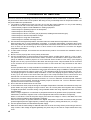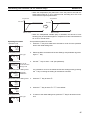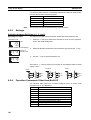
1
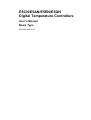
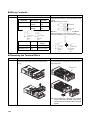
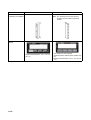
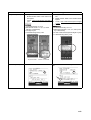
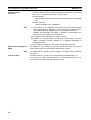
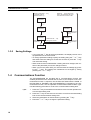
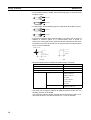
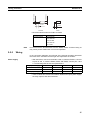
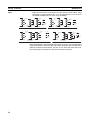
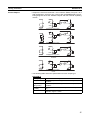
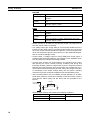
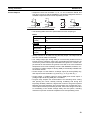
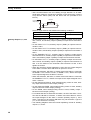
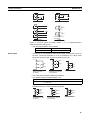
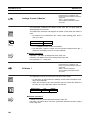
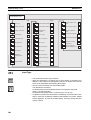
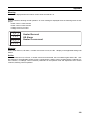
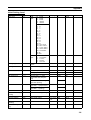
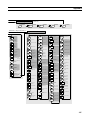
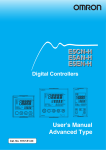
E5CN
E5CN
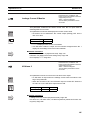
E5AN
E5AN
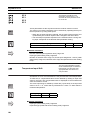
E5EN
E5EN
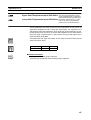
E5GN
E5GN
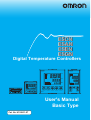
Digital Temperature Controllers
SUB1
PV
SUB2
SUB1 SUB2
HA SUB3
SUB3
PV
HA
SV
OUT1
STOP
OUT2
CMW MANU
MV
SV
OUT1 STOP
MV
OUT2 CMW MANU
PF
A/M
PF
A/M
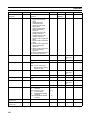
E5AN
E5EN
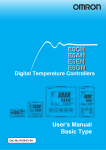
User's Manual
Basic Type
Cat. No. H156-E1-07
E5CN/E5AN/E5EN/E5GN
Digital Temperature Controllers
User’s Manual
Basic Type
Revised June 2015
iv
Preface
The E5CN, E5CN-U, E5AN, E5EN, and E5GN are Digital Temperature Controllers. The E5CN and
E5CN-U are both compact temperature controllers, with the E5CN featuring screw terminal connections, and the E5CN-U featuring socket pin connections. The E5GN can be connected using screw terminals or screwless clamp terminals. The main functions and characteristics of these Digital
Temperature Controllers are as follows:
• Any of the following types of input can be used: thermocouple, platinum
resistance thermometer, infrared sensor, analog voltage, or analog current.
• Either standard or heating/cooling control can be performed.
• Both auto-tuning and self-tuning are supported.
• Event inputs can be used to switch set points (multi-SP function), switch
between RUN and STOP status, switch between automatic and manual
operation, start/reset the simple program function, and perform other
operations. (Event inputs are not applicable to the E5CN-U.)
• Heater burnout detection, heater short (HS) alarms, and heater overcurrent (OC) functions are supported. (Applicable to E5CN, E5AN, E5EN,
and E5GN models with heater burnout detection function.)
• Communications are supported. (Applicable to E5CN, E5AN, E5EN, and
E5GN models with communications.)
• User calibration of the sensor input is supported.
• The structure is waterproof (IP66). (Not applicable to the E5CN-U.)
• Conforms to UL, CSA, and IEC safety standards and EMC Directive.
• The PV display color can be switched to make process status easy to
understand at a glance.
This manual describes the E5CN, E5CN-U, E5AN, E5EN, and E5GN. Read this manual thoroughly
and be sure you understand it before attempting to use the Digital Temperature Controller and use the
Digital Temperature Controller correctly according to the information provided. Keep this manual in a
safe place for easy reference. Refer to the following manual for further information on communications:
E5CN/E5AN/E5EN/E5GN Digital Temperature Controllers Communications Manual Basic Type (Cat.
No. H158).
Refer to the following manual for information on the Advanced Type Controllers: E5CN/E5AN/E5EN-H
Digital Temperature Controllers User's Manual Advanced Type (Cat. No. H157).
Visual Aids
The following headings appear in the left column of the manual to help you locate different types of
information.
Note Indicates information of particular interest for efficient and convenient operation of the product.
1,2,3...
1. Indicates lists of one sort or another, such as procedures, checklists, etc.
v
OMRON, 2008
All rights reserved. No part of this publication may be reproduced, stored in a retrieval system, or transmitted, in any form, or
by any means, mechanical, electronic, photocopying, recording, or otherwise, without the prior written permission of
OMRON.
No patent liability is assumed with respect to the use of the information contained herein. Moreover, because OMRON is constantly striving to improve its high-quality products, the information contained in this manual is subject to change without
notice. Every precaution has been taken in the preparation of this manual. Nevertheless, OMRON assumes no responsibility
for errors or omissions. Neither is any liability assumed for damages resulting from the use of the information contained in
this publication.
vi
Terms and Conditions Agreement
Warranty, Limitations of Liability
Warranties
zExclusive Warranty
zLimitations
Omron’s exclusive warranty is that the Products will be free from defects in
materials and workmanship for a period of twelve months from the date of
sale by Omron (or such other period expressed in writing by Omron). Omron
disclaims all other warranties, express or implied.
OMRON MAKES NO WARRANTY OR REPRESENTATION, EXPRESS OR
IMPLIED, ABOUT NON-INFRINGEMENT, MERCHANTABILITY OR FITNESS FOR A PARTICULAR PURPOSE OF THE PRODUCTS. BUYER
ACKNOWLEDGES THAT IT ALONE HAS DETERMINED THAT THE PRODUCTS WILL SUITABLY MEET THE REQUIREMENTS OF THEIR INTENDED
USE.
Omron further disclaims all warranties and responsibility of any type for claims
or expenses based on infringement by the Products or otherwise of any intellectual property right.
zBuyer Remedy
Omron’s sole obligation hereunder shall be, at Omron’s election, to (i) replace
(in the form originally shipped with Buyer responsible for labor charges for
removal or replacement thereof) the non-complying Product, (ii) repair the
non-complying Product, or (iii) repay or credit Buyer an amount equal to the
purchase price of the non-complying Product; provided that in no event shall
Omron be responsible for warranty, repair, indemnity or any other claims or
expenses regarding the Products unless Omron’s analysis confirms that the
Products were properly handled, stored, installed and maintained and not
subject to contamination, abuse, misuse or inappropriate modification. Return
of any Products by Buyer must be approved in writing by Omron before shipment. Omron Companies shall not be liable for the suitability or unsuitability or
the results from the use of Products in combination with any electrical or electronic components, circuits, system assemblies or any other materials or substances or environments. Any advice, recommendations or information given
orally or in writing, are not to be construed as an amendment or addition to
the above warranty.
See http://www.omron.com/global/ or contact your Omron representative for
published information.
Limitation on
Liability; Etc
OMRON COMPANIES SHALL NOT BE LIABLE FOR SPECIAL, INDIRECT,
INCIDENTAL, OR CONSEQUENTIAL DAMAGES, LOSS OF PROFITS OR
PRODUCTION OR COMMERCIAL LOSS IN ANY WAY CONNECTED WITH
THE PRODUCTS, WHETHER SUCH CLAIM IS BASED IN CONTRACT,
WARRANTY, NEGLIGENCE OR STRICT LIABILITY.
Further, in no event shall liability of Omron Companies exceed the individual
price of the Product on which liability is asserted.
vii
Application Considerations
Suitability of Use
Omron Companies shall not be responsible for conformity with any standards,
codes or regulations which apply to the combination of the Product in the
Buyer’s application or use of the Product. At Buyer’s request, Omron will provide applicable third party certification documents identifying ratings and limitations of use which apply to the Product. This information by itself is not
sufficient for a complete determination of the suitability of the Product in combination with the end product, machine, system, or other application or use.
Buyer shall be solely responsible for determining appropriateness of the particular Product with respect to Buyer’s application, product or system. Buyer
shall take application responsibility in all cases.
NEVER USE THE PRODUCT FOR AN APPLICATION INVOLVING SERIOUS
RISK TO LIFE OR PROPERTY WITHOUT ENSURING THAT THE SYSTEM
AS A WHOLE HAS BEEN DESIGNED TO ADDRESS THE RISKS, AND
THAT THE OMRON PRODUCT(S) IS PROPERLY RATED AND INSTALLED
FOR THE INTENDED USE WITHIN THE OVERALL EQUIPMENT OR SYSTEM.
Programmable
Products
Omron Companies shall not be responsible for the user’s programming of a
programmable Product, or any consequence thereof.
Disclaimers
Performance Data
Data presented in Omron Company websites, catalogs and other materials is
provided as a guide for the user in determining suitability and does not constitute a warranty. It may represent the result of Omron’s test conditions, and the
user must correlate it to actual application requirements. Actual performance
is subject to the Omron’s Warranty and Limitations of Liability.
Change in
Specifications
Product specifications and accessories may be changed at any time based on
improvements and other reasons. It is our practice to change part numbers
when published ratings or features are changed, or when significant construction changes are made. However, some specifications of the Product may be
changed without any notice. When in doubt, special part numbers may be
assigned to fix or establish key specifications for your application. Please consult with your Omron’s representative at any time to confirm actual specifications of purchased Product.
Errors and Omissions
Information presented by Omron Companies has been checked and is
believed to be accurate; however, no responsibility is assumed for clerical,
typographical or proofreading errors or omissions.
viii
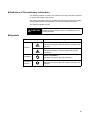
Definition of Precautionary Information
The following notation is used in this manual to provide precautions required
to ensure safe usage of the product.
The safety precautions that are provided are extremely important to safety.
Always read and heed the information provided in all safety precautions.
The following notation is used.
CAUTION
Indicates a potentially hazardous situation which, if not
avoided, is likely to result in minor or moderate injury or in
property damage.
Symbols
Symbol
Meaning
General Caution
Indicates non-specific general cautions, warnings, and
dangers.
Caution
Electrical Shock Caution
Indicates possibility of electric shock under specific
conditions.
Prohibition
General Prohibition
Indicates non-specific general prohibitions.
Mandatory
Caution
General Caution
Indicates non-specific general cautions, warnings, and
dangers.
ix
Safety Precautions
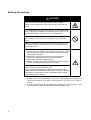
CAUTION
Do not touch the terminals while power is being supplied.
Doing so may occasionally result in minor injury due to electric
shock.
Do not allow pieces of metal, wire clippings, or fine metallic shavings or filings from installation to enter the product. Doing so may
occasionally result in electric shock, fire, or malfunction.
Do not use the product where subject to flammable or explosive
gas. Otherwise, minor injury from explosion may occasionally
occur.
Never disassemble, modify, or repair the product or touch any of
the internal parts. Minor electric shock, fire, or malfunction may
occasionally occur.
CAUTION - Risk of Fire and Electric Shock
a) This product is UL listed as Open Type Process Control Equipment. It must be mounted in an enclosure that does not allow
fire to escape externally.
b) More than one disconnect switch may be required to deenergize the equipment before servicing the product.
c) Signal inputs are SELV, limited energy. *1
d) Caution: To reduce the risk of fire or electric shock, do not interconnect the outputs of different Class 2 circuits.*2
If the output relays are used past their life expectancy, contact
fusing or burning may occasionally occur.
Always consider the application conditions and use the output
relays within their rated load and electrical life expectancy. The life
expectancy of output relays varies considerably with the output
load and switching conditions.
*1
*2
x
A SELV circuit is one separated from the power supply with double insulation or
reinforced insulation, that does not exceed 30 V r.m.s. and 42.4 V peak or
60 VDC.
A class 2 power supply is one tested and certified by UL as having the current
and voltage of the secondary output restricted to specific levels.
CAUTION
Tighten the terminal screws to between 0.74 and 0.90 N·m. Loose
screws may occasionally result in fire. *3
Set the parameters of the product so that they are suitable for the
system being controlled. If they are not suitable, unexpected
operation may occasionally result in property damage or
accidents.
A malfunction in the Temperature Controller may occasionally
make control operations impossible or prevent alarm outputs,
resulting in property damage. To maintain safety in the event of
malfunction of the Temperature Controller, take appropriate safety
measures, such as installing a monitoring device on a separate
line.
A semiconductor is used in the output section of long-life relays. If
excessive noise or surge is impressed on the output terminals, a
short-circuit failure is likely to occur. If the output remains shorted,
fire will occur due to overheating of the heater or other cause.
Take measures in the overall system to prevent excessive temperature increase and to prevent fire from spreading.
When inserting the body of the Temperature Controller into the
case, confirm that the hooks on the top and bottom are securely
engaged with the case. If the body of the Temperature Controller
is not inserted properly, faulty contact in the terminal section or
reduced water resistance may occasionally result in fire or malfunction.
*3
The tightening torque is 0.5 N·m for the E5CN-U and 0.43 to 0.58 N·m for the
E5GN. The terminal torque is 0.5 to 0.6 N·m for auxiliary output 2 on the E5GN.
xi
Precautions for Safe Use
Be sure to observe the following precautions to prevent operation failure, malfunction, or adverse affects on
the performance and functions of the product. Not doing so may occasionally result in unexpected events. Use
the product within the specifications.
1) The product is designed for indoor use only. Do not use the product outdoors or in any of the following
locations. Do not use or store the product in any of the following locations.
• Places directly subject to heat radiated from heating equipment.
• Places subject to splashing liquid or oil atmosphere.
• Places subject to direct sunlight.
• Places subject to dust or corrosive gas (in particular, sulfide gas and ammonia gas).
• Places subject to intense temperature change.
• Places subject to icing and condensation.
• Places subject to vibration and large shocks.
2) Use and store the Digital Temperature Controller within the rated ambient temperature and humidity.
Gang-mounting two or more temperature controllers, or mounting temperature controllers above each
other may cause heat to build up inside the temperature controllers, which will shorten their service life. In
such a case, use forced cooling by fans or other means of air ventilation to cool down the Digital
Temperature Controllers.
3) To allow heat to escape, do not block the area around the product. Do not block the ventilation holes on
the product.
4) Be sure to wire properly with correct polarity of terminals.
5) Use the specified size of crimp terminals for the E5CN, E5AN, or E5EN (M3.5, width of 7.2 mm or less).
For open-wired connections to the E5CN, E5AN, or E5EN, use stranded or solid copper wires with a
gauge of AWG24 to AWG14 (equal to a cross-sectional area of 0.205 to 2.081 mm 2). (The stripping
length is 5 to 6 mm.) Up to two wires of the same size and type or two crimp terminals can be connected
to one terminal. Do not connect more than two wires or more than two crimp terminals to the same
terminal.
Use the specified size of crimp terminals for the E5GN (M3.0, width of 5.8 mm or less). For open-wired
connections to the E5GN, use stranded or solid copper wires with a gauge of AWG24 to AWG18 (equal to
a cross-sectional area of 0.205 to 0.8231 mm2). (The stripping length for screw terminals is 6 to 8 mm.
The stripping length for screwless clamp terminals is 10 mm. The stripping length for auxiliary output 2 is
6 mm.) Up to two wires of the same size and type or two crimp terminals can be connected to one
terminal. Do not connect more than two wires or more than two crimp terminals to the same terminal.
Ferrules for screwless clamp terminals must be 0.8 to 1.4 mm in diameter and the exposed conductor
must be 8 to 12 mm in length. Ferrules for auxiliary output 2 must be 0.8 to 1.4 mm in diameter and the
exposed conductor must be 6 mm in length.
6) Do not wire the terminals which are not used.
7) To avoid inductive noise, keep the wiring for the Digital Temperature Controller's terminal block away from
power cables carry high voltages or large currents. Also, do not wire power lines together with or parallel
to Digital Temperature Controller wiring. Using shielded cables and using separate conduits or ducts is
recommended.
Attach a surge suppressor or noise filter to peripheral devices that generate noise (in particular, motors,
transformers, solenoids, magnetic coils or other equipment that have an inductance component).
When a noise filter is used at the power supply, first check the voltage or current, and attach the noise
filter as close as possible to the temperature controller.
Allow as much space as possible between the Digital Temperature Controller and devices that generate
powerful high frequencies (high-frequency welders, high-frequency sewing machines, etc.) or surge.
8) Use this product within the rated load and power supply.
9) Make sure that the rated voltage is attained within two seconds of turning ON the power using a switch or
relay contact. If the voltage is applied gradually, the power may not be reset or output malfunctions may
occur.
xii
10) Make sure that the Temperature Controller has 30 minutes or more to warm up after turning ON the power
before starting actual control operations to ensure the correct temperature display.
11) When executing self-tuning, turn ON power for the load (e.g., heater) at the same time as or before
supplying power to the Digital Temperature Controller. If power is turned ON for the Digital Temperature
Controller before turning ON power for the load, self-tuning will not be performed properly and optimum
control will not be achieved.
12) A switch or circuit breaker should be provided close to this unit. The switch or circuit breaker should be
within easy reach of the operator, and must be marked as a disconnecting means for this unit.
13) Always turn OFF the power supply before removing the body of the E5CN, E5AN, or E5EN from the case,
and never touch nor apply shock to the terminals or electronic components. When inserting the interior of
the product, do not allow the electronic components to touch the case.
Always turn OFF the power supply before removing the terminal block from the E5GN, and never touch
nor apply shock to the terminals or electronic components.
14) Do not use paint thinner or similar chemical to clean with. Use standard grade alcohol.
15) Design system (control panel, etc.) considering the 2 second of delay that the controller’s output to be set
after power ON.
16) The output may turn OFF when shifting to certain levels. Take this into consideration when performing
control.
17) The number of EEPROM write operations is limited. Therefore, use RAM write mode when frequently
overwriting data during communications or other operations.
18) Always touch a grounded piece of metal before touching the Digital Temperature Controller to discharge
static electricity from your body.
19) Do not remove the terminal block from the E5CN, E5AN, or E5EN. Doing so may result in failure or
malfunction.
20) Control outputs that are voltage outputs are not isolated from the internal circuits. When using a grounded
thermocouple, do not connect any of the control output terminals to ground. (Doing so may result in an
unwanted circuit path, causing error in the measured temperature.)
21) When replacing the body of the E5CN, E5AN, or E5EN, check the condition of the terminals. If corroded
terminals are used, contact failure in the terminals may cause the temperature inside the E5CN, E5AN, or
E5EN to increase, possibly resulting in fire. If the terminals are corroded, replace the case as well.
When removing the terminal block of the E5GN to replace the Digital Temperature Controller, check the
condition of the terminals. If corroded terminals are used, contact failure in the terminals may cause the
temperature inside the Digital Temperature Controller to increase, possibly resulting in fire. If the terminals
are corroded, replace the terminal block as well.
22) Use suitable tools when taking the Digital Temperature Controller apart for disposal. Sharp parts inside
the Digital Temperature Controller may cause injury.
23) When applying Lloyd's standards, install the Digital Temperature Controller according to the requirements
given in Shipping Standards.
24) Do not use the Temperature Controller if the front sheet is peeling off or torn.
z Service Life
Use the Temperature Controller within the following temperature and humidity ranges:
Temperature: −10 to 55°C (with no icing or condensation), Humidity: 25% to 85%
If the Controller is installed inside a control board, the ambient temperature must be kept to under
55°C, including the temperature around the Controller.
The service life of electronic devices like Temperature Controllers is determined not only by the number of times the relay is switched but also by the service life of internal electronic components. Component service life is affected by the ambient temperature: the higher the temperature, the shorter the
service life and, the lower the temperature, the longer the service life. Therefore, the service life can be
extended by lowering the temperature of the Temperature Controller.
xiii
When two or more Temperature Controllers are mounted horizontally close to each other or vertically
next to one another, the internal temperature will increase due to heat radiated by the Temperature
Controllers and the service life will decrease. In such a case, use forced cooling by fans or other
means of air ventilation to cool down the Temperature Controllers. When providing forced cooling,
however, be careful not to cool down the terminals sections alone to avoid measurement errors.
z Ambient Noise
To avoid inductive noise, keep the wiring for the Digital Temperature Controller's terminal block wiring
away from power cables carrying high voltages or large currents. Also, do not wire power lines together
with or parallel to Digital Temperature Controller wiring. Using shielded cables and using separate conduits or ducts is recommended.
Attach a surge suppressor or noise filter to peripheral devices that generate noise (in particular,
motors, transformers, solenoids, magnetic coils or other equipment that have an inductance component). When a noise filter is used at the power supply, first check the voltage or current, and attach the
noise filter as close as possible to the Temperature Controller.
Allow as much space as possible between the Digital Temperature Controller and devices that generate powerful high frequencies (high-frequency welders, high-frequency sewing machines, etc.) or
surge.
z Ensuring Measurement Accuracy
When extending or connecting the thermocouple lead wire, be sure to use compensating wires that
match the thermocouple types.
When extending or connecting the lead wire of the platinum resistance thermometer, be sure to use
wires that have low resistance and keep the resistance of the three lead wires the same.
Mount the Temperature Controller so that it is horizontally level.
If the measurement accuracy is low, check to see if input shift has been set correctly.
z Waterproofing
The degree of protection is as shown below. Sections without any specification on their degree of protection or those with IP
0 are not waterproof.
Front panel: IP66
Rear case: IP20, Terminal section: IP00
(E5CN-U: Front panel: IP50, rear case: IP20, terminals: IP00)
xiv
Precautions for Operation
1)
2)
3)
4)
It takes approximately two seconds for the outputs to turn ON from after the power supply is turned ON.
Due consideration must be given to this time when incorporating Temperature Controllers into a control
panel or similar device.
Make sure that the Temperature Controller has 30 minutes or more to warm up after turning ON the power
before starting actual control operations to ensure the correct temperature display.
When executing self-tuning, turn ON power for the load (e.g., heater) at the same time as or before
supplying power to the Temperature Controller. If power is turned ON for the Temperature Controller
before turning ON power for the load, self-tuning will not be performed properly and optimum control will
not be achieved. When starting operation after the Temperature Controller has warmed up, turn OFF the
power and then turn it ON again at the same time as turning ON power for the load. (Instead of turning the
Temperature Controller OFF and ON again, switching from STOP mode to RUN mode can also be used.)
Avoid using the Controller in places near a radio, television set, or wireless installing. The Controller may
cause radio disturbance for these devices.
Shipping Standards
The E5CN, E5CN-H, E5AN, E5AN-H, E5EN, and E5EN-H comply with Lloyd's standards. When applying the
standards, the following installation and wiring requirements must be met in the application.
Application Conditions
1) Installation Location
The E5CN, E5CN-H, E5AN, E5AN-H, E5EN, and E5EN-H comply with installation category ENV1 and
ENV2 of Lloyd's standards. Therefore, they must be installed in a location equipped with air conditioning. They must therefore be installed in a location equipped with air conditioning. They cannot be used
on the bridge or decks, or in a location subject to strong vibration.
2) Wiring Conditions
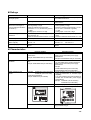
Install the recommended ferrite core and wrap the line around it three turns for the applicable lines
(e.g., power supply cable line and signal lines) of the models listed in the following table. (See illustrations.) Install the ferrite cores as close to the terminal block of the E5
N as possible. (As a guideline,
the ferrite core should be within 10 cm of the terminal block.)
z Lines Requiring Ferrite Cores
Model
E5CN, E5CN-U, or E5CN-H
E5EN, E5AN, E5EN-H, or
E5AN-H
Signal and power lines provided with ferrite cores
Input power supply
Input power supply and I/O lines (control outputs (1 and 2), communications,
event inputs (1 to 4), transfer output, and external power supply (Advanced
Type models do not have an external power supply.)
z Recommended Ferrite Core
Manufacturer
Model
Seiwa Electric Mfg. Co., Ltd.
E04RA310190100
xv
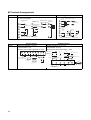
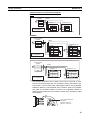
z Ferrite Core Connection Examples
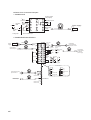
1. E5CN/E5CN-H
Auxiliary outputs
(relay outputs)
+
1
11
6
2
12
7
3
13
8
4
14
9
5
15
10
Auxiliary output 2
Control output 1
+
DO NOT
USE
mA
−
−
V
DO NOT
USE
−
DO NOT A
USE
−
●
B
Auxiliary
output 1
●
Power supply
Input power
supply
●
+
Analog input
B
+
AC/DC
3 turns
TC/Pt universal input
2. E5AN/E5EN/E5AN-H/E5EN-H
Power
supply
AC/DC
Event Inputs
3 turns
Input power
supply
+
Connected to
control output 1.
1
21
11
2
22
12
3
23
13
4
24
14
5
25
15
6
26
16
EV1
Control
CT1/CT2 Output 2
+
Control
CT1
Output 2
−
CT2
DO NOT
USE
7
27
17
DO NOT
USE
8
28
18
Control output 1
3 turns
−
Auxiliary output 3
Auxiliary output 2
9
29
19
10
30
20
EV2
A
DO NOT
USE
−
External Power
Supply
+
External power supply
12 VDC, 20 mA
−
DO NOT
USE
V
B
+
+
TC/Pt universal input
3 turns
+
DO NOT
USE
−
B
Auxiliary output 1
Connected to
communications or
event inputs 1 and 2.
3 turns
mA
−
DO NOT
USE
Analog input
Communications
21
RS-232C
Connected to event
inputs 3 and 4.
EV3
3 turns
SD
11
B (+)
12
RD
12
A (−)
13
SG
13
DO NOT USE
24
21
DO NOT USE
21
B (+)
25
22
DO NOT USE
22
A (−)
+
Connected to
transfer output.
3 turns
26
27
Transfer output
−
DO NOT USE
DO NOT USE
xvi
23
EV4
DO NOT USE
RS-485
11
22
28
29
30
4 to 20 mA DC
(Load: 600 Ω max.)
Connected to
control output 2
or external
power supply.
Preparations for Use
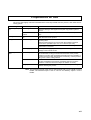
Be sure to thoroughly read and understand the manual provided with the product, and check the following points.
Timing
Check point
Purchasing the prod- Product appearance
uct
Setting the Unit
Wiring
Operating environment
Details
After purchase, check that the product and packaging are not dented or
otherwise damaged. Damaged internal parts may prevent optimum
control.
Product model and speci- Make sure that the purchased product meets the required specificafications
tions.
Product installation loca- Provide sufficient space around the product for heat dissipation. Do not
tion
block the vents on the product.
Terminal wiring
Do not subject the terminal screws to excessive stress (force) when
tightening them.
Make sure that there are no loose screws after tightening terminal
screws to the specified torque of 0.74 to 0.90 N·m (see note).
Be sure to confirm the polarity for each terminal before wiring the terminal block and connectors.
Power supply inputs
Wire the power supply inputs correctly. Incorrect wiring will result in
damage to the internal circuits.
Ambient temperature
The ambient operating temperature for the product is −10 to 55°C (with
no condensation or icing). To extend the service life of the product,
install it in a location with an ambient temperature as low as possible. In
locations exposed to high temperatures, if necessary, cool the products
using a fan or other cooling method.
Vibration and shock
Check whether the standards related to shock and vibration are satisfied at the installation environment. (Install the product in locations
where the conductors will not be subject to vibration or shock.)
Foreign particles
Install the product in a location that is not subject to liquid or foreign
particles entering the product.
Note The tightening torque is 0.5 N·m for the E5CN-U and 0.43 to 0.58 N·m for the
E5GN. The terminal torque is 0.5 to 0.6 N·m for auxiliary output 2 on the
E5GN.
xvii
Upgraded Functions
The functionality of the E5CN, E5CN-U, E5AN, and E5EN was improved starting from December 2007
production.
The functionality of the E5GN was improved starting from August 2009 production.
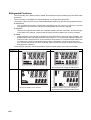
The design of the front panel can be used to differentiate between the previous and upgraded models.
z E5CN/CN-U
The upgraded Controllers are basically compatible with the previous Controllers. Terminal
arrangements, terminal sizes, and panel mounting depth have not been changed.
z E5AN/EN
Although the upgraded Controllers are compatible with the previous Controllers, terminal arrangements have been changed. Terminal sizes and panel mounting depth have not been changed.
z E5GN
Model numbers have changed accompanying the introduction of universal input capability. The
default setting of the input type parameter of the E5GN-
P (models with resistance thermometers) has been changed from a Pt100 resistance thermometer to a K thermocouple. Make sure
the setting of the input type parameter agrees with the temperature sensor that is being used.
The terminal block has also been changed, which means the wiring methods and terminal
arrangement are different.
Other changes outlined in the following tables. Refer to relevant pages in the manual for details.
Previous models
Upgraded models
E5CN/CN-U
• ALM indicator was changed to SUB indicator.
E5AN
• Number of displays: 2 (PV and SV)
xviii
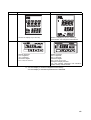
• Number of displays: 3 (PV, SV, and MV) *
• ALM indicator was changed to SUB indicator.
Previous models
Upgraded models
E5EN
• Number of displays: 2 (PV and SV)
• Number of displays: 3 (PV, SV, and MV) *
• ALM indicator was changed to SUB indicator.
• Display Segments
PV: 7 segments,
SV: 7 segments
• Character Heights
PV: 7 mm, SV: 3.5 mm
• Display Segments
PV: 11 segments,
SV: 11 segments
• Character Heights
PV: 7.5 mm, SV: 3.6 mm
• Changes to Display Contents
"AL" LED indicator eliminated, LED indicators
added, and key indicator added.
E5GN
* A 2-level display is set when shipped from the factory.
A 3-level display is activated if parameters are initialized.
xix
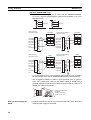
Terminal Arrangements
Previous models
Terminals 16 through 20 were changed. Terminals 1 through
15 were not changed.
15
14
Control Output 2
12 VDC, 21 mA
−
15
Control Output 2
250 VAC, 3 A
A
17
18
19
E5GN
+
−
CT1
−
B
CT2
CT2
mA
V
B
+
−
17
DO NOT
USE
18
DO NOT
USE
Previous models
Number of terminals: 9 (1 to 9)
Input terminals: 7 to 9
RS-485 communications terminals: 5 and 6
+
−
RS-232C
communications
+
CT input
PT
Event input
DO NOT
USE
SD
RD
+
−
B
Analog
input
−
DO NOT
USE
Analog input
mA
DO NOT
USE
SG
V
DO NOT
USE
EV2
EV1
7
Analog input
DO NOT
USE
CT
8
9
2
3
1
Input power
supply
• 100 to 240 VAC
• 24 VAC/DC (no polarity)
xx
V
Upgraded models
Number of terminals: 14 (1 to 14)
Input terminals: 10 to 12
RS-485 communications terminals: 7 and 8
TC
+
B
mA
−
B
A
A
+
DO NOT
USE
TC/Pt universal input
B(+)
RS-485
communications
+
A
DO NOT
USE
B
20
19
TC/Pt universal input Analog input
−
DO NOT
USE
−
19
+
Control − B(+) A(−)
Input
output 1
power
Communications
supply
12 VDC 21 mA
100 to 240 VAC or
24 VAC/DC (no polarity)
Relay output Alarm output 1,
(OUT1)
control output 2,
or input error
alarm 1/output 1
(ALM1/OUT1)
−
16
+
External power
supply
12 VDC, 20 mA
Control Output 2
15
15
+
+
14
CT1
12 VDC, 20 mA
15
(Resistive load)
16
−
External power One CT
supply for ES1B Two CTs
14
14
+
+
14
Long-life relay
output
External power
Control Output 2 supply
One CT
Two CTs
+
Control
output 1
B
B
DO NOT
USE
Universal TC/Pt input
+
Voltage output
Upgraded models
+
E5AN/EN
10
11
4
5
12
6
Auxiliary
output 1
13
14
Auxiliary
output 2
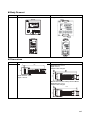
Body Drawout
Previous models
E5AN/EN
Upgraded models
• Using Screws
• Using Hooks
Dimensions
99
22
2
35
Bezel thickness: 3 mm
Depth: 100 mm
100
• Models with Screwless Clamp Terminal Blocks
Bezel thickness: 2 mm
Shape of slits changed
2
35
35
3
22
E5GN
Upgraded models
• Models with Screw Terminal Blocks
Bezel thickness: 2 mm
Depth: 99 mm
Shape of slits changed
100
22
Previous models
xxi
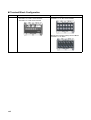
Terminal Block Configuration
E5GN
Previous models
• Models with Screw Terminal Blocks
Terminals 1 to 6: M2.6 screw terminals
Terminals 7 to 9: M2 screw terminals
Upgraded models
• Models with Screw Terminal Blocks
Terminals 1 to 12: M3 screw terminals
• Models with Screwless Clamp Terminal Blocks
Terminals 1 to 12: None
xxii
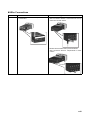
Wire Connections
E5GN
Previous models
• Wire connection direction: Perpendicular to
back surface
Upgraded models
• Models with Screw Terminal Blocks
Wire connection direction: Horizontal from the top
and bottom of back surface
• Models with Screwless Clamp Terminal Blocks
Wire connection direction: Perpendicular to back
surface
xxiii
Wiring Terminals
• Models with Screw Terminal Blocks
Terminals
Wire gauge
Ferrules
Terminals 1 to 6
AWG24 to
AWG14
2.1 mm dia.
max.
Terminals 7 to 9
AWG28 to
AWG22
1.3 mm dia.
max.
5 to 6 mm
Wires
Terminals
5 to 6 mm
Upgraded models
• Models with Screw Terminal Blocks
Changed from ferrules to crimp terminals for M3
screws.
Tightening torque: 0.5 N·m
5.8 mm max.
5.8 mm max.
• Models with Screwless Clamp Terminal Blocks
Wires: Changed to 10 mm from 5 to 6 mm.
Ferrules: Changed to 8 to 12 mm from 5 to 6 mm.
0.8 to 1.4 mm
Previous models
E5GN
Ferrules
Screws
Tightening
torque
Terminals 1 to 6
M2.6
0.23 to 0.25 N·m
Terminals 7 to 9
M2
0.12 to 0.14 N·m
10 mm
Wires
8 to 12 mm
Ferrules
Removing the Terminal Block
E5GN
Previous models
Upgraded models
Press firmly in on both sides of the terminal block to Insert a tool into the tool holes (one on the top and
release the lock and then pull up on the terminal
one on the bottom) to release the hooks and pull out
block.
the terminal block.
Terminal hole
Note The method for removing the terminal
block is the same for both screw terminal blocks and screwless clamp terminal
blocks.
xxiv
Ratings
Input sensor types for thermocouple inputs
Input accuracy
(There are no changes in
thermocouple specifications
for E5CN-U.)
Influence of signal source
resistance
Current outputs
Auxiliary outputs
(alarm outputs)
Input sampling cycle
Previous models
Upgraded models
The following types of thermocouple input
were added: W and PLII.
Input range for E thermocouple: 0 to 600°C
Input range increased for E thermocouple:
−200 to 600°C
---
• Thermocouple: (±0.5% PV or ±1°C, which- • Thermocouple: (±0.3% PV or ±1°C, whichever is greater) ±1 digit
ever is greater) ±1 digit
• Platinum resistance thermometer:
• Platinum resistance thermometer: (±0.2%
(±0.5%PV or ±1°C, whichever is greater)
PV or ±0.8°C, whichever is greater)
±1 digit
±1 digit
• Analog input: ±0.5% FS ±1 digit
• Analog input: ±0.2% FS ±1 digit
• Thermocouple: 0.1°C/Ω (except B, R, S), • Thermocouple: 0.1°C/Ω (for all specifica0.2°C/Ω (B, R, S)
tions)
• Platinum resistance thermometer: 0.4°C/Ω • Platinum resistance thermometer: 0.1°C/Ω
Current output resolution: Approx. 2,700
Current output resolution: Approx. 10,000
E5CN/E5CN-U/E5GN
E5CN/E5CN-U E5GN
250 VAC, 1 A
250 VAC, 3 A
250 VAC, 2 A
E5GN
E5GN
500 ms
250 ms
Characteristics
Previous models
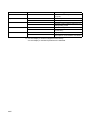
Model numbers for the E5CN Models with 24-VAC/VDC power supply
specifications
Example: E5CN-R2MT-500 (24 VAC/VDC)
Model numbers for the
E5AN/EN
Example: E5AN-R3MT-500 (100 to 240
VAC)
Example: E5AN-R3MT-500 (24 VAC/VDC)
Model numbers for the
E5GN
Examples:
Front panel
---
E5GN-RTC (100 to 240 VAC)
E5GN-RP (100 to 240 VAC)
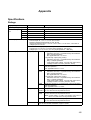
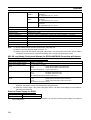
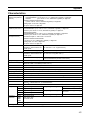
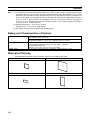
24-VAC/DC Specification
Example: E5GN-RTC (24 VAC/DC)
---
Upgraded models
A “D” was added to the model numbers for
models with 24-VAC/VDC power supply
specifications.
Example: E5CN-R2MTD-500 (24 VAC/VDC)
“-N” was added to all model numbers
A “D” was added to the model numbers for
models with 24-VAC/VDC power supply
specifications.
Example:
• E5AN-R3MT-500-N (100 to 240 VAC)
• E5AN-R3MTD-500-N (24 VAC/VDC)
• Model numbers have changed accompanying the introduction of universal input
capability.
• A “D” was added to the model numbers for
models with 24-VAC/VDC power supply
specifications.
Example: E5GN-RT (100 to 240 VAC)
E5GN-RTD (24 VAC/VDC)
PV status display and SV status display
PF Key added (E5AN/EN only).
PV/SP display selection for three-level display (E5AN/EN only) *
xxv
Previous models
Inputs
---
Outputs
---------
Controls
Alarms
-----
Other
-----
Upgraded models
Square root extraction (for models with analog inputs)
Control output ON/OFF count alarm
MV change rate limiter
40% AT
Automatic cooling coefficient adjustment for
heating/cooling control
PV rate of change alarm
OC alarm (only for models with heater burnout detection)
Logic operations
Inverting direct/reverse operation using
event inputs or communications commands
* A 2-level display is set when shipped from the factory.
A 3-level display is activated if parameters are initialized.
xxvi
Communications Characteristics
Previous models
Communications
Double word access only
access size
CompoWay/F services --Communications buffer 40 bytes
size
Baud rate
38.4 kbps max.
External communications
Upgraded models
Word access and double word access
Composite Read from Variable Area and Composite Write to Variable Area
217 bytes
E5GN: 19.2k max. 57.6 kbps max.
Setup Tool Cable Communications: 38.4k (fixed)
RS-485/RS-232C external communications
RS-485/RS-232C external communications and
and Setup Tool communications cannot be
Setup Tool communications can be used at the
used at the same time.
same time.
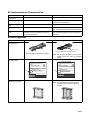
Other Upgrades
Previous models
Upgraded models
Mounting Bracket
(E5AN/EN only)
Modified section
Mounting Bracket for upgraded models
Mounting Bracket for previous models
Packing case
(E5AN/EN only)
• Previous ID code: N5
TYPE
TYPEE5AN-R3MT-500
E5CN T
TEMPERATURE CONTROLLER
TEMP.
TEMP.
MULTI-RANGE
MULTI
- RANGE
TYPE
TYPEE5AN-R3MT-500-N
E5CN
- R2T
TEMPERATURE CONTROLLER
TEMP.
TEMP.
MULTI-RANGE
MULT-IRANGE
VOLTS
VOLTS
VOLTS
VOLTS
LOT No.∗∗∗∗
N5 LOT
N5
No.**** QYT.1
QYT.1
N6 LOT
N6
LOT No.∗∗∗∗
No.**** QYT.1
QYT.1
100-240
100
- 240 VAC
VAC
OMRON Corporation MADE IN CHINA
Terminal Cover (sold
separately) for E5CN
Note The Mounting Bracket for the previous
models cannot be used for upgraded
models.
• New ID code: N6
• E53-COV10 (for E5CN only)
100-240
100- 240VAC
VAC
OMRON
MADE
IN CHINA
OMRONCorporation
Corporation
MADE
IN CHIN
• E53-COV17 (for E5CN only)
Note The Terminal Cover for the previous
models cannot be used for improved
models.
xxvii
Previous models
Terminal Cover (sold
• E53-COV11
separately) for E5AN/EN
Upgraded models
• E53-COV16
Note The Terminal Cover for the previous
models cannot be used for improved
models.
Front Panel Labels
(E5GN)
• Display area dimensions: 36.1 × 9.8 mm
(W × H)
xxviii
• The design has been changed.
• Added characters: MANU, SUB1, SUB2, and
HA
• Display area dimensions: 36.8 × 10.1 mm (W
× H)
Previous models
Body Labels (E5GN)
Upgraded models
1.
1.
Body labels: 3
2.
Model number: Refer to the model number legend.
2.
3.
Body labels: All labels combined into one label.
Model number: Refer to the model number
legend.
Lot No.: Year of manufacture (last digit of
3. Lot No.: Year of manufacture (last two digits
year
of year)
@@@@@@
@@@@@@@
1, 2: Manufacture day: 01 to 31
1, 2: Manufacture day: 01 to 31
3: Manufacture month: 1 to 9, X, Y, and Z
(January to December)
3: Manufacture month: 1 to 9, X, Y, and Z (January to December)
4: Last digit of year.
4,
5:
Year of manufacture (last two digits of year)
5, 6: Manufacturing factory code
6, 7: Manufacturing factory code
Top of Controller
Box Labels (E5GN)
Bottom of Controller
No ID number
Top of Controller
“N6” has been added to identify the new models.
RT
RTC
Ro
Ro
xxix
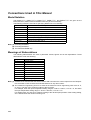
Conventions Used in This Manual
Model Notation
The E5CN-
, E5CN-
U, E5AN-
, E5EN-
, and E5GN-
are given as the
E5CN, E5CN-U, E5AN, E5EN, and E5GN when they share functionality.
The following notation is used when specifying differences in functionality.
Notation
E5
N-
B
E5
N-
03
E5
N-
H
E5
N-
HH
E5
N-
Q
E5
N-
P
E5
N-
01
E5
N-
F
Options
Two event inputs
RS-485 communications
One of HB, HS, and heater overcurrent detection
Two of HB, HS, and heater overcurrent detection (See note 1.)
Control output 2 (voltage output) (See note 1.)
External power supply to ES1B (See note 1.)
RS-232C communications (See note 2.)
Transfer output (See note 3.)
Note: (1) Excluding the E5GN.
(2) Excluding the E5CN.
(3) The E5AN and E5EN only.
Meanings of Abbreviations
The following abbreviations are used in parameter names, figures and in text explanations. These
abbreviations mean the following:
Symbol
PV
SP
SV
AT
ST
HB
HS
OC
LBA
EU
Term
Process value
Set point
Set value
Auto-tuning
Self-tuning
Heater burnout
Heater short (See note 1.)
Heater overcurrent
Loop burnout alarm
Engineering unit (See note 2.)
Note: (1) A heater short indicates that the heater remains ON even when the control output from the Temperature Controller is OFF because the SSR has failed or for any other reason.
(2) “EU” stands for Engineering Unit. EU is used as the minimum unit for engineering units such as °C,
m, and g. The size of EU varies according to the input type.
For example, when the input temperature setting range is –200 to +1300°C, 1 EU is 1°C, and when
the input temperature setting range is –20.0 to +500.0°C, 1 EU is 0.1°C.
For analog inputs, the size of EU varies according to the decimal point position of the scaling setting,
and 1 EU becomes the minimum scaling unit.
xxx
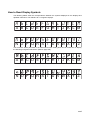
How to Read Display Symbols
The following tables show the correspondence between the symbols displayed on the displays and
alphabet characters. The default is for 11-segment displays.
a b c d e f g h i j k l m
A B C D E F G H I
J K L M
n o p q r s t u v w x y z
N O P Q R S T U V W X Y Z
The Character Select parameter in the advanced function setting level can be turned OFF to display
the following 7-segment characters. (Refer to page 243.)
A B C D E F G H I
J K L M
N O P Q R S T U V W X Y Z
xxxi
xxxii
TABLE OF CONTENTS
SECTION 1
Introduction. . . . . . . . . . . . . . . . . . . . . . . . . . . . . . . . . . . . . . .
1
1-1
Names of Parts . . . . . . . . . . . . . . . . . . . . . . . . . . . . . . . . . . . . . . . . . . . . . . . . . . . . . . . . . . . .
2
1-2
I/O Configuration and Main Functions . . . . . . . . . . . . . . . . . . . . . . . . . . . . . . . . . . . . . . . . .
6
1-3
Setting Level Configuration and Key Operations . . . . . . . . . . . . . . . . . . . . . . . . . . . . . . . . .
15
1-4
Communications Function. . . . . . . . . . . . . . . . . . . . . . . . . . . . . . . . . . . . . . . . . . . . . . . . . . .
18
1-5
Insulation Block Diagrams . . . . . . . . . . . . . . . . . . . . . . . . . . . . . . . . . . . . . . . . . . . . . . . . . .
20
SECTION 2
Preparations . . . . . . . . . . . . . . . . . . . . . . . . . . . . . . . . . . . . . .
21
2-1
Installation . . . . . . . . . . . . . . . . . . . . . . . . . . . . . . . . . . . . . . . . . . . . . . . . . . . . . . . . . . . . . . .
22
2-2
Wiring Terminals . . . . . . . . . . . . . . . . . . . . . . . . . . . . . . . . . . . . . . . . . . . . . . . . . . . . . . . . . .
31
2-3
Using the Support Software Port . . . . . . . . . . . . . . . . . . . . . . . . . . . . . . . . . . . . . . . . . . . . . .
45
SECTION 3
Basic Operation. . . . . . . . . . . . . . . . . . . . . . . . . . . . . . . . . . . .
49
3-1
Initial Setting Examples. . . . . . . . . . . . . . . . . . . . . . . . . . . . . . . . . . . . . . . . . . . . . . . . . . . . .
50
3-2
Setting the Input Type . . . . . . . . . . . . . . . . . . . . . . . . . . . . . . . . . . . . . . . . . . . . . . . . . . . . . .
52
3-3
Selecting the Temperature Unit . . . . . . . . . . . . . . . . . . . . . . . . . . . . . . . . . . . . . . . . . . . . . . .
54
3-4
Selecting PID Control or ON/OFF Control . . . . . . . . . . . . . . . . . . . . . . . . . . . . . . . . . . . . . .
54
3-5
Setting Output Specifications . . . . . . . . . . . . . . . . . . . . . . . . . . . . . . . . . . . . . . . . . . . . . . . .
54
3-6
Setting the Set Point (SP) . . . . . . . . . . . . . . . . . . . . . . . . . . . . . . . . . . . . . . . . . . . . . . . . . . .
59
3-7
Using ON/OFF Control . . . . . . . . . . . . . . . . . . . . . . . . . . . . . . . . . . . . . . . . . . . . . . . . . . . . .
60
3-8
Determining PID Constants (AT, ST, Manual Setup) . . . . . . . . . . . . . . . . . . . . . . . . . . . . . .
62
3-9
Alarm Outputs . . . . . . . . . . . . . . . . . . . . . . . . . . . . . . . . . . . . . . . . . . . . . . . . . . . . . . . . . . . .
69
3-10 Using Heater Burnout, Heater Short, and Heater Overcurrent Alarms . . . . . . . . . . . . . . . . .
73
3-11 Setting the No. 3 Display. . . . . . . . . . . . . . . . . . . . . . . . . . . . . . . . . . . . . . . . . . . . . . . . . . . .
84
SECTION 4
Applications Operations. . . . . . . . . . . . . . . . . . . . . . . . . . . . .
87
4-1
Shifting Input Values . . . . . . . . . . . . . . . . . . . . . . . . . . . . . . . . . . . . . . . . . . . . . . . . . . . . . . .
89
4-2
Alarm Hysteresis . . . . . . . . . . . . . . . . . . . . . . . . . . . . . . . . . . . . . . . . . . . . . . . . . . . . . . . . . .
93
4-3
Setting Scaling Upper and Lower Limits for Analog Inputs . . . . . . . . . . . . . . . . . . . . . . . . .
94
4-4
Executing Heating/Cooling Control . . . . . . . . . . . . . . . . . . . . . . . . . . . . . . . . . . . . . . . . . . .
95
4-5
Using Event Inputs . . . . . . . . . . . . . . . . . . . . . . . . . . . . . . . . . . . . . . . . . . . . . . . . . . . . . . . .
99
4-6
Setting the SP Upper and Lower Limit Values . . . . . . . . . . . . . . . . . . . . . . . . . . . . . . . . . . .
104
4-7
Using the SP Ramp Function to Limit the SP Change Rate . . . . . . . . . . . . . . . . . . . . . . . . .
106
4-8
Moving to the Advanced Function Setting Level . . . . . . . . . . . . . . . . . . . . . . . . . . . . . . . . .
108
4-9
Using the Key Protect Level . . . . . . . . . . . . . . . . . . . . . . . . . . . . . . . . . . . . . . . . . . . . . . . . .
110
4-10 PV Change Color. . . . . . . . . . . . . . . . . . . . . . . . . . . . . . . . . . . . . . . . . . . . . . . . . . . . . . . . . .
113
4-11 Alarm Delays . . . . . . . . . . . . . . . . . . . . . . . . . . . . . . . . . . . . . . . . . . . . . . . . . . . . . . . . . . . . .
116
4-12 Loop Burnout Alarm . . . . . . . . . . . . . . . . . . . . . . . . . . . . . . . . . . . . . . . . . . . . . . . . . . . . . . .
118
4-13 Performing Manual Control. . . . . . . . . . . . . . . . . . . . . . . . . . . . . . . . . . . . . . . . . . . . . . . . . .
122
4-14 Using the Transfer Output . . . . . . . . . . . . . . . . . . . . . . . . . . . . . . . . . . . . . . . . . . . . . . . . . . .
126
xxxiii
TABLE OF CONTENTS
4-15 Using the Simple Program Function . . . . . . . . . . . . . . . . . . . . . . . . . . . . . . . . . . . . . . . . . . .
129
4-16 Output Adjustment Functions . . . . . . . . . . . . . . . . . . . . . . . . . . . . . . . . . . . . . . . . . . . . . . . .
136
4-17 Using the Extraction of Square Root Parameter . . . . . . . . . . . . . . . . . . . . . . . . . . . . . . . . . .
137
4-18 Setting the Width of MV Variation . . . . . . . . . . . . . . . . . . . . . . . . . . . . . . . . . . . . . . . . . . . .
139
4-19 Setting the PF Key . . . . . . . . . . . . . . . . . . . . . . . . . . . . . . . . . . . . . . . . . . . . . . . . . . . . . . . . .
141
4-20 Counting Control Output ON/OFF Operations . . . . . . . . . . . . . . . . . . . . . . . . . . . . . . . . . . .
143
4-21 Displaying PV/SV Status. . . . . . . . . . . . . . . . . . . . . . . . . . . . . . . . . . . . . . . . . . . . . . . . . . . .
145
4-22 Logic Operations . . . . . . . . . . . . . . . . . . . . . . . . . . . . . . . . . . . . . . . . . . . . . . . . . . . . . . . . . .
147
SECTION 5
Parameters. . . . . . . . . . . . . . . . . . . . . . . . . . . . . . . . . . . . . . . . 157
5-1
Conventions Used in this Section . . . . . . . . . . . . . . . . . . . . . . . . . . . . . . . . . . . . . . . . . . . . .
158
5-2
Protect Level . . . . . . . . . . . . . . . . . . . . . . . . . . . . . . . . . . . . . . . . . . . . . . . . . . . . . . . . . . . . .
159
5-3
Operation Level . . . . . . . . . . . . . . . . . . . . . . . . . . . . . . . . . . . . . . . . . . . . . . . . . . . . . . . . . . .
163
5-4
Adjustment Level. . . . . . . . . . . . . . . . . . . . . . . . . . . . . . . . . . . . . . . . . . . . . . . . . . . . . . . . . .
177
5-5
Monitor/Setting Item Level . . . . . . . . . . . . . . . . . . . . . . . . . . . . . . . . . . . . . . . . . . . . . . . . . .
196
5-6
Manual Control Level . . . . . . . . . . . . . . . . . . . . . . . . . . . . . . . . . . . . . . . . . . . . . . . . . . . . . .
197
5-7
Initial Setting Level . . . . . . . . . . . . . . . . . . . . . . . . . . . . . . . . . . . . . . . . . . . . . . . . . . . . . . . .
199
5-8
Advanced Function Setting Level . . . . . . . . . . . . . . . . . . . . . . . . . . . . . . . . . . . . . . . . . . . . .
218
5-9
Communications Setting Level . . . . . . . . . . . . . . . . . . . . . . . . . . . . . . . . . . . . . . . . . . . . . . .
255
SECTION 6
CALIBRATION . . . . . . . . . . . . . . . . . . . . . . . . . . . . . . . . . . . 257
6-1
Parameter Structure . . . . . . . . . . . . . . . . . . . . . . . . . . . . . . . . . . . . . . . . . . . . . . . . . . . . . . . .
258
6-2
User Calibration. . . . . . . . . . . . . . . . . . . . . . . . . . . . . . . . . . . . . . . . . . . . . . . . . . . . . . . . . . .
260
6-3
Thermocouple Calibration (Thermocouple/Resistance Thermometer Input) . . . . . . . . . . . .
260
6-4
Platinum Resistance Thermometer Calibration
(Thermocouple/Resistance Thermometer Input). . . . . . . . . . . . . . . . . . . . . . . . . . . . . . . . . .
264
6-5
Analog Input Calibration (Thermocouple/Resistance Thermometer Input) . . . . . . . . . . . . .
265
6-6
Calibrating Analog Input (Analog Input) . . . . . . . . . . . . . . . . . . . . . . . . . . . . . . . . . . . . . . .
267
6-7
Checking Indication Accuracy . . . . . . . . . . . . . . . . . . . . . . . . . . . . . . . . . . . . . . . . . . . . . . .
270
Appendix . . . . . . . . . . . . . . . . . . . . . . . . . . . . . . . . . . . . . . . . . 275
Index. . . . . . . . . . . . . . . . . . . . . . . . . . . . . . . . . . . . . . . . . . . . . 309
Revision History . . . . . . . . . . . . . . . . . . . . . . . . . . . . . . . . . . . 317
xxxiv
About this Manual:
This manual describes the E5CN/CN-U/AN/EN Digital Temperature Controllers and includes the sections described below.
Please read this manual carefully and be sure you understand the information provided before
attempting to set up or operate an E5CN/CN-U/AN/EN Digital Temperature Controller.
• Overview
Section 1 introduces the features, components, and main specifications of the E5CN/CN-U/AN/EN/
GN Digital Temperature Controllers.
• Setup
Section 2 describes the work required to prepare the E5CN/CN-U/AN/EN/GN Digital Temperature
Controllers for operation, including installation and wiring.
• Basic Operations
Section 3 describes the basic operation of the E5CN/CN-U/AN/EN/GN Digital Temperature Controllers, including key operations to set parameters and descriptions of display elements based on specific
control examples.
Section 5 describes the individual parameters used to setup, control, and monitor operation.
• Operations for Applications
Section 4 describes scaling, the SP ramp function, and other special functions that can be used to
make the most of the functionality of the E5CN/CN-U/AN/EN/GN Digital Temperature Controllers.
Section 5 describes the individual parameters used to setup, control, and monitor operation.
• User Calibration
Section 6 describes how the user can calibrate the E5CN/CN-U/AN/EN/GN Digital Temperature Controllers.
• Appendix
The Appendix provides information for easy reference, including lists of parameters and settings.
!WARNING Failure to read and understand the information provided in this manual may result in personal injury or death, damage to the product, or product failure. Please read each section
in its entirety and be sure you understand the information provided in the section and
related sections before attempting any of the procedures or operations given.
xxxv
xxxvi
SECTION 1
Introduction
This section introduces the features, components, and main specifications of the E5CN, and E5AN, and E5EN Digital
Temperature Controllers.
1-1
1-2
1-3
Names of Parts . . . . . . . . . . . . . . . . . . . . . . . . . . . . . . . . . . . . . . . . . . . . . . . .
2
1-1-1
Front Panel . . . . . . . . . . . . . . . . . . . . . . . . . . . . . . . . . . . . . . . . . . . .
2
1-1-2
Explanation of Indicators . . . . . . . . . . . . . . . . . . . . . . . . . . . . . . . . .
4
1-1-3
Using the Keys . . . . . . . . . . . . . . . . . . . . . . . . . . . . . . . . . . . . . . . . .
5
I/O Configuration and Main Functions . . . . . . . . . . . . . . . . . . . . . . . . . . . . . .
6
1-2-1
I/O Configuration . . . . . . . . . . . . . . . . . . . . . . . . . . . . . . . . . . . . . . .
6
1-2-2
Main Functions . . . . . . . . . . . . . . . . . . . . . . . . . . . . . . . . . . . . . . . . .
12
Setting Level Configuration and Key Operations . . . . . . . . . . . . . . . . . . . . . .
15
1-3-1
Selecting Parameters. . . . . . . . . . . . . . . . . . . . . . . . . . . . . . . . . . . . .
17
1-3-2
Saving Settings . . . . . . . . . . . . . . . . . . . . . . . . . . . . . . . . . . . . . . . . .
18
1-4
Communications Function . . . . . . . . . . . . . . . . . . . . . . . . . . . . . . . . . . . . . . .
18
1-5
Insulation Block Diagrams . . . . . . . . . . . . . . . . . . . . . . . . . . . . . . . . . . . . . . .
20
1
Section 1-1
Names of Parts
1-1
1-1-1
Names of Parts
Front Panel
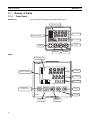
E5CN/CN-U
The front panel is the same for the E5CN and E5CN-U.
Temperature unit
No. 1 display
Operation indicators
No. 2 display
Up Key
Level Key
Mode Key
Down Key
E5AN
Temperature unit
SUB1
PV
SUB2
No.1 display
SUB3
Operation indicators
HA
SV
Function Key/
Auto/Manual Key
OUT1
STOP
OUT2
CMW MANU
MV
PF
Down Key
E5AN
2
No. 3 display
Up Key
A/M
Level Key
No. 2 display
Mode Key
Section 1-1
Names of Parts
E5EN
Operation indicators
SUB1 SUB2
HA
SUB3
PV
Temperature unit
No.1 display
SV
OUT1 STOP
Operation indicators
No.2 display
MV
No.3 display
OUT2 CMW MANU
Up Key
Mode Key
Function Key/
Auto/Manual Key
PF
Level Key
A/M
E5EN
Down Key
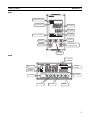
E5GN
No. 1 display
Temperature
unit
Operation
indicators
Operation
indicators
No. 2 display
Level Key
Mode Key
Down Key
Up Key
3
Section 1-1
Names of Parts
1-1-2
Explanation of Indicators
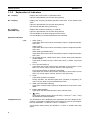
No. 1 Display
Displays the process value or parameter name.
Lights for approximately one second during startup.
No. 2 Display
Displays the set point, parameter operation read value, or the variable input
value.
Lights for approximately one second during startup.
The set point will flash during autotuning.
No. 3 Display
(E5AN/EN Only)
Displays MV, soak time remaining, or multi SP.
Lights for approximately one second during startup.
A 2-level display is set when shipped from the factory.
A 3-level display is activated if parameters are initialized.
Operation Indicators
1,2,3...
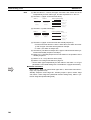
1. SUB1 (Sub 1)
Lights when the function set for the Auxiliary Output 1 Assignment parameter is ON.
SUB2 (Sub 2)
Lights when the function set for the Auxiliary Output 2 Assignment parameter is ON.
SUB3 (Sub 3) (E5AN/EN Only)
Lights when the function set for the Auxiliary Output 3 Assignment parameter is ON.
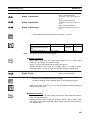
2. HA (Heater Burnout, Heater Short Alarm, Heater Overcurrent Detection
Output Display)
Lights when a heater burnout, heater short alarm, or heater overcurrent
occurs.
3. OUT1 (Control Output 1)
Lights when the control output function assigned to control output 1 turns
ON. For a current output, however, OFF for a 0% output only.
OUT2 (Control Output 2) (Excluding the E5GN)
Lights when the control output function assigned to control output 2 turns
ON. For a current output, however, OFF for a 0% output only.
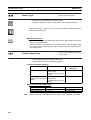
4. STOP
Lights when operation is stopped.
During operation, this indicator lights when operation is stopped by an
event or by key input using the RUN/STOP function.
5. CMW (Communications Writing)
Lights when communications writing is enabled and is not lit when it is disabled.
6. MANU (Manual Mode)
Lights when the auto/manual mode is set to manual mode.
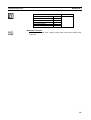
7.
Temperature Unit
(Key)
Lights when settings change protect is ON (i.e., when the U and D Keys
are disabled by protected status.)
The temperature unit is displayed when parameters are set to display a temperature. The display is determined by the currently set value of the Temperature Unit parameter. °c indicates °C and °f indicates °F.
This indicator flashes during ST operation. It is OFF on models with linear
inputs.
4
Section 1-1
Names of Parts
1-1-3
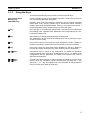
Using the Keys
This section describes the basic functions of the front panel keys.
PF (Function (Auto/
Manual)) Key
(E5AN/EN Only)
This is a function key. When it is pressed for at least 1 second, the function set
in the PF Setting parameter will operate.
O Key
Press this key to move between setting levels. The setting level is selected in
the following order: operation level: adjustment level, initial setting level, communications setting level.
M Key
Press this key to change parameters within a setting level.
Example: When A-M (auto/manual) is selected in the PF Setting parameter
(initial value: A-M), the key operates as an auto/manual switch, switching
between Auto Mode and Manual Mode. If the key is pressed for more than 1
second (regardless of key release timing), the mode will switch.
The parameters can be reversed by holding down the key (moving one per
second in reverse order).
U Key
Each press of this key increments the value displayed on the No. 2 display or
advances the setting. Holding the key down speeds up the incrementation.
D Key
Each press of this key decrements values displayed on the No. 2 display or
reverses the setting. Holding the key down speeds up the incrementation.
O + M Keys
Press these keys to change to the protect level. For details on operations
involving holding these keys down simultaneously, refer to 1-3 Setting Level
Configuration and Key Operations. For details on the protect level, refer to
SECTION 5 Parameters.
O + U Keys
O + D Keys
To restrict set value changes (in order to prevent accidental or incorrect operations), these key operations require simultaneously pressing the O key
along with U or D key. This applies only to the parameter for the password to
move to protect level. (Refer to page 162.)
5
Section 1-2
I/O Configuration and Main Functions
1-2
I/O Configuration and Main Functions
1-2-1
I/O Configuration
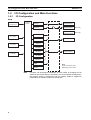
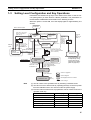
E5CN
Temperature input
or analog input
Control
section
Control output
(heating)
Control output 1
Control output
(cooling)
Control output 2
(See note.)
External power
supply for ES1B
(See note.)
Heating/cooling
Alarm 3
CT1 input
Alarm 2
Auxiliary output 2
Alarm 1
CT2 input
HB alarm
HS alarm
Auxiliary output 1
Event inputs
2 channels
OC alarm
Input error
Program end
output
Communications
function
Note
6
Note:
Press one of these keys,
depending on the model.
Functions can be assigned individually for each output by changing the set
values for the Control Output 1 Assignment, the Control Output 2 Assignment,
the Auxiliary Output 1 Assignment, and the Auxiliary Output 2 Assignment
parameters in the advanced function setting level.
Section 1-2
I/O Configuration and Main Functions
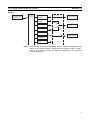
E5CN-U
Control
section
Temperature input
or analog input
Control output
(heating)
Control output
(cooling)
Control output 1
Heating/
cooling
Alarm 3
Auxiliary output 2
Standard
Alarm 2
Alarm 1
Auxiliary output 1
Input error
Program end
output
Note
Functions can be assigned individually for each output by changing the set
values for the Control Output 1 Assignment, the Auxiliary Output 1 Assignment, and the Auxiliary Output 2 Assignment parameters in the advanced
function setting level.
7
Section 1-2
I/O Configuration and Main Functions
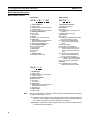
Model Number Structure
Model Number Legend
Controllers
Option Units
E5CN-@@M@@-@-500
1 2 3 4 5
6
7
1. Control Output 1
R: Relay output
Q: Voltage output (for driving SSR)
C: Current output
Y: Long-life relay output (hybrid) *1
2. Auxiliary Outputs *2
Blank: None
2: Two outputs
3. Option
M: Option Unit can be mounted.
4. Input Type
T: Universal thermocouple/platinum
resistance thermometer
L: Analog current/voltage input
5. Power Supply Voltage
Blank: 100 to 240 VAC
D: 24 VAC/VDC
6. Case Color
Blank: Black
W: Silver
7. Terminal Cover
-500: With terminal cover
E53-CN@@@
1 2 3 4
1. Applicable Controller
CN: E5CN or E5CN-H
2. Function 1
Blank: None
Q: Control output 2 (voltage for driving SSR)
P: Power supply for sensor
3. Function 2
Blank: None
H: Heater burnout/SSR failure/Heater
overcurrent detection (CT1)
HH: Heater burnout/SSR failure/
Heater overcurrent detection
(CT2)
B: Two event inputs
03: RS-485 communications
H03: Heater burnout/SSR failure/
Heater overcurrent detection
(CT1) + RS-485 communications
HB: Heater burnout/SSR failure/
Heater overcurrent detection
(CT1) + Two event inputs
HH03: Heater burnout/SSR failure/
Heater overcurrent detection
(CT2) + RS-485 communications
4. Version
N2: Applicable only to models
released after January 2008
E5CN-@@@U
1 2 3 4
1. Output Type
R: Relay output
Q: Voltage output (for driving SSR)
C: Current output
2. Number of Alarms
Blank: No alarm
1: One alarm
2: Two alarms
3. Input Type
T: Universal thermocouple/platinum
resistance thermometer
L: Analog Input
4. Plug-in type
U: Plug-in type
Note
Not all combinations of function 1 and function 2 specifications are possible
for Option Units (E53-
).
*1 Always connect an AC load to a long-life relay output. The output will not
turn OFF if a DC load is connected because a triac is used for switching
the circuit. For details, check the conditions in Ratings.
*2 Auxiliary outputs are contact outputs that can be used to output alarms
or results of logic operations.
8
Section 1-2
I/O Configuration and Main Functions
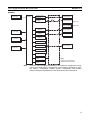
E5AN/EN
Temperature input
or analog input
Control
section
Control output
(heating)
Control output
(cooling)
Control output 1
Heating/cooling
Control output 2
External power
supply for ES1B
Alarm 3
(See note.)
(See note.)
Alarm output 3
CT1 input
Alarm 2
Alarm output 2
Alarm 1
CT2 input
HB alarm
HS alarm
Event inputs 1 and
2 (2 channels)
Alarm output 1
OC alarm
Input error
Program end
output
Communications
function
Note
Note:
Press one of these keys,
depending on the model.
Functions can be assigned individually to each output by changing the set values for the Control Output 1 Assignment, Control Output 2 Assignment, Auxiliary Output 1 Assignment, Auxiliary Output 2 Assignment, and Auxiliary
Output 3 Assignment parameters in the advanced function setting level.
9
Section 1-2
I/O Configuration and Main Functions
Model Number Structure
Model Number Legends
Controllers
Option Units
E5AN/EN-@3@M@@-@-500-N
1 2 3 4 5 6
7
8
9
1. Control Output 1
R: Relay output
Q: Voltage output (for driving SSR)
C: Current output
2. Auxiliary Outputs
3: Three outputs
3. Heater Burnout/Heater Short, Control Output 2,
or External Power Supply for ES1B
Blank: None
Q: Control output 2 (voltage output for driving SSR)
Y: Long-life relay output (hybrid)
H: Heater burnout/Heater short/Heater overcurrent
detection (CT1)
HH: Heater burnout/Heater short/Heater overcurrent
detection (CT2)
P: Power supply for sensor
4. Option
M: Option Unit can be mounted.
5. Input Type
T: Universal thermocouple/platinum resistance
thermometer input
L: Analog current/voltage input
6. Power Supply Voltage
Blank: 100 to 240 VAC
D: 24 VAC/VDC
7. Case Color
Blank: Black
W: Silver
8. Terminal Cover
500: With terminal cover
9. Version
N: Available only to models released after January
2008.
10
E53-@
1
1. Function
EN01: RS-232C
communications
EN03: RS-485
communications
AKB: Event input
Section 1-2
I/O Configuration and Main Functions
E5GN
Control
section
Temperature input
or analog input
Control output
(heating)
Control output
(cooling)
Control output 1
Heating/
cooling
Auxiliary output 1
Alarm 1
Standard
CT1 input
HB alarm
HS alarm
OC alarm
Input error
Event inputs
2 channels
Alarm 2
Auxiliary output 2
Alarm 3
Program end
output
Communications
function
Note
Functions can be assigned individually for each output by changing the set
values for the Control Output 1 Assignment, the Auxiliary Output 1 Assignment, and the Auxiliary Output 2 Assignment parameters in the advanced
function setting level.
11
Section 1-2
I/O Configuration and Main Functions
Model Number Structure
Model Number Legends
Controllers
E5GN-@@@@@-@-@-@
1 2 3 4 5
6
7
8
1. Control Output 1
R: Relay output
Q: Voltage output (for driving SSR)
C: Current output
2. Auxiliary Outputs
Blank: None
1: One outputs
2: Two outputs
3. Option
Blank: None
01: RS-232C communications
03: RS-485 communications
B: Two event inputs
H: Heater burnout/Heater short/Heater overcurrent
detection (CT1)
4. Input Type
T: Universal thermocouple/platinum resistance
thermometer input
L: Analog current/voltage input
5. Power Supply Voltage
Blank: 100 to 240 VAC
D: 24 VAC/VDC
6. Terminal Type
Blank: Models with Screw Terminal Blocks
C: Models with Screwless Clamp Terminal Blocks
7. Case Color
Blank: Black
W: Silver
8. Communications Protocol
Blank: None
FLK: CompoWay/F communications
Note
1-2-2
Silver is available by special order only.
Main Functions
This section introduces the main E5CN/CN-U/AN/EN/GN functions. For
details on particular functions and how to use them, refer to SECTION 3 Basic
Operation and following sections.
Input Sensor Types
12
• The following input sensors can be connected for temperature input
(i.e., E5_N-
T):
Thermocouple:
K, J, T, E, L, U, N, R, S, B, W, PLII
Infrared temperature sensor:
ES1B
10 to 70°C, 60 to 120°C, 115 to 165°C,
140 to 260°C
Platinum resistance thermometer: Pt100, JPt100
Analog input:
0 to 50 mV
Section 1-2
I/O Configuration and Main Functions
• Inputs with the following specifications can be connected for analog input
(i.e., E5_N-
L):
Current input: 4 to 20 mA DC, 0 to 20 mA DC
Voltage input: 1 to 5 VDC, 0 to 5 V DC, 0 to 10 V DC
Control Outputs
• A control output can be a relay, voltage (for driving SSR), or current output, depending on the model.
• Long-life relay outputs (see note) use semiconductors for switching when
closing and opening the circuit, thereby reducing chattering and arcing
and improving durability. However, if high levels of noise or surge are
imposed between the output terminals, short-circuit faults may occasionally occur. If the output becomes permanently shorted, there is the danger
of fire due to overheating of the heater. Design safety into the system,
including measures to prevent excessive temperature rise and spreading
of fire. Take countermeasures such as installing a surge absorber. As an
additional safety measure, provide error detection in the control loop.
(Use the Loop Burnout Alarm (LBA) and HS alarm that are provided for
the E5
N.)
Varistor
Long-life
relay output
Inductive
load
1
Varistor
2
Select a surge absorber that satisfies the following conditions.
Voltage used
100 to 120 VAC
200 to 240 VAC
Varistor voltage
240 to 270 V
440 to 470 V
Surge resistance
1,000 A min.
• Always connect an AC load to a long-life relay output (see note). The output will not turn OFF if a DC load is connected.
Note
Alarms
Long-life relay outputs are not supported for the E5GN.
• Set the alarm type and alarm value or the alarm value upper and lower
limits.
• If necessary, a more comprehensive alarm function can be achieved by
setting a standby sequence, alarm hysteresis, auxiliary output close in
alarm/open in alarm, alarm latch, alarm ON delay, and alarm OFF delay.
• If the Input Error Output parameter is set to ON, the output assigned to
alarm 1 function will turn ON when an input error occurs.
Control Adjustment
• Optimum PID constants can be set easily by performing AT (auto-tuning)
or ST (self-tuning).
Event Inputs
• With the E53-CN
B
N2 for the E5CN or the E5AN/EN-
M
-500-N
with the E53-AKB for the E5AN/EN, the following functions can be executed using event inputs: switching set points (multi-SP, 4 points max.),
switching RUN/STOP, switching between automatic and manual operation, starting/resetting the program, inverting direct/reverse operation,
100% AT execute/cancel, 40% AT execute/cancel, setting change enable/
disable, and canceling the alarm latch.
Heater Burnout, HS Alarm,
and Heater Overcurrent
• With the E53-CN
H
N2 or E53-CN
HH
N2 for the E5CN, or the
E5AN/EN-
H
-500-N or E5AN/EN-
HH
-500-N, the heater burnout detection function, HS alarm function, and heater overcurrent detection function can be used.
13
I/O Configuration and Main Functions
Communications
Functions
Section 1-2
• Communications functions utilizing CompoWay/F (See note 1.), SYSWAY
(See note 2.), or Modbus (See note 3.) can be used.
RS-485 Interface
Use the E53-CN
03N2 for the E5CN or the E53-EN03 for the E5AN/
EN.
RS-232C Interface
Use the E53-EN01 for the E5AN/EN.
Note
(1) CompoWay/F is an integrated general-purpose serial communications
protocol developed by OMRON. It uses commands compliant with the
well-established FINS, together with a consistent frame format on
OMRON Programmable Controllers to facilitate communications between personal computers and components.
(2) SYSWAY communications do not support alarm 3.
(3) Modbus is a communications control method conforming to the RTU
Mode of Modbus Protocol. Modbus is a registered trademark of
Schneider Electric.
(4) The E5CN and E5CN-U do not support the RS-232C interface.
External Power Supply for
ES1B
Note
Transfer Output
The E5AN-
P
-N or E5EN-
P
-N with the E53-CN
P
N2 can be used
as the power supply for ES1B Infrared Temperature Sensors.
The E5GN does not provide a power supply for an ES1B Infrared Temperature Sensor.
A transfer output for 4 to 20 mA can be used with the E5AN/E5EN-
F.
For E5
N-C
models (models without “F” in the model number), the current output can be used as a simple transfer output.
14
Section 1-3
Setting Level Configuration and Key Operations
1-3
Setting Level Configuration and Key Operations
Parameters are divided into groups, each called a level. Each of the set values (setting items) in these levels is called a parameter. The parameters on
the E5CN/CN-U/AN/EN/GN are divided into the following 9 levels.
When the power is turned ON, all of the display lights for approximately one
second.
Power ON
Start in manual mode.
Start in automatic mode.
Press the O Key or the
PF Key for at least 1 s.
(See note 4.)
Operation
Level
Adjustment
Level
Press the
O Key less than 1 s.
a-m
Manual
mode
(See
note
3.)
Press the O Key
for at least 3 s while
a-m is displayed.
(a-m will flash after
1st second.)
PF Key
(See note 5.)
(See note 4.)
Manual
Control Level
Press the PF Key
for at least 1 s.
Press the
O Key for
at least 1 s.
Control stops.
(See
note 1.)
PF Key
(See note 5.)
Monitor/Setting
Item Level
c
25
25
100
Press the O Key for at
least 3 s. (Display will flash
after 1st second.)
100
Protect Level
Communications Setting
Level
Initial Setting
Level
Press the
O Key for less than 1 s.
Press the O Key
for at least 1 s.
Press the
O+ M
Keys for at
least 1 s.
Press the
O+ M
Keys for at
least 3 s.
c
(Display
will flash
after 1st
second.)
Note The time taken to move
to the protect level can
be adjusted by changing the "Move to protect level time" setting.
(Refer to page 228.)
Input password while
amoV is displayed. (Set
value −169)
Advanced Function
Setting Level
Input password.
Control in progress
Control stopped
Calibration Level
(See
note 2.)
Not displayed for some models
Level change
Note
(1) You can return to the operation level by executing a software reset.
(2) You cannot move to other levels by operating the keys on the front panel
from the calibration level. You must turn OFF the power supply.
(3) From the manual control level, key operations can be used to move to the
operation level only.
Level
Protect level
Operation level
Adjustment level
Manual control level
Monitor/setting item level
Initial setting level
Control in progress
Can be set.
Can be set.
Can be set.
Can be set.
Can be set.
---
Control stopped
----------Can be set.
15
Section 1-3
Setting Level Configuration and Key Operations
Level
Advanced function setting level
Calibration level
Communications setting level
Control in progress
Control stopped
--Can be set.
--Can be set.
--Can be set.
Of these levels, the initial setting level, communications setting level,
advanced function setting level, and calibration level can be used only
when control is stopped. Control outputs are stopped when any of
these four levels is selected.
(4) When the PF Setting is set to A-M in models with a PF Key (E5AN/EN)
(5) When the PF Setting is set to PFDP in models with a PF Key (E5AN/EN)
Protect Level
• To switch to the protect level from the operation level, the adjustment
level, or the monitor/setting item level, simultaneously hold down the O
and M Keys for at least 3 seconds. (See note.) This level is for preventing
unwanted or accidental modification of parameters. Protected levels will
not be displayed, and so the parameters in that level cannot be modified.
Note
Operation Level
The key pressing time can be changed in Move to Protect Level parameter (advanced function setting level).
• The operation level is displayed when the power is turned ON. You can
move to the protect level, initial setting level, or adjustment level from this
level.
• Normally, select this level during operation. While operation is in progress,
items such as the PV and manipulated variable (MV) can be monitored,
and the set points, alarm values, and alarm upper and lower limits can be
monitored and changed.
Adjustment Level
• To move to the adjustment level, press the O Key once (for less than 1 s).
• This level is for entering set values and offset values for control. In addition to AT (auto-tuning), communications write enable/disable switching,
hysteresis settings, multi-SP settings, and input offset parameters, it
includes HB alarm, HS alarm, OC alarm, and PID constants. From the
adjustment level, it is possible to move to the top parameter of the initial
setting level, protect level, or operation level.
Monitor/Setting Item Level
• To switch to the monitor/setting item level, press the PF Key from the
operation level or adjustment level. The contents set for monitor/setting
items 1 to 5 can be displayed. You can move from the monitor/setting item
level to the operation level or initial setting level. (This level is supported
by the E5AN and E5EN only.)
Manual Control Level
• When the O Key is pressed for at least 3 seconds from the operation
level's auto/manual switching display, the manual control level will be displayed. (The MANU indicator will light.)
• When the PF Setting is set to A-M (auto/manual) and the PF Key is
pressed for more than one second from the operation level or adjustment
level, the manual control level will be displayed (E5AN and E5EN only.)
• This is the level for changing the MV in manual mode.
• To return to the operation level, press the O Key for at least one second.
It is also possible to return to the operation level by pressing the PF Key
for more than one second when the PF Setting is set to A-M.
16
Setting Level Configuration and Key Operations
Initial Setting Level
• To move to the initial setting level from the operation level or the adjustment level, press the O Key for at least 3 seconds. The PV display
flashes after one second. This level is for specifying the input type and
selecting the control method, control period, setting direct/reverse operation, setting the alarm types, etc. You can move to the advanced function
setting level or communications setting level from this level. To return to
the operation level, press the O Key for at least one second. To move to
the communications setting level, press the O Key for less than one second.
(When moving from the initial setting level to the operation level, all the
indicators will light.)
Note
Advanced Function
Setting Level
Section 1-3
Pressing the O Key for at least 3 seconds in the operation level's
auto/manual switching display will move to the manual control level,
and not the initial setting level.
• To move to the advanced function setting level, set the Initial Setting/Communications Protect parameter in the protect level to 0 and then, in the initial setting level, input the password (−169).
• From the advanced function setting level, it is possible to move to the calibration level or to the initial setting level.
• This level is for setting the automatic display return time and standby
sequence, and it is the level for moving to the user calibration and other
functions.
Communications Setting
Level
• To move to the communications setting level from the initial setting level,
press the O Key once (for less than 1 s). When using the communications function, set the communications conditions in this level. Communicating with a personal computer (host computer) allows set points to be
read and written, and manipulated variables (MV) to be monitored.
Calibration Level
• To move to the calibration level, input the password (1201) from the
advanced function setting level. The calibration level is for offsetting error
in the input circuit.
• You cannot move to other levels from the calibration level by operating the
keys on the front panel. To cancel this level, turn the power OFF then back
ON again.
1-3-1
Selecting Parameters
• Within each level, the parameter is changed in order (or in reverse order)
each time the M Key is pressed. (In the calibration level, however, parameters cannot be changed in reverse order.) For details, refer to SECTION
5 Parameters.
17
Section 1-4
Communications Function
Moves in order after M key
is pressed (if key is
released within 1 s).
While the M key is being held
down, the parameter will move
each second in reverse order.
Parameter 1
M
Parameter 2
Parameter 2
After M key has
been held down
for 2 s.
M
Parameter 3
After M key
is pressed
Parameter 3
Hold down the M key
during this interval.
After M key has
been held down
for 1 s.
Parameter 4
1-3-2
Saving Settings
• If you press the M Key at the final parameter, the display returns to the
top parameter for the current level.
• To change parameter settings, specify the setting using the U or D Key,
and either leave the setting for at least two seconds or press the M Key.
This saves the setting.
• When another level is selected after a setting has been changed, the contents of the parameter prior to the change is saved.
• When you turn the power OFF, you must first save the settings (by pressing the M Key). The settings are sometimes not changed by merely
pressing the U or D Keys.
1-4
Communications Function
The E5CN/AN/EN/GN are provided with a communications function that
enables parameters to be checked and set from a host computer. If the communications function is required, use the E53-CN
03N2 with the E5CN, or
the E53-EN03 or E53-EN01 with the E5AN/EN/GN. For details on the communications function, see the separate Communications Manual Basic Type.
Use the following procedure to move to the communications setting level.
1,2,3...
1. Press the O Key for at least three seconds to move from the operation level to the initial setting level.
2. Press the O Key for less than one second to move from the initial setting
level to the communications setting level.
3. Select the parameters as shown below by pressing the M Key.
4. Press the U or D Key to change the parameter setting.
18
Section 1-4
Communications Function
psel
Protocol Setting
cwf
M
u-no
Communications Unit No.
1
M
bps
Communications Baud Rate
9.6
M
len
Communications Data Length
7 (See note.)
M
sbit
Communications Stop Bits
2 (See note.)
M
prty
Communications Parity
even
M
sdwt
Send Data Wait Time
20
M
Note
Setting Communications
Data
Parameter name
Protocol Setting
Symbol
psel
Communications
Unit No.
Communications
Baud Rate
Communications
Data Length
Communications
Stop Bits
Communications
Parity
Send Data Wait
Time
u-no
The Protocol Setting parameter is displayed only when CompoWay/F communications are being used.
Match the communications specifications of the E5CN/AN/EN/GN and the
host computer. If a 1:N connection is being used, ensure that the communications specifications for all devices in the system (except the communications
Unit No.) are the same.
Setting (monitor) value
CompoWay/F (SYSWAY),
Modbus
0 to 99
Selection symbols
cwf, mod
1.2, 2.4, 4.8, 9.6, 19.2, 38.4.
57.6
len
1.2, 2.4, 4.8, 9.6, 19.2,
38.4, 57.6
7, 8
sbit
1, 2
prty
None, Even, Odd
sdwe
0 to 99
bps
none, even, odd
Default
CompoWay/F
(SYSWAY)
1
Unit
None
None
9.6
kbps
7
Bits
2
Bits
Even
None
20
ms
19
Section 1-5
Insulation Block Diagrams
1-5
Insulation Block Diagrams
The insulation block diagrams for the E5CN, E5AN, E5EN, and E5GN are provided in this section.
E5CN
Power
supply
Input, CT input, Q outputs (outputs 1 and 2)
Communications and events
External power supply
C output
R output
Y output
Auxiliary outputs 1 and 2
: Reinforced insulation
: Functional insulation
E5CN-U
Input and Q output (output 1)
C output
Power
supply
R output
Y output
Auxiliary outputs 1 and 2
: Reinforced insulation
: Functional insulation
E5AN/EN
Input, CT input, and Q output (output 1)
Communications and events
External power supply and Q output (output 2)
C output and transfer output
Power
supply
R output
Y output
Auxiliary output 1
Auxiliary output 2
Auxiliary output 3
: Reinforced insulation
: Functional insulation
E5GN
Power
supply
Input, CT input, Q output (output 1)
Communications and events
C output
R output
Auxiliary output 1
Auxiliary output 2
: Reinforced insulation
20
: Functional insulation
SECTION 2
Preparations
This section describes the work required to prepare the E5CN, E5AN, and E5EN Digital Temperature Controllers for
operation, including installation and wiring.
2-1
2-2
2-3
Installation. . . . . . . . . . . . . . . . . . . . . . . . . . . . . . . . . . . . . . . . . . . . . . . . . . . .
22
2-1-1
Dimensions . . . . . . . . . . . . . . . . . . . . . . . . . . . . . . . . . . . . . . . . . . . .
22
2-1-2
Panel Cutout . . . . . . . . . . . . . . . . . . . . . . . . . . . . . . . . . . . . . . . . . . .
24
2-1-3
Mounting. . . . . . . . . . . . . . . . . . . . . . . . . . . . . . . . . . . . . . . . . . . . . .
25
2-1-4
Removing the Temperature Controller from the Case . . . . . . . . . . .
28
Wiring Terminals. . . . . . . . . . . . . . . . . . . . . . . . . . . . . . . . . . . . . . . . . . . . . . .
31
2-2-1
Terminal Arrangement . . . . . . . . . . . . . . . . . . . . . . . . . . . . . . . . . . .
31
2-2-2
Precautions when Wiring . . . . . . . . . . . . . . . . . . . . . . . . . . . . . . . . .
33
2-2-3
Wiring . . . . . . . . . . . . . . . . . . . . . . . . . . . . . . . . . . . . . . . . . . . . . . . .
35
Using the Support Software Port. . . . . . . . . . . . . . . . . . . . . . . . . . . . . . . . . . .
45
21
Section 2-1
Installation
2-1
Installation
2-1-1
Dimensions
Unit: mm
E5CN
58
44.8 × 44.8
1.5
48.8
91
78
6
48 × 48
E5CN-U
6
(84.7)
48 × 48
44.8 × 44.8
14.2
58
70.5
48
6
79.2
78
2
91 × 91
112
96 × 96
E5AN
79.2
E5EN
6
48
78
44
2
PV
22
91
112
96
SV
MV
Section 2-1
Installation
E5GN
• Models with Screw Terminal Blocks
22
44.8
99
22
2
35
35
24
48
• Models with Screwless Clamp Terminal Blocks
22
44.8
100
22
2
35
35
24
48
23
Section 2-1
Installation
2-1-2
Panel Cutout
Unit: mm
E5CN/CN-U
Individual Mounting
Group Mounting
(48 × number of Units − 2.5) +1.0
45+0.6
0
60 min.
45+0.6
0
0
45+0.6
0
E5AN
Individual Mounting
Group Mounting
(96 × number of Units − 3.5) +1.0
92+0.8
0
92+0.8
0
120 min.
92+0.8
0
0
E5EN
Individual Mounting
92+0.8
0
120 min.
92+0.8
0
0
45+0.6
0
24
Group Mounting
(48 × number of Units − 2.5) +1.0
Section 2-1
Installation
E5GN
Individual Mounting
Group Mounting
+1.0
22.2 +0.3
0
(48 × number of units − 2.5) 0
22.2 +0.3
0
40 min.
45 +0.6
0
• Waterproofing is not possible when group mounting several Controllers.
• The recommended panel thickness is 1 to 5 mm for the E5CN, E5CN-U,
and E5GN, and 1 to 8 mm for E5AN and E5EN.
• Units must not be closely mounted vertically. (Observe the recommended
mounting space limits.)
• When group mounting several Controllers, ensure that the surrounding
temperature does not exceed the ambient operating temperature listed in
the specifications.
• When group mounting Controllers that have auxiliary output 2, it will not
be possible to tighten the wiring screws for auxiliary output 2 after the
Controllers are mounted.
2-1-3
Mounting
E5CN/CN-U
E53-COV17
Terminal Cover
Adapter
Waterproof packing
Panel
E5CN
E5CN-U
For the Wiring Socket for the E5CN-U, order the P2CF-11 or P3GA-11 separately.
Mounting to the Panel
1,2,3...
1. For waterproof mounting, waterproof packing must be installed on the
Controller. Waterproofing is not possible when group mounting several
Controllers. Waterproof packing is not necessary when there is no need for
the waterproofing function. There is no waterproof packing included with
the E5CN-U.
2. Insert the E5CN/E5CN-U into the mounting hole in the panel.
3. Push the adapter from the terminals up to the panel, and temporarily fasten
the E5CN/E5CN-U.
25
Section 2-1
Installation
4. Tighten the two fastening screws on the adapter. Alternately tighten the
two screws little by little to maintain a balance. Tighten the screws to a
torque of 0.29 to 0.39 N·m.
Mounting the Terminal Cover
For the E5CN, make sure that the “UP” mark is facing up, and then attach the
E53-COV17 Terminal Cover to the holes on the top and bottom of the Temperature Controller.
E5AN/EN
Mounting
Bracket
Panel
Mounting
Bracket
Panel
Terminal Cover
(E53-COV16)
Waterproof packing
E5AN
Terminal Cover
(E53-COV16)
Waterproof packing
E5EN
Mounting to the Panel
1,2,3...
1. For waterproof mounting, waterproof packing must be installed on the
Controller. Waterproofing is not possible when group mounting several
Controllers. Waterproof packing is not necessary when there is no need for
the waterproofing function.
2. Insert the E5AN/E5EN into the square mounting hole in the panel (thickness: 1 to 8 mm). Attach the Mounting Brackets provided with the product
to the mounting grooves on the top and bottom surfaces of the rear case.
3. Use a ratchet to alternately tighten the screws on the top and bottom
Mounting Brackets little by little to maintain balance, until the ratchet turns
freely.
Mounting the Terminal Cover
Slightly bend the E53-COV16 Terminal Cover to attach it to the terminal block
as shown in the following diagram. The Terminal Cover cannot be attached in
the opposite direction.
26
Section 2-1
Installation
Slightly bend the
E53-COV16
Terminal Cover in
the direction shown
by the arrows to
attach it to the
terminal block.
Enlarged Illustration of Terminal Section
E5GN
Mounting to the Panel
1,2,3...
1. For waterproof mounting, waterproof packing must be installed on the
Controller. Waterproofing is not possible when group mounting several
Controllers.
Waterproof packing is not necessary when there is no need for the waterproofing function.
2. Insert the E5GN into the mounting hole in the panel.
3. Push the adapter from the terminals up to the panel, and temporarily fasten
the E5GN.
4. Tighten the two fastening screws on the adapter. Alternately tighten the
two screws little by little to maintain a balance.Tighten the screws to a
torque of 0.29 to 0.39 N·m.
Panel
Adapter
Waterproof packing
E5GN
27
Section 2-1
Installation
2-1-4
Removing the Temperature Controller from the Case
The Temperature Controller can be removed from the case to perform maintenance without removing the terminal leads. This is possible for only the E5CN,
E5AN, and E5EN, and not for the E5CN-U or E5GN. Check the specifications
of the case and Temperature Controller before removing the Temperature
Controller from the case.
E5CN
Tool insertion hole
(1)
Flat-blade screwdriver
(Unit: mm)
20 min.
(2)
(3)
0.4
2.0
(1)
1,2,3...
1. Insert a flat-blade screwdriver into the two tool insertion holes (one on the
top and one on the bottom) to release the hooks.
2. Insert the flat-blade screwdriver in the gap between the front panel and
rear case, and pull out the front panel slightly. Hold the top and bottom of
the front panel and carefully pull it out toward you, without applying unnecessary force.
3. When inserting the body of the Temperature Controller into the case, make
sure the PCBs are parallel to each other, make sure that the sealing rubber
is in place, and press the E5CN toward the rear case into position. While
pushing the E5CN into place, push down on the hooks on the top and bottom surfaces of the rear case so that the hooks are securely locked in
place. Be sure that electronic components do not come into contact with
the case.
Make sure the PCBs are
parallel to each other, and
then press the body of the
Temperature Controller
toward the rear case into
position.
Bottom View of the E5CN
28
Section 2-1
Installation
E5AN/EN
Tool insertion hole
Tool insertion hole
(1)
(1)
(2)
(2)
(3)
(3)
(1)
E5AN
(1)
E5EN
Flat-blade screwdriver
(Unit: mm)
0.4
1,2,3...
2.0
5.0
1. Insert a flat-blade screwdriver into the two tool insertion holes (one on the
top and one on the bottom) to release the hooks.
2. Insert the flat-blade screwdriver in the gap between the front panel and
rear case (two on the top and two on the bottom), and use it to pry and pull
out the front panel slightly. Then, pull out on the front panel gripping both
sides. Be sure not to impose excessive force on the panel.
Gap between the Front Panel and Rear Case
Four gaps, two on the top and two on the bottom
Top View of E5AN
Gap between the Front Panel and Rear Case
Four gaps, two on the top and two on the bottom
Top View of E5EN
29
Section 2-1
Installation
3. When inserting the body of the Temperature Controller into the case, make
sure the PCBs are parallel to each other, make sure that the sealing rubber
is in place, and press the E5AN/EN toward the rear case until it snaps into
position. While pressing the E5AN/EN into place, press down on the hooks
on the top and bottom surfaces of the rear case so that the hooks securely
lock in place. Make sure that electronic components do not come into contact with the case.
Make sure the PCBs are
parallel to each other, and
then press the body of the
Temperature Controller
toward the rear case until
it snaps into position.
Bottom View of the E5EN
Make sure the PCBs are
parallel to each other, and
then press the body of the
Temperature Controller
toward the rear case until
it snaps into position.
Bottom View of the E5AN
Removing the Terminal
Block
The terminal block can be removed from the E5GN. It is not possible for the
E5CN, E5AN, E5EN, and E5CN-U.
E5GN
The body of the Controller can be replaced by removing the terminal block
from the E5GN.
1,2,3...
1. Insert a flat-blade screwdriver into the tool holes (one on the top and one
on the bottom) to release the hooks. Do not apply excessive force.
Terminal hole
20 min.
Flat-blade screwdriver
(Unit: mm)
0.4
20
2. Pull the terminal block out while the hooks are released.
Note
30
The method for removing the terminal block is the same for both screw terminal blocks and screwless clamp terminal blocks.
Section 2-2
Wiring Terminals
Do not connect a different type of terminal block to a Controller. For example,
do not replace a screw terminal block with a screwless clamp terminal block.
The temperature indication accuracy will decrease.
2-2
Wiring Terminals
Confirm the location of the terminals (terminals 1 to 15 for the E5CN, 1 to 30
for the E5AN and E5EN, and terminals 1 to 14 for the E5GN) using the product labels and case markings.
2-2-1
Terminal Arrangement
E5CN
Controllers
Control output 1
Long-life relay output
The E5@N-@@@T@ is set for a K thermocouple
(input type of 5) by default. If a difference sensor is
used, an input error (s.err) will occur. Check the
setting of the input type parameter.
250 VAC, 3 A (resistive load)
Relay output
250 VAC, 3 A (resistive load)
Voltage output (for driving SSR)
12 VDC, 21 mA
Current output
Auxiliary outputs (relay outputs)
250 VAC, 3 A
(resistive load)
0 to 20 mA DC
4 to 20 mA DC
Load: 600 Ω max.
Auxiliary outputs
(relay outputs)
+
Control output 1
Control output 2
Voltage output (for driving SSR)
12 VDC, 21 mA
+
mA
−
DO NOT
USE
−
DO NOT
USE
DO NOT
USE
−
−
Auxiliary output 1
A
B
V
+
Auxiliary output 2
• 100 to 240 VAC
• 24 VAC/VDC (no polarity)
TC/Pt
universal input
Analog input
A heater burnout alarm, heater short alarm,
heater overcurrent alarm, or input error is
sent to the output to which the alarm 1
function is assigned.
Input power
supply
B
+
Option Units
E53-CNHH03N2
Communications
(RS-485) and CT2
B(+)
E53-CNHBN2
Event inputs
and CT
11
11
RS-485
A(−)
12
13
CT2
EV1
13
EV2
14
CT1
12
14
CT1
15
15
E53-CNQ03N2
Communications
(RS-485) and
Control Output 2
B(+)
A(−)
DO NOT
USE
+
B(+)
11
RS-485
A(−)
DO NOT
USE
12
13
14
CT1
15
13
14
Control output 2
15
E53-CNBN2
Event inputs
E53-CN03N2
Communications
(RS-485)
B(+)
12
11
A(−)
12
−
13
EV2
+
External
power supply
DO NOT
USE
14 12 VDC,
20 mA
15
−
+
11
Control output 2
12
13
14
15
EV1
EV2
DO NOT
USE
DO NOT
USE
−
12
13
DO NOT
USE
14
13
A(−)
−
12
13
15
E53-CNQBN2
Event Inputs and
Control Output 2
11
11
Control output 2
−
12
13
CT2
14
CT1
15
11
14
External
12 VDC,
power supply
20 mA
E53-CNQHHN2
Control Output 2
and CT2
13
14
B(+)
RS-485
+
14
+
E53-CNP03N2
Communications (RS-485)
and External Power Supply
DO NOT
USE
CT1
12
CT1
15
12
15
E53-CNQHN2
Control Output 2
and CT
11
RS-485
DO NOT
USE
DO NOT
USE
DO NOT
USE
EV1
E53-CNPHN2
External Power
Supply and CT
External +
11 12 VDC,
power supply
20 mA
11
11
RS-485
−
E53-CNH03N2
Communications
(RS-485) and CT
E53-CNPBN2
Event Inputs and
External Power Supply
EV1
EV2
+
12
13
14
Control output 2
15
−
15
Since the voltage output (control output) is not electrically insulated from the internal wiring, one or other of
the control output terminals must be left unearthed when using an earthed thermocouple thermometer. (Connection makes measurements unreliable due to sneak currents.)
To comply with EMC standards, the length of the cable connecting the analog input or universal TC/Pt input
sensor must be 30 m or less. If the cable is longer than 30 m, the EMC standards will not be satisfied.
31
Section 2-2
Wiring Terminals
E5CN-U
The E5@N-@@@T@ is set for a K thermocouple
(input type of 5) by default. If a difference sensor is
used, an input error (s.err) will occur. Check the
setting of the input type parameter.
Auxiliary output
250 VAC, 3 A (resistive load)
(Relay outputs)
Control output 1
Relay output
(three terminals used)
SPDT, 250 VAC, 3 A
(resistive load)
Voltage output
(for driving SSR)
12 VDC, 21 mA
Current output
4 to 20 mA DC
0 to 20 mA DC
Load: 600 Ω max.
Control output 1
DO NOT
USE
mA
DO NOT
USE
Auxiliary output 1
Auxiliary output 2
(Control output (cooling side))
A
An input error is sent to the
sent to which the alarm 1
function is assigned.
B
DO NOT
USE
V
Analog input
Note
Input power supply
B
• 100 to 240 VAC
• 24 VAC/VDC (no polarity)
TC/Pt
universal input
For the Wiring Socket, purchase the P2CF-11 or PG3A-11 separately.
Since the voltage output (control output) is not electrically insulated from the internal wiring, one or other of
the control output terminals must be left unearthed when using an earthed thermocouple thermometer. (Connection makes measurements unreliable due to sneak currents.)
To comply with EMC standards, the length of the cable connecting the analog input or universal TC/Pt input
sensor must be 30 m or less. If the cable is longer than 30 m, the EMC standards will not be satisfied.
E5AN/EN
Controllers
• 100 to 240 VAC
• 24 VAC/VDC (no polarity)
Control output 1
Relay output
250 VAC, 5A
(resistive load)
Voltage output
(for driving SSR)
12 VDC, 40 mA
Current output
0 to 20 mA DC
4 to 20 mA DC
Load: 600 Ω max.
Option Units
The E5@N-@@@T@ is set for a K thermocouple
(input type of 5) by default. If a difference sensor is
used, an input error (s.err) will occur. Check the
setting of the input type parameter.
1
11
Input power supply
2
12
3
13
4
14
Control output 1
Long-life relay output
250 VAC, 3 A
(resistive load)
Relay outputs
250 VAC, 3 A
+
7
17
DO NOT
USE
8
18
DO NOT
USE
9
19
20
Control output 2
13
11
12
DO NOT USE
13
EV2
EV
CT1/CT2
External Power Supply
+
External power supply
-
16
10
Auxiliary output
1, 2, 3
CT1/CT2 Control Output 2
6
Auxiliary output 1
12
E53-AKB
Event inputs
EV1
CT2
Auxiliary output 2
E53-EN03
RS-485
11
B (+)
EV2
15
Auxiliary output 3
Control output 2
Voltage output
(for driving SSR)
12 VDC, 21 mA
Event Inputs
CT1
5
Communications
E53-EN01
RS-232C
11
SD
12
RD
13
SG
-
DO NOT
USE
A
DO NOT
USE
B
B
TC/Pt universal input
12 VDC, 20 mA
DO NOT
USE
V
mA
DO NOT
USE
Analog input
A heater burnout alarm, heater short alarm,
heater overcurrent alarm, or input error is
sent to the output to which the alarm 1
function is assigned.
(resistive load)
Since the voltage output (control output) is not electrically insulated from the internal wiring, one or other of
the control output terminals must be left unearthed when using an earthed thermocouple thermometer. (Connection makes measurements unreliable due to sneak currents.)
To comply with EMC standards, the length of the cable connecting the analog input or universal TC/Pt input
sensor must be 30 m or less. If the cable is longer than 30 m, the EMC standards will not be satisfied.
32
Section 2-2
Wiring Terminals
E5GN
The E5@N-@@@T@ is set for a K thermocouple
(input type of 5) by default. If a difference sensor is
used, an input error (s.err) will occur. Check the
setting of the input type parameter.
B(+)
SD
RS-232C communications
RD
DO NOT
USE
V
DO NOT
USE
Analog input
DO NOT
USE
CT
CT input
mA
SG
+
DO NOT
USE
RS-485 communications
+
A
EV2
EV1
Event input
B
B
DO NOT
USE
Universal TC/Pt input
+
Control output 1
Relay output
250 VAC, 2 A
(resistive load)
Voltage output
(for driving SSR)
12 VDC, 21 mA
Current output
0 to 20 mA DC
4 to 20 mA DC
Load: 500 Ω max.
7
8
9
10
11
12
1
2
3
4
5
6
Auxiliary
outputs
Relay outputs
250 VAC, 2 A
(resistive load)
Input power
supply
Note: The terminals for auxiliary output 2 are
on the bottom of the case. The
mounting screws are on the sides of the
case. (This applies only to Controllers
with auxiliary output 2.)
• 100 to 240 VAC
• 24 VAC/VDC (no polarity)
+
Control
output 1
Auxiliary
output 1
13
14
Auxiliary
output 2
A heater burnout alarm, heater short alarm,
heater overcurrent alarm, or input error is
sent to the output to which the alarm 1
function is assigned.
* Side View of E5GN-series Controller
Auxiliary output 2
connection screws
* Bottom View of E5GN-series Controller
Auxiliary
output 2
Since the voltage output (control output) is not electrically insulated from the internal wiring, one or other of
the control output terminals must be left unearthed when using an earthed thermocouple thermometer. (Connection makes measurements unreliable due to sneak currents.)
To comply with EMC standards, the length of the cable connecting the analog input or universal TC/Pt input
sensor must be 30 m or less. If the cable is longer than 30 m, the EMC standards will not be satisfied.
2-2-2
Precautions when Wiring
• Separate input leads and power lines in order to prevent external noise.
• Use a shielded, AWG24 to AWG14 (cross-sectional area of 0.205 to
2.081 mm2) twisted-pair cable for the E5CN, E5EN, or E5AN. Use a
shielded, AWG24 to AWG18 (cross-sectional area of 0.205 to 0.823 mm2)
twisted-pair cable for the E5GN. The stripping length is 5 to 6 mm for the
E5CN, E5AN, or E5EN, and 6 to 8 mm for the E5GN.
• Use crimp terminals when wiring the terminals.
• Use the suitable wiring material and crimp tools for crimp terminals.
• Tighten the terminal screws to a torque of 0.5 N·m for the E5CN-U and
E5GN and to 0.74 to 0.90 N·m for other models. The terminal torque is
0.5 to 0.6 N·m for auxiliary output 2 on the E5GN.
33
Section 2-2
Wiring Terminals
• For the E5CN, E5AN, or E5EN, use the following types of crimp terminals
for M3.5 screws.
7.2 mm max.
7.2 mm max.
• For the E5GN, use the following types of crimp terminals for M3.0 screws.
5.8 mm max.
5.8 mm max.
• For E5GN screwless clamp terminal blocks, use wires with a gauge of
AWG24 to AWG18 (equal to a cross-sectional area of 0.205 to
0.823 mm2). The length of the conductive portion inserted into the terminal must be 10 mm for wires and 8 to 12 mm for ferrules. Ferrules must be
0.8 to 1.4 mm in diameter.
0.8 to 1.4 mm
8 to 12 mm
Ferrules
10 mm
wires
• Recommended Ferrules for E5GN Screwless Clamp Terminals
Manufacturer
Altech Corp.
Daido Solderless Terminal Mfg. Co.
J.S.T. Mfg. Co.
Nichifu Co.
Single (1 wire)
Double (2 wires)
Model number
2623.0
AVA-0.5
TUB-0.5
TGNTC-1.25-9T
TGVTC-1.25-11T
TGNTC-1.25-11T
TC0.3-9.5
TC1.25-11S-ST
TC1.25-11S
TC2-11S
TGWVTC-1.25-9T
TGWVTC-1.25-11T
• Use wires with a gauge of AWG24 to AWG18 (0.205 to 0.823 mm2) for
auxiliary output 2 on the E5GN.
The exposed conductor length inserted into the terminal for wires or ferrules must be 6 mm. Ferrules must be 0.8 to 1.5 mm in diameter.
34
Section 2-2
3 mm max.
0.8 to 1.5 mm
Wiring Terminals
6 mm
6 mm
Ferrules
Wires
• Recommended Ferrules for SUB2 on E5GN
Manufacturer
Phoenix Contact
Note
2-2-3
Model number
AI 0,25-6 BU
AI 0,34-6 TQ
AI 0,5-6 WH
AI 0,75-6 GY
AI 1-6 RD
Do not remove the terminal block from the E5AN, E5EN, or E5CN. Doing so
may cause product malfunction or incorrect operation.
Wiring
In the connection diagrams, the left side of the terminal numbers represents
the inside of the Controller and the right side represents the outside.
Power supply
• With the E5CN, connect to terminals 9 and 10; with the E5CN-U, connect
to pins 10 and 11; with the E5AN, E5EN, and E5GN, connect pins 1 and
2. The following table shows the specifications.
Input power supply
E5CN
100 to 240 VAC, 50/60 Hz 7.5 VA
24 VAC, 50/60 Hz
5 VA
24 VDC (no polarity)
3W
E5CN-U
6 VA
3 VA
2W
E5AN/EN
10 VA
5.5 VA
4W
E5GN
5.5 VA
3 VA
2W
• These models have reinforced insulation between the input power supply,
the relay outputs, and other terminals.
35
Section 2-2
Wiring Terminals
Input
• Make the connections according to the input type as shown below, using
terminals 3 to 5 for the E5CN, pins 1 to 3 for the E5CN-U, pins 18 to 20 for
the E5AN or E5EN and pins 10 to 12 for the E5GN.
3
4
5
Do not
use.
3
−
+
Thermocouple
3
4
4
5
5
Do not
use.
−
V
+
3
mA
2
−
Do not
use.
+
1
Platinum resistance
Analog input
thermometer
Do not
use.
−
+
Thermocouple
3
3
2
2
1
1
Platinum resistance
thermometer
E5CN
Do not
use.
18
19
20
−
+
Thermocouple
18
19
20
mA
−
Do not
use.
Analog input
E5CN-U
18
19
20
Do not
use.
V
+
Platinum resistance
Analog input
thermometer
E5AN/EN
+
Do not
use.
−
v
+
+
mA
−
Do not
use.
−
Do not
use.
Do not
use.
−
V
+
Thermocouple
+
+
mA
−
Do not
use.
Platinum resistance
Analog input
thermometer
E5GN
When extending the thermocouple lead wires, be sure to use compensating
wires that match the thermocouple type. When extending the lead wires of a
platinum resistance thermometer, be sure to use wires that have low resistance and keep the resistance of the three lead wires the same.
36
Section 2-2
Wiring Terminals
Control Output 1
• Outputs are sent from terminals 1 and 2 with the E5CN, from pins 4 to 6
with the E5CN-U, and from pins 3 and 4 with the E5AN/EN/GN. The following diagrams show the available outputs and their internal equalizing
circuits.
+v
+v
1
1
+
1
L
2
Relay
GND 2
+v
4
4
L
2
−
Voltage (for driving SSR)
E5CN
GND 5
6
6
Relay
+v
+
4
5
Current
+v
3
+
3
L
Relay
−
6
+v
4
+
L
−
Voltage (for driving SSR)
E5CN-U
3
−
Current
L
5
+
GND 4
L
4
−
Voltage (for driving SSR)
+
−
Current
E5AN/EN
+v
+v
+
+
L
L
−
Relay
Voltage (for driving SSR)
−
Current
E5GN
• The following table shows the specifications for each output type.
E5CN/CN-U
Output type
Relay
Long-life relay
(using a triac)
Voltage (for driving SSR)
Current
Specifications
250 VAC, 3 A (resistive load), electrical durability: 100,000
operations
250 VAC, 3 A (resistive load), electrical durability: 1,000,000
operations
PNP type, 12 VDC ±15%, 21 mA (with short-circuit protection)
DC 4 to 20 mA/DC 0 to 20 mA, resistive load: 600 Ω max.
Resolution: Approx. 10,000
37
Section 2-2
Wiring Terminals
E5AN/EN
Output type
Relay
Specifications
250 VAC, 5 A (resistive load), electrical durability: 100,000
operations
PNP type, 12 VDC +15%, 40 mA (with short-circuit protection)
DC 4 to 20 mA/DC 0 to 20 mA, resistive load: 600 Ω max.
Resolution: Approx. 10,000
Voltage (for driving SSR)
Current
E5GN
Output type
Relay
Specifications
250 VAC, 2 A (resistive load), electrical durability: 100,000
operations
PNP type, 12 VDC ±15%, 21 mA (with short-circuit protection)
DC 4 to 20 mA/DC 0 to 20 mA, resistive load: 500 Ω max.
Resolution: Approx. 10,000
Voltage (for driving SSR)
Current
• Always connect an AC load to a long-life relay output. The output will not
turn OFF if a DC load is connected.
• The voltage output (for driving SSR) is not electrically isolated from the
internal circuits. When using a grounding thermocouple, do not connect
any of the control output terminals to the ground. If a control output terminal is connected to the ground, errors will occur in the measured temperature as a result of leakage current.
• Control output 1 (voltage output for driving SSR) and control output 2
(voltage output for driving SSR) are not isolated. For the E5AN/EN, however, the internal circuits are functionally isolated.
• Long-life relay outputs use semiconductors for switching when closing
and opening the circuit, thereby reducing chattering and arcing and
improving durability. However, if high levels of noise or surge are imposed
between the output terminals, short-circuit faults may occasionally occur.
If the output becomes permanently shorted, there is the danger of fire due
to overheating of the heater. Design safety into the system, including
measures to prevent excessive temperature rise and spreading of fire.
• Take countermeasures such as installing a surge absorber. As an additional safety measure, provide error detection in the control loop. (Use the
Loop Burnout Alarm (LBA) and HS alarm that are provided for the
E5
N.)
Varistor
Long-life
relay output
Inductive
load
1
Varistor
2
Select a surge absorber that satisfies the following conditions.
Voltage used
100 to 120 VAC
200 to 240 VAC
38
Varistor voltage
240 to 270 V
440 to 470 V
Surge resistance
1,000 A min.
Section 2-2
Wiring Terminals
Control Output 2
• Outputs are sent from terminals 11, 12, 14, and 15 with the E5CN, and
from pins 14 and 15 with the E5AN/EN. The following diagrams show the
available outputs and their internal equalizing circuits.
+v
+v
+v
14
11
or
L
L
GND 15
GND 12
Voltage (for driving SSR) Voltage (for driving SSR)
E5CN
14
14
15
GND 15
L
Relay
Voltage (for driving SSR)
E5AN/EN
• The following table shows the specifications for each output type.
E5CN
Output type
Voltage (for driving SSR)
Specifications
PNP type, 12 VDC ±15%, 21 mA (with short-circuit protection)
E5AN/EN
Output type
Long-life relay
(using a triac)
Voltage (for driving SSR)
Specifications
250 VAC, 3 A (resistive load), electrical durability: 1,000,000
operations
PNP type, 12 VDC ±15%, 21 mA (with short-circuit protection)
• Always connect an AC load to a long-life relay output. The output will not
turn OFF if a DC load is connected.
• The voltage output (for driving SSR) is not electrically isolated from the
internal circuits. Therefore, when using a grounding thermocouple, do not
connect any of the control output terminals to the ground. If a control output terminal is connected to the ground, errors will occur in the measured
temperature as a result of leakage current. With E5AN/EN, however, control output 2 (voltage output for driving SSR) is functionally isolated from
the internal circuits.
• Control output 2 of the E5CN is a voltage output (for driving SSR) only,
and outputs across terminals 11(+) and 12(−), or 14(+) and 15(−).
• Control output 1 (voltage output for driving SSR) and control output 2
(voltage output for driving SSR) are not isolated.
• Long-life relay outputs use semiconductors for switching when closing
and opening the circuit, thereby reducing chattering and arcing and
improving durability. However, if high levels of noise or surge are imposed
between the output terminals, short-circuit faults may occasionally occur.
If the output becomes permanently shorted, there is the danger of fire due
to overheating of the heater. Design safety into the system, including
measures to prevent excessive temperature rise and spreading of fire.
39
Section 2-2
Wiring Terminals
• Take countermeasures such as installing a surge absorber. As an additional safety measure, provide error detection in the control loop. (Use the
Loop Burnout Alarm (LBA) and HS alarm that are provided for the
E5
N.)
Varistor
Long-life
relay output
Inductive
load
1
Varistor
2
Select a surge absorber that satisfies the following conditions.
Voltage used
100 to 120 VAC
200 to 240 VAC
Auxiliary Outputs 1, 2, and
3
Varistor voltage
240 to 270 V
440 to 470 V
Surge resistance
1,000 A min.
• On the E5CN-
2
, auxiliary output 1 (SUB1) is output across terminals 7 and 8, and auxiliary output 2 (SUB2) is output across terminals 6
and 8.
• On the E5CN-
1
U, auxiliary output 1 (SUB1) is output across terminals 7 and 8.
• On the E5CN-
2
U, auxiliary output 1 (SUB1) is output across terminals 7 and 8, and auxiliary output 2 (SUB2) is output across terminals 7
and 9.
• On the E5AN/EN-
3
, auxiliary output 1 (SUB1) is output across
terminals 9 and 10, auxiliary output 2 (SUB2) is output across terminals 7
and 8, and auxiliary output 3 (SUB3) is output across terminals 5 and 6.
• On the E5GN-
2
, auxiliary output 1 (SUB1) is output across terminals 5 and 6, and auxiliary output 2 (SUB2) is output across terminals 13
and 14 on the bottom of the Controller. Wire terminals 13 and 14 and
tighten the screws.
• When the Input Error Output parameter is set to ON, the output assigned
to the alarm 1 function turns ON when an input error occurs.
• When the HB alarm, HS alarm, or heater overcurrent alarm is used with
the E5CN-
H
, E5CN-
HH
, or E5GN-
H
, alarms are output
to the output assigned to the alarm 1 function.
• When the HB alarm, HS alarm, or heater overcurrent alarm is used with
the E5AN/EN-
H
, alarms are output to the output assigned to the
alarm 1 function.
• On the E5CN and E5CN-U, when heating/cooling control is used, auxiliary output 2 becomes control output (cooling).
• On the E5AN and E5EN, when heating/cooling control is used, auxiliary
output 3 becomes control output (cooling).
• On the E5GN, when heating/cooling control is used, auxiliary output 1
becomes control output (cooling).
• For models that have a heater burnout alarm, an OR of the alarm 1 function and the HB alarm, HS alarm, or heater overcurrent alarm is sent to
the output assigned to the alarm 1 function (auxiliary output 1). If the
alarm 1 function is to be used for HB alarm only, set the alarm 1 type to 0
(i.e., do not use alarm 1 function).
• The following diagrams show the internal equalizing circuits for auxiliary
outputs 1, 2, and 3.
40
Section 2-2
Wiring Terminals
SUB2
SUB1
SUB2
SUB1
E5CN
E5CN-U
SUB3
SUB1
SUB2
SUB2
SUB1
Terminal 14 is on
the bottom.
E5AN/EN
E5GN
ALM1, 2, 3 can be output to auxiliary output 1, 2, 3, or changed with the
advanced function setting level.
• The relay specifications are as follows:
E5CN/AN/EN
E5GN
Event Inputs
SPST-NO, 250 VAC, 3 A
SPST-NO, 250 VAC, 2 A
• The E5
N-
B supports event inputs. When event inputs 1/2 are to
be used, connect to terminals 11 to 13 or terminals 7 to 9. When event
inputs 3/4 are to be used, connect to terminals 23 to 25.
11
12
13
11
EV1
EV1
12
EV2
EV2
13
E53-CN@B@N2 in the
E5CN-@M@-500
(for E5CN)
EV1
EV2
E53-AKB in the
E5AN/EN-@M@-500-N
(for E5AN/EN)
E5GN-@@@B
• Use event inputs under the following conditions:
• The outflow current is approximately 7 mA.
Contact input
ON: 1 kΩ max., OFF: 100 kΩ min.
No-contact input ON: Residual voltage 1.5 V max.; OFF: Leakage current
0.1 mA max.
Polarities during no-contact input are as follows:
11 −
EV1
12 +
13 +
11 +
EV1
EV1
EV2
EV2
12 +
EV2
E53-CN@B@N2 in
the E5CN-@M@-500
(for E5CN)
13 −
E53-AKB in the
E5AN/EN-@M@-500-N
(for E5AN/EN)
E5GN-@@@B
41
Section 2-2
Wiring Terminals
CT Inputs
• When the HB alarm, HS alarm, or heater overcurrent alarm is to be used
with the E5CN-
M
-500 with an E53-CN
H/HH
N2 Option Unit, connect a current transformer (CT) across terminals 14 and 15 or terminals
13 and 15 (no polarity).
• When the HB alarm, HS alarm, or heater overcurrent alarm is to be used
with the E5AN/EN-
H
-500-N or E5AN/EN-
HH
-500-N, connect
a current transformer (CT) across terminals 14 and 15 or terminals 15
and 16 (no polarity).
• When using the HB alarm, HS alarm, or heater overcurrent alarm with the
E5GN-
H
, connect the current transformer (CT) across terminals 7
and 8. (no polarity)
13
14
14
CT
E53-CN@@H@N2
(for E5CN)
16
15
15
E53-CN@HH@N2
CT1
15
CT
CT1
15
14
14
CT2
E5AN/EN-@@H@-500-N
CT2
E5AN/EN-@@HH@-500-N
7
CT
8
E5GN-@@H@
Communications
RS-485
• When communications are to be used with the E5
N-
03, connect
communications cable across terminals 11 and 12, terminals 21 and 22,
or terminals 7 and 8.
11
11
B(+)
12
A(−)
RS-485
13
E5CN-@@@03
7
B(+)
8
A(−)
12
B(+)
A(−)
RS-485
Do not use.
E5AN/EN-@@@03
RS-485
E5GN-@@@03
Specify both ends of the transmission path including the host computer as
end nodes (that is, connect terminators to both ends).
The minimum terminal resistance is 54 Ω.
42
Section 2-2
Wiring Terminals
Communications Unit Connection Diagram
E5CN
Host computer
Shield
RS-485
−
+
E5CN (No. 1)
FG
RS-485
RS-485
12
A (−)
No. Abbreviation
12
A (−)
11
B (+)
11
No.
A < B: [1] Mark
A > B: [0] Space
E5CN (No. 31)
Abbreviation
B (+)
Terminator (120 Ω, 1/2 W)
E5AN/EN
Host computer
RS-485
−
+
Shield
E5AN/EN (No. 31)
FG
A < B: [1] Mark
A > B: [0] Space
RS-485
No.
22
21
12
11
RS-485
Abbreviation
A (−)
B (+)
A (−)
B (+)
No.
22
21
12
11
Abbreviation
A (−)
B (+)
A (−)
B (+)
Terminator (120 Ω, 1/2 W)
E5GN
Host computer
RS-485
−
+
FG
Shield
E5GN (No. 1)
8
7
A < B: [1] Mark
A > B: [0] Space
RS-485
RS-485
No.
E5GN (No. 31)
Abbreviation
A (−)
B (+)
No.
8
7
Abbreviation
A (−)
B (+)
Terminator (120 Ω, 1/2 W)
• The RS-485 connection can be either one-to-one or one-to-N. A maximum of 32 Units (including the host computer) can be connected in oneto-N systems. The maximum total cable length is 500 m. Use a shielded,
AWG24 to AWG14 (cross-sectional area of 0.205 to 2.081 mm2) twistedpair cable for the E5CN, E5EN, or E5AN. Use a shielded, AWG24 to
AWG18 (cross-sectional area of 0.205 to 0.823 mm2) twisted-pair cable
for the E5GN.
Cross-sectional area of
conductor
AWG24: 0.205 mm2
AWG14: 2.081 mm2
43
Section 2-2
Wiring Terminals
RS-232C (E5AN/EN/GN Only)
• When communications are to be used with the E5AN/E5EN/E5GN
01
, connect communications cable across terminals 11 to 13 or
terminals 7 to 9.
SD
RD
7
RS-232C
SG
E5AN/EN-@@@01@
Host computer
RS-232C: 25-pin
8
9
SD
RD
RS-232C
SG
E5GN-@@@01@
E5AN/EN
Host computer (DOS/V)
RS-232C: 9-pin
RS-232C
RS-232C
SD (TXD) 2
RD (RXD) 3
RS (RTS) 4
CS (CTS) 5
DR (DSR) 6
7
SG
ER (DTR) 20
FG
No.
11 SD
12 RD
13 SG
RD (RXD)
SD (TXD)
ER (DTR)
SG
DR (DSR)
RS (RTS)
CS (CTS)
2
3
4
5
6
7
8
No.
11 SD
12 RD
13 SG
1
Host computer
RS-232C: 25-pin
E5GN
Host computer (DOS/V)
RS-232C: 9-pin
SD (TXD) 2
RD (RXD) 3
RS (RTS) 4
CS (CTS) 5
DR (DSR) 6
SG
7
ER (DTR) 20
No.
7
SD
8
RD
9
SG
E5GN
RS-232C
RS-232C
FG
E5AN/EN
RD (RXD)
SD (TXD)
ER (DTR)
SG
DR (DSR)
RS (RTS)
CS (CTS)
2
3
4
5
6
7
8
No.
7
SD
8
RD
9
SG
1
• A 1:1 connection is used. The maximum cable length is 15 m. To extend
the transmission path, use the OMRON Z3R RS-232C Optical Interface.
• Use a shielded, AWG24 to AWG14 (cross-sectional area of 0.205 to
2.081 mm2) twisted-pair cable for the E5CN, E5EN, or E5AN. Use a
shielded, AWG24 to AWG18 (cross-sectional area of 0.205 to 0.823 mm2)
twisted-pair cable for the E5GN.
Cross-sectional area of
conductor
AWG24: 0.205 mm2
AWG14: 2.081 mm2
External Power Supply for
ES1B
44
• Connect terminals 11 and 12 when using the E53-CN
PH
N2 as the
external power supply for the ES1B.
Section 2-3
Using the Support Software Port
• Connect terminals 14 and 15 when using the E53-CN
PBN2 as the
external power supply for the ES1B.
• Connect terminals 14 and 15 when using the E5AN/EN-
P
-N as the
external power supply for the ES1B.
E53-CN@@PH@N2
E53-CN@@PBN2
E5AN/EN-@@P@-N
11
(+)
14
(+)
14
(+)
12
(−)
15
(−)
15
(−)
• The following table provides the specifications of the external power supply for ES1B.
Output voltage
Output current
Note
2-3
12 VDC ±10%
20 mA max.
Contact your OMRON representative for information on using the
external power supply for ES1B for other applications.
Using the Support Software Port
Use the communications port for Support Software to connect the personal
computer to the Temperature Controller when using EST2-2C-MV4 CXThermo or a version of CX-Thermo higher than 4.00, or other Support Software. The E5GN is supported from CX-Thermo version 4.2. The E58-CIFQ1
USB-Serial Conversion Cable is required to make the connection.
For information concerning the models that can be used with CX-Thermo,
contact your OMRON sales representative.
Procedure
Use the following procedure to connect the Temperature Controller to the personal computer using the USB-Serial Conversion Cable. The USB-Serial
Conversion Cable is used to communicate with the COM port of the personal
computer. To perform communications using USB-Serial Conversion Cable,
set the communications port (COM port) number to be used for the software
to the COM port assigned to the Cable.
1,2,3...
1. Turn ON the power to the Temperature Controller.
Note
If the Cable is connected when the power to the Temperature Controller is OFF, power will be supplied from the personal computer
and impose a load on the internal circuits of the Temperature Controller.
2. Connect the Cable.
Connect the personal computer’s USB port with the Support Software port
on the Temperature Controller using the Cable.
45
Section 2-3
Using the Support Software Port
• Temperature Controller Connection Method
E5CN/CN-U
Personal computer's USB port
Communications port
for Support Software
E58-CIFQ1
Bottom view of E5CN
E5EN
E5AN
Communications port
for Support Software
Communications port
for Support Software
Bottom view of E5AN
Bottom view of E5EN
Setup Tool port
E5GN
Side View of the E5GN
Note
Hold the connector when inserting or disconnecting the Cable.
3. Install the driver.
Install the driver to enable the Cable to be used with the personal computer.
• Installation
When the Cable is connected with the personal computer, the OS detects
the product as a new device. At this time, install the driver using the installation wizard. For details on installation methods, refer to the user’s manual for the E58-CIFQ1 USB-Serial Conversion Cable.
4. Setting Setup Tool Communications Conditions
Set the communications port (COM port) number to be used for the CXThermo Setup Tool to the COM port number assigned to the USB-Serial
Conversion Cable.
Refer to the E58-CIFQ1 USB-Serial Conversion Cable Instruction Manual
46
Section 2-3
Using the Support Software Port
and Setup Manual for details on how to check the COM port assigned to
the USB-Serial Conversion Cable.
The communications conditions for Setup Tool COM ports are fixed as
shown in the table below. Set the communications conditions for the CXThermo Setup Tool according to the following table.
Parameter
Communications Unit No.
Communications baud rate
Communications data length
Communications stop bits
Communications parity
Set value
01
38.4 (kbps)
7 (bits)
2 (bits)
Even
47
Using the Support Software Port
48
Section 2-3
SECTION 3
Basic Operation
This section describes the basic operation of the E5CN, E5AN, and E5EN Digital Temperature Controllers, including key
operations to set parameters and descriptions of display elements based on specific control examples.
3-1
3-2
Initial Setting Examples . . . . . . . . . . . . . . . . . . . . . . . . . . . . . . . . . . . . . . . . .
50
Setting the Input Type . . . . . . . . . . . . . . . . . . . . . . . . . . . . . . . . . . . . . . . . . . .
52
3-2-1
Input Type . . . . . . . . . . . . . . . . . . . . . . . . . . . . . . . . . . . . . . . . . . . . .
52
Selecting the Temperature Unit. . . . . . . . . . . . . . . . . . . . . . . . . . . . . . . . . . . .
54
3-3-1
Temperature Unit . . . . . . . . . . . . . . . . . . . . . . . . . . . . . . . . . . . . . . .
54
3-4
Selecting PID Control or ON/OFF Control . . . . . . . . . . . . . . . . . . . . . . . . . .
54
3-5
Setting Output Specifications . . . . . . . . . . . . . . . . . . . . . . . . . . . . . . . . . . . . .
54
3-5-1
Control Periods . . . . . . . . . . . . . . . . . . . . . . . . . . . . . . . . . . . . . . . . .
54
3-5-2
Direct and Reverse Operation. . . . . . . . . . . . . . . . . . . . . . . . . . . . . .
55
3-5-3
3-3
3-6
3-7
Assigned Output Functions. . . . . . . . . . . . . . . . . . . . . . . . . . . . . . . .
56
Setting the Set Point (SP) . . . . . . . . . . . . . . . . . . . . . . . . . . . . . . . . . . . . . . . .
59
3-6-1
Changing the SP . . . . . . . . . . . . . . . . . . . . . . . . . . . . . . . . . . . . . . . .
59
Using ON/OFF Control. . . . . . . . . . . . . . . . . . . . . . . . . . . . . . . . . . . . . . . . . .
60
3-7-1
ON/OFF Control. . . . . . . . . . . . . . . . . . . . . . . . . . . . . . . . . . . . . . . .
60
3-7-2
Settings . . . . . . . . . . . . . . . . . . . . . . . . . . . . . . . . . . . . . . . . . . . . . . .
61
Determining PID Constants (AT, ST, Manual Setup) . . . . . . . . . . . . . . . . . . .
62
3-8-1
AT (Auto-tuning) . . . . . . . . . . . . . . . . . . . . . . . . . . . . . . . . . . . . . . .
62
3-8-2
ST (Self-tuning) . . . . . . . . . . . . . . . . . . . . . . . . . . . . . . . . . . . . . . . .
64
3-8-3
RT (Robust Tuning) . . . . . . . . . . . . . . . . . . . . . . . . . . . . . . . . . . . . .
66
3-8-4
Manual Setup . . . . . . . . . . . . . . . . . . . . . . . . . . . . . . . . . . . . . . . . . .
68
Alarm Outputs. . . . . . . . . . . . . . . . . . . . . . . . . . . . . . . . . . . . . . . . . . . . . . . . .
69
3-9-1
Alarm Types . . . . . . . . . . . . . . . . . . . . . . . . . . . . . . . . . . . . . . . . . . .
70
3-9-2
Alarm Values . . . . . . . . . . . . . . . . . . . . . . . . . . . . . . . . . . . . . . . . . .
71
3-10 Using Heater Burnout, Heater Short, and Heater Overcurrent Alarms. . . . . .
73
3-10-1 Heater Burnout, Heater Short,
and Heater Overcurrent Alarm Operations. . . . . . . . . . . . . . . . . . . .
73
3-10-2 Installing Current Transformers (CT). . . . . . . . . . . . . . . . . . . . . . . .
74
3-10-3 Calculating Detection Current Values . . . . . . . . . . . . . . . . . . . . . . .
75
3-10-4 Application Examples. . . . . . . . . . . . . . . . . . . . . . . . . . . . . . . . . . . .
76
3-10-5 Settings: HB Alarm. . . . . . . . . . . . . . . . . . . . . . . . . . . . . . . . . . . . . .
80
3-10-6 Settings: Heater Short Alarm . . . . . . . . . . . . . . . . . . . . . . . . . . . . . .
81
3-10-7 Settings: Heater Overcurrent Alarm . . . . . . . . . . . . . . . . . . . . . . . . .
82
3-8
3-9
3-11 Setting the No. 3 Display . . . . . . . . . . . . . . . . . . . . . . . . . . . . . . . . . . . . . . . .
84
3-11-1 PV/SP Display Selection . . . . . . . . . . . . . . . . . . . . . . . . . . . . . . . . .
84
49
Section 3-1
Initial Setting Examples
3-1
Initial Setting Examples
Initial hardware setup, including the sensor input type, alarm types, control
periods, and other settings, is done using parameter displays. The O and M
Keys are used to switch between parameters, and the amount of time that you
press the keys determines which parameter you move to.
This section describes two typical examples.
Explanation of Examples
Changing Parameters
in-t
0
in-h
100 M
M
A
image means that there are parameters.
Continue pressing the M key to change parameters
until you reach the intended parameter.
in-l
0 M
Changing Numbers
C
cntl
cntl
onof
25
0
onof
Numeric data and selections in each
screen can be changed by using the
U and D keys.
Example 1
Input type:
5 (K thermocouple,
−200°C to 1,300°C)
Control method: ON/OFF control
Alarm type:
2 (upper limit)
Alarm value 1: 20°C (deviation)
Set point:
100°C
Setup Procedure
Power ON
Power ON
An s.err
error will be
displayed if
the power
supply is
turned ON
before the
Initial Setting sensor is
Level
connected.
Operation
Level
C
25 PV/SP
0
Press the O key for
at least 3 s.
Control stops.
Initial Setting
Level
Set input
specifications
Check input type.
Set control
specifications
Check that
control method is
ON/OFF control.
in-t
Input Type: 5
5
M
cntl
onof
M
alt1
Check alarm type.
Set alarm type
ON/OFF
control:
PID
control:
onof
pid
Alarm 1 Type: 2
2
M
Press the O key for
at least 1 s.
Control starts.
Operation
Level
Use the U and
D keys to set the
SP to 100°C.
C
25
100
PV/SP:
100
M
Operation
Level
Set alarm values
Start operation
50
r-s
Confirm that
control is running.
Use the U and
D keys to set the
alarm value to
20°C.
Running
run Stopped:
M
C
al-1
20
run
stop
Alarm Value 1: 20
M
Start operation.
Section 3-1
Initial Setting Examples
Example 2
Input type:
9 (T thermocouple,
−200°C to 400°C)
Control method: PID control
PID constants found using autotuning (AT).
Alarm type:
2 upper limit
Alarm value 1: 30°C
Set point:
150°C
Setup Procedure
Power ON
Power ON
Operation Level
C
25
PV/SP
0
Press the O key for
at least 3 s.
Initial Setting
Level
Control stops.
Initial Setting
Level
Use the U and
D keys to
select the input
type.
in-t
Set control
specifications
Use the U and
D keys to select
PID control.
cntl
st
Set alarm type
Use the U and
D keys to set ST
to OFF.
Set input
specifications
9
pid
off
M
Check the
control period.
25
150
Adjustment
Level
AT execution
(When PID
control is
selected)
C
The set point
flashes during
auto-tuning (AT)
execution.
After AT is
stopped
at
off
During AT
execution
at
Operation
Level
Set alarm value
onof
For PID, set pid.
pid
on
When ON, self-tuning
operates.
off
cp
Control Period
20
(Heat)
alt1
Alarm 1 Type: 2
It is recommended that 20 seconds
be set for a relay output and 2
seconds for an SSR voltage output.
2
M
Press the O key for
at least 1 s.
Control starts.
Operation Level
Use the U and
D keys to set
the SP to 150°C.
C
150
To execute
100%AT: at-2
To execute
40%AT:
at-1
off To cancel
off
AT:
at
Execute AT.
Operation Level
C
To execute 100% AT (auto-tuning),
select at-2. To execute 40% AT,
select at-1. To cancel AT, select
off: (AT cancel).
Press the O key
(for less than 1 s).
25
PV/SP
150
at-1
M
Confirm that
control is
running.
Use the U and
D keys to set
the alarm value
to 30°C.
PV/SP:
Press the O key
(for less than 1 s).
Adjustment
Level
Confirm that
the set point
is 150°C.
25
150
26
150
ON/OFF
control:
PID
control:
To execute
ST:
To cancel
ST:
20 (Unit: Seconds)
M
Check the
alarm type.
C
9
M
M
PV/SP
after AT is
stopped
Input Type:
r-s
run
M
C
al-1
30
Running
Stopped
run
stop
Alarm
Value 1
30
M
Start operation.
Start operation
51
Section 3-2
Setting the Input Type
3-2
Setting the Input Type
The Controller supports four input types: platinum resistance thermometer,
thermocouple, infrared temperature sensor, and analog inputs. Set the input
type that matches the sensor that is used. In the product specifications, there
are models with thermocouple/resistance thermometer inputs (universal
inputs) and models with analog input. The settings differ depending on the
model. Check to make sure which model you are using.
3-2-1
Input Type
The following example shows how to set a K thermocouple for −20.0 to
500.0°C.
Operating Procedure
1. Press the O Key for at least three seconds to move from the operation
level to the initial setting level.
Operation Level
C
25
0
Initial Setting Level
in-t
Input Type
2. Press the U Key to enter the set value of the desired sensor.
When you use a K thermocouple (−20.0 to 500.0°C), enter 6 as the set
value.
5
in-t
6
52
Hint: The key operation is saved two seconds after the change, or by pressing the O or M Key.
Section 3-2
Setting the Input Type
List of Input Types
Input type
Controllers Platinum resistance
thermometer
with Thermocouple/
Resistance
Thermometer Multiinput
Thermocouple
Specifications Set value
Pt100
0
1
2
JPt100
3
4
K
5
J
T
E
L
U
N
R
S
B
Infrared temperature 10 to 70°C
sensor ES1B
60 to 120°C
115 to 165°C
140 to 260°C
Analog input
0 to 50 mV
Thermocouple
W
PLII
6
7
8
9
10
11
12
13
14
15
16
17
18
19
20
21
22
23
24
25
Input temperature setting range
−200 to 850 (°C)/−300 to 1,500 (°F)
−199.9 to 500.0 (°C)/−199.9 to 900.0 (°F)
0.0 to 100.0 (°C)/0.0 to 210.0 (°F)
−199.9 to 500.0 (°C)/−199.9 to 900.0 (°F)
0.0 to 100.0 (°C)/0.0 to 210.0 (°F)
−200 to 1,300 (°C)/−300 to 2,300 (°F)
−20.0 to 500.0 (°C)/0.0 to 900.0 (°F)
−100 to 850 (°C)/−100 to 1,500 (°F)
−20.0 to 400.0 (°C)/0.0 to 750.0 (°F)
−200 to 400 (°C)/−300 to 700 (°F)
−199.9 to 400.0 (°C)/−199.9 to 700.0 (°F)
−200 to 600 (°C)/−300 to 1,100 (°F)
−100 to 850 (°C)/−100 to 1,500 (°F)
−200 to 400 (°C)/−300 to 700 (°F)
−199.9 to 400.0 (°C)/−199.9 to 700.0 (°F)
−200 to 1,300 (°C)/−300 to 2,300 (°F)
0 to 1,700 (°C)/0 to 3,000 (°F)
0 to 1,700 (°C)/0 to 3,000 (°F)
100 to 1,800 (°C)/300 to 3,200 (°F)
0 to 90 (°C)/0 to 190 (°F)
0 to 120 (°C)/0 to 240 (°F)
0 to 165 (°C)/0 to 320 (°F)
0 to 260 (°C)/0 to 500 (°F)
Either of the following ranges, by scaling:
−1,999 to 9,999
−199.9 to 999.9
0 to 2,300 (°C)/0 to 3,200 (°F)
0 to 1,300 (°C)/0 to 2,300 (°F)
• The default is 5.
• If a platinum resistance thermometer is mistakenly connected while a setting for other than a platinum resistance thermometer is in effect, S.ERR
will be displayed. To clear the S.ERR display, check the wiring and then
turn the power OFF and back ON. Make sure that the setting of the input
type parameter agrees with the sensor that is connected.
Input type
Models with Current input
analog
input
Voltage input
Specifications Set value
0
4 to 20 mA
0 to 20 mA
1
1 to 5 V
2
0 to 5 V
0 to 10 V
3
4
Input temperature setting range
Either of the following ranges, by scaling:
−1,999 to 9,999
−199.9 to 999.9
−19.99 to 99.99
−1.999 to 9.999
• The default is 0.
53
Section 3-3
Selecting the Temperature Unit
3-3
3-3-1
Selecting the Temperature Unit
Temperature Unit
• Either °C or °F can be selected as the temperature unit.
• Set the temperature unit in the Temperature Unit parameter of the initial
setting level. The default is c (°C).
Operating Procedure
1. Press the O Key for at least three seconds to move from the operation
level to the initial setting level.
Operation Level
C
The following example shows how to select °C as the temperature unit.
30
0
Initial Setting Level
in-t
Input Type
5
d-u
Temperature
Unit
2. Select the Temperature Unit parameter by pressing the M Key.
Press the U or D Key to select either °C or °F.
c: °C
f: °F
3. To return to the operation level, press the O Key for at least one second.
c
3-4
Selecting PID Control or ON/OFF Control
Two control methods are supported: 2-PID control and ON/OFF control.
Switching between 2-PID control and ON/OFF control is executed by means
of the PID ON/OFF parameter in the initial setting level. When this parameter
is set to pid, 2-PID control is selected, and when set to onof, ON/OFF control, is selected. The default is onof.
2-PID Control
PID control is set by AT (auto-tuning), ST (self-tuning), or manual setting.
For PID control, set the PID constants in the Proportional Band (P), Integral
Time (I), and Derivative Time (D) parameters.
ON/OFF Control
3-5
3-5-1
In ON/OFF control, the control output is turned ON when the process value is
lower than the current set point, and the control output is turned OFF when
the process value is higher than the current set point (reverse operation).
Setting Output Specifications
Control Periods
cp
c-cp
Control Period
(Heating)
Control Period
(Cooling)
• Set the output periods (control periods). Though a shorter period provides
better control performance, it is recommended that the control period be
set to 20 seconds or longer for a relay output to preserve the service life
of the relay. After the settings have been made in the initial setup, readjust
the control period, as required, by means such as trial operation.
• Set the control periods in the Control Period (Heating) and Control Period
(Cooling) parameters in the initial setting level. The default is 20 seconds.
• The control periods are used only for PID control.
• The Control Period (Cooling) parameter is used only for heating/cooling
control.
54
Section 3-5
Setting Output Specifications
• When control output 1 is used as a current output, Control Period (Heating) cannot be used.
3-5-2
Direct and Reverse Operation
• Direct operation increases the manipulated variable whenever the process value increases. Reverse operation decreases the manipulated variable whenever the process value increases.
Manipulated variable
Manipulated variable
100%
100%
0%
0%
Low
Set Value
temperature
High
temperature
Direct operation
Low
Set Value
temperature
High
temperature
Reverse operation
For example, when the process value (PV) is lower than the set point (SP)
in a heating control system, the manipulated variable increases according
to the difference between the PV and SP. Accordingly, reverse operation is
used in a heating control system. Direct operation is used in a cooling control system, in which the operation is the opposite of a heating control system. The Control Output 1 Assignment is set to o (control output (heating))
for either direct or reverse operation.
• Direct/reverse operation is set in the Direct/Reverse Operation parameter
in the initial setting level. The default is or-r (reverse operation).
Operating Procedure
In this example, the input type, temperature unit, direct/reverse operation, and
control period (heat) parameters are checked.
Input type = s (K thermocouple)
Temperature unit = c (°C)
Direct/reverse operation = or-r (reverse operation)
Control period (heat) = 20 (seconds)
1. Press the O Key for at least three seconds to move from the operation
level to the initial setting level.
Operation Level
C
30
0
Initial Setting Level
in-t
Input Type
2. The input type is displayed. When the input type is being set for the first
time, s (K thermocouple) is set. To select a different sensor, press the U
or D Key.
5
d-u
Temperature
Unit
3. Select the Temperature Unit parameter by pressing the M Key. The default is c (°C). To select f (°F), press the U Key.
c
55
Section 3-5
Setting Output Specifications
cp
Control Period
(Heating)
4. Select the Control Period (Heating) parameter by pressing the M Key.
The default is 20.
orev
Direct/Reverse
Operation
5. Select the Direct/Reverse Operation parameter by pressing the M Key.
The default is or-r (reverse operation). To select or-d (direct operation), press the U Key.
20
or-r
6. To return to the operation level, press the O Key for at least one second.
Operation Level
C
30
PV/SP
0
Move to Ad-
Function
amov vanced
Setting Level
7. Select the Move to Advanced Function Setting Level parameter by pressing the M Key.
0
3-5-3
Assigned Output Functions
• Function assignments can be changed by changing the settings for control and auxiliary output assignments.
• The default function assignments for each output are shown below.
Parameter name
Control Output 1 Assignment
Control Output 2 Assignment
Auxiliary Output 1 Assignment
Auxiliary Output 2 Assignment
Auxiliary Output 3 Assignment
(E5AN/EN only)
Symbol
out1
out2
sub1
sub2
sub3
Initial status
Control output (heating)
Not assigned.
Alarm 1
Alarm 2
Alarm 3
• Refer to pages 240 to 242 for the functions that can be assigned to the
outputs.
• Each output is automatically initialized as shown below by changing the
control mode.
Example: E5CN
Parameter name
Control Output 1
Assignment
Control Output 2
Assignment
Auxiliary Output 1
Assignment
Auxiliary Output 2
Assignment
56
Symbol
out1
out2
sub1
sub2
Without control output 2
Standard
Heating/cooling
Control output
Control output
(heating)
(heating)
Not assigned.
Not assigned.
(See note 1.)
(See note 1.)
Alarm 1
Alarm 1
(See note 2.)
(See note 2.)
Alarm 2
Control output
(See note 3.)
(cooling)
(See note 3.)
With control output 2
Standard
Heating/cooling
Control output
Control output
(heating)
(heating)
Not assigned.
Control output
(cooling)
Alarm 1
Alarm 1
(See note 2.)
(See note 2.)
Alarm 2
Alarm 2
Section 3-5
Setting Output Specifications
Example: E5GN
Parameter name
Control Output 1
Assignment
Auxiliary Output 1
Assignment
Auxiliary Output 2
Assignment
Symbol
out1
sub1
sub2
Note
Standard
Control output
(heating)
Alarm 1
(See note 2.)
Alarm 2
Heating/cooling
Control output
(heating)
Control output
(cooling)
Alarm 2
(1) There is no control output 2 and no parameter assignment is displayed
for that output.
(2) The Auxiliary Output 1 Assignment parameter becomes the program end
output unless the Program Pattern parameter is set to OFF.
(3) For the E5AN/EN, the Auxiliary Output 3 Assignment parameter is set as
the control output for cooling. (The Auxiliary Output 2 Assignment parameter is set for alarm 2).
Alarms
It will be specified in this section when an alarm must be assigned, i.e., when
an alarm must be set for the Control Output 1 or 2 Assignment parameters, or
for the Auxiliary Output 1 to 3 Assignment parameters. For example, if alarm 1
is set for the Control Output 1 Assignment parameter, then alarm 1 has been
assigned.
Assigning a work bit to either control output 1 or 2 or to auxiliary output 1 to 3
is also considered to be the same as assigning an alarm. For example, if work
bit 1 is set for the Auxiliary Output 1 Assignment parameter, then alarms 1 to 3
have been assigned.
Operating Procedure
Operation Level
C
25
PV/SP
This procedure sets the following control and auxiliary output assignments.
Control output 1: Control output (heating); Control output 2: Control output
(cooling); Auxiliary output 1: Alarm 1; Auxiliary output 2: Alarm 2
1. Press the O Key for at least three seconds to move from the operation
level to the initial setting level.
100
Initial Setting Level
in-t
Input Type
2. Select the Standard or Heating/Cooling parameter by pressing the M
Key.
5
Initial Setting Level
Standard or
5-hc Heating/Cooling
stnd
Initial Setting Level
5-hc
h-c
3. Press the U Key to set the parameter to h-c.
Note The following output assignments do not need to be set because they
are set automatically by changing the control mode, but they are
shown here as a reference for checking the assignments for each output.
57
Section 3-5
Setting Output Specifications
amov
0
4.
Move to Advanced Function
Setting Level
Advanced Function Setting Level
Parameter
init Initialization
Select the Move to Advanced Function Setting Level parameter by pressing the M Key. (For details on moving between levels, refer to 4-8 Moving
to the Advanced Function Setting Level.)
5. Press the D Key to enter the password (“−169”), and move from the initial
setting level to the advanced function setting level.
off
Advanced Function Setting Level
Control Output
out1 1 Assignment
6. Select the Control Output 1 Assignment parameter by pressing the M
Key.
o
7. Press the U or D Key to set o.
(The default is o.)
out1
o
Advanced Function Setting Level
Control Output
out2 2 Assignment
8. Select the Control Output 2 Assignment parameter by pressing the M
Key.
c-o
9. Press the U or D Key to set c-o.
(When h-c is selected for the Standard or Heating/Cooling parameter,
the setting will be c-o.)
out2
c-o
Advanced Function Setting Level
Auxiliary Output
sub1 1 Assignment
10. Select the Auxiliary Output 1 Assignment parameter by pressing the M
Key.
alm1
11. Press the U or D Key to set alm1.
(The default is alm1.)
sub1
alm1
12. Select the Auxiliary Output 2 Assignment parameter by pressing the M
Key.
Auxiliary Output
Advanced Function Setting Level
sub2
2 Assignment
alm2
13. Press the U or D Key to set alm2.
(The default is alm2.)
sub2
alm2
Input Type
14. Press the O Key for at least one second to move from the advanced
function setting level to the initial setting level.
PV/SP
15. Press the O Key for at least one second to move from the initial setting
level to the operation level.
Initial Setting Level
in-t
5
Operation Level
C
25
100
58
Section 3-6
Setting the Set Point (SP)
Auxiliary Output
Opening or Closing in
Alarm
• When “close in alarm” is set, the status of the auxiliary output is output
unchanged. When “open in alarm” is set, the status of the auxiliary output
function is reversed before being output.
• Each auxiliary output can be set independently.
• These settings are made in the Auxiliary Output 1 to 3 Open in Alarm
parameters (advanced function setting level).
• The default is n-o: Close in Alarm.
• When “open in alarm” is set for the alarm 1 output, the open in alarm status is also applied to heater burnout, HS alarm, heater overcurrent, and
input error outputs.
Auxiliary output
functions 1 to 3
Close in Alarm ON
OFF
Open in Alarm ON
OFF
Auxiliary
output
ON
OFF
OFF
ON
Indicators
(SUB1 to SUB3)
Lit
Not lit
Lit
Not lit
• The alarm output will turn OFF (i.e., the relay contacts will open) when
power is interrupted and for about two seconds after the power is turned
ON regardless of the setting of the Auxiliary Output 1 to 3 Open in Alarm
parameter.
3-6
Setting the Set Point (SP)
Operation Level
C
20
The operation level is displayed when the power is turned ON. The process
value (PV) is at the top of the display, and the set point (SP) is at the bottom.
0
Operation Level
C
20
0
50.0
3-6-1
For Controllers that support a No. 3 display (E5AN/E5EN), the contents set
in the PV/SP Display Screen Selection parameter (advanced function setting
level) are displayed below the PV and SP.
The MV is displayed as the default. For details, refer to 3-11 Setting the No.
3 Display.
Changing the SP
• The set point cannot be changed when the Operation/Adjustment Protect
parameter is set to 3. For details, refer to 4-9 Using the Key Protect Level.
• To change the set point, press the U or D Key in the Process Value/Set
Point parameter (in the operation level), and set the desired set value. The
new set point is selected two seconds after you have specified the new
value.
• Multi-SP is used to switch between two or four set points. For details, refer
to 4-5 Using Event Inputs for details.
Operating Procedure
Operation Level
C
30
In this example, the set point is changed from 0°C to 200°C.
1. Normally, the Process Value/Set Point parameter is displayed. The set
point is 0°C.
0
59
Section 3-7
Using ON/OFF Control
C
30
2. Use the U and D Keys to set the set point to 200°C.
200
3-7
Using ON/OFF Control
In ON/OFF control, the control output turns OFF when the temperature being
controlled reaches the preset set point. When the manipulated variable turns
OFF, the temperature begins to fall and the control turns ON again. This operation is repeated over a certain temperature range. At this time, how much the
temperature must fall before control turns ON again is determined by the Hysteresis (Heating) parameter. Also, what direction the manipulated variable
must be adjusted in response to an increase or decrease in the process value
is determined by the Direct/Reverse Operation parameter.
3-7-1
ON/OFF Control
• Switching between 2-PID control and ON/OFF control is performed using
the PID ON/OFF parameter in the initial setting level. When this parameter is set to pid, 2-PID control is selected, and when it is set to onof, ON/
OFF control is selected. The default is onof.
Hysteresis
• With ON/OFF control, hysteresis is used to stabilize operation when
switching between ON and OFF. The control output (heating) and control
output (cooling) functions are set in the Hysteresis (Heating) and Hysteresis (Cooling) parameters, respectively.
• In standard control (heating or cooling control), the setting of the Hysteresis (Heating) parameter in the adjustment level is used as the hysteresis
regardless of whether the control type is heating control or cooling control.
Reverse operation
Hysteresis (heating)
ON
PV
OFF
Set point
Three-position
Control
• In heating/cooling control, a dead band (an area where both control outputs are 0) can be set to either the heating or cooling side. This makes it
possible to use 3-position control.
Reverse operation
Dead band
Hysteresis (heating)
Hysteresis (cooling)
ON
Heating
side
Cooling
side
PV
OFF
Set point
60
Section 3-7
Using ON/OFF Control
Parameters
Symbol
s-hc
cntl
orev
c-db
hys
chys
3-7-2
Parameter: level
Application
Standard or Heating/Cooling: Initial setting level
PID ON/OFF: Initial setting level
Direct/Reverse Operation: Initial setting level
Dead Band: Adjustment level
Hysteresis (Heating): Adjustment level
Hysteresis (Cooling): Adjustment level
Specifying control method
Specifying control method
Specifying control method
Heating/cooling control
ON/OFF control
ON/OFF control
Settings
To execute ON/OFF control, set the Set Point, PID ON/OFF, and Hysteresis
parameters.
Setting the PID ON/OFF Parameter
Operating Procedure
Operation Level
C
25
PV
Confirm that the PID ON/OFF parameter is set to onof in the initial setting
level.
1. Press the O Key for at least three seconds to move from the operation
level to the initial setting level.
100
Initial Setting Level
in-t
Input Type
cntl
PID ON/OFF
2. The Input Type parameter is displayed in the initial setting level.
5
3. Select the PID ON/OFF parameter by pressing the M Key.
onof
4. Check that the set value is onof (i.e., the default).
5. To return to the operation level, press the O Key for at least one second.
Next, set the set point value.
Setting the SP
Operating Procedure
1. Select the Process Value/Set Point parameter in the operation level.
Operation Level
C
25
In this example, the set point is set to 200. The set value (i.e., the SP) is
shown at the bottom of the display.
PV/SP
100
C
25
200
2. Use the U and D Keys to set the SP. (In this example, it is set to 200.)
The new set value can be saved by pressing the M Key, or it will go into
effect after two seconds have elapsed.
Next, set the hysteresis.
61
Determining PID Constants (AT, ST, Manual Setup)
Section 3-8
Setting the Hysteresis
Set the hysteresis to 2.0°C.
Operating Procedure
1. Press the O Key to move from the operation level to the adjustment level.
Operation Level
C
PV
25
200
Adjustment Level
1.adj
C
hys
Adjustment
Level Display
2. The Adjustment Level Display parameter will be displayed in the adjustment level.
3. Select the Hysteresis (Heating) parameter by pressing the M Key.
Hysteresis
(Heating)
1.0
C
4. Press the U and D Keys to set the hysteresis (2.0 in this example). Either press the M Key or wait for at least two seconds after setting the hysteresis value to confirm the setting.
hys
2.0
5. To return to the operation level, press the O Key.
3-8
3-8-1
Determining PID Constants (AT, ST, Manual Setup)
AT (Auto-tuning)
at
Adjustment Level
C
p
Proportional Band
i
Integral Time
• Either 40% AT or 100% AT can be selected depending on the width of MV
variation in the limit cycle. In the AT Execute/Cancel parameter, specify
at-2 (100% AT) or at-1 (40% AT). To cancel AT, specify off (AT cancel).
(0
• Only 100% AT can be executed for heating and cooling control.
233
d
• When AT is executed, the optimum PID constants for the set point at that
time are set automatically. A method (called the limit cycle method) for
forcibly changing the manipulated variable and finding the characteristics
of the control object is employed.
• AT cannot be executed when control has stopped or during ON/OFF control.
Derivative Time
40
Note
• The results of AT are reflected in the Proportional Band (P), Integral Time
(I), and Derivative Time (D) parameters in the adjustment level.
If ST (self-tuning) parameter is set to ON in the initial setting level, ST is executed the first time operation is started and whenever the set point is
changed. This may cause the PID constants that were calculated by AT to be
overwritten with new values. To retain the PID constants that were calculated
by AT, turn OFF the ST parameter.
Related Parameters
See
62
ST (Self-tuning) (initial setting level): page 64
Section 3-8
Determining PID Constants (AT, ST, Manual Setup)
AT Operations
AT is started when either at-2 (100% AT) or at-1 (40% AT) is specified for
the AT Execute/Cancel parameter. During execution, the AT Execute/Cancel
parameter on the No. 1 display flashes. When AT ends, the AT Execute/Cancel parameter turns OFF, and the No. 1 display stops flashing.
AT Execute/Cancel
at
at
off
No. 1 display
at-2
100% AT execution in progress
If you move to the operation level during AT execution, the No. 2 display
flashes to indicate that AT is being executed.
PV/SP
C
C
25
100
25
100
No. 2 display
AT execution in progress
Only the Communications Writing, RUN/STOP, AT Execution/Cancel, and Program Start parameters can be changed during AT execution. Other parameters cannot be changed.
AT Calculated Gain
The AT Calculated Gain parameter sets the gain for when PID values are calculated using AT. When emphasizing response, decrease the set value. When
emphasizing stability, increase the set value.
AT Hysteresis
The AT Hysteresis parameter sets the hysteresis when switching ON and OFF
for the limit cycle operation during auto-tuning.
Limit Cycle MV Amplitude
The Limit Cycle MV Amplitude parameter sets the MV amplitude for limit cycle
operation during auto-tuning.
Note
This setting is disabled for 100% AT.
40% AT
The width of MV variation in the limit cycle can be changed in the Limit Cycle
MV Amplitude parameter, but the AT execution time may be longer than for
100% AT. The limit cycle timing varies according to whether the deviation (DV)
at the start of auto-tuning execution is less than 10% FS.
Deviation ≥ 10% FS
PV
Deviation < 10% FS
PV
Limit Cycle MV
Amplitude 40%
Limit Cycle MV
Amplitude 40%
SP
SP
Deviation:
10% FS
Deviation:
10% FS
Time
AT started
AT ended
Time
AT started
AT ended
63
Section 3-8
Determining PID Constants (AT, ST, Manual Setup)
100% AT
Operation will be as shown in the following diagram, regardless of the deviation (DV) at the start of AT execution. To shorten the AT execution time, select
100% AT.
PV
Limit Cycle MV
Amplitude 100%
SP
Time
AT started
Note
Operating Procedure
AT ended
The Limit Cycle MV Amplitude parameter is disabled.
This procedure executes 40%AT.
1. Press the O Key to move from the operation level to the adjustment level.
Adjustment Level
AT Execute/
at Cancel
off
2. Press the U Key to select at-1. The No. 1 display for AT Execute/Cancel
will flash during AT execution.
at
at-1
3. off will be displayed when AT ends.
at
off
4. To return to the operation level, press the O Key.
Operation Level
C
25
PV
0
3-8-2
ST (Self-tuning)
st
ST (self-tuning) is a function that finds PID constants by using step response
tuning (SRT) when Controller operation begins or when the set point is
changed.
Once the PID constants have been calculated, ST is not executed when the
next control operation is started as long as the set point remains unchanged.
ST (self-tuning) is enabled when the ST parameter is set to ON in the initial
setting level.
When the ST function is in operation, be sure to turn the power supply of the
load connected to the control output ON simultaneously with or before starting
Controller operation.
When executing self-tuning, turn ON power for the load (e.g., heater) at the
same time as or before supplying power to the Digital Temperature Controller.
If power is turned ON for the Digital Temperature Controller before turning ON
power for the load, self-tuning will not be performed properly and optimum
control will not be achieved.
64
Section 3-8
Determining PID Constants (AT, ST, Manual Setup)
Note
Operating Procedure
This procedure executes self-tuning (ST).
Input Type
1. Press the O Key for at least three seconds to move from the operation
level to the initial setting level.
ST
2. Select the ST parameter by pressing the M Key.
Initial Setting Level
in-t
PID Constants
When control characteristics are already known, PID constants can be set
directly to adjust control. PID constants are set in the Proportional Band (P),
Integral Time (I), and Derivative Time (D) parameters in the adjustment level.
5
st
3. Press the U Key to select on. ON is the default.
on
4. To return to the operation level, press the O Key for at least one second.
The temperature display flashes during self-tuning (ST) execution.
Operation Level
C
25
PV
100
Startup Conditions
Self-tuning by step response tuning (SRT) is started when the following conditions are met after program execution is started and the set point is changed.
At start of operation
1. The set point at the start of operation
differs from the set point when the previous SRT was executed. (See note 1.)
2. The difference between the temperature at the start of operation and the set
point is greater both of the following:
(Present proportional band × 1.27 +
4°C) and the ST stable range.
3. The temperature at the start of operation is lower than the set point during
reverse operation, and is larger than
the set point during direct operation.
4. There is no reset from input errors.
Note
When set point is changed
1. The new set point differs from the set
point used when the previous SRT was
executed. (See note 1.)
2. The set point change width is greater
both of the following: (Present proportional band × 1.27 + 4°C) and the ST
stable range.
3. During reverse operation, the new set
point is larger than the set point before
the change; and during direct operation, the new set point is smaller than
the set point before the change.
4. The temperature is stable. (See note
2.) (Equilibrium with the output amount
at 0% when the power is turned ON is
also all right.) (See note 3.)
(1) The previous SRT-implemented set point is the set point that was used for
calculating the PID constants for the previous SRT.
(2) In this state, the measurement point is within the ST stable range.
(3) In this state, the change width of the PV every 60 seconds is within the
ST stable range or less.
In the following instances, PID constants are not changed by self-tuning (ST)
for the present set point.
1,2,3...
1. When the PID constants have been changed manually with ST set to ON.
2. When auto-tuning (AT) has been executed.
ST Stable Range
Operating Procedure
The ST stable range determines the condition under which ST (self-tuning)
functions.
65
Section 3-8
Determining PID Constants (AT, ST, Manual Setup)
This procedure sets the ST stable range to 20.0°C.
Advanced Function Setting Level
C
ST Stable
st-b Range
1. Select the ST Stable Range parameter by pressing the M Key in the advanced function setting level.
1%0
C
2. Use the U Key to set the parameter to 20.0°C.
st-b
2*0
3-8-3
RT (Robust Tuning)
• When AT or ST is executed with RT selected, PID constants are automatically set that make it hard for control performance to degenerate even
when the characteristics of the controlled object are changed.
rt
• RT can be set in the advanced function setting level when PID control has
been set.
• The RT mode cannot be selected while an analog input is set.
• Selecting the RT mode in the following cases will help to prevent hunting
from occurring.
• When the set temperature is not constant and is changed in a wide
range
• When there are large variations in ambient temperatures due to factors
such as seasonal changes or differences between day and night temperatures
• When there are large variations in ambient wind conditions and air flow
• When heater characteristics change depending on the temperature
• When an actuator with disproportional I/O, such as a phase-controltype power regulator, is used
• When a rapidly heating heater is used
• When the control object or sensor has much loss time
• When hunting occurs in normal mode for any reason
• PID constants are initialized to the factory settings by switching to RT
mode.
• When the RT mode is selected, the derivative time setting unit becomes the second.
RT Features
• Even when hunting occurs for PID constants when AT or ST is executed
in normal mode, it is less likely to occur when AT or ST is executed in RT
mode.
Temperature
Temperature
Much hunting occurs.
Set value
Start of control
66
Hunting is reduced.
Set value
Time
Start of control
Time
Section 3-8
Determining PID Constants (AT, ST, Manual Setup)
• When the temperature (PV) falls short of the set point for the PID constants when using AT or ST in normal mode, executing AT or ST in RT
mode tends to improve performance.
Temperature
Temperature
Set value
Set value
Start of control
Time
Start of control
Time
• When the manipulated variable (MV) is saturated, the amount of overshooting may be somewhat higher in comparison to PID control based on
AT or ST in normal mode.
Operating Procedure
Operation Level
C
25
PV/SP
This procedure selects RT mode.
1. Press the O Key for at least three seconds to move from the operation
level to the initial setting level.
100
Initial Setting Level
in-t
Input Type
2. Select the Move to Advanced Function Setting Level parameter by pressing the M Key.
5
Initial Setting Level
3. Use the D Key to enter “−169” (the password).
Move to Ad-
Function
amov vanced
Setting Level
0
Advanced Function Setting Level
Parameter
init Initialization
It is possible to move to the advanced function setting level by pressing
the M Key or leaving the setting for at least two seconds.
off
Advanced Function Setting Level
rt
4. Press the M Key to select rt.
RT
off
5. Press the U Key to select on. off is the default.
rt
on
Initial Setting Level
in-t
Input Type
6. To return to the initial setting level, press the O Key for at least one second.
5
67
Determining PID Constants (AT, ST, Manual Setup)
7. To return to the operation level, press the O Key for at least one second.
Operation Level
C
25
Section 3-8
PV/SP
100
3-8-4
Manual Setup
Individual PID constants can be manually set in the Proportional Band, Integral Time, and Derivative Time parameters in the adjustment level.
Operating Procedure
In this example, the Proportional Band parameter is set to 10.0, the Integral
Time parameter to 250, and the Derivative Time parameter to 45.
1. Press the O Key to move from the operation level to the adjustment level.
Adjustment Level
Adjustment
l.adj Level Display
C
p
2. Press the M Key to select the proportional band” parameter.
Proportional
Band
8.0
C
3. Use the U and D Keys to set 10.0.
p
10.0
i
4. Press the M Key to select the Integral Time parameter.
Integral Time
233
5. Use the U and D Keys to set 250.
i
250
d
Derivative Time
6. Select the Derivative Time operation by pressing the M Key.
40
7. Use the U and D Keys to set 45.
d
45
8. To return to the operation level, press the O Key.
Note
If ST (self-tuning) parameter is set to ON in the initial setting level, ST is executed the first time operation is started and whenever the set point is
changed. This may cause the manually set PID constants to be overwritten
with new values. To retain the manually set PID constants, turn OFF the ST
parameter.
Related Parameters
See
68
ST (Self-tuning) (initial setting level): page 64
Section 3-9
Alarm Outputs
Note
Proportional Action
When PID constants I (integral time) and D (derivative time) are set to 0, control is executed according to proportional action. As the default, the center
value of the proportional band becomes the set point.
Related parameter: Manual reset value (adjustment level)
When P (Proportional Band) Is Adjusted
Increased
Set
value
The curve rises gradually, and a long
stabilization time is created, but overshooting is prevented.
Set
value
Overshooting and hunting occur, but
the set value is quickly reached and the
temperature stabilizes.
Decreased
When I (Integral Time) Is Adjusted
Increased
Decreased
Set
value
Set
value
It takes a long time to reach the set
point.
It takes time to achieve a stable state,
but overshooting, undershooting, and
hunting are reduced.
Overshooting and undershooting occur.
Hunting occurs.
The Controller starts up faster.
When D (Derivative Time) Is Adjusted
Increased
Decreased
3-9
Set
value
Set
value
Overshooting, undershooting, and stabilization times are reduced, but fine
hunting occurs on changes in the curve
itself.
Overshooting and undershooting
increase, and it takes time to return to
the set point.
Alarm Outputs
• Alarms can be used by the E5CN-
2
(2 auxiliary outputs), E5AN/
E5EN-
1
(1 auxiliary output), E5AN/E5EN-
3
(3 auxiliary
outputs), the E5CN-
1
U (1 auxiliary output), the E5CN-
2
U
(2 auxiliary outputs), E5GN-
1
(1 auxiliary output), and E5GN
2
(2 auxiliary outputs).
Alarms can also be used by setting the Control Output 1 Assignment or
Control Output 2 Assignment parameter to any of the alarms from alarm 1
to 3. The alarm output condition is determined by a combination of the
alarm type, alarm value, alarm hysteresis, and the standby sequence.
For details, refer to 4-2 Alarm Hysteresis.
• This section describes the Alarm Type, Alarm Value, Upper-limit Alarm
and Lower-limit Alarm parameters.
69
Section 3-9
Alarm Outputs
3-9-1
Set value
Alarm Types
Alarm type
Alarm output operation
Description of function
When alarm value X When alarm value X
is positive
is negative
Output OFF
No alarm
See
note
2.
Set
the deviation in the set point by
L H
ON
setting the alarm upper limit (H)
OFF
SP
and alarm lower limit (L).
0
Alarm function OFF
1 (See note Upper- and lower-limit
1.)
2
3
Upper-limit
X
ON
OFF
Lower-limit
SP
X
ON
OFF
4 (See note Upper- and lower-limit
1.)
range
ON
OFF
5 (See note Upper- and lower-limit
1.)
with standby sequence
ON
OFF
ON
OFF
ON
OFF
SP
Set the upward deviation in the set
point by setting the alarm value
(X).
Set the downward deviation in the
set point by setting the alarm value
(X).
Set the deviation above the set
point as the alarm upper limit (H)
and the deviation below the set
point as the alarm lower limit (L).
The alarm output will be ON within
the set deviations.
A standby sequence is added to
the upper- and lower-limit alarm
(1). (See note 6.)
X
SP
X
SP
See note 3.
L H
SP
See note 4.
L H
SP
See note 5.
6
7
8
9
10
11
12
13
Upper-limit with standby
sequence
ON
OFF
Lower-limit with standby
sequence
ON
OFF
Absolute-value upperlimit
ON
OFF
Absolute-value lower-limit
Absolute-value upperlimit with standby
sequence
Absolute-value lower-limit
with standby sequence
LBA (alarm 1 type only)
PV change rate alarm
Note
X
ON
OFF
SP
X
ON
OFF
SP
X
ON
OFF
0
X
ON
OFF
ON
OFF
0
X
ON
OFF
ON
OFF
0
X
ON
OFF
ON
OFF
0
A standby sequence is added to
the upper-limit alarm (2). (See note
6.)
A standby sequence is added to
the lower-limit alarm (3). (See note
6.)
The alarm will turn ON if the process value is larger than the alarm
value (X) regardless of the set
point.
The alarm will turn ON if the process value is smaller than the
alarm value (X) regardless of the
set point.
A standby sequence is added to
the absolute-value upper-limit
alarm (8). (See note 6.)
A standby sequence is added to
the absolute-value lower-limit
alarm (9). (See note 6.)
Refer to page 118. (See note 7.)
Refer to page 72. (See note 8.)
X
SP
X
SP
X
0
X
0
X
0
X
0
-----
(1) With set values 1, 4, and 5, the upper- and lower-limit values can be set
independently for each alarm type, and are expressed as “L” and “H.”
(2) Set value: 1 (Upper- and lower-limit alarm)
Case 1
Case 2
Case 3 (Always ON)
H < 0, L < 0
L
H SP
H < 0, L > 0
|H| < |L|
H
SP L H
H > 0, L < 0
|H| > |L|
H
SP
70
H < 0, L > 0
|H| ≥ |L|
L SP
SP H
(3) Set value: 4 (Lower limit range)
L
L
H > 0, L < 0
|H| ≤ |L|
Section 3-9
Alarm Outputs
Case 1
Case 2
Case 3 (Always OFF)
H < 0, L < 0
L
H SP
H < 0, L > 0
|H| < |L|
SP L
H
H
H > 0, L < 0
|H| > |L|
H
SP
L
L SP
SP H L
H < 0, L > 0
|H| ≥ |L|
H > 0, L < 0
|H| ≤ |L|
(4) Set value: 5 (Upper- and lower-limit with standby sequence)
• For the lower-limit alarms in cases 1 and 2 above, the alarm is always
OFF if upper- and lower-limit hysteresis overlaps.
• In case 3, the alarm is always OFF.
(5) Set value: 5 (Upper- and lower-limit with standby sequence)
• The alarm is always OFF if upper- and lower-limit hysteresis overlaps.
(6) Refer to 4-2-1 Standby Sequence for information on the operation of the
standby sequence.
(7) Refer to 4-12-1 Loop Burnout Alarm (LBA).
(8) Refer to PV Change Rate Alarm on page 72.
• Set the alarm type independently for each alarm in the Alarm 1 to 3 Type
parameters in the initial setting level. The default is 2 (Upper-limit alarm).
3-9-2
Alarm Values
al1l
Alarm Lower
Limit Value
al2l
• To set the alarm value upper and lower limits for deviation, set the upper
and lower limits in each of the Alarm 1 to 3 Upper Limit, and Alarm 1 to 3
Lower Limit parameters in the operation level.
al3l
al1h
• Alarm values are indicated by “X” in the table on the previous page. When
the upper and lower limits are set independently, “H” is displayed for
upper limit values, and “L” is displayed for lower limit values.
Alarm Upper
Limit Value
al2h
al3h
al-1
Alarm Value
al-2
al-3
Operating Procedure
This procedure sets alarm 1 as an upper-limit alarm. The related parameters
and settings are shown below. The alarm is output when the set point
exceeds 10°C. (In this example, the temperature unit is °C.)
Alarm 1 type = 2 (Upper-limit alarm)
Alarm value 1= 10
Initial Setting Level
in-t
Input Type
1. Press the O Key for at least three seconds to move from the operation
level to the initial setting level.
5
71
Section 3-9
Alarm Outputs
alt1
Alarm 1 Type
2. Select the Alarm 1 Type parameter by pressing the M Key. Confirm that
the set value is 2. The default value is 2 (Upper-limit alarm).
PV/SP
3. To return to the operation level, press the O Key for at least one second.
Alarm Value 1
4. Select the Alarm Value 1 parameter by pressing the M Key.
2
C
25
100
C
al-1
0
C
al-1
5. Use the U Key to set the parameter to 10.
10
PV Change Rate Alarm
The change width can be found for PV input values in any set period. Differences with previous values in each set period are calculated, and an alarm is
output if the result exceeds the alarm value. The PV rate of change calculation
period can be set in units of 250 ms.
If a positive value is set for the alarm value, the PV will operate as a change
rate alarm in the rising direction. If a negative value is set, the PV will operate
as a change rate alarm in the falling direction.
Precaution
If a shorter PV rate of change calculation period is set, outputs set for the PV
change rate alarm function may repeatedly turn ON and OFF for a short
period of time. It is therefore recommended that the PV change rate alarm be
used with the alarm latch turned ON.
PV
Time
Alarm value
0
PV change width for PV rate
of change calculation period
ON
Alarm function
OFF
ON
OFF
Parameter name
Setting range
Unit
PV Rate of Change Calcu- 1 to 999
Sampling cycle
lation Period
72
Default
4 (1 s)
Section 3-10
Using Heater Burnout, Heater Short, and Heater Overcurrent Alarms
3-10 Using Heater Burnout, Heater Short, and Heater
Overcurrent Alarms
3-10-1 Heater Burnout, Heater Short, and Heater Overcurrent Alarm
Operations
• Heater burnout detection and heater overcurrent detection are executed
by measuring heater current while the control output (heating) is ON, and
heater short detection is executed by measuring heater current while it is
OFF. For details, refer to the following table. (Heater burnout detection,
heater short detection, and heater overcurrent detection cannot be used
with the control output for cooling.)
Control output (heating) status
Control output
Operation
(heating)
indicator
ON
Lit
OFF
ON
Not lit
Lit
Power to heater
HB alarm
output
HS alarm
output
Heater overcurrent
alarm output
Yes (Normal) (See note 1.) OFF
No (Heater burnout)
ON
Yes (HS alarm)
---
----ON
-------
No (Normal) (See note 2.)
Normal
Heater overcurrent status
(See note 3.)
OFF
-----
--OFF
ON
-------
Ton
(See note 4.)
Toff
(See note 5.)
ON
Control output (heating)
OFF
Note
(1) In the above diagram, power is considered to be ON (normal) if the heater
current is greater than the heater burnout detection current during the Ton
interval. If the heater is burned out, the measured current decreases and
falls below the heater burnout detection value. The output is then activated as the heater burnout alarm.
(2) In the above diagram, power is considered to be OFF (normal) if the leakage current is less than the HS alarm current during the Toff interval. If
the SSR output is short-circuited, the measured current increases beyond the HS alarm value. The output is then activated as the HS alarm.
(3) In the above diagram, it is regarded as normal when the heater current is
less than the heater overcurrent detection current during the Ton period.
Current is increased when excessive current flows to the heater, causing
the heater overcurrent detection value to be exceeded and an OC (heater
overcurrent) alarm to be output.
(4) Heater burnout and heater overcurrent are not detected if the control output (heating) ON time (Ton) is 100 ms or less.
(5) HS alarms are not detected if the control output (heating) OFF time (Toff)
is 100 ms or less.
73
Using Heater Burnout, Heater Short, and Heater Overcurrent Alarms
Section 3-10
• For Controllers with heater burnout, HS, and heater overcurrent alarms,
an OR output is established between the ALM 1 function and the alarms.
If the ALM1 function is to be used for the heater burnout, HS, and heater
overcurrent alarms only, set 0 as the alarm 1 type (i.e., do not use ALM1).
• Turn the heater power ON simultaneously or before turning ON the E5
N
power. If the heater power is turned ON after turning ON the E5AN power,
the HB alarm will be activated.
• Control is continued even when the heater burnout, HS, or heater overcurrent alarm is active.
• The rated current value may sometimes differ slightly from the actual current flowing to the heater.
Use the Heater Current 1 Value Monitor, Heater Current 2 Value Monitor,
Leakage Current 1 Monitor, and Leakage Current 2 Monitor parameters to
check the actual current being used.
• If there is little difference between the current in normal and abnormal
states, detection may become unstable. To stabilize detection, set a current value difference of at least 1.0 A for heaters of less than 10.0 A, and
at least 2.5 A for heaters of 10.0 A or more. If the heater current is too low,
loop the load line several times through a CT, as shown in the diagram
below. Looping it through once will double the detection current.
Load line
CT
3-10-2 Installing Current Transformers (CT)
• This function can be used with E5
N models that have the HB alarm, HS
alarm, and OC alarm.
For the E5CN, connect the CT in advance to terminals 14 and 15 (CT1),
or 13 and 15 (CT2). For the E5AN/E5EN, connect the CT in advance to
terminals 14 and 15 (CT1) or 15 and 16 (CT2). For the E5GN, connect the
CT in advance to terminals 7 and 8 (CT1). Then pass the heater power
line through the CT's hole. For specifications, models and dimensions of
current transformers that can be used with this Controller, refer to Appendix Current Transformer (CT) on page 279.
Single-phase Heaters
For single-phase heaters, install the CT in the position shown in the following
diagram.
Load
AC line
Load (such as a heater)
CT
Product
To CT input
Three-phase Heaters (E5AN-
HH
-N, E5EN-
HH
-N, and E53-CN
HHN2 (for E5CN) 3-phase
Heater Detection Models)
When a 3-phase power supply is used, regardless of the types of connecting
lines, two current transformers (CTs) are required to detect heater burnout,
HS, and OC.
1,2,3...
1. Delta connecting lines: Refer to the following diagram for CT installation
positions.
Note
74
Heater voltage fluctuations are not considered here, so be take that
into account when setting the detection current.
Using Heater Burnout, Heater Short, and Heater Overcurrent Alarms
Lo
ad
ad
Lo
AC line
Section 3-10
Load (such as a heater)
Load
Product
To CT input
AC line
CT
Product
To CT input
2. Star connecting lines: Refer to the following diagram for CT installation positions.
Heater voltage fluctuations are not considered here, so be take that
into account when setting the detection current.
Load
Note
Load (such as a heater)
Lo
ad
ad
Lo
AC line
Product
To CT input
CT
CT
Product
To CT input
3. V connecting lines: Refer to the following diagram for CT installation positions.
Heater voltage fluctuations are not considered here, so be take that
into account when setting the detection current.
CT
ad
Product
To CT input
Lo
Note
Load (such as a heater)
ad
Lo
AC line
CT
Product
To CT input
3-10-3 Calculating Detection Current Values
• Calculate the set value using the following equation:
Heater Burnout Detection 1/2 set value = Normal current value + Burnout current value
2
HS Alarm 1/2 set value = Leakage current value (output OFF) + HS current value
2
Heater overcurrent 1/2 set value = Normal current value + Overcurrent value
2
• To set the current for heater burnout when two or more heaters are connected through the CT, use the value from when the heater with the smallest current burns out. If all of the heaters have the same current, use the
value from when any one of them burns out.
75
Section 3-10
Using Heater Burnout, Heater Short, and Heater Overcurrent Alarms
• Make sure that the following conditions are satisfied:
Heater with a current of less than 10.0 A:
(Current value at normal operation) − (Current value at heater burnout) ≥
1A
When the difference is less than 1 A, detection is unstable.
Heater with a current of 10.0 A or more:
(Current value at normal operation) − (Current value at heater burnout) ≥
2.5 A
When the difference is less than 2.5 A, detection is unstable.
• The setting range is 0.1 to 49.9 A. Heater burnout, HS, and heater overcurrent are not detected when the set value is 0.0 or 50.0. When the set
value is 0.0, the heater burnout alarm is always OFF, the HS alarm is
always ON, and the heater overcurrent alarm is always ON. When the set
value is 50.0, the heater burnout alarm is always ON, the HS alarm is
always OFF, and the heater overcurrent alarm is always OFF.
• Set the total current value for normal heater operation to 50 A or less.
When a current value of 55.0 A is exceeded, ffff is displayed in the
Heater Current 1 (or 2) Value Monitor and Leakage Current 1 (or 2) Monitor parameters.
3-10-4 Application Examples
Single-phase Heaters
Example: Using a 200-VAC, 1-kW Heater
Normal
Burnout
AC line
5 A→
AC line
200 V
200 V
Load
←5 A
Load Load (such as a heater)
Burnout
0A
CT
CT
Product
To CT input
Product
To CT input
The heater power supply provides 5 A when the current is normal, and 0 A
when there is a burnout, so the heater burnout detection current is calculated
as follows:
Heater burnout detection current =
=
(Normal current) + (Heater burnout current)
2
5+0
= 2.5 [A]
2
Example: Using Three 200-VAC, 1-kW Heaters
Normal
Burnout
15 A→
200 V
10 A
Load Load
←15 A
Product
To CT input
Load
200 V
Load Load
10 A
CT
Product
To CT input
Load
Burnout
CT
The heater power supply provides 15 A when the current is normal, and 10 A
when there is a burnout, so the heater burnout detection current is calculated
as follows:
76
Section 3-10
Using Heater Burnout, Heater Short, and Heater Overcurrent Alarms
Heater burnout detection current =
=
Three-phase Heaters
(Normal current) + (Heater burnout current)
2
15 + 10
= 12.5 [A]
2
Delta Connecting Lines
Example: Using Three 200-VAC, 2-kW Heaters
Normal
17.3 A→
17.3 A→
Load
200 V
200 V
ad
Lo
ad
Lo
200 V
Product
17.3 A→ To CT input
CT
Product
To CT input
The current when each phase is normal is 17.3 A (≈ √3 × 10 A).
Burnout
Burnout
Burnout
10 A→
CT
15 A→
CT
Product
To CT input
ad
17.3 A→
200 V
200 V
Product
To CT input
Lo
Lo
Load
ad
200 V
ad
15 A→
200 V
200 V
Lo
200 V
Lo
ad
Burnout
Load
CT
Product
To CT input
10 A→
CT
Product
To CT input
Current when there is a burnout = 10 A × √3 ×
(√3/2) = 15 A
Current when there is a burnout = 10 A × √3 ×
(1/√3) = 10 A
The heater burnout current when there is a burnout at the load line is as follows:
(Heater burnout detection current) = (17.3 + 15) / 2 ≈ 16.1 [A]
The heater burnout current when there is a burnout at the load is as follows:
(Heater burnout detection current) = (17.3 + 10) / 2 ≈ 13.65 [A]
To enable detection in either case, use 16.1 A as the heater burnout detection
current.
77
Section 3-10
Using Heater Burnout, Heater Short, and Heater Overcurrent Alarms
Star Connecting Lines
Example: Using Three 200-VAC, 2-kW Heaters
Normal
Load
5.8 A→
200 V
Load (such as a heater)
200 V
Lo
d
ad
a
Lo
5.8 A→
CT
200 V Product
To CT input
5.8 A→
CT
Product
To CT input
The current when each phase is normal is 5.8 A (≈ 10 A × (1 /√3)).
Burnout
Burnout
Load (such as a heater)
200 V
Load
Load (such as a heater)
Load
5 A→
200 V
Lo
d
200 V
ad
a
Lo
5 A→
5 A→
CT
200 V Product
To CT input
To CT input
CT
Product
To CT input
ad
a
Lo
5 A→
CT
200 V Product
Lo
d
200 V
Burnout
CT
Product
To CT input
Current when there is a burnout = 10 A × (1/√3)
× (√3/2) = 5 A
Current when there is a burnout = 10 A × (1/√3)
× (√3/2) = 5 A
The heater burnout detection current for this connecting line is 5.4 A (= (5.8 +
5) / 2).
78
Section 3-10
Using Heater Burnout, Heater Short, and Heater Overcurrent Alarms
V Connecting Lines
Example: Using Two 200-VAC, 2-kW Heaters
Normal
10 A→
CT
ad
Product
To CT input
Lo
200 V
17.3 A→
200 V
ad
Lo
200 V
10 A
CT
Product
To CT input
Burnout
5 A→
10 A→
200 V
200 V
10 A→
Burnout
5 A→
CT
ad
Lo
200 V
ad
Lo
200 V
Product
To CT input
Lo
200 V
Lo
Product
To CT input
ad
CT
ad
CT
200 V
CT
Product
To CT input
Product
To CT input
Current when there is a burnout = 10 A × (1/2)
=5A
Current when there is a burnout = 0 A
The heater burnout current when there is a burnout at the common is as follows:
Heater burnout detection current = (10 + 5) / 2 ≈ 7.5 [A]
The heater burnout current when there is a burnout at the load is as follows:
Heater burnout detection current = (10 + 0) / 2 ≈ 5 [A]
To enable detection in either case, use 7.5 A as the heater burnout detection
current.
79
Using Heater Burnout, Heater Short, and Heater Overcurrent Alarms
Section 3-10
3-10-5 Settings: HB Alarm
To activate the heater burnout alarm, set the HB ON/OFF parameter to ON in
the advanced function setting level and set the Heater Burnout Detection 1
and Heater Burnout Detection 2 parameters in the adjustment level.
Operating Procedure
This procedure sets the Heater Burnout Detection 1 parameter to 2.5.
Moving to the Advanced Function Setting Level
The Heater Burnout Detection parameter setting is already ON by default, so
set the Heater Burnout Detection 1 parameter.
1. Move to the advanced function setting level.
Press the O Key for at least three seconds to move from the operation
level to the initial setting level.
Operation Level
C
25
PV/SP
100
2. Select Move to Advanced Function Setting Level by pressing the M Key.
(For details on moving between levels, refer to 4-8 Moving to the Advanced Function Setting Level.)
Initial Setting Level
in-t
Input Type
5
3. Press the D Key to enter the password (−169), and move from the initial
setting level to the advanced function setting level.
Initial Setting Level
amov
-169
The top parameter in the advanced function setting level is displayed.
Advanced Function Setting Level
to Adinit Moves
vanced Function
Setting Level
off
hbu
Heater Burnout
Detection
on
Operation Level
C
25
PV/SP
4. Select the Heater Burnout Detection parameter by pressing the M Key.
Check that this parameter is set to ON (the default).
Next, set the Heater Burnout Detection 1 parameter.
Setting Heater Burnout Detection
5. Press the O Key for at least one second to move from the advanced
function setting level to the initial setting level. Press the O key again for
at least one second to move to the operation level.
100
Adjustment Level
6. Press the O Key for less than one second to move from the operation
level to the adjustment level.
Adjustment Level
l.adj Display
ct1
Heater Current
1 Value Monitor
7. Select the Heater Current 1 Value Monitor parameter by pressing the M
Key. Check the current value. Next, set the Heater Burnout Detection 1
parameter.
hb1
Heater Burnout
Detection 1
8. Select the Heater Burnout Detection 1 parameter by pressing the M Key.
Refer to Calculating Detection Current Values on page 75 on when making the settings.
0.0
0.0
80
Using Heater Burnout, Heater Short, and Heater Overcurrent Alarms
Section 3-10
9. For this example, set 2.5. To return to the operation level, press the O
Key for less than one second.
hb1
2.5
3-10-6 Settings: Heater Short Alarm
To activate the HS alarm, set the HS Alarm Use parameter to ON in the
advanced function setting level and set the HS Alarm 1 and HS Alarm 2
parameters in the adjustment level.
Operating Procedure
This procedure sets the HS Alarm 1 parameter to 2.5.
Moving to the Advanced Function Setting Level
The HS Alarm Use parameter setting is already ON by default, so set the HS
Alarm 1 parameter.
Operation Level
C
25
PV/SP
1. Move to the advanced function setting level.
Press the O Key for at least three seconds to move from the operation
level to the initial setting level.
100
Initial Setting Level
in-t
Input Type
2. Select Move to Advanced Function Setting Level by pressing the M Key.
(For details on moving between levels, refer to 4-8 Moving to the Advanced Function Setting Level.)
5
Initial Setting Level
amov
3. Press the D Key to enter the password (−169), and move from the initial
setting level to the advanced function setting level.
-169
Advanced Function Setting Level
init
off
hsu
on
The top parameter in the advanced function setting level is displayed.
Move to the
Advanced
Function
Setting Level
HS Alarm
Use
4. Select the HS Alarm Use parameter by pressing the M Key.
Check that this parameter is set to ON (the default).
Next, set the HS Alarm 1 parameter.
81
Using Heater Burnout, Heater Short, and Heater Overcurrent Alarms
25
HS Alarm Settings
5. Press the O Key for at least one second to move from the advanced
function setting level to the initial setting level. Press the O key again for
at least one second to move to the operation level.
Operation Level
C
Section 3-10
PV/SP
100
Adjustment Level
6. Press the O Key for less than one second to move from the operation
level to the adjustment level.
Adjustment Level
l.adj Display
Leakage Current 7.
lcr1 1 Monitor
Select the Leakage Current 1 Monitor parameter by pressing the M Key.
Check the current value. Next, set the HS Alarm 1 parameter.
0.0
hs1
8. Select the HS Alarm 1 parameter by pressing the M Key. Refer to Calculating Detection Current Values on page 75 when setting the values.
HS Alarm 1
50.0
9. For this example, set 2.5. To return to the operation level, press the O
Key for less than one second.
hs1
2.5
3-10-7 Settings: Heater Overcurrent Alarm
To activate heater overcurrent alarm, set the Heater Overcurrent Use parameter to ON in the advanced function setting level and set the Heater Overcurrent Detection 1 and Heater Overcurrent Detection 2 parameters in the
adjustment level.
Operating Procedure
This procedure sets the Heater Overcurrent Detection 1 parameter to 20.0.
Moving to the Advanced Function Setting Level
The default setting for the Heater Overcurrent Use parameter is ON, so set
the Heater Overcurrent Detection 1 parameter.
Operation Level
C
25
PV/SP
1. Move to the advanced function setting level.
Press the O Key for at least three seconds to move from the operation
level to the initial setting level.
100
Initial Setting Level
in-t
Input Type
2. Press the M Key to select the Move to Advanced Function Setting Level
parameter. (For details on moving between levels, refer to 4-8 Moving to
the Advanced Function Setting Level.)
5
Initial Setting Level
amov
-169
82
3. Press the D Key to enter the password (−169), and move from the initial
setting level to the advanced function setting level.
Using Heater Burnout, Heater Short, and Heater Overcurrent Alarms
Advanced Function Setting Level
init
off
ocu
on
4. Press the M Key to select the Heater Overcurrent Use parameter.
Check that this parameter is set to ON (the default), and then set the
Heater Overcurrent Detection 1 parameter.
Heater
Overcurrent
Use
Operation Level
25
The top parameter in the advanced function setting level is displayed.
Move to the
Advanced
Function
Setting Level
C
Section 3-10
PV/SP
Setting Heater Overcurrent Detection
5. Press the O Key for at least one second to move from the advanced
function setting level to the initial setting level. Press the O key again for
at least one second to move to the operation level.
100
Adjustment Level
6. Press the O Key for less than one second to move from the operation
level to the adjustment level.
Adjustment Level
l.adj Display
ct1
Heater Current
1 Value Monitor
7. Press the M Key to select the Heater Current 1 Value Monitor parameter.
Check the current value, and then set the Heater Overcurrent Detection
parameter.
oc1
Heater
Overcurrent
Detection 1
8. Press the M Key to select the Heater Overcurrent Detection 1 parameter.
Refer to Calculating Detection Current Values on page 75 when setting
the values.
0.0
50.0
oc1
9. For this example, set 20.0. To return to the operation level, press the O
Key for less than one second.
20.0
83
Section 3-11
Setting the No. 3 Display
3-11 Setting the No. 3 Display
This section describes how to set the No. 3 Display (E5AN/EN). The Multi-SP,
MV, or soak time remain can be displayed on the No. 3 display.
3-11-1 PV/SP Display Selection
The following table shows the set values and display contents for the PV/SP
Display selection.
Set value
0
1
2
3
4
5
6
7
Display contents
Only PV/SP is displayed (with no No. 3 display.)
PV/SP/Multi-SP and PV/SP/MV are displayed in order. (See note.)
PV/SP/MV and PV/SP/Multi-SP are displayed in order. (See note.)
Only PV/SP/Multi-SP is displayed.
Only PV/SP/MV is displayed. (See note.)
PV/SP/Multi-SP and PV/SP/Soak time remain are displayed in order.
PV/SP/MV and PV/SP/Soak time remain are displayed in order. (See
note.)
Only PV/SP/Soak time remain is displayed.
• A 2-level display is set when shipped from the factory. (set value: 0)
A 3-level display is activated if parameters are initialized. (set value: 4)
Note
For details on setting the MV for heating and cooling control, refer to MV Display for Heating and Cooling Control below.
When 1, 2, 5, or 6 is selected, press the M Key to display the next value set
for the PV/SP display (display 2).
Example: When the PV/SP Display Screen Parameter Is Set to 2
Operation Level
PV/SP (Display 1)
C
25
PV/SP (Display 2)
Press the
C
M key
100
100
50.0
sp0
PV/SP/MV
MV Display for
Heating and Cooling
Control
PV/SP/Multi-SP
Select either the manipulated variable (heating) or manipulated variable (cooling) as the MV to be displayed for PV/SP/MV during heating and cooling control. The MV Display Selection parameter is displayed only when heating/
cooling control is being performed and PV/SP/MV is selected in the PV/SP
Display Screen parameter or a Monitor/Setting Item Display parameter.
Parameter name
MV Display Selection
84
25
Set value
Symbol
O
o
C-O
c-o
Display contents
Manipulated variable
(heating)
Manipulated variable
(cooling)
Section 3-11
Setting the No. 3 Display
Operating Procedure
Operation Level
C
25
PV/SP
This procedure displays PV/SP/MV and PV/SP/Multi-SP on the Process
Value/Set Point display. The PV/SP Display Screen Selection parameter is set
to 2.
1. Press the O Key for at least three seconds to move from the operation
level to the initial setting level.
100
Initial Setting Level
in-t
Input Type
2. Press the M Key to select the Move to Advanced Function Setting Level
parameter.
5
Initial Setting Level
amov
-169
Move to
Advanced
Function Setting
Level
Advanced Function Setting Level
init Parameter
Initialization
3. Use the D Key to enter the password (“−169”).
It is possible to move to the advanced function setting level by either
pressing the M Key or waiting two seconds without pressing any key.
4. Press the M Key to select the PV/SP Display Screen Selection parameter.
off
Advanced Function Setting Level
5. Use the U and D Keys to set 2.
PV/SP Display
spdp Screen Selection
4
6. Press the O Key for at least one second to move from the advanced
function setting level to the initial setting level.
spdp
2
Initial Setting Level
in-t
Input Type
7. Press the O Key for at least one second to move from the initial setting
level to the operation level.
The MV will be displayed on the No. 3 display.
5
Operation Level
C
25
PV/SP
8. Press the M Key to confirm that the Multi-SP is displayed on the No. 3
display.
100
50.0
Operation Level
C
25
PV/SP
100
sp0
85
Setting the No. 3 Display
86
Section 3-11
SECTION 4
Applications Operations
This section describes scaling, the SP ramp function, and other special functions that can be used to make the most of the
functionality of the E5CN, E5AN, and E5EN Digital Temperature Controllers.
4-1
4-2
4-3
4-4
4-5
4-6
Shifting Input Values. . . . . . . . . . . . . . . . . . . . . . . . . . . . . . . . . . . . . . . . . . . .
89
4-1-1
Shifting Inputs . . . . . . . . . . . . . . . . . . . . . . . . . . . . . . . . . . . . . . . . .
89
4-1-2
How to Calculate Input Shift Values for a 2-point Shift. . . . . . . . . .
90
Alarm Hysteresis. . . . . . . . . . . . . . . . . . . . . . . . . . . . . . . . . . . . . . . . . . . . . . .
93
4-2-1
Standby Sequence. . . . . . . . . . . . . . . . . . . . . . . . . . . . . . . . . . . . . . .
93
4-2-2
Alarm Latch . . . . . . . . . . . . . . . . . . . . . . . . . . . . . . . . . . . . . . . . . . .
94
Setting Scaling Upper and Lower Limits for Analog Inputs . . . . . . . . . . . . .
94
4-3-1
Analog Input . . . . . . . . . . . . . . . . . . . . . . . . . . . . . . . . . . . . . . . . . . .
94
Executing Heating/Cooling Control . . . . . . . . . . . . . . . . . . . . . . . . . . . . . . . .
95
4-4-1
Heating/Cooling Control . . . . . . . . . . . . . . . . . . . . . . . . . . . . . . . . .
95
4-4-2
Settings . . . . . . . . . . . . . . . . . . . . . . . . . . . . . . . . . . . . . . . . . . . . . . .
98
Using Event Inputs . . . . . . . . . . . . . . . . . . . . . . . . . . . . . . . . . . . . . . . . . . . . .
99
4-5-1
Event Input Settings . . . . . . . . . . . . . . . . . . . . . . . . . . . . . . . . . . . . .
99
4-5-2
How to Use the Multi-SP Function. . . . . . . . . . . . . . . . . . . . . . . . . .
101
4-5-3
Settings . . . . . . . . . . . . . . . . . . . . . . . . . . . . . . . . . . . . . . . . . . . . . . .
102
4-5-4
Operation Commands Other than Multi-SP . . . . . . . . . . . . . . . . . . .
102
Setting the SP Upper and Lower Limit Values . . . . . . . . . . . . . . . . . . . . . . . .
104
4-6-1
Set Point Limiter. . . . . . . . . . . . . . . . . . . . . . . . . . . . . . . . . . . . . . . .
104
4-6-2
Setting . . . . . . . . . . . . . . . . . . . . . . . . . . . . . . . . . . . . . . . . . . . . . . . .
105
Using the SP Ramp Function to Limit the SP Change Rate . . . . . . . . . . . . . .
106
4-7-1
SP Ramp . . . . . . . . . . . . . . . . . . . . . . . . . . . . . . . . . . . . . . . . . . . . . .
106
4-8
Moving to the Advanced Function Setting Level . . . . . . . . . . . . . . . . . . . . . .
108
4-9
Using the Key Protect Level . . . . . . . . . . . . . . . . . . . . . . . . . . . . . . . . . . . . . .
110
4-9-1
Protection . . . . . . . . . . . . . . . . . . . . . . . . . . . . . . . . . . . . . . . . . . . . .
110
4-9-2
Entering the Password to Move to the Protect Level . . . . . . . . . . . .
111
4-10 PV Change Color . . . . . . . . . . . . . . . . . . . . . . . . . . . . . . . . . . . . . . . . . . . . . .
113
4-10-1 PV Color Change Function. . . . . . . . . . . . . . . . . . . . . . . . . . . . . . . .
113
4-10-2 Setting . . . . . . . . . . . . . . . . . . . . . . . . . . . . . . . . . . . . . . . . . . . . . . . .
114
4-11 Alarm Delays . . . . . . . . . . . . . . . . . . . . . . . . . . . . . . . . . . . . . . . . . . . . . . . . .
116
4-7
4-11-1 Alarm Delays . . . . . . . . . . . . . . . . . . . . . . . . . . . . . . . . . . . . . . . . . .
116
4-12 Loop Burnout Alarm . . . . . . . . . . . . . . . . . . . . . . . . . . . . . . . . . . . . . . . . . . . .
118
4-12-1 Loop Burnout Alarm (LBA) . . . . . . . . . . . . . . . . . . . . . . . . . . . . . . .
118
4-13 Performing Manual Control . . . . . . . . . . . . . . . . . . . . . . . . . . . . . . . . . . . . . .
122
4-13-1 Manual Operation . . . . . . . . . . . . . . . . . . . . . . . . . . . . . . . . . . . . . . .
122
4-14 Using the Transfer Output. . . . . . . . . . . . . . . . . . . . . . . . . . . . . . . . . . . . . . . .
126
4-14-1 Transfer Output Function . . . . . . . . . . . . . . . . . . . . . . . . . . . . . . . . .
126
87
88
4-15 Using the Simple Program Function . . . . . . . . . . . . . . . . . . . . . . . . . . . . . . . .
129
4-15-1 Simple Program Function . . . . . . . . . . . . . . . . . . . . . . . . . . . . . . . . .
129
4-15-2 Operation at the Program End . . . . . . . . . . . . . . . . . . . . . . . . . . . . . .
132
4-15-3 Application Example Using a Simple Program . . . . . . . . . . . . . . . .
135
4-16 Output Adjustment Functions . . . . . . . . . . . . . . . . . . . . . . . . . . . . . . . . . . . . .
136
4-16-1 Output Limits . . . . . . . . . . . . . . . . . . . . . . . . . . . . . . . . . . . . . . . . . .
136
4-16-2 MV at Stop . . . . . . . . . . . . . . . . . . . . . . . . . . . . . . . . . . . . . . . . . . . .
136
4-16-3 MV at PV Error . . . . . . . . . . . . . . . . . . . . . . . . . . . . . . . . . . . . . . . . .
137
4-17 Using the Extraction of Square Root Parameter . . . . . . . . . . . . . . . . . . . . . . .
137
4-18 Setting the Width of MV Variation . . . . . . . . . . . . . . . . . . . . . . . . . . . . . . . . .
139
4-19 Setting the PF Key . . . . . . . . . . . . . . . . . . . . . . . . . . . . . . . . . . . . . . . . . . . . . .
141
4-19-1 PF Setting (Function Key). . . . . . . . . . . . . . . . . . . . . . . . . . . . . . . . .
141
4-20 Counting Control Output ON/OFF Operations . . . . . . . . . . . . . . . . . . . . . . . .
143
4-20-1 Control Output ON/OFF Count Function . . . . . . . . . . . . . . . . . . . . .
143
4-21 Displaying PV/SV Status. . . . . . . . . . . . . . . . . . . . . . . . . . . . . . . . . . . . . . . . .
145
4-21-1 PV and SV Status Display Functions . . . . . . . . . . . . . . . . . . . . . . . .
145
4-22 Logic Operations . . . . . . . . . . . . . . . . . . . . . . . . . . . . . . . . . . . . . . . . . . . . . . .
147
4-22-1 The Logic Operation Function (CX-Thermo) . . . . . . . . . . . . . . . . . .
147
4-22-2 Using Logic Operations . . . . . . . . . . . . . . . . . . . . . . . . . . . . . . . . . .
148
Section 4-1
Shifting Input Values
4-1
4-1-1
Shifting Input Values
Shifting Inputs
The input shift matched to the sensor currently selected in the Input Type
parameter is displayed.
• A 2-point shift is applied for infrared temperature sensors. A 2-point shift
can also be used if the Input Shift Type parameter (advanced function setting level) is set to INS2 for a thermocouple or platinum resistance thermometer.
• There is no shift for analog inputs. Use scaling for fine adjustments.
One-point shift
ins
Temperature
Input Shift
• With a 1-point shift, the value set for the Temperature Input Shift parameter (adjustment level) is applied to each point in the entire temperature
input range. For example, if the input shift value is set to 1.2°C, the process value is treated as 201.2°C after the input shift is applied when the
measured process value is 200°C.
Temperature
Upper limit
After shifting
Lower limit
Before
shifting
Input shift value
Input
0
100
Operating Procedure
Operation Level
Operation Level
C
In this example, the input from a K sensor is shifted by 1°C using a 1-point
input shift.
30
200
1. Press the O Key to move from the operation level to the adjustment level.
Adjustment Level
Adjustment
l.adj Level Display
C
ins
Temperature
Input Shift
2. Select the Temperature Input Shift parameter by pressing the M Key.
0.0
C
ins
3. Press the U or D Key to set 1.0.
1.0
Operation Level
C
31
4. To return to the operation level, press the O Key. The process value is
1°C larger than before the shift was applied.
200
89
Section 4-1
Shifting Input Values
Two-point shift
insh
Upper-limit
Temperature
Input Shift Value
insl
Lower-limit
Temperature
Input Shift Value
• Separate shift values can be set for the upper limit and lower limit of the
sensor input range for an infrared sensor as well as for a thermocouple or
platinum resistance thermometer with the Input Shift Type parameter set
to INS2. If different shift values are set for the upper limit and lower limit,
then the slope of the line will be different before and after applying the
input shift. For example, if the upper-limit value is set to 2°C and the
lower-limit value is set to 1°C, the input temperature will be shifted by
1.5°C for a 50% input, i.e., by the average of the upper-limit and lowerlimit values.
• Set the upper-limit value in the Upper-limit Temperature Input Shift Value
parameter and the lower-limit value in the Lower-limit Temperature Input
Shift Value parameter.
Temperature
Upper-limit temperature
input shift value
Upper limit
After shifting
Before shifting
Lower limit
0
4-1-2
Input
Lower-limit temperature 100
input shift value
How to Calculate Input Shift Values for a 2-point Shift
When an ES1B Infrared Temperature Sensor is connected to the E5CN, an
offset of several degrees to several tens of a degree can occur.
For this reason, offset the readout value using a 1-point or 2-point shift as
described in this section. This offset occurs because a bias current for detecting a Controller sensor error flows to the output impedance of the infrared
temperature sensor.
Preparations
1,2,3...
1. Set a temperature range matching the input specifications of the infrared
temperature sensor. (The ES1B can be used with the E5
N only for a thermocouple/resistance thermometer universal input.)
2. Prepare a thermometer capable of measuring the temperature of the control target as shown in Figure 1 so that a 1-point shift or 2-point shift can
be carried out.
3. The E53-CN
P
N2 (for E5CN), E5AN-
P
-N, or E5EN-
P
-N
has a built-in external power supply for ES1B Infrared Temperature Sensors. These E5CN models can be used as the power supply when using
ES1B. When ES1B are used with other E5CN models, provide a separate
power supply for the Infrared Temperature Sensors.
90
Section 4-1
Shifting Input Values
(C) Control target
Infrared Temperature
Sensor
Power supply
(B) Thermometer
Output
(A) E5CN/AN/EN Temperature Controller
Figure 1 Offset Configuration for an Infrared Temperature Sensor
Method for a 1-point Shift
C
1,2,3...
1. In the configuration shown in Figure 1, bring the set point to near the value
at which the temperature of the control target is to be controlled. Assume
that the control target temperature (C) and the thermometer temperature
(B) are the same.
insh
Upper-limit
Temperature
Input Shift
Value
2. Check the thermometer temperature (B) and the Controller readout (A).
Subtract the Controller readout temperature (A) from the thermometer
temperature (B), and set insl and insh to the result as the input shift value. The shift is illustrated in Figure 2.
insl
Lower-limit
Temperature
Input Shift
Value
3. After setting the input shift values, check the Controller readout (A) and the
thermometer temperature (B). If they are almost the same, this completes
shifting the temperature input.
10.0
C
10.0
Controller readout (A)
After shifting
Controller readout after
shifting (e.g., 120°C)
Controller readout before
shifting (e.g., 110°C)
0
Input shift value (e.g., 10°C)
Before shifting
Near set point
(e.g., 120°C)
Control target temperature (B)
Figure 2 Illustration of 1-Point Shift
91
Section 4-1
Shifting Input Values
Method for a 2-point
Shift
1,2,3...
Use a 2-point input shift if you want to increase the accuracy of the readout
values across the range of the Sensor.
1. Shift the Controller readout at two points, near room temperature and near
the value at which the temperature of the control target is to be controlled.
For this reason, check the thermometer temperature (B) and Controller
readout (A) with the thermometer temperature near room temperature and
near the set point.
2.
• Y1 is the Controller readout at room temperature before shifting and
X1 is the Controller readout at room temperature after shifting.
• Y2 is the Controller readout at the set temperature before shifting and
X2 is the Controller readout at the set temperature after shifting.
• Set the upper-limit temperature input shift and the lower-limit temperature input shift using the following formulas based on the temperatures before shifting (Y1 and Y2), the temperatures after shifting (X1
and X2), the set temperature upper limit (YH), and the set temperature
lower limit (YL). The shift is illustrated in Figure 3.
Controller readout (A)
YH: Set temperature upper limit
(e.g., 260°C)
After shifting
Upper-limit temperature input
shift value (e.g., 52.7°C) insh
Before shifting
X2: Controller readout after shifting
(e.g., 110°C)
Y2: Controller readout before shifting
(e.g., 105°C)
Y1: Controller readout before shifting
(e.g., 40°C)
X1: Controller readout after shifting
(e.g., 25°C)
Lower-limit temperature input
shift value (e.g., −27.3°C) insl
Control target temperature (B)
260°C
0 X1: Room temper- X2: Near set point (e.g., 110°C)
ature (e.g., 25°C)
YL: Set temperature lower limit
(e.g., 0°C)
Figure 3 Illustration of 2-Point Shift
a. Lower-limit temperature input shift value
insl =
b.
YL − Y1
× {(X2 − Y2) − (X1 − Y1)} + (X1 − Y1)
Y2 − Y1
Upper-limit temperature input shift value
insh =
YH − Y1
× {(X2 − Y2) − (X1 − Y1)} + (X1 − Y1)
Y2 − Y1
3. After setting the calculated values to insl and insh, check the Controller
readout (A) and thermometer temperature (B).
4. Here, offsets are set at two points, near room temperature and near the set
point. To improve accuracy within the measurement temperature range,
another point in the measurement temperature range other than the set
point should be set instead of room temperature.
92
Section 4-2
Alarm Hysteresis
Example of a 2-point
Temperature Input
Shift
In this example, we use the ES1B K 0 to 260°C specification. In equations 1
and 2, the set temperature lower limit YL is 0°C and the set temperature upper
limit YH is 260°C. Check the temperature of the control target.
The temperature input offset values can be calculated as shown below when
the Controller readout Y1 is 40°C for a room temperature X1 of 25°C and
when the Controller readout Y2 is 105°C for a set point temperature X2 of
110°C.
Lower-limit Temperature Input Shift Value
C
Lower-limit
insl Temperature
Input Shift
-27.3
C
Value
4-2
0 − 40
× {(110 − 105) − (25 − 40)} + (25 − 40) = −27.3 (°C)
105 − 40
Upper-limit Temperature Input Shift Value
Upper-limit
insh Temperature
Input Shift
52.7
insl =
insh =
260 − 40
× {(110 − 105) − (25 − 40)} + (25 − 40) = 52.7 (°C)
105 − 40
Value
Alarm Hysteresis
• The hysteresis of alarm outputs when alarms are switched ON/OFF can
be set as follows:
Upper-limit alarm
Alarm hysteresis
ON
Lower-limit alarm
Alarm hysteresis
ON
OFF
OFF
Alarm value
Alarm value
• Alarm hysteresis is set independently for each alarm in the Alarm Hysteresis 1 to Alarm Hysteresis 3 parameters (initial setting level).
• The default is 0.2 (°C/°F) for Controllers with Thermocouple/Resistance
Thermometer Universal Inputs and 0.02% FS for Controllers with Analog
Inputs.
4-2-1
Standby Sequence
• The standby sequence can be used so that an alarm will not be output
until the process value leaves the alarm range once and then enters it
again.
• For example, with a lower limit alarm, the process value will normally be
below the set point, i.e., within the alarm range, when the power supply is
turned ON, causing an alarm to be output.
If the lower limit alarm with a standby sequence is selected, an alarm will
not be output until the process value increases above the alarm set value,
i.e., until it leaves the alarm range, and then falls back below the alarm set
value.
Restart
• The standby sequence is canceled when an alarm is output. It is, however, restarted later by the Standby Sequence Reset parameter
(advanced function setting level). For details, refer to the Standby
Sequence Reset parameter in SECTION 5 Parameters.
93
Section 4-3
Setting Scaling Upper and Lower Limits for Analog Inputs
4-2-2
Alarm Latch
• The alarm latch can be used to keep the alarm output ON until the latch is
canceled regardless of the temperature once the alarm output has turned
ON.
Any of the following methods can be used to clear the alarm latch.
• Turn OFF the power supply. (The alarm latch is also cleared by switching
to the initial setting level, communications setting level, advanced function
setting level, or calibration level.)
• Use the PF Key.
• Use an event input.
For details on setting the PF Key, refer to 4-19 Setting the PF Key. For details
on setting events, refer to 4-5 Using Event Inputs.
Summary of Alarm
Operation
The following figure summarizes the operation of alarms when the Alarm Type
parameter is set to “lower-limit alarm with standby sequence” and “close in
alarm” is set.
Alarm type: Lower-limit alarm with standby sequence
PV
Alarm value
Alarm hysteresis
Time
Standby sequence
canceled
Alarm
ON
OFF
ON (closed)
Output
OFF (open)
Parameters
Symbol
alh*
rest
Note
4-3
Description
Alarm
Alarm
* = 1 to 3
Setting Scaling Upper and Lower Limits for Analog Inputs
4-3-1
Analog Input
in-h
Scaling Upper Limit
in-l
Scaling Lower Limit
dp
94
Parameter: level
Alarm 1 to 3 Hysteresis: Initial setting level
Standby Sequence: Advanced function setting level
Decimal Point
• When an analog input is selected, scaling can be performed as needed
by the control application.
• Scaling is set in the Scaling Upper Limit, Scaling Lower Limit, and Decimal Point parameters (initial setting level). These parameters cannot be
used when a temperature input is selected.
• The Scaling Upper Limit parameter sets the physical quantity to be
expressed by the upper limit value of input, and the Scaling Lower Limit
parameter sets the physical quantity to be expressed by the lower-limit
value of input. The Decimal Point parameter specifies the number of digits
below the decimal point.
Section 4-4
Executing Heating/Cooling Control
• The following figure shows a scaling example for a 4 to 20 mV input.
After scaling, the humidity can be directly read. Here, one place below the
decimal point is set.
Display
(humidity)
Upper limit (95.0%)
Lower limit (10.0%)
Input (mA)
4
20
Operating Procedure
Initial Setting Level
in-t
Input Type
in-h
Scaling Upper
Limit
In this example scaling is set to display 4 to 20 mA as 10.0% to 95.0%.
1. Press the O Key for three seconds to move from the operation level to
the initial setting level.
0
2. Select Scaling Upper Limit parameter by pressing the M Key.
100
3. Use the U and D Keys to set the parameter to 950.
in-h
950
in-l
Scaling Lower
Limit
4. Select the Scaling Lower Limit parameter by pressing the M Key.
0
5. Press the U and D Keys to set 100.
in-l
100
dp
Decimal Point
6. Select the Decimal Point parameter by pressing the M Key.
0
dp
7. Press the U and D Keys to set 1.
1
8. To return to the operation level, press the O Key for one second.
4-4
4-4-1
Executing Heating/Cooling Control
Heating/Cooling Control
Heating/cooling control can be used on the E5CN-
M
-500 (with an E53CNQ
N2), E5CN-
2M
-500, E5AN-
3
M
-500-N or E5EN-
3
M
500-N. Heating/cooling control operates when h-c (heating/cooling) is
selected for the Standard or Heating/Cooling parameter.
95
Section 4-4
Executing Heating/Cooling Control
The following functions are assigned to outputs in the initial status.
Parameter name
Control Output 1 Assignment
Control Output 2 Assignment
Auxiliary Output 1 Assignment
Auxiliary Output 2 Assignment
Auxiliary Output 3 Assignment
(E5AN/EN only)
Symbol
out1
out2
sub1
sub2
sub3
Initial status
Control output for heating
Not assigned.
Alarm 1
Alarm 2
Alarm 3
Each output assignment is automatically initialized as shown below when the
control mode is changed.
Example: E5CN
Parameter name
Control Output 1
Assignment
Control Output 2
Assignment
Auxiliary Output 1
Assignment
Auxiliary Output 2
Assignment
Symbol
out1
out2
sub1
sub2
Without control output 2
Standard
Heating/cooling
Control output
Control output
(heating)
(heating)
Not assigned. (See Not assigned. (See
note 1.)
note 1.)
Alarm 1 (See note Alarm 1 (See note
2.)
2.)
Alarm 2 (See note Control output (coo3.)
ing) (See note 3.)
With control output 2
Standard
Heating/cooling
Control output
Control output
(heating)
(heating)
Not assigned.
Control output (cooing)
Alarm 1 (See note Alarm 1 (See note
2.)
2.)
Alarm 2
Alarm 2
Example: E5GN
Parameter name
Control Output 1
Assignment
Auxiliary Output 1
Assignment
Auxiliary Output 2
Assignment
Symbol
out1
sub1
sub2
Note
Standard
Control output
(heating)
Alarm 1 (See note
2.)
Alarm 2
Heating/cooling
Control output
(heating)
Control output (cooing)
Alarm 2
(1) No parameter assignment is displayed because there is no control output
2.
(2) The output set for the Auxiliary Output 1 Assignment parameter becomes
the program END output unless the program pattern is OFF.
(3) For the E5AN/EN, the Auxiliary Output 3 Assignment parameter is set for
control output (cooling) (the Auxiliary Output 2 Assignment parameter is
set for alarm 2).
• The heating/cooling operation of the control outputs will switch when the
Direct/Reverse Operation parameter is set to “direct.”
• When DRS (Invert Direct/Reverse Operation) is assigned for an Event
Input Assignment (1 or 2), control will start with the contents set for the
Direct/Reverse Operation parameter inverted when the event input turns
ON, and with the contents left according to the setting when the event
input turns OFF. For details on event inputs and control combined with the
Direct/Reverse Operation parameter, refer to Control by Inverting Direct/
Reverse Operation on page 103.
• When heating/cooling control is selected, the Dead Band and Cooling
Coefficient parameters can be used.
96
Section 4-4
Executing Heating/Cooling Control
Dead Band
• For heating/cooling control, the dead band is set with the set point as its
center. The dead band width is the set value of the Dead Band parameter
(adjustment level). Setting a negative value produces an overlapping
band.
• If an overlapping band is set, the bumpless function may not operate
when switching between manual operation and automatic operation.
• The default is 0.0 EU for Controllers with Thermocouple/Resistance Thermometer Universal Inputs and 0.00% FS for Controllers with Analog
Inputs.
Dead band: Dead band
width = A positive value
Output
Heating
side
Heating
side
Cooling
side
PV
0
Set point
Cooling Coefficient
Overlapping dead band: Dead
band width = A negative value
Output
Cooling
side
PV
0
Set point
If the heating characteristics and cooling characteristics of the control object
are very different and good control characteristics cannot be achieved with the
same PID constants, the cooling coefficient can be used to adjust the proportional band (P) for the control output assigned to the cooling side. Use this to
achieve balanced control between the heating side and cooling side. The proportional bands (P) for the control outputs assigned to the heating/cooling
sides can be calculated using the following equations.
P for control output assigned to heating side = P
P for control output assigned to cooling side = P for control output assigned to
heating side × cooling coefficient
The cooling coefficient is multiplied by the P for the control output assigned to
the heating side to obtain control with characteristics that differ from those of
the control output assigned to the heating side.
Output
Output
P for control output
assigned to heatP for control output
ing side × 1.0
assigned to heating side × 1.0
P for control output
P for control output
P for control output
P for control output
assigned to heating side
assigned to heating side
assigned to cooling side
assigned to cooling side
PV
PV
0
0
Set point
Set point
P for control output assigned to
P for control output assigned to
heating side × 1.5
heating side × 0.8
Automatic Cooling
Coefficient Adjustment
By executing AT during heating/cooling control, the cooling coefficient can be
automatically calculated along with the PID parameters.
Parameter name
Automatic Cooling
Coefficient Adjustment
Note
Setting rage
OFF: Disabled, ON: Enabled
Default
OFF
If there is strong non-linear gain for the cooling characteristics, such as when
cooling water boils for cooling control, it may not be possible to obtain the optimum cooling coefficient at the Controller, and control may take the form of
97
Executing Heating/Cooling Control
Section 4-4
oscillating waves. If that occurs, increase the proportional band or the cooling
coefficient to improve control.
4-4-2
Settings
To set heating/cooling control, set the Standard or Heating/Cooling, Dead
Band, and Cooling Coefficient parameters.
Setting Heating/Cooling Control
Operating Procedure
Initial Setting Level
Standard or
s-hc Heating/
Cooling
Standard or heating/cooling = Heating/cooling
1. Press the O Key for at least three seconds to move from the operation
level to the initial setting level.
stnd
2. Select “heating/cooling control” in the initial setting level.
stnd: Standard control
h-c: Heating/cooling control
Setting the Cooling Coefficient
Operating Procedure
Adjustment Level
c-sc
Cooling Coefficient = 10
1. Select the Cooling Coefficient parameter in the adjustment level.
Cooling
Coefficient
1.00
2. Use the U Key to set the parameter to 10.00.
c-sc
10.00
Setting the Dead Band
Operating Procedure
1. Select the Dead Band parameter in the adjustment level.
Adjustment Level
C
c-db
Dead Band = 5
Dead Band
0.0
C
c-db
5.0
98
2. Use the U Key to set the parameter to 5.0.
Section 4-5
Using Event Inputs
4-5
4-5-1
Using Event Inputs
Event Input Settings
• Event inputs can be used for Multi-SP, RUN/STOP, Auto/Manual Switch,
Program Start, Invert Direct/Reverse Operation, 100% AT Execute/Cancel, 40% AT Execute/Cancel, Setting Change Enable/Disable, and Alarm
Latch Cancel.
• Of these, only the number of event inputs (0 to 2) set in the Number of
Multi-SP Uses parameter (initial setting level) are used for the multi-SP
function.
• Of these, only the number of event inputs (0 to 2) set in the Number of
Multi-SP Uses parameter (initial setting level) are automatically assigned
by the multi-SP function. Displays for event input assignments will not be
displayed for inputs that are automatically assigned by the multi-SP function. Event inputs 1 and 2 are used for the multi-SP function by models
with four event inputs.
• Event inputs can be used on the following models:
E5CN-
M
-500 with the E53-CN
B
N2 for the E5CN
E5AN/EN-
M
-500-N with the E53-AKB for the E5AN/EN
• When using event inputs to switch the multi-SP, the event input assignment display will not appear. Whether the set value and event input
assignments 1 and 2 will be displayed or hidden is shown in the tables
below.
• Do not connect the contacts from the same switch to more than one
E5
N Controllers.
Models with Two Event Inputs, 1 and 2
Event input assignment 1
Number of MultiSP Uses
0
1
2
Event input assignment 2
Description of EV1 and EV2
operation
Displayed (Multi-SP not used).
EV1 and EV2 will perform the
operation command assigned
using the Event Input Assignment 1 and 2 parameters.
EV1 will be used for the MultiNot displayed (Operation per- Displayed (Event input 2 not
used as multi-SP switch).
SP function to switch between
formed with two Multi-SP
set points 0 and 1. EV2 will
points.)
perform the operation command assigned using the
Event Input Assignment 2
parameter.
Not displayed (Operation performed with four Multi-SP points.) EV1 and EV2 will be used for
the Multi-SP function to switch
between set points 0, 1, 2,
and 3.
99
Section 4-5
Using Event Inputs
Models with Two Event Inputs, 3 and 4
Event input assignment 3
Number of MultiSP Uses
0
1
2
Event input assignment 4
Description of EV3 and EV4
operation
Displayed (Multi-SP not used).
EV3 and EV4 will perform the
operation command assigned
using the Event Input Assignment 3 and 4 parameters.
EV3 will be used for the MultiNot displayed (Operation per- Displayed (Event input 4 not
used as multi-SP switch).
SP function to switch between
formed with two Multi-SP
set points 0 and 1. EV4 will
points.)
perform the operation command assigned using the
Event Input Assignment 2
parameter.
Not displayed (Operation performed with four Multi-SP points.) EV3 and EV4 will be used for
the Multi-SP function to switch
between set points 0, 1, 2,
and 3.
Models with Four Event Inputs, 1 to 4
Number of MultiSP Uses
0
1
2
100
Event input
Event input
Event input
Event input
Description of EV1, EV2,
assignment 1 assignment 2 assignment 3 assignment 4
EV3, and EV4 operation
Displayed (Multi-SP not used).
EV1, EV2, EV3, and EV4 will
perform the operation command assigned using the
Event Input Assignment 1, 2,
3, and 4 parameters.
Not displayed Displayed (Event inputs 2, 3, and 4 cannot be EV1 will be used for the Multiused for multi-SP switching.)
SP function to switch between
(Operation
set points 0 and 1. EV2, EV3,
performed
and EV4 will perform the
with two Multioperation command assigned
SP points.)
using the Event Input Assignment 2, 3, and parameters.
Not displayed (Operation per- Displayed (Event inputs 3 and EV1 and EV2 will be used for
formed with four Multi-SP
4 cannot be used for multi-SP the Multi-SP function to switch
points.)
switching.)
between set points 0, 1, 2,
and 3. EV3 and EV4 will perform the operation command
assigned using the Event
Input Assignment 3 and 4
parameters.
Section 4-5
Using Event Inputs
Two set points are set externally by using the Number of Multi-SP Uses
parameter.
• Switching is possible between two set points (0 and 1) by setting the
Number of Multi-SP Uses parameter to 1. The default setting is 1 and
does not need to be changed to switch between two set points. Set points
0 and 1 are specified by the status of event input 1.
E5AN/EN
E5CN
11
−
12
EV1
13
EV2
EV1
+
EV2
+
E53-CN@B@N2 in the
E5CN-@M@-500 (for E5CN)
11
EV1
+
12
EV2
+
13
EV1
EV2
−
E53-AKB in the E5AN/EN-@M@-500-N
(for E5AN/EN)
E5GN
7
4-5-2
−
8
EV1
9
EV2
EV1
+
EV2
+
How to Use the Multi-SP Function
The multi-SP function allows you to set up to four set points (SP 0 to 3) in the
adjustment level. The set point can be switched by operating the keys on the
front panel or by using external input signals (event inputs).
Using Event Inputs
■
Two Event Inputs: Event Inputs 1 and 2
The following tables show the relationship between the ON/OFF combinations
of event inputs 1 and 2 and the selected set points.
Number of Multi-SP Uses = 1
Event input 1
OFF
ON
Selected set point
Set point 0
Set point 1
Number of Multi-SP Uses = 2
Event input 1
OFF
ON
OFF
ON
Using Key Operations
Event input 2
OFF
OFF
ON
ON
Selected set point
Set point 0
Set point 1
Set point 2
Set point 3
You can select any of the set points 0 to 3 by changing the set value of the
Multi-SP Uses parameter. The Multi-SP Uses parameter display conditions
are as follows:
• If the Controller does not support event inputs, the Multi-SP Uses parameter must be set to ON.
• If the Controller supports event inputs, the Number of Multi-SP Uses
parameter must be set to 0 and the Multi-SP Uses parameter must be set
to ON.
101
Section 4-5
Using Event Inputs
The following table shows the relationship between the Multi-SP Uses parameter set value and the selected set point.
Multi-SP
Selected set point
Set point 0
Set point 1
Set point 2
Set point 3
0
1
2
3
Note
4-5-3
The set point can also be switched using communications.
Settings
Switching between Set Points 0, 1, 2, and 3
Operating Procedure
The following example sets the Number of Multi-SP Uses parameter to 2.
1. Press the O Key for at least three seconds to move from the operation
level to the initial setting level.
Operation Level
C
25
PV/SP
100
Number of Multi-SP Uses Setting
ev-m
2. Select the Number of Multi-SP Uses parameter by pressing the M Key.
Number of
Multi-SP Uses
1
3. Use the U Key to set the parameter to 2.
ev-m
2
Set points 0, 1, 2 and 3 will be set according to the ON/OFF states of event
inputs 1 and 2.
E5AN/EN
E5CN
11
4-5-4
−
12
EV1
13
EV2
+
+
EV1
EV2
E5GN
11
EV1
12
EV2
13
+
+
EV1
EV2
−
7
−
8
EV1
9
EV2
+
+
EV1
EV2
Operation Commands Other than Multi-SP
The following table shows the functions assigned when an Event Input
Assignment (1 or 2) is displayed.
Setting
none
stop
manu
prst
drs
at-2
at-1
wtpt
lat
102
Function
None
RUN/STOP
Auto/Manual
Program Start (See note 1.)
Invert Direct/Reverse Operation
100% AT Execute/Cancel
40% AT Execute/Cancel (See note 2.)
Setting Change Enable/Disable
Alarm Latch Cancel
Section 4-5
Using Event Inputs
Note
(1) PRST (Program Start) can be set even when the Program Pattern parameter is set to OFF, but the function will be disabled.
(2) This function can be set for heating/cooling control, but the function will
be disabled.
When any of the following functions is set for an Event Input Assignment
parameter, the same function cannot be set for another Event Input Assignment parameter: STOP (RUN/STOP), MANU (Auto/Manual Switch), PRST
(Program Start), DRS (Invert Direct/Reverse Operation), AT-2 (100% AT Execute/Cancel), AT-1 (40% AT Execute/Cancel), WTPT (Setting Change Enable/
Disable), or LAT (Alarm Latch Cancel). Turn event inputs ON and OFF while
the power is being supplied. Event input ON/OFF changes are detected for
inputs of 50 ms or longer. (However, inputs of 250 ms or longer is determined
using logic operations.)
The functions are described in detail below. Event inputs 1 and 2 are taken as
examples.
Executing Run/Stop
Control
When the Event Input Assignment 1 or Event Input Assignment 2 parameter
is set to STOP (RUN/STOP), control is started when event input 1 or 2 turns
OFF. Control is stopped when the input turns ON. Alarm outputs, however, will
be according to the process value.
The STOP indicator will light while control is stopped.
Setting
Event input 1 or 2
Event input 1 or 2
Switching between
Auto and Manual
Control
Input contact
ON
OFF
Status
STOP
RUN
When the Event Input Assignment 1 or Event Input Assignment 2 parameter
is set to MANU (auto/manual), manual control will start when event input 1 or
2 turns ON. Auto control will start when the input turns OFF.
The MANU indicator will light during manual control.
Setting
Event input 1 or 2
Event input 1 or 2
Controlling the Start
of the Simple
Program Function
Status
Automatic
Manual
When the Event Input Assignment 1 or Event Input Assignment 2 parameter
is set to PRST (program start), the program will start when event input 1 or 2
turns ON. The program will be reset when the input turns OFF and the RUN/
STOP status will automatically switch to STOP mode. If the program END output is ON, the program END output will turn OFF.
Setting
Event input 1 or 2
Event input 1 or 2
Control by Inverting
Direct/Reverse
Operation
Input contact
OFF
ON
Input contact
OFF
ON
Status
Reset
Start
When DRS (Invert Direct/Reverse Operation) is set for the Event Input
Assignment 1 or Event Input Assignment 2 parameter and the Direct/Reverse
Operation parameter is set for reverse operation, control starts with direct
operation (cooling control) when event input 1 or 2 turns ON and control starts
with reverse operation (heating control) when the event input turns OFF.
Setting
Event input
1 or 2
Input
contact
OFF
Direct/Reverse Operation
Status
parameter
Direct operation (cooling)
Direct operation (cooling)
Reverse operation (heating) Reverse operation (heating)
103
Section 4-6
Setting the SP Upper and Lower Limit Values
Setting
Event input
1 or 2
Switching 100% AT
Execute/Cancel
Input
contact
ON
When AT-2 (100% AT Execute/Cancel) is set for either the Event Input Assignment 1 or Event Input Assignment 2 parameter, 100% AT will be executed
when event input 1 or 2 turns ON and will be cancelled when the input turns
OFF.
Setting
Event input 1 or 2
Event input 1 or 2
Switching 40% AT
Execute/Cancel
Input contact
OFF
ON
Input contact
OFF
ON
Status
40% AT cancelled
40% AT executed
When WTPT (Setting Change Enable/Disable) is set for either the Event Input
Assignment 1 or Event Input Assignment 2 parameter, the setting change will
be disabled when event input 1 or 2 turns ON and will be enabled when the
input turns OFF.
Setting
Event input 1 or 2
Event input 1 or 2
Switching Alarm
Latch Cancel
Status
100% AT cancelled
100% AT executed
When AT-1 (40% AT Execute/Cancel) is set for either the Event Input Assignment 1 or Event Input Assignment 2 parameter, 40% AT will be executed
when event input 1 or 2 turns ON and will be cancelled when the input turns
OFF.
Setting
Event input 1 or 2
Event input 1 or 2
Switching Setting
Change Enable/
Disable
Direct/Reverse Operation
Status
parameter
Direct operation (cooling)
Reverse operation (heating)
Reverse operation (heating) Direct operation (cooling)
Input contact
OFF
ON
Status
Enabled
Disabled
When LAT (Alarm Latch Cancel) is set for either the Event Input Assignment 1
or Event Input Assignment 2 parameter, all alarm latches (alarms 1 to 3,
heater burnout, HS alarm, and heater overcurrent latch) will be cancelled
when event input 1 or 2 turns ON.
Setting
Event input 1 or 2
Event input 1 or 2
Input contact
OFF
ON
Status
--Cancelled
Parameters
Symbol
ev-1
ev-2
ev-m
4-6
4-6-1
Parameter: level
Event Input Assignment 1: Initial setting level
Event Input Assignment 2: Initial setting level
Number of Multi-SP Uses: Initial setting level
Description
Function of
event input function
Setting the SP Upper and Lower Limit Values
Set Point Limiter
The setting range of the set point is limited by the set point limiter. This function can be used to prevent setting incorrect process values. The set point limiter is used to prevent the control target from reaching abnormal
temperatures. If the set point is not within the range set for the set point limiter
as the result of changes to the Set Point Upper Limit or Set Point Lower Limit
parameter, the set point will automatically be change to a value within the set
104
Section 4-6
Setting the SP Upper and Lower Limit Values
range. The upper- and lower-limit values of the set point limiter are set using
the Set Point Upper Limit and Set Point Lower Limit parameters in the initial
setting level. When the set point limiter is reset, the set point is forcibly
changed to the upper- or lower-limit value of the set point limiter if the set point
is out of the limiter range. Also, when the input type and the temperature unit,
scaling upper-limit value, or lower-limit value are changed, the set point limiter
is forcibly reset to the input setting range or the scaling upper- or lower-limit
value.
Input setting range
Set point limiter
Setting range
Set point
A
B
(Cannot be set.)
Upper limit
value changed
Upper limit value changed
Set point
C
Input type changed
Set point
Set value Upper/lower limit values
Sensor upper/lower limit values
B
(Can be set.)
Parameters
Symbol
sl-h
sl-l
4-6-2
Parameter: level
Set Point Upper Limit: Initial setting level
Set Point Lower Limit: Initial setting level
Description
To limit the SP setting
To limit the SP setting
Setting
Set the set point upper and lower limits in the Set Point Upper Limit and Set
Point Lower Limit parameters in the initial setting level. In this example, it is
assumed that the input type is set to a K thermocouple with a temperature
range of −200 to 1300°C.
−200
1300
Input setting range
Set point limiter
−100
1000
Setting the Set Point Upper-limit Value
Operating Procedure
in-t
Input Type
sl-h
Set Point
Upper-limit
Set Point Upper Limit = 1000
1. Press the O Key for at least three seconds to move from the operation
level to the initial setting level.
5
C
2. Select the Set Point Upper Limit parameter.
1300
105
Section 4-7
Using the SP Ramp Function to Limit the SP Change Rate
C
3. Use the U and D Keys to set the parameter to 1000.
sl-h
1000
Setting the Set Point Lower-limit Value
Operating Procedure
C
sl-l
Set Point
Lower Limit
Set Point Lower Limit = −100
1. Select the Set Point Lower Limit parameter in the initial setting level.
-200
C
sl-l
2. Use the U and D Keys to set the parameter to −100.
-100
4-7
4-7-1
Using the SP Ramp Function to Limit the SP Change Rate
SP Ramp
The SP ramp function is used to restrict the width of changes in the set point
as a rate of change. When the SP ramp function is enabled and the change
width exceeds the specified rate of change, an area where the set point is
restricted will be created, as shown in the following diagram.
During the SP ramp, control will be performed not for the specified set point
but rather for the set point restricted by the rate of change set for the SP ramp
function.
SP
SP after change
SP ramp
SP ramp
set value
SP ramp time unit (s/min)
SP before change
Time
Point of change
The rate of change during SP ramp is specified using the SP Ramp Set Value
and SP Ramp Time Unit parameters. The SP Ramp Set Value parameter is
set to OFF by default, i.e., the SP ramp function is disabled.
Changes in the ramp set point can be monitored in the Set Point During SP
Ramp parameter (operation level). Use this parameter when monitoring SP
ramp operation.
The SP ramp function operates in the same way when switching the set point
using the multi-SP function.
106
Section 4-7
Using the SP Ramp Function to Limit the SP Change Rate
Parameters
Symbol
ol-h
ol-l
sl-h
sl-l
sprt
spru
alsp
Operation at Startup
Parameter: level
Description
MV Upper Limit: Adjustment level
MV Lower Limit: Adjustment level
Set Point Upper Limit: Initial setting level
Set Point Lower Limit: Initial setting level
SP Ramp Set Value: Adjustment level
SP Ramp Time Unit: Advanced function setting level
Alarm SP Selection: Advanced function setting level
To limit the manipulated variable
To limit the manipulated variable
To limit the SP setting
To limit the SP setting
To limit the SP rate of change
Unit for setting the SP
Alarm SP selection
If the SP ramp function is enabled when the Controller is turned ON or when
switching from STOP to RUN mode, the process value reaches the set point
using the SP ramp function in the same way as when the set point is changed.
In this case, operation is carried out with the process value treated as the set
point before the change was made. The direction of the SP ramp changes
according to the relationship between the process value and the set point.
PV > SP
PV < SP
SP
SP
SP ramp
SP ramp
PV
Set point
Same rate
of change
Set point
PV
Time
Power ON
Restrictions during
SP Ramp Operation
Time
Power ON
• Execution of auto-tuning starts after the end of the SP ramp.
• When control is stopped or an error occurs, the SP ramp function is disabled.
107
Section 4-8
Moving to the Advanced Function Setting Level
Alarms during SP
Ramp Operation
The operation of alarms during SP ramp operation depends on whether
alarms are set to be based on the ramp set point or the target set point (refer
to the following diagrams). The set point to be used is set in the Alarm SP
Selection parameter. (Refer to page 244.)
Alarm SP Selection = Ramp SP (Alarm Type: 1 (Upper/Lower Limits))
Temperature
Alarm output ON
Alarm output ON
Time
Alarm SP Selection = Target SP (Alarm Type: 1 (Upper/Lower Limits))
Temperature
Alarm output ON
Alarm output ON
Time
4-8
Moving to the Advanced Function Setting Level
To move to the advanced function setting level, you must first cancel the protection applied by the Initial Setting/Communications Protect parameter.
In the default setting, the advanced function setting level is protected and you
cannot move to this setting level.
1,2,3...
1. Press the O and M Keys simultaneously for at least three seconds in operation level.
Note
The key pressing time can be changed in the Move to Protect Level
Time parameter (advanced function setting level).
2. The Controller moves to the protect level, and the Operation/Adjustment
Protect parameter is displayed.
Operation/Adjust-
Protect Level
oapt ment Protect
0
icpt
1
icpt
0
108
Initial Setting/
Communications Protect
3. Press the M Key once to move to the Initial Setting/Communications Protect parameter.
4. Set the set value to 0.
Moving to the Advanced Function Setting Level
Operation Level
C
25
PV/SP
Section 4-8
5. Press the O and M Keys simultaneously for at least one second to return to the operation level.
100
Initial Setting Level
in-t
Input Type
6. Move to the advanced function setting level.
Press the O Key for at least three seconds to move from the operation
level to the initial setting level.
5
Initial Setting Level
amov
-169
Move to Advanced Function
Setting Level
Advanced function setting level
Parameter
init Initialization
7. Select the Move to Advanced Function Setting Level parameter by pressing the M Key.
8. Press the D Key, enter the password (−169), and then either press the
M Key or leave the setting for at least two seconds to move to the advanced function setting level from the initial setting level.
off
Initial Setting Level
in-t
Input Type
9. To return to the initial setting level, press the O Key for at least one second.
5
10. To return to the operation level, press the O Key for at least one second.
Operation Level
C
25
PV/SP
100
109
Section 4-9
Using the Key Protect Level
4-9
4-9-1
Using the Key Protect Level
Protection
• To move to the protect level, press the O and M Keys simultaneously for
at least three seconds in operation level or adjustment level. (See note.)
Note
The key pressing time can be changed in the Move to Protect Level
Time parameter (advanced function setting level).
• The protect level protects parameters that are not changed during Controller operation until operation is started to prevent them from being modified unintentionally.
There are four types of protection: operation/adjustment protect, initial
setting/communications protect, setting change protect, and PF Key protect.
• The protect level settings restrict the range of parameters that can be
used.
Operation/Adjustment
Protect
The following table shows the relationship between set values and the range
of protection.
Level
oapt
0
Operation
level
0
PV
Can be displayed
PV/SP Can be displayed and
changed
Others Can be displayed and
changed
Adjustment level
Can be displayed and
changed
Set value
1
2
Can be disCan be displayed
played
Can be disCan be displayed and
played and
changed
changed
Cannot be
Can be disdisplayed and
played and
moving to
changed
other levels is
not possible
Cannot be
Cannot be
displayed and displayed and
moving to
moving to
other levels is other levels is
not possible
not possible
3
Can be displayed
Can be displayed
Cannot be
displayed and
moving to
other levels is
not possible
Cannot be
displayed and
moving to
other levels is
not possible
• Parameters are not protected when the set value is set to 0.
• The default is 0.
Initial Setting/
Communications
Protect
icpt
1
This protect level restricts movement to the initial setting level, communications setting level, and advanced function setting level.
Set
value
0
1
2
Initial setting level
Possible to reach
Communications
setting level
Possible to reach
Advanced function
setting level
Possible to reach
Possible to reach
Not possible to reach
Possible to reach
Not possible to reach
Not possible to reach
Not possible to reach
• The default is 1.
Setting Change
Protect
wtpt
off
110
This protect level restricts key operations.
Set value
OFF
ON
Description
Settings can be changed using key operations.
Settings cannot be changed using key operations. (The protect level
settings, however, can be changed.)
Section 4-9
Using the Key Protect Level
• The default is OFF.
• The all protect indication (
set.
PF Key Protect
) will light when setting change protect is
This protect level enables or disables PF Key operations.
Set value
OFF
ON
pfpt
off
Description
PF Key enabled.
PF Key disabled (Operation as function key prohibited).
• The default is OFF.
4-9-2
Entering the Password to Move to the Protect Level
• Protect level can be moved to only by display the password display and
entering the correct password. (The user can set any password in the
Protect Level Password parameter. If no password is set (i.e., if the password is set to 0 in the Protect Level Password parameter), the password
input display to move to protect level will not be displayed and the protect
level can be moved to directly.
Operating Procedure
Use the following procedure to move to protect level.
■ Example with a Password of 1234
Operation Level
C
25
PV/SP
100
Protect Level
Move to Protect
pmov Level
1. Press the O and M Keys simultaneously for at least the time set in the
Move to Protect Level Time parameter to move from the operation level
to the protect level.
0
2. Press the U Key to set the parameter to 1234 (password input).
pmov
1234
3. Move to the Operation/Adjustment Protect parameter by pressing the O
or M Key or leaving the setting for at least two seconds.
Operation/Adjust-
Protect Level
oapt ment Protect
0
■ Example with No Password Set
Operation Level
C
25
PV/SP
100
Protect Level
oapt
0
Press the O and M Keys simultaneously for at least the time set in the
Operation/Adjust- Operation/Adjustment Protect parameter to move from the operation level to
the protect level.
ment Protect
When a password is not set, the Operation/Adjustment Protect parameter
will be displayed.
111
Section 4-9
Using the Key Protect Level
Setting the Password
Operating Procedure
Use the following procedure to set the password to move to the protect level.
■ Example To set the Password to 1234
Operation Level
C
25
PV/SP
100
Protect Level
oapt
1. Press the O and M Keys simultaneously for at least the time set in the
Move to Protect Level Time parameter to move from the operation level
Operation/Adjustto the protect level.
ment Protect
0
Protect Level
Password to
to Protect
prlp Move
Level
2. Select the Password to Move to Protect Level parameter by pressing the
M Key.
0
3. Press the O and U Keys to set the parameter to 1234.
(To prevent setting the password incorrectly, the U and O Keys or D
and O Keys must be pressed simultaneously to set the password.)
prlp
1234
Note
Protection cannot be cleared or changed without the password. Be
careful not to forget it. If you forget the password, contact your
OMRON sales representative.
Communications
Operation Command
to Move to the Protect
Level
• The Write Variable operation command can be used via communications
to write the password to the Move to Protect Level parameter. When the
correct password is written, the display will change to the Operation/
Adjustment Protect parameter and writing the parameters in the protect
level will be enabled.
Note
(1) If the Write Variable operation command is used to write the wrong password to the Move to Protect Level parameter after the correct parameter
has been written, the Move to Protect Level parameter will be displayed
and any Write Variable operation commands to write parameters in the
protect level will result in operation errors.
(2) If a password is not set or if it is set to 0, the display will change to the
Operation/Adjustment Protect parameter and writing the parameters in
the protect level will be enabled immediately.
112
Section 4-10
PV Change Color
4-10 PV Change Color
4-10-1 PV Color Change Function
Use the PV color change function to change the color of the PV display (No. 1
display).
There are three display colors, orange, red, and green, and you can select
from the following three modes and eight functions.
colr
• Constant: This mode displays orange, red, or green all the time.
PV Change
Color
• Linked to Alarm 1: This mode switches the PV display color from red to
green when alarm 1 turns ON or from green to red when alarm 1 turns
ON.
• Linked to PV stable band: This mode switches the PV display color
between red outside the PV stable band and green within PV stable band,
or between green outside the PV stable band and red within PV stable
band.
Set the PV stable band in the PV Stable Band parameter (advanced function setting level).
• The default is red (red).
The following tables shows the display functions that can be set using the PV
color change function.
Mode
Constant
Setting
org
Function
Orange
PV change color
Constant: Orange
red
Red
Constant: Red
grn
Green
Constant: Green
Linked to
alarm 1
Application example
To match the display color
with other Controller models
To match the display color
with other Controller models
To match the display color
with other Controller models
Alarm
value
ALM1 lit
PV
SP
r-g
Red to Green
ALM1 not lit
Red
g-r
Green to Red
Green
Linked to
PV stable
band
PV
stable
band
Low
ALM1 lit
Green
Red
Application example
To display the PV reached signal
To display error signals
PV
stable
band
Within
High
PV
SP
Low
r-g.r
g-o.r
o-g.r
Red to Green to Red
Red
Green to
Green
Orange to Red
Orange to
Orange
Green to Red
Within PV stable High
band
Application example
Green
Red
To display stable status
Orange
Red
To display stable status
Green
Red
To display stable status
113
PV Change Color
Section 4-10
PV Stable Band
When the mode to link to the PV stable band is selected, the PV display color
will change according to whether the present value (PV) is lower than, within,
or higher than the PV stable band shown in the following figure. The PV stable
band is set with the SP as the center, as shown below.
pv-b
PV Stable
Band
PV stable PV stable
band
band
Low
Within
High
PV
SP
The default is 5.0 (°C/°F) for Controllers with Thermocouple/Resistance Thermometer Universal Inputs and 5.00% FS for Controllers with Analog Inputs.
4-10-2 Setting
Setting the PV
Change Color to
Indicate Stable Status
To display the PV in a stable green display when the PV is within ±15.0°C of
the set point to enable checking the control process at a glance, set the PV
Change Color and PV Stable Band parameters.
PV change color = r-gr (Red to Green to Red)
PV stable band = 15.0°C
Operating Procedure
Release the protection before setting the PV Change Color and PV Stable
Band parameters to enable moving to advanced function setting level. (Refer
to steps 1 to 8 on page 108.)
Operation Level
C
25
PV/SP
100
Initial Setting Level
in-t
Input Type
1. Press the O Key for at least three seconds to move from the operation
level to the initial setting level.
5
Initial Setting Level
Move to Ad-
Function
amov vanced
Setting Level
2. Select the Move to Advanced Function Setting Level parameter by pressing the M Key.
3. Use the D Key to enter “−169” (the password).
-169
Advanced Function Setting Level
Parameter
init Initialization
Move to the advanced function setting level by pressing the M Key or
leaving the setting for at least two seconds.
off
Advanced Function Setting Level
PV Change
colr Color
red
114
4. Select the PV Change Color parameter by pressing the M Key.
Section 4-10
PV Change Color
5. Press the U Key to set the parameter to r-gr.
colr
r-g.r
Advanced Function Setting Level
C
6. Select the PV Stable Band parameter by pressing the M Key.
PV Stable
pv-b Band
5.0
C
7. Use the U Key to set the parameter to 15.0.
pv-b
15.0
8. To return to the initial setting level, press the O Key for at least one second.
9. To return to the operation level, press the O Key for at least one second.
Operation Level
C
25
PV/SP
100
115
Section 4-11
Alarm Delays
4-11 Alarm Delays
4-11-1 Alarm Delays
• Delays can be set for the alarm outputs. ON and OFF delays can be set
separately for alarms 1, 2, and 3. The ON and OFF delays for alarm 1
function only for the alarm function. If the alarm 1 function is set to be output as an OR with other alarms (i.e., the heater burnout alarm, HS alarm,
heater overcurrent alarm, or input error output alarm), delays cannot be
set for the other alarms. The ON and OFF delays for alarms 1, 2, and 3
also apply to the individual SUB1, SUB2, and SUB3 indicators and to
communications status. The alarm ON delays will also function when
power is turned ON or when moving from the initial setting level to operation level (e.g., to software resets). All outputs will turn OFF and the OFF
delays will not function when moving to the initial setting level or when an
alarm is output for a A/D converter error.
Operation of Alarm ON and OFF Delays (for an Upper-limit Alarm)
PV
Alarm hysteresis
Alarm setting
ON delay
set time
OFF delay
set time
Alarm status
ON delay set time
Alarm Latch = OFF
Alarm will not turn ON.
• The alarm will not turn ON if the time that the alarm is ON is equal to or
less than the ON delay set time. Also, the alarm will not turn OFF if the
time that the alarm is OFF is equal to or less than the OFF delay set time.
• If an alarm turns OFF and then back ON during the ON delay time, the
time will be remeasured from the last time the alarm turns ON. Also, if an
alarm turns ON and then back OFF during the OFF delay time, the time
will be remeasured from the last time the alarm turns OFF.
Parameters Related to Alarm Delays
Parameter name
Alarm 1 ON Delay
Alarm 2 ON Delay
Alarm 3 ON Delay
Alarm 1 OFF Delay
Alarm 2 OFF Delay
Alarm 3 OFF Delay
116
Symbol
a1on
a2on
a3on
a1of
a2of
a3of
Set (monitor) values
0 to 999 (s)
0 to 999 (s)
0 to 999 (s)
0 to 999 (s)
0 to 999 (s)
0 to 999 (s)
Section 4-11
Alarm Delays
Note
(1) The defaults are 0, i.e., the ON and OFF delays are disabled.
(2) The parameters are displayed when alarm functions are assigned and
when the alarm type is set to any type but 0 (none), 12: LBA, or 13: PV
change rate alarm.
Operating Procedure
Use the following procedure to set ON and OFF delays for the alarm 1.
An ON delay of 5 seconds and an OFF delay of 10 s will be set.
Operation Level
C
25
PV/SP
100
Initial Setting Level
in-t
Input Type
1. Press the O Key for at least three seconds to move from the operation
level to the initial setting level.
5
2. Select the Move to Advanced Function Setting Level parameter by pressing the M Key. (For details on moving between levels, refer to 4-8 Moving
Move to Adto
the Advanced Function Setting Level.)
vanced Function
Initial Setting Level
amov Setting Level
0
Advanced Function Setting Level
Parameter
init Initialization
3. Press the D Key to enter the password (−169) and move from the initial
setting level to the advanced function setting level.
off
Advanced Function Setting Level
4. Press the M Key to select the Alarm 1 ON Delay parameter.
Alarm 1 ON
a1on Delay
0
5. Press the U Key to set the parameter to 5.
a1on
5
Advanced Function Setting Level
6. Press the M Key to select the Alarm 1 OFF Delay parameter.
Alarm 1 OFF
a1of Delay
0
7. Press the U Key to set the parameter to 10.
a1of
10
Initial Setting Level
in-t
Input Type
8. Press the O Key for at least one second to move from the advanced
function setting level to the initial setting level.
5
117
Section 4-12
Loop Burnout Alarm
9. Press the O Key for at least one second to move from the initial setting
level to the operation level.
Operation Level
C
25
PV/SP
100
4-12 Loop Burnout Alarm
4-12-1 Loop Burnout Alarm (LBA)
• With a loop burnout alarm, there is assumed to be an error in the control
loop if the control deviation (SP − PV) is greater than the threshold set in
the LBA Level parameter and if the control deviation is not reduced by at
least the value set in the LBA Detection Band parameter within the LBA
detection time.
• Loop burnout alarms are detected at the following times.
LBA level
Set point
LBA band
LBA band
LBA level
LBA band
LBA detection time
(1)
Area where LBA
is not detected
(2)
(3)
LBA OFF
LBA detection
time
(4)
LBA detection
LBA detection time
time
(5)
(6)
(7)
LBA ON
LBA OFF
LBA ON
If the control deviation is reduced in the area between 1 and 2 (i.e., the set
point is approached) and the amount the control deviation is reduced is at
least equal to the LBA band, the loop burnout alarm will remain OFF.
The process value is within the LBA level between 3 and 4, and thus loop
burnout alarms will not be detected. (The loop burnout alarm will remain OFF.)
If the process value is outside the LBA level between 4 and 5 and the control
deviation is not reduced by at least the LBA band within the LBA detection
time, the loop burnout alarm will turn ON.
If the control deviation is reduced in the area between 5 and 6 (i.e., the set
point is approached) and the amount the control deviation is reduced is at
least equal to the LBA band, the loop burnout alarm will turn OFF.
If the control deviation is reduced in the area between 6 and 7 (i.e., the set
point is approached) and the amount the control deviation is reduced is less
than the LBA band, the loop burnout alarm will turn ON.
• If the LBA detection time, LBA level, LBA detection band, and PID settings are not appropriate, alarms may be detected inappropriately or
alarms may not be output when necessary.
• Loop burnout alarms may be detected if unexpectedly large disturbances
occur continuously and a large deviation does not decrease.
• If a loop burnout occurs when the set point is near the ambient temperature, the temperature deviation in a steady state may be less than the LBA
level, preventing detection of the loop burnout.
118
Section 4-12
Loop Burnout Alarm
• If the set point is so high or low that it cannot be reached even with a saturated manipulated variable, a temperature deviation may remain even in
a steady state and a loop burnout may be detected.
• Detection is not possible if a fault occurs that causes an increase in temperature while control is being applied to increase the temperature (e.g.,
an SSR short-circuit fault).
• Detection is not possible if a fault occurs that causes a decrease in temperature while control is being applied to decrease the temperature (e.g.,
a heater burnout fault).
Parameters Related to Loop Burnout Alarms
Parameter name
LBA Detection Time
Symbol
lba
LBA Level
lbal
LBA Band
lbab
Note
Setting range
0 to 9999 (s)
Controllers with Thermocouple/Resistance Thermometer Universal Inputs
Controllers with Analog
Inputs
Controllers with Thermocouple/Resistance Thermometer Universal Inputs
Controllers with Analog
Inputs
0.1 to 999.9 (°C/°F) (See
note.)
Remarks
Setting 0 disables the LBA
function.
Default: 8.0 (°C/°F)
0.01 to 99.99 (%FS)
Default: 10.00% FS
0.0 to 999.9 (°C/°F) (See
note.)
Default: 3.0 (°C/°F)
0.00 to 99.99 (%FS)
Default: 0.20% FS
Set “None” as the unit for analog inputs.
• A loop burnout alarm can be output by setting the alarm 1 type to 12
(LBA).
• A setting of 12 (LBA) can be set for alarm 2 or alarm 3, but the setting will
be disabled.
• Loop burnouts are not detected during SP ramp operation.
• Loop burnouts are not detected during auto-tuning, manual operation, or
while stopped.
• If the alarm 1 latch is set to ON, the latch will be effective for the loop
burnout alarm.
Automatically Setting
the LBA Detection
Time
• The LBA detection time is automatically set by auto-tuning.
(It is not set automatically, however, for heating/cooling control.)
• If the optimum LBA detection time is not obtained by auto-tuning, set the
LBA Detection Time parameter (advanced function setting level).
119
Section 4-12
Loop Burnout Alarm
Determining the LBA
Detection Time
1,2,3...
• To manually set the LBA detection time, set the LBA Detection Time
parameter to twice the LBA reference time given below.
1. Set the output to the maximum value.
2. Measure the time required for the width of change in the input to reach the
LBA band.
Temperature
Measurement time
Tm
PV
LBA band
MV = 100%
Time
LBA detection time = Tm × 2
3. Set the LBA Detection Time parameter to two times the measured time.
LBA Level
• Set the control deviation when the control loop is working properly.
• The default is 8.0 (°C/°F) for Controllers with Thermocouple/Resistance
Thermometer Universal Inputs and 10.00% FS for Controllers with Analog
Inputs.
LBA Band
• There is assumed to be an error in the control loop if the control deviation
is greater than the threshold set in the LBA Level parameter and if the
control deviation does not change by at least the value set in the LBA
Band parameter.
• The default is 3.0 (°C/°F) for Controllers with Thermocouple/Resistance
Thermometer Universal Inputs and 0.20% FS for Controllers with Analog
Inputs.
Operating Procedure
Perform the following procedure to use the loop burnout alarm.
In this example, the LBA detection time is set to 10, the LBA level is set to 8.0,
and the LBA band is set to 3.0.
Operation Level
C
25
PV/SP
100
Initial Setting Level
in-t
Input Type
1. Press the O Key for at least three seconds to move from the operation
level to the initial setting level.
5
Initial Setting Level
alt1
2
120
Alarm 1 Type
2. Select the Alarm 1 Type parameter by pressing the M Key.
Section 4-12
Loop Burnout Alarm
Initial Setting Level
3. Press the U Key to set the parameter to 12.
alt1
12
amov
0
4.
Move to Advanced Function
Setting Level
Advanced Function Setting Level
init
Parameter
Initialization
Select the Move to Advanced Function Setting Level parameter by pressing the M Key. (For details on moving between levels, refer to 4-8 Moving
to the Advanced Function Setting Level.)
5. Press the D Key to enter the password (−169), and move from the initial
setting level to the advanced function setting level.
off
Advanced Function Setting Level
6. Select the LBA Detection Time parameter by pressing the M Key.
LBA Detection
lba Time
0
C
7. Press the U Key to set the parameter to 10.
lba
10
Advanced Function Setting Level
C
lbal
8. Select the LBA Level parameter by pressing the M Key.
LBA Level
8.0
C
9. Press the U Key to set the parameter to 8.0. (The default is 8.0.)
lbal
8.0
Advanced Function Setting Level
C
lbab
10. Select the LBA Band parameter by pressing the M Key.
LBA Band
3.0
C
11. Press the U or D Key to set the parameter to 3.0. (The default is 3.0.)
lbab
3.0
Input Type
12. Press the O Key for at least one second to move from the advanced
function setting level to the initial setting level.
PV/SP
13. Press the O Key for at least one second to move from the initial setting
level to the operation level.
Initial Setting Level
in-t
5
Operation Level
C
25
100
121
Section 4-13
Performing Manual Control
4-13 Performing Manual Control
4-13-1 Manual Operation
• The manipulated variable can be set in manual mode if the PV/MV parameter is displayed in the manual control level. The final MV used in automatic mode will be used as the initial manual MV when moving from
automatic mode to manual mode. In manual mode, the change value will
be saved immediately and reflected in the actual MV.
• The automatic display return function will not operate in manual mode.
• Balanceless-bumpless operation will be performed for the MV when
switching from manual operation to automatic operation. (See note.)
• If a power interruption occurs during manual operation, manual operation
will be restarted when power is restored using the same MV as when
power was interrupted.
• Switching between automatic and manual operation is possible for a maximum of one million times.
• Manual operation can be used only for PID control.
Note
In balanceless-bumpless operation, the MV before switching is used initially
after the switch and then gradually changed to achieve the proper value after
switch to prevent radical changes in the MV after switching operation.
The overall manual operation is illustrated in the following figure.
MV (%)
Balanceless-bumpless
Time
0
Manual
MV switched
OFF
ON
Power interrupted
Automatic
Related Displays and Parameters
Parameter name
PV/MV (Manual MV)
Symbol
---
Level
Manual Control Level
Auto/Manual Switch
a-m
Operation Level
Auto/Manual Select Addi- amad
tion
Note
Advanced Function Setting
Level
Remarks
−5.0 to 105.0 (heating/cooling control: −105.0 to
105.0 (See note 2.)
Switches between automatic and manual
modes.
Enables switching between automatic and manual modes.
(1) Refer to 4-16 Output Adjustment Functions for information on the priority
for the MV.
(2) For Manual MV Limit Enable, this value will be between the MV upper limit
and the MV lower limit.
122
Section 4-13
Performing Manual Control
Manual MV Limit
Enable
When the Manual MV Limit Enable parameter is set to ON (enabled), the MV
limits will function and the setting range for the Manual MV parameter will be
between the MV upper limit and the MV lower limit. When the parameter is set
to OFF (disabled), MV limits will not function.
Parameter name
Manual MV Limit
Enable
Moving from the
Operation Level to the
Manual Control Level
Setting range
OFF: Disabled, ON: Enabled
Default
ON
• When the O Key is pressed for at least 3 seconds in the operation level's
auto/manual switching display, the manual mode will be entered and the
manual control level will be displayed. It is not possible to move to any displays except for the PV/MV parameter during manual operation. Press the
O Key for at least one second from the PV/MV parameter display in manual control level to return to automatic mode and display the top parameter in the operation level.
Operation Level
C
Press O key for at least 1 s.
25
PV
M
C
25
PV/SP
100
Manual Control Level
M
C
25
20
PV/MV
a-m
Press O key for at least
3 s.
a-m display flashes for
at least 1 s.
a-m
Auto/Manual Switch
M
m-sp
Multi-SP
0
M
• If an event input is set to MANU (auto/manual), the Auto/Manual Switch
parameter will not be displayed. Use the event input to switch between
automatic and manual modes.
123
Performing Manual Control
Using the PF Key to
Move to the Manual
Control Level
Section 4-13
• When the PF Setting parameter is set to A-M (Auto/Manual), pressing the
PF Key for at least one second while in the adjustment or operation level
will change the mode to manual mode and move to the manual control
level. During manual operation it is not possible to move to any displays
other than PV/MV (Manual MV). Press the PF Key for at least one second
from the PV/MV display in the manual control mode to change the mode
to automatic mode, move to the operation level, and display the top
parameter in the operation level.
• When MANU (Auto/Manual) is selected for an event input, the Auto/Manual Switch parameter is not displayed. In that case, switching between
auto and manual mode is executed by using an event input.
Auto/Manual Select
Addition
Note
• The Auto/Manual Select Addition parameter must be set to ON in the
advanced function setting level before it is possible to move to manual
mode. The default is OFF.
(1) Priority of Manual MV and Other Functions
Even when operation is stopped, the manual MV is given priority.
Auto-tuning and self-tuning will stop when manual mode is entered.
(2) Manual MV and SP Ramp
If operating, the SP ramp function will continue even when manual mode
is entered.
Operating Procedure
Use the following procedure to set the manipulated variable in manual mode.
Operation Level
C
25
PV/SP
100
Initial Setting Level
in-t
Input Type
1. Press the O Key for at least three seconds to move from the operation
level to the initial setting level.
5
2. Press the M Key to select PID-ON/OFF and then select PID with the U
Key.
cntl
pid
3. Select the Move to Advanced Function Setting Level parameter by pressing the M Key. (For details on moving between levels, refer to 4-8 Moving
Move to Adto the Advanced Function Setting Level.)
vanced Function
Initial Setting Level
amov Setting Level
0
Advanced Function Setting Level
Parameter
init Initialization
4. Press the D Key to enter the password (−169), and move from the initial
setting level to the advanced function setting level.
off
Advanced Function Setting Level
Auto/Manual
amad Select Addition
off
124
5. Select the Auto/Manual Select Addition parameter by pressing the M
Key.
Section 4-13
Performing Manual Control
6. Use the U Key to set the parameter to ON.
amad
on
Initial Setting Level
in-t
Input Type
7. Press the O Key for at least one second to move from the advanced
function setting level to the initial setting level.
5
8. Press the O Key for at least one second to move from the initial setting
level to the operation level.
9. Select the Auto/Manual Switch parameter by pressing the M Key.
Operation Level
Auto/Manual
a-m Switch
Manual Control Level
C
25
PV/MV
10. Press the O Key for at least three seconds to move from the operation
level to the manual control level.
0.0
C
11. Press the U or D Key to set the manual MV. (In this example, the MV is
set to 50.0%.)
25
50.0
Note
The manual MV setting must be saved (see page 18), but values
changed with Key operations are reflected in the control output
immediately.
12. Press the O Key for at least one second to move from the manual control
level to the operation level.
C
▲
25
▲
Operation Level
PV/SP
100
Operating Procedure
In this example, A-M (Auto/Manual) is set for the PF Setting parameter
(E5AN/EN only).
C
▲
25
▲
Operation Level
PV/SP
100
Initial Setting Level
in-t
Input Type
1. Press the O Key for at least three seconds to move from the operation
level to the initial setting level.
5
2. Press the M Key to select PID-ON/OFF and then select PID with the U
Key.
cntl
pid
3. Select the Move to Advanced Function Setting Level parameter by pressing the M Key. (For details on moving between levels, refer to 4-8 Moving
Move to Adto
the Advanced Function Setting Level.)
vanced Function
Initial Setting Level
amov Setting Level
0
125
Section 4-14
Using the Transfer Output
Advanced Function Setting Level
Parameter
init Initialization
4. Press the D Key to enter the password (−169), and move from the initial
setting level to the advanced function setting level.
off
Advanced Function Setting Level
Auto/Manual
amad Select Addition
5. Select the Auto/Manual Select Addition parameter by pressing the M
Key.
off
6. Use the U Key to set the parameter to ON.
amad
on
7. Press the M Key to select the PF Setting parameter and confirm that it is
set to “A-M.” (“A-M” is the default setting.)
pf
a-m
Initial Setting Level
in-t
Input Type
8. Press the O Key for at least one second to move from the advanced
function setting level to the initial setting level.
5
Manual Control Level
C
25
PV/MV
9. Press the O Key for at least one second to move from the initial setting
level to the operation level.
10. Press the PF Key for at least one second to move from the operation level
to the manual control level.
0.0
C
11. Press the U or D Key to set the manual MV. (In this example, the MV is
set to 50.0%.)
25
50.0
Note
The manual MV setting must be saved (see page 18), but values
changed with key operations are reflected in the control output
immediately.
12. Press the PF Key to move from the manual control level to the operation
level.
C
alm
▲
25
▲
Operation Level
100
4-14 Using the Transfer Output
4-14-1 Transfer Output Function
• To use a transfer output, change the setting for the Transfer Type parameter to anything other than OFF. (This will enable the Transfer Output Upper
Limit and Transfer Output Lower Limit parameters.)
126
Section 4-14
Using the Transfer Output
• The operation is shown in the following table.
Control output 1
Control output 2
Current output
None, relay output, voltage
output (for driving SSR)
Relay output, voltage out- None, relay output, voltage
put (for driving SSR)
output (for driving SSR)
■
Transfer output
destination
Control output 1
None
Precision and User Calibration
Simple transfer output
Precision
Not specified.
User calibration
Not supported.
Transfer Output Type
Note
Transfer output type
OFF (See note 1.)
Set point
Set point during SP ramp
PV
Symbol
off
sp
sp-m
pv
MV monitor (heating)
mv
MV monitor (cooling)
c-mv
Setting range
--SP lower limit to SP upper limit
SP lower limit to SP upper limit
Input setting range lower limit to input setting range upper limit or
Scaling lower limit to scaling upper limit
−5.0 to 105.0 (heating/cooling control: 0.0 to
105.0) (See note 2.)
0.0 to 105.0 (See note 2.)
(1) The default is OFF.
(2) The output value will be different between when the Transfer Output Type
parameter is set to MV monitor (heating) or MV monitor (cooling), and
when the Control Output 1 Assignment parameter is set to a heating control output or cooling control output.
Example: When a Current Output Is Set to 4 to 20 mA and MV Monitor
(Heating) Is Selected
When used as a transfer output, 4.0 mA will be output for 0% and
20.0 mA will be output for 100%.
When used as a control output, 3.7 mA will be output for 0% and 20.3 mA
will be output for 100% so that the actuator is controlled at 0% or 100%.
Output current (mA)
20.3
20
Transfer output value
Control output
4
3.7
0
MV (%)
100
(The above graph is for when the linear current output type is set to 4 to 20 mA.)
127
Section 4-14
Using the Transfer Output
Transfer Scaling
• Reverse scaling is possible by setting the Transfer Output Lower Limit
parameter larger than the Transfer Output Upper Limit parameter. If the
Transfer Output Lower Limit and Transfer Output Upper Limit parameters
are set to the same value when 4 to 20 mA is set, the transfer output will
be output continuously at 0% (4 mA).
• If the SP, SP during SP ramp, or PV is selected, the Transfer Output
Lower Limit and Transfer Output Upper Limit parameters will be forcibly
initialized to the respective upper and lower setting limits for changes in
the upper and lower limits of the SP limiter and the temperature unit.
If the MV for heating or MV for cooling is selected, the Transfer Output
Lower Limit and Transfer Output Upper Limit parameters will be initialized
to 100.0 and 0.0, respectively, when a switch is made between standard
control and heating/cooling control using the Standard or Heating/Cooling
parameter.
• The output current when the linear current type is set to 4 to 20 mA, the
transfer output upper limit is set to 90.0, and the transfer output lower limit
is set to 10.0 is shown in the following graph.
• For scaling from 0.0% to 100.0%, the output for −5.0 to 0.0 will be the
same value as for 0.0%, and the output for 100.0 to 105.0 will be the
same value as for 100.0%
Output current (mA)
20
4
MV (%)
0
10
Transfer output
lower limit
90
100
Transfer output
upper limit
(The above graph is for when the linear current output type is set to 4 to 20 mA.)
Operating Procedure
The following procedure sets the transfer output for an SP range of −50 to
200.
Operation Level
C
25
PV/SP
100
Initial Setting Level
in-t
Input Type
1. Press the O Key for at least three seconds to move from the operation
level to the initial setting level.
0
Initial Setting Level
Transfer Output
tr-t Type
off
128
2. Select the Transfer Output Type parameter by pressing the M Key.
Section 4-15
Using the Simple Program Function
3. Press the U Key to select sp (set point).
tr-t
sp
Initial Setting Level
C
4. Select the Transfer Output Upper Limit parameter by pressing the M Key.
Transfer Output
tr-h Upper Limit
1300
C
5. Use the D Key to set the parameter to 200. The default is 1300.
tr-h
200
Initial Setting Level
C
6. Select the Transfer Output Lower Limit parameter by pressing the M Key.
Transfer Output
tr-l Lower Limit
-200
C
7. Use the U Key to set the parameter to −50. The default is −200.
tr-l
-50
8. To return to the operation level, press the O Key for at least one second.
Operation Level
C
25
PV/SP
100
4-15 Using the Simple Program Function
4-15-1 Simple Program Function
• The simple program function can be used for the following type of control.
SP
Wait band
Wait band
Set point
PV
RSET → STRT
Soak time
END display
END output
Select either
STOP or RUN.
129
Section 4-15
Using the Simple Program Function
• The program will start when the Program Start parameter is changed from
RSET to STRT. END will be displayed on the No. 2 display and the output
assigned as the program end output will turn ON after the time set in the
Soak Time parameter has expired in the wait band. The Program Pattern
parameter can be used to select moving to STOP mode or continuing
operation in RUN mode after the program ends.
Parameters Related to the Simple Program Function
Parameter name
Program Pattern
Program Start
Soak Time
Soak Time Unit
Symbol
ptrn
prst
soak
t-u
Set (monitor) values
OFF, STOP, CONT
RSET, STRT
1 to 9999
m (minutes)/h (hours)
Wait Band
wt-b
OFF or 0.1 to 999.9 (See note 2.)
Soak Time Remain
Monitor
sktr
0 to 9999
Note
Unit
----min or h
--°C or °F (See notes 1
and 2.)
min or h
Display level
Initial setting level
Operation level
Adjustment level
Advanced function setting level
Adjustment level
Operation level
(1) Set for Controllers with Thermocouple/Resistance Thermometer Universal Inputs. Set “None” as the unit for Controllers with Analog Inputs.
(2) The setting unit of the Wait Band parameter is %FS for Controllers with
Analog Inputs and the setting range is OFF or 0.01 to 99.99.
Program Pattern
Either of two program patterns can be selected. The simple program operation will not be performed if the Program Pattern parameter is set to OFF.
■ Pattern 1 (STOP)
Control will stop and the STOP mode will be entered when the program has
ended.
SP
Wait band
Wait band
Set point
PV
RSET → STRT
Soak time
END display
END output
Automatically switches
from RUN to STOP mode.
■ Pattern 2 (CONT)
Control will continue in RUN mode when the program has ended.
SP
Wait band
Wait band
Set point
PV
RSET → STRT
Soak time
RUN mode continues.
130
END display
END output
Section 4-15
Using the Simple Program Function
Starting Method
Any of the following three methods can be used to start the simple program.
• Setting the Program Start parameter to STRT.
• Turning ON an event input. (The program start must be assigned to an
event input. See note.)
• Starting with an Operation Command using communications. (When the
program start is not assigned to an event input.)
Note
When the simple program is started and reset, writing is performed to
EEPROM. Be sure to consider the write life (1 million writes) of the EEPROM
in the system design. When the program start is assigned to an event input,
the Program Start parameter will function as a monitor display, and the RSET/
STRT displays can be used to check when the event input has started or reset
the simple program. When this is done, the Program Start parameter functions as a monitor display only and cannot be changed using key operations.
If the Program Pattern parameter is set to OFF, the event input assignment
setting will be initialized to “None.”
Soak Time and Wait Band
Wait band
Set point
Wait band
PV
RSET → STRT
(1)
(2) (3)
(4)
(5)
Set point
Set point
Soak time
remain
The wait band is the band within which the process value is stable in respect
to the set point. The soak time is measured within the wait band. The timer
that measures the soak time operates only when the process value is within
the wait band around the set point (i.e., SP ± wait band). In the following diagram, the timer will be stopped between the start and (1), (2) and (3), and (4)
and (5) and will measure the time only between (1) and (2), (3) and (4), and
(5) and the end.
Note
If the wait band is set to OFF, the wait band will be treated as infinity and the
timer will measure time continuously after changing from RSET to STRT.
131
Section 4-15
Using the Simple Program Function
4-15-2 Operation at the Program End
Display at the Program End
When the program ends, the process value will be displayed on the No. 1 display (see note) and the set point and “end” will be alternately displayed on the
No. 2 display at 0.5 s intervals.
Note
One of the following displays: PV/SP, PV only, or PV/MV.
120.1
Displayed alternately.
end
120.0
Program End Output
The output assignment parameters can be used to assign the program END
output to any output. The program END output can also be used in communications status.
E5CN/CN-U, E5AN/EN
When the Program Pattern parameter is changed from OFF to STOP or
CONT for the E5CN, E5CN-U, E5AN, or E5EN, the Auxiliary Output 1 Assignment parameter will automatically be set to the END output. When the Program Pattern parameter is changed from STOP or CONT to OFF, the Alarm 1
Output Assignment parameter will automatically be initialized to ALM1.
E5GN
When the Program Pattern parameter is changed from OFF to STOP or
CONT for the E5GN, the Auxiliary Output 1 Assignment parameter will automatically be set to the END output. When the Program Pattern parameter is
changed from STOP or CONT to OFF, the Alarm 1 Output Assignment parameter will automatically be initialized to ALM1. When using heating/cooling control and the Program Pattern parameter is changed from OFF to STOP or
CONT, the END output will not be assigned to an output. Use the output
assignment parameters to assign the program END output to the desired output.
Clearing the Program End Status
The program END output and display will be cleared when the Program Start
parameter is changed from STRT to RSET. The setting is changed from STRT
to RSET while the Program Start parameter is displayed.
The program END status can also be cleared using an event. If the program
start function is assigned to an event, however, the program end status cannot
be cleared from the Program Start parameter display, which will function only
as a monitor display.
Operating Procedure
Perform the following procedure to use the simple program function.
In this example, the program pattern will be set to STOP, the soak time to
10 min, and the wait band to 3.
132
Section 4-15
Using the Simple Program Function
Wait band = 3
Set point
PV
RSET → STRT
Soak time = 10 min
STOP
END display
END output
Operation Level
C
25
PV/SP
100
Initial Setting Level
in-t
Input Type
1. Press the O Key for at least three seconds to move from the operation
level to the initial setting level.
5
Initial Setting Level
ptrn
2. Select the Program Pattern parameter by pressing the M Key.
Program Pattern
off
3. Use the U Key to set the parameter to STOP.
ptrn
stop
Operation Level
C
25
PV/SP
4. Press the O Key for at least one second to move from the initial setting
level to the operation level.
100
5. Press the O Key to move from the operation level to the adjustment level.
Adjustment Level
Adjustment Level
l.adj Display
6. Select the Soak Time parameter by pressing the M Key.
Adjustment Level
soak
Soak Time
1
soak
10
7. Use the U Key to set the parameter to 10. (The soak time unit is set in
Soak Time Unit parameter in the advanced function setting level. The default is m (minutes).
133
Using the Simple Program Function
8. Select the Wait Band parameter by pressing the M Key.
Adjustment Level
wt-b
Section 4-15
Wait Band
off
9. Use the U Key to set the parameter to 3.0.
wt-b
3.0
10. Press the O Key to move from the adjustment level to the operation level.
Operation Level
C
25
100
134
PV/SP
Section 4-15
Using the Simple Program Function
4-15-3 Application Example Using a Simple Program
The program will be started by changing the setting of the Program Start
parameter. The following example shows using a simple program with the program pattern set to STOP.
Wait band
Set point
PV
Soak time
Soak time
Soak time
END display
END output
RUN
STOP RUN
RUN/STOP
status
STRT
RSET
RSET
STRT
STRT
Program
start
(1)
Timing
(1)
(2)
(3)
(4)
(5)
(6)
(7)
(8)
(9)
(10)
(2)
(3)
(4)
(5) (6)
(7) (8)
(9)
(10)
Description
• The Program Start parameter was changed from RSET to STRT using either an event or key operations.
• The RUN/STOP status automatically changes to RUN mode when the above operation is performed.
• The Program Start parameter was changed from STRT to RSET using either an event or key operations
before the soak time expired.
• The RUN/STOP status automatically changes to STOP mode when the above operation is performed.
• The Program Start parameter is again changed from RSET to STRT using either an event or key operations.
• The RUN/STOP status will automatically change to RUN mode when the above operation is performed.
• The RUN/STOP status automatically changes to STOP mode when soak time expires.
• END flashes on the No. 2 display and the program END output turns ON.
• The Program Start parameter is changed from STRT to RSET using either an event or key operations.
• The END display is cleared and the program END output turns OFF.
• Key operations are used to switch the RUN/STOP status to RUN with the Program Start parameter set to
RSET (stopped).
• Normal control operation is started.
• The Program Start parameter is changed from RSET to STRT after the process value stabilizes.
• The RUN/STOP status remains as RUN.
• Key operations are used to change the RUN/STOP status to STOP (during program operation).
• Measuring the soak time is continued within the wait band. (Measuring the soak time stops when the process value leaves the wait band.)
• Key operations are used to change the RUN/STOP status to RUN.
• Measuring the soak time is continued within the wait band (continuing from the time between (7) and (9)).
• The RUN/STOP status automatically changes to STOP mode when the measured time reaches the soak
time.
• END flashes on the No. 2 display and the program END output turns ON.
135
Section 4-16
Output Adjustment Functions
4-16 Output Adjustment Functions
4-16-1 Output Limits
• Output limits can be set to control the output using the upper and lower
limits to the calculated MV.
• The following MV takes priority over the MV limits.
Manual MV (See note.)
MV at stop
MV at PV error
Output
100%
MV upper limit
MV lower limit
0%
Note
When the manual MV limit is enabled, the manual MV will be restricted by the MV limit.
• For heating/cooling control, upper and lower limits are set of overall heating/cooling control. (They cannot be set separately for heating/cooling.)
Output
Heating MV
Cooling MV
MV lower limit
MV upper limit
4-16-2 MV at Stop
• The MV when control is stopped can be set.
For heating/cooling control, the MV at stop will apply to the cooling side if
the MV is negative and to the heating side if the MV is positive.
When setting the MV when control is stopped, set the MV at Stop and
Error Addition parameter (advanced function setting level) to ON.
The default is 0.0, so an MV will not be output for either standard or heating/cooling control.
Parameter name
MV at STOP
Note
136
Setting range
%
−5.0 to 105.0 for standard
control
−105.0 to 105.0 (heating/cooling control)
Unit
Default
0.00
The order of priority is as follows: Manual MV > MV at stop > MV at PV error.
Section 4-17
Using the Extraction of Square Root Parameter
4-16-3 MV at PV Error
• The MV to be output for input errors can be set.
The MV at stop takes priority when stopped and the manual MV takes priority in manual mode.
Parameter name
MV at PV ERROR
Note
Setting range
−5.0 to 105.0 for standard
%
control
−105.0 to 105.0 (heating/cooling control)
Unit
Default
0.0
The order of priority is as follows: Manual MV > MV at stop > MV at PV error.
• The order of priority of the MVs is illustrated in the following diagram.
MV upper limit
Manual MV
(See note.)
MV at PV Error
RUN/STOP
Manipulated variable
Output
PID
calculations
Input error
Auto/manual switch
Time
MV at Stop
MV lower limit
Note
When the Manual MV Limit Enable parameter is set to ON, the setting range
will be the MV lower limit to the MV upper limit.
4-17 Using the Extraction of Square Root Parameter
Extraction of Square
Roots
Extraction of Square Root Enable
sqr
off
Extraction of Square Root Low-cut
Point
sqrp
0.0
• For analog inputs, the Extraction of Square Root parameter is provided
for inputs so that differential pressure-type flow meter signals can be
directly input.
• The default setting for the Extraction of Square Root parameter is OFF.
The Extraction of Square Root Enable parameter must be set to ON in
order to use this function.
• If the PV input (i.e., the input before extracting the square root) is higher
than 0.0% and lower than the low cut point set in the Extraction of
Square Root Low-Cut Point parameter, the results of extracting the
square root will be 0.0%. If the PV input is lower than 0.0% or higher
than 100.0%, extraction of the square root will not be executed, so the
result will be equal to the PV input. The low-cut point is set as normalized data for each input, with 0.0 as the lower limit and 100.0 as the
upper limit for the input setting range.
137
Section 4-17
Using the Extraction of Square Root Parameter
Extraction of
square root
100% FS
Extraction of square
root low-cut point
0
100% FS
Argument 1 (Input Data)
Parameter name
Setting rage
Extraction of Square OFF: Disabled, ON: Enabled
Root Enable
Extraction of Square 0.0 to 100.0
Root Low-cut Point
Operating Procedure
Unit
Default
---
OFF
%
0.0
This procedure sets the Extraction of Square Root Low-cut Point parameter to
10.0%.
Operation Level
C
25
PV/SP
100
Initial Setting Level
in-t
Input Type
1. Press the O Key for at least three seconds to move from the operation
level to the initial setting level.
0
sqr
Extraction
of Square
Root Enable
sqr
Extraction
of Square
Root Enable
off
on
Operation Level
C
25
PV/SP
2. Press the M Key to select the Extraction of Square Root Enable parameter.
3. Use the U Key to select ON.
4. Press the O Key for at least one second to move from the initial setting
level to the operation level.
100
5. Press the O Key to move from the operation level to the adjustment level.
Adjustment Level
l.adj
sqrp
0.0
138
Extraction of
Square Root
Low-cut Point
6. Select the Extraction of Square Root Low-cut Point parameter by pressing the M Key.
Section 4-18
Setting the Width of MV Variation
sqrp
10.0
Extraction of
Square Root
Low-cut Point
8. Press the O Key to return to the operation level.
Operation Level
C
25
7. Use the U Key to set the parameter to 10.0.
PV/SP
100
4-18 Setting the Width of MV Variation
MV Change Rate Limit
MV Change Rate Limit (Heating)
orl
0.0
• The MV change rate limit sets the maximum allowable width of change
in the MV per second. If the change in the MV exceeds this setting, the
MV will be changed by the MV change rate limit until the calculated
value is reached. This function is disabled when the setting is 0.0.
• The MV change rate limit does not function in the following situations:
• In manual mode
• During ST execution (Cannot be set when ST is ON.)
• During AT execution
• During ON/OFF control
• While stopped (during MV at Stop output)
• During MV at PV Error output
Parameter name
MV Change Rate
Limit
Operating Procedure
Setting rage
0.0 to 100.0
Unit
%/s
Default
0.0
This procedure sets the MV change rate limit to 5.0%/s. The related parameters are as follows:
PID·ON/OFF = PID
ST = OFF
Operation Level
C
25
PV/SP
100
Initial Setting Level
in-t
Input Type
1. Press the O Key for at least three seconds to move from the operation
level to the initial setting level.
0
cntl
PID·ON/OFF
2. Select the PID ON/OFF parameter by pressing the M Key.
onof
139
Setting the Width of MV Variation
Section 4-18
PID·ON/OFF
3. Use the U Key to select 2-PID control.
st
ST
4. Press the M Key to select the ST parameter.
st
ST
5. Press the D Key to select OFF.
PV/SP
6. Press the O Key for at least one second to move from the initial setting
level to the operation level.
cntl
pid
on
off
Operation Level
C
25
100
7. Press the O Key to move from the operation level to the adjustment level.
Adjustment Level
l.adj
MV
orl Change
Rate Limit
8. Press the M Key to select the MV Change Rate Limit parameter.
0.0
orl
5.0
MV
Change
Rate Limit
10. Press the O Key to return to the operation level.
Operation Level
C
25
100
140
9. Use the U Key to set the parameter to 5.0.
PV/SP
Section 4-19
Setting the PF Key
4-19 Setting the PF Key
4-19-1 PF Setting (Function Key)
• Pressing the PF Key for at least one second executes the operation set
in the PF Setting parameter (E5AN/EN only).
PF Setting
pf
a-m
Set value
OFF
RUN
STOP
R-S
off
run
stop
r-s
AT-2
at-2
AT-1
at-1
LAT
lat
Setting
Disabled
RUN
STOP
RUN/STOP reverse
operation
100% AT
Execute/Cancel
40% AT
Execute/Cancel
Alarm Latch Cancel
A-M
a-m
Auto/Manual
PFDP
pfdp
Monitor/Setting Item
Note
Symbol
Function
Does not operate as a function key.
Specifies RUN status.
Specifies STOP status.
Specifies reversing the RUN/STOP
operation status.
Specifies reversing the 100% AT Execute/Cancel status. (See note 1.)
Specifies reversing the 40% AT Execute/Cancel status. (See note 1.)
Specifies canceling all alarm latches.
(See note 2.)
Specifies reversing the Auto/Manual
status. (See note 3.)
Specifies the monitor/setting item display. Select the monitor setting item
according to the Monitor/Setting Item 1
to 5 parameters (advanced function
setting level).
(1) When AT cancel is specified, it means that AT is cancelled regardless of
whether the AT currently being executed is 100% AT or 40% AT.
(2) Alarms 1 to 3, heater burnout, HS alarms, and heater overcurrent latches
are cancelled.
(3) For details on auto/manual operations using the PF Key, refer to 4-13 Performing Manual Control.
(4) Pressing the PF Key for at least one second executes operation according to the set value. When the Monitor/Setting Item parameter is selected,
however, the display is changed in order from Monitor/Setting Item 1 to 5
each time the key is pressed.
(5) This function is enabled when PF Key Protect is OFF.
Monitor/Setting Item
Monitor/Setting Item 1
pfd1Item 5
1
pfd5
Setting the PF Setting parameter to the Monitor/Setting Item makes it possible to display monitor/setting items using the function key. The following
table shows the details of the settings. For setting (monitor) ranges, refer to
the applicable parameter.
0
141
Section 4-19
Setting the PF Key
Set
value
0
1
2
3
4
5
6
7
8
9
10
11
12
13
14
15
Setting
Remarks
Monitor/Setting
Disabled
PV/SP/Multi-SP
PV/SP/MV (See note.)
PV/SP /Soak time remain
Proportional band (P)
Integral time (I)
Derivative time (D)
Alarm value 1
Alarm value upper limit 1
Alarm value lower limit 1
Alarm value 2
Alarm value upper limit 2
Alarm value lower limit 2
Alarm value 3
Alarm value upper limit 3
Alarm value lower limit 3
Note
Can be set. (SP)
Can be set. (SP)
Can be set. (SP)
Can be set.
Can be set.
Can be set.
Can be set.
Can be set.
Can be set.
Can be set.
Can be set.
Can be set.
Can be set.
Can be set.
Can be set.
Symbol
--------p
i
d
al-1
al1h
al1l
al-2
al2h
al2l
al-3
al3h
al3l
For details on MV settings for heating and cooling control, refer to
MV Display for Heating and Cooling Control on page 84.
Setting Monitor/Setting Items
Pressing the PF Key in either the operation or adjustment level displays the
applicable monitor/setting items. Press the PF Key to display in order Monitor/
Setting Items 1 to 5. After Monitor/Setting Item 5 has been displayed, the display will switch to the top parameter in the operation level.
Note
(1) Items set as disabled in the Monitor/Setting Items 1 to 5 parameters will
not be displayed, and the display will skip to the next enabled setting.
(2) While a monitor/setting item is being displayed, the display will be
switched to the top parameter in the operation level if the M Key or the
O Key is pressed.
Operating Procedure
This procedure sets the PF Setting parameter to PFDP, and the Monitor/Setting Item 1 parameter to 7 (Alarm Value 1).
Operation Level
C
25
PV/SP
100
Initial Setting Level
in-t
Input Type
1. Press the O Key for at least three seconds to move from the operation
level to the initial setting level.
5
amov
-169
142
2.
Move to Advanced Function
Setting Level
Select the Move to Advanced Function Setting Level parameter by pressing the M Key.
Counting Control Output ON/OFF Operations
Advanced Function Setting Level
Parameter
init Initialization
Section 4-20
3. Press the D Key to enter the password (−169). It is possible to move to
the advanced function setting level by either pressing the M Key or waiting two seconds without pressing any key.
off
pf
PF Setting
pf
PF Setting
4. Press the M Key to select the PF Setting parameter.
a-m
5. Press the U Key to select PFDP (Monitor/Setting Item).
pfdp
pfd1
Monitor/Setting
Item 1
pfd1
Monitor/Setting
Item 1
6. Press the M Key to select the Monitor/Setting Item 1 parameter.
1
7. Press the U Key to select 7 (Alarm Value 1).
7
Initial Setting Level
in-t
Input Type
8. Press the O Key for at least one second to move from the advanced
function setting level to the initial setting level.
5
9. Press the O Key for at least one second to move from the initial setting
level to the operation level.
C
alm
▲
25
▲
Operation Level
100
Monitor/Setting Item Level
C
al-1
10. Press the PF Key to display Alarm Value 1.
Monitor/Setting
Item Display 1
0
4-20 Counting Control Output ON/OFF Operations
4-20-1 Control Output ON/OFF Count Function
With Control Output 1 and 2 ON/OFF outputs (relay outputs or voltage outputs
for driving SSR), the number of times that a control output turns ON and OFF
can be counted. Based on the control output ON/OFF count alarm set value,
an alarm can be output and an error can be displayed if the set count value is
exceeded.
The default setting of the Control Output ON/OFF Alarm Setting parameter is
0. ON/OFF operations are not counted when this parameter is set to 0. To
enable counting ON/OFF operations, change the setting to a value other than
0.
143
Section 4-20
Counting Control Output ON/OFF Operations
Control Output ON/
OFF Counter Monitor
Function
This function is not displayed when the Control Output 1 ON/OFF Alarm Setting and the Control Output 2 ON/OFF Alarm Setting parameter are set to 0,
or when the control outputs are set for linear outputs.
Parameter name
Control Output 1 ON/OFF Count Monitor
Control Output 2 ON/OFF Count Monitor
Setting range
Unit
0 to 9999
100 times
0 to 9999
100 times
Default
0
0
Display When ON/OFF Count Alarm Occurs
When an ON/OFF count alarm occurs, the PV display in the No. 1 display
shown below alternates with the ralm display on the No. 2 display.
• PV
• PV/SP (Including the items displayed by setting the “PV/SP” Display
Screen Selection parameter.)
• PV/Manual MV, PV/SP/Manual MV
• PV/SP displayed for the monitor/setting items
Normal
C
PV/SP
25
ON/OFF Count Alarm
C
100
Control Output ON/
OFF Count Alarm
Function
25
ralm
Alternating
display
100
If the ON/OFF counter exceeds the control output ON/OFF count alarm set
value, an ON/OFF count alarm will occur. The alarm status can be assigned
to a control output or an auxiliary output, or it can be displayed at the Controller. The ON/OFF count alarm set value function is disabled by setting the ON/
OFF count alarm set value to 0.
Parameter name
Setting range
Control Output 1 ON/OFF Alarm Set- 0 to 9999
ting
Control Output 2 ON/OFF Alarm Set- 0 to 9999
ting
Unit
100 times
0
Default
100 times
0
ON/OFF Counter Reset Function
The ON/OFF counter can be reset for a specific control output.
Parameter name
ON/OFF Counter Reset
Note
Setting range
0: Disable the counter reset
function.
1: Reset the control output 1
ON/OFF counter.
2: Reset the control output 2
ON/OFF counter.
Unit
---
Default
0
After the counter has been reset, the control output ON/OFF count monitor
value will be automatically returned to 0.
If an error occurs in the control output ON/OFF counter data, the ON/OFF
count monitor value will be set to 9999 and an ON/OFF count alarm will occur.
The alarm can be cleared by resetting the ON/OFF counter.
144
Section 4-21
Displaying PV/SV Status
Operating Procedure
Initial Setting Level
in-t
Input Type
This procedure sets the Control Output 1 ON/OFF Alarm Setting parameter to
10 (1,000 times).
1. Press the O Key for at least three seconds to move from the operation
level to the initial setting level.
5
Initial Setting Level
Move to Ad-
Function
amov vanced
Setting Level
2. Select the Move to Advanced Function Setting Level parameter by pressing the M Key.
-169
Advanced Function Setting Level
Parameter
init Initialization
3. Use the D Key to enter the password (“−169”). It is possible to move to
the advanced function setting level by either pressing the M Key or waiting two seconds without pressing any key.
off
ra1
Control Output
1 ON/OFF
Count Alarm
Set Value
ra1
Control Output
1 ON/OFF
Count Alarm
Set Value
0
10
Initial Setting Level
in-t
Input Type
4. Press the M Key to select the Control Output 1 ON/OFF Count Alarm Set
Value parameter.
5. Use the U Key to set the parameter to 10.
6. Press the O Key for at least one second to move to the initial setting level.
5
7. Press the O Key for at least one second to move to the operation level.
C
alm
▲
25
▲
Operation Level
100
4-21 Displaying PV/SV Status
4-21-1 PV and SV Status Display Functions
PV Status Display
Function
The PV in the PV/SP, PV, or PV/Manual MV Display and the control and alarm
status specified for the PV status display function are alternately displayed in
0.5-s cycles.
OFF
Manual
Set value
Symbol
off
manu
Stop
stop
Alarm 1
alm1
Alarm 2
alm2
Function
No PV status display
MANU is alternately displayed during
manual control.
STOP is alternately displayed while operation is stopped.
ALM1 is alternately displayed during
Alarm 1 status.
ALM2 is alternately displayed during
Alarm 2 status.
145
Section 4-21
Displaying PV/SV Status
Alarm 3
Set value
Symbol
alm3
Alarm 1 to 3 OR status
alm
Heater Alarm (See note.)
ha
Function
ALM3 is alternately displayed during
Alarm 3 status.
ALM is alternately displayed when Alarm
1, 2, or 3 is set to ON.
HA is alternately displayed when a heater
burnout alarm, HS alarm, or heater overcurrent alarm is ON.
• The default is OFF.
Note
“HA” can be selected for models that do not support heater burnout detection,
but the function will be disabled.
Example: When STOP Is Selected for the PV Status Display Function
When RUN/STOP
is STOP
Normal
C
PV/SP
SV Status Display
Function
C
25
100
stop
100
Alternating
display
25
The SP, Blank, or Manual MV in the PV/SP, PV, or PV/Manual MV Display and
the control and alarm status specified for the SV status display function are
alternately displayed in 0.5-s cycles.
OFF
Manual
Set value
Symbol
off
manu
Stop
stop
Alarm 1
alm1
Alarm 2
alm2
Alarm 3
alm3
Alarm 1 to 3 OR status
alm
Heater Alarm (See note.)
ha
Function
No SV status display
MANU is alternately displayed during
manual control.
STOP is alternately displayed while operation is stopped.
ALM1 is alternately displayed during
Alarm 1 status.
ALM2 is alternately displayed during
Alarm 2 status.
ALM3 is alternately displayed during
Alarm 3 status.
ALM is alternately displayed when Alarm
1, 2, or 3 is set to ON.
HA is alternately displayed when a heater
burnout alarm, HS alarm, or heater overcurrent alarm is ON.
• The default is OFF.
Note
“HA” can be selected for models that do not support heater burnout detection,
but the function will be disabled.
Example: When ALM1 Is Selected for the SV Status Display Function
Normal
C
PV/SP
146
25
100
When ALM1 Is ON
C
25
alm1
Alternating
display
100
Section 4-22
Logic Operations
Operating Procedure
Initial Setting Level
in-t
Input Type
This procedure sets the PV Status Display Function parameter to ALM1.
1. Press the O Key for at least three seconds to move from the operation
level to the initial setting level.
5
Initial Setting Level
Move to Ad-
Function
amov vanced
Setting Level
2. Select the Move to Advanced Function Setting Level parameter by pressing the M Key.
-169
Advanced Function Setting Level
Parameter
init Initialization
3. Use the D Key to enter the password (−169). It is possible to move to the
advanced function setting level by either pressing the M Key or waiting
two seconds without pressing any key.
off
pvst
PV Status
Display
Function
pvst
PV Status
Display
Function
off
alm1
Initial Setting Level
in-t
Input Type
4. Press the M Key to select the PV Status Display Function parameter.
5. Press the U Key to select ALM1.
6. Press the O Key for at least one second to move to the initial setting level.
5
7. Press the O Key for at least one second to move to the operation level.
Operation Level
If the Alarm 1 status is ON, PV and ALM1 will be alternately displayed.
alm1
▲
25
▲
C
100
4-22 Logic Operations
4-22-1 The Logic Operation Function (CX-Thermo)
• The logic operation function logically calculates as 1 or 0 the Controller
status (alarms, SP ramp, RUN/STOP, auto/manual, etc.) and the external
event input status, and outputs the results to work bits. The work bit status
can be output to auxiliary or control outputs, and operating status can be
switched according to the work bit status.
• Work bit logic operation can be set from 1 to 8. Set them to No operation
(Always OFF) (the default) when the work bits are not to be used. When
logic operations are being used, a dot will be displayed on the No. 2 display of the adjustment level display
Adjustment Level
Adjustment level display
l.adj
.
Dot displayed.
147
Section 4-22
Logic Operations
4-22-2 Using Logic Operations
Logic operations are set using the CX-Thermo.
Starting Logic
Operations
There are two ways to start logic operations.
• Select Logic Operation Editor from the CX-Thermo tree, and click the
Start Button.
• Select Logic Operation Editor from the CX-Thermo Options Menu.
Making the Settings
1,2,3...
The following display will appear on the Logic Operation Editor Setting Window. Set each of the parameters.
1. Displaying the Library Import Dialog Box
Logic operation samples for specific cases are set in the library in advance.
Examples of settings for specific cases are loaded by selecting them from
the library list and clicking the OK Button.
148
Section 4-22
Logic Operations
Example: Selecting Library 1
2. Switching Work Bit Operations
Select the work bit logic operations from the Operation of Work Bit 1 to Operation of Work Bit 8 Tab Pages.
3. Selecting the Operation Type
From one to four operations are supported. If work bits are not to be used,
set them to No operation (Always OFF) (the default).
• No operation (Always OFF)
• Operation 1
(A and B) or (C and D)
When conditions A
and B or conditions C
and D are satisfied
• Operation 2
(A or C) and (B or D)
When condition A or
C and condition B or
D are satisfied
149
Section 4-22
Logic Operations
• Operation 3
A or B or C or D
When condition A,
B, C or D is satisfied
• Operation 4
A and B and C
and D
When conditions
A, B, C and D are
all satisfied
150
Section 4-22
Logic Operations
4. Selecting Input Assignments
Select the input assignment for the work bit logic operation from the following settings.
Parameter
name
Work Bit 1 Input
Assignment A
Work Bit 1 Input
Assignment B
Work Bit 1 Input
Assignment C
Work Bit 1 Input
Assignment D
to
Work Bit 8 Input
Assignment D
Note
Setting range
0: Always OFF
1: Always ON
2: ON for one cycle when power is turned ON
3: Event input 1 (external input) (See note 1.)
4: Event input 2 (external input) (See note 1.)
5: Event input 3 (external input) (See note 1.)
6: Event input 4 (external input) (See note 1.)
7: Alarm 1
8: Alarm 2
9: Alarm 3
10: Control output ON/OFF count alarm (See note 2.)
11: Control output (heating) (See note 3.)
12: Control output (cooling) (See note 4.)
13: Input error
14: Disabled
15: HB (heater burnout) alarm
16: HS alarm
17: OC (heater overcurrent) alarm
18: Auto/Manual
19: RUN/STOP
20: Disabled
21: Program start
22: AT Execute/Cancel
23: SP ramp operating
24: Multi-SP (bit 0)
25: Multi-SP (bit 1)
26: Disabled
27: Program end output
28: Work bit 1
29: Work bit 2
30: Work bit 3
31: Work bit 4
32: Work bit 5
33: Work bit 6
34: Work bit 7
35: Work bit 8
Same as for work bit 1 input assignment A
Same as for work bit 1 input assignment A
Same as for work bit 1 input assignment A
to
Same as for work bit 1 input assignment A
(1) The event inputs that can be used depend on the Controller model.
151
Section 4-22
Logic Operations
(2) Turns ON when either the control output 1 or 2 ON/OFF count alarm is
ON.
(3) Setting 11 (control output (heating)) gives the status of control output 1.
However, if control output 1 is a current output, setting 11 (control output
(heating)) will always produce OFF.
(4) Setting 12 (control output (cooling)) gives the status of control output 2.
However, if there is no control output 2, setting 12 (control output (cooling)) will always produce OFF.
5. Switching between Normally Open and Normally Closed for Inputs A to D
Click the condition to switch between normally open and normally closed
inputs A to D.
Normally open
Normally closed
6. Switching between Normally Open and Normally Closed for Work Bits
Click the condition to switch between normally open and normally closed
work bits.
Normally open
Normally closed
7. Setting ON Delay Times
When an input with ON delay turns ON, the output will turn ON after the
set delay time has elapsed. The setting range is 0 to 9,999. The default is
0 (disabled).
8. Setting OFF Delay Times
When an input with OFF delay turns OFF, the output will turn OFF after the
set delay time has elapsed. The setting range is 0 to 9,999. The default is
0 (disabled).
9. Switching ON/OFF Delay Time Unit
Select either seconds or minutes for the ON/OFF delay time unit. The default is seconds.
10. Selecting the Number of Multi-SP Uses
Select the number of Multi-SP uses from 0 to 2.
11. Changing Event Input Data
152
Section 4-22
Logic Operations
Select the event input conditions from the following setting ranges.
Parameter name
Event Input Data 1
Event Input Data 2
Event Input Data 3
Event Input Data 4
Note
Setting range
0: Not assigned.
1: Event input 1 (external input)
2: Event input 2 (external input)
3: Event input 3 (external input)
4: Event input 4 (external input)
5: Work bit 1
6: Work bit 2
7: Work bit 3
8: Work bit 4
9: Work bit 5
10: Work bit 6
11: Work bit 7
12: Work bit 8
Same as for event input data 1
Same as for event input data 1
Same as for event input data 1
The event input data can be changed from the default setting even
if there is no event input terminal (external input). By changing the
default setting, the event input assignment parameters will be displayed at the Controller display and can be set from the Controller.
12. Changing the Event Input Assignment Function
Select the setting for the event input assignment.
When a work bit is selected as event input data, Communications Write
Enable/Disable cannot be assigned to an event input.
13. Changing Control Output and Auxiliary Output Settings
Control output and auxiliary output assignments can be changed. The
items that can be changed depend on the Controller model. For details, refer to 3-5-3 Assigned Output Functions.
Assigning a work bit to either a control output or to an auxiliary output is
also considered to be the same as assigning an alarm. For example, if
work bit 1 is set for the Auxiliary Output 1 Assignment parameter, then
alarms 1 to 3 have been assigned.
14. Displaying Parameter Guides
A description of the parameters can be displayed.
15. Displaying the Work Bit Use Destinations
Display a list of destinations where the work bits are used.
Operating Procedure
This procedure uses event input 2 to change to RUN or STOP.
Event input 2 ON: RUN
Event input 2 OFF: STOP
153
Section 4-22
Logic Operations
Work bit 1
Event 2
Always OFF
Reverse
operation
Always OFF
Always OFF
1. Select Logic Operation Editor from the CX-Thermo
tree, and click the Start Button.
2. The Logic Operation Editor will be displayed. Confirm
that the screen for work bit 1 is displayed, and select
Operation 3 from the Operation Type Field.
3. Set the operation by selecting one of the following:
Work bit 1 input assignment A = 4: Event input 2 (external input)
Work bit 1 input assignment B = 0: Always OFF
Work bit 1 input assignment C = 0: Always OFF
Work bit 1 input assignment D = 0: Always OFF
4. Invert work bit 1. Click
(Normally open) to change
it to
(Normally closed).
5. Assign RUN/STOP to event input 2. Set “5: Work bit 1”
for the event input data for event input 2, and set “RUN/
STOP” for the assignment function.
6. Closing the Logic Operation Editor Dialog Box
Click the Close Button.
This completes the procedure for setting parameters
using the CX-Thermo. Transfer the settings to the Controller to set the Controller. Refer to CX-Thermo help for the
procedure to transfer the settings.
154
Section 4-22
Logic Operations
Operating Procedure
This procedure outputs alarm 1 status to auxiliary output 1 during operation
(RUN). A library object is used to make the setting.
Alarm 1 RUN/STOP
Work bit 1
Always OFF Always OFF
1. Select Logic Operation Editor from the CX-Thermo
tree, and click the Start Button.
2. Click the Import of Library Button.
3. Select Library 1 from the library list, and then click the
OK Button.
Confirm the following settings, and then click the OK
Button.
Work bit 1 operation type: Operation 1
Work bit 1 input assignment A = 7: Alarm 1
Work bit 1 input assignment B = 19: Invert for RUN/
STOP
Work bit 1 input assignment C = 0: Always OFF
Work bit 1 input assignment D = 0: Always OFF
Auxiliary output 1 = Work bit 1
155
Logic Operations
Section 4-22
4. Closing the Logic Operation Editor Dialog Box
Click the Close Button.
This completes the procedure for setting parameters
using the CX-Thermo. Transfer the settings to the Controller to set the Controller. Refer to CX-Thermo help for the
procedure to transfer the settings.
156
SECTION 5
Parameters
This section describes the individual parameters used to setup, control, and monitor operation.
5-1
Conventions Used in this Section . . . . . . . . . . . . . . . . . . . . . . . . . . . . . . . . . .
158
5-1-1
Meanings of Icons Used in this Section . . . . . . . . . . . . . . . . . . . . . .
158
5-1-2
About Related Parameter Displays . . . . . . . . . . . . . . . . . . . . . . . . . .
158
5-1-3
The Order of Parameters in This Section . . . . . . . . . . . . . . . . . . . . .
158
5-1-4
Alarms. . . . . . . . . . . . . . . . . . . . . . . . . . . . . . . . . . . . . . . . . . . . . . . .
158
5-2
Protect Level . . . . . . . . . . . . . . . . . . . . . . . . . . . . . . . . . . . . . . . . . . . . . . . . . .
159
5-3
Operation Level. . . . . . . . . . . . . . . . . . . . . . . . . . . . . . . . . . . . . . . . . . . . . . . .
163
5-4
Adjustment Level . . . . . . . . . . . . . . . . . . . . . . . . . . . . . . . . . . . . . . . . . . . . . .
177
5-5
Monitor/Setting Item Level. . . . . . . . . . . . . . . . . . . . . . . . . . . . . . . . . . . . . . .
196
5-6
Manual Control Level . . . . . . . . . . . . . . . . . . . . . . . . . . . . . . . . . . . . . . . . . . .
197
5-7
Initial Setting Level. . . . . . . . . . . . . . . . . . . . . . . . . . . . . . . . . . . . . . . . . . . . .
199
5-8
Advanced Function Setting Level . . . . . . . . . . . . . . . . . . . . . . . . . . . . . . . . . .
218
5-9
Communications Setting Level . . . . . . . . . . . . . . . . . . . . . . . . . . . . . . . . . . . .
255
157
Section 5-1
Conventions Used in this Section
5-1
Conventions Used in this Section
5-1-1
Meanings of Icons Used in this Section
Describes the functions of the parameter.
Function
Describes the setting range and default of the parameter.
Setting
Used to indicate parameters used only for monitoring.
Monitor
Describes the parameter settings, such as those for Operation Commands,
and procedures.
Operation
Used to indicate information on descriptions in which the parameter is used or
the names of related parameters.
See
5-1-2
About Related Parameter Displays
Parameters are displayed only when the conditions for use given on the right
of the parameter heading are satisfied. Protected parameters are not displayed regardless of the conditions for use, but the settings of these parameters are still valid.
at
AT Execute/Cancel
Displayed symbol
5-1-3
The E5CN must be in operation, and
control must be 2-PID control.
Parameter name
Conditions for use
The Order of Parameters in This Section
Parameters are described level by level.
The first page of each level describes the parameters in the level and the procedure to switch between parameters.
5-1-4
Alarms
It will be specified in this section when alarms are set for the Control Output 1
or 2 Assignment parameters, or for the Auxiliary Output 1 or 3 Assignment
parameters. For example, when alarm 1 is set for the Control Output 1 Assignment parameter, it will be specified that alarm 1 is assigned.
Assigning a work bit to either control output 1 or 2 or to auxiliary output 1 to 3
is also considered to be the same as assigning an alarm. For example, if work
bit 1 is set for the Auxiliary Output 1 Assignment parameter, then alarms 1 to 3
have been assigned.
158
Section 5-2
Protect Level
5-2
Protect Level
Four levels of protection are provided on the E5
N, operation/adjustment
protect, initial setting/communications protect, setting change protect, and PF
key protect (E5AN/EN only). These protect levels prevent unwanted operation
of the keys on the front panel in varying degrees.
Power ON
Operation
Level
Adjustment
Level
Press the O + M keys;
display will flash.
Press the
O Key less than 1 s.
C
25
100
Press the O + M
Keys for at least 1 s.
Press the O + M Keys
for at least 3 s. (See
note.)
Protect
Level
Control in Progress
To move from the operation level to the protect level, press O and M Keys for
three seconds (see note) or more.
Note
The time taken to move to the protect level can be adjusted by changing the
Move to Protect Level Time parameter setting.
Protect Level
Page
to Protect Level
pmov Move
160
Displayed only when a password
0
is set.
M
oapt Operation/Adjustment
160
icpt Initial Setting/
160
wtpt Setting Change Protect
161
pfpt PF Key Protect
161
pmsk Parameter Mask Enable
161
to Move to
prlp Password
Protect Level
162
0 Protect
M
1 Communications Protect
M
off
M
off
M
on
M
0
M
Parameters that are protected will not be displayed and their settings cannot
be changed.
159
Section 5-2
Protect Level
pmov
The Password to Move to Protect
Level password must not be set to 0.
Move to Protect Level
The password to move to the protect level is entered for this parameter.
• The password to move to the protect level (i.e., the password set for the
Password to Move to Protect Level parameter) is entered for this parameter.
Function
• The Operation/Adjustment Protect parameter will be displayed if the correct password is entered.
■ Related Parameters
See
oapt
icpt
Password to move to protect level (protect level): Page 162
Operation/Adjustment Protect
Initial Setting/Communications Protect
These parameters specify the range of parameters to be protected. Shaded
settings are the defaults.
■ Operation/Adjustment Protect
The following table shows the relationship between set values and the range
of protection.
Function
Level
Setting
Operation
Level
0
Can be displayed
Can be displayed
and changed
Can be displayed
and changed
PV
PV/SP
Others
Adjustment Level
Can be displayed
and changed
Set value
1
2
Can be displayed Can be displayed
Can be displayed Can be displayed
and changed
and changed
Can be displayed Cannot be disand changed
played and moving
to other levels is
not possible
Cannot be disCannot be displayed and moving played and moving
to other levels is
to other levels is
not possible
not possible
3
Can be displayed
Can be displayed
Cannot be displayed and moving
to other levels is
not possible
Cannot be displayed and moving
to other levels is
not possible
• Parameters are not protected when the set value is set to 0.
■ Initial Setting/Communications Protect
This protect level restricts movement to the initial setting level, communications setting level, and advanced function setting level.
160
Set
value
0
1
2
Initial setting level
Possible to reach
Communications
setting level
Possible to reach
Advanced function
setting level
Possible to reach
Possible to reach
Not possible to reach
Possible to reach
Not possible to reach
Not possible to reach
Not possible to reach
Section 5-2
Protect Level
wtpt
The Event Input Assignment 1 and 2
parameters must not be set to “setting change enable/disable.”
Setting Change Protect
This parameter specifies the range of data to be protected. The shaded cell
indicates the default.
■ Change Setting Protect
Changes to settings using key operations are restricted.
When enabling and disabling of setting changes by event inputs assignment 1
and 2 is selected, this parameter is not displayed.
Function
Setting range
on: Enabled, off: Disabled
Setting
Set value
OFF
ON
Description
Settings can be changed using key operations.
Settings cannot be changed using key operations. (The protect level
settings, however, can be changed.)
• The all protect indication (
pfpt
Default
on
) will light when setting is ON.
The Controller must have a PF Key
(E5AN/EN).
PF Key Protect
■ PF Key Protect
This parameter enables and disables PF Key operation (E5AN/EN only).
Function
Set value
OFF
ON
Description
PF Key enabled
PF Key disabled (Operation as a function key is prohibited.)
Setting
• The shaded cell indicates the default.
pmsk
This parameter is displayed only
when a parameter mask has been
set from the Setup Tool.
Parameter Mask Enable
• This parameter turns the parameter mask function ON and OFF.
Function
Setting range
on: Enabled, off: Disabled
Setting
Note
Default
on
A parameter mask can be used to hide the displays of parameters that are not
needed. The parameter mask function is provided by the Setup Tool.
Setup Tool: CX-Thermo (EST2-2C-MV4)
161
Section 5-2
Protect Level
prlp
Password to Move to Protect Level
This parameter is used to set the password to move to the protect level.
• To prevent setting the password incorrectly, the U and O Keys or D and
O Keys must be pressed simultaneously to set the password.
Function
Setting range
−1999 to 9999
Setting
Default
0
• Set this parameter to 0 when no password is to be set.
■ Related Parameters
See
Move to protect level (protect level): Page 160
Note
162
Protection cannot be cleared or changed without the password. Be careful not
to forget it. If you forget the password, contact your OMRON sales representative.
Section 5-3
Operation Level
5-3
Operation Level
Display this level to perform control operations on the E5
N. You can set
alarm values, monitor the manipulated variable, and perform other operations
in this level.
In the advanced function setting level, you can set a parameter to hide or
show the set points.
Power ON
Operation
Level
Adjustment
Level
Press the
O Key less than 1 s.
Press the O Key for at
least 1 s; display will flash.
Press the O Key
for at least 1 s.
C
25
100
Initial Setting
Level
Press the O Key for at least 3 s.
Control stops.
Communications
Setting
Level
Press the
O Key for less than 1 s.
Control in progress
Control stopped
This level is displayed immediately after the power is turned ON.
To move to other levels, press the O Key or the O and M Keys.
163
Section 5-3
Operation Level
Operation Level
Page
C
25 Process Value
165
Page
C
25 Process Value/Set Point 165
(See note.)
C
166
C
C
167
sp-m Set Point During SP
167
ct1 Heater Current 1
168
ct2 Heater Current 2
169
lcr1 Leakage Current 1
170
lcr2 Leakage Current 2
170
0 Ramp
M
0.0 Value Monitor
M
0.0 Value Monitor
M
0.0 Monitor
M
0.0 Monitor
174
C
al-2 Alarm Value 2
173
al2h Alarm Value Upper
174
al2l Alarm Value Lower
174
al-3 Alarm Value 3
173
Value Upper
al3h Alarm
Limit 3
175
Value Lower
al3l Alarm
Limit 3
175
0
M
C
0 Limit 2
M
C
0 Limit 2
M
C
0
M
C
C
0
M
M
171
sktr Soak Time Remain
171
rset
M
r-s RUN/STOP
al1l Alarm Value Lower
0
M
prst Program Start
0
M
174
0 Limit 1
M
M
Set
m-sp Multi-SP
Point Setting
0
M
al1h Alarm Value Upper
0 Limit 1
M
0
M
a-m Auto/Manual Switch
172
0
M
M
C
al-1 Alarm Value 1
o MV Monitor (Heating)
175
c-o MV Monitor (Cooling)
176
0.0
M
0.0
M
172
run
M
Note
164
For details on the displays of Controllers with a No. 3 display (E5AN/EN), refer
to Process Value/Set Point on page 165.
Section 5-3
Operation Level
The Additional PV Display parameter
must be set to ON.
Process Value
The process value is displayed on the No. 1 display, and nothing is displayed
on the No. 2 and No. 3 (E5AN/EN only) displays.
Function
Process value
Monitor
Monitor range
Temperature: According to indication range for
each sensor.
Analog: Scaling lower limit −5% FS to Scaling
upper limit +5% FS (Refer to page 303.)
Unit
EU
During temperature input, the decimal point position depends on the currently
selected sensor, and during analog input it depends on the Decimal Point
parameter setting.
The default setting is for a K thermocouple (5).
An s.err error will be displayed if the input type setting is incorrect. To clear
the s.err error, correct the input type or wiring, and then cycle the power.
■ Related Parameters
See
Input type: Page 200, Set point upper limit, Set point lower limit: Page 203 (initial setting level)
Process Value/Set Point (Display 1)
Process Value/Set Point (Display 2)
(E5AN/EN only)
The process value is displayed on the No. 1 display, and the set point is displayed on the No. 2 display.
Function
Process value
Monitor
Set point
Monitor range
Temperature: According to indication range for
each sensor.
Analog: Scaling lower limit −5% FS to Scaling
upper limit +5% FS (Refer to page 303.)
Setting range
SP lower limit to SP upper limit
Unit
EU
Unit
EU
During temperature input, the decimal point position depends on the currently
selected sensor, and during analog input it depends on the Decimal Point
parameter setting.
165
Section 5-3
Operation Level
No. 3 Display (E5AN/EN)
The following table shows the contents of the No. 3 display, according to the
setting of the PV/SP Display Screen Selection parameter.
Set value
0
1
2
3
4
5
6
7
Display contents
Only the PV and SP are displayed. (The No. 3 display is not
shown.)
PV/SP/Multi-SP and PV/SP/MV are displayed in order.
PV/SP/MV and PV/SP/Multi-SP are displayed in order.
Only PV/SP/Multi-SP are displayed.
PV/SP/MV are displayed
PV/SP/Multi-SP and PV/SP/Soak time remain are displayed in
order.
PV/SP/MV and PV/SP/Soak time remain are displayed in order.
Only PV/SP/Soak time remain are displayed.
A 2-level display is set when shipped from the factory.
A 3-level display is activated if parameters are initialized.
When 1, 2, 5, or 6 is selected, press the M Key to display PV/SP (Display 2).
Example: When the PV/SP Display Screen Selection Parameter Is Set to 2
Operation Level
PV/SP (Display 1)
C
25
PV/SP (Display 2)
Press the M
key.
100
C
25
100
50.0
sp0
PV/SP/MV
PV/SP/Multi-SP
■ Related Parameters
See
Input type: Page 200, Set point upper limit, Set point lower limit: Page 203 (initial setting level)
PV/SP display screen selection (advanced function setting level): Page 249
a-m
Auto/Manual Switch
The Event Input Assignment 1 and 2
parameters must not be set to Auto/
Manual and the Auto/Manual Select
Addition parameter must be set to
ON.
The control must be set to 2-PID
control.
• This parameter switches the Controller between automatic and manual
modes.
Operation
• If the O Key is pressed for at least 3 seconds when the Auto/Manual
Switch parameter is displayed, the manual mode will be entered and the
manual control level will be displayed.
• This parameter will not be displayed if an event input is set to “MANU”
(auto/manual).
■ Related Parameters
See
PID ON/OFF (initial setting level): Page 204
Auto/manual select addition (advanced function setting level): Page 234
166
Section 5-3
Operation Level
m-sp
Multi-SP Set Point Setting
(Set Points 0 to 3)
The Multi-SP Uses parameter must
be set to ON.
To use the multi-SP function, preset the four set points (SP 0 to 3) in the
adjustment level, and then switch the set point either by operating the keys or
by using external input signals (event inputs).
Function
sp-m
This parameter is used to select set points 0 to 3.
Set Point During SP Ramp
The SP Ramp Set Value parameter
must not be set to OFF.
The ST parameter must be set to
OFF.
This parameter monitors the set point during SP ramp operation.
Function
A ramp is used to restrict the change width of the set point as a rate of
change.
This parameter is displayed when a set value is input for the SP Ramp Set
Value parameter (adjustment level).
When not in ramp operation, the set point will be the same as the one displayed for the Process Value/Set Point parameter.
Monitor range
SP: SP lower limit to SP upper limit
Unit
EU
Monitor
■ Related Parameters
See
Process value/set point (operation level): Page 165
SP ramp set value (adjustment level): Page 193
Set point upper limit, Set point lower limit (initial setting level): Page 203
167
Section 5-3
Operation Level
ct1
Heater Current 1 Value Monitor
Heater burnout, HS alarm, and
heater overcurrent detection must be
supported.
Alarm 1 must be assigned.
The Heater Burnout Detection or
Heater Overcurrent Use parameter
must be set to ON.
This parameter measures the heater current from the CT input used for
detecting heater burnout.
Function
This parameter measures and displays the heater current value.
• Heater burnouts and heater overcurrent are not detected if the control
output (heating) ON time is 100 ms or less.
Monitor range
0.0 to 55.0
Monitor
Unit
A
• ffff is displayed when 55.0 A is exceeded.
• If a heater burnout detection 1 or heater overcurrent detection 1 alarm is
output, the HA indicator will light and the No. 1 display for the heater current 1 value monitor will flash.
■ Related Parameters
See
Heater burnout detection 1, Heater burnout detection 2 (adjustment level):
Pages 181, and 183
HB ON/OFF (advanced function setting level): Page 222
Heater overcurrent detection 1, Heater overcurrent detection 2 (adjustment
level): Pages 181, and 183
Heater overcurrent use (advanced function setting level): Page 246
Error Displays ct1: Page 283
168
Section 5-3
Operation Level
ct2
Heater Current 2 Value Monitor
Heater burnout, HS alarm, and
heater overcurrent detection must be
supported (two CTs).
Alarm 1 must be assigned.
The Heater Burnout Detection or
Heater Overcurrent Use parameter
must be set to ON.
This parameter measures the heater current from the CT input used for
detecting heater burnout.
Function
This parameter measures and displays the heater current value.
• Heater burnouts and heater overcurrent are not detected if the control
output (heating) ON time is 100 ms or less.
Monitor range
0.0 to 55.0
Monitor
Unit
A
• ffff is displayed when 55.0 A is exceeded.
• If a heater burnout detection 2 or heater overcurrent detection 2 alarm is
output, the HA indicator will light and the No. 1 display for the heater current 2 value monitor will flash.
■ Related Parameters
See
Heater burnout detection 1, Heater burnout detection 2 (adjustment level):
Pages 181, and 183
HB ON/OFF (advanced function setting level): Page 222
Heater overcurrent detection 1, Heater overcurrent detection 2 (adjustment
level): Pages 181, and 183
Heater overcurrent use (advanced function setting level): Page 246
Error Displays ct2: Page 283
169
Section 5-3
Operation Level
lcr1
Heater burnout, HS alarms, and
heater overcurrent detection must be
supported.
Alarm 1 must be assigned.
The HS Alarm Use parameter must
be set to ON.
Leakage Current 1 Monitor
This parameter measures the heater current from the CT input used for
detecting SSR short-circuits.
Function
The heater current is measured and the leakage current 1 monitor is displayed.
• HS alarms are not detected if the control output (heating) OFF time is
100 ms or less.
Monitor range
0.0 to 55.0
Monitor
Unit
A
• ffff is displayed when 55.0 A is exceeded.
• If an HS alarm 1 alarm is output, the HA indicator will light and the No. 1
display for the leakage current 1 monitor will flash.
■ Related Parameters
See
HS alarm 1, HS alarm 2 (adjustment level): Page 184
Failure detection (advanced function setting level): Page 235
Error Displays lcr1: Page 283
lcr2
Heater burnout, HS alarms, and
heater overcurrent detection must be
supported (two CTs).
Alarm 1 must be assigned.
The HS Alarm Use parameter must
be set to ON.
Leakage Current 2 Monitor
This parameter measures the heater current from the CT input used for
detecting SSR short-circuits.
Function
This parameter measures and displays the heater current value.
• HS alarms are not detected if the control output (heating) OFF time is
100 ms or less.
Monitor range
0.0 to 55.0
Monitor
Unit
A
• ffff is displayed when 55.0 A is exceeded.
• If an HS alarm 2 alarm is output, the HA indicator will light and the No. 1
display for the leakage current 2 monitor will flash.
■ Related Parameters
See
HS alarm 1, HS alarm 2 (adjustment level): Page 184
HS alarm use (advanced function setting level): Page 235
Error Displays lcr2: Page 283
170
Section 5-3
Operation Level
prst
The Program Pattern parameter
must not be set to OFF.
Program Start
This parameter starts and stops the simple program function.
Function
• The RUN/STOP status will automatically switch to RUN when this parameter is set to STRT.
• The simple program will stop when this parameter is set to RSET.
• This parameter will function as a monitor display for the start/stop status
of the simple program if an event input is selected to start the simple program.
Operation
RSET
STRT
Setting range
Stops the simpler program.
Starts the simpler program.
Default
rset
■ Related Parameters
See
Soak time remain: Page 171, RUN/STOP: Page 172 (operation level)
Soak time, Wait band (adjustment level): Page 191
Program pattern (initial setting level): Page 205
Soak time unit (advanced function setting level): Page 243
sktr
The Program Pattern parameter
must not be set to OFF.
Soak Time Remain
• This parameter measures and displays the remaining time of the soak
time for the simple program function.
Function
Monitor range
0 to 9999
Unit
min or h
Monitor
■ Related Parameters
See
Program start (operation level): Page 171
Soak time, Wait band (adjustment level): Page 191
Program pattern (initial setting level): Page 205
Soak time unit (advanced function setting level): Page 243
171
Section 5-3
Operation Level
r-s
The Event Input Assignment 1 and 2
parameters must not be set to “RUN/
STOP.”
RUN/STOP
This parameter starts and stops the control operation.
When run (RUN) is selected, control is started. When stop (STOP) is
selected, control is stopped. The STOP indicator will light when control.
Operation
See
al-1
The default is run.
This parameter will not be displayed if an event input is set to “RUN/STOP.”
Alarm 1 must be assigned.
The alarm 1 type must not be 0, 1, 4,
5, or 12.
Alarm Value 1
This parameter is set to one of the input values “X” in the alarm type list.
• This parameter sets the alarm value for alarm 1.
Function
• During temperature input, the decimal point position depends on the currently selected sensor, and during analog input it depends on the Decimal
Point parameter setting.
Setting range
−1999 to 9999
Unit
EU
Default
0
Setting
■ Related Parameters
See
Input type: Page 200, Scaling upper limit, Scaling lower limit, Decimal point
(initial setting level): Page 202 (initial setting level)
Alarm 1 type (initial setting level): Page 207
Standby sequence reset: Page 221, Auxiliary output * open in alarm: Page
222, Alarm 1 hysteresis: Page 209, Alarm 1 latch: Page 227 (advanced function setting level)
172
Section 5-3
Operation Level
al-2
Alarm 2 must be assigned.
The alarm 2 type must not be 0, 1, 4,
5, or 12.
Alarm Value 2
This parameter is set to one of the input values “X” in the alarm type list.
• This parameter sets the alarm value for alarm 2.
Function
• During temperature input, the decimal point position depends on the currently selected sensor, and during analog input it depends on the Decimal
Point parameter setting.
Setting range
−1999 to 9999
Unit
EU
Default
0
Setting
■ Related Parameters
See
Input type: Page 200, Scaling upper limit, Scaling lower limit, Decimal point
(initial setting level): Page 202 (initial setting level)
Alarm 2 type (initial setting level): Page 209
Standby sequence reset: Page 221, Auxiliary output * open in alarm: Page
222, Alarm 2 hysteresis: Page 209, Alarm 2 latch: Page 227 (advanced function setting level)
al-3
Alarm 3 must be assigned.
The alarm 3 type must not be 0, 1, 4,
5, or 12.
Alarm Value 3
This parameter is set to one of the input values “X” in the alarm type list.
• This parameter sets the alarm value for alarm 3.
Function
• During temperature input, the decimal point position depends on the currently selected sensor, and during analog input it depends on the Decimal
Point parameter setting.
Setting range
−1999 to 9999
Unit
EU
Default
0
Setting
■ Related Parameters
See
Input type: Page 200, Scaling upper limit, Scaling lower limit, Decimal point
(initial setting level): Page 202 (initial setting level)
Alarm 3 type (initial setting level): Page 210
Standby sequence reset: Page 221, Auxiliary output * open in alarm: Page
222, Alarm 3 hysteresis: Page 209, Alarm 3 latch: Page 227 (advanced function setting level)
173
Section 5-3
Operation Level
al1h
al1l
Alarm Value Upper Limit 1
Alarm Value Lower Limit 1
Alarm 1 must be assigned.
The alarm 1 type must not be 1, 4, or
5.
These parameters independently set the alarm value upper and lower limits
when the mode for setting the upper and lower limits is selected for the Alarm
1 Type parameter (initial setting level).
• This parameter sets the upper and lower limit values of alarm 1.
Function
• During temperature input, the decimal point position depends on the currently selected sensor, and during analog input it depends on the Decimal
Point parameter setting.
Setting range
−1999 to 9999
Unit
EU
Default
0
Setting
■ Related Parameters
See
al2h
al2l
Input type: Page 200, Scaling upper limit, Scaling lower limit, Decimal point:
Page 202, Alarm 1 type: Page 207 (initial setting level), Standby sequence
reset: Page 221, Auxiliary output * open in alarm: Page 222, Alarm 1 hysteresis: Page 209, Alarm 1 latch: Page 227 (advanced function setting level
Alarm Value Upper Limit 2
Alarm Value Lower Limit 2
Alarm 2 must be assigned.
The alarm 2 type must not be 1, 4, or
5.
These parameters independently set the alarm value upper and lower limits
when the mode for setting the upper and lower limits is selected for the Alarm
2 Type parameter (initial setting level).
• This parameter sets the upper and lower limit values of alarm 2.
Function
• During temperature input, the decimal point position depends on the currently selected sensor, and during analog input it depends on the Decimal
Point parameter setting.
Setting range
−1999 to 9999
Unit
EU
Default
0
Setting
■ Related Parameters
See
174
Input type: Page 200, Scaling upper limit, Scaling lower limit, Decimal point:
Page 202, Alarm 2 type: Page 209 (initial setting level), Standby sequence
reset: Page 221, Auxiliary output * open in alarm: Page 222, Alarm 2 hysteresis: Page 209, Alarm 2 latch: Page 227 (advanced function setting level)
Section 5-3
Operation Level
al3h
al3l
Alarm Value Upper Limit 3
Alarm Value Lower Limit 3
Alarm 3 must be assigned.
The alarm 3 type must not be 1, 4, or
5.
These parameters independently set the alarm value upper and lower limits
when the mode for setting the upper and lower limits is selected for the Alarm
3 Type parameter (initial setting level).
• This parameter sets the upper and lower limit values of alarm 3.
Function
• During temperature input, the decimal point position depends on the currently selected sensor, and during analog input it depends on the Decimal
Point parameter setting.
Setting range
−1999 to 9999
Unit
EU
Default
0
Setting
■ Related Parameters
See
o
Input type: Page 200, Scaling upper limit, Scaling lower limit, Decimal point:
Page 202, Alarm 3 type: Page 210 (initial setting level), Standby sequence
reset: Page 221, Auxiliary output * open in alarm: Page 222, Alarm 3 hysteresis: Page 209, Alarm 3 latch: Page 227 (advanced function setting level)
The MV Display parameter must be
set to ON.
MV Monitor (Heating)
This parameter is used to check the manipulated variable for the heating control output during operation.
• This parameter cannot be set.
Function
• During standard control, the manipulated variable is monitored. During
heating/cooling control, the manipulated variables on the control output
(heating) is monitored.
• The default is OFF and the manipulated variable is not displayed.
Monitor
Control
Standard
Heating/cooling
Monitor range
−5.0 to 105.0
0.0 to 105.0
Unit
%
%
■ Related Parameters
See
MV display (advanced function setting level): Page 227
175
Section 5-3
Operation Level
c-o
The control system must be set to
heating/cooling control.
The MV Display parameter must be
set to ON.
MV Monitor (Cooling)
This parameter is used to check the manipulated variable for the cooling control output during operation.
• This parameter cannot be set.
Function
• During heating/cooling control, the manipulated variable on the control
output (cooling) is monitored.
• The default is OFF and the manipulated variable is not displayed.
Control
Heating/cooling
Monitor range
0.0 to 105.0
Unit
%
Monitor
■ Related Parameters
See
Standard or heating/cooling (initial setting level): Page 204
MV display (advanced function setting level): Page 227
176
Section 5-4
Adjustment Level
5-4
Adjustment Level
This level is for executing AT (auto-tuning) and other operations, and for set
control parameters.
This level provides the basic Controller parameters for PID control (proportional band, integral time, derivative time) and heating/cooling control.
Power ON
Operation
Level
Adjustment
Level
Press the
O Key less than 1 s.
Control in progress
To move to the adjustment level from the operation level, press the O Key
once.
• The set points 0 to 3 in the adjustment level are the set values for switching the set point during multi-SP input.
• The following parameters are displayed for Controllers with CT Inputs:
Heater current monitors, Leakage current monitors, heater burnout detections, HS alarms, and heater overcurrent detections.
• Adjustment level parameters can be changed after setting the Operation/
Adjustment Protect parameter to 0. Displays and changing levels are not
possible if the Operation/Adjustment Protect parameter is set to 1 to 3.
Protection is set in the protect level.
177
Section 5-4
Adjustment Level
Adjustment Level
Page
l.adj Adjustment Level
Display
179
Page
C
M
at AT Execute/Cancel
C
179
cmwt Communications
180
ct1 Heater Current 1
180
off Writing
M
0.0 Value Monitor
M
hb1 Heater Burnout
0.0 Detection 1
50.0 Detection 1
186
sp-2 SP 2
186
sp-3 SP 3
189
of-r Manual Reset Value
190
C
hys Hysteresis (Heating)
190
186
chys Hysteresis (Cooling)
190
ins Temperature Input
186
soak Soak Time
191
Limit
insh Upper
Temperature Input
187
wt-b Wait Band
191
insl Lower Limit
187
mv-s MV at Stop
192
p Proportional Band
188
mv-e MV at PV Error
192
i Integral Time
188
sprt SP Ramp Set Value
193
d Derivative Time
188
ol-h MV Upper Limit
193
ol-l MV Lower Limit
193
0
M
C
0
M
C
181
0.0 Shift
M
C
181
0.0
M Shift Value
M
ct2 Heater Current 2 Value 182
Monitor
C
0.0 Temperature Input
M Shift Value
0.0
M
hb2 Heater Burnout
183
oc2 Heater Overcurrent
183
0.0 Detection 2
M
50.0 Detection 2
M
lcr1 Leakage Current 1
0.0 Monitor
M
hs1 HS Alarm 1
C
8.0
M
233
M
184
C
184
c-sc Cooling Coefficient
1.00
lcr2 Leakage Current 2
0.0 Monitor
185
M
50.0
M
C
1.0
M
C
1.0
M
1
M
C
off
M
0.0
M
0.0
M
C
off
M
105.0
M
189
-5.0
M
orl MV Change Rate Limit 194
0.0
M
M
HS Alarm 2
0.0
M
40
M
50.0
M
178
sp-1 SP 1
c-db Dead Band
0
M
M
oc1 Heater Overcurrent
50.0
M
186
0
M
off
M
hs2
sp-0 SP 0
Page
185
sqrp Extraction of Square
0.0 Root Low-cut Point
M
194
Section 5-4
Adjustment Level
l.adj
Adjustment Level Display
This parameter is displayed after moving to the adjustment level.
When a logic operation is set, a period “.” will be displayed on the No. 2. display.
Function
at
• This parameter indicates that the adjustment level has been entered.
(The Adjustment Level parameter will not be displayed again even if the
M Key is pressed in the adjustment level to scroll through the parameters.)
The ramp must be in operation, and
2-PID control must be used. Event
Input Assignments 1 and 2 parameters must be other than 100% or
40% AT Execute/Cancel.
AT Execute/Cancel
This parameter executes auto-tuning (AT).
Function
• The MV is forcibly increased and decreased around the set point to find
the characteristics of the control object. From the results, the PID constants are automatically set in the Proportional Band (P), Integral Time (I),
and Derivative Time (D) parameters.
• Both 100% AT and 40% AT are supported for AT.
• Only 100% AT can be executed for heating and cooling control.
• This parameter will not be displayed when either 100% or 40% AT execute/cancel is set to be executed using an event input.
Operation
Setting rage
OFF: AT Cancel
AT-2: 100%AT Execute
AT-1: 40%AT Execute
Default
OFF
• This parameter is normally off. Press the U Key and select at-2 or at1 to execute AT. AT cannot be executed when control is stopped or during
ON/OFF control.
• When AT execution ends, the parameter setting automatically returns to
off.
■ Related Parameters
See
Proportional band, Integral time, Derivative time (adjustment level): Page 188
PID ON/OFF (initial setting level): Page 204
179
Section 5-4
Adjustment Level
cmwt
Communications must be supported.
The Event Input Assignments 1 and
2 parameters must not be set to
enable communications writing.
Communications Writing
• This parameter enables/disables writing of parameters to the E5CN from
the host (personal computer) using communications.
Function
• This parameter is not displayed if communications write enable/disable is
set for execution using an event input assignment 1 and 2.
ON:
Writing enabled
OFF: Writing disabled
Setting
• Default: OFF
■ Related Parameters
See
MB command logic switching (advanced function setting level): Page 229
Communications Unit No., Communications baud rate, Communications data
length, Communications parity, Communications stop bits (communications
setting level): Page 255
ct1
Heater Current 1 Value Monitor
Heater burnout, HS alarms, and
heater overcurrent detection must be
supported.
Alarm 1 must be assigned.
The HB ON/OFF parameter or
Heater Overcurrent Use parameter
must be set to ON.
This parameter measures the heater current from the CT input used for
detecting heater burnout.
This parameter measures and displays the heater current value.
Function
• Heater burnouts or heater overcurrent are not detected if the control output (heating) ON time is 100 ms or less.
Monitor range
0.0 to 55.0
Monitor
Unit
A
• ffff is displayed when 55.0 A is exceeded.
• If a heater burnout detection 1 or heater overcurrent detection 1 alarm is
output, the HA indicator will light and the No. 1 display for the heater current 1 value monitor will flash.
■ Related Parameters
See
Heater burnout detection 1, Heater burnout detection 2 (adjustment level):
Pages 181, and 183
HB ON/OFF (advanced function setting level): Page 222
Heater overcurrent detection 1, Heater overcurrent detection 2 (adjustment
level): Pages 181, and 183
Heater overcurrent use (advanced function setting level): Page 246
Error displays ct1: Page 283
180
Section 5-4
Adjustment Level
hb1
Heater burnout, HS alarms, and
heater overcurrent detection must be
supported.
Alarm 1 must be assigned.
The HB ON/OFF parameter must be
set to ON.
Heater Burnout Detection 1
This parameter sets the current for the heater burnout alarm to be output.
• The heater burnout alarm is output when the heater current value falls
below the setting of this parameter.
Function
Setting
• When the set value is 0.0, the heater burnout alarm output is turned OFF.
When the set value is 50.0, the heater burnout alarm output is turned ON.
Setting range
0.0 to 50.0
Unit
A
Default
0.0
■ Related Parameters
See
Heater current 1 value monitor (adjustment level): Page 180
Heater burnout detection, Heater burnout latch, Heater burnout hysteresis
(advanced function setting level): Page 222
oc1
Heater burnout, HS alarms, and
heater overcurrent detection must be
supported.
Alarm 1 must be assigned.
The Heater Overcurrent Use ON/
OFF parameter must be set to ON.
Heater Overcurrent Detection 1
This parameter sets the current value for heater overcurrent alarm outputs.
• A heater overcurrent alarm is output when the heater current exceeds the
value set for this parameter.
Function
Setting
• When the set value is 50.0, the heater overcurrent alarm is turned OFF.
When the set value is 0.0, the heater overcurrent alarm is turned ON.
Setting range
0.0 to 50.0
Unit
A
Default
50.0
■ Related Parameters
See
Heater current 1 value monitor (adjustment level): Page 180
Heater overcurrent use, Heater overcurrent latch, Heater overcurrent hysteresis (advanced function setting level): Page 222
181
Section 5-4
Adjustment Level
ct2
Heater Current 2 Value Monitor
Heater burnout, HS alarms, and
heater overcurrent detection must be
supported (two CTs).
Alarm 1 must be assigned.
The HB ON/OFF or Heater Overcurrent Use parameter must be set to
ON.
This parameter measures the heater current from the CT input used for
detecting heater burnout.
This parameter measures and displays the heater current value.
Function
• Heater burnouts and heater overcurrent are not detected if the control
output (heating) ON time is 100 ms or less.
Monitor range
0.0 to 55.0
Monitor
Unit
A
• ffff is displayed when 55.0 A is exceeded.
• If a heater burnout detection 2 or heater overcurrent detection 2 alarm is
output, the HA indicator will light and the No. 1 display for the heater current 2 value monitor will flash.
■ Related Parameters
See
Heater burnout detection 1, Heater burnout detection 2 (adjustment level):
Pages 181, and 183
HB ON/OFF (advanced function setting level): Page 222
Heater overcurrent detection 1, Heater overcurrent detection 2 (adjustment
level): Pages 181, and 183
Heater overcurrent use (advanced function setting level): Page 246
Error Displays ct2: Page 283
182
Section 5-4
Adjustment Level
hb2
Heater burnout, HS alarms, and
heater overcurrent detection must be
supported (two CTs).
Alarm 1 must be assigned.
The HB ON/OFF parameter must be
set to ON.
Heater Burnout Detection 2
This parameter sets the current for the heater burnout alarm to be output.
• The heater burnout alarm is output when the heater current value falls
below the setting of this parameter.
Function
Setting
• When the set value is 0.0, the heater burnout alarm output is turned OFF.
When the set value is 50.0, the heater burnout alarm output is turned ON.
Setting range
0.0 to 50.0
Unit
A
Default
0.0
■ Related Parameters
See
Heater current 2 value monitor (adjustment level): Page 182
HB ON/OFF, Heater burnout latch, Heater burnout hysteresis (advanced func-
tion setting level): Page 222
oc2
Heater burnout, HS alarms, and
heater overcurrent detection must be
supported (two CTs).
Alarm 1 must be assigned.
The Heater Overcurrent Use parameter must be set to ON.
Heater Overcurrent Detection 2
This parameter sets the current value for heater overcurrent alarm outputs.
Function
• A heater overcurrent alarm is output when the heater current exceeds the
value set for this parameter.
• When the set value is 50.0, the heater overcurrent alarm is turned OFF.
When the set value is 0.0, the heater overcurrent alarm is turned turn ON.
Setting
Setting range
0.0 to 50.0
Unit
A
Default
50.0
■ Related Parameters
See
Heater current 2 value monitor (adjustment level): Page 180
Heater overcurrent use, Heater overcurrent latch, Heater overcurrent hysteresis (advanced function setting level): Page 222
183
Section 5-4
Adjustment Level
lcr1
Heater burnout, HS alarms, and
heater overcurrent detection must be
supported.
Alarm 1 must be assigned.
The HS Alarm parameter must be
set to ON.
Leakage Current 1 Monitor
This parameter measures the heater current from the CT input used for
detecting SSR short-circuits.
This parameter measures and displays the heater current when the heater is
OFF.
Function
• HS alarms are not detected if the control output (heating) OFF time is
100 ms or less.
Monitor range
0.0 to 55.0
Monitor
Unit
A
• ffff is displayed when 55.0 A is exceeded.
• If an HS alarm 1 alarm is output, the HA indicator will light and the No. 1
display for the leakage current 1 monitor will flash.
■ Related Parameters
See
HS alarm 1, HS alarm 2 (adjustment level): Page 184
HS alarm use (advanced function setting level): Page 235
Error Displays lcr1: Page 283
hs1
Heater burnout, HS alarms, and
heater overcurrent detection must be
supported.
Alarm 1 must be assigned.
The HS Alarm parameter must be
set to ON.
HS Alarm 1
This parameter sets the current for the HS alarm to be output.
Function
• An HS alarm is output when the leakage current value exceeds the setting of this parameter.
• When the set value is 50.0, the HS alarm output is turned OFF. When the
set value is 0.0, the HS alarm output is turned ON.
Setting
Setting range
0.0 to 50.0
Unit
A
Default
50.0
■ Related Parameters
See
Leakage current 1 monitor (adjustment level): Page 184
HS alarm, HS alarm latch, HS alarm hysteresis (advanced function setting
level): Page 235
184
Section 5-4
Adjustment Level
lcr2
Heater burnout, HS alarms, and
heater overcurrent detection must be
supported (two CTs).
Alarm 1 must be assigned.
The HS Alarm parameter must be
set to ON.
Leakage Current 2 Monitor
This parameter measures the heater current from the CT input used for
detecting SSR short-circuits.
This parameter measures and displays the heater current value.
Function
• HS alarms are not detected if the control output (heating) OFF time is
100 ms or less.
Monitor range
0.0 to 55.0
Monitor
Unit
A
• ffff is displayed when 55.0 A is exceeded.
• If an HS alarm 2 alarm is output, the HA indicator will light and the No. 1
display for the leakage current 2 monitor will flash.
■ Related Parameters
See
HS alarm 1, HS alarm 2 (adjustment level): Page 184
HS alarm use (advanced function setting level): Page 235
Error Displays lcr2: Page 283
hs2
Heater burnout, HS alarms, and
heater overcurrent detection must be
supported (two CTs).
Alarm 1 must be assigned.
The HS Alarm parameter must be
set to ON.
HS Alarm 2
This parameter sets the current for the HS alarm to be output.
• An HS alarm is output when the leakage current value exceeds the setting of this parameter.
Function
Setting
• When the set value is 50.0, the HS alarm output is turned OFF. When the
set value is 0.0, the HS alarm output will turn ON.
Setting range
0.0 to 50.0
Unit
A
Default
50.0
■ Related Parameters
See
Leakage current 2 monitor (adjustment level): Page 185
HS alarm use, HS alarm latch, HS alarm hysteresis (advanced function setting level): Page 235
185
Section 5-4
Adjustment Level
sp-0
sp-1
sp-2
sp-3
SP 0
SP 1
SP 2
SP 3
The Number of Multi-SP Uses
parameter must be set to 1 or 2.
The Multi-SP Uses parameter must
be set to ON.
These parameters set the set points when the multi-SP function is used.
The values set in these parameters can be selected by operating the keys on
the front panel or by using event inputs.
Function
• When the set point has been changed, the set value of the set point (0 to
3) selected by the multi-SP inputs is also changed to the same value.
• The decimal point position depends on the selected sensor. During analog input, it depends on the Decimal Point parameter setting.
Setting
Setting range
SP lower limit to SP upper limit
Unit
EU
Default
0
■ Related Parameters
See
Process value/set point (operation level): Page 165
Input type (initial setting level): Page 200
Number of multi-SP uses: Page 213, Event input assignment 1 and 2 (initial
setting level): Page 216, Multi-SP uses: Page 220 (advanced function setting
level)
ins
The Input Type parameter must be
set for a thermocouple or resistance
thermometer, and the Input Shift
Type parameter must be set to a
one-point shift.
Temperature Input Shift
Sometimes an error occurs between the set point and the actual temperature.
To offset this, a compensated value can be obtained by adding an input shift
value to the input. The compensated value is displayed as the measurement
value and used for control.
The entire input range is shifted by a fixed rate (1-point shift). If the input shift
value is set to −1°C, control will be performed for a value 1°C lower than the
measured temperature.
Function
Setting
Setting range
−199.9 to 999.9
Unit
°C or °F
Default
0.0
■ Related Parameters
See
Input type (initial setting level): Page 200
Input shift type (advanced function setting level): Page 233
186
Section 5-4
Adjustment Level
insh
Upper-limit Temperature Input Shift Value
insl
Lower-limit Temperature Input Shift Value
The Input Type parameter must be
set for a thermocouple or resistance
thermometer and the Input Shift Type
parameter must be set to a 2-point
shift, or the Input Type parameter
must be set for an infrared sensor.
These parameters are used to shift the input temperature at two points: an
upper-limit temperature and a lower-limit temperature (as opposed to the
Temperature Input Shift parameter, which shifts the input temperature by setting the shift for only one point). A 2-point shift enables more accurate offset of
the input range compared with a 1-point shift if the input shift values at the
upper and lower limits differ.
This parameter sets input shift values for the upper and lower limits (2-point
shift) of the input range.
Function
Setting range
−199.9 to 999.9
Unit
°C or °F
Default
0.0
Setting
■ Related Parameters
See
Input type (initial setting level): Page 200
Input shift type (advanced function setting level): Page 233
187
Section 5-4
Adjustment Level
p
i
d
Proportional Band
Integral Time
Derivative Time
The control must be set to 2-PID
control.
These parameters set PID control constants. PID constants are automatically
set when AT or ST is executed.
P action: Refers to control in which the MV is proportional to the deviation
(control error).
I action: Refers to a control action that is proportional to the time integral of
the deviation. With proportional control, there is normally an offset
(control error). Proportional action is thus used in combination with
integral action. As time passes, this control error disappears, and
the control temperature (process value) comes to agree with the set
point.
Function
D action: Refers to a control action that is proportional to the time derivative of
the control error. The proportional control and integral control correct for errors in the control result, and thus the control system is
late in responding to sudden changes in temperature. The derivative
action increases the MV in proportion to the slope of the change in
the temperature as a corrective action.
Setting
Parameter
name
Proportional
Band
Models
Controllers with Thermocouple/
Resistance Thermometer Multiinputs
Controllers with Analog Inputs
Integral Time
Derivative Time
Note
Setting range
0.1 to 999.9
0 to 3999
RT is OFF.
RT is ON.
Unit
°C or °F
(See note
1.)
%FS
Second
0 to 3999
Second
0.0 to 999.9 Second
Default
8.0
10.0
233
40
40.0
(1) Set “None” as the unit for Controllers with Analog Inputs.
(2) If the settings for RT (robust tuning) are changed, the proportional band
(P), integral time (I), and derivative time (D) will be initiated.
■ Related Parameters
See
188
AT execute/cancel (adjustment level): Page 179
Section 5-4
Adjustment Level
c-sc
The control must be heating/cooling
control and 2-PID control.
Cooling Coefficient
If the heating characteristics and cooling characteristics of the control object
are very different and good control characteristics cannot be achieved with the
same PID constants, the cooling coefficient can be used to adjust the proportional band (P) for the control output assigned to the cooling side.
• In heating/cooling control, the proportional band P for the cooling control
output is calculated using the following formula to set the cooling coefficient:
Cooling control output side P = Cooling coefficient × P (proportional band)
Function
• When the Automatic Cooling Coefficient Adjustment parameter is set to
ON, the cooling coefficient is set automatically when AT is executed. If
there is strong non-linear gain for the cooling characteristics, however, it
may not be possible to obtain the optimum cooling coefficient at the Controller.
Setting range
0.01 to 99.99
Unit
None
Default
1.00
Setting
■ Related Parameters
See
Proportional band (adjustment level): Page 188
Automatic cooling coefficient adjustment (advanced function setting level):
Page 245
c-db
Dead Band
The control system must be set to
heating/cooling control.
This parameter sets the output dead band width for heating/cooling control. A
negative setting sets an overlapping band.
• This parameter sets an area in which the control output is 0 centering
around the set point for a heating/cooling control.
• During temperature input, the decimal point position depends on the currently selected sensor, and during analog input it depends on the Decimal
Point parameter setting.
Function
Model
Controllers with Thermocouple/Resistance Thermometer Universal Inputs
Controllers with Analog Inputs
Setting
Note
Setting range
−199.9 to 999.9
−19.99 to 99.99
Unit
°C or °F
(See note.)
%FS
Default
0.0
0.00
Set “None” as the unit for Controllers with Analog Inputs.
189
Section 5-4
Adjustment Level
of-r
The control must be standard control
and 2-PID control.
The Integral Time parameter must be
set to 0.
Manual Reset Value
• This parameter sets the required manipulated variable to remove offset
during stabilization of P or PD control.
Function
Setting range
0.0 to 100.0
Unit
%
Default
50.0
Setting
■ Related Parameters
See
Integral time (adjustment level): Page 188
PID ON/OFF (initial setting level): Page 204
hys
Hysteresis (Heating)
chys
Hysteresis (Cooling)
The control must be ON/OFF control.
For the Hysteresis (Cooling) parameter, the control must be heating/cooling control.
This parameter sets the hysteresis for ensuring stable operation at the ON/
OFF switching point.
• For standard control, use the Hysteresis (Heating) parameter. The Hysteresis (Cooling) parameter cannot be used.
• For heating/cooling control, the hysteresis can be set independently for
heating/cooling. The Hysteresis (Heating) parameter is used for the heating side, and the Hysteresis (Cooling) parameter is used for the cooling
side.
Function
Setting
Parameter
name
Hysteresis
(Heating)
Hysteresis
(Cooling)
Note
Model
Controllers with Thermocouple/Resistance
Thermometer Universal Inputs
Controllers with Analog Inputs
Controllers with Thermocouple/Resistance
Thermometer Universal Inputs
Controllers with Analog Inputs
Setting range
0.1 to 999.9
0.01 to 99.99
0.1 to 999.9
0.01 o 99.99
Unit
°C or °F
(See note.)
%FS
°C or °F
(See note.)
%FS
Default
1.0
0.10
1.0
0.10
Set “None” as the unit for Controllers with Analog Inputs.
■ Related Parameters
See
190
PID ON/OFF, Standard or heating/cooling (initial setting level): Page 204
Section 5-4
Adjustment Level
soak
The Program Pattern parameter
must not be set to OFF.
Soak Time
• This parameter sets the time for the control operation when using the simple program function.
Function
Setting range
1 to 9999
Unit
min or h
Default
1
Setting
■ Related Parameters
See
Program start, Soak time remain (operation level): Page 171
Wait band (adjustment level): Page 191
Program pattern (initial setting level): Page 205
Soak time unit (advanced function setting level): Page 243
wt-b
The Program Pattern parameter
must not be set to OFF.
Wait Band
• This parameter sets the stable band within which the soak time is measured for the simple program function.
Function
Model
Controllers with Thermocouple/Resistance Thermometer Universal Inputs
Controllers with Analog Inputs
Setting
Note
Setting range
OFF or 0.1 to
999.9
OFF or 0.01 to
99.99
Unit
°C or °F
(See note.)
%FS
Default
off
Set “None” as the unit for Controllers with Analog Inputs.
■ Related Parameters
See
Program start, Soak time remain (operation level): Page 171
Soak time (adjustment level): Page 191
Program pattern (initial setting level): Page 205
Soak time unit (advanced function setting level): Page 243
191
Section 5-4
Adjustment Level
mv-s
The control must be set to 2-PID
control.
The MV at Stop and Error Addition
parameter must be ON.
MV at Stop
• This parameter sets the MV to use when the RUN/STOP status changes
from RUN to STOP.
Function
Setting range
−5.0 to 105.0 for standard control
−105.0 to 105.0 (heating/cooling control)
Unit
%
Default
0.0
Setting
■ Related Parameters
See
RUN/STOP (operation level): Page 172
MV at stop and error addition (advanced function setting level): Page 233
mv-e
The control must be set to 2-PID
control.
The MV at Stop and Error Addition
parameter must be ON.
MV at PV Error
• This parameter sets the MV to use when an input error occurs.
Function
Setting range
−5.0 to 105.0 for standard control
−105.0 to 105.0 (heating/cooling control)
Unit
%
Default
0.0
Setting
■ Related Parameters
See
192
MV at stop and error addition (advanced function setting level): Page 233
Section 5-4
Adjustment Level
sprt
The ST parameter must be set to
OFF.
SP Ramp Set Value
• This parameter sets the rate of change during SP ramp operation. Set the
maximum permissible change width per unit of time as the SP ramp set
value. The SP ramp function is disabled if this parameter is set to OFF.
Function
• During temperature input, the decimal point position of the SP ramp set
value is dependent on the currently selected sensor, and during analog
input it is dependent on scaling.
Setting range
OFF or 1 to 9999
Setting
Unit
EU/s, EU/minute, or
EU/h
Default
off
■ Related Parameters
See
Input type: Page 200, Scaling upper limit, Scaling lower limit, Decimal point
(initial setting level): Page 202, ST: Page 205 (initial setting level)
SP ramp time unit (advanced function setting level): Page 220
ol-h
MV Upper Limit
ol-l
MV Lower Limit
Function
The control must be set to 2-PID
control.
The ST parameter must be set to
OFF.
• The MV Upper Limit and MV Lower Limit parameters set the upper and
lower limits of the manipulated variable. When the calculated manipulated
variable exceeds the upper or lower limit value, the upper or lower limit
value will be the output level.
• MV Upper Limit
The setting ranges during standard control and heating/cooling control
are different.
Setting
Control method
Standard
Heating/cooling
Setting range
MV lower limit + 0.1 to 105.0
0.0 to 105.0
Unit
%
Default
105.0
• MV Lower Limit
The setting ranges during standard control and heating/cooling control
are different. The manipulated variable for the cooling control output side
during heating/cooling control is expressed as a negative value.
Control method
Standard
Heating/cooling
Setting range
−5.0 to MV upper limit − 0.1
−105.0 to 0.0
Unit
%
Default
−5.0
−105.0
■ Related Parameters
See
PID ON/OFF: Page 204, ST: Page 205 (initial setting level)
193
Section 5-4
Adjustment Level
orl
Function
2-PID control must be used.
ST must be OFF.
MV Change Rate Limit
• The MV Change Rate Limit parameter sets the maximum allowable variation in the MV per second. If the change in the MV exceeds this setting,
the MV will be changed by the MV change rate limit until the calculated
value is reached. If the limit is set to 0.0, this function will be disabled.
• The MV Change Rate Limit parameter will not operate in the following situations.
• In manual mode
• During ST execution (Cannot be set when ST is ON.)
• During AT execution
• During ON/OFF control
• While stopped (MV output during STOP)
• During MV output when error occurs
Setting
Setting range
0.0 to 100.0
Unit
%/s
Default
0.0
■ Related Parameters
See
sqrp
Proportional band (adjustment level): Page 188
Extraction of Square Root Low-cut Point
The input type must be an analog
input, and the Extraction of Square
Root Enable parameter must be set
to ON.
• This parameter sets the extraction of square root low-cut point used for
the inputs. The data after extracting the square root is shown below.
Function
• The low-cut point is used for extracting the square root for flowrate sensors.
Operation result
100% FS
Extraction of square
root low-cut point
100% FS
0
Argument 1 (input data)
Setting
194
Setting range
0.0 to 100.0
Unit
%
Default
0.0
Section 5-4
Adjustment Level
■ Related Parameters
See
Extraction of square root enable (initial setting level): Page 216
195
Section 5-5
Monitor/Setting Item Level
5-5
Monitor/Setting Item Level
Monitor/setting items can be displayed by means of the function key when the
PF Setting parameter (advanced function setting level) is set to PFDP: Monitor/Setting Item (for the E5AN/EN only).
Power ON
Operation
Level
Adjustment
Level
Press the O Key for
at least 1 s.
PF Key
Monitor/Setting
Item Level
PF Key
Control in progress
Monitor/Setting Item Display 1 to 5
Function
The PF Setting parameter must be
set to PFDP, and the Monitor/Setting
Item 1 to 5 parameters must not be
set to OFF.
• When the PF Key is set to display monitor/setting items, pressing the PF
Key will display in order the contents of the Monitor/Setting Item 1 to 5
parameters. The contents of these parameters are shown in the following
table. For the setting (monitor) ranges, refer to the applicable parameters.
Set
value
0
1
2
3
4
5
6
7
8
9
10
11
12
13
14
15
Setting
Disabled
PV/SP/Multi-SP
PV/SP/MV
PV/SP /Soak time remain
Proportional band (P)
Integral time (I)
Derivative time (D)
Alarm value 1
Alarm value upper limit 1
Alarm value lower limit 1
Alarm value 2
Alarm value upper limit 2
Alarm value lower limit 2
Alarm value 3
Alarm value upper limit 3
Alarm value lower limit 3
Remarks
Monitor/Setting
Can be set. (SP)
Can be set. (SP)
Can be set. (SP)
Can be set.
Can be set.
Can be set.
Can be set.
Can be set.
Can be set.
Can be set.
Can be set.
Can be set.
Can be set.
Can be set.
Can be set.
Symbol
--------p
i
d
al-1
al1h
al1l
al-2
al2h
al2l
al-3
al3h
al3l
■ Related Parameters
See
PF setting (advanced function setting level): Page 247
Monitor/setting items 1 to 5 (advanced function setting level): Page 248
196
Section 5-6
Manual Control Level
5-6
Manual Control Level
The manipulated variable can be set in manual mode while the PV/MV parameter is displayed.
The final MV used in automatic mode will be used as the initial manual MV
when moving from automatic mode to manual mode. In manual mode, the
change value will be saved immediately and reflected in the actual MV.
Power ON
Operation
Level
Adjustment
Level
Press the O Key for
at least 1 s.
a-m
Press the PF Key for
at least 1 s or the O
Key for at least 1 s.
(See note.)
Press the O Key for at
least 1 s; display will flash.
Press the PF Key
for at least 1 s. (See note.)
Press the O Key for
at least 3 s.
Manual Control Level
Note: When the PF Setting parameter is
set to A-M for a Controller that has a
PF Key (E5AN/EN).
To move from the operation level to the manual control level, press the O Key
for at least three seconds with the Auto/Manual Switch parameter displayed.
In addition, this operation can be performed using the PF Key by setting the
PF Key parameter (advanced function setting level) to A-M (Auto/Manual). For
details on the setting method, refer to 4-13 Performing Manual Control.
This setting cannot be made during ON/OFF operation.
• The MANU indicator will light during manual control.
• It is not possible to move to any displays except for the PV/MV parameter
during manual operation.
• To return to the operation level, press the O Key or the PF Key in the
manual control level for at least one second.
PV/MV (Manual MV)
The manual control level display appears as shown below.
With No. 3 Display
Function
25
C
Without No. 3 Display
C
25
100
MANU
50.0
PV/SP/Manual MV
C
25
50.0
MANU
MANU
PV/Manual MV
50.0
PV/Manual MV
Note: When the PV/SP Display Screen
Selection parameter is 0.
Process value
Set point
Monitor range
Temperature: According to indication range for
each sensor.
Analog: Scaling lower limit −5% FS to Scaling
upper limit +5% FS (Refer to page 303.)
SP lower limit to SP upper limit
Unit
EU
EU
197
Section 5-6
Manual Control Level
Setting range
MV (manual MV)
Standard control
Heating/cooling control
Note
Unit
−5.0 to 105.0
(See note.)
−105.0 to 105.0
(See note.)
When the Manual MV Limit Enable parameter is set to ON, the setting range
will be the MV lower limit to the MV upper limit.
■ Related Parameters
See
198
%
Standard or heating/cooling (initial setting level): Page 204
Section 5-7
Initial Setting Level
5-7
Initial Setting Level
This level is used to set up the basic Temperature Controller specifications. In
this level, you can set the Input Type parameter to set the sensor input to be
connected, limit the setting range of set points, set the alarm modes, and perform other operations.
Power ON
Operation
Level
Press the O Key
for at least 1 s.
Press the
O Key
for at
least 1 s;
display
will flash.
Initial Setting
Level
C
25
100
Press the O Key for at
least 3 s.
Control stops.
Control in progress
Control stopped
To move from the operation level to the initial setting level, press the O Key
for at least three seconds with any parameter displayed except for the Auto/
Manual Switch parameter.
• The initial setting level is not displayed when the Initial Setting/Communications Protect parameter is set to 2. It can be used when the Initial Setting/Communications Protect parameter is set to 0 or 1.
• If the Input Type parameter is set for an analog input, the following parameters will be set: Scaling upper limit, Scaling lower limit, and Decimal
point.
199
Section 5-7
Initial Setting Level
Initial Setting Level
in-t Input Type
5
M
100
M
200
cp Control Period (Heating) 206
20
202
202
202
Temperature Unit
-200
M
PID·ON/OFF
onof
M
or
s-hc Standard
Heating/Cooling
stnd
M
st ST
on
M
ptrn Program Pattern
off
in-t
0.0
M
o1-t Linear Current Output
212
4-20
M
ev-m Number of Multi-SP
1 Uses
213
M
207
209
ev-2 Event Input Assignment 216
2
none
M
202
alh1 Alarm 1 Hysteresis
203
alt2 Alarm 2 Type
203
alh2 Alarm 2 Hysteresis
0.2
2
209
0.2
M
209
stop
M
sqr Extraction of Square
off Root Enable
M
amov Move to Advanced
0 Function Setting Level
216
217
M
Alarm 3 Type
204
alt3
204
alh3 Alarm 3 Hysteresis
209
205
tr-t Transfer Output Type
210
205
tr-h Transfer Output Upper
212
M
tr-l Transfer Output Lower 212
Limit
ev-1 Event Input Assignment 216
1
M
sl-l SP Lower Limit
cntl
alt1
Alarm 1 Type
M
sl-h SP Upper Limit
1300
M
C
206
2
M
c
M
C
oreV Direct/Reverse
or-r Operation
M
Decimal Point
0
M
d-u
c-cp Control Period (Cooling) 206
20
M
Scaling Lower Limit
0
M
dp
Page
M
in-h Scaling Upper Limit
in-l
Page
2
M
02
M
off
M
100.0 Limit
M
210
Input Type
• This parameter sets the type of sensor.
Function
Setting
• When this parameter is changed, the set point limiter is changed to the
defaults. If the limiter must be specified, set the SP Upper Limit and SP
Lower Limit parameters (initial setting level) again.
• Set one of the set values from the following table.
The defaults are as follows:
Controllers with Thermocouple/Resistance Thermometer Universal
Inputs: 5 (K thermocouple)
Controllers with Analog Inputs: 0 (current input, 4 to 20 mA)
• If a platinum resistance thermometer is mistakenly connected while a setting for other than a platinum resistance thermometer is in effect, S.ERR
will be displayed. To clear the S.ERR display, check the wiring and then
cycle the power.
200
Section 5-7
Initial Setting Level
Input type
Controllers Platinum resistance
thermometer
with Thermocouple/
Resistance
Thermometer Multiinputs
Thermocouple
Specifications Set value
Pt100
0
1
2
JPt100
3
4
K
5
N
R
S
B
10 to 70 (°C)
60 to 120 (°C)
115 to 165 (°C)
140 to 260 (°C)
0 to 50 mV
6
7
8
9
10
11
12
13
14
15
16
17
18
19
20
21
22
23
Thermocouple
W
PLII
24
25
Input type
Current input
Specifications Set value
4 to 20 mA
0
0 to 20 mA
1
1 to 5 V
2
0 to 5 V
3
0 to 10 V
4
J
T
E
L
U
Infrared Temperature Sensor
ES1B
Analog input
Controllers
with Analog Inputs
Voltage input
Input temperature range
−200 to 850 (°C)/−300 to 1,500 (°F)
−199.9 to 500.0 (°C)/−199.9 to 900.0 (°F)
0.0 to 100.0 (°C)/0.0 to 210.0 (°F)
−199.9 to 500.0 (°C)/−199.9 to 900.0 (°F)
0.0 to 100.0 (°C)/0.0 to 210.0 (°F)
−200 to 1,300 (°C)/−300 to 2,300 (°F)
−20.0 to 500.0 (°C)/0.0 to 900.0 (°F)
−100 to 850 (°C)/−100 to 1,500 (°F)
−20.0 to 400.0 (°C)/0.0 to 750.0 (°F)
−200 to 400 (°C)/−300 to 700 (°F)
−199.9 to 400.0 (°C)/−199.9 to 700.0 (°F)
−200 to 600 (°C)/−300 to 1,100 (°F)
−100 to 850 (°C)/−100 to 1,500 (°F)
−200 to 400 (°C)/−300 to 700 (°F)
−199.9 to 400.0 (°C)/−199.9 to 700.0 (°F)
−200 to 1,300 (°C)/−300 to 2,300 (°F)
0 to 1,700 (°C)/0 to 3,000 (°F)
0 to 1,700 (°C)/0 to 3,000 (°F)
100 to 1,800 (°C)/300 to 3,200 (°F)
0 to 90 (°C)/0 to 190 (°F)
0 to 120 (°C)/0 to 240 (°F)
0 to 165 (°C)/0 to 320 (°F)
0 to 260 (°C)/0 to 500 (°F)
One of the following ranges depending on the scaling.
−1,999 to 9,999
−199.9 to 999.9
0 to 2,300 (°C)/0 to 3,200 (°F)
0 to 1,300 (°C)/0 to 2,300 (°F)
Input temperature range
One of the following ranges depending on the scaling.
−1,999 to 9,999
−199.9 to 999.9
−19.99 to 99.99
−1.999 to 9.999
■ Related Parameters
See
Temperature unit, Set point upper limit, Set point lower limit (initial setting
level): Page 202
201
Section 5-7
Initial Setting Level
in-h
in-l
dp
Scaling Upper Limit
Scaling Lower limit
Decimal Point
The input type must be set for an
analog input.
• These parameters can be used when the input type is set for an analog
input.
Function
• When an analog input is used, scaling is performed. Set the upper limit in
the Scaling Upper Limit parameter and the lower limit in the Scaling Lower
Limit parameter.
• The Decimal Point parameter specifies the decimal point position of
parameters (set point, etc.) whose unit is EU.
• Scaling Upper Limit, Scaling Lower Limit
Setting
Parameter name
Scaling Upper Limit
Scaling Lower Limit
Setting range
Scaling lower limit + 1 to 9999
−1999 to scaling upper limit − 1
Unit
None
None
Default
100
0
• Decimal Point
Parameter
name
Decimal Point
Set value
0
1
2
3
Model
Controllers with Thermocouple/Resistance Thermometer Universal Inputs
Controllers with Analog Inputs
Settings
0 digits past decimal point
1 digits past decimal point
2 digits past decimal point
3 digits past decimal point
Setting
range
0 to 1
Default
0
0 to 3
0
Example
1234
123.4
12.34
1.234
■ Related Parameters
See
d-u
Input type (initial setting level): Page 200
The input type must be set for a temperature input.
Temperature Unit
• Set the temperature input unit to either °C or °F.
Function
Setting range
c: °C, f: °F
Default
c
Setting
■ Related Parameters
See
202
Input type (initial setting level): Page 200
Section 5-7
Initial Setting Level
sl-h
sl-l
Function
SP Upper Limit
SP Lower Limit
• These parameters set the upper and lower limits of the set points. A set
point can be set within the range defined by the upper and lower limit set
values in the SP Upper Limit and SP Lower Limit parameters. If these
parameters are reset, any set point that is outside of the new range will be
forcibly changed to either the upper limit or the lower limit.
• When the temperature input type and temperature unit have been
changed, the set point upper limit and set point lower limit are forcibly
changed to the upper and lower limits of the sensor.
• During temperature input, the decimal point position depends on the currently selected sensor, and during analog input it depends on the Decimal
Point parameter setting.
Controllers with Thermocouple/Resistance Thermometer Universal Inputs
Setting
Parameter
name
Set Point
Upper Limit
Setting range
Temperature
Analog
Set Point
Lower Limit
Temperature
Analog
SP lower limit + 1 to Input setting range upper limit
SP lower limit + 1 to scaling
upper limit
Input setting range lower limit
to SP upper limit − 1
Scaling lower limit to SP
upper limit − 1
Unit
Default
EU
1300
EU
100
EU
−200
EU
0
Controllers with Analog Inputs
Parameter name
Setting range
Unit
Set Point Upper Limit SP lower limit + 1 to scaling upper EU
limit
Set Point Lower Limit Scaling lower limit to SP upper
EU
limit − 1
Default
100
0
■ Related Parameters
See
Input type: Page 200, Temperature unit: Page 202 (initial setting level)
203
Section 5-7
Initial Setting Level
cntl
PID ON/OFF
• This parameter selects 2-PID control or ON/OFF control.
• The auto-tuning and self-tuning functions can be used in 2-PID control.
Function
Setting range
pid: 2-PID, onof: ON/OFF
Default
onof
Setting
■ Related Parameters
See
AT execute/cancel: Page 179, Manual reset value, Hysteresis (heating), and
Hysteresis (cooling): Page 190 (adjustment level)
ST stable range (advanced function setting level): Page 224
s-hc
Standard or Heating/Cooling
• This parameter selects standard control or heating/cooling control.
• When heating/cooling control is selected for the E5CN or E5CN-U, the
auxiliary output 2 terminal (SUB2) is assigned as the control output (cooling).
Function
• When heating/cooling control is selected for the E5AN or E5EN, the auxiliary output 3 terminal (SUB3) is assigned as the control output (cooling).
• When heating/cooling control is selected for the E5GN, the auxiliary output 1 terminal (SUB1) is assigned as the control output (cooling).
Note
If standard control is selected, set the Control Output 1 Assignment to o (control output (heating)) for either direct (cooling) or reverse (heating) operation.
Setting range
stnd: Standard, h-c: Heating/cooling
Default
stnd
Setting
■ Related Parameters
See
MV monitor (heating): Page 175, MV monitor (cooling): Page 176 (operation
level)
Cooling coefficient, Dead band: Page 189, Hysteresis (heating), Hysteresis
(cooling): Page 190 (adjustment level)
Control period (heat), Control period (cool) (initial setting level): Page 206
Control output 1 assignment: Page 238, Control output 2 assignment, Auxiliary output 1 assignment: Page 240, Auxiliary output 2 assignment: Page 241,
Auxiliary output 3 assignment: Page 242 (advanced function setting level)
204
Section 5-7
Initial Setting Level
st
Function
The control must be set to a temperature input, standard control, and 2PID control.
ST (self-tuning)
• The ST (self-tuning) function executes tuning from the start of program
execution to calculate PID constants matched to the control target. When
the ST function is in operation, be sure to turn ON the power supply of the
load connected to the control output simultaneously with or before starting
Controller operation.
• Auto-tuning can be started during self-tuning.
Parameter name
ST
Setting
Setting range
off: ST function OFF, on: ST
function ON
Unit
None
Default
on
■ Related Parameters
See
ptrn
Input type: Page 200, PID ON/OFF: Page 204 (initial setting level), ST stable
range (advanced function setting level): Page 224
Program Pattern
This parameter sets the type of control when using the simple program function.
• If the program pattern is set to off, the simple program will not operate.
Function
Setting
• If the program pattern is set to stop, the RUN/STOP status will change to
STOP after the soak time has expired. If the program pattern is set to
cont, control will continue in RUN status after the soak time has expired.
off
stop
cont
Setting range
Simple program function turned OFF
Go to STOP mode at end of program.
Continue in RUN mode at end of program.
Default
off
■ Related Parameters
See
Program start, Soak time remain: Page 171, RUN/STOP: Page 172 (operation
level)
Soak time, Wait band (adjustment level): Page 191
Soak time unit (advanced function setting level): Page 243
205
Section 5-7
Initial Setting Level
cp
Control Period (Heating)
c-cp
Control Period (Cooling)
The cooling control output and heating control output must be assigned
to relay or voltage outputs (for driving
SSR).
The control must be set to 2-PID
control.
For the Control Period (Cooling)
parameter, the control must be set to
heating/cooling control.
• These parameters set the output periods. Set the control periods taking
the control characteristics and the electrical durability of the relay into
consideration.
Function
• For standard control, use the Control Period (Heating) parameter. The
Control Period (Cooling) parameter cannot be used.
• When the heating control output is a current output, the Control Period
(Heating) parameter cannot be used.
• For heating/cooling control, the control period can be set independently
for heating and cooling. The Control Period (Heating) parameter is used
for the heating control output, and the Control Period (Cooling) parameter
is used for the cooling control output
Setting
Parameter name
Control Period (Heating)
Control Period (Cooling)
Setting range
0.5 or 1 to 99
0.5 or 1 to 99
Unit
Second
Second
Default
20
20
■ Related Parameters
See
orev
Function
PID ON/OFF (initial setting level): Page 204
Direct/Reverse Operation
• “Direct operation” refers to control where the manipulated variable is
increased when the process value increases. Alternatively, “reverse operation” refers to control where the manipulated variable is increased when
the process value decreases.
Setting range
or-r: Reverse operation, or-d: Direct operation
Setting
206
Default
or-r
Section 5-7
Initial Setting Level
alt1
Alarm 1 Type
Alarm 1 must be assigned.
• Select one of the following alarm 1 types:
Deviation, deviation range, absolute value, LBA, or PV change rate alarm.
Function
Setting
Set value
Alarm type
0
Alarm function OFF
1 (See note Upper- and lower-limit
1.)
2
3
Upper-limit
Lower-limit
Alarm output operation
Description of function
When alarm value X When alarm value X
is positive
is negative
Output OFF
No alarm
See note 2.
Set the deviation in the set point by
L H
ON
setting the alarm upper limit (H)
OFF
SP
and alarm lower limit (L).
X
ON
OFF
SP
X
ON
OFF
4 (See note Upper- and lower-limit
1.)
range
ON
OFF
5 (See note Upper- and lower-limit
1.)
with standby sequence
ON
OFF
SP
L H
ON
OFF
ON
OFF
X
SP
X
SP
See note 3.
SP
L H
See note 4.
SP
See note 5.
6
7
8
9
10
11
12
13
Upper-limit with standby
sequence
ON
OFF
Lower-limit with standby
sequence
ON
OFF
Absolute-value upperlimit
ON
OFF
Absolute-value lower-limit
Absolute-value upperlimit with standby
sequence
Absolute-value lower-limit
with standby sequence
LBA (alarm 1 type only)
PV change rate alarm
ON
OFF
ON
OFF
ON
OFF
-----
X
SP
X
SP
X
0
X
0
X
0
X
0
ON
OFF
ON
OFF
ON
OFF
ON
OFF
ON
OFF
ON
OFF
X
SP
X
SP
X
0
X
0
X
0
X
0
Set the upward deviation in the set
point by setting the alarm value
(X).
Set the downward deviation in the
set point by setting the alarm value
(X).
Set the deviation in the set point by
setting the alarm upper limit (H)
and alarm lower limit (L).
A standby sequence is added to
the upper- and lower-limit alarm
(1). (See note 6.)
A standby sequence is added to
the upper-limit alarm (2). (See note
6.)
A standby sequence is added to
the lower-limit alarm (3). (See note
6.)
The alarm will turn ON if the process value is larger than the alarm
value (X) regardless of the set
point.
The alarm will turn ON if the process value is smaller than the
alarm value (X) regardless of the
set point.
A standby sequence is added to
the absolute-value upper-limit
alarm (8). (See note 6.)
A standby sequence is added to
the absolute-value lower-limit
alarm (9). (See note 6.)
Refer to page 118. (See note 7.)
Refer to page 72. (See note 8.)
207
Section 5-7
Initial Setting Level
Note
(1) With set values 1, 4 and 5, the upper- and lower- limit values can be set
independently for each alarm type, and are expressed as “L” and “H.”
(2) Set value: 1 (Upper- and lower-limit alarm)
Case 1
Case 2
Case 3 (Always ON)
H < 0, L < 0
L
H
SP L H
H SP
H < 0, L > 0
|H| < |L|
H > 0, L < 0
|H| > |L|
SP
L
H < 0, L > 0
|H| ≥ |L|
L SP
H
SP H
L
H > 0, L < 0
|H| ≤ |L|
(3) Set value: 4 (Lower limit range)
Case 1
Case 2
Case 3 (Always OFF)
H < 0, L < 0
L
H SP
H < 0, L > 0
|H| < |L|
SP L
H
H
H > 0, L < 0
|H| > |L|
H
SP
L
L SP
SP H L
H < 0, L > 0
|H| ≥ |L|
H > 0, L < 0
|H| ≤ |L|
(4) Set value: 5 (Upper- and lower-limit with standby sequence)
• For the lower-limit alarms in cases 1 and 2 above, the alarm is normally OFF if upper- and lower-limit hysteresis overlaps.
• In case 3, the alarm is always OFF.
(5) Set value: 5 (The alarm is always OFF if upper- and lower-limit alarm hysteresis with standby sequence overlaps.)
(6) Refer to 4-2-1 Standby Sequence for information on the operation of the
standby sequence.
(7) Refer to 4-12-1 Loop Burnout Alarm (LBA)
(8) Refer to PV Change Rate Alarm on page 72.
• Set the alarm type independently for each alarm in the Alarm 1 to 3 Type
parameters in the initial setting level. The default is 2 (Upper-limit alarm).
■ Related Parameters
See
Alarm value 1: Page 172, Alarm value upper limit 1, Alarm value lower limit 1:
Page 174 (operation level)
Standby sequence reset: Page 221, Auxiliary output 1 open in alarm: Page
222, Alarm 1 latch: Page 227 (advanced function setting level), Alarm 1 hysteresis: Page 209 (initial setting level)
208
Section 5-7
Initial Setting Level
alh1
Alarm 1 Hysteresis
alh2
Alarm 2 Hysteresis
alh3
Alarm 3 Hysteresis
Alarm 1 must be assigned.
The alarm 1 type must not be 0, 12,
or 13.
Alarm 2 must be assigned.
The alarm 2 type must not be 0, 12,
or 13.
Alarm 3 must be assigned.
The alarm 3 type must not be 0, 12,
or 13.
• These parameters set the hysteresis for alarms 1, 2, and 3.
Function
Models
Model with thermocouple/resistance thermometer universal
input
Model with analog Input
Setting
Note
Setting range
0.1 to 999.9
Unit
°C or °F
(See note.)
Default
0.2
0.01 to 99.99
%FS
0.02
Set “None” as the unit for analog inputs.
■ Related Parameters
See
Alarm value 1 to 3: Page 173, Alarm value upper limit 1 to 3, Alarm value
lower limit 1 to 3: Page 174 (operation level)
Alarm 1 to 3 type (initial setting level): Pages 207 to 210
Standby sequence reset: Page 221, Auxiliary output 1 to 3 open in alarm:
Page 222, Alarm 1 to 3 latch: Page 227 (advanced function setting level)
alt2
Alarm 2 Type
Alarm 2 must be assigned.
• Select one of the following four alarm 2 types:
Deviation, deviation range, absolute value, or PV change rate alarm.
Function
Refer to the alarm 1 type list. The 12: LBA (Loop Burnout Alarm) setting in
that list cannot be used.
Setting
■ Related Parameters
See
Alarm value 2: Page 173, Alarm value upper limit 2, Alarm value lower limit 2:
Page 174 (operation level)
Standby sequence reset: Page 221, Auxiliary output * open in alarm: Page
222, Alarm 2 hysteresis: Page 209, Alarm 2 latch: Page 227 (advanced function setting level)
209
Section 5-7
Initial Setting Level
alt3
Alarm 3 Type
Alarm 3 must be assigned.
• Select one of the following four alarm 3 types:
Deviation, deviation range, absolute value, or PV change rate alarm.
Function
Refer to the alarm 1 type list. The 12: LBA (Loop Burnout Alarm) setting in
that list cannot be used.
Setting
■ Related Parameters
See
Alarm value 3: Page 173, Alarm value upper limit 3, Alarm value lower limit 3:
Page 175 (operation level)
Standby sequence reset: Page 221, Auxiliary output * open in alarm: Page
222, Alarm 3 hysteresis: Page 209, Alarm 3 latch: Page 227 (advanced function setting level)
tr-t
There must be a transfer output or a
current output.
Transfer Output Type
• This parameter sets the transfer output type.
• The operation is shown in the following table.
■
Transfer Output Destination
Control output 1
Control output 2
Current output
Transfer output
destination
Control output 1
• No
• Relay output
• Voltage output (for driving
SSR)
No
• No
• Relay output
• Voltage output (for driving • Relay output
SSR)
• Voltage output (for driving
SSR)
■ Precision and User Calibration
Precision
Transfer output
Simple transfer output
Note
210
±0.3% FS
±0.3% FS
User calibration
Supported (See note.)
Not supported.
Refer to SECTION 6 CALIBRATION for details on the calibration procedure.
Section 5-7
Initial Setting Level
Transfer output type
OFF
Set point
Set point during SP ramp
PV
MV monitor (heating)
MV monitor (cooling)
Setting
Default
off
sp
sp-m
pv
mv
c-mv
off
]
■ Related Parameter
See
Transfer output upper limit, Transfer output lower limit (initial setting level):
Page 212
211
Section 5-7
Initial Setting Level
tr-h
Transfer Output Upper Limit
tr-l
Transfer Output Lower Limit
There must be a transfer output or a
current output.
The transfer output type must not be
set to OFF.
• This parameter sets the upper and lower limit values of transfer outputs.
Function
Transfer output
type
Setting
Setting range
Set point
SP lower limit to SP upper limit
Set point during SP lower limit to SP upper limit
SP ramp
PV
Temperature Input setting range lower limit
to input setting range upper
limit
Analog
Analog scaling lower limit to
analog scaling upper limit
MV monitor
Standard
−5.0 to 105.0
(heating)
Heating/
0.0 to 105.0
cooling
MV monitor
0.0 to 105.0
(cooling)
Default
Transfer
Transfer
output upper
output lower
limit
limit
SP lower limit
SP upper limit
Input setting
range lower
limit
Scaling lower
limit
0.0
Input setting
range upper
limit
Scaling upper
limit
100.0
Unit
EU
%
■ Related Parameter
See
o1-t
Transfer output type (initial setting level): Page 210
Control output 1 must be a current
output.
Linear Current Output
This parameter selects the output type for linear current outputs.
Linear current
output
4-20: 4 to 20 mA
0-20: 0 to 20 mA
Setting
Note
Default
4-20
Even when control output 1 is used as a control output or a simple transfer
output, 0 to 20 mA can be used.
■ Related Parameter
See
212
Transfer output type (initial setting level): Page 210
Section 5-7
Initial Setting Level
ev-m
Number of Multi-SP Uses
An event input must be assigned.
• Multi-SP is a function for setting set points 0 to 3 in advance, and switching between these set points using a combination of event input ON/OFF
signals.
• The Number of Multi-SP Uses parameter is used to switch between using
two and four preset set points.
Function
Setting range
0 to 2
Setting
Default
1
• Whether the Event Input Assignments 1 and 2 parameters are displayed
or hidden is determined by the Number of Multi-SP Uses parameter setting.
Models with Two Event Inputs, 1 and 2
Event input assignment 1
Number of multi- 0
SP uses
Event input assignment 2
Displayed (Multi-SP not used).
Description of EV1 and EV2
operation
EV1 and EV2 will perform the
operation command assigned
using the Event Input Assignment 1 and 2 parameters.
1
Not displayed (Operation per- Displayed (Event input 2 not
formed with two Multi-SP
used as multi-SP switch).
points.)
2
Not displayed (Operation performed with four Multi-SP points.) EV1 and EV2 will be used for
the Multi-SP function to switch
between set points 0, 1, 2, and
3.
EV1 will be used for the MultiSP function to switch between
set points 0 and 1. EV2 will perform the operation command
assigned using the Event Input
Assignment 2 parameter.
The following tables show the relationships between ON/OFF combinations of
event inputs 1 and 2 and selected set points.
Number of Multi-SP Uses: 1:
Even input 1
OFF
ON
Selected set point
Set point 0
Set point 1
Number of Multi-SP Uses: 2
Even input 1
OFF
ON
OFF
ON
Even input 2
OFF
OFF
ON
ON
Selected set point
Set point 0
Set point 1
Set point 2
Set point 3
213
Section 5-7
Initial Setting Level
Models with Two Event Inputs, 3 and 4
Event input assignment 3
Number of multi- 0
SP uses
Event input assignment 4
Displayed (Multi-SP not used).
Description of EV3 and EV4
operation
EV3 and EV4 will perform the
operation command assigned
using the Event Input Assignment 3 and 4 parameters.
EV3 will be used for the MultiSP function to switch between
set points 0 and 1. EV4 will
perform the operation command assigned using the
Event Input Assignment 4
parameter.
1
Not displayed (Operation per- Displayed (Event input 4 not
used as multi-SP switch).
formed with two Multi-SP
points.)
2
Not displayed (Operation performed with four Multi-SP points.) EV3 and EV4 will be used for
the Multi-SP function to switch
between set points 0, 1, 2,
and 3.
The following tables show the relationships between ON/OFF combinations of
event inputs 3 and 4 and selected set points.
Number of Multi-SP Uses: 1:
Even input 3
OFF
ON
Selected set point
Set point 0
Set point 1
Number of Multi-SP Uses: 2
Even input 3
OFF
ON
OFF
ON
Even input 4
OFF
OFF
ON
ON
Selected set point
Set point 0
Set point 1
Set point 2
Set point 3
Models with Four Event Inputs, 1 to 4
Number of MultiSP Uses
0
1
2
Event input
Event input
Event input
Event input
Description of EV1, EV2,
assignment 1 assignment 2 assignment 3 assignment 4
EV3, and EV4 operation
Displayed (Multi-SP not used).
EV1, EV2, EV3, and EV4 will
perform the operation command assigned using the
Event Input Assignment 1, 2,
3, and 4 parameters.
Not displayed Displayed (Event inputs 2, 3, and 4 cannot be EV1 will be used for the Multiused for multi-SP switching.)
SP function to switch between
(Operation
set points 0 and 1. EV2, EV3,
performed
and EV4 will perform the
with two Multioperation command assigned
SP points.)
using the Event Input Assignment 2, 3, and 4 parameters.
Not displayed (Operation per- Displayed (Event inputs 3 and EV1 and EV2 will be used for
4 cannot be used for multi-SP the Multi-SP function to switch
formed with four Multi-SP
between set points 0, 1, 2,
switching.)
points.)
and 3. EV3 and EV4 will perform the operation command
assigned using the Event
Input Assignment 3 and 4
parameters.
Only event inputs 1 and 2 are used for the multi-SP function.
214
Section 5-7
Initial Setting Level
The following tables show the relationships between ON/OFF combinations of
event inputs 1 and 2 and selected set points.
Number of Multi-SP Uses: 1:
Even input 1
OFF
ON
Selected set point
Set point 0
Set point 1
Number of Multi-SP Uses: 2
Even input 1
OFF
ON
OFF
ON
Even input 2
OFF
OFF
ON
ON
Selected set point
Set point 0
Set point 1
Set point 2
Set point 3
• The following table shows the functions assigned when an Event Input
Assignment (1 or 2) is displayed.
Setting
none
stop
manu
prst
drs
at-2
at-1
wtpt
lat
Note
Function
None
RUN/STOP
Auto/Manual Switch
Program start (See note 1.)
Invert Direct/Reverse Operation
100% AT Execute/Cancel
40% AT Execute/Cancel (See note 2.)
Setting Change Enable/Disable
Alarm Latch Cancel
(1) PRST (Program Start) can be set even when the Program Pattern parameter is set to OFF, but the function will be disabled.
(2) This function can be set for heating/cooling control, but the function will
be disabled.
• When any of the following functions is set for an Event Input Assignment
parameter, the same function cannot be set for another Event Input
Assignment parameter: STOP (RUN/STOP), MANU (Auto/Manual
Switch), PRST (Program Start), DRS (Invert Direct/Reverse Operation),
AT-2 (100% AT Execute/Cancel), AT-1 (40% AT Execute/Cancel), WTPT
(Setting Change Enable/Disable), or LAT (Alarm Latch Cancel).
Note
Event inputs can be used on the E5CN-
M
(with an E53-CN
B
N2) or
E5AN/EN-
M
-N (with an E53-AKB) Controllers. Turn event inputs ON and
OFF while the power is being supplied. Event input ON/OFF changes are
detected for inputs of 50 ms or longer.
■ Related Parameter
See
SP0 to SP3 (adjustment level): Page 186
Event input assignment 1 and 2: Page 216 (initial setting level), Multi-SP use:
Page 220 (advanced function setting level)
215
Section 5-7
Initial Setting Level
ev-*
An event input must be assigned.
Multi-SP must not be used.
Event Input Assignment * (*: 1 and 2)
• The following functions can be assigned to event inputs 1 and 2.
RUN/STOP
Auto/Manual Switch
Function
Program Start
Invert Direct/Reverse Operation
100% AT Execute/Cancel
40% AT Execute/Cancel
Setting Change Enable/Disable
Alarm Latch Cancel
• Default:
Event Input Assignment 1:
Event Input Assignment 2:
Setting
none
stop
manu
prst
drs
at-2
at-1
wtpt
lat
Setting
Note
none
stop
Function
None
RUN/STOP
Auto/Manual
Program start (See note 1.)
Invert Direct/Reverse Operation
100% AT Execute/Cancel
40% AT Execute/Cancel (See note 2.)
Setting Change Enable/Disable
Alarm Latch Cancel
(1) PRST (Program Start) can be set even when the Program Pattern parameter is set to OFF, but the function will be disabled.
(2) This function can be set for heating/cooling control, but the function will
be disabled.
■ Related Parameter
See
SP0 to SP3 (adjustment level): Page 186
Number of multi-SP uses (initial setting level): Page 213
sqr
Extraction of Square Root Enable
An analog input must be supported.
This parameter enables and disables square root extraction.
Function
Setting range
on: Enabled, off: Disabled
Setting
216
Default
OFF
Section 5-7
Initial Setting Level
■ Related Parameter
See
amov
Extraction of square root low-cut point (adjustment level): Page 194
Move to Advanced Function Setting Level
The Initial Setting/Communications
Protect parameter must be set to 0.
• Set the Move to Advanced Function Setting Level parameter set value to
“−169.”
Function
• Move to the advanced function setting level either by pressing M Key or
O Key or by waiting or two seconds to elapse.
■ Related Parameter
See
Initial setting/communication protect (protect level): Page 160
217
Section 5-8
Advanced Function Setting Level
5-8
Advanced Function Setting Level
The advanced function setting level is used for optimizing Controller performance. To move to this level, input the password (“−169”) from the initial setting level.
To be able to enter the password, the Initial Setting/Communications Protect
parameter in the protect level must be set to 0.
• The parameters in this level can be used when the Initial Setting/Communications Protect parameter is set to 0.
• To switch between setting levels, press the O Key.
• To change set values, press the U and D Keys.
Power ON
Adjustment
Level
Operation
Level
Press the
O Key less than 1 s.
Press the O Key
for at least 1 s.
Press the
O Key
for at
least 3 s.
C
25
100
Press the O Key for at
least 3 s.
Control stops.
Initial Setting
Level
Communications
Setting
Level
Press the
O Key for less than 1 s.
Press the O Key
for at least 1 s.
Password input
set value −169
Advanced Function
Setting Level
218
Control in progress
Control stopped
Section 5-8
Advanced Function Setting Level
Advanced Function Setting Level
M
init
off
a1lt Alarm 1 Latch
220
Multi-SP Uses
220
a2lt Alarm 2 Latch
227
hsl HS Alarm Latch
235
220
a3lt Alarm 3 Latch
227
hsh HS Alarm
236
pfd1 Monitor/Setting
248
236
pfd2 Monitor/Setting
248
lbal LBA Level
237
pfd3 Monitor/Setting
248
lbab LBA Band
237
pfd4 Monitor/Setting
248
off
M
M
mspu
off
off
M
M
spru SP Ramp Time
m
Unit
rest Standby
Sequence
M
221
Reset
sero Input Error
off
2 Open in Alarm
Cold Junction
M
sb3n Auxiliary Output
3 Open in Alarm
on
off
Burnout
hbl Heater
Latch
off
222
Hysteresis
223
M
Stable
st-b ST
Range
15.0
224
alfa α
0.65
229
red
M
Color
C
Band
a1on Alarm 1 ON
0
M
224
Delay
a2on Alarm 2 ON
0 Delay
8.0
M
M
0.8 Gain
225
Delay
M
at-h AT Hysteresis
0.8
M
lcma Limit Cycle MV
Amplitude
inf Input Digital
Filter
225
225
226
Delay
Delay
231
232
Display
o-dp MV Display
off
M
ret Automatic
Display Return
Time
M
226
Delay
istp Input Shift Type
in51
232
232
232
232
227
227
Error Addition
amad Auto/Manual
off
M
Select Addition
rt RT
off
M
sub1 Auxiliary Output 1 240
Assignment
233
234
0
M
0
0
4
sub2 Auxiliary Output 2 241
Assignment
sub3 Auxiliary Output 3 242
Assignment
csel Character
Select
m
Item 5
248
Screen Selection
249
243
Selection
249
pvdp PV Decimal
250
pvst PV Status
250
on
M
off
M
Point Display
Display Function
svst SV Status
off
Display Function
251
243
d.ref Display Refresh 251
0.25 Period
244
ra1m ON/OFF Count
M
alsp Alarm SP
Selection
0
M
manl Manual MV Limit 244
Enable
Change Calculation
Period
245
0
Adjustment
ocu Heater
Overcurrent
Use
ocl Heater
off Overcurrent
M Latch
0
246
252
Monitor
Control Output 2
Monitor
ra1 Control Output 1
M
csca Automatic Cooling 245
Coefficient
Control Output 1
ra2m ON/OFF Count
M
pvrp PV Rate of
off
M
Item 4
247
M
t-u Soak Time Unit
sp-m
Item 3
odsl MV Display
o
on
Item 2
spdp PV/SP Display
M
alm3
Item 1
pfd5 Monitor/Setting
M
on
M
234
0
M
alm1
off
M
233
a-m
M
M
M
232
pf PF Setting
1
M
247
Hysteresis
M
out2 Control Output 2 239
none Assignment
4
M
mvse MV at Stop and
off
M
238
alm2
M
pvad Additional PV
Assignment
M
a3of Alarm 3 OFF
0
M
out1 Control Output 1
o
M
och Overcurrent
0.1
M
M
a2of Alarm 2 OFF
0
M
3.0
M
a1of Alarm 1 OFF
0
M
C
M
a3on Alarm 3 ON
0
Time
M
pv-b PV Stable
5.0
M
230
M
at-g AT Calculated
off
0
M
M
M
M
off
M
Logic Switching
colr PV Change
°c
223
M
hbh Heater Burnout
0.0
M
229
Method
rlrv MB Command
222
M
20.0
M
228
M
hbu HB ON/OFF
C
Output
cjc Compensation
on
222
M
C
lba LBA Detection
M
M
sb2n Auxiliary Output
Hysteresis
M
M
M
0.1
0.1
235
M
off
M
Level Time
n-o
n-o
M
on
M
prlt Move to Protect 228
3
sb1n Auxiliary Output 222
1 Open in Alarm
n-o
hsu HS Alarm Use
227
off
M
M
a
Heater
Parameter
Initialization
ON/OFF Count
Alarm Set Value
252
253
ra2 Control Output 2 253
ON/OFF Count
Alarm Set Value
rac ON/OFF Counter
0 Reset
0
M
254
M
246
cmov Move to
0
Calibration Level
254
M
exfn Extended
0
M
Function
254
219
Section 5-8
Advanced Function Setting Level
init
Parameter Initialization
• This parameter returns all parameter settings to their defaults.
• After the initialization, the set value automatically turns off.
Function
Setting range
off: Initialization is not executed.
fact: Initializes to the factory settings described in the manual.
Default
off
Setting
mspu
Multi-SP Uses
The model must not support event
inputs, or the number of multi-SP
uses must be 0.
This parameter enables switching between set points 0 to 3 by operating the
keys on the front panel.
Function
Prerequisites
• A model without event inputs
• The Number of Multi-SP Uses parameter set to 0 on a model with event
inputs
on:
Set points 0 to 3 can be selected.
off: Set points 0 to 3 cannot be selected.
Setting
• Default: OFF
■ Related Parameters
See
Multi-SP set point setting (operation level): Page 167
Number of multi-SP uses (Initial setting level): Page 213
spru
SP Ramp Time Unit
The ST parameter must be set to
OFF.
• This parameter sets the time unit for the rate of change during SP ramp
operation.
Function
Setting range
s: EU/s, m: EU/min, h: EU/h
Setting
■ Related Parameters
See
Ramp SP monitor (operation level): Page 167
SP ramp set value (adjustment level): Page 193
220
Default
m
Section 5-8
Advanced Function Setting Level
rest
Alarm 1 to 3 type must be 5, 6, 7, 10,
or 11.
Standby Sequence Reset
• This parameter selects the conditions for enabling reset after the standby
sequence of the alarm has been canceled.
Function
• Output is turned OFF when switching to the initial setting level, communications setting level, advanced function setting level, or calibration level.
• Condition A
Control started (including power ON), and set point, alarm value (alarm
value upper/lower limit), or input shift value (upper/lower-limit temperature
input shift value) changed.
• Condition B
Power ON
• The following example shows the reset action when the alarm type is
lower-limit alarm with standby sequence.
Condition A only
SP change
Alarm
(after change)
Alarm
Alarm hysteresis
Condition A
only
: Standby sequence canceled
: Standby sequence reset
Alarm output:
Condition A
Alarm output:
Condition B
Setting range
a: Condition A, b: Condition B
Default
a
Setting
■ Related Parameters
See
Alarm 1 to 3 type (initial setting level): Page 207 to 209
Alarm 1 to 3 latch (advanced function setting level): Page 227
221
Section 5-8
Advanced Function Setting Level
sb*n
Auxiliary Output * Open in Alarm
(*: 1 to 3)
Auxiliary output 1, 2, or 3 must be
assigned.
• This parameter sets the output status of auxiliary outputs 1 to 3.
Function
• When Close in Alarm is set, the status of the auxiliary output function is
output unchanged. When Open in Alarm is set, the status of the auxiliary
output function is reversed before being output. The following table shows
the relationship between the auxiliary output function, auxiliary output,
and operation displays (SUB1 to SUB3).
Close in Alarm
Setting
Open in Alarm
Auxiliary output
function
ON
OFF
ON
OFF
Auxiliary output
ON
OFF
OFF
ON
Setting range
n-o: Close in alarm, n-c: Open in alarm
Operation display
(SUB1 to SUB3)
Lit
Not lit
Lit
Not lit
Default
n-o
■ Related Parameters
See
hbu
Auxiliary output 1 to 3 assignment (advanced function setting level): Pages
240 to 242
HB ON/OFF
Heater burnout, HS alarms, and
heater overcurrent detection must be
supported.
Alarm 1 must be assigned.
• Set to use the heater burnout alarm.
Function
Setting range
on: Enabled, off: Disabled
Setting
222
Default
on
Section 5-8
Advanced Function Setting Level
hbl
Heater burnout, HS alarms, and
heater overcurrent detection must be
supported.
Alarm 1 must be assigned.
The Heater Burnout Detection
parameter must be set to ON.
Heater Burnout Latch
• When this parameter is set to ON, the heater burnout alarm is held until
either of the following conditions is satisfied.
Function
a
Heater burnout detection is set to 0.0 A.
b
The power is cycled.
c
The latch is cancelled by the PF Key.
(PF Setting = LAT: Alarm Latch Cancel)
d
The latch is cancelled by an event input.
(Event Input Assignment 1 and 2 = LAT: Alarm Latch Cancel)
• Output is turned OFF when switching to the initial setting level, communications setting level, advanced function setting level, or calibration level.
Setting range
on: Enabled, off: Disabled
Default
off
Setting
■ Related Parameters
See
Event input assignment 1 and 2 (initial setting level): Page 216
HB ON/OFF: Page 222, PF setting: Page 247 (advanced function setting
level)
hbh
The Heater Burnout parameter must
be set to ON.
The Heater Burnout Latch parameter
must be set to OFF.
Heater burnout, HS alarms, and
heater overcurrent detection must be
supported.
Alarm 1 must be assigned.
Heater Burnout Hysteresis
• This parameter sets hysteresis for heater burnout detection.
Function
Setting range
0.1 to 50.0
Unit
A
Default
0.1
Setting
■ Related Parameters
See
HB ON/OFF (advanced function setting level): Page 222
223
Section 5-8
Advanced Function Setting Level
st-b
ST must be ON and temperature
input, standard control, 2-PID control
must be set.
ST Stable Range
• The setting of this parameter determines when ST operates.
This parameter cannot be used when ST is set to OFF.
Function
Setting range
0.1 to 999.9
Unit
°C or °F
Default
15.0
Setting
■ Related Parameters
See
alfa
Input type: Page 200, PID ON/OFF: Page 204, ST: Page 205 (initial setting
level)
ST must be OFF and 2-PID control
must be set.
α
• Normally, use the default for this parameter.
• This parameter sets the 2-PID control α constant.
Function
Setting range
0.00 to 1.00
Unit
None
Default
0.65
Setting
■ Related Parameters
See
224
PID ON/OFF: Page 204, ST: Page 205 (initial setting level)
Section 5-8
Advanced Function Setting Level
at-g
at-h
lcma
AT Calculated Gain
AT Hysteresis
Limit Cycle MV Amplitude
Control must be set to 2-PID control.
• Normally use the default values for these parameters.
• The AT Calculated Gain parameter sets the gain for when PID values are
calculated using AT. When emphasizing response, decrease the set
value. When emphasizing stability, increase the set value.
Function
• The AT Hysteresis parameter sets the hysteresis for limit cycle operation
during autotuning when switching ON and OFF.
• The Limit Cycle MV Amplitude parameter sets the MV amplitude for limit
cycle operation during autotuning.
Parameter name
AT Calculated Gain
AT Hysteresis
Setting
Limit Cycle MV
Amplitude
Note
Setting range
0.1 to 10.0
Universal input:
0.1 to 999.9
Analog input:
0.01 to 9.99
5.0 to 50.0
Unit
Default
--°C or °F
0.8
0.8 (See note.)
%FS
0.20
%
20.0
When the temperature unit is °F, the default is 1.4.
■ Related Parameters
See
AT execute/cancel (adjustment level): Page 179
225
Section 5-8
Advanced Function Setting Level
inf
Input Digital Filter
• This parameter sets the time constant for the input digital filter. The following diagram shows the effect on data after passing through the digital filter:
Function
PV before passing through filter
A
PV after passing through filter
0.63 A
(Time
constant)
Time
Input digital filter
Setting range
0.0 to 999.9
Unit
Second
Default
0.0
Setting
pvad
Additional PV Display
This parameter adds a display at the beginning of the operation level for the
process value (PV). If there is no need to display the set point, use this to display only the present temperature.
Function
Set to ON to display, and OFF to not display.
Setting range
on: Displayed, off: Not displayed
Setting
226
Default
off
Section 5-8
Advanced Function Setting Level
o-dp
MV Display
This parameter is used to display the manipulated variable (MV).
The manipulated variable is displayed when the MV Monitor (Heating) and MV
Monitor (Cooling) parameters are set to ON, and not displayed when these
parameters are set to OFF.
Function
Setting range
on: Displayed, off: Not displayed
Default
off
Setting
■ Related Parameters
See
ret
MV monitor (heating): Page 175, MV monitor (cooling): Page 176 (operation
level)
Automatic Display Return Time
• In the operation level, adjustment level, or monitor/setting item level, the
display automatically returns to the PV/SP if there are no key operations
for the time set for this parameter.
Function
• The automatic display return time is disabled when the parameter is set to
OFF. (In that case, the display will not be automatically switched.)
Setting range
OFF, 1 to 99
Unit
Second
Default
off
Setting
a1lt
Alarm 1 Latch
a2lt
Alarm 2 Latch
Alarm 1 must be assigned, and the
alarm 1 type must not be 0.
Alarm 2 must be assigned, and the
alarm 2 type must not be 0 or 12.
a3lt
Alarm 3 Latch
Alarm 3 must be assigned, and the
alarm 3 type must not be 0 or 12.
• When this parameter is set to ON, the alarm function is held until one of
the following conditions is satisfied.
Function
a
The power is cycled.
b
The latch is cancelled by the PF Key.
(PF Setting = LAT: Alarm Latch Cancel)
c
The latch is cancelled by an event input.
(Event Input Assignment 1 and 2 = LAT: Alarm Latch Cancel)
227
Section 5-8
Advanced Function Setting Level
• The output is turned OFF when switching to the initial setting level, communications setting level, advanced function setting level, or calibration
level.
• If an auxiliary output is set to close in alarm, the output is kept closed. If it
is set to open in alarm, it is kept open.
Setting range
on: Enabled, off: Disabled
Default
off
Setting
■ Related Parameters
See
Alarm value 1 to 3: Page 172 to 173, Alarm value upper limit 1 to 3: Page 174
to 175, Alarm value lower limit 1 to 3: Page 174 to 175 (operation level)
Alarm 1 to 3 type (initial setting level): Page 207 to 210
Standby sequence reset: Page 221, Auxiliary output 1 to 3 open in alarm:
Page 222 (advanced function setting level), Alarm 1 to 3 hysteresis: Page 209
(initial setting level)
Event input assignment 1 and 2 (initial setting level): Page 216
HB ON/OFF: Page 222, PF setting: Page 247 (advanced function setting
level)
prlt
Move to Protect Level Time
• This parameter sets the key pressing time required to move to the protect
level from the operation level, the adjustment level, or monitor/setting item
level.
Function
Setting range
1 to 30
Unit
Second
Default
3
Setting
■ Related Parameters
See
sero
Operation/adjustment protect, Initial setting/communications protect, Setting
change protect (protect level): Page 160
Input Error Output
Alarm 1 must be assigned, but not to
a work bit output.
• When this parameter is set to ON, the output assigned for alarm 1 turns
ON for input errors.
Function
Note
For details on input errors, refer to Error Displays on page 281.
• The alarm 1 output is an OR output of alarm 1, HB alarm/HS alarm,
heater overcurrent alarm, and input error.
• Output is turned OFF when switching to the initial setting level, communications setting level, advanced function setting level, or calibration level.
Setting
228
Section 5-8
Advanced Function Setting Level
Setting range
on: Enabled, off: Disabled
cjc
Default
off
Cold Junction Compensation Method
Input type must be thermocouple or
infrared temperature sensor
• This parameter specifies whether cold junction compensation is to be performed internally by the Controller or to be performed externally when the
input type setting is 5 to 22, 24, or 25.
Function
• The cold junction compensation external setting is enabled when the temperature difference is measured using two thermocouples or two ES1B
Sensors.
Setting range
on: Internally, off: Externally
Default
on
Setting
■ Related Parameters
See
rlrv
Input type (initial setting level): Page 200
Communications must be supported.
CompoWay/F must be selected as
the protocol.
MB Command Logic Switching
• This parameter switches the logic of the MB command (communications
writing switch) for the SYSWAY communications protocol
Function
• The MB command (communications writing switch) is the equivalent of
the MB command (remote/local switch) of the E5
J.
• The setting indicated by the shaded cell indicates the default (same logic
as E5
J).
Setting
Set
value
OFF
ON
Text data of MB command
0000
Communications writing enabled
(remote mode selection)
Communications writing disabled
(local mode selection)
0001
Communications writing disabled
(local mode selection)
Communications writing enabled
(remote mode selection)
(Terms in parentheses () are the terms used on the E5
J.)
■ Related Parameters
See
Communications writing (adjustment level): Page 180
Protocol setting (communications setting level): Page 255
229
Section 5-8
Advanced Function Setting Level
colr
PV Change Color
Use the PV color change function to change the color of the PV display (No. 1
display).
There are three display colors, orange, red, and green, and you can select
from the following three modes and eight types.
Function
• Constant: This mode displays orange, red, or green all the time.
• Linked to Alarm 1: This mode switches the PV display color from red to
green when alarm 1 turns ON or from green to red when alarm 1 turns
ON.
• Linked to PV stable band: This mode switches the PV display color
between red outside the PV stable band and green within PV stable band,
or between green outside the PV stable band and red within PV stable
band. Set the PV stable band in the PV Stable Band parameter in the
advanced function setting level.
• The default is red (red).
The following table shows the display functions that can be set using the PV
color change function.
Mode
Constant
Setting
Setting
org
Function
Orange
PV change color
Constant: Orange
red
Red
Constant: Red
grn
Green
Constant: Green
Linked to
alarm 1
Application example
To match the display color
with other Controller models
To match the display color
with other Controller models
To match the display color
with other Controller models
Alarm
value
ON
ALM1 ON
PV
OFF
SP
ALM1 ON
r-g
g-r
230
Red to
Green
Green to
Red
Red
ALM1
OFF
Green
Green
Red
Application example
To display the PV reached
signal
To display error signals
Section 5-8
Advanced Function Setting Level
Mode
Setting
Function
PV change color
Linked to
PV stable
band
Application example
Within
Within
PV stable PV stable
band
band
Low
High
Within
PV
SP
r-g.r
g-o.r
o-g.r
Red to
Green to
Red
Green to
Orange to
Red
Orange to
Green to
Red
Low
Red
PV stable band
Green
High
Red
Application example
To display stable status
Green
Orange
Red
To display stable status
Red
To display stable status
Orange Green
■ Related Parameters
See
pv-b
PV stable band (advanced function setting level): Page 231
PV Stable Band
This parameter sets the PV stable band width within which the PV display
color is changed.
• When the mode to link to the PV stable band is selected with the PV
Change Color parameter, the PV display color will change according to
whether the present value (PV) is lower than, within, or higher than the PV
stable band, as shown in the following figure.
Function
• There is a hysteresis of 0.2 (°C or °F).
PV stable PV stable
band
band
Low
Within
High
PV
0.2 (°C or °F)
SP
Models
Controllers with Thermocouple/Resistance Thermometer Universal Inputs
Controllers with Analog Inputs
Setting
Note
0.2 (°C or °F)
When analog inputs are used: 0.02 (%FS)
Setting range
0.1 to 999.9
0.01 to 99.99
Unit
°C or °F
(See note.)
%FS
Default
5.0
5.00
Set “None” as the unit for Controllers with Analog Inputs.
■ Related Parameters
See
PV change color (advanced function setting level): Page 230
231
Section 5-8
Advanced Function Setting Level
a1on
Alarm 1 ON Delay
a2on
Alarm 2 ON Delay
a3on
Alarm 3 ON Delay
Alarm 1 must be assigned, and the
alarm 1 type must not be 0, 12, or
13.
Alarm 2 must be assigned, and the
alarm 2 type must not be 0, 12, or
13.
Alarm 3 must be assigned, and the
alarm 3 type must not be 0, 12, or
13.
Alarm 1, 2, or 3 outputs are prevented from turning ON until after the delay
times set in these parameters have elapsed.
Function
• Set the time for which the ON delay is to be enabled.
• To disable the ON delay, set 0.
Setting
Setting range
0 to 999
Unit
Second
Default
0
■ Related Parameters
See
Alarm 1 to 3 type (initial setting level): Pages 207 to 210
a1of
Alarm 1 OFF Delay
a2of
Alarm 2 OFF Delay
a3of
Alarm 3 OFF Delay
Alarm 1 must be assigned, and the
alarm 1 type must not be 0, 12, or
13.
Alarm 2 must be assigned, and the
alarm 2 type must not be 0, 12, or
13.
Alarm 3 must be assigned, and the
alarm 3 type must not be 0, 12, or
13.
Alarm 1, 2, or 3 outputs are prevented from turning OFF until after the delay
times set in these parameters have elapsed.
• Set the time for which the OFF delay is to be enabled.
• To disable the OFF delay, set 0.
Function
Setting range
0 to 999
Unit
Second
Default
0
Setting
■ Related Parameters
See
232
Alarm 1 to 3 type (initial setting level): Pages 207 to 210
Section 5-8
Advanced Function Setting Level
istp
Input Shift Type
The input type must be thermocouple or resistance thermometer.
This parameter sets the shift method for thermocouple or resistance thermometer inputs.
• When the input type is thermocouple or resistance thermometer, set
either a 1-point shift or a 2-point shift.
Function
Setting range
ins1: 1-point shift, ins2: 2-point shift
Default
ins1
Setting
■ Related Parameters
See
Temperature input shift, Upper-limit temperature input shift value, Lower-limit
temperature input shift value (adjustment level): Page 186
Input type (initial setting level): Page 200
mvse
MV at Stop and Error Addition
The control must be set to 2-PID
control.
This parameter sets whether or not the MV at Stop and MV at PV Error
parameters are to be displayed.
• Set whether or not the MV at Stop and MV at PV Error parameters are to
be displayed.
Function
Setting range
on: Displayed, off: Not displayed
Default
off
Setting
■ Related Parameters
See
MV at stop, MV at PV error (adjustment level): Page 192
233
Section 5-8
Advanced Function Setting Level
amad
Auto/Manual Select Addition
The control must be set to 2-PID
control.
This parameter sets whether the Auto/Manual Switch parameter is to be displayed.
• Set whether the Auto/Manual Switch parameter is to be displayed.
Function
Setting range
on: Displayed, off: Not displayed
Default
off
Setting
■ Related Parameters
See
rt
Auto/manual switch (operation level): Page 166
The control must be set to 2-PID
control.
The input type must be set to temperature input.
RT
This parameter executes robust tuning (RT).
• When AT or ST is executed with RT selected, PID constants are automatically set which make it hard for control performance to degenerate even
when control object characteristics are changed.
Function
• Even when hunting occurs for PID constants when AT or ST is executed
in normal mode, it is less likely to occur when AT or ST is executed in RT
mode.
Setting range
on: RT function OFF, off: RT function ON
Default
off
Setting
■ Related Parameters
See
AT execute/cancel: Page 179, Proportional band, Integral time, Derivative
time: Page 188 (adjustment level)
PID ON/OFF: Page 204, ST: Page 205 (initial setting level)
234
Section 5-8
Advanced Function Setting Level
hsu
Heater burnout, HS alarms, and
heater overcurrent detection must be
supported.
Alarm 1 must be assigned.
HS Alarm Use
• Set this parameter to use HS alarms.
Function
Setting range
on: Enabled, off: Disabled
Default
on
Setting
hsl
Heater burnout, HS alarms, and
heater overcurrent detection must be
supported.
Alarm 1 must be assigned.
The HS Alarm parameter must be
set to ON.
HS Alarm Latch
• When this parameter is set to ON, the HS alarm is held until any of the following conditions is satisfied.
Function
a
The HS alarm current is set to 50.0 A.
b
The power is cycled.
c
The latch is cancelled by the PF Key.
(PF Setting = LAT: Alarm Latch Cancel)
d
The latch is cancelled by an event input.
(Event Input Assignment 1 and 2 = LAT: Alarm Latch Cancel)
• Output is turned OFF when switching to the initial setting level, communications setting level, advanced function setting level, or calibration level.
Setting range
on: Enabled, off: Disabled
Default
OFF
Setting
■ Related Parameters
See
HS alarm use (advanced function setting level): Page 235
Event input assignment 1 and 2 (initial setting level): Page 216
HB ON/OFF: Page 222, PF setting: Page 247 (advanced function setting
level)
235
Section 5-8
Advanced Function Setting Level
hsh
Heater burnout and HS alarms must
be supported.
Alarm 1 must be assigned.
The HS Alarm parameter must be
set to ON.
The HS Alarm Latch parameter must
be set to OFF.
HS Alarm Hysteresis
• This parameter sets the hysteresis for HS alarms.
Function
Setting range
0.1 to 50.0
Unit
A
Default
0.1
Setting
■ Related Parameters
See
lba
HS alarm use (advanced function setting level): Page 235
Alarm 1 must be assigned.
The alarm type must be set to 12
(LBA).
LBA Detection Time
This parameter enables or disables the LBA function and sets the detection
time interval.
• Set the time interval for detecting loop burnouts.
• To disable the LBA function, set 0.
Function
Setting range
0 to 9999
Unit
Second
Default
0
Setting
■ Related Parameters
See
Alarm 1 type (initial setting level): Page 207
LBA level: Page 237, LBA band: Page 237 (advanced function setting level)
236
Section 5-8
Advanced Function Setting Level
lbal
Alarm 1 must be assigned.
The alarm type must be set to 12 (LBA).
The LBA detection time must not be 0.
LBA Level
• This parameter sets the LBA level.
• If the deviation between the SP and PV exceeds the LBA level, a loop
burnout is detected.
Function
Models
Controllers with Thermocouple/Resistance Thermometer Universal Inputs
Controllers with Analog Inputs
Setting
Note
Setting range
0.1 to 999.9
0.01 to 99.99
Unit
°C or °F
(See note.)
%FS
Default
8.0
10.00
Set “None” as the unit for Controllers with Analog Inputs.
■ Related Parameters
See
Process value/set point (operation level): Page 165
Alarm 1 type (initial setting level): Page 207
LBA detection time: Page 236, LBA band: Page 237 (advanced function setting level)
lbab
Alarm 1 must be assigned.
The alarm type must be set to 12
(LBA).
The LBA detection time must not be
0.
LBA Band
• This parameter sets the LBA band.
• If a control deviation greater than the LBA band is not reduced when the
LBA level is exceeded, an loop burnout is detected.
Function
Models
Controllers with Thermocouple/Resistance Thermometer Universal Inputs
Controllers with Analog Inputs
Setting
Note
Setting range
0.0 to 999.9
0.00 to 99.99
Unit
°C or °F
(See note.)
%FS
Default
3.0
0.20
Set “None” as the unit for Controllers with Analog Inputs.
■ Related Parameters
See
Process value/set point (operation level): Page 165
Alarm 1 type (initial setting level): Page 207
LBA detection time, LBA level (advanced function setting level): Page 236
237
Section 5-8
Advanced Function Setting Level
out1
Control Output 1 Assignment
The transfer output type must be set
to OFF when the control output is a
current output.
• This parameter sets the function to be assigned to control output 1.
Function
None:
o:
c-o:
alm1:
alm2:
alm3:
p.end:
ralm:
wr1:
wr2:
wr3:
wr4:
wr5:
wr6:
wr7:
wr8:
Setting
Note
Setting range
No function is assigned to control output 1.
Heating control output is output.
Cooling control output is output. (See note 1.)
Alarm 1 is output. (See note 2.)
Alarm 2 is output. (See note 2.)
Alarm 3 is output. (See note 2.)
Program end is output. (See notes 2 and 3.)
Control output ON/OFF count alarm (See note 2.)
Work bit 1 (See notes 2 and 4.)
Work bit 2 (See notes 2 and 4.)
Work bit 3 (See notes 2 and 4.)
Work bit 4 (See notes 2 and 4.)
Work bit 5 (See notes 2 and 4.)
Work bit 6 (See notes 2 and 4.)
Work bit 7 (See notes 2 and 4.)
Work bit 8 (See notes 2 and 4.)
Default
o
(1) If c-o is assigned for standard control, a value equivalent to 0% is output.
(2) Can be selected for relay and voltage outputs (for driving SSR) only.
(3) Can be selected when the Program Pattern parameter is set to OFF, but
the function will be disabled.
(4) WR1 to WR8 are not displayed when the logic operation function is not
used.
■ Related Parameters
See
238
Standard or heating/cooling: Page 204, Program pattern: Page 205, Transfer
output type: Page 210 (initial setting level)
Section 5-8
Advanced Function Setting Level
out2
Control Output 2 Assignment
Control output 2 must be assigned.
• This parameter sets the function to be assigned to control output 2.
Function
none:
o:
c-o:
alm1:
alm2:
alm3:
p.end:
ralm:
wr1:
wr2:
wr3:
wr4:
wr5:
wr6:
wr7:
wr8:
Setting
Note
Setting range
No function is assigned to control output 2.
Heating control output is output.
Cooling control output is output. (See note 1.)
Alarm 1 is output.
Alarm 2 is output.
Alarm 3 is output.
Program end is output. (See note 2.)
Control output ON/OFF count alarm
Work bit 1 (See note 4.)
Work bit 2 (See note 4.)
Work bit 3 (See note 4.)
Work bit 4 (See note 4.)
Work bit 5 (See note 4.)
Work bit 6 (See note 4.)
Work bit 7 (See note 4.)
Work bit 8 (See note 4.)
Default
none
(See note
3.)
(1) If c-o is assigned for standard control, a value equivalent to 0% will be
output.
(2) Can be selected when the Program Pattern parameter is set to OFF, but
the function will be disabled.
(3) If the Standard or Heating/Cooling parameter is set to heating/cooling
control, control automatically switches to c-o.
(4) WR1 to WR8 are not displayed when the logic operation function is not
used.
■ Related Parameters
See
Standard or heating/cooling: Page 204, Program pattern: Page 205, (initial
setting level)
239
Section 5-8
Advanced Function Setting Level
sub1
Auxiliary Output 1 Assignment
Auxiliary output 1 must be assigned.
• This parameter sets the function to be assigned to auxiliary output 1.
Function
none:
o:
c-o:
alm1:
alm2:
alm3:
p.end:
ralm:
wr1:
wr2:
wr3:
wr4:
wr5:
wr6:
wr7:
wr8:
Setting
Note
Setting range
No function is assigned to auxiliary output 1.
Heating control output is output.
Cooling control output is output. (See note 1.)
Alarm 1 is output.
Alarm 2 is output.
Alarm 3 is output.
Program end is output. (See note 2.)
Control output ON/OFF count alarm
Work bit 1 (See note 4.)
Work bit 2 (See note 4.)
Work bit 3 (See note 4.)
Work bit 4 (See note 4.)
Work bit 5 (See note 4.)
Work bit 6 (See note 4.)
Work bit 7 (See note 4.)
Work bit 8 (See note 4.)
Default
alm1
(See note
3.)
(See note
5.)
(1) If c-o is assigned for standard control, a value equivalent to 0% will be
output.
(2) Can be selected when the Program Pattern parameter is set to OFF, but
the function will be disabled.
(3) If a setting is changed when the Program Pattern parameter is not set to
OFF, control automatically switches to p.end.
(4) WR1 to WR8 are not displayed when the logic operation function is not
used.
(5) If the Standard or Heating/Cooling parameter is set to heating/cooling
control, this parameter will automatically be set to c-o.
■ Related Parameters
See
240
Program pattern (initial setting level): Page 205
Section 5-8
Advanced Function Setting Level
sub2
Auxiliary Output 2 Assignment
Auxiliary output 2 must be assigned.
• This parameter sets the function to be assigned to auxiliary output 2.
Function
none:
o:
c-o:
alm1:
alm2:
alm3:
p.end:
ralm:
wr1:
wr2:
wr3:
wr4:
wr5:
wr6:
wr7:
wr8:
Note
Setting range
No function is assigned to auxiliary output 2.
Heating control output is output.
Cooling control output is output. (See note 1.)
Alarm 1 is output.
Alarm 2 is output.
Alarm 3 is output.
Program end is output. (See note 2.)
Control output ON/OFF count alarm
Work bit 1 (See note 4.)
Work bit 2 (See note 4.)
Work bit 3 (See note 4.)
Work bit 4 (See note 4.)
Work bit 5 (See note 4.)
Work bit 6 (See note 4.)
Work bit 7 (See note 4.)
Work bit 8 (See note 4.)
Default
alm2
(See note
3.)
(1) If c-o is assigned for standard control, a value equivalent to 0% will be
output.
(2) Can be selected when the Program Pattern parameter is set to OFF, but
the function will be disabled.
(3) If the Standard or Heating/Cooling parameter is set to heating/cooling
control when there is no control output 2 (E5CN/CN-U), control automatically switches to c-o.
(4) WR1 to WR8 are not displayed when the logic operation function is not
used.
■ Related Parameters
See
Standard or heating/cooling: Page 204, Program pattern: Page 205, (initial
setting level)
241
Section 5-8
Advanced Function Setting Level
sub3
Auxiliary Output 3 Assignment
Auxiliary output 3 must be assigned
(E5AN and E5EN only).
• This parameter sets the function to be assigned to Auxiliary output 3.
Function
Setting range
none: No function is assigned to auxiliary output 3.
o:
c-o:
alm1:
alm2:
alm3:
p.end:
ralm:
wr1:
wr2:
wr3:
wr4:
wr5:
wr6:
wr7:
wr8:
Setting
Note
Heating control output is output.
Cooling control output is output. (See note 1.)
Alarm 1 is output.
Alarm 2 is output.
Alarm 3 is output.
Program end is output. (See note 2.)
Control output ON/Off count alarm
Work bit 1 (See note 4.)
Work bit 2 (See note 4.)
Work bit 3 (See note 4.)
Work bit 4 (See note 4.)
Work bit 5 (See note 4.)
Work bit 6 (See note 4.)
Work bit 7 (See note 4.)
Work bit 8 (See note 4.)
Default
alm3
(See note
3.)
(1) If c-o is assigned for standard control, a value equivalent to 0% will be
output.
(2) Can be selected when the Program Pattern parameter is set to OFF, but
the function will be disabled.
(3) If the Standard or Heating/Cooling parameter is set to heating/cooling
control when there is no control output 2 (E5AN/EN), control automatically switches to c-o.
(4) WR1 to WR8 are not displayed when the logic operation function is not
used.
■ Related Parameters
See
242
Standard or heating/cooling: Page 204, Program pattern: Page 205, (initial
setting level)
Section 5-8
Advanced Function Setting Level
csel
Function
Character Select
• This parameter switches the characters to be displayed.
The following two types of characters can be displayed.
11-segment display
7-segment display
Setting range
on: 11-segment display, off: 7-segment display
Setting
t-u
Default
on
When set to on, an 11-segment display is used.
Soak Time Unit
The Program Pattern parameter
must not be set to OFF.
• Set the soak time unit for the simple program function.
Function
Setting range
m: Minutes, h: Hours
Default
m
Setting
■ Related Parameters
See
Program start, Soak time remain (operation level): Page 171
Soak time, Wait band (adjustment level): Page 191
Program pattern (initial setting level): Page 205
243
Section 5-8
Advanced Function Setting Level
alsp
Alarm SP Selection
Alarm 1, 2, and 3 functions must be
assigned.
The SP Ramp Set Value parameter
must not be set to OFF.
The ST parameter must be set to
OFF.
The alarm type must be set to 1, 2, 3,
4, 5, 6, or 7.
This parameter sets whether the set point that triggers a deviation alarm during SP ramp operation is to be the ramp SP or target SP.
• Set whether the set point that triggers a deviation alarm is the ramp SP or
target SP.
Function
Setting range
sp-m: Ramp SP, sp: SP
Default
sp-m
Setting
■ Related Parameters
See
manl
SP ramp set value (adjustment level): Page 193
ST (initial setting level): Page 205
Manual MV Limit Enable
The control must be set to 2-PID
control.
This parameter sets whether the MV Upper Limit and MV Lower Limit parameters are to be enabled for manual MV in manual mode.
Function
Setting range
on: Enabled, off: Disabled
Setting
■ Related Parameters
See
244
MV upper limit, MV lower limit (adjustment level): Page 193
Default
OFF
Section 5-8
Advanced Function Setting Level
pvrp
PV Rate of Change Calculation Period
Alarms 1, 2, and 3 must be assigned.
The alarm type must be set to 13.
• The change width can be found for PV input values in any set period. Differences with previous values in each set period are calculated, and an
alarm is output if the results exceed the alarm value.
Function
• The PV rate of change calculation period can be set in units of 250 ms
(sampling period).
Setting range
1 to 999
Unit
Sampling period
Default
4 (1 s)
Setting
■ Related Parameters
See
Present value, Process value/set point (operation level): Page 165
Alarm 1 to 3 type, (Initial setting level): Pages 207 to 210
csca
Function
Automatic Cooling Coefficient Adjustment
The control must be set to heating/
cooling control and 2-PID control.
• By setting the Automatic Cooling Coefficient Adjustment parameter to
ON, autotuning can be executed during heating/cooling control to automatically calculate the cooling coefficient at the same time as the PID
parameters. If there is strong non-linear gain for the cooling characteristics, such as when cooling water boils for cooling control, it may not be
possible to obtain the optimum cooling coefficient at the Controller, and
control may take the form of oscillating waves. If that occurs, increase the
proportional band or the cooling coefficient to improve control.
Setting range
on: Enabled, off: Disabled
Default
OFF
Setting
■ Related Parameters
See
Cooling coefficient (adjustment level): Page 189
245
Section 5-8
Advanced Function Setting Level
ocu
Heater burnout, HS alarms, and
heater overcurrent detection must be
supported.
Alarm 1 must be assigned.
Heater Overcurrent Use
• Set this parameter to use the heater overcurrent alarm.
Function
Setting range
on: Enabled, off: Disabled
Default
ON
Setting
ocl
Heater burnout, HS alarms, and
heater overcurrent detection must be
supported (two CTs).
Alarm 1 must be assigned.
Heater Overcurrent Latch
• When this parameter is set to ON, the heater overcurrent alarm is held
until any of the following conditions is satisfied.
Function
a
Heater overcurrent detection is set to 50.0 A.
b
The power is cycled.
c
The latch is cancelled by the PF Key.
(PF Setting = LAT: Alarm Latch Cancel)
d
The latch is cancelled by an event input.
(Event Input Assignment 1 and 2 = LAT: Alarm Latch Cancel)
• Output is turned OFF when switching to the initial setting level, communications setting level, advanced function setting level, or calibration level.
Setting range
on: Enabled, off: Disabled
Default
OFF
Setting
■ Related Parameters
See
Heater overcurrent detection 1, Heater overcurrent detection 2 (adjustment
level): Pages 181, and 183
Heater overcurrent use (advanced function setting level): Page 246
Heater overcurrent hysteresis (advanced function setting level): Page 247
Event input assignment 1 and 2 (initial setting level): Page 216
HB ON/OFF: Page 222, PF setting: Page 247 (advanced function setting
level)
246
Section 5-8
Advanced Function Setting Level
och
Heater burnout, HS alarms, and
heater overcurrent detection must be
supported, and alarm 1 must be
assigned. The Heater Overcurrent
Use parameter must be set to ON,
and the Heater Overcurrent Latch
parameter must be set to OFF.
Heater Overcurrent Hysteresis
• This parameter sets the hysteresis for heater overcurrent detection.
Function
Setting range
0.1 to 50.0
Unit
A
Default
0.1
Setting
■ Related Parameters
See
pf
Heater overcurrent use (advanced function setting level): Page 246
The PF Key must be supported
(E5AN/EN).
PF Setting
• This parameter sets the function of the PF Key.
Function
• The default is A-M.
Set value
OFF: off
RUN: run
STOP: stop
R-S: r-s
Setting
LAT: lat
Setting
Disabled
RUN
STOP
Reversing RUN/STOP
operation
100%AT
Execute/Cancel
40%AT
Execute/Cancel
Alarm Latch Cancel
A-M: a-m
Auto/Manual
PFDP: pfdp
Monitor/Setting Item
AT-2: at-2
AT-1: at-1
Note
Function
Does not operate as a function key.
Specifies RUN status.
Specifies STOP status.
Specifies reversing RUN/STOP operation status.
Specifies reversing 100% AT Execute/
Cancel status. (See note 1.)
Specifies reversing 40% AT Execute/
Cancel status. (See note 1.)
Specifies canceling alarm latches. (See
note 2.)
Specifies reversing Auto/Manual status
(See note 3.)
Specifies the monitor/setting item display. Select the monitor/setting item
using the Monitor/Setting Item 1 to 5
parameters (advanced function setting
level).
(1) When AT cancel is specified, it means that AT is cancelled regardless of
whether the AT currently being executed is 100% AT or 40% AT.
247
Section 5-8
Advanced Function Setting Level
(2) Alarms 1 to 3, heater burnout, HS alarms, and heater overcurrent latches
are cancelled.
(3) For details on auto/manual operations using the PF Key, refer to 4-13 Performing Manual Control.
■ Related Parameters
See
pfd*
Monitor/setting item 1 to 5 (advanced function setting level): Page 248
Monitor/Setting Item * (*: 1 to 5)
• Set the PF Key parameter to Monitor/Setting Item to enable using the
function key to display monitor/setting items. The items that will be displayed are set using the Monitor/Setting Item 1 to 5 parameters. The settings are listed in the following table.
Function
Set value
Setting
The PF Setting parameter must be
set to PFDP.
0
1
2
3
4
5
6
7
8
9
10
11
12
13
14
15
Note
Setting
Disabled
PV/SP/Multi-SP
PV/SP/MV (See note.)
PV/SP/Soak time remain
Proportional band (P)
Integral time (I)
Derivative time (D)
Alarm value 1
Alarm value upper limit 1
Alarm value lower limit 1
Alarm value 2
Alarm value upper limit 2
Alarm value lower limit 2
Alarm value 3
Alarm value upper limit 3
Alarm value lower limit 3
Remarks
Monitor/Setting
Can be set. (SP)
Can be set. (SP)
Can be set. (SP)
Can be set.
Can be set.
Can be set.
Can be set.
Can be set.
Can be set.
Can be set.
Can be set.
Can be set.
Can be set.
Can be set.
Can be set.
Symbol
--------p
i
d
al-1
al1h
al1l
al-2
al2h
al2l
al-3
al3h
al3l
The MV for heating and cooling control is set in the MV Display Selection
parameter.
■ Related Parameters
See
248
PF setting: Page 247, MV display selection: Page 249 (advanced function setting level)
Section 5-8
Advanced Function Setting Level
spdp
The No. 3 display must be supported
(E5AN/EN).
PV/SP Display Screen Selection
• This parameter sets the PV/SP Screen No. 3 display and order of display.
• The default is 4.*
*
Function
A 2-level display is set at the time of shipping from the factory. (set value: 0)
A 3-level display is activated if parameters are initialized. (set value: 4)
Set value
0
1
Setting
2
3
4
5
6
7
Note
Display contents
Only PV/SP is displayed (with no No. 3 display).
PV/SP/Multi-SP and PV/SP/MV are displayed in order. (See
note.)
PV/SP/MV and PV/SP/Multi-SP are displayed in order. (See
note.)
Only PV/SP/Multi-SP is displayed.
PV/SP/MV is displayed (See note.)
PV/SP/Multi-SP and PV/SP/Soak time remain are displayed
in order. (See note.)
PV/SP/MV and PV/SP/Soak time remain are displayed in
order. (See note.)
Only PV/SP/Soak time remain is displayed.
The MV for heating and cooling control is set in the MV Display Selection
parameter.
■ Related Parameters
See
Process value/set point (operation level): Page 165
MV display selection (advanced function setting level): Page 249
odsl
The No. 3 display must be supported
(E5AN/EN).
Heating and cooling control must be
used.
The PV/SP Display Screen Selection
parameter must be set to 1, 2, 4, or
6, or the Monitor/Setting Item 1 to 5
parameter must be set to 2.
MV Display Selection
• This parameter selects the MV display for PV/SP/MV during heating and
cooling control. Either heating MV or cooling MV can be selected.
Function
Setting range
o: MV (heating)
c-o: MV (cooling)
Default
o
Setting
249
Section 5-8
Advanced Function Setting Level
pvdp
The input type must be set to temperature input.
PV Decimal Point Display
The display below the decimal point in the PV can be hidden for temperature
inputs.
Function
• The PV decimals below the decimal point can be hidden by setting the PV
Decimal Point Display parameter to OFF. When this parameter is set to
ON, the display below the decimal point will appear according to the input
type setting.
Setting range
on: ON, off: OFF
Default
ON
Setting
■ Related Parameters
See
pvst
Input type (initial setting level): Page 200
PV Status Display Function
• The PV in the No. 1 display for the PV/SP, PV, or PV/Manual MV Screen is
alternately displayed in 0.5-s cycles with the control and alarm status
specified for the PV status display function.
Function
Monitor range
Monitor
off: No PV status display
manu: MANU is alternately displayed during manual control.
stop: STOP is alternately displayed while operation is stopped.
alm1: ALM1 is alternately displayed during Alarm 1 status.
alm2: ALM2 is alternately displayed during Alarm 2 status.
alm3: ALM3 is alternately displayed during Alarm 3 status.
alm: ALM is alternately displayed when Alarm 1, 2, or 3 is set to ON.
ha: HA is alternately displayed when a heater burnout alarm, HS alarm,
or heater overcurrent alarm is ON.
■ Related Parameters
See
Process value/set point, PV (operation level): Page 165
PV/MV (manual MV) (manual control level): Page 197
250
Default
off
Section 5-8
Advanced Function Setting Level
svst
SV Status Display Function
• The SP, Blank, or Manual MV in the No. 2 display for the PV/SP, PV, or
PV/Manual MV Screen is alternately displayed in 0.5-s cycles with the
control and alarm status specified for the SV status display function.
Function
Monitor
Monitor range
off: No SV status display
manu: MANU is alternately displayed during manual control.
stop: STOP is alternately displayed while operation is stopped.
alm1: ALM1 is alternately displayed during Alarm 1 status.
alm2: ALM2 is alternately displayed during Alarm 2 status.
alm3: ALM3 is alternately displayed during Alarm 3 status.
alm: ALM is alternately displayed when Alarm 1, 2, or 3 is set to ON.
ha: HA is alternately displayed when a heater burnout alarm, HS
alarm, or heater overcurrent alarm is ON.
Default
off
■ Related Parameters
See
Process value/set point, PV (operation level): Page 165
PV/MV (manual MV) (manual control level): Page 197
d.ref
Display Refresh Period
• This parameter delays the display refresh period for monitor values. Only
display refreshing is delayed, and the refresh period for process values
used in control is not changed.
Function
• This function is disabled by setting the parameter to OFF.
Setting range
OFF, 0.25, 0.5, 1.0
Unit
Second
Default
0.25
Monitor
251
Section 5-8
Advanced Function Setting Level
ra1m
Control Output 1 ON/OFF Count Monitor
Control output 1 must be supported.
Relay or voltage outputs (for driving
SSR) must be used.
The Control Output 1 ON/OFF Count
Alarm Set Value parameter must not
be set to 0.
• This parameter monitors the number of times that control output 1 is
turned ON and OFF.
Function
• This function is not displayed when the set value is 0, or when the control
output is a linear output.
Monitor range
0 to 9999
Unit
100 times
Monitor
ra2m
Control Output 2 ON/OFF Count Monitor
Control output 2 must be supported.
Relay or voltage outputs (for driving
SSR) must be used.
The Control Output 2 ON/OFF Count
Alarm Set Value parameter must not
be set to 0.
• This parameter monitors the number of times that control output 2 is
turned ON and OFF.
Function
• This function is not displayed when the set value is 0, or when the control
output is a linear output.
Monitor range
0 to 9999
Monitor
252
Unit
100 times
Section 5-8
Advanced Function Setting Level
ra1
Control Output 1 ON/OFF Count Alarm
Set Value
Control output 1 must be supported.
Relay or voltage outputs (for driving
SSR) must be used.
• An ON/OFF count alarm occurs when the ON/OFF counter exceeds the
value set for this parameter.
Function
• It is possible to assign ON/OFF count alarms to auxiliary outputs and to
have them displayed on the screen.
• This function is disabled when the set value is 0.
Setting range
0 to 9999
Unit
100 times
Default
0
Monitor
■ Related Parameters
See
ra2
Control output 1 ON/OFF count monitor (advanced function setting level):
Page 252
Control Output 2 ON/OFF Count Alarm
Set Value
Control output 2 must be supported.
Relay or voltage outputs (for driving
SSR) must be used.
• An ON/OFF count alarm occurs when the ON/OFF counter exceeds the
value set for this parameter.
Function
• It is possible to assign ON/OFF count alarms to auxiliary outputs and to
have them displayed on the screen.
• This function is disabled when the set value is 0.
Setting range
0 to 9999
Unit
100 times
Default
0
Monitor
■ Related Parameters
See
Control output 2 ON/OFF count monitor (advanced function setting level):
Page 252
253
Section 5-8
Advanced Function Setting Level
rac
ON/OFF Counter Reset
Control outputs 1 and 2 must be supported.
Relay or voltage outputs (for driving
SSR) must be used.
• This parameter resets the ON/OFF counter for specified control outputs.
Function
Setting range
0: Disable the counter reset function.
1: Reset the control output 1 ON/OFF counter.
2: Reset the control output 2 ON/OFF counter.
Setting
Note
Default
0
After the counter has been reset, the set value will be automatically returned
to 0.
■ Related Parameters
See
cmov
Control output 1 ON/OFF count monitor, Control output 2 ON/OFF count monitor (advanced function setting level): Page 252
Move to Calibration Level
Initial setting/communications protect
must be 0.
This parameter sets the password to move to the calibration level.
• Set the password to move to the calibration level. The password is 1201.
Function
• Move to the calibration level either by pressing the M Key or O Key or by
waiting for two seconds to elapse.
■ Related Parameter
See
exfn
Initial setting/communications protect (protect level): Page 160
Extended Function
This parameter sets an extended function. (The Digital Controller must be
manufactured in April 2015 or later (version 6.1 or higher).)
Function
Setting
Setting range
0: Disabled, 1: Enabled
* Do not set any other value.
Default
0
Set this parameter to Enabled only when you want to use the following special
application of the Digital Controller.
Using the Digital Controller as a backup for the host system, setting the manual manipulated value when backup operation starts to 100%, and switching
from manual mode to automatic mode.
254
Section 5-9
Communications Setting Level
5-9
psel
u-no
bps
len
sbit
prty
sdwt
Communications Setting Level
Protocol Setting
Communications Unit No.
Communications Baud Rate
Communications Data Length
Communications Stop Bits
Communications Parity
Send Data Wait Time
Communications must be supported.
CompoWay/F must be selected as the protocol.
CompoWay/F must be selected as the protocol.
• Each parameter is enabled when the power is reset.
• Match the communications specifications of the E5
N and the host computer. If multiple devices are connected, ensure that the communications
specifications for all devices in the system (except the Communications
unit number) are the same.
Item
Protocol setting
Symbol
psel
Set values
cwf, mod
Default
cwf
0 to 99
Settings
CompoWay/F
(SYSWAY), Modbus
0 to 99
Communications
Unit No.
Communications
baud rate
u-no
bps
1.2, 2.4, 4.8, 9.6,
19.2, 38.4, or 57.6
(kbps)
7 or 8 bits
9.6
len
1.2, 2.4, 4.8, 9.6,
19.2, 38.4, or 57.6
(kbps)
7 or 8 bits
Communications
data length
Stop bits
Communications
parity
Send data wait time
sbit
prty
1 or 2 bits
none, even, odd
1 or 2 bits
None, Even, Odd
2
even
sdwt
0 to 99
0 to 99 (ms)
20
1
7
■ Related Parameter
See
Communications writing (adjustment level): Page 180
255
Communications Setting Level
256
Section 5-9
SECTION 6
CALIBRATION
This section describes how the user can calibrate the E5CN and E5CN-U Digital Temperature Controllers.
6-1
6-2
Parameter Structure. . . . . . . . . . . . . . . . . . . . . . . . . . . . . . . . . . . . . . . . . . . . .
258
User Calibration . . . . . . . . . . . . . . . . . . . . . . . . . . . . . . . . . . . . . . . . . . . . . . .
260
6-2-1
Calibrating Inputs . . . . . . . . . . . . . . . . . . . . . . . . . . . . . . . . . . . . . . .
260
6-2-2
Registering Calibration Data . . . . . . . . . . . . . . . . . . . . . . . . . . . . . .
260
6-3
Thermocouple Calibration (Thermocouple/Resistance Thermometer Input) .
260
6-3-1
Preparations . . . . . . . . . . . . . . . . . . . . . . . . . . . . . . . . . . . . . . . . . . .
261
6-4
Platinum Resistance Thermometer Calibration
(Thermocouple/Resistance Thermometer Input) . . . . . . . . . . . . . . . . . . . . . .
264
6-5
Analog Input Calibration (Thermocouple/Resistance Thermometer Input) . .
265
6-6
Calibrating Analog Input (Analog Input) . . . . . . . . . . . . . . . . . . . . . . . . . . . .
267
6-6-1
Calibrating a Current Input. . . . . . . . . . . . . . . . . . . . . . . . . . . . . . . .
267
6-6-2
Calibrating a Voltage Input . . . . . . . . . . . . . . . . . . . . . . . . . . . . . . . .
268
6-7
Checking Indication Accuracy . . . . . . . . . . . . . . . . . . . . . . . . . . . . . . . . . . . .
270
6-7-1
Thermocouple or Infrared Temperature Sensor . . . . . . . . . . . . . . . .
270
6-7-2
Platinum Resistance Thermometer . . . . . . . . . . . . . . . . . . . . . . . . . .
271
6-7-3
Analog Input . . . . . . . . . . . . . . . . . . . . . . . . . . . . . . . . . . . . . . . . . . .
272
257
Section 6-1
Parameter Structure
6-1
Parameter Structure
• To execute user calibration, enter the password “1201” at the Move to Calibration Level parameter in the advanced function setting level. The mode
will be changed to the calibration mode, and adj will be displayed.
• The Move to Calibration Level parameter may not be displayed when the
user is doing the calibration for the first time. If this happens, set the Initial
Setting/Communications Protect parameter in the protect level to 0 before
moving to the advanced function setting level.
• The calibration mode is ended by turning the power OFF.
• The parameter calibrations in the calibration mode are structured as
shown below.
Controllers with Thermocouple/Resistance Thermometer Universal Inputs
Advanced Function Setting
Level
adj
Moves automatically according to input type.
30
Platinum resistance
thermometer
0: Pt100
1: Pt100
2: Pt100
3: JPt100
4: JPt100
Thermocouple or infrared
temperature sensor
5: K
7: J
11: E
12: L
15: N
19: K140F/60C
20: K240F/120C
21: K280F/140C
22: K440F/220C
24: W
25: PL II
23: 0 to 50 mV
p390
p280
t 54
t 24
c 54
p200
p140
t -6
t -6
t -6
p10
p10
c700
c700
e20c
9387
4543
e26b
93d7
4543
b9a5
2988
br13
no
0200
ba13
c400
bias
bias
35b8
str
e220
c400
296e
258
6: K
8: J
9, 10: T
13, 14: U
16: R
17: S
18: B
Analog input
29be
35b8
b9as
2988
Section 6-1
Parameter Structure
Controllers with an Analog Input
Advanced Function
Setting Level
adj
30
Moves automatically according to input type.
Current input
Voltage input
0: 4 to 20 mA
1: 0 to 20 mA
2: 1 to 5 V
3: 0 to 5 V
4: 0 to 10 V
a 20
1v 5
2v10
a
1v 1
2v 1
c8e7
c7c3
1
4677
sac0
b104
4ad9
str
no
When calibration has been performed after purchase, the user calibration
information shown in the following illustration will be displayed when moving to
the calibration level.
.adj
30
A dot is displayed.
259
Section 6-2
User Calibration
6-2
User Calibration
The E5CN/CN-U/AN/EN/GN is correctly calibrated before it is shipped from
the factory, and normally need not be calibrated by the user.
If, however, it must be calibrated by the user, use the parameters for calibrating temperature input and analog input. OMRON, however, cannot ensure the
results of calibration by the user. Also, calibration data is overwritten with the
latest calibration results. The default calibration settings cannot be restored
after user calibration. Perform user calibration with care.
6-2-1
Calibrating Inputs
The input type selected in the parameter is used for calibration. The input
types are as follows:
Controllers with Thermocouple/Resistance Thermometer Universal Inputs
• Thermocouple:
16 types
• Infrared temperature sensor:
4 types
• Analog input:
1 type
• Platinum resistance thermometer: 5 types
Controllers with Analog Inputs
• Current input: 2 types
• Voltage input: 3 types
6-2-2
Registering Calibration Data
The new calibration data for each item is temporarily registered. It can be officially registered as calibration data only when all items have been calibrated
to new values. Therefore, be sure to temporarily register all items when you
perform the calibration. When the data is registered, it is also recorded that
user calibration has been performed.
Prepare separate measuring devices and equipment for calibration. For
details on how to handle measuring devices and equipment, refer to the
respective instruction manuals.
6-3
Thermocouple Calibration (Thermocouple/Resistance
Thermometer Input)
• Calibrate according to the type of thermocouple: thermocouple 1 group
(input types 5, 7, 11, 12, 15) and thermocouple 2 group (input types 6, 8,
9, 10, 13, 14, 16, 17, 18, 19, 20, 21, 22, 24, 25).
• When calibrating, do not cover the bottom of the Controller. Also, do not
touch input terminals/pins (terminals 4 and 5 on the E5CN, pins 1 and 2
on the E5CN-U, pins 19 and 20 on the E5AN/E5EN, or pins 11 and 12 on
the E5GN) or compensating conductors.
260
Section 6-3
Thermocouple Calibration (Thermocouple/Resistance Thermometer Input)
6-3-1
Preparations
Input power supply
E5CN
−
+
STV
Input power supply
E5CN-U
−
Cold junction
compensator
0°C/32°F
+
Compensating conductor
Input power supply
E5AN/EN
−
+
STV
Cold junction
compensator
0°C/32°F
Compensating conductor
STV
Input power supply
Cold junction
compensator
0°C/32°F
E5GN
−
+
Compensating conductor
STV
Cold junction
compensator
0°C/32°F
Compensating conductor
• Set the cold junction compensator designed for compensation of internal
thermocouples to 0°C. Make sure that internal thermocouples are disabled (i.e., that tips are open).
• In the above figure, STV indicates a standard DC current/voltage source.
• Use the compensating conductor designed for the selected thermocouple. When thermocouples R, S, E, B, W, or PLII or an infrared temperature
sensor is used, the cold junction compensator and the compensating conductor can be substituted with the cold junction compensator and the
compensating conductor for thermocouple K.
■ Connecting the Cold Junction Compensator
Correct process values cannot be obtained if you touch the contact ends of
the compensating conductor during calibration of a thermocouple. Accordingly, short-circuit (enable) or open (disable) the tip of the thermocouple inside
the cold junction compensator as shown in the figure below to create a contact or non-contact state for the cold junction compensator.
Cold junction compensator
Short-circuit
E5CN
0°C/32°F
E5CN-U
E5AN
E5EN
Compensating conductor
E5GN
Cold junction compensator
E5CN
0°C/32°F
Open
E5CN-U
E5AN
E5EN
Compensating conductor
E5GN
261
Section 6-3
Thermocouple Calibration (Thermocouple/Resistance Thermometer Input)
In this example, calibration is shown for a Controller with a Thermocouple/
Resistance Thermometer Universal Input, with thermocouple/infrared temperature sensor set as the input type.
1,2,3... 1. Connect the power supply.
2. Connect a standard DC current/voltage source (STV), precision digital
multimeter (DMM), and contact junction compensator (e.g., a zero controller as in the figure) to the thermocouple input terminals, as shown in
the figure below.
STV
−
DMM
+
Leave open.
Zero
controller
OUTPUT
adj
30
Input types 5, 7, 11, 12, 15:
t-54
b9a5
Input types 6, 8, 9, 10, 13, 14, 16,
17, 18, 19, 20, 21, 22, 24, 25:
t-24
e220
t--6
2988
c700
-
ba13
262
INPUT
Compensating conductor of currently selected
thermocouple.
Use K thermocouple compensating conductor
for E, R, S, B, W, and PLII thermocouples and
for an infrared temperature sensor.
3. Turn the power ON.
4. Move to the calibration level.
This starts the 30-minute aging timer. This timer provides an approximate
timer for aging. After 30 minutes have elapsed, the No. 2 display changes
to 0. You can advance to the next step in this procedure even if 0 is not
displayed.
5. When the M Key is pressed, the status changes as shown to the left.
The No. 2 display at this time shows the currently entered count value in
hexadecimal. Set the STV as follows:
• Input types 5, 7, 11, 12, 15: Set to 54 mV.
• Input types 6, 8, 9, 10, 13, 14, 16, 17, 18, 19, 20, 21, 22, 24, 25:
Set to 24 mV.
Allow the count value on the No. 2 display to fully stabilize, then press the
D Key to temporarily register the calibration settings.
If this count value is outside of the specified range, the No. 2 display will
flash and the count value will not be temporarily registered.
6. When the M Key is pressed, the status changes as shown to the left.
Set the STV to −6 mV.
Allow the count value on the No. 2 display to fully stabilize, then press the
D Key to temporarily register the calibration settings.
If this count value is outside of the specified range, the No. 2 display will
flash and the count value will not be temporarily registered.
7. Press the M Key. The display changes as shown on the left. Set the STV
to 700 mV.
Allow the count value on the No. 2 display to fully stabilize, then press the
D Key to temporarily register the calibration settings.
If this count value is outside of the specified range, the No. 2 display will
flash and the count value will not be temporarily registered.
Section 6-3
Thermocouple Calibration (Thermocouple/Resistance Thermometer Input)
c400
4
29be
bias
8. Press the M Key. The display changes as shown on the left.
Set the STV to 400 mV.
Allow the count value on the No. 2 display to fully stabilize, then press the
D Key to temporarily register the calibration settings.
If this count value is outside of the specified range, the No. 2 display will
flash and the count value will not be temporarily registered.
9. When the M Key is pressed, the status changes as shown to the left.
35b8
10. Change the wiring as follows:
Open in non-connected state
STV
−
DMM
+
Short-circuit
Zero
controller
OUTPUT
INPUT
Compensating conductor of currently selected
thermocouple.
Use K thermocouple compensating conductor
for E, R, S, B, W, and PLII thermocouples and
for an infrared temperature sensor.
Disconnect the STV to enable the thermocouple of the cold junction compensator. When doing this, be sure to disconnect the wiring on the STV
side.
str
no
11. Allow the count value on the No. 2 display to fully stabilize, then press the
D Key to temporarily register the calibration settings.
12. When the M Key is pressed, the status changes as shown to the left.
The data to be temporarily registered is not displayed if it is not complete.
Press the U Key. The No. 2 display changes to yes. Release the key and
wait two seconds or press the M Key. This stores the temporarily registered calibration data to EEPROM. To cancel the saving of temporarily
registered calibration data to EEPROM, press the M Key (while no is displayed in the No. 2 display) without pressing the U Key.
13. The calibration mode is ended by turning the power OFF.
263
Platinum Resistance Thermometer Calibration (Thermocouple/Resistance Thermometer Input)
6-4
Section 6-4
Platinum Resistance Thermometer Calibration
(Thermocouple/Resistance Thermometer Input)
In this example, calibration is shown for Controller with a Thermocouple/
Resistance Thermometer Universal Input, with a resistance thermometer set
as the input type.
Use connecting wires of the same thickness.
1,2,3... 1. Connect the power supply.
2. Connect a precision resistance box (called a “6-dial” in this manual) to the
platinum resistance thermometer input terminals, as shown in the following diagram.
9
E5CN
Input power supply
10
A 3
B' 4
6-dial
B 5
10
E5CN-U
Input power supply
11
A 3
B' 2
6-dial
B 1
1
E5AN/EN
Input power supply
2
A 18
B' 19
6-dial
B 20
1
E5GN
Input power supply
2
A 10
B' 11
6-dial
B 12
adj
30
Input type 0:
p390
e20c
Input types 1, 2, 3, 4:
p280
e26b
264
3. Turn the power ON.
4. Move to the calibration level.
This starts the 30-minute aging timer. This timer provides an approximate
timer for aging. After 30 minutes have elapsed, the No. 2 display changes
to 0. You can advance to the next step in this procedure even if 0 is not
displayed.
5. Execute calibration for the main input.
Press the M Key to display the count value for each input type.
The No. 2 display at this time shows the currently entered count value in
hexadecimal. Set the 6-dial as follows:
• Input type 0:
390 Ω
• Input type 1, 2, 3 or 4: 280 Ω
Allow the count value on the No. 2 display to fully stabilize, then press the
D Key to temporarily register the calibration settings.
If this count value is outside of the specified range, the No. 2 display will
flash and the count value will not be temporarily registered.
Section 6-5
Analog Input Calibration (Thermocouple/Resistance Thermometer Input)
Input type 0:
p200
93a7
Input types 1, 2, 3, 4:
p140
e26b
p-10
4543
str
no
Press the M Key to display the count value for each input type.
The No. 2 display at this time shows the currently entered count value in hexadecimal. Set the 6-dial as follows:
200 Ω
• Input type 0:
• Input type 1, 2, 3 or 4: 140 Ω
Allow the count value on the No. 2 display to fully stabilize, then press the D Key
to temporarily register the calibration settings.
If this count value is outside of the specified range, the No. 2 display will flash
and the count value will not be temporarily registered.
6. When the M Key is pressed, the status changes as shown to the left.
Set the 6-dial to 10 Ω.
Allow the count value on the No. 2 display to fully stabilize, then press the
D Key to temporarily register the calibration settings.
If this count value is outside of the specified range, the No. 2 display will
flash and the count value will not be temporarily registered.
7. When the M Key is pressed, the status changes as shown to the left.
The data to be temporarily registered is not displayed if it is not complete.
Press the U Key. The No. 2 display changes to yes. Release the key and
wait two seconds or press the M Key. This stores the temporarily registered calibration data to EEPROM.
To cancel the saving of temporarily registered calibration data to EEPROM, press the M Key (while no is displayed in the No. 2 display) without pressing the U Key.
8. The calibration mode is quit by turning the power OFF.
6-5
Analog Input Calibration (Thermocouple/Resistance
Thermometer Input)
In this example, calibration is shown for a Controller with a Thermocouple/
Resistance Thermometer Universal Input, with an analog input (0 to 50 mV)
set as the input type.
E5CN
E5CN-U
9
10
Input power supply
Input power supply
10
11
STV
4 −
STV
2 −
DMM
5 +
DMM
1 +
E5AN/EN
E5GN
1
1
Input power supply
Input power supply
2
2
STV
19 −
STV
11 −
DMM
20 +
DMM
12 +
265
Analog Input Calibration (Thermocouple/Resistance Thermometer Input)
Section 6-5
1,2,3... 1. Connect the power supply.
2. Connect an STV and DMM to the analog input terminals (same as thermocouple inputs), as shown in the figure above.
adj
30
t-54
b9a5
t--6
2988
str
no
3. Turn the power ON.
4. Move to the calibration level.
This starts the 30-minute aging timer. This timer provides an approximate
timer for aging. After 30 minutes have elapsed, the No. 2 display changes
to 0. You can advance to the next step in this procedure even if 0 is not
displayed.
5. When the M Key is pressed, the status changes as shown to the left.
The No. 2 display at this time shows the currently entered count value in
hexadecimal. Set the STV to 54 mV.
Allow the count value on the No. 2 display to fully stabilize, then press the
D Key to temporarily register the calibration settings.
If this count value is outside of the specified range, the No. 2 display will
flash and the count value will not be temporarily registered.
6. When the M Key is pressed, the status changes as shown to the left.
Set the STV to −6 mV.
Allow the count value on the No. 2 display to fully stabilize, then press the
D Key to temporarily register the calibration settings.
If this count value is outside of the specified range, the No. 2 display will
flash and the count value will not be temporarily registered.
7. When the M Key is pressed, the status changes as shown to the left.
The data to be temporarily registered is not displayed if it is not complete.
Press the U Key. The No. 2 display changes to yes. Release the key and
wait two seconds or press the M Key. This stores the temporarily registered calibration data to EEPROM.
To cancel the saving of temporarily registered calibration data to EEPROM, press the M Key (while no is displayed in the No. 2 display) without pressing the U Key.
8. The calibration mode is ended by turning the power OFF.
266
Section 6-6
Calibrating Analog Input (Analog Input)
6-6
6-6-1
Calibrating Analog Input (Analog Input)
Calibrating a Current Input
In this example, calibration is shown for a Controller with an Analog Input, with
a current input set as the input type.
1,2,3... 1. Connect the power supply.
2. Connect an STV and DMM to the current input terminals, as shown in the
following diagram.
E5CN
E5AN/EN
1
9
Input power supply
Input power supply
2
10
STV
4 −
STV
19 −
DMM
3 +
DMM
18 +
E5CN-U
E5GN
10
1
Input power supply
Input power supply
11
adj
30
a-20
c8e7
a--1
4677
2
STV
2 −
STV
11 −
DMM
3 +
DMM
10 +
3. Turn the power ON.
4. Move to the calibration level.
This starts the 30-minute aging timer. This timer provides an approximate
timer for aging. After 30 minutes have elapsed, the No. 2 display changes
to 0. You can advance to the next step in this procedure even if 0 is not
displayed.
5. When the M Key is pressed, the status changes as shown to the left.
The No. 2 display at this time shows the currently entered count value in
hexadecimal. Set the STV to 20 mA.
Allow the count value on the No. 2 display to fully stabilize, then press the
D Key to temporarily register the calibration settings.
If this count value is outside of the specified range, the No. 2 display will
flash and the count value will not be temporarily registered.
6. When the M Key is pressed, the status changes as shown to the left.
Set the STV to 1 mA.
Allow the count value on the No. 2 display to fully stabilize, then press the
D Key to temporarily register the calibration settings.
If this count value is outside of the specified range, the No. 2 display will
flash and the count value will not be temporarily registered.
267
Section 6-6
Calibrating Analog Input (Analog Input)
str
no
7. When the M Key is pressed, the status changes as shown to the left.
The data to be temporarily registered is not displayed if it is not complete.
Press the U Key. The No. 2 display changes to yes. Release the key and
wait two seconds or press the M Key. This stores the temporarily registered calibration data to EEPROM.
To cancel the saving of temporarily registered calibration data to EEPROM, press the M Key (while no is displayed in the No. 2 display) without pressing the U Key.
8. The calibration mode is ended by turning the power OFF.
6-6-2
Calibrating a Voltage Input
In this example, calibration is shown for a Controller with an Analog Input, with
a voltage input set as the input type.
1,2,3... 1. Connect the power supply.
2. Connect an STV and DMM to the voltage input terminals, as shown in the
following diagram.
E5AN/EN
E5CN
9
1
Input power supply
Input power supply
10
2
STV
4 −
STV
19 −
DMM
5 +
DMM
20 +
E5CN-U
E5GN
10
Input power supply
1
Input power supply
11
adj
30
Input type 2 or 3:
1v-5
c7c3
Input type 4:
2v10
b104
268
2
STV
2 −
STV
11 −
DMM
1 +
DMM
12 +
3. Turn the power ON.
4. Move to the calibration level.
This starts the 30-minute aging timer. This timer provides an approximate
timer for aging. After 30 minutes have elapsed, the No. 2 display changes
to 0. You can advance to the next step in this procedure even if 0 is not
displayed.
5. When the M Key is pressed, the status changes as shown to the left.
The No. 2 display at this time shows the currently entered count value in
hexadecimal. Set the STV as follows:
• Input type 2 or 3: 5 V
• Input type 4:
10 V
Allow the count value on the No. 2 display to fully stabilize, then press the
D Key to temporarily register the calibration settings.
If this count value is outside of the specified range, the No. 2 display will
flash and the count value will not be temporarily registered.
Calibrating Analog Input (Analog Input)
Input type 2 or 3:
1v-1
5ac0
Input type 4:
Section 6-6
6. When the M Key is pressed, the status changes as shown to the left.
Set the STV to 1 V.
Allow the count value on the No. 2 display to fully stabilize, then press the
D Key to temporarily register the calibration settings.
If this count value is outside of the specified range, the No. 2 display will
flash and the count value will not be temporarily registered.
2v-1
4ad9
str
no
7. When the M Key is pressed, the status changes as shown to the left.
The data to be temporarily registered is not displayed if it is not complete.
Press the U Key. The No. 2 display changes to yes. Release the key and
wait two seconds or press the M Key. This stores the temporarily registered calibration data to EEPROM.
To cancel the saving of temporarily registered calibration data to EEPROM, press the M Key (while no is displayed in the No. 2 display) without pressing the U Key.
8. The calibration mode is ended by turning the power OFF.
269
Section 6-7
Checking Indication Accuracy
6-7
Checking Indication Accuracy
• After calibrating the input, be sure to check the indication accuracy to
make sure that the calibration has been executed correctly.
• Operate the E5CN/CN-U/AN/EN in the process value/set point monitor
mode.
• Check the indication accuracy at the following three values: upper limit,
lower limit, and mid-point.
• To check the range of an infrared sensor, set the input type parameter to 6
(i.e., a K thermocouple) and input a voltage that is equivalent to the starting power of a K thermocouple.
6-7-1
Thermocouple or Infrared Temperature Sensor
• Preparations
The diagram below shows the required device connections. Make sure
that the E5CN/CN-U/AN/EN/GN and cold junction compensator are connected by a compensating conductor for the thermocouple that is to be
used during actual operation.
9
E5CN
Input power supply
Cold junction compensator
10
− 4
STV
+ 5
Compensating conductor
10
E5CN-U
Input power supply
Cold junction compensator
11
− 2
STV
+ 1
Compensating conductor
1
E5AN/EN
Input power supply
Cold junction compensator
2
− 19
STV
+ 20
Compensating conductor
1
E5GN
Input power supply
Cold junction compensator
2
− 11
STV
+ 12
Compensating conductor
• Operation
Make sure that the cold junction compensator is at 0°C, and set the STV
output to the voltage equivalent of the starting power of the check value.
The cold junction compensator and compensation conductor are not
required when an external cold junction compensation method is used.
270
Section 6-7
Checking Indication Accuracy
6-7-2
Platinum Resistance Thermometer
• Preparations
The diagram below shows the required device connections.
9
E5CN
Input power supply
10
A 3
B' 4
6-dial
B 5
10
E5CN-U
Input power supply
11
A 3
B' 2
6-dial
B 1
1
E5AN/EN
Input power supply
2
A 18
B' 19
6-dial
B 20
1
E5GN
Input power supply
2
A 10
B' 11
6-dial
B 22
• Operation
Set the 6-dial to the resistance equivalent to the check value.
271
Section 6-7
Checking Indication Accuracy
6-7-3
Analog Input
• Preparations
The diagram below shows the required device connections.
(The connection terminals depend on the model and input type.)
Controller with a Thermocouple/Resistance Thermometer Universal
Input (Analog Input)
9
E5CN
Input power supply
10
− 4
+ 5
10
STV
E5CN-U
Input power supply
11
− 2
+ 1
1
STV
E5AN/EN
Input power supply
2
− 19
+ 20
1
STV
E5GN
Input power supply
2
− 11
+ 12
272
STV
Section 6-7
Checking Indication Accuracy
Current Input for a Controller with an Analog Input
9
E5CN
Input power supply
10
+ 3
− 4
10
STV
E5CN-U
Input power supply
11
+ 3
− 2
1
STV
E5AN/EN
Input power supply
2
+ 18
− 19
1
STV
E5GN
Input power supply
2
+ 10
− 11
STV
Voltage Input for a Controller with an Analog Input
9
E5CN
Input power supply
10
− 4
+ 5
10
STV
E5CN-U
Input power supply
11
− 2
+ 1
1
STV
E5AN/EN
Input power supply
2
− 19
+ 20
1
STV
E5GN
Input power supply
2
− 11
+ 12
STV
• Operation
Set the STV output to the voltage or current equivalent to the check value.
273
Checking Indication Accuracy
274
Section 6-7
Appendix
Specifications
Ratings
Supply voltage
Operating voltage range
Power consumpE5CN
tion
E5CN-U
E5AN
E5EN
E5GN
Sensor input (See note 1.)
Control output
100 to 240 VAC, 50/60 Hz 24 VAC, 50/60 Hz/24 VDC
85% to 110% of rated supply voltage
7.5 VA
5 VA/3 W
6 VA
3 VA/2 W (4 VA/2 W for current output)
10 VA
5.5 VA/4 W
10 VA
5.5 VA/4 W
5.5 VA
3 VA/2 W
Temperature input type
Thermocouple: K, J, T, E, L, U, N, R, S, B, W, PLII
Platinum resistance thermometer: Pt100, JPt100
Infrared temperature sensor: 10 to 70°C, 60 to 120°C, 115 to 165°C, 140 to 260°C
Voltage input: 0 to 50 mV
Controllers with Analog Inputs (See note 2.)
Current input: 4 to 20 mA, 0 to 20 mA (Input impedance: 150 Ω max.)
Voltage input: 1 to 5 V, 0 to 5 V, 0 to 10 V (Input impedance: 1 MΩ max.)
Relay output
E5CN
Relay output:
SPST-NO, 250 VAC, 3 A (resistive load), electrical durability: 100,000 operations
Min. applicable load: 5 V, 10 mA
Long-life relay output (using a triac):
SPST-NO, 250 VAC, 3 A (resistive load), electrical durability: 1,000,000 operations
Load power supply voltage: 75 to 250 VAC (See note 3.)
Leakage current: 5 mA max. (250 VAC, 60 Hz)
E5CN-U SPDT, 250 VAC, 3A (resistive load), electrical durability:
100,000 operations
Min. applicable load 5 V 10 mA
E5AN
Relay output:
E5EN
SPST-NO, 250 VAC, 5 A (resistive load), electrical durability: 100,000 operations
Min. applicable load: 5 V, 10 mA
Long-life relay output (using a triac):
SPST-NO, 250 VAC, 3 A (resistive load), electrical durability: 1,000,000 operations
Load power supply voltage: 75 to 250 VAC (See note 3.)
Leakage current: 5 mA max. (250 VAC, 60 Hz)
E5GN
SPST-NO, 250 VAC, 2 A (resistive load), electrical durability:
100,000 operations,
Min. applicable load: 5 V, 10 mA
Voltage output
E5CN
Output voltage 12 VDC ±15% (PNP), max. load current
E5CN-U 21 mA, with short-circuit protection circuit
E5AN
Output voltage 12 VDC ±15% (PNP), max. load current
E5EN
40 mA, with short-circuit protection circuit
Current output
Note Control output 2: 12 VDC ±15% (PNP), max. load current 21 mA, with short-circuit protection circuit
E5GN
Output voltage 12 VDC ±15% (PNP), max. load current
21 mA, with short-circuit protection circuit
4 to 20 mA DC, 0 to 20 mA DC, Load: 500 Ω max. for E5GN and 600 Ω
max. for other models, Resolution: Approx. 10,000
275
Appendix
Auxiliary output
E5CN
E5CN-U
Control method
Setting method
Indication method
Other functions
Ambient temperature
Ambient humidity
Storage temperature
Altitude
Recommended fuse
Installation environment
Note
SPST-NO, 250 VAC, 3 A (resistive load), electrical durability: 100,000
operations
Min. applicable load: 5 V, 10 mA
E5AN
SPST-NO, 250 VAC, 3 A (resistive load), electrical durability: 100,000
E5EN
operations
Min. applicable load: 5 V, 10 mA
E5GN
SPST-NO, 250 VAC, 2 A (resistive load), electrical durability: 100,000
operations,
Min. applicable load: 5 V, 10 mA
2-PID or ON/OFF control
Digital setting using front panel keys
11-segment/7-segment digital display and single-lighting indicator
Depend on the model
−10 to 55°C (with no condensation or icing); with 3-year guarantee: −10 to 50°C
25% to 85%
−25 to 65°C (with no condensation or icing)
2,000 m or less
T2A, 250 VAC, time lag, low shut-off capacity
Installation Category II, Pollution Class 2 (IEC 61010-1 compliant)
(1) For the setting ranges for each sensor input, see page 303.
(2) When connecting the ES2-THB, connect it 1:1.
(3) Always connect an AC load to a long-life relay output. The output will not turn OFF if a DC load is
connected, because a triac is used for switching when closing and opening the circuit.
HB, HS, and Heater Overcurrent Alarms (for E5CN/AN/EN/GN Controllers with Heater
Burnout, HS, and Heater Overcurrent Alarms)
Max. heater current
Input current readout accuracy
Heater burnout alarm setting
range
HS alarm setting range
Heater overcurrent alarm setting
range
Note
50 A AC
±5% FS ±1 digit max.
0.1 to 49.9 A (0.1 A units)
0.0 A:
Heater burnout alarm output turns OFF.
50.0 A:
Heater burnout alarm output turns ON.
Min. detection ON time: 100 ms (See note 1.)
0.1 to 49.9 A (0.1 A units)
0.0 A:
HS alarm output turns ON.
50.0 A:
HS alarm output turns OFF.
Min. detection OFF time: 100 ms (See note 2.)
0.1 to 49.9 A (0.1 A units)
0.0 A:
Heater overcurrent alarm output turns ON.
50.0 A:
Heater overcurrent alarm output turns OFF.
Min. detection OFF time: 100 ms
(1) When the control output 1 ON time is less than 100 ms, heater burnout detection, heater overcurrent
detection, and heater current measurement are not performed.
(2) When the control output 1 OFF time is less than 100 ms, HS alarm, and leakage current measurement are not performed.
External Power Supply for ES1B
Output voltage
Output current
12 VDC ±10%
20 mA max.
Note Contact your OMRON representative for information on using the external power supply for ES1B for
other applications.
276
Appendix
Characteristics
Indication accuracy
(ambient temperature
of 23°C)
Temperature variation
influence (See note 2.)
Voltage variation influence (See note 2.)
Hysteresis
Proportional band (P)
Integral time (I)
Derivative time (D)
Control Period
Manual reset value
Alarm setting range
Sampling period
Insulation resistance
Dielectric strength
Malfunction vibration
Thermocouple (See note 1.):
E5CN/AN/EN/GN: (±0.3% of PV or ±1°C, whichever is greater) ±1 digit max.
E5CN-U:
(±1% of PV or ±2°C, whichever is greater) ±1 digit max.
Platinum resistance thermometer:
(±0.2% of PV or ±0.8°C, whichever is greater) ±1 digit max.
Analog input: ±0.2% FS ±1 digit max.
CT input: ±5% FS ±1 digit max.
Thermocouple (R, S, B, W, PLII)
E5CN/AN/EN/GN: (±1% of PV or ±10°C, whichever is greater) ±1 digit max.
E5CN-U: (±2% of PV or ±10°C, whichever is greater) ±1 digit max.
Other thermocouples:
E5CN/AN/EN/GN: (±1% of PV or ±4°C, whichever is greater) ±1 digit max.
E5CN-U: (±2% of PV or ±4°C, whichever is greater) ±1 digit max.
*K thermocouple at −100°C max: ±10°C max.
Platinum resistance thermometer:
(±1% of PV or ±2°C, whichever is greater) ±1 digit max.
Analog input: ±1% FS ±1 digit max.
CT input: ±5% FS ±1 digit max.
Controllers with Thermocouple/ 0.1 to 999.9°C or °F
Resistance Thermometer Uni- (in units of 0.1°C or °F) (See note 3.)
versal Inputs
Controllers with Analog Inputs 0.01% to 99.99% FS (in units of 0.01% FS)
Controllers with Thermocouple/ 0.1 to 999.9°C or °F
Resistance Thermometer Uni- (in units of 0.1 EU) (See note 3.)
versal Inputs
Controllers with Analog Inputs 0.1% to 999.9% FS (in units of 0.1% FS)
0.01% to 99.99% FS (in units of 0.01% FS)
0 to 3,999 s (in units of 1 s)
0 to 3,999 s (in units of 1 s)
When RT is ON: 0.0 to 999.9 (in units of 0.1 s)
0.5, 1 to 99 s (in units of 1 s)
0.0% to 100.0% (in units of 0.1%)
−1,999 to 9,999 (decimal point position depends on input type)
250 ms
20 MΩ min. (at 500 VDC)
2,300 VAC, 50/60 Hz for 1 min between terminals of different charge
10 to 55 Hz, 20 m/s2 for 10 min each in X, Y and Z directions
Vibration resistance
10 to 55 Hz, 20 m/s2 for 2 hr each in X, Y, and Z directions
Malfunction shock
100 m/s2, 3 times each in X, Y, and Z directions
Shock resistance
300 m/s2, 3 times each in X, Y, and Z directions
Approx. 150 g
Adapter: approx. 10 g
Approx. 110 g
Approx. 310 g
Adapter: approx. 100 g
Approx. 260 g
Approx. 90 g
Adapter: approx. 10 g
Front panel: IP66
Rear case: IP20
Terminals: IP00
Weight
E5CN
E5CN-U
E5AN
E5EN
E5GN
Degree of
E5CN
protection
E5AN
E5EN
E5GN
E5CN-U
Memory protection
Terminal cover: approx. 10 g
--Terminal cover: approx. 1.6 g
per cover
---
Front panel: IP50, rear case: IP20, terminals: IP00
EEPROM (non-volatile memory) (number of writes: 1,000,000)
277
Appendix
Note
(1) The indication accuracy of K thermocouples in the −200 to 1,300°C range, T and N thermocouples
at a temperature of −100°C or less, and U and L thermocouples at any temperature is ±2°C ±1 digit
maximum. The indication accuracy of B thermocouples at a temperature of 400°C to 800±3°C or
less is not specified. The indication accuracy of R and S thermocouples at a temperature of 200°C
or less is ±3°C ±1 digit maximum. The indication accuracy of W thermocouples is (the larger of
±0.3% or ±3°C) ±1 digit maximum and the indication accuracy of PLII thermocouples is (the larger
of ±0.3% or ±2°C) ±1 digit maximum.
(2) Ambient temperature: −10°C to 23°C to 55°C
Voltage range: −15 to +10% of rated voltage
(3) Set “None” as the unit for Controllers with Analog Inputs.
Rating and Characteristics of Options
Event inputs
Communications
Transfer output
Contact Input
ON: 1 kΩ max., OFF: 100 kΩ min.
Non-contact Input
ON: Residual voltage 1.5 V max.; OFF: Leakage current 0.1 mA max.
Transmission path: RS-485/232C
Communications method: RS-485 (2-wire, half duplex) or RS-232C
Synchronization: Start-stop
Baud rate: 1.2, 2.4, 4.8, 9.6, 19.2, 38.4, or 57.6 kbps
4 to 20 mA DC, Load: 600 Ω max., Resolution: 10,000, Accuracy: ±0.3%
Waterproof Packing
If the Waterproof Packing is lost or damage, order one of the following models.
278
Y92S-29 (for DIN 48 × 48)
Y92S-P4 (for DIN 96 × 96)
Y92S-32 (for DIN 48 × 24)
Y92S-P4 (for DIN 48 × 96)
Appendix
Current Transformer (CT)
Specifications
Item
Model number
Max. continuous current
Dielectric strength
Vibration resistance
Weight
Accessories
Specifications
E54-CT3
120 A (See note.)
E54-CT1
50 A
1,000 VAC (for 1 min)
50 Hz, 98 m/s2
Approx. 11.5 g
None
Approx. 50 g
Armature (2), Plug (2)
Note The maximum continuous current of the E5
N is 50 A.
External Dimensions
E54-CT1
2.8
10.5
di
a.
3
25
5.
8
di
a.
7.5
21
15
10
Tw
o,
3.
5
40
30
E54-CT3
2.36 dia.
40 × 40
12
di
a.
9
30
:4
th
s,
p
de
le
3
ho
15
M
o,
w
T
30
279
Appendix
E58-CIFQ1 USB-Serial Conversion Cable
Specifications
Item
Applicable OS
Applicable software
Applicable models
Specifications
Windows 2000/XP/Vista
CX-Thermo
OMRON E5AN/EN/CN/CN-U/GN Digital Temperature Controllers
USB interface rating
Conforms to USB Specification 1.1
DTE speed
38,400 bps
Connector specifications
Computer end: USB (type A plug)
Temperature Controller end: Serial
Power supply
Bus power (5 VDC supplied from USB host controller)
Current consumption
70 mA
Ambient operating temperature 0 to 55°C (with no condensation or icing)
Ambient operating humidity
10% to 80%
Storage temperature
−20 to 60°C (with no condensation or icing)
Storage humidity
10% to 80%
Altitude
2,000 m max.
Weight
Approx. 100 g
Compatible Operating Environment
A personal computer that includes the following specifications is required.
• USB port
• CD-ROM drive
• Windows 2000/XP/Vista
Appearance and Nomenclature
Appearance
250 mm
(2,100 mm)
LED (SD)
USB connector (type A plug)
LED (RD)
1,765 mm
Serial connector
LED Indicator Display
SD
Indicator
Color
Yellow
RD
Yellow
280
Status
Lit
Not lit
Lit
Not lit
Meaning
Sending data from USB-Serial Conversion Cable
Not sending data from USB-Serial Conversion Cable
Receiving data from the USB-Serial Conversion Cable
Not receiving data from the USB-Serial Conversion Cable
Appendix
Error Displays
When an error occurs, the error contents are shown on the No. 1 or the No. 2 display.
This section describes how to check error codes on the display, and the actions to be taken to remedy the
problems.
s.err
Input Error
Meaning
The input value has exceeded the control range. (See note.)
The input type setting is not correct.
The sensor is disconnected or shorted.
The sensor wiring is not correct.
The sensor is not wired.
Note Control Range
Resistance thermometer, thermocouple input: Temperature setting lower limit −20°C to temperature
setting upper limit +20°C
(Temperature setting lower limit −40°F to temperature
setting upper limit +40°F)
ES1B input:
Same as input indication range
Analog input
−5% to +105% of scaling range
Action
Check the wiring of inputs for miswiring, disconnections, and short-circuits and check the input type.
If no abnormality is found in the wiring and input type, turn the power OFF then back ON again.
If the display remains the same, the Controller must be replaced. If the display is restored, then the probable
cause is electrical noise affecting the control system. Check for electrical noise.
Note With resistance thermometer input, a break in the A, B, or B’ line is regarded as a disconnection.
Operation at Error
After an error occurs, the error is displayed and the alarm outputs function as if the upper limit has been
exceeded.
If will also operate as if transfer output exceeded the upper limit.
When the Input Error Output parameter in the advanced function setting level is set to ON, the output assigned
to the alarm 1 function turns ON whenever an input error occurs.
An error message is displayed when the PV, PV/SP, or PV/MV is displayed.
Note The control output turns OFF. When the manual MV, MV at stop, or MV at PV error is set, however the
control output corresponds to the set value.
[[[[
]]]]
Display Range Exceeded
Meaning
Though this is not an error, it is displayed if the process value exceeds the display range when the control
range is larger than the display range.
The display ranges are shown below (with decimal points omitted).
• When less than −1,999
[[[[
281
Appendix
]]]]
• When more than 9,999
Action
Control continues, allowing normal operation. The message is displayed when the PV, PV/SP, or PV/MV is displayed.
Resistance thermometer input (Except for models with a
setting range of −199.9 to 500.0°C)
Thermocouple input (Except for models with a setting range of
−199.9 to 400.0°C)
ES1B
Control range
s.err display
Numeric display
Resistance thermometer input (Except for models with a
setting range of −1999. to 500.0°C)
Thermocouple input (Except for models with a setting range of
−199.9 to 400.0°C)
Control range
s.err display
s.err display
[[[[ display
Numeric display
Input indication range
Analog Input
• When display range < control range
Analog Input
• When display range > control range
Control range
s.err display
[[[[ display
s.err display
Input indication range
Control range
]]]] display
Numeric display
s.err display
s.err display
Numeric display
s.err display
Input indication range
−1999
Display range
(See note.)
9999
−1999
Display range
(See note.)
9999
Note: The display range is shown in numbers with decimal points omitted.
e333
AD Converter Error
Meaning
There is an error in internal circuits.
Action
First, turn the power OFF then back ON again. If the display remains the same, the Controller must be
repaired. If the display is restored, then the probable cause is electrical noise affecting the control system.
Check for electrical noise.
Operation
Control output and alarm output turn OFF.
e111
Memory Error
Meaning
Internal memory operation is in error.
Action
First, turn the power OFF then back ON again. If the display remains the same, the Controller must be
repaired. If the display is restored, then the probable cause is electrical noise affecting the control system.
Check for electrical noise.
Operation at Error
Control output and alarm output turn OFF. (Current output is approx. 0 mA).
ffff
282
Current Value Exceeds
Appendix
Meaning
This error is displayed when the heater current value exceeds 55.0 A.
Action
Control continues, allowing normal operation. An error message is displayed when the following items are displayed.
Heater current 1 value monitor
Heater current 2 value monitor
Leakage current 1 monitor
Leakage current 2 monitor
ct1
ct2
lcr1
lcr2
Heater Burnout
HS Alarm
Heater Overcurrent
Meaning
When heater burnout, HS alarm, or heater overcurrent occurs, the No. 1 display in the applicable setting level
flashes.
Action
When a heater burnout, HS error, or heater overcurrent is detected, the HA indicator lights and the No. 1 display flashes for the applicable Heater Current 1 Value Monitor, Heater Current 2 Value Monitor, Leakage Current 1 Monitor, or Leakage current 2 Monitor parameters in the operation level and adjustment level. Control
continues, allowing normal operation.
283
Appendix
Troubleshooting
Checking Problems
If the Temperature Controller is not operating normally, check the following points before requesting repairs. If
the problem persists, contact your OMRON representative for details on returning the product.
Timing
Turning ON the
power for the
first time
Status
Temperature unit
(°C/°F) is flashing.
Meaning
ST (self-tuning) is in
progress (default
setting: ON).
Input type mismatch
Temperature error is
large.
Input error (S.Err dis- Thermometer is not
play)
installed properly.
Communications are Non-recommended
not possible.
adapter is being
used.
During operation
Communications are Non-recommended
not possible.
adapter is being
used.
Overshooting
ON/OFF control is
Undershooting
enabled (default:
Hunting
ON/OFF control
selected).
Control cycle is
longer compared
with the speed of
rise and fall in temperature
Unsuitable PID constant
HS alarm operation
fault
Temperature is not
rising
Countermeasures
Page
This is not a product fault. The temperature 64
unit (°C/°F) flashes while ST (self-tuning) is
being performed
Check the sensor type and reset the input
52
type correctly.
Check the thermometer installation location 31
and polarity and install correctly.
Make sure that the connected device is not Section 1 of
faulty.
Communications
Manual
Make sure that the connected device is not (See note.)
faulty.
Select PID control and execute either ST
(self-tuning) or AT (auto-tuning).
When using self-tuning, turn ON the power
supply to the Temperature Controller and
load (heater, etc.) at the same time, or turn
ON the load power supply first. Accurate
self-tuning and optimum control will not be
possible if the power supply to the load is
turned ON after turning ON the power supply to the Temperature Controller.
Shorten the control cycle. A shorter control
cycle improves control performance, but a
cycle of 20 ms minimum is recommended in
consideration of the service life of the
relays.
Set appropriate PID constants using either
of the following methods.
• Execute AT (autotuning).
• Set PID constants individually using manual settings.
Use breeder resistance if the problem is
due to leakage current. Also investigate the
errors detected by the HS alarm function.
Select either forward or reverse operation
depending on the required control. Reverse
operation is used for heating operations.
Specified operation
is unsuitable for
required control
(default: Reverse
operation)
Heater is burnt out or Check whether heater burnout or deterioradeteriorated.
tion have occurred. Also investigate the
errors detected by the heater burnout
alarm.
Insufficient heater
Check whether the heater’s heating capaccapacity
ity is sufficient.
Cooling system in
Check whether a cooling system is operatoperation.
ing.
Peripheral devices
Set the heating prevention temperature sethave heat preventing to a value higher than the set temperation device operatture of the Temperature Controller.
ing.
62
54
62
54
54
54
-------
Note Refer to the E5CN/E5AN/E5EN/E5GN Digital Temperature Controller Communications Manual (Cat. No.
H158) for details.
284
Appendix
Timing
During operation (continued)
Status
Output will not turn
ON
Temperature Controller will not operate
Temperature error is
large
Input error (S.err display)
Meaning
Set to STOP
(default: RUN)
Specified operation
is unsuitable for
required control
(default: Reverse
operation)
A high hysteresis is Set a suitable value for the hysteresis.
set for ON/OFF operation (default: 1.0°C)
Set to STOP
Set the RUN/STOP mode to RUN. If STOP
(default: RUN)
is lit on the display, control is stopped.
Thermometer has
burnt out or short-circuited.
Thermometer lead
wires and power
lines are in the same
conduit, causing
noise from the power
lines (generally, display values will be
unstable).
Connection between
the Temperature
Controller and thermocouple is using
copper wires.
Installation location
of thermometer is
unsuitable.
Input shift is not set
correctly (default:
0°C)
Keys will not operate Setting change protect is ON.
Cannot shift levels
Operations limited
due to protection.
After long service life
Control is unstable
Countermeasures
Page
Set the RUN/STOP mode to RUN. If STOP 172
is lit on the display, control is stopped.
Select either forward or reverse operation
54
depending on the required control. Reverse
operation is used for heating operations.
Check whether the thermometer has burnt
out or short-circuited
172
---
Wire the lead wires and power lines in sep- --arate conduits, or wiring using a more direct
path.
--Connect the thermocouple’s lead wires
directly, or connect a compensating conductor suitable for the thermocouple.
Check whether the location of the thermom- --eter is suitable.
Set a suitable input shift. If input shift is not
required, set the input shift value to 0.0.
89
Turn OFF setting change protect.
110
Set the operation/adjustment protect, initial
setting/communications protect, and setting change protect values as required.
Terminal screws may Retighten terminal screws to a torque of
be loose.
0.74 to 0.90 N·m (see note).
The internal components have reached
the end of their service life.
60
110
33
The Temperature Controller’s internal elec- --trolytic capacitor depends on the ambient
temperature, and load rate. The structural
life depends on the ambient environment
(shock, vibration). The life expectancy of the
output relays varies greatly with the switching capacity and other switching conditions.
Always use the output relays within their
rated load and electrical life expectancy. If
an output relay is used beyond its life
expectancy, its contacts may become
welded or burned. Replace the Temperature
Controller and all other Temperature Controllers purchased in the same time period.
Note The tightening torque is 0.5 N·m for the E5CN-U and 0.43 to 0.58 N·m for the E5GN. The terminal torque
is 0.5 to 0.6 N·m for auxiliary output 2 on the E5GN.
285
Appendix
Symptom: Cannot Communicate or a Communications Error
Occurs
Meaning
The communications wiring is not correct.
The communications line has become disconnected.
The communications cable is broken.
The communications cable is too long.
Countermeasures
Correct the wiring.
Connect the communications line securely and tighten the screws.
Replace the cable.
The total cable length is 500 m maximum for RS-485 and 15 m maximum
for RS-232C communications. To extend the communications distance for
RS-232C communications, use OMROM's Z3R Optical Interface.
The wrong communications cable has been E5CN, E5EN, or E5AN: Use a shielded, AWG24 to AWG14 (cross-secused.
tional area of 0.205 to 2.081 mm2) twisted-pair cable for the communications cable.
E5GN: Use a shielded, AWG24 to AWG18 (cross-sectional area of 0.205
to 0.823 mm2) twisted-pair cable for the communications cable.
More than the specified number of communi- When 1:N RS-485 communications are used, a maximum of 32 nodes
cations devices are connected to the same
(including the host node) can be connected.
communications path for RS-485 communications.
An end node has not been set at each end of Set or connect terminating resistance at each end of the line. If the E5CN,
the communications line for RS-485 commu- E5AN, E5EN, or E5GN is the end node, use 120-Ω (1/2-W) terminating
resistance. The combined terminating resistance with the host device
nications.
must be at least 54 Ω.
The specified power supply voltage is not
Supply the specified power supply voltage.
being supplied to the Controller.
The specified power supply voltage is not
Supply the specified power supply voltage.
being supplied to an Interface Converter
(such as the K3SC).
The same baud rate and communications
Set the same values for the baud rate, protocol, data length, stop bits, and
method are not being used by all of the Con- parity on all nodes.
trollers, host devices, and other devices on
the same communications line.
Use the same unit number.
The unit number specified in the command
frame is different from the unit number set by
the Controller.
The same unit number as the Controller is
Set each unit number for only one node.
being used for another node on the same
communications line for RS-485 communications.
There is a mistake in programming the host
Use a line monitor to check the commands. Check operation using a samdevice.
ple program.
The host device is detecting the absence of a Shorten the send data wait time in the Controller or increase the response
wait time in the host device.
response as an error before it receives the
response from the Controller.
The host device is detecting the absence of a The Controller does not return responses for broadcast commands.
response as an error after broadcasting a
command (except for SYSWAY).
The host device sent another command
The response must always be read after sending a command (except for
before receiving a response from the Control- broadcast commands).
ler.
The host device sent the next command too After receiving a response, wait at least 2 ms before sending the next
command.
soon after receiving a response from the
Controller.
286
Appendix
Meaning
The communications line became unstable
when Controller power was turned ON or
interrupted, and the host device read the
unstable status as data.
Countermeasures
Initialize the reception buffer in the host device before sending the first
command and after turning OFF the power to the Controller.
The communications data was corrupted
from noise from the environment.
Try using a slower baud rate.
Separate the communications cable from the source of noise.
Use a shielded, twisted-pair cable for the communications cable.
Use as short a communications cable as possible, and do not lay or loop
extra cable.
To prevent inductive noise, do not run the communications cable parallel
to a power line.
If noise countermeasures are difficult to implement, use an Optical Interface.
Note For details on errors, refer to E5CN/E5AN/E5EN/E5GN Digital Temperature Controllers Communications Manual Basic Type (Cat. No. H158).
287
Appendix
Parameter Operation Lists
Universal input: Controllers with Thermocouple/Resistance Thermometer Universal Inputs
Analog input: Controllers with Analog Inputs
Operation Level
Parameters
Process Value
Characters
Set Point
Auto/Manual Switch
Multi-SP Set Point
Setting
Set Point During SP
Ramp
Heater Current 1
Value Monitor
Heater Current 2
Value Monitor
Leakage Current 1
Monitor
Leakage Current 2
Monitor
Program Start
Soak Time Remain
RUN/STOP
Alarm Value 1
Alarm Value Upper
Limit 1
Alarm Value Lower
Limit 1
Alarm Value 2
Alarm Value Upper
Limit 2
Alarm Value Lower
Limit 2
Alarm Value 3
Alarm Value Upper
Limit 3
Alarm Value Lower
Limit 3
MV Monitor (Heating)
MV Monitor (Cooling)
288
a-m
m-sp
sp-m
Setting (monitor) value
Temperature: According to
indication range for each sensor.
Analog: Scaling lower limit
−5% FS to Scaling upper limit
+5% FS
SP lower limit to SP upper
limit
Display
Default
Unit
EU
0 to 3
0
EU
0
None
ct1
SP lower limit to SP upper
limit
0.0 to 55.0
EU
A
ct2
0.0 to 55.0
A
lcr1
0.0 to 55.0
A
lcr2
0.0 to 55.0
A
prst
sktr
r-s
al-1
al1h
RSET, STRT
0 to 9999
RUN/STOP
−1999 to 9999
−1999 to 9999
al1l
rset, strt RSET
Run
0
0
None
min or h
None
EU
EU
−1999 to 9999
0
EU
al-2
al2h
−1999 to 9999
−1999 to 9999
0
0
EU
EU
al2l
−1999 to 9999
0
EU
al-3
al3h
−1999 to 9999
−1999 to 9999
0
0
EU
EU
al3l
−1999 to 9999
0
EU
o
−5.0 to 105.5 (standard)
0.0 to 105.0 (heating/cooling)
0.0 to 105.0
c-o
run, stop
%
%
Set value
Appendix
Adjustment Level
Parameters
Adjustment Level
Display
AT Execute/Cancel
Characters
l.adj
at
OFF, AT Cancel
AT-2: 100%AT Execute
AT-1: 40%AT Execute
Communications
Writing
Heater Current 1
Value Monitor
Heater Burnout
Detection 1
Heater Overcurrent
Detection 1
Heater Current 2
Value Monitor
Heater Burnout
Detection 2
Heater Overcurrent
Detection 2
Leakage Current 1
Monitor
HS Alarm 1
Leakage Current 2
Monitor
HS Alarm 2
SP 0
cmwt
OFF, ON
ct1
0.0 to 55.0
hb1
0.0 to 50.0
0.0
A
oc1
0.0 to 50.0
50.0
A
ct2
0.0 to 55.0
hb2
0.0 to 50.0
0.0
A
oc2
0.0 to 50.0
50.0
A
lcr1
0.0 to 55.0
hs1
lcr2
0.0 to 50.0
0.0 to 55.0
50.0
A
A
hs2
sp-0
0.0 to 50.0
SP lower limit to SP upper
limit
SP lower limit to SP upper
limit
SP lower limit to SP upper
limit
SP lower limit to SP upper
limit
−199.9 to 999.9
50.0
0
A
EU
0
EU
0
EU
0
EU
0.0
°C or °F
−199.9 to 999.9
0.0
°C or °F
−199.9 to 999.9
0.0
°C or °F
Universal input: 0.1 to 999.9
8.0
Analog input: 0.1 to 999.9
0 to 3,999
RT OFF: 0 to 3,999
RT ON: 0.0 to 999.9
0.01 to 99.99
Universal input: −199.9 to
999.9
10.0
233
40
40.0
1.00
0.0
Analog input: −19.99 to 99.99
0.00
°C or °F
(See note
1.)
%FS
Second
Second
Second
None
°C or °F
(See note
1.)
%FS
SP 1
sp-1
SP 2
sp-2
SP 3
sp-3
Temperature Input
ins
Shift
Upper Limit Temper- insh
ature Input Shift
Value
Lower Limit Temper- insl
ature Input Shift
Value
Proportional Band
p
Integral Time
Derivative Time
i
d
Cooling Coefficient
Dead Band
c-sc
c-db
Setting (monitor) value
Display
off,
at-2,
at-1
off, on
Default
Unit
OFF
None
OFF
None
Set value
A
A
A
289
Appendix
Parameters
Characters
Setting (monitor) value
Display
Default
Manual Reset Value of-r
Hysteresis (Heating) hys
0.0 to 100.0
Universal input: 0.1 to 999.9
50.0
1.0
Hysteresis (Cooling)
chys
Analog input: 0.01 to 99.99
Universal input: 0.1 to 999.9
0.10
1.0
Soak Time
Wait Band
soak
wt-b
Analog input: 0.01 to 99.99
1 to 9,999
Universal input: OFF, 0.1 to
999.9
0.10
1
OFF
MV at Stop
mv-s
MV at PV Error
mv-e
SP Ramp Set Value
sprt
MV Upper Limit
ol-h
MV Lower Limit
ol-l
MV Change Rate
Limit
orl
Extraction of Square sqrp
Root Low-cut Point
290
off, 0.1 to
999.9
Analog input: OFF, 0.01 to
off, 0.01 to
99.99
99.99
−5.0 to 105.0 (standard)
−105.0 to 105.0 (heating/cooling)
−5.0 to 105.0 (standard)
−105.0 to 105.0 (heating/cooling)
OFF or 1 to 9,999
off, 1 to
9999
MV lower limit +0.1 to 105.0
(standard)
0.0 to 105.0 (heating/cooling)
−5.0 to MV upper limit −0.1
(standard)
−105.0 to 0.0 (heating/cooling)
0.0 to 100.0
(0.0: MV Change Rate Limit
Disabled)
0.0 to 100.0
Unit
OFF
%
°C or °F
(See note
1.)
%FS
°C or °F
(See note
1.)
%FS
min or h
°C or °F
(See note
1.)
%FS
0.0
%
0.0
%
OFF
EU/s, EU/
min, EU/h
%
105.0
−5.0 (standard)
−105.0
(heating/
cooling)
0.0
%
0.0
%
%/s
Set value
Appendix
Initial Setting Level
Parameters
Input Type
Characters
Setting (monitor) value
in-t
Multi0: Pt100
input
1: Pt100
2: Pt100
3: JPt100
4: JPt100
5: K
6: K
7: J
8: J
9: T
10: T
11: E
12: L
13: U
14: U
15: N
16: R
17: S
18: B
19: 10 to 70°C
20: 60 to 120°C
21: 115 to 165°C
22: 160 to 260°C
23: 0 to 50 mV
24: W
25: PLII
Analog
0: 4 to 20 mA
input
1: 0 to 20 mA
2: 1 to 5 V
3: 0 to 5 V
4: 0 to 10 V
Scaling Upper Limit in-h
Scaling lower limit + 1 to
9,999
Scaling Lower Limit in-l
−1,999 to scaling upper limit
−1
Decimal Point
dp
Universal input: 0 to 1
Analog input: 0 to 3
Temperature Unit
d-u
°C, °F
SP Upper Limit
sl-h
SP lower limit + 1 / input
range lower limit (temperature)
SP lower limit + 1 / scaling
upper limit (analog)
SP Lower Limit
sl-l
Input range lower limit to SP
upper limit − 1 (temperature)
Scaling lower limit to SP
upper limit − 1 (analog)
PID ON/OFF
intl
ON/OFF 2-PID
Standard or Heating/ s-hc
Standard or heating/cooling
Cooling
ST
st
OFF, ON
Program Pattern
ptrn
OFF, STOP, CONT
Control Period
cp
(Heating)
Control Period (Cool- c-cp
ing)
Display
c, f
5
Default
Unit
None
0
None
100
None
0
None
0
0
°C
1300
None
None
None
EU
Set value
100
−200
EU
0
onof, pid
stnd, h-c
ON/OFF
Standard
None
None
None
None
0.5 or 1 to 99
off, on
ON
off, stop, OFF
cont
0.5, 1 to 99 20
0.5 or 1 to 99
0.5, 1 to 99 20
Second
Second
291
Appendix
Parameters
Characters
Direct/Reverse
Operation
Alarm 1Type
orev
Alarm 1 Hysteresis
alh1
Alarm 2 Type
Alarm 2 Hysteresis
alt1
alt2
alh2
Alarm 3 Type
alt3
Alarm 3 Hysteresis
alh3
292
Display
Analog input: 0.01 to 99.99
Same settings as the alarm 1
type.
Note The 12: LBA (Loop
Burnout Alarm) setting
cannot be used.
Universal input: 0.1 to 999.9
Analog input: 0.01 to 99.99
Same settings as the alarm 2
type
Universal input: 0.1 to 999.9
tr-h
Analog input: 0.01 to 99.99
OFF: OFF
SP:
Set point
SP-M: Ramp set point
PV:
Process value
MV: Manipulated variable
(heating)
C-MV: Manipulated variable
(cooling)
See note 2.
tr-l
See note 2.
Transfer Output Type tr-t
Transfer Output
Upper Limit
Transfer Output
Lower Limit
Setting (monitor) value
Reverse operation, direct
or-r, or-d
operation
0: Alarm function OFF
1: Upper and lower-limit
alarm
2: Upper-limit alarm
3: Lower-limit alarm
4: Upper and lower-limit
range alarm
5: Upper and lower-limit
alarm with standby
sequence
6: Upper-limit alarm with
standby sequence
7: Lower-limit alarm with
standby sequence
8: Absolute-value upper-limit
alarm
9: Absolute-value lower-limit
alarm
10: Absolute-value upper-limit
alarm with standby
sequence
11: Absolute-value lower-limit
alarm with standby
sequence
12: LBA (Loop Burnout Alarm)
13: PV change rate alarm
Universal input: 0.1 to 999.9
Default
None
0.2
°C or °F
(See note
1.)
0.02
2
%FS
None
0.2
°C or °F
(See note
1.)
%FS
None
0.02
2
0.2
off
sp
sp-m
pv
mv
Unit
Reverse
operation
2
0.02
OFF
None
°C or °F
(See note
1.)
%FS
None
c-mv
See note 2. See note 2.
See note 2. See note 2.
Set value
Appendix
Parameters
Characters
Linear Current Output
Multi-SP Use
Event Input Assignment 1
Event Input Assignment 2
o1-t
ev-m
ev-1
ev-2
Extraction of Square sqr
Root Enable
amov
Move to Advanced
function Setting
Level
Note
Setting (monitor) value
4-20: 4 to 20 mA
0-20: 0 to 20 mA
0 to 2
None: None
STOP: RUN/STOP
MANU: Auto/Manual
PRST: Program Start (See
note 3.)
DRS: Invert Direct/Reverse
Operation
AT-2: 100% AT Execute/Cancel
AT-1: 40% AT Execute/Cancel
WTPT: Setting Change
Enable/Disable
LAT: Alarm Latch Cancel
None: None
STOP: RUN/STOP
MANU: Auto/Manual
PRST: Program Start (See
note 3.)
DRS: Invert Direct/Reverse
Operation
AT-2: 100% AT Execute/Cancel
AT-1: 40% AT Execute/Cancel
WTPT: Setting Change
Enable/Disable
LAT: Alarm Latch Cancel
OFF, ON
Display
Default
4-20, 0-20 4-20
none
stop
manu
prst
Unit
Set value
None
1
NONE
None
None
STOP
None
OFF
None
0
None
drs
at-2
at-1
wtpt
lat
none
stop
manu
prst
drs
at-2
at-1
wtpt
lat
off,
on
−1999 to 9,999
(1) Set “None” as the unit for analog inputs (23: 0 to 50 mV).
(2)
Transfer output
type
Setting (monitor) range
Set Point
Set Point During SP
Ramp
PV
SP lower limit to SP upper limit
SP lower limit to SP upper limit
MV Monitor (Heating)
MV Monitor (Cooling)
Default (transfer output
upper/lower limits)
(See note 2.1.)
SP upper limit/lower limit
SP upper limit/lower limit
Input setting range upper/
Temperature: Input setting
range lower limit to input setting lower limit
range upper limit
Analog: Scaling lower limit to
Scaling upper/lower limit
scaling upper limit
Standard: −5.0 to 105.0
Heating/cooling: 0.0 to 105.0
0.0 to 105.0
Unit
EU
EU
EU
EU
100.0/0.0
%
100.0/0.0
%
(2.1) Initialized when the transfer output type is changed.
Initialized if the input type, temperature unit, scaling upper/lower limit, or SP upper/
lower limit is changed when the transfer output type is SP, ramp SP, or PV.
(When initialized by the initializing settings, it is initialized to 100.0/0.0.)
(3) PRST (Program Start) can be set even when the Program Pattern parameter is set to OFF, but the
function will be disabled.
293
Appendix
Manual Control Level
Parameters
Manual MV
Characters
Setting (monitor) value
−5.0 to 105.0 (standard) (See
note.)
−105.0 to 105.0 (heating/cooling) (See note.)
Display
Default
0.0
Unit
Set value
%
Note When the Manual MV Limit Enable parameter is set to ON, the setting range will be the MV lower limit to
the MV upper limit.
Monitor/Setting Item Level
The contents displayed vary depending on the Monitor/Setting 1 to 5 (advanced function setting level) setting.
Advanced Function Setting Level
Parameters
Parameter Initialization
Multi-SP Uses
SP Ramp Time Unit
Characters
Setting (monitor) value
init
OFF, FACT
Display
off, fact
Default
OFF
Unit
None
mspu
spru
None
None
rest
off, on
s
m
h
a, b
OFF
M
Standby Sequence
Reset
HB ON/OFF
Auxiliary Output 1
Open in Alarm
OFF, ON
S: EU/second
M: EU/minute
H: EU/hour
Condition A, condition B
hbu
sb1n
OFF, ON
N-O: Close in alarm
N-C: Open in alarm
off, on
n-o, n-c
ON
N-O
None
None
Auxiliary Output 2
Open in Alarm
Auxiliary Output 3
Open in Alarm
Heater Burnout
Latch
Heater Burnout Hysteresis
ST Stable Range
α
AT Calculated Gain
AT Hysteresis
sb2n
n-o, n-c
N-O
None
n-o, n-c
N-O
None
hbl
N-O: Close in alarm
N-C: Open in alarm
N-O: Close in alarm
N-C: Open in alarm
OFF, ON
off, on
OFF
None
hbh
0.1 to 50.0
0.1
A
st-b
alfa
at-g
at-h
0.1 to 999.9
0.00 to 1.00
0.1 to 10.0
Universal input: 0.1 to 999.9
15.0
0.65
0.8
0.8
Limit Cycle MV
Amplitude
Input Digital Filter
Additional PV Display
MV Display
Automatic Display
Return Time
lcma
Analog input: 0.01 to 9.99
5.0 to 50.0
0.20
20.0
°C or °F
None
None
°C or °F
(See note
1.)
%FS
%
inf
pvad
0.0 to 999.9
OFF, ON
0.0
OFF
Second
None
o-dp
ret
OFF, ON
OFF or 1 to 99
off, on
off, 1 to
99
OFF
OFF
None
Second
Alarm 1 Latch
Alarm 2 Latch
Alarm 3 Latch
Move to Protect
Level Time
Input Error Output
a1lt
a2lt
a3lt
prlt
OFF, ON
OFF, ON
OFF, ON
1 to 30
off, on
off, on
off, on
OFF
OFF
OFF
3
None
None
None
Second
sero
OFF, ON
off, on
OFF
None
294
sb3n
off, on
Condition A None
Set value
Appendix
Parameters
Characters
Cold junction Comcjc
pensation Method
MB Command Logic rlrv
Switching
PV Change Color
colr
PV Stable Band
pv-b
Setting (monitor) value
Display
Default
Unit
OFF, ON
off, on
ON
None
OFF, ON
off, on
OFF
None
RED
None
5.0
5.00
0
°C or °F
(See note
1.)
%FS
Second
0
Second
0
Second
0
Second
0
Second
0
Second
org, red,
grn
Red to Green: When ALM1 is r-g
lit,
Green to Red: When ALM1 is g-r
lit
r-g.r
Red to Green to Red
Within PV stable band:
Green
Outside stable band: Red
Green to Orange to Red
g-o.r
Within PV stable band:
Green
Outside stable band: Green,
Red
Orange to Green to Red
o-g.r
Within PV stable band:
Green
Outside stable band: Green,
Red
Universal input: 0.1 to 999.9
Orange, Red, Green
Alarm 1 ON Delay
a1on
Alarm 2 ON Delay
a2on
Alarm 3 ON Delay
a3on
Alarm 1 OFF Delay
a1of
Alarm 2 OFF Delay
a2of
Alarm 3 OFF Delay
a3of
Input Shift Type
istp
MV at Stop and Error
Addition
Auto/Manual Select
Addition
RT
HS Alarm Use
HS Alarm Latch
HS Alarm Hysteresis
LBA Detection Time
mvst
Analog input: 0.01 to 99.99
0 to 999 (0: ON delay disabled)
0 to 999 (0: ON delay disabled)
0 to 999 (0: ON delay disabled)
0 to 999 (0: OFF delay disabled)
0 to 999 (0: OFF delay disabled)
0 to 999 (0: OFF delay disabled)
INS1: Temperature input 1point shift
INS2: Temperature input 2point shift
OFF, ON
amad
OFF, ON
rt
hsu
hsl
hsh
lba
LBA Level
lbal
ins1, ins2 INS1
None
off, on
OFF
None
off, on
OFF
None
OFF, ON
off, on
OFF, ON
off, on
OFF, ON
off, on
0.1 to 50.0
0 to 9999 (0: LBA function disabled)
Universal input: 0.1 to 999.9
OFF
ON
OFF
0.1
0
None
None
None
A
Second
8.0
Analog input: 0.01 to 99.99
10.00
°C or °F
(See note
1.)
%FS
Set value
295
Appendix
Parameters
Characters
LBA Band
lbab
Control Output 1
Assignment
out1
Control Output 2
Assignment
296
out2
Setting (monitor) value
Display
Default
Unit
Universal input: 0.0 to 999.9
3.0
Analog input: 0.00 to 99.99
When control output 1 is a
voltage output (for driving
SSR) (See note 2.):
NONE: No assignment
O:
Control output (heating)
C-O: Control output (cooling)
ALM1: Alarm 1
ALM2: Alarm 2
ALM3: Alarm 3
P.END: Program end output
(See note 3.)
RALM: Control output ON/
OFF count alarm
(See note 4.)
WR1: Work bit 1 (See note 5.)
WR2: Work bit 2 (See note 5.)
WR3: Work bit 3 (See note 5.)
WR4: Work bit 4 (See note 5.)
WR5: Work bit 5 (See note 5.)
WR6: Work bit 6 (See note 5.)
WR7: Work bit 7 (See note 5.)
WR8: Work bit 8 (See note 5.)
When control output 1 is a
current output (See note 2.):
NONE: No assignment
O:
Control output (heating)
C-O: Control output (cooling)
NONE: No assignment
O:
Control output (heating)
C-O: Control output (cooling)
ALM1: Alarm 1
ALM2: Alarm 2
ALM3: Alarm 3
P.END: Program end output
(See note 3.)
RALM: Control output ON/
OFF count alarm
(See note 4.)
WR1: Work bit 1 (See note 5.)
WR2: Work bit 2 (See note 5.)
WR3: Work bit 3 (See note 5.)
WR4: Work bit 4 (See note 5.)
WR5: Work bit 5 (See note 5.)
WR6: Work bit 6 (See note 5.)
WR7: Work bit 7 (See note 5.)
WR8: Work bit 8 (See note 5.)
0.20
O
°C or °F
(See note
1.)
%FS
None
NONE
None
none
o
c-o
alm1
alm2
alm3
p.end
ralm
wr1
wr2
wr3
wr4
wr5
wr6
wr7
wr8
none
o
c-o
none
o
c-o
alm1
alm2
alm3
p.end
ralm
wr1
wr2
wr3
wr4
wr5
wr6
wr7
wr8
Set value
Appendix
Parameters
Auxiliary Output 1
Assignment
Characters
sub1
Setting (monitor) value
Display
none
o
Default
Unit
ALM1
None
ALM2
None
ALM3
None
off, on
m, h
sp-m, sp
ON
M
SP-M
None
None
None
off, on
ON
None
4
Auxiliary Output 2
Assignment
Auxiliary Output 3
Assignment (E5AN/
E5EN only)
Character Select
Soak Time Unit
Alarm SP Selection
sub2
NONE: No assignment
O:
Control output (heating)
C-O: Control output (cooling)
ALM1: Alarm 1
ALM2: Alarm 2
ALM3: Alarm 3
P.END: Program end output
(See note 3.)
RALM: Control output ON/
OFF count alarm
(See note 4.)
WR1: Work bit 1 (See note 5.)
WR2: Work bit 2 (See note 5.)
WR3: Work bit 3 (See note 5.)
WR4: Work bit 4 (See note 5.)
WR5: Work bit 5 (See note 5.)
WR6: Work bit 6 (See note 5.)
WR7: Work bit 7 (See note 5.)
WR8: Work bit 8 (See note 5.)
Same as for control output 1.
sub3
Same as for control output 1.
csel
t-u
alsp
Manual MV Limit
Enable
PV Rate of Change
Calculation Period
Automatic Cooling
Coefficient Adjustment
Heater Overcurrent
Use
Heater Overcurrent
Latch
Heater Overcurrent
Hysteresis
PF Setting
manl
OFF, ON
M: Minutes; H: Hours
SP-M: Ramp set point
SP:
Set point
OFF, ON
pvrp
1 to 999
csca
OFF, ON
off, on
OFF
Sampling
period
None
ocu
OFF, ON
off, on
ON
None
ocl
OFF, ON
off, on
OFF
None
och
0.1 to 50.0
0.1
A
pf
OFF: OFF
RUN: RUN
STOP: STOP
R-S: RUN/STOP
AT-2: 100% AT execute/cancel
AT-1: 40% AT execute/cancel
LAT: Alarm Latch Cancel
A-M: Auto/manual
PFDP: Monitor/setting item
A-M
None
Set value
c-o
alm1
alm2
alm3
p.end
ralm
wr1
wr2
wr3
wr4
wr5
wr6
wr7
wr8
off
run
stop
r-s
at-2
at-1
lat
a-m
pfdp
297
Appendix
Parameters
Characters
Monitor/Setting Item
1
pfd1
Monitor/Setting Item
2
Monitor/Setting Item
3
Monitor/Setting Item
4
Monitor/Setting Item
5
PV/SP Display
Screen Selection
pfd2
MV Display Selection
PV Decimal Point
Display
PV Status Display
Function
odsl
SV Status Display
Function
svst
pfd3
pfd4
pfd5
spdp
pvdp
pvst
Display Refresh
d.ref
Period
Control Output 1 ON/ ra1m
OFF Count Monitor
Control Output 2 ON/ ra2m
OFF Count Monitor
298
Setting (monitor) value
Display
0: Disabled
1: PV/SP/Multi-SP
2: PV/SP/MV
3: PV/SP/Soak time remain
4: Proportional band (P)
5: Integral time (I)
6: Derivative time (D)
7: Alarm value 1
8: Alarm value upper limit 1
9: Alarm value lower limit 1
10: Alarm value 2
11: Alarm value upper limit 2
12: Alarm value lower limit 2
13: Alarm value 3
14: Alarm value upper limit 3
15: Alarm value lower limit 3
0 to 15: Same as for Monitor/
Setting Item 1.
0 to 15: Same as for Monitor/
Setting Item 1.
0 to 15: Same as for Monitor/
Setting Item 1.
0 to 15: Same as for Monitor/
Setting Item 1.
0: PV/SP
1: PV/SP/Multi-SP, PV/SP/MV
2: PV/SP/MV, PV/SP/Multi-SP
3: PV/SP/Multi-SP
4: PV/SP/MV
5: PV/SP/Multi-SP, PV/SP/
Soak Time Remain
6: PV/SP/MV, PV/SP/Soak
Time Remain
7: PV/SP/Soak Time Remain
O: MV (Heating)
o
C-O: MV (Cooling)
c-o
OFF, ON
off, on
OFF: OFF
MANU: Manual
STOP: Stop
ALM1: Alarm 1
ALM2: Alarm 2
ALM3: Alarm 3
ALM: Alarm 1 to 3 OR status
HA: Heater alarm
OFF: OFF
MANU: Manual
STOP: Stop
ALM1: Alarm 1
ALM2: Alarm 2
ALM3: Alarm 3
ALM: Alarm 1 to 3 OR status
HA: Heater alarm
OFF, 0.25, 0.5, 1.0
off
manu
stop
alm1
alm2
alm3
alm
ha
off
manu
stop
alm1
alm2
alm3
alm
ha
Default
Unit
1
None
0
None
0
None
0
None
0
None
4
None
0
None
ON
None
OFF
None
OFF
None
0.25
Second
0 to 9999
100 times
0 to 9999
100 times
Set value
Appendix
Parameters
Characters
Control Output 1 ON/ ra1
OFF Count Alarm
Set Value
Control Output 2 ON/ ra2
OFF Count Alarm
Set Value
ON/OFF Counter
rac
Reset
Move to Calibration cmov
Level
Extended Function
exfn
(The Digital Controller must be manufactured in April 2015 or
later (version 6.1 or
higher).)
Note
Setting (monitor) value
Display
Default
Unit
0 to 9999
0
100 times
0 to 9999
0
100 times
0: Disable the counter reset
function.
1: Reset the control output 1
ON/OFF counter.
2: Reset the control output 2
ON/OFF counter.
−1999 to 9,999
0
None
0
None
0 to 8,191
0
None
Set value
(1) Set “None” as the unit for analog inputs (23: 0 to 50 mV).
(2) The setting range depends on whether control output 1 is a current output or voltage output (for driving SSR).
(3) P.END (program end output) can be set even when the program pattern is set to OFF, but the function will be disabled.
(4) Turns ON when either the control output 1 or 2 ON/OFF count alarm is ON.
(5) Displayed when logic operations are used. For detail, refer to 4-22 Logic Operations.
Protect Level
Parameters
Move to Protect level
Operation/Adjustment Protect
Initial Setting/Communications Protect
Setting Change Protect
PF Key Protect
Parameter Mask Enable
Password to Move to Protect
Level
Characters Setting (monitor) value
pmov
−1999 to 9,999
oapt
0 to 3
icpt
0 to 2
wtpt
pfpt
pmsk
prlp
OFF, ON
OFF, ON
OFF, ON
−1999 to 9,999
Display
Default
off, on
off, on
off, on
0
0
1
Unit
None
None
None
OFF
OFF
ON
0
None
None
None
None
Set value
Communications Setting Level
Parameters
Protocol Setting
Characters
Setting (monitor) value
psel
CompoWay/F (SYSWAY),
Modbus (See note.)
Communications Unit No. u-no
Communications Baud
bps
Rate
Communications Data
Length
Communications Stop
Bits
0 to 99
1.2, 2.4, 4.8, 9.6, 19.2, 38.4,
or 57.6
Display
cwf, mod
1.2, 2.4,
4.8, 9.6,
19.2, 38.4,
57.6
Default
CompoWay/F
(SYSWAY)
1
9.6
Unit
None
None
kbps
len
7, 8
7
Bit
sbit
1, 2
2
Bit
Set value
299
Appendix
Parameters
Characters
Setting (monitor) value
Communications Parity
prty
None, Even, Odd
Send Data Wait Time
sdwt
0 to 99
Display
none,
even, odd
Default
Unit
Even
None
20
ms
Set value
Note When setting CWF, either CompoWay/F or SYSWAY can be used as the communications protocol.
(CompoWay/F and SYSWAY are automatically identified by the command frames.)
Initialization According to Parameter Changes
The parameters that are initialized when parameters are changed are shown under Related initialized parameters.
Changed
parameter
Related initialized parameters
Input
type
Related parameter initialization execution
condition
Temperature
unit
Temperature
input
Scaling
Lower
Limit
Scaling
Upper
Limit
Analog
input
SP
Lower
Limit
SP
Upper
Limit
TransProStangram fer Outdard or
put
Pattern
HeatType
ing/
Cooling
RT
Number of
MultiSP
Uses
SP0 to
SP3
Set
Point
SP Upper Limit
SP Lower Limit
Set Point
z (See
note 1.)
z (See
note 1.)
z (See
note 1.)
---
---
---
---
---
---
---
z (See
note 2.)
z (See
note 2.)
z (See
note 2.)
z (See
note 2.)
---
---
---
---
---
SP0 to SP3
z (See
note 2.)
z (See
note 2.)
z (See
note 2.)
z (See
note 2.)
---
---
---
---
---
RT
z (See
note 3.)
z (See
note 3.)
---
---
---
---
---
---
---
---
z (See
note
11.)
z (See
note
11.)
---
---
---
---
---
---
---
---
z (See
note 9.)
---
z (See
note 3.)
z (See
note 3.)
---
---
---
---
---
---
---
---
---
---
---
---
---
---
---
---
---
---
---
---
---
---
---
------z (See
note 41.)
------z (See
note 41.)
------z (See
note 41.)
------z (See
note 41.)
z (See
note 5.)
z
z
--z (See
note 42.)
z (See
note 9.)
z (See
note 9.)
---
---------
------z (See
note 43.)
---------
---------
---------
---
---
---
---
z
z
---
---
---
---
---
---
---
---
---
---
---
---
---
---
---
---
---
---
---
---
---
---
z (See
note 6.)
z (See
note 7.)
z (See
note 6.)
---
---
z (See
note 6.)
z (See
note 7.)
z (See
note 6.)
---
---
---
---
Proportional
Band (See note
10.)
Integral Time
(See note 10.)
Derivative Time
(See note 10.)
MV Upper Limit,
MV Lower Limit
MV at Stop
MV at PV Error
Manual MV
Transfer Output
Upper Limit,
Transfer Output
Lower Limit
(See note 4.)
Control Output 1
Assignment
Control Output 2
Assignment
Auxiliary Output
1 Assignment
Auxiliary Output
2 Assignment
300
---
Appendix
Changed
parameter
Related initialized parameters
Input
type
Related parameter initialization execution
condition
Temperature
unit
Temperature
input
Scaling
Lower
Limit
Scaling
Upper
Limit
Analog
input
SP
Lower
Limit
SP
Upper
Limit
Number of
MultiSP
Uses
RT
SP0 to
SP3
Set
Point
z (See
note 6.)
z (See
note 8.)
---
---
---
---
---
z (See
note 6.)
---
---
---
---
---
---
---
z (See
note 8.)
---
---
---
---
---
---
---
---
---
z (See
note
12.)
z (See
note
12.)
---
---
---
---
---
---
---
z
---
---
---
---
---
---
---
---
---
---
---
---
---
---
---
---
---
---
---
---
---
---
---
---
---
-----
-----
-----
-----
-----
-----
-----
-----
-----
-----
---
---
---
---
---
---
---
---
---
---
-----
----
-----
-----
-----
-----
-----
-----
-----
-----
---
---
---
---
---
---
---
---
---
---
---
z (See
note
13.)
-------
---
---
---
---
---
---
---
-------
-------
-------
-------
-------
-------
-------
Auxiliary Output --3 Assignment
--Event Input
Assignment 1
---
---
---
---
---
Event Input
Assignment 2
---
---
Move to Protect
Level
MV Display
Selection
Temperature
Input Shift
Upper Limit
Temperature
Input Shift,
Lower Limit
Temperature
Input Shift
Dead Band
Hysteresis
(Heating)
---
Hysteresis
(Cooling)
Wait Band
Alarm 1 to 3
Hysteresis
ST Stable
Range
AT Hysteresis
PV Stable Band --LBA Level
--LBA Band
---
Note
StanProTransdard or
gram fer OutHeatPattern
put
ing/
Type
Cooling
(1) Initialized to input setting range upper and lower limits, or scaling upper and lower limits.
(2) Clamped by SP upper and lower limits.
(3) Initialized only when the input type is changed to analog input when RT turns ON. The defaults are
as follows:
RT: OFF
Proportional band: 8.0
Integral time: 233
Derivative time: 40
(4) Initialization is performed as shown below according to the transfer output type setting. The initialization differs depending on the changed parameter and the output type setting.
301
Appendix
SP: SP upper and lower limits
Ramp SP: SP upper and lower limits
PV: Input setting range upper and lower limits or scaling upper and lower limits
MV (Heating): 100.0/0.0
MV (Cooling): 100.0/0.0
(4-1) Initialized only when the transfer output type is set to SP, Ramp SP, or PV.
(4-2) Initialized only when the transfer output type is set to MV (Heating) or MV (Cooling).
(4-3) Initialized to the above default values regardless of the settings for changing the transfer output type.
(5) Initialized as follows according to the Standard or Heating/Cooling parameter setting.
MV Upper Limit: 105.0
MV Lower Limit: Standard −5.0, heating/cooling −105.0
(6) Initialized to control output (cooling) for heating and cooling control, according to the following.
(The defaults for standard control are the defaults in the parameter list.)
With control output 2: The Control Output 2 Assignment parameter is initialized to control output
(cooling).
Without control output 2 and E5AN/EN: The Auxiliary Output 3 Assignment parameter is initialized
to control output (cooling).
Without control output 2 and E5CN: The Auxiliary Output 2 Assignment parameter is initialized to
control output (cooling).
E5GN: The Auxiliary Output 1 Assignment parameter is initialized to control output (cooling).
(7) When the program pattern is OFF, the Auxiliary Output 1 Assignment parameter is initialized to
alarm output 1. When the program pattern is not OFF, the Auxiliary Output 1 Assignment parameter
is initialized to program end output. The Auxiliary Output 1 Assignment parameter is not initialized
for the E5GN, however, if it is set for heating/cooling control.
(8) If the Program Start parameter is assigned when the program pattern is changed to OFF, the Program Start parameter will be initialized to “not assigned.”
(9) Initialized when temperature inputs are used and RT is changed. The defaults are as follows:
Proportional band: 8.0
Integral time: 233
Derivative time: 40 when RT is OFF, and 40.0 when RT is ON.
(10) The proportional band, integral time, and derivative time are initialized as follows by RT and input
type changes.
• When RT is turned from ON to OFF by a change from temperature input to analog input.
• When ON is turned to OFF or OFF is turned to ON by an RT change.
(11) Write to both so that the SP and the currently selected Multi-SP SP0 to SP3 match.
(12) Initializes event input assignments used for Multi-SP to NONE.
(13) Initialized to 0.8 when the temperature unit is °C, and to 1.4 when the temperature unit is °F.
302
Appendix
Sensor Input Setting Range, Indication Range, Control Range
Controllers with
Thermocouple/
Resistance
Thermometer Multiinputs
Input type
Specifications Set value
Resistance ther- Pt100
0
mometer
1
2
JPt100
3
4
Thermocouple
K
5
6
J
7
8
T
9
10
E
11
L
12
U
13
14
N
15
R
16
S
17
B
18
10 to 70°C
19
60 to 120°C
20
115 to 165°C
21
140 to 260°C
22
Analog input
0 to 50 mV
23
Thermocouple
W
24
PL-II
25
ES1B Infrared
Temperature
Sensor
Input setting range
−200 to 850 (°C)/−300 to
1,500 (°F)
−199.9 to 500.0 (°C)/−199.9
to 900.0 (°F)
0.0 to 100.0 (°C)/0.0 to 210.0
(°F)
−199.9 to 500.0 (°C)/−199.9
to 900.0 (°F)
0.0 to 100.0 (°C)/0.0 to 210.0
(°F)
Input indication range
−220 to 870 (°C)/−340 to
1,540 (°F)
−199.9 to 520.0 (°C)/−199.9
to 940.0 (°F)
−20.0 to 120.0 (°C)/−40.0 to
250.0 (°F)
−199.9 to 520.0 (°C)/−199.9
to 940.0 (°F)
−20.0 to 120.0 (°C)/−40.0 to
250.0 (°F)
−200 to 1,300 (°C)/−300 to
2,300 (°F)
−20.0 to 500.0 (°C)/0.0 to
900.0 (°F)
−100 to 850 (°C)/−100 to
1,500 (°F)
−20.0 to 400.0 (°C)/0.0 to
750.0 (°F)
−200 to 400 (°C)/−300 to 700
(°F)
−199.9 to 400.0 (°C)/−199.9
to 700.0 (°F)
−220 to 1,320 (°C)/−340 to
2,340 (°F)
−40.0 to 520.0 (°C)/−40.0 to
940.0 (°F)
−120 to 870 (°C)/−140 to
1,540 (°F)
−40.0 to 420.0 (°C)/−40.0 to
790.0 (°F)
−220 to 420 (°C)/−340 to 740
(°F)
−199.9 to 420.0 (°C)/−199.9
to 740.0 (°F)
−200 to 600 (°C)/−300 to
1,100 (°F)
−100 to 850 (°C)/−100 to
1,500 (°F)
−200 to 400 (°C)/−300 to 700
(°F)
−199.9 to 400.0 (°C)/−199.9
to 700.0 (°F)
−200 to 1,300 (°C)/−300 to
2,300 (°F)
0 to 1,700 (°C)/0 to 3,000
(°F)
0 to 1,700 (°C)/0 to 3,000
(°F)
100 to 1,800 (°C)/300 to
3,200 (°F)
0 to 90 (°C)/0 to 190 (°F)
−220 to 620 (°C)/−340 to
1,140 (°F)
−120 to 870 (°C)/−140 to
1,540 (°F)
−220 to 420 (°C)/−340 to 740
(°F)
−199.9 to 420.0 (°C)/−199.9
to 740.0 (°F)
−220 to 1,320 (°C)/−340 to
2,340 (°F)
−20 to 1,720 (°C)/−40 to
3,040 (°F)
−20 to 1,720 (°C)/−40 to
3,040 (°F)
0 to 1,820 (°C)/0 to 3,240
(°F)
−20 to 130 (°C)/−40 to 270
(°F)
0 to 120 (°C)/0 to 240 (°F)
−20 to 160 (°C)/−40 to 320
(°F)
0 to 165 (°C)/0 to 320 (°F)
−20 to 205 (°C)/−40 to 400
(°F)
0 to 260 (°C)/0 to 500 (°F)
−20 to 300 (°C)/−40 to 580
(°F)
Any of the following ranges, −5% to 105% of setting
by scaling:
range. The display shows −1,999 to 9,999
1999 to 9999 (numeric range
−199.9 to 999.9
with decimal point omitted).
0 to 2300 (°C)/0 to 3200 (°F) −20 to 2320 (°C)/−40 to 3240
(°F)
0 to 1300 (°C)/0 to 2300 (°F) −20 to 1320 (°C)/−40 to 2340
(°F)
303
Appendix
Controllers with
Analog
Inputs
Input type
Current input
Voltage input
Specifications
4 to 20 mA
0 to 20 mA
1 to 5 V
0 to 5 V
0 to 10 V
Set value
0
1
2
3
4
Input setting range
Any of the following ranges,
by scaling:
−1,999 to 9,999
−199.9 to 999.9
−19.99 to 99.99
−1.999 to 9.999
Input indication range
−5% to 105% of setting
range. The display shows
−1999 to 9999 (numeric
range with decimal point
omitted).
• The default is 5 (°C/°F) for Controllers with Thermocouple/Resistance Thermometer Universal Inputs and 0
for Controllers with Analog Inputs.
• The applicable standards for each of the above input ranges are as follows:
K, J, T, E, N, R, S, B: JIS C1602-1995, IEC 584-1
L:
Fe-CuNi, DIN 43710-1985
U:
Cu-CuNi, DIN 43710-1985
W:
W5Re/W26Re, ASTM E988-1990
JPt100:
JIS C 1604-1989, JIS C 1606-1989
Pt100:
JIS C 1604-1997, IEC 751
PLII:
According to Platinel II Electromotive Force Table by Engelhard Corp.
Control Range
• Resistance thermometer and thermocouple input
Temperature lower limit −20°C to temperature upper limit +20°C, or temperature lower limit −40°f to
temperature upper limit +40°f
• ES1B input:
Same as input indication range
• Analog input
−5% to +105% of scaling range
304
Appendix
Setting Levels Diagram
This diagram shows all of the setting levels. To move to the advanced function setting level and calibration
level, you must enter passwords. Some parameters are not displayed depending on the protect level setting
and the conditions of use.
Control stops when you move from the operation level to the initial setting level.
Power ON
Start in manual mode.
Start in automatic mode.
Press the O Key or the
PF Key for at least 1 s.
(See note 4.)
Operation
Level
Adjustment
Level
Press the
O Key less than 1 s.
a-m
Manual
mode
(See
note
3.)
Press the O Key
for at least 3 s while
a-m is displayed.
(a-m will flash after
1st second.)
PF Key
(See note 5.)
(See note 4.)
Manual
Control Level
Press the PF Key
for at least 1 s.
Press the
O Key for
at least 1 s.
(See
note 1.)
PF Key
(See note 5.)
Monitor/Setting
Item Level
c
25
25
100
Protect Level
Control stops.
Communications Setting
Level
Press the
O Key for less than 1 s.
Press the O Key
for at least 1 s.
Press the
O+ M
Keys for at
least 1 s.
Press the O Key for at
least 3 s. (Display will flash
after 1st second.)
100
Initial Setting
Level
Press the
O+ M
Keys for at
least 3 s.
c
(Display
will flash
after 1st
second.)
Note The time taken to move
to the protect level can
be adjusted by changing the "Move to protect level time" setting.
(Refer to page 228.)
Input password while
amoV is displayed. (Set
value −169)
Advanced Function
Setting Level
Input password.
Control in progress
Control stopped
Calibration Level
(See
note 2.)
Not displayed for some models
Level change
Note
(1) You can return to the operation level by executing a software reset.
(2) It is not possible to move to other levels from the calibration level by operating the keys on the front
panel. It can be done only by first turning OFF the power.
(3) From the manual control level, key operations can be used to move to the operation level only.
(4) When the PF Setting parameter is set to A-M for a Controller with a PF Key (E5AN/EN).
(5) When the PF Setting parameter is set to PFDP for a Controller with a PF Key (E5AN/EN)
305
Appendix
Parameter Flow
This section describes the parameters set in each level. Pressing the M Key at the last parameter in each level
returns to the top parameter in that level.
PF Key (See note 2.)
Power ON
Starting in manual mode.
Manual Control Level
Press the PF Key
for at least 1 s.
(See note 1.)
Adjustment
Level
Press the O
Key or the PF
PID
25 Control Key for at least
only
1 s.
(See note 1.).
PV/MV
PF Key (See note 2.)
Press the O Key for at least 3 s.
Other than the Auto/Manual Switch display
Starting in
automatic
mode.
Initial Setting Level
Press the
O Key for
at least 1 s.
C
Press the O Key less than 1 s.
in-t Input Type
5
Press the O Key less than 1 s.
M
in-h
Operation Level
Press the O Key less than 1 s.
C
0.0 Input Shift Value parameters.
2-point shift
M
Limit
insl Lower
Temperature
C
0.0 Input Shift Value
off
C
0.0
8.0
M
Burnout
hb1 Heater
Detection 1
M
i
M
d
M
Overcurrent
oc1 Heater
Detection 1
50.0
M
hb2
0.0
M
oc2
50.0
M
lcr1
0.0
0.0
M
hs1
Heater Current 2
Value Monitor
C
M
c-db Dead Band
0.0
Manual Reset Value
Clear the offset during
50.0 stabilization of P or PD
control.
Heater Overcurrent
Detection 2
Leakage Current 1
Monitor
M
hys Hysteresis (Heating)
C
1.0
M
hs2
M
wt-b
HS Alarm 2
C
50.0
off
M
sp-0
M
mv-s
SP 0
M
sp-2
MV at Stop
SP used by
multi-SP
SP 2
M
sp-3 SP 3
C
M
sprt SP Ramp Set Value
off
M
ol-h
0
105.0
M
M
ol-l
MV Upper Limit
rset
M
sktr Soak Time Remain
M
orl MV Change Rate Limit
0.0
M
sqrp
0.0
M
Extraction of Square Root
Low-cut Point
M
M
Value
al3h Alarm
Upper Limit 3
M
Value
al3l Alarm
Lower Limit 3
C
Move to Protect Level:
Displayed only when a password
level.
Operation/Adjustment Protect:
displaying and modioapt Restricts
fying menus in operation, ad0 justment, and manual control
levels.
M Initial Setting/
Protect:
icpt Communications
This protect level restricts movement
1 to the initial setting, communications
off operating the front panel keys.
M
s-hc
M
st ST (Self-tuning)
on
M
ptrn
M
control output to ON/OFF
output
cp Control Period (Heating)
20
M
c-cp
Set the ON/OFF
output cycle.
Control Period (Cooling)
20
M
orev Direct/Reverse Operation
or-r
M
alt1
Press the O Key
less than 1 s.
Communications
Setting Level
Alarm 1 Type
2
C
Displayed only for models with communications.
Changes are effective after cycling power or after
a software reset.
M
alh1
0.2
Alarm 1
Hysteresis
M
Setting:
psel Protocol
Switches between
cwf CompoWay/F (SYSWAY) and Modbus.
M
u-no Communications Unit No.
1
M
Communications
bps Baud Rate
9.6
CompoWay/F
(SYSWAY) only
M
len Communications
Data Length
7
M
prty Communications Parity
0
For input type of
temperature, standard control, or PID
Program Pattern
off When assigning PID or
M
Mask Enable:
pmsk Parameter
Displayed only when a parameM
to Move to Protect Level:
prlp Password
Password setting
Standard or
Heating/Cooling
stnd
M
sbit Communications
Stop Bits
on ter mask is set.
Limit the set point
SP Lower Limit
onof
M
Key Protect
pfpt PF
Restricts PF key operation
off (E5AN/EN only)
M
sl-l
M
cntl PID ON/OFF
M
o MV Monitor (Heating)
Press the O and M Keys for at least 1 s.
Protect Level
SP Upper Limit
-200
M
c-o MV Monitor (Cooling)
The time taken to move to the protect level
can be adjusted by changing the "Move to
protect level time" setting.
Temperature Unit
°C, °F
For input type of
temperature
1300
M
Press the O and M Keys for
at least 3 s.
M
M
sl-h
C
0.0
M
306
c
0.0
setting, and advanced function setting
MV Lower Limit
M
d-u
0
M levels.
Change Protect:
wtpt Setting
Protects changes to setups by
-5.0
M
al-3 Alarm Value 3
0
C
0 is set. Restricts moving to protect
MV at PV Error
M
Alarm Value
al2l Lower Limit 2
0
C
M
prst Program Start
pmov
0.0
0
C
M
mv-e
SP 1
0
C
M
Current 2
lcr2 Leakage
Monitor
Wait Band
0.0
0
C
0.0
0
M
soak Soak Time
Leakage Current 2
Monitor
C
Alarm Value
Upper Limit 2
Decimal Point
0 For input type of analog
0
1.0
0.0
M
sp-1
Heater Current 2 Value
Monitor
M
Current 1
lcr1 Leakage
Monitor
M
chys Hysteresis (Cooling)
C
M
al2h
0
0.0
Hysteresis settings
HS Alarm 1
C
0.0
M
of-r
1
C
M
ct2
M
al-2 Alarm Value 2
0
0.0
PID settings
Heating/cooling
C
C
M
Current 1 Value
ct1 Heater
Monitor
Derivative Time
M
Value
al1l Alarm
Lower Limit 1
0
M
dp
0
M
Point During
sp-m Set
SP Ramp
Integral Time
1.00
Heater Burnout
Detection 2
C
0
C
M
Value
al1h Alarm
Upper Limit 1
0
0
M
c-sc Cooling Coefficient
50.0
M
lcr2
M
m-sp Multi-SP
Set Point Setting
40
0.0
C
Added when auto/manual select addition is ON.
Press the
O Key
for at
least 3 s.
M
al-1 Alarm Value 1
0
M
Switch
a-m Auto/Manual
PID control only.
233
0.0
M
ct2
M
p Proportional Band
C
0
1-point shift
M
Upper Limit
Set either
insh Temperature
of these
AT Execute/Cancel
M
Current 1
ct1 Heater
Value Monitor
M
Value/
25 Process
Set Point
C
0.0
off
M
cmwt Communications
Writing
ins Temperature Input Shift
Set either of these parameters.
M
at
C
run
Set either of these parameters.
l.adj
M
in-l Scaling Lower Limit
r-s RUN/STOP
Process Value
Added when Additional
PV display is ON.
25
Set either of these parameters.
C
Adjustment Level
Display
Displayed only
once when
entering
adjustment level.
Scaling Upper Limit
100
2
even
M
sdwt
20
M
Send Data Wait Time
Note:
1. When the PF Setting parameter is
set to A-M for a Controller with a
PF Key (E5AN/EN).
2. When the PF Setting parameter is
set to PFDP for a Controller with a
PF Key (E5AN/EN).
Appendix
Monitor/Setting Item Level
25
C
0
Monitor/Setting
Item Display 1
PF
(E5AN/EN only)
Monitor/Setting
Item Display 2
Monitor/Setting
Item Display 3
PF
Monitor/Setting
Item Display 4
PF
Monitor/Setting
Item Display 5
PF
Note: The monitor/setting items to be displayed is set in the Monitor/Setting Item 1 to 5 parameters (advanced function setting level).
Press the O Key for at least 1 s.
alt2
Advanced Function Setting Level
Alarm 2 Type
0.2
2
M
alh3
C
0.2
M
mspu Multi-SP Uses
M
a2lt Alarm 2 Latch
M
spru
M
a3lt Alarm 3 Latch
SP Ramp Time Unit
Alarm 3
Hysteresis
M
Sequence
rest Standby
Reset
M
to Protect Level
prlt Move
Time
M
sb1n
M
sero Input Error Output
off
M
tr-h
Linear output
M
sb2n
100.0
M
Output
tr-l Transfer
Lower Limit
n-o
M
sb3n
0.0
M
o1-t Linear Current Output
4-20
n-o
M
hbu
Linear output
M
of Multi-SP Uses
ev-m Number
Two SPs: 1
none
M
ev-2
stop
on Method
M
Command
rlrv MB
Logic Switching
Auxiliary Output 3
Open in Alarm
off
M
colr PV Change Color
HB ON/OFF
red
off
M
Burnout
hbh Heater
Hysteresis
0.1
Event Input
Assignment 2
M
of Square
sqr Extraction
Root Enable
M
Junction
cjc Cold
Compensation
on
Event Input
Assignment 1
C
0.65
Displayed when initial
M protect is set to 0.
0.8
Move by setting password (−169).
C
M
at-h AT Hysteresis
0.8
M
a1on Alarm 1 ON Delay
M
a2on Alarm 2 ON Delay
M
a3on Alarm 3 ON Delay
M
a1of Alarm 1 OFF Delay
0
M
a2of Alarm 2 OFF Delay
0
M
Cycle MV
lcma Limit
Amplitude
20.0
M
inf Input Digital Filter
0.0
M
pvad Additional PV Display
off
M
o-dp
5.0
0
M
at-g AT Calculated Gain
0 setting/communications
M
pv-b PV Stable Band
0
M
alfa α
M Move to Advanced Function
amov Setting Level:
C
0
M
st-b ST Stable Range
15.0
off
0.1
M
a3of Alarm 3 OFF Delay
0
MV Display
M
Display
ret Automatic
Return Time
M
lbal LBA Level
M
lbab LBA Band
3.0
M
rt RT
off
off
M
M
M
pfd5
Monitor/Setting Item 5
0
M
out2
Control Output 2
Assignment
M
odsl MV Display Selection
Auxiliary Output 1
Assignment
M
Decimal Point
pvdp PV
Display
none
M
sub1
alm1
M
sub2
Auxiliary Output 2
Assignment
M
sub3
alm3
4
"PV/SP" Display
Screen Selection
o
on
M
PV Status Display
pvst Function
off
alm2
Auxiliary Output 3
Assignment
(E5AN/E5EN only)
M
csel Character Select
on
M
t-u Soak Time Unit
m
M
alsp Alarm SP Selection
sp-m
M
MV
manl Manual
Limit Enable
off
M
csca
off
0
M
pfd4 Monitor/Setting Item 4
M
spdp
o
M
at Stop and Error
mvse MV
Addition
M
Select
amad Auto/Manual
Addition
M
pfd3 Monitor/Setting Item 3
M
Output 1
out1 Control
Assignment
M
Rate of Change
pvrp PV
Calculation Period
ins1
(E5AN/E5EN only)
M
pfd2 Monitor/Setting Item 2
0
8.0
M
istp Input Shift Type
off
off
0
C
M
pfd1 Monitor/Setting Item 1
0
M
lba LBA Detection Time
off
Auxiliary Output 2
Open in Alarm
M
hbl Heater Burnout Latch
1 Four SPs: 2
M
ev-1
Auxiliary Output 1
n-o Open in Alarm
Transfer Output
Upper Limit
M
hsh HS Alarm Hysteresis
C
PF Setting
(E5AN/E5EN only)
1
off
3
a
tr-t Transfer Output Type
pf
a-m
M
hsl HS Alarm Latch
off
m
HS Alarm Use
on
off
off
M
alt3 Alarm 3 Type
hsu
off
off
M
2
alh2 Alarm
Hysteresis
C
a1lt Alarm 1 Latch
init Parameter Initialization
2
4
off
Automatic Cooling
Coefficient Adjustment
M
SV Status Display
svst Function
off
M
Refresh
d.ref Display
Period
0.25
M
Output 1
ra1m Control
ON/OFF Count
0 Monitor
M
ra2m
Control Output 2
ON/OFF Count
0 Monitor
M
ra1
Control Output 1
ON/OFF Count
0 Alarm Set Value
M
Output 2
ra2 Control
ON/OFF Count
0 Alarm Set Value
M
Counter
rac ON/OFF
Reset
0
M
Overcurrent
ocu Heater
Use
M
to Calibration
cmov Move
Level
M
Overcurrent
ocl Heater
Latch
M
exfn Extended Function
on
off
M
och
0.1
0
0
M
Heater Overcurrent
Hysteresis
M
307
Appendix
308
Index
Numerics
2-PID control, 54, 204
A
platinum resistance thermometer, 264
registering calibration data, 260
thermocouple, 260
user calibration, 260
voltage input, 268
characteristics, 277
adjustment level, 16, 177
parameter operation list, 289
cold junction compensator
connecting, 261
advanced function setting level, 17, 218
moving to, 108
parameter operation list, 294
communications
operation commands, 112
wiring
RS-232C, 44
RS-485, 42
alarm delays, 116
alarms, 13
alarm delays, 116
alarm hysteresis, 93
alarm latch, 94
alarm outputs, 69
alarm types, 70
alarm values, 71
operation, 94
analog input, 94, 272
calibration, 265, 267
AT (auto-tuning), 62
auto control, 103
auto/manual select addition, 124, 234
auto/manual switch, 166
auxiliary output 1 assignment, 240
auxiliary output 2 assignment, 241
auxiliary output 3 assignment, 242
auxiliary outputs 1, 2 and 3, 40
wiring, 41
B
basic model
E5AN, 9
E5CN, 6
E5CN-U, 7
E5EN, 9
E5GN, 11
C
calibration
analog input, 265, 267
current input, 267
indication accuracy, 270
input types, 260
communications function, 14
communications setting level, 17, 255
parameter operation list, 299
control outputs, 13
control outputs 1 and 2
wiring, 37, 39
control periods, 54, 206
Controllers with Analog Input, 267
Controllers with Analog Inputs, 259, 268
Controllers with Thermocouple/Resistance Thermometer
Universal Input, 258, 265
cooling coefficient
setting, 98
current input
calibration, 267
current transformer
calculating detection current, 75
Current Transformers (CT), 74, 279
CT inputs
wiring, 42
external dimensions, 279
E54-CT1, 279
E54-CT3, 279
specifications, 278, 279
Current Value Exceeds (error display), 283
D
dead band, 97
setting, 98
derivative time, 68
detection current, 75
dimensions, 22
E5AN, 22
E5CN, 22
309
Index
E5CN-U, 22
E5EN, 22
E5GN, 23
settings, 82
HS Alarm (error display), 283
hysteresis, 60, 62
direct operation, 55, 206
Display Range Exceeded (error display), 281
down key, 5
E
error displays, 281
Current Value Exceeds, 283
Display Range Exceeded, 281
Heater Burnout, 283
Heater Overcurrent, 283
HS Alarm, 283
Input Error, 281
Memory Error, 282
I
I/O configuration, 6
basic model
E5AN, 9
E5CN, 6
E5CN-U, 7
E5EN, 9
E5GN, 11
main functions, 12
indication accuracy, 270
indicators
explanation, 4
operation, 4
event inputs, 13, 41, 99, 101
wiring, 41
infrared temperature sensor, 270
external dimensions
Current Transformer (CT), 279
initial setting level, 17, 199
parameter operation list, 291
external power supply for ES1B, 14, 44, 90, 276
initial setting/communications protect, 110
F
front panel
E5AN, 2
E5CN, 2
E5CN-U, 2
E5EN, 3
E5GN, 3
H
HB alarm (heater burnout alarm), 73
settings, 80
Heater Burnout (error display), 283
heater burnout alarm, 13, 276
heater burnout hysteresis, 223
heater burnout latch, 223
heater overcurrent
hysteresis, 247
latch, 246
heating/cooling control, 95, 189, 193, 204
cooling coefficient, 97, 189
dead band, 97, 189
setting, 98
HS alarm, 13, 73, 276
310
initial settings, 50
examples, 50, 51
initialization, 220
Input Error (error display), 281
input sensor types, 12, 200
input shift, 89
one-point shift, 89
two-point shift, 90
calculating, 90
input types, 52, 303
default values, 200
list, 53
setting, 52
inputs
wiring, 36
installation, 22, 25
E5AN/E5EN
mounting the terminal cover, 26
mounting to the panel, 26
E5CN/E5CN-U
mounting the terminal cover, 26
mounting to the panel, 25
E5GN
mounting to the panel, 27
panel cutout
E5AN, 24
E5CN, 24
Index
E5CN-U, 24
E5EN, 24
E5GN, 25
removing from case
E5AN, 29
E5CN, 28
E5EN, 29
removing the terminal block
E5GN, 30
integral time, 68, 188
K
keys
down key, 5
key operations, 15
level key, 5
mode key, 5
operations, 5
up key, 5
MV at PV error, 137, 233
MV at stop, 136, 233
N
No. 1 display, 4
No. 2 display, 4
O
ON/OFF control, 54, 204
setting, 61
one-point shift, 91
operation level, 16, 163
parameter operation list, 288
operation/adjustment protect, 110
output functions
assignments, 56
output limits, 136
output periods, 206
L
LBA (loop burnout alarm), 118
band, 119
detection time, 119, 120
level, 119, 120
level key, 5
loop burnout alarm (LBA), 118
M
main functions, 12
manual control, 103, 122
manual control level, 16
moving to, 123
parameter operation list, 294
manual setup, 68
Memory Error (error display), 282
mode key, 5
mounting, 25
terminal cover
E5AN/E5EN, 26
E5CN/E5CN-U, 26
to panel
E5AN/E5EN, 26
E5CN/E5CN-U, 25
E5GN, 27
multi-SP, 101, 167
output specifications
setting, 54
P
panel cutout
E5AN, 24
E5CN/E5CN-U, 24
E5EN, 24
E5GN, 25
parameter flow, 305
parameter operation list, 288
adjustment level, 289
manual control level, 294
operation level, 288
parameter operation lists
advanced function setting level, 294
communications setting level, 299
initial setting level, 291
protect level, 299
parameter structure, 258
parameters
additional PV display, 226
adjustment level display, 179
alarm 1 hysteresis, 209
alarm 1 latch, 227
alarm 1 OFF delay, 232
alarm 1 ON delay, 232
311
Index
alarm 1 type, 207
alarm 2 hysteresis, 209
alarm 2 latch, 227
alarm 2 OFF delay, 232
alarm 2 ON delay, 232
alarm 2 type, 209
alarm 3 hysteresis, 209
alarm 3 latch, 227
alarm 3 OFF delay, 232
alarm 3 ON delay, 232
alarm 3 type, 210
alarm SP selection, 244
alarm value 1, 172
alarm value 2, 173
alarm value 3, 173
alarm value lower limit 1, 174
alarm value lower limit 2, 174
alarm value lower limit 3, 175
alarm value upper limit 1, 174
alarm value upper limit 2, 174
alarm value upper limit 3, 175
alpha, 224
AT calculated gain, 225
AT execute/cancel, 179
AT hysteresis, 225
auto/manual select addition, 234
auto/manual switch, 166
automatic cooling coefficient adjustment, 245
automatic display return time, 227
auxiliary output 1 assignment, 240
auxiliary output 1 open in alarm, 222
auxiliary output 2 assignment, 241
auxiliary output 2 open in alarm, 222
auxiliary output 3 assignment, 242
auxiliary output 3 open in alarm, 222
character select, 243
cold junction compensation method, 229
communications baud rate, 255
communications data length, 255
communications parity, 255
communications stop bits, 255
communications Unit No., 255
communications writing, 180
control output 1 assignment, 238
control output 1 ON/OFF count alarm set value, 253
control output 1 ON/OFF count monitor, 252
control output 2 assignment, 239
control output 2 ON/OFF count alarm set value, 253
control output 2 ON/OFF count monitor, 252
control period (cooling), 206
control period (heating), 206
cooling coefficient, 189
312
dead band, 189
decimal point, 202
derivative time, 188
direct/reverse operation, 206
display refresh period, 251
event input assignment *, 216
extended function, 254
extraction of square root enable, 216
extraction of square root low-cut point, 194
HB ON/OFF, 222
heater burnout detection 1, 181
heater burnout detection 2, 183
heater burnout hysteresis, 223
heater burnout latch, 223
heater current 1 value monitor, 168, 180
heater current 2 value monitor, 169, 182
heater overcurrent detection 1, 181
heater overcurrent detection 2, 183
heater overcurrent hysteresis, 247
heater overcurrent latch, 246
heater overcurrent use, 246
HS alarm 1, 184
HS alarm 2, 185
HS alarm hysteresis, 236
HS alarm latch, 235
HS alarm use, 235
hysteresis (cooling), 190
hysteresis (heating), 190
initial setting/communications protect, 160
input digital filter, 226
input error output, 228
input shift type, 233
input type, 200
integral time, 188
LBA band, 237
LBA detection time, 236
LBA level, 237
leakage current 1 monitor, 170, 184
leakage current 2 monitor, 170, 185
limit cycle MV amplitude, 225
linear current output, 212
lower-limit temperature input shift value, 187
manual MV limit enable, 244
manual reset value, 190
MB command logic switching, 229
monitor/setting item *, 248
monitor/setting item display 1 to 5, 196
move to advanced function setting level, 217
move to calibration level, 254
move to protect level, 160
move to protect level time, 228
multi-SP set point setting, 167
Index
multi-SP uses, 220
MV (manual MV), 197
MV at PV error, 192
MV at stop, 192
MV at stop and error addition, 233
MV change rate limit, 194
MV display, 227
MV display selection, 249
MV lower limit, 193
MV monitor (cooling), 176
MV monitor (heating), 175
MV upper limit, 193
number of multi-SP uses, 213
ON/OFF counter reset, 254
operation/adjustment protect, 160
parameter initialization, 220
parameter mask enable, 161
password to move to protect level, 162
PF key protect, 161
PF setting, 247
PID ON/OFF, 204
process value, 165
process value/set point, 165
program pattern, 205
program start, 171
proportional band, 188
protocol setting, 255
PV change color, 230
PV decimal point display, 250
PV rate of change calculation period, 245
PV stable band, 231
PV status display function, 250
PV/MV (manual MV), 197
PV/SP display screen selection, 249
RT, 234
RUN/STOP, 172
scaling lower limit, 202
scaling upper limit, 202
selecting, 17
send data wait time, 255
set point during SP ramp, 167
setting change protect, 161
soak time, 191
soak time remain, 171
soak time unit, 243
SP 0, 186
SP 1, 186
SP 2, 186
SP 3, 186
SP lower limit, 203
SP ramp set value, 193
SP ramp time unit, 220
SP upper limit, 203
ST (self-tuning), 205
ST stable range, 224
standard or heating/cooling, 204
standby sequence reset, 221
SV status display function, 251
temperature input shift, 186
temperature unit, 202
transfer output lower limit, 212
transfer output type, 210
transfer output upper limit, 212
upper-limit temperature input shift value, 187
wait band, 191
part names, 2
password, 111, 112
PID constants, 62, 65
setting manually, 68
PID control
setting, 61
PID ON/OFF
Page, 193
platinum resistance thermometer, 271
calibration, 264
power supply
wiring, 35
precautions
wiring, 33
process value (PV), 165
program end, 132
output, 132
program patterns, 130
proportional action, 69
proportional band, 68
protect level, 16, 110, 159
moving to, 112, 160, 228
communications operation command, 112
password, 111, 162
parameter operation list, 299
protection, 110
initial setting/communications, 110, 160
operation/adjustment, 110, 160
setting change, 110, 111
PV display
color change, 113
stable band, 114
PV/MV, 197
313
Index
R
ratings, 275
removing from case
E5AN/E5EN, 29
E5CN, 28
saving, 18
SP lower limit, 106
SP upper limit, 105
switching between SPs, 102
shifting input values, 89
removing the terminal block
E5GN, 30
simple program function, 129, 135
controlling start, 103
starting, 131
reverse operation, 55, 206
soak time, 131
RT (robust tuning), 66, 234
SP ramp, 106
alarm operations, 108
operation at startup, 107
restrictions, 107
run/stop control, 103
S
scaling
upper and lower limits for analog inputs, 94
screwless clamp terminals, 34
self-tuning (ST), 64, 205
sensor input
control range, 303
indication range, 303
setting range, 303
sensor types, 200
set point (SP), 59
limiter, 104
limiting change rate, 106
lower limit, 106
ramp, 106
setting, 59, 61
setting upper and lower limits, 104
switching between SPs, 102
upper limit, 105
specifications, 275
Current Transformer (CT), 278, 279
external power supply for ES1B, 45
output, 54
USB-Serial Conversion Cable, 280
ST (self-tuning), 64
ST stable range, 65
startup conditions, 65
standard control, 204
standby sequence, 93
startup
conditions, 65
operation, 107
support software port, 45
T
temperature input, 12, 13
shift values, 93
setting change protect, 110
temperature unit, 4, 54
setting level configuration, 15
terminals
arrangement
E5AN/E5EN, 32
E5CN, 31
E5CN-U, 32, 33
wiring, 31
setting levels
diagram, 305
settings
cooling coefficient, 98
dead band, 98
event input, 99
HB alarm (heater burnout alarm), 80
moving to advanced function setting level, 80
heating/cooling control, 98
HS alarm, 82
moving to advanced function setting level, 81, 82
hysteresis, 62
LBA detection time, 119
password, 112
PID ON/OFF, 61
314
thermocouple, 270
calibration, 260
Thermocouple/Resistance Thermometer
input type, 264, 265
universal input type, 265
three-position control, 60
transfer output, 126
type, 127
troubleshooting, 284
Index
two-point shift, 90, 92, 93
calculating, 90
U
up key, 5
USB-Serial Conversion Cable
specifications, 280
user calibration, 260
V
voltage input
calibration, 268
W
wait band, 131
wiring, 35
auxiliary outputs 1, 2, and 3, 40
communications
RS-232C, 44
RS-485, 42
control output 1, 37
control output 2, 39
CT inputs, 42
event inputs, 41
external power supply for ES1B, 44
inputs, 36
power supply, 35
precautions, 33
terminal arrangement, 31
terminals, 31
315
Index
316
Revision History
A manual revision code appears as a suffix to the catalog number on the front cover of the manual.
Cat. No. H156-E1-07
Revision code
The following table outlines the changes made to the manual during each revision. Page numbers refer to the
previous version.
Revision code
01
01A
02
03
04
05
06
07
Date
January 2008
March 2008
March 2009
Revised content
Original production
Page 9: Added case color information to the model number legend.
Pages xii and xiv: Added information on shipping standards and corrected mistakes.
Pages 26, 96,236, 246, 255, 263, and 277: Made minor corrections.
Pages 62 to 67: Made minor corrections to graphics.
Page 80: Replaced graphic and changed step 2.
September 2009 Added the E5GN.
November 2010 Page 54: Added paragraph to section 3-5.
Page 70: Changed description of a set value of 4.
Page 127: Changed note 2.
Page 270: Added a paragraph just before section 6-7-1.
September 2013 Page 25: Added information on auxiliary output 2 of E5GN in Installation.
Page 33: Added information to the figure of E5GN in Terminal Arrangement.
Page 62: Added note for AT (Auto-tuning) at bottom of page.
Page 68: Added note for Manual Setup at bottom of page.
Page 151: Added two notes and references to Setting range for Control output
(heating) and Control output (cooling).
April 2015
Made revisions accompanying addition of an extended function (version 6.1).
June 2015
Page vii: Deleted section entitled Read and Understand this Manual.
Page 281: Added information on transfer output under Operation at Error.
317
OMRON Corporation
Industrial Automation Company
Authorized Distributor:
Tokyo, JAPAN
Contact: www.ia.omron.com
Regional Headquarters
OMRON EUROPE B.V.
Wegalaan 67-69, 2132 JD Hoofddorp
The Netherlands
Tel: (31)2356-81-300/Fax: (31)2356-81-388
OMRON ELECTRONICS LLC
2895 Greenspoint Parkway, Suite 200
Hoffman Estates, IL 60169 U.S.A
Tel: (1) 847-843-7900/Fax: (1) 847-843-7787
OMRON ASIA PACIFIC PTE. LTD.
No. 438A Alexandra Road # 05-05/08 (Lobby 2),
Alexandra Technopark,
Singapore 119967
Tel: (65) 6835-3011/Fax: (65) 6835-2711
OMRON (CHINA) CO., LTD.
Room 2211, Bank of China Tower,
200 Yin Cheng Zhong Road,
PuDong New Area, Shanghai, 200120, China
Tel: (86) 21-5037-2222/Fax: (86) 21-5037-2200
© OMRON Corporation 2008 All Rights Reserved.
In the interest of product improvement,
specifications are subject to change without notice.
Cat. No. H156-E1-07
0615