1
Configuration • Presets tab
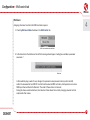
• A
utomatic – Any change of a parameter in the current preset is automatically stored.
• O
n Demand – If any parameter is changed, the change is not saved in the current preset until the Store option
is used (CTRL + Browse). Selecting a different preset from the bank causes irreversible loss to changes applied
to the parameters, unless the Store option is used.
4
The Preset Storing flag is saved in the Decimort configuration file and applies to all new instances of the plug-in. When
removing any instance of the plug-in from the host application the configuration file is saved.
Changing Type
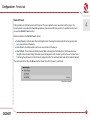
Changing between presets may cause undesirable sonic artifacts. Switching the Changing Type flag may prevent this
phenomenon.
Changing Type flag
• N
ormal – Changing presets takes place in a classical manner; all parameter values are rapidly changed into new
values.
• S
ilent – Before changing the preset the output signal is muted. Next, the parameters are set to new values and
the signal level is restored to its previous value. This feature is significant in live performances, during which, sonic
artifacts caused by preset changes are undesirable.
The flag is saved in the Decimort configuration file and applied to all new instances of the plug-in. When removing any
instance of the plug-in from the host application the configuration file is saved.
18