1
Performing White Balance
Follow these steps to perform a White Balance procedure:
1. The operating room circulator adjusts the light source to the mid-to-maximum range. For
more information on the light source, refer to your Light Source User Manual.
2. An individual in the surgical field points the scope at a clean white surface.
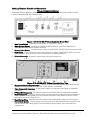
3. The circulator presses the White Balance button while the scope remains focused on the
white surface. “White balance ok” should be displayed on your monitor and an audible beep
will sound.
After the Procedure Ends
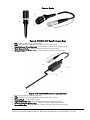
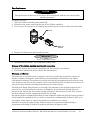
After the procedure, the camera head may be disconnected, cleaned and stored if desired. See
below for cleaning instructions for the camera. To disconnect the camera head from the
controller, grasp the ridged metallic portion of the connector immediately adjacent to the
controller and gently pull it away from the camera controller.
CAUTION
Hold the TriLux camera controller in place while pulling the connector of the camera head.
CAUTION
If the connector is grasped anywhere other than the ridged metallic portion adjacent to the
TriLux controller, it will lock in place and cannot be removed. Do not pull on the flexible
cable portion of the device or the cable could be damaged. Be sure to grasp the connector as
noted above.
Maintenance and Cleaning
Maintenance
CAUTION
This product has no user serviceable parts. Do not remove the cover or attempt to do any
repairs yourself.
IMPORTANT
In your inquiries or correspondence please always indicate the model and serial number
printed on the identification plate. Further documentation is available from the
manufacturer on request.
Maintenance intervals
IMPORTANT
To prevent incidents caused by aging and wear, the device and its accessories must be
serviced at adequate intervals. Depending on the frequency of use, however at least once a
year, an expert must check the device and carry out a safety test.
Cleaning of TriLux Controller & IsoVu Camera Head
Clean the TriLux controller, IsoVu camera head and video cables using a soft cloth dampened
with 70% isopropyl alcohol. Remove stains by using a mild ammonia-based cleaner.
IsoLux IIc 100 Ferncroft Road, Danvers, MA USA 01923 PH 978.774.9136 FAX 978.774.1559
12