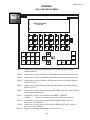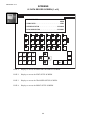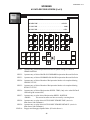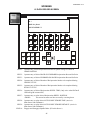
1
I-SV-301A
Installation, Setup
and Operation
INSTRUCTIONS
for
SUNNEN® VERTICAL HONING MACHINE
SV3 Series
READ THE FOLLOWING INSTRUCTIONS THOROUGHLY AND CAREFULLY BEFORE UNPACKING,
INSPECTING, OR INSTALLING THE SUNNEN® SV3 VERTICAL HONING MACHINE.
“SUNNEN, THE SUNNEN LOGO, GENERAL HONE AND THE GENERAL HONE LOGO ARE REGISTERED TRADEMARKS OF SUNNEN PRODUCTS COMPANY.”
SUNNEN ® PRODUCTS COMPANY • 7910 MANCHESTER AVENUE • ST. LOUIS, MO 63143, U.S.A. • PHONE: 314-781-2100
GENERAL INFORMATION
The Sunnen® equipment has been designed and engineered for a wide variety of parts within the capacity and limitation of the equipment. With proper care
and maintenance this equipment will give years of service.
READ THE FOLLOWING INSTRUCTIONS CAREFULLY AND THOROUGHLY BEFORE UNPACKING, INSPECTING, OR INSTALLING THIS EQUIPMENT.
IMPORTANT: Read any supplemental instructions BEFORE installing this equipment. These supplemental instructions give you important information to
assist you with the planning and installation of your Sunnen equipment.
Sunnen Technical Service Department is available to provide telephone assistance for installation, programming, & troubleshooting of your Sunnen
equipment. All support is available during normal business hours, 8:00 AM to 4:30 PM Central Time. Emergency breakdown support is available on a 24
hour / 7 day basis.
Review all literature provided with your Sunnen equipment. This literature provides valuable information for proper installation, operation, and maintenance
of your equipment. Troubleshooting information can also be found within the Instructions. If you cannot find what you need, call for technical support.
Where applicable, programming information for your Sunnen equipment is also included. Most answers can be found in the literature packaged with your
equipment.
Help us help you. When ordering parts, requesting information, or technical assistance about your equipment, please have the following
information available:
• Have ALL MANUALS on hand. The Customer Services Representative or Technician will refer to it.
• Have Model Number and Serial Number printed on your equipment Specification Nameplate.
• Where Applicable: Have Drive model and all nameplate data. Motor type, brand, and all nameplate data.
For Troubleshooting, additional information may be required:
• Power distribution information (type - delta, wye, power factor correction; other major switching devices used, voltage fluctuations)
• Installation Wiring (separation of power & control wire; wire type/class used, distance between drive and motor, grounding).
• Use of any optional devices/equipment between the Drive & motor (output chokes, etc.).
For fast service on your orders call:
Sunnen Automotive Customer Service toll free at: 1-800-772-2878
Sunnen Industrial Customer Service toll free at: 1-800-325-3670
Customers outside the USA, contact your local authorized Sunnen Distributor.
Additional information available at: http://www.sunnen.com or e-mail: [email protected]
NOTE: Sunnen reserves the right to change or revise specifications and product design in connection with any feature of our products contained herein.
Such changes do not entitle the buyer to corresponding changes, improvements, additions, or replacements for equipment, supplies or accessories
previously sold. Information contained herein is considered to be accurate based on available information at the time of printing. Should any discrepancy of
information arise, Sunnen recommends that user verify the discrepancy with Sunnen before proceeding.
ESD PREVENTION REVIEW
Let's review the basics of a sound static control system and its effective implementation. First, in the three step plan:
1.
Always ground yourself when handling sensitive components or assemblies.
2.
Always use a conductive or shielded container during storage or transportation. These materials create a Faraday
cage which will isolate the contents from static charges.
3.
Open ESD safe containers only at a static safe work station.
At the static safe work station, follow these procedures before beginning any work:
A.
Put on your wrist strap or foot grounding devices.
B.
Check all grounding cords to make sure they are properly connected to ground, ensuring the effective dissipation of static charges.
C.
Make sure that your work surface is clean and clear of unnecessary materials, particularly common plastics.
D.
Anti-static bubble wrap has been included for use at the machine when an ESD safe workstation is not available.
You are now properly grounded and ready to begin work. Following these few simple rules and using a little common sense will go a long
way toward helping you and your company in the battle against the hazards of static electricity. When you are working with ESD sensitive devices, make sure you:
GROUND
ISOLATE
NEUTRALIZE
ii
SUNNEN® LIMITED PRODUCT WARRANTY
Sunnen® Products Company and its subsidiaries (SPC) warrant that all new SPC honing machines, gaging equipment, tooling, and related equipment will
be free of defects in material and/or workmanship for a period of one year from the date of original shipment from SPC.
Upon prompt notification of a defect during the one-year period, SPC will repair, replace, or refund the purchase price, with respect to parts that prove to be
defective (as defined above). Any equipment or tooling which is found to be defective from improper use will be returned at the customer's cost or repaired
(if possible) at customer's request. Customer shall be charged current rates for all such repair.
Prior to returning any SPC product, an authorization (RMA#) and shipping instructions must be obtained from the Customer Service Department or items
sent to SPC will be returned to the customer.
Warranty Limitations and Exclusions This Warranty does not apply to the following:
• Normal maintenance items subject to wear and tear: (belts, fuses, filters, etc).
• Damages resulting from but not limited to:
› Shipment to the customer (for items delivered to customer or customer's agent F.O.B., Shipping Point)
› Incorrect installation including improper lifting, dropping and/or placement
› Incorrect electric power (beyond +/- 10% of rated voltage) including intermittent or random voltage spikes or drops
› Incorrect air supply volume and/or pressure and/or contaminated air supply
› Electromagnetic or radio frequency interference from surrounding equipment (EMI, RFI)
› Storm, lightning, flood or fire damage
› Failure to perform regular maintenance as outlined in SPC manuals
› Improper machine setup or operation causing a crash to occur
› Misapplication of the equipment
› Use of non-SPC machines, tooling, abrasive, fixturing, coolant, repair parts, or filtration
› Incorrect software installation and/or misuse
› Non-authorized customer installed electronics and/or software
› Customer modifications to SPC software
THE LIMITED WARRANTY DESCRIBED HEREIN IS EXPRESSLY IN LIEU OF ALL ANY OTHER WARRANTIES. SPC MAKES NO REPRESENTATION OR WARRANTY OF ANY
OTHER KIND, EXPRESS OR IMPLIED, WHETHER AS TO MERCHANTABILITY, FITNESS FOR A PARTICULAR PURPOSE OR ANY OTHER MATTER. SPC IS NOT
RESPONSIBLE FOR THE IMPROPER USE OF ANY OF ITS PRODUCTS. SPC SHALL NOT BE LIABLE FOR DIRECT, INDIRECT, INCIDENTAL, OR CONSEQUENTIAL
DAMAGES INCLUDING BUT NOT LIMITED TO: LOSS OF USE, REVENUE, OR PROFIT. SPC ASSUMES NO LIABILITY FOR PURCHASED ITEMS PRODUCED BY OTHER
MANUFACTURERS WHO EXTEND SEPARATE WARRANTIES. REGARDLESS OF ANY RIGHTS AFFORDED BY LAW TO BUYER, SPC's LIABILITY, IF ANY, FOR ANY AND
ALL CLAIMS FOR LOSS OR DAMAGES WITH RESPECT TO THE PRODUCTS, AND BUYER'S SOLE AND EXCLUSIVE REMEDY THEREFORE, SHALL IN ALL EVENTS BE
LIMITED IN AMOUNT TO THE PURCHASE PRICE OF THAT PORTION OF THE PRODUCTS WITH RESPECT TO WHICH A VALID CLAIM IS MADE.
Shipping Damages
Except in the case of F.O.B., Buyer's destination shipments, SPC will not be liable for any settlement claims for obvious and/or concealed shipping damages.
The customer bears the responsibility to unpack all shipments immediately and inspect for damage. When obvious and/or concealed damage is found, the
customer must immediately notify the carrier's agent to make an inspection and file a claim. The customer should retain the shipping container and packing
material.
SUNNEN® SOFTWARE LICENSE AGREEMENT
This document is a Legal Agreement between you, as user and licensee (Licensee), and Sunnen® Products Company (SPC) with respect to preprogrammed
software (Software) provided by SPC for use on SPC Equipment. By using the Software, you, as Licensee, agree to become bound by the terms of this
Agreement.
In consideration of payment of the license fee (License Fee) which is part of the price evidenced by your receipt (Receipt), SPC grants to you as Licensee
a non-exclusive right, without right to sub-license, to use the particular copy of the SPC Software licensed hereunder only on the particular equipment sold with
the Software. SPC reserves all rights including rights not otherwise expressly granted, and retain title and ownership to the Software including all subsequent copies or updates in any media. The Software and all accompanying written materials are covered by copyrights owned by SPC. If supplied on
removable media (floppy disk), you, as Licensee, may copy the Software only for back up purposes; or you may request that SPC copy the Software for you
for the same purposes. All other copying of the Software or of the accompanying written materials is expressly forbidden and is in violation of the Agreement.
The Software and accompanying written materials (including the user's manual, if any) are provided in an "as is" condition without warranty of any kind
including the implied warranties of merchantability and fitness for a particular purpose, even if SPC has been advised of this purpose. SPC specifically does
not warrant that it will be liable as a result of the operation of the Software for any direct, indirect, consequential or accidental damages arising out of the
use of or inability to use such product even if SPC has been advised of the possibility of such use. It is recognized that some states do not allow the exclusion or limitation of liability for consequential or accidental damages and to the extent this is true, the above limitations may not apply.
Any alteration or reverse engineering of the software is expressly forbidden and is in violation of this agreement.
SPC reserves the right to update the software covered by this agreement at any time without prior notice and any such updates are covered by this
agreement.
iii
SAFETY INSTRUCTIONS
READ FIRST
This machine, like any equipment, may be dangerous if used improperly. Please
read all warnings and instructions before attempting to use this machine.
Always disconnect power at main enclosure before servicing machine.1
Always wear eye protection when operating this machine.
NEVER open or remove any machine cover or protective guard with power "ON."
Always disconnect power at main enclosure before servicing this equipment.1
DO NOT attempt any repair or maintenance procedure beyond those described in
this book. Contact your Sunnen® Field Service Engineer or Technical Services
Representative for repairs not covered in these instructions.
Due to the wide variety of machine configurations, all possibilities cannot be
described in these instructions. Instructions for safe use and maintenance of
optional equipment ordered through Sunnen, will be provided through separate
documentation and/or training provided by your Sunnen Field Service Engineer or
Technical Services Representative.
DO NOT attempt to defeat any safety device on this machine or on any of the
optional equipment.
If specially built automation components are added to this system, be sure that
safety is not compromised. If necessary, obtain special enlarged work area safety
system from Sunnen Products Co.
Indicates CE version ONLY.
1
DO NOT touch electrical components until main input power has been turned off and CHARGE
lamps are extinguished. WARNING: The capacitors are still charged and can be quite dangerous.
iv
TABLE OF CONTENTS
Page
TABLE OF CONTENTS . . . . . . . . . . . . . . . . . . . . . . . . . . . . . . . . . . . . . . . . . . . . . . . . . . . . . . . . . . . . . . . . i
LIST OF APPENDIXES . . . . . . . . . . . . . . . . . . . . . . . . . . . . . . . . . . . . . . . . . . . . . . . . . . . . . . . . . . . . . . . . ii
INTRODUCTION . . . . . . . . . . . . . . . . . . . . . . . . . . . . . . . . . . . . . . . . . . . . . . . . . . . . . . . . . . . . . . . . . . . . . ii
GENERAL INFORMATION & SPECIFICATIONS . . . . . . . . . . . . . . . . . . . . . . . . . . . . . . . . . . . . . . . . . iii
FLOOR LAYOUT (Configuration) . . . . . . . . . . . . . . . . . . . . . . . . . . . . . . . . . . . . . . . . . . . . . . . . . . . . . . . iv
INSTALLATION . . . . . . . . . . . . . . . . . . . . . . . . . . . . . . . . . . . . . . . . . . . . . . . . . . . . . . . . . . . . . . . . . . . . . . .
Purpose . . . . . . . . . . . . . . . . . . . . . . . . . . . . . . . . . . . . . . . . . . . . . . . . . . . . . . . . . . . . . . . . . . . . . . . . . . . . . .
Tools & Materials . . . . . . . . . . . . . . . . . . . . . . . . . . . . . . . . . . . . . . . . . . . . . . . . . . . . . . . . . . . . . . . . . . . . . .
Installation . . . . . . . . . . . . . . . . . . . . . . . . . . . . . . . . . . . . . . . . . . . . . . . . . . . . . . . . . . . . . . . . . . . . . . . . . . . .
Pneumatic Connection . . . . . . . . . . . . . . . . . . . . . . . . . . . . . . . . . . . . . . . . . . . . . . . . . . . . . . . . . . . . . . . . . . .
Electrical Requirements . . . . . . . . . . . . . . . . . . . . . . . . . . . . . . . . . . . . . . . . . . . . . . . . . . . . . . . . . . . . . . . . . .
Electrical Connection . . . . . . . . . . . . . . . . . . . . . . . . . . . . . . . . . . . . . . . . . . . . . . . . . . . . . . . . . . . . . . . . . . .
Hydraulic System . . . . . . . . . . . . . . . . . . . . . . . . . . . . . . . . . . . . . . . . . . . . . . . . . . . . . . . . . . . . . . . . . . . . . .
Coolant Reservoir . . . . . . . . . . . . . . . . . . . . . . . . . . . . . . . . . . . . . . . . . . . . . . . . . . . . . . . . . . . . . . . . . . . . . .
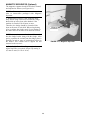
Magnetic Separator (Optional) . . . . . . . . . . . . . . . . . . . . . . . . . . . . . . . . . . . . . . . . . . . . . . . . . . . . . . . . . . . .
Operational Check . . . . . . . . . . . . . . . . . . . . . . . . . . . . . . . . . . . . . . . . . . . . . . . . . . . . . . . . . . . . . . . . . . . . . .
1
1
2
2
4
4
5
5
6
6
6
PREPARING FOR OPERATION . . . . . . . . . . . . . . . . . . . . . . . . . . . . . . . . . . . . . . . . . . . . . . . . . . . . . . . . . . 7
General . . . . . . . . . . . . . . . . . . . . . . . . . . . . . . . . . . . . . . . . . . . . . . . . . . . . . . . . . . . . . . . . . . . . . . . . . . . . . . 7
Major Components . . . . . . . . . . . . . . . . . . . . . . . . . . . . . . . . . . . . . . . . . . . . . . . . . . . . . . . . . . . . . . . . . . . . . 7
Emergency Switch . . . . . . . . . . . . . . . . . . . . . . . . . . . . . . . . . . . . . . . . . . . . . . . . . . . . . . . . . . . . . . . . . . . . . . 7
Controls . . . . . . . . . . . . . . . . . . . . . . . . . . . . . . . . . . . . . . . . . . . . . . . . . . . . . . . . . . . . . . . . . . . . . . . . . . . . . . 7
Safety Symbols . . . . . . . . . . . . . . . . . . . . . . . . . . . . . . . . . . . . . . . . . . . . . . . . . . . . . . . . . . . . . . . . . . . . . . . 10
Workholding Fixture . . . . . . . . . . . . . . . . . . . . . . . . . . . . . . . . . . . . . . . . . . . . . . . . . . . . . . . . . . . . . . . . . . . 10
Honing Tool . . . . . . . . . . . . . . . . . . . . . . . . . . . . . . . . . . . . . . . . . . . . . . . . . . . . . . . . . . . . . . . . . . . . . . . . . . 11
SETUP AND OPERATION . . . . . . . . . . . . . . . . . . . . . . . . . . . . . . . . . . . . . . . . . . . . . . . . . . . . . . . . . . . . . .
General . . . . . . . . . . . . . . . . . . . . . . . . . . . . . . . . . . . . . . . . . . . . . . . . . . . . . . . . . . . . . . . . . . . . . . . . . . . . .
Safety Precautions . . . . . . . . . . . . . . . . . . . . . . . . . . . . . . . . . . . . . . . . . . . . . . . . . . . . . . . . . . . . . . . . . . . . .
Operating Hints . . . . . . . . . . . . . . . . . . . . . . . . . . . . . . . . . . . . . . . . . . . . . . . . . . . . . . . . . . . . . . . . . . . . . . .
Setup & Operation . . . . . . . . . . . . . . . . . . . . . . . . . . . . . . . . . . . . . . . . . . . . . . . . . . . . . . . . . . . . . . . . . . . . .
13
13
13
13
13
ROUTINE MAINTENANCE . . . . . . . . . . . . . . . . . . . . . . . . . . . . . . . . . . . . . . . . . . . . . . . . . . . . . . . . . . . .
General . . . . . . . . . . . . . . . . . . . . . . . . . . . . . . . . . . . . . . . . . . . . . . . . . . . . . . . . . . . . . . . . . . . . . . . . . . . . .
Cleaning . . . . . . . . . . . . . . . . . . . . . . . . . . . . . . . . . . . . . . . . . . . . . . . . . . . . . . . . . . . . . . . . . . . . . . . . . . . .
Lubrication . . . . . . . . . . . . . . . . . . . . . . . . . . . . . . . . . . . . . . . . . . . . . . . . . . . . . . . . . . . . . . . . . . . . . . . . . .
Hydraulics . . . . . . . . . . . . . . . . . . . . . . . . . . . . . . . . . . . . . . . . . . . . . . . . . . . . . . . . . . . . . . . . . . . . . . . . . . .
Coolant Reservoir . . . . . . . . . . . . . . . . . . . . . . . . . . . . . . . . . . . . . . . . . . . . . . . . . . . . . . . . . . . . . . . . . . . . .
Drive Belt Tension . . . . . . . . . . . . . . . . . . . . . . . . . . . . . . . . . . . . . . . . . . . . . . . . . . . . . . . . . . . . . . . . . . . . .
Drive Belt Replacement . . . . . . . . . . . . . . . . . . . . . . . . . . . . . . . . . . . . . . . . . . . . . . . . . . . . . . . . . . . . . . . . .
Coolant Motor . . . . . . . . . . . . . . . . . . . . . . . . . . . . . . . . . . . . . . . . . . . . . . . . . . . . . . . . . . . . . . . . . . . . . . . .
Wipers . . . . . . . . . . . . . . . . . . . . . . . . . . . . . . . . . . . . . . . . . . . . . . . . . . . . . . . . . . . . . . . . . . . . . . . . . . . . . .
Magnetic Separator (Opt) . . . . . . . . . . . . . . . . . . . . . . . . . . . . . . . . . . . . . . . . . . . . . . . . . . . . . . . . . . . . . . .
17
17
17
17
18
18
19
19
19
19
20
TROUBLESHOOTING . . . . . . . . . . . . . . . . . . . . . . . . . . . . . . . . . . . . . . . . . . . . . . . . . . . . . . . . . . . . . . . . . 21
General . . . . . . . . . . . . . . . . . . . . . . . . . . . . . . . . . . . . . . . . . . . . . . . . . . . . . . . . . . . . . . . . . . . . . . . . . . . . . 21
Operational Troubleshooting . . . . . . . . . . . . . . . . . . . . . . . . . . . . . . . . . . . . . . . . . . . . . . . . . . . . . . . . . . . . . 21
v
APPENDIXES
A
B
C
D
Screens . . . . . . . . . . . . . . . . . . . . . . . . . . . . . . . . . . . . . . . . . . . . . . . . . . . . . . . . . . . . . . . . . . . . . . . . . . .
Speed Conversion Chart . . . . . . . . . . . . . . . . . . . . . . . . . . . . . . . . . . . . . . . . . . . . . . . . . . . . . . . . . . . . .
Coolant Flow Diagram . . . . . . . . . . . . . . . . . . . . . . . . . . . . . . . . . . . . . . . . . . . . . . . . . . . . . . . . . . . . . . .
Pneumatic Flow Diagram . . . . . . . . . . . . . . . . . . . . . . . . . . . . . . . . . . . . . . . . . . . . . . . . . . . . . . . . . . . .
Purchased Components . . . . . . . . . . . . . . . . . . . . . . . . . . . . . . . . . . . . . . . . . . . . . . . . . . . . . . . . . . . . . .
23
45
46
47
49
INTRODUCTION
This Instruction Manual is provided to give the information required to install, operate, and maintain the
SV3-Series Sunnen Vertical Honing Machines.
As there are numerous workpieces that can be honed on this machine, all possible combinations cannot be
discussed here. The determining factor as to whether a particular part or material can be honed in the machine
will come with experience from working with the machine in your shop.
When ordering parts for, or requesting information about your machine, include the serial number of your
machine.
READ THE FOLLOWING INSTRUCTION THOROUGHLY BEFORE UNPACKING, INSPECTING, OR
INSTALLING THE SUNNEN SV3 VERTICAL HONING MACHINE.
vi
GENERAL INFORMATION & SPECIFICATIONS
Sunnen Vertical Honing Machine - SV3-Series
Diameter Range (OD)1:
Workpiece Weight1:
1360 kg (3000 lbs.)
Workpiece Length :
1 m (39.38 in.)
1
Work Area Envelope (Table):
Stroke Length Range :
1
Reciprocation Speed (Stroke):
Hydraulic (Stroke) Motor:
Thrust:
Spindle Speeds:
762 x 1270 mm (30 x 50 in.)
Up to 1219 mm (48 in.)
3,04 - 27,4 mpm (10 - 90 fpm)
7,5 kW (10 hp)
1134 kg (2500 lbs.) maximum
10 to 300 rpm (Opt: 10 to 500 rpm)
Spindle Motor:
3,7 kW (5 hp) / 7,5 kW (10 hp)
Feed - Rotary:
Up to 14,8 m-kg (20 ft-lb) maximum torque
Feed - Push Feed:
Coolant Pump:
Up to 952 kg (2100 lbs.) force
Centrifugal pump
Pump Motor:
0,187 kW (1/4 hp)
Coolant Capacity:
189 L (50 US gal.)
Pump Rate:
38 LPM (10 GPM)
Coolant Requirements:
Floor Space:
Floor Weight (Dry):
Floor Load:
Pneumatic Requirements:
Electrical Requirements:
Color:
Noise Emission:
1
12,7 - 305 mm (.50 - 12 in.)
Sunnen Industrial Honing Fluids
2159 W x 2083 D x 3937 H mm (85 x 82 x 155 in.)
2268 kg (5000 lbs.)
739 kg/sq. meter (151 lbs./sq. ft)
30 LPM @ 5,4 Bar (1 CFM @ 80 PSI)
230/460V, 60Hz, 3Ph
380/400V, 50Hz, 3Ph
Pearl Gray / Pewter Gray / Burgundy Trim
Less than 76 dB(A) continuous
Less than 78 dB(A) peak
Load (max. noise) condition in a typical factory environment.
Diameter range, length range, and workpiece weight are contingent on workpiece and application.
vii
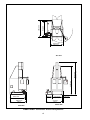
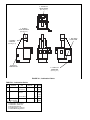
1778 mm
(70 in.)
2082,8 mm
(82 in.)
1619,3 mm
(63.75 in.)
3467,1 mm
(136.5 in.)
4086,3 mm
(160.875 in.)
TOP VIEW
533,4 mm
(21 in.)
1968,5 mm
(77.5 in.)
1371,6 mm
(54 in.)
2159 mm
(85 in.)
2082,8 mm
(82 in.)
FRONT VIEW
SIDE VIEW
FLOOR LAYOUT - Sunnen SV3 Vertical Honing Machine
viii
76,2 mm
(3 in.)
SECTION 1
INSTALLATION
PURPOSE
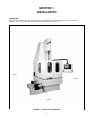
This Section is designed to aid user in unpacking, inspecting, and installing Sunnen® Vertical Honing
Machine, SV3 Series. Hereafter, referred to as the Machine (see Figure 1-1).
LEFT
RIGHT
FRONT
FIGURE 1-1, Vertical Honing Machine
1
TOOLS & MATERIALS
The following tools and materials are required for
unpacking and installing machine:
Wire Cutters/Strippers
Knife
Screw Driver (Std. nose)
Hammer
Slip-Joint Pliers
Crow Bar
Cleaning Solvent
Tin Strips
Open End Wrench (17, 19 & 24 mm)
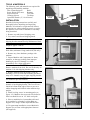
LEVELING
SCREW
JAM NUT
INSTALLATION
Read the following instructions carefully and
thoroughly before unpacking and inspecting
Machine. All references to right and left in these
instructions are, unless otherwise noted, as seen by
the operator as one looks at Machine or assembly
being described.
STEEL PAD
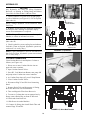
1. Remove top and front of shipping crate.
FIGURE 1-2, Leveling Screws
2. Cut, remove and discard shipping bands.
NOTE: Machine is shipped lying on its back with
shipping brackets mounted to top and bottom of base.
CAUTION
Weight is approx. 3000 lb.
3. Move machine to desire location using a forklift.
Slide forks (minimum 6' long) under skid (side only).
4. Remove any loose hardware package with
machine.
5. Inspect Machine and Components for dents,
scratches, or damage resulting from improper
handling by carrier. If damage is evident,
immediately file a claim with carrier.
CAUTION
Remove machine from skid. Do not lift directly on
machine. Lift with shipping brackets only.
FIGURE 1-3, Operator Control Console
6. Remove machine from skid with a crane by
attaching a clevis to each front mounting pad and a
strap on 6" channel at top of upper shipping bracket.
CAUTION
Use forklift to prevent kickback.
7. The machine can be set up right by lifting on 6"
channel of top-shipping bracket. Take care to use a
forklift at bottom front edge of base to prevent a
sudden dropping and kickback when machine tips
upright.
8. Install leveling screws in mounting pads (see
Figure 1-2). Machine does not need to be bolted to
floor but should be set on 1/2" thick steel pads.
9. Place a machinist level on machine table and
level machine by adjusting Leveling Bolts on
Support Feet, using a 24 mm Open End Wrench.
10. For permanent installation, secure Machine's
Support Feet to Floor with appropriate fasteners
(not supplied).
FIGURE 1-4, Swing Arm
2
11. Remove top and bottom shipping brackets after
machine is setting upright.
12. After machine is up right and in position,
remove wrapping from operator's console and
bracing bolted to side panels (see Figure 1-3).
13. If applicable: While supporting console and arm
with a crane, remove bolts mounting it to offset
shipping pad where it attaches to machine column.
• Remove shipping pad from column and remount
assembly, without pad, to four holes on machine
column.
• Discard shipping pad. (Some machines may not
have this pad.)
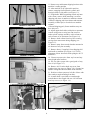
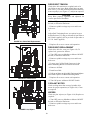
FIGURE 1-5, Way Bars
14. Adjust upper shaft collar (with pins) on operators
console swing arm so swing arm can not move
under spindle carriage assembly or hit column at
each extreme of its movement (see Figure 1-4).
15. Remove shaft collars from way bars securing
carriage from movement during shipping (see
Figure 1-5).
16. Remove strap from encoder bracket mounted at
tile bottom of way bar assembly.
17. Remove doors, if supplied, from shipping skid
and install on machine (see Figure 1-6). (Verify
alignment of door interlock switch plungers on CE
machines)
FIGURE 1-6, Doors
18. Clean rust preservative from way bars and any
other bright metal surfaces.
19. Fill way lube system with a good grade of way
lube oil (see Figure 1-7).
20. Remove #8-32 socket head cap screw from
gearbox riser pipe cap (see Figure 1-8). (Located on
spindle carriage and accessed from inside column.)
21. Position coolant system on left side of base with
filter under trough extending from base.
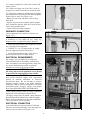
22. A small chute is provided to extend trough.
Attach chute to the trough with two 1/4-20-button
head cap screws (see Figure 1-9).
FIGURE 1-7, Lube System
DISCHARGE
CHUTE
FIGURE 1-9, Discharge Chute
FIGURE 1-8, Gearbox
3
23. Connect coolant hose to hose barb on base and
clamp in place.
24. Connect two plugs (one if no filter is used) to
receptacles on small electrical box located on base.
25. Connect drive adapter to spindle nose by aligning
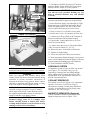
pins with bayonet slots, push up while allowing spring
loaded collar to move (see Figure 1-10).
• Rotate pins into slots and allow collar to drop
back down.
• Tighten ring nut on drive adapter against spindle
nose. (Rotate hex shaft to align drives feed rod hex
socket inside spindle shaft.)
• Connect desired tooling to adapter.
FIGURE 1-10, Drive Adapter
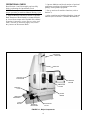
PNEUMATIC CONNECTION
Connect pneumatic line (airline) as follows (see
Figure 1-11):
NOTE: The Factory Air Supply Line is not supplied.
A minimum of 0,55 MPa (80 psi) clean, dry
compressed air is required for proper operation.
1. Install Quick-Disconnect (not supplied) in airline
port on Airline Filter Regulator.
2. CONNECT 1/2 in. (13 mm) factory air supply
line (not supplied) to Quick-Disconnect.
FIGURE 1-11, Pneumatic
3. Airline Filter Regulator Valve: This valve is
preset at the factory to 0,55 MPa (80 psi).
ELECTRICAL REQUIREMENTS
All wiring is to be performed by a competent,
Licensed Electrician in accordance with all local,
state, and federal codes and regulations; along with
any special information provided on machine
nameplate or electrical specification plate.
WARNING
All wiring and electrical equipment service should
be performed by authorized personnel ONLY.
CAUTION
Note model electrical supply cord requirement
printed on machine nameplate or electrical
specification plate. Do not attempt to connect
machine if supply voltage is not within following
acceptable limits as noted on nameplate or electrical
specification plate. If supply voltage is not within
these limits MACHINE WILL BE DAMAGED.
• Verify supply voltage is same as voltage on Machine
Nameplate or Electrical Specifications Plate.
• If supply voltage does not match voltage stated on
Electrical Specification Plate but is within acceptable
limits, electrical connection can proceed but Machine
Conversion below will be necessary.
ELECTRICAL CONNECTION
A pre-drilled hole has been provided in Electrical
Enclosure for Electrical Supply Cord (not supplied).
Connect Cord as follows (see Figure 1-12).
FIGURE 1-12, Electrical
4
2. Turn Master ON/OFF Switch to OFF position
and open Doors. (Doors WILL NOT open unless
Master ON/OFF Switch is in OFF position.)
WARNING
You must use hole provided. Drilling any new
holes in electrical enclosure may void machine
warranty.
FILL CASE HERE
PRESSURE
ADJUSTMENT
3. Remove hole plug from entrance hole in
enclosure and install an approved oil tight fitting.
4. Insert Electrical Supply Cord through Oil Tight
Fitting and route to Electrical Disconnect Block.
Allow for approximately 305 mm of cable from
where it enters Enclosure; then cut off excess.
5. Strip 153 mm (6 in.) off cable's outer jacket.
6. Strip 6 mm (1/4 in.) of insulation off each wire.
FIGURE 1-13, Hydraulic
7. Connect Green Wire (GRN) to PE Terminal on
Electrical Disconnect Block (Earth Ground).
MAGNETIC
SEPARATOR
8. If applicable: Connect Blue Wire to E (Zero
Point) as noted on Block.
9. Connect other three wires to Disconnect Block
(CB1) as noted on Block (L1, L2, L3).
PUMP
10. Route and secure Cord inside of Enclosure.
11. Tighten Oil Tight Fitting.
12. Close and secure/lock Door(s) to Enclosure.
13. Route and connect Electrical Supply Cord to power
source. (PLUG Machine's Electrical Supply Cord into a
properly polarized grounding-type wall receptacle.)
14. Turn ON Master ON/OFF Switch.
FIGURE 1-16, Coolant Reservoir
HYDRAULIC SYSTEM
Fill hydraulic system (50 gal.) at filler cap on tank
(see Figure 1-13). Fill pump case (2 qt.) by
temporarily removing hose and filling through
fitting with medium weight hydraulic oil. (BP
Energol HLP-46 or equivalent pre-filtered to 10
micron.) Reinstall the hose.
NOTE: For Cord dimensions refer to General
Information & Specification at front of this manual.
CAUTION
Doors are equipped with lockable Safety Door
Latches. Doors should be closed and latched during
operation to prevent accidental interruption of
operation from doors being opened. Doors Latches
should be Locked-Out and Tagged during servicing
to prevent machine from being powered up.
COOLANT RESERVOIR
Fill coolant reservoir (see Figure 1-14). Maximum
capacity of reservoir is 189 Liters (50 gal.)
subsequent to running Coolant pump. Minimum
capacity of Coolant Reservoir, for proper pump
operation is 110 Liters (29 gal.).
1. If applicable: Loosen Safety Latches on door(s) to
enclosure, using a screwdriver. Or, on CE models,
unlock doors to Electrical Control Enclosure using
key supplied with machine. Door(s) to enclosure is
equipped with Key-Lock Safety Latches.
MAGNETIC SEPARATOR (Optional)
Consult installation Instructions packaged with
Magnetic Separator (refer to Figure 1-14).
WARNING
Residual Voltage exists for 2-3 minutes after
Master ON/OFF Switch is turned OFF. Before
working inside Enclosure, wait for all fans to stop
running to allow drives to discharge.
5
OPERATIONAL CHECK
Read Sections 1 and 2 thoroughly and carefully
before performing the Operational Check.
2. Operate Machine and check rotation of optional
equipment according to Installation Instruction
package with optional equipment.
NOTE: Power up and start machine to check for
proper operation per machine Manual Honing Cycle.
3. Set up and test all machine functions (refer to
Section 3).
1. Operate Machine and check rotation of Spindle
Shaft. Rotation of Shaft should be counterclockwise,
as viewed from output end of Spindle Drive Motor.
If rotation is incorrect, reverse any two wires (red,
white, or black) of electrical supply cord, where
they connect to Disconnect Block.
4. After unpacking and installing Machine, clean and
lubricate (refer to Section: 4, Routine Maintenance).
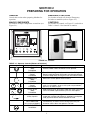
SPINDLE
GEAR BOX
FEED UNIT
ELECTRICAL
ENCLOSURE
CONTROL
STATION
WORKPIECE
FIXTURE
COOLANT
PUMP
GUARD
DOORS
COOLANT
RESERVOIR
WASTE
BUCKET
DISCHARGE
CHUTE
MAGNETIC
SEPARATOR
FIGURE 2-1, Major Components
6
SECTION 2
PREPARING FOR OPERATION
GENERAL
EMERGENCY SWITCHES
Consult this section when preparing Machine for
operation.
For location of major all electrical Emergency
Switches on machine (refer to Figure 2-1).
MAJOR COMPONENTS
CONTROLS
For location of major components on machine (see
Figure 2-1).
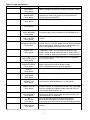
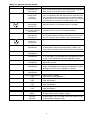
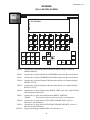
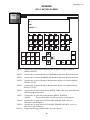
For location of controls see Figure 2-3; and refer to
Table 2-1 thru 2-2 for function of controls.
R
SUNNEN PRODUCTS CO.
CYCLE STOP
SUNNENGV3
SPINDLE ROTATION . . . . . . . . . . . . . . . . . . . . . . . . . . . . . . . . . . FORWARD
HONING CYCLE TIME . . . . . . . . . . . . . . . . . . . . . . . . . . . . . . 10 MIN 0 SEC
RUNOUT STROKE COUNT . . . . . . . . . . . . . . . . . . . . . . . . . . . . . . . . 0 CNT
ENTER SPINDLE SPEED . . . . . . . . . . . . . . . . . . . . . . . . . . . . . . . . .120 RPM
ENTER RECIPROCATION SPEED . . . . . . . . . . . . . . . . . . . . . . . . . . . 70 FPM
F7
F3
F4
F5
MAIN
MENU
SCREEN
DIR
K1
K2
K3
K4
K5
K6
K7
HYD.
STOP /
START
MAN /
AUTO
MODE
JOG
UP
JOG
DOWN
SPINDLE
JOG
DWELL
OFF /
ON
COOL
MAN. /
AUTO
F1
F2
K9
HOME
MACH.
K11
K10
RESET
CNTRS
K12
PULSE
FEED
OFF / ON
WITHDRAW
EXIT
K13
JOG
EXPAND
F6
F8
SPINDLE
FWD /
REV
ENG
METRIC
SHIFT
K16
TOOL
BLOCK
TOOL
AUTO
EXPAND
!
HELP
WITHDRAW
K15
K14
DWELL
SEL.
K8
TOOL
COL.
+0.00
ESC
8
7
E
D
5
4
1
9
A
2
0
B
ACK
F
6
3
.
C
0
+/-
EMERGENCY
STOP
POWER ON
SHIFT
POWER OFF
INS
DEL
HELP
0
ENTER
SPINDLE LOAD
CYCLE READY
START
CYCLE STOP
UP
DOWN
FIGURE 2-2, Controls
TABLE 2-1, Operator Controls (Buttons & Switches)
SYMBOL
DESCRIPTION
FUNCTION
EMERGENCY STOP
(Red)
Pushbutton
POWER ON
(Green)
Pushbutton
POWER OFF
(Red)
Pushbutton
CYCLE READY/START
(Green)
Pushbutton
CYCLE STOP
(Red)
Pushbutton
Shuts-OFF all power to the machine functions. Button must
release, before Power ON button can be pushed.
UP / DOWN
3-Way Joystick
CYCLE START
OPTO SWITCHES
(U.S. Domestic Models)
0
0
Turns ON control power to the machine. After E-Stop
Button is pushed; Power ON button must be pushed once
to reset E-Stop Relay and again to turn ON Control Power.
Shuts-OFF control power to the machine.
Flashes when conditions have been met to start a honing
cycle. On CE models, serves as the cycle start pushbutton;
light stays on while in cycle.
Stops honing cycle. All counters hold their count and cycle
can be resumed at place where cycle was interrupted.
Used to move spindle carriage in either direction. To short
stroke tool at either end of bore or anywhere in workpiece
used joystick to hold or reverse direction of travel.
Two optically isolated switches that must be operated
simultaneously in order to start a honing cycle. They are
located on either side of the operator’s console.
SPINDLE FEED
Load Meter
7
TABLE 2-2, Operator Interface
SYMBOL
DESCRIPTION
FUNCTION
F1
MAIN MENU
Touch Button
F2
SCREEN DIR.
Touch Button
F3
Touch Button
Press to access MAIN MENU.
(NOTE: Hitting the escape key will return to previous screen.)
F4
Touch Button
Various functions - Screen Dependent.
F5
HOME MACHINE
Touch Button
F6
ENG. / METRIC
Touch Button
F7
SPINDLE FWD./REV.
Touch Button
F8
DWELL SEL.
Touch Button
K1
HYD. STOP/START
Touch Button
K2
MAN/AUTO MODE
Touch Button
K3
JOG UP
Touch Button
K4
JOG DOWN
Touch Button
K5
SPINDLE JOG
Touch Button
K6
DWELL OFF/ON
Touch Button
K7
COOL MAN/AUTO
Touch Button
K8
WITHDRAW
Touch Button
K9
RESET CNTRS
Touch Button
Press to access SCREEN DIRECTORY.
Operator can access any screen by cursing to desired
screen and pressing ENTER.
Various functions - Screen Dependent.
Press to automatically move Spindle Carriage to Home
In manual mode, causes machine to re-zero encoder to PLC.
This will convert units of measurement to English or Metric
system.
This is a screen sensitive key and is only active while in spindle
screen. Press to alternate spindle direction display between
forward and reverse. Selects rotation of spindle head. Can
only be changed while machine is not in cycle.
This is a screen sensitive key and is only active while in
reciprocation screen. Press to display dwell position (top,
bottom or both. Used in conjunction with K6 (Dwell Off/On). If
dwell is turned on, honing tool will dwell at selected position.
Press to turn hydraulic system either ON or OFF depending
on its current status.
Press to select operating mode of machine.
MAN: Used joystick to move spindle carriage.
AUTO: Required to initiate “Cycle Ready/Start.”
Press to move spindle carriage in upward direction.
Press to move spindle carriage in downward direction.
Press to initiate spindle for short intervals. Cause spindle
to rotate in the selected direction at a slow speed.
Press to initiate dwell status. Used in conjunction with dwell
position selected “on” reciprocation screen. LED associated
with this function key indicates current status with LED “on”
meaning that dwell function is on.
Press to select operation of coolant pump. MAN: Coolant flows
continuously. AUTO: Coolant flows only during honing cycle.
(Machine defaults to automatic.)
Press to interrupt honing cycle and stroke counter.
Ends honing cycle. Resets all timers and counters.
Depressing again will cause tool to move to withdraw position.
Press to reset cycle timer and stroke counter to their default
settings.
NOTE: “K” function button LED indicators are on for a function operating or for the second function of a dual function key.
8
TABLE 2-2, Operator Interface (Cont’d)
SYMBOL
DESCRIPTION
FUNCTION
K10
WITHDRAW / EXIT
Touch Button
Press to withdraw honing tool to mouth of bore. Tool will jog
up to second withdraw position with spindle rotating at jog speed
Ends honing cycle. Resets all timers and counters.
K12
PULSE FEED
OFF/ON
Touch Button
Press to turn pulse feed option ON or OFF, depending on current
status as indicated by LED. ON: Honing tool will expand for time
set on tool feed screen and will then go into a blocked condition
for amount of time set on tool feed screen. Process will continue
until cycle times out and run out stroke counter starts.
K13
JOG EXPAND
Touch Button
Press to expand honing tool.
(Will not function if an auto expand cycle is activated.)
K14
TOOL AUTO EXPAND
Touch Button
Press to automatic feed honing tool upon cycle start..
(Otherwise tool will start up in a blocked condition.)
K15
TOOL BLOCK
Touch Button
Press for honing tool to stay in a blocked condition, meaning
tool will neither expand or collapse. An automatic cycle will start
up in this condition unless operator selects another option.
K16
TOOL COL.
Touch Button
Press to collapse honing tool.
SHIFT
Touch Button
Used in conjunction with Numeric (Alpha) Keypad to switch
to enter letters. Because of limited space, if letter is not
shown, press last letter shown and use arrows to select letter.
INS DEL
Touch Button
HELP
Touch Button
ENTER
Touch Button
ACK
Touch Button
ESC
Touch Button
FEED IN PROGRESS
LED
SHIFT
LED
HELP
LED
(CAUTION)
LED
CURSOR
KEYS
NUMERIC
(ALPHA)
KEYPAD
Button will light when operator entry screen for which there
is a help screen. Pressing button will take operator to help
screen. Press ESC button to return to previous screen.
Pressing this button enters operations and entries that
require this function.
If an alarm appears on screen then operator presses this
button acknowledge alarm and return to operations screen.
Red light will remain lit until condition is cleared.
Escape: Press to return to previous screen or step.
Indicates tool is feeding.
(Also see K9 and K10 Buttons.)
Indicates that Shift Button has been pressed.
(See Shift Button.)
Indicates that help screen is available for present screen.
(See Help Button.)
Indicates that an alarm has sounded.
(See ACK Button.)
Arrows: Used in conjunction with other keys/buttons.
Used to move cursor on display screen.
Used to enter numbers. Using Shaft Button allows operator
to enter letters. Press last letter and use up arrow to scroll
to desired letter and press enter.
NOTE: “K” function button LED indicators are on for a function operating or for the second function of a dual function key.
9
TABLE 2-3, Safety Symbols
SYMBOL
DESCRIPTION
FUNCTION
Warning Label
Warns that an electrical hazard exists.
Warning Label
Warns that safety glasses should be worn at all times when operating
this machine.
Warning Strip
Warns that a physical hazard exists, and that proper precautions should
be taken.
Label
Designates this machine is “CE” compliance.
Warning
Label
Warns that a hazard from objects falling off work table exists and that proper
precautions should be taken.
Warning
Label
Warns not to hold workpiece in hand without a torque
resisting fixture.
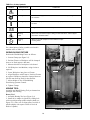
SAFETY SYMBOLS
For a description of safety symbols used on this
machine refer to Table 2-3.
WORKHOLDING FIXTURE
Position the Workholding Fixture as follows:
1. Loosen Clamps (see Figure 2-3).
2. Position Fixture so Workpiece will be clamped
close to its Ends (approx. 400 mm).
3. Measure distance of workpiece to be honed.
4. Lift Workpiece into Machine, using a hoist as
required.
CLAMPS
5. Lower Workpiece into place on Fixture.
6. Align Workpiece with Fixtures. Position Fixtures
as required. Workpiece should be clamped between
300-500 mm from its Ends for best Results.
7. Adjust height of Top of Workholding
Fixtureusing operator controls.
8. Tighten Clamps.
HONING TOOL
Assembly and install Honing Tool per instructions
packaged with Tooling.
CLAMPS
Rotary Tool
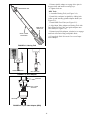
1. Assemble Honing Tool (see Figure 2-4).
2. Install drive adapter in spindle by sliding lock
collar up and inserting spindle adapter shank (see
Figure 2-5). (Take care to align square feed rod of
spindle adapter with square socket of feed rod
inside of spindle.)
FIGURE 2-3, Fixture
10
3. Rotate spindle adapter to engage drive pins in
bayonet slots and install reversing keys.
ADAPTER
4. Tighten lock nut.
MPS Tools
1. Assemble Honing Tool (see Figure 2-4).
2. Install drive adapter in spindle by sliding lock
collar up and inserting spindle adapter shank (see
Figure 2-5).
3. Install MPS Feed Unit (see Figure 2-5).
4. Align Input Yoke Adapter on Honing Tool with
Drive Ring on Feed Unit, and guide adapter onto
Hex Shaft (see Figure 2-6).
HONE HEAD
MODULAR
5. Rotate input Yoke Adapter (clockwise) to engage
and Lock into Drive Ring on Spindle Nose.
DRIVE & FEED
EXTENSION
6. If supplied: Slide Universal Cover over Input
Yoke Adapter.
FIGURE 2-4, Honing Tool
ROTARY ADAPTER
MPS ADAPTER
FIGURE 2-5, Drive Adapter
ADAPTER
INPUT YOKE
ADAPTER
COVER
FIGURE 2-6, Input Yoke Adapter (MPS)
11
NOTES
12
SECTION 3
SETUP & OPERATION
GENERAL
• Keep all visitors a safe distance from work area.
• DO NOT use in dangerous environment. DO NOT
use machines in damp or wet locations, or expose
them to rain. Keep work area well lighted.
• IT IS DANGEROUS to rotating parts, such as, drive
shafts and honing tool during operation.
SV3
• All operational information must be read and understood before operating equipment.
• Observe all caution labels1tags on machine.
• Make no adjustments to hydraulic or electrical systems of machine while machine is powered unless
you are a fully qualified repair technician.
• When electrical panel(s) is (are) opened, all power
must be disconnected and locked out prior to initiating any modifications or repairs.
• Never leave machine unattended while it is running.
• Stay clear from any areas of machine that are painted "SAFETY" yellow.
This section describes a step-by-step operating procedure for Machine.
• Prior to starting Machine, Operator shall ensure:
• All prerequisites described in sections 1 and 2 are
complete.
• All personnel are clear of machine.
SAFETY PRECAUTIONS
The following precautions should be followed to
ensure maximum safety of personnel while working
on or around Machine.
• DO NOT operate machine while lifting devices are
installed.
• Ensure workpiece is securely fixtured and located
before operating.
• Ensure all guards are in place before operating.
• Ensure area is clear of other personnel before operating machine.
• Keep machine clear of tools or other foreign objects.
• Wear proper safety items such as, safety glasses,
gloves, non-slip safety shoes and other personal safety
equipment as necessary or required.
• DO NOT wear loose clothing or jewelry while
working on or around machine.
• Keep area around machine free of paper, oil, water
and all other debris at all times.
• When lifting part or tooling use proper lifting
procedures. DO NOT overreach; keep proper footing
and balance at all times.
•
Push E-STOP Button and turn OFF electrical
power at Disconnect Switch, on Electrical Enclosure
when preforming service not requiring power.
•
Turn OFF electrical power at Main Power
Source when preforming maintenance on, or cleaning
of Electrical Control Enclosure.
• Clear area of excessive lubricant or lubricant spills.
• DO NOT adjust stroke length while Spindle
Retractor Carriage is not in locked position.
• KEEP hands clear of all moving parts. Stay clear of
all moving parts.
• Remove keys and wrenches from machine before
honing.
• DO NOT operate machine with tool support bar in
load position.
• To avoid personal injury, allow spindle and stroking
arm to come to a complete stop before removing part.
OPERATING HINTS
There are several features on the STH Machines for
correcting problems in the bore. These features are as
follows:
1. During honing cycle, the Short Stroke Joystick can
be used at any time to reduce “Tight Spots”.
2. Additionally, the Short Stroke Joystick can be used
to stop or oscillate the stroke at either end of the bore,
for correcting barrel or bellmouth conditions.
3. Ability to dwell at either or both ends.
4. Auto short stroke at blind end of bore. Opens up
blind end, then goes into regular cycle.
START-UP & OPERATION
1. Assemble and install Honing Tool (refer to
Section 2).
2. Turn ON power at Main Power Disconnect
Switch, on Electrical Enclosure.
3. Release all Emergency STOP Buttons. Also insure
Carriage is in locked position.
4. Press Power ON Button. If Main Power has been
cycled, press Power ON Button twice.
NOTE: Machine automatically comes up in Manual
Mode when power is turned ON.
5. Press ACK Button to acknowledge message: "ReZero Machine - Re-Home Servo."
13
6. Press K5, Home Machine on Control Panel.
CAUTION
Ensure honing tool is collapsed.
7. If required: Press K2, Man/Auto Mode Button
until LED is OFF.
24. Press K16, Tool Col. to fully collapse tool.
8. Press K1, Hyd. Stop/Start to START hydraulic
unit.
25. Press K4, Jog Down, to inch tool down into
workpiece bore.
9. Press K16, Tool Col. to fully collapse tool.
26. Press K13, Jog Expand to expand stone in
workpiece bore; hold until all stones contact bore
wall. Shaking Honing Tool keeps hone from binding
in bore while stones are being fed out.
10. Go to 02 RECIPROCATION screen.
CAUTION
Remember that when jogging down, spindle carriage
will move at a slow speed for first three seconds and
then will change to jog speed rate set on
Reciprocation Screen.
27. Close guard doors.
28. Recheck all values entered in Control Panel.
29. Press K2, Man/Auto Mode, until LED is ON.
This indicate machine is in automatic mode. At this
point, the Cycle Ready / Start Button will be
illuminated indicating that all conditions have been
met to start a honing cycle.
10. Inch down until honing tool is in desired full
withdraw position, but has not yet entered the bore.
11. Enter this position in ENTER WITHDRAW
POSITION field using RECIPROCATION POSITION
display as a reference.
Cursor down to ENTER WITHDRAW POSITION
and enter position, using numeric keypad. If a decimal
point is needed it must be entered from keypad (28.5).
30. Depress CYCLE START OPTO SWITCHES, on
sides on Operator Control Console simultaneously
to initiate A honing Cycle.
CE Models: Press Cycle Ready/Start Button to initiate A Honing Cycle.
12. Jog tool down until approximately 1/3 of Stone
length is visible out top of Workpiece, to allow for
overstroke. Enter UP-GO-DOWN POSITION.
NOTE: At this point machine should start
reciprocating between the reversal points, spindle
should be rotating, tool should be expanding (if
selected), and cycle timer should be counting down to.
At any time during cycle operator may hit cycle
stop and cycle will interrupt. Counters will hold
their count unless cycle is terminated.
The operator may also press K10, Withdraw / Exit
and honing tool will exit bore and stop at withdraw
position and cycle will end.
The operator may also press K8, WIthdraw and
honing tool will stop just above up-go-down position. A second pressing of K8 will allow carriage to
exit to withdraw position.
At any time during cycle, spindle and reciprocation
speeds may be changed. Change will take place
immediately.
Honing Tool will continue to feed stones out, to
maintain load set by Feed Knob, until Honing Cycle
Time reaches zero "0". At that point, the stones stop
feeding out and remain in a blocked position until
Run Out Stroke Counter reaches zero "0" and Honing
Cycle ends.
13. Continue to jog tool down, until approximately
1/3 of Stone length is visible out bottom of
Workpiece. Enter DOWN-GO-UP POSITION.
13. If required: Enter DWELL TIME.
14. Press F2, Screen Dir. Cursor down to 03
SPINDLE and press Enter.
15. Enter desired SPINDLE ROTATION
DIRECTION by toggling F7.
16. Press F2, Screen Dir. Cursor down to 04 TOOL
FEED and press Enter.
17. Enter desired PULSE FEED ON / OFF TIMES.
18. Press F2, Screen Dir. Cursor down to 05
TIMER/COUNTER and press Enter.
19. Enter desired amount of time for HONING
CYCLE and desired amount of counts for RUNOUT
CYCLE.
20. Press F1, Main Menu. Next.
21. Jog tool up and out of bore until the TOOL IN
WITHDRAW message appears.
NOTE: After the honing timer and the stroke counter
have both reached zero, the honing tool will stop at
the up-go-down reversal point or exit the part,
depending on the withdraw default selected on the
Maintenance Screen. Again, a second pressing of K8
will cause the tool to exit the second withdraw
position if the "MANUALLY" withdraw default is
selected.
22. Enter desired SPINDLE SPEED and
RECIPROCATION SPEED. (See Appendix X,
Spindle Speed Chart.)
23. Select any options needed, such as K6 Dwell or
K12 Pulse Feed, using Keypad.
14
NOTE: Pressing Red E-STOP Button will Shut OFF
power to all machine functions. After E-STOP
Button has been pressed: E-STOP Button must be
released, POWER ON Button must be pressed twice
before machine will operate. Also, K9-FEED
RETRACT-Button must be used so that stones will
not be under pressure before machine can be
restarted. When honing cycle is interrupted Timer
resets itself.
31. Press K2, Manual/Auto Mode Button, until LED
is OFF.
32. Retract stones slightly by pressing K9, Feed
Retract Button.
33. Swing Tool Support into Load Position.
34. Press K12, Carriage Release Down Button and
slide spindle carriage to the left.
35. Slide Honing Tool out of Bore.
36 Repeat the previous process to start a new
honing cycle
15
3 HYDRAULIC
DRIVE MOTOR
(See Fig. 4-5)
5 SPINDLE
SHIFT BEARINGS
(See Fig. 4-2)
1 WAY BARS
LUBRICATOR
4 SPINDLE
CARRIAGE
(See Fig. 4-3)
HYDRAULIC
COOLING FAN
2 HYDRAULIC
RESERVOIR
(See Fig. 4-5)
FIGURE 4-1, Lubrication Points
TABLE 4-1, Lubrication Points
ITEM
DESCRIPTION
LUB.
POINT
LUB.
PROCEDURE
LUB.
CODE
INTERVAL
1
Machine Base
Way bar
Lub. Reservoir
Fill
2
As Req.
Check
2
Hyd. System
Hyd. Reservoir
Drive Unit
Fill
1
Check
Weekly
As Req.
Hyd. Drive Motor
4
6 Mths
Spindle Carriage
Gearbox
3
6 Mths
5
6 Mths
3
4
5
Spindle Shft Brgs
Lub. Code
Commercial
1 - Standard Oil Co., Energol Blp-46
2 - Standard Oil Co., Sulkleer 102s
3 - Mobil Shc629 Synthetic Oil
4 - Shell Bearing Grease - Cyprina #3
5 - Standard #Mk-1 Bearing Grade #1
SECTION 4
ROUTINE MAINTENANCE
GENERAL
CLEANING
The following procedures and suggested maintenance
periods are given as guides only and are not to be
construed as absolute or invariable. Local conditions
must always be considered. Each machine must be
maintained individually according to its particular
requirements.
Daily: Wipe exterior of Machine with a clean dry cloth.
Monthly: Wipe exterior of Machine with a clean dry
cloth; Wash exterior of Machine with warm water
and a mild detergent (or mild industrial solvent);
Rinse thoroughly with clean hot water; Wipe dry
with a clean dry cloth.
WARNING
Turn OFF electrical power when performing
service on your machine, which does not require
power. Disconnect Machine from main power
supply before any work is performed inside of
Electrical Enclosure.
LUBRICATION
Hand lubricate various machine components called
out in below (see Figure 4-1 & Table 4-1).
NOTE: The intervals between lubrication will vary
with amount of use your Machine receives. Lubricate
all components at least once every six months.
CAUTION
Be careful not to get oil on drive belts, pulleys, or
brake strap.
1.Remove spindle carriage top cover and lower belt
cover.
2. Lubricate lower spindle bearing at grease fitting
behind pulley (see Figure 4-2). (lube code #5)
3. Lubricate upper spindle bearing. (lube code #5)
4. Lubricate spindle motor bearings. (lube code #5)
5. Spindle Motor Gearbox (see Figure 4-3): When
Spindle Drive is not running, check lubricant level
in Sight Glass on fill tube. Fill as required. Fill tube is
accessible from inside machine column. (lube code #3)
6. Check way bars for lubrication film and wear
(see Figure 4-4): Wipe Bars with a clean soft cloth.
Fill way bar lubricator as required. (lube code #2)
FIGURE 4-2, Spindle Bearings
7. Replace all covers to ensure safe operation.
FIGURE 4-3, Gearbox
FIGURE 4-4, Way Bars
17
HYDRAULICS
CAUTION
Any Hydraulic Oil used for filling Hydraulic
Reservoir, or Priming or Filling Pump and Motor
Cases Must be filtered thru 10 Micron Filter.
1. Check hydraulic oil system level at sight gauge
on side of machine (see Figure 4-5). Fill as required
(lube code #1).
HYDRAULIC
DRIVE MOTOR
NOTE: Change Hydraulic Oil In Reservoir Once
Each Year.
2. Hydraulic system filters are monitored electrically
and will provide a warning on operators display
screen when maintenance is required.
NOTE: Change Filter a minimum of every Six
Months, or sooner as indicated on screen.
3. Grease hydraulic system electric drive motor.
(lube code #4)
4. Check hydraulic system cooling fan and radiator
for debris. Clean as required. (Hydraulic system can
overheat if it is overly dirty.)
HYDRAULIC SYS.
COOLING FAN
HYDRAULIC SYS.
LEVEL & FILL
FIGURE 4-5, Hydraulics
NOTE: Clean a minimum of Twice A Year. Blow Air
Into Coils To Clean. (Hydraulic system can overheat
if it is overly dirty.)
COOLANT RESERVOIR
Clean Coolant Reservoir and Replace Coolant as
follows (see Figure 4-6):
COOLANT
RESERVOIR
1. Direct one or more Coolant Nozzles into an
approved waste container.
2. Open Coolant Control Valves.
3. Press K5, Cool Man/Auto Button, turn pump ON
and pump waste Coolant into waste container.
4. As Coolant flow drops off, press E-Stop Button.
5. Close Coolant Control Valves.
6. Disconnect Plug X5 and X6 from Connecting
Panel.
FIGURE 4-6, Coolant Reservoir
7. Remove Drain Tube and disconnect oil fitting,
then slide Reservoir out from Machine.
8. Take out Magnetic Filter from Reservoir.
9. To remove Coolant that was not pumped out by
Pump, remove Drain Plug on front of Reservoir
10. Drain and clean Reservoir.
11. Slide Reservoir under Machine
12. Connect oil fitting, then install Drain Tube and
connect Plugs X5 and X6.
FIGURE 4-7, Drive Belt Tension
18
DRIVE BELT TENSION
Check drive belt tension on a regular basis to be
sure Belts are not loose. Belts should have no more
than 1/8 in. (3,18 mm) deflection measured halfway
between pulleys (see Figure 4-7). Adjust as required:
CAUTION
Keep Belts properly tightened and adjusted for
correct operation of machines.
1. Turn OFF power to Machine at Master ON/OFF
Switch, on Electrical Enclosure.
2. Remove spindle carriage top cover and lower
belt cover.
3.
Adjust Belt Tensioning Screw as required to get a
belt deflection of 3,5 mm per 100 mm of span when a
60 N load is applied (.035 in per inch of span when a
13.5 lb. load is applied).
FIGURE 4-8, Drive Belt Replacement
5. Replace all covers to ensure safe operation.
DRIVE BELT REPLACEMENT
Check drive belt for wear (see Figure 4-8). To
replace belt, proceed as follows:
1. Turn OFF power to Machine at Master ON/OFF
Switch, on Electrical Enclosure.
2. Remove spindle carriage top cover and lower
belt cover.
3. Loosen two (2) Hex Head Capscrews in the
Motor Mounting Block to release belt tension.
4. Remove old Belt.
5. Install new Belt.
6. Pull up on Motor to adjust Belt Tension and tighten
Hex Head Capscrew in Motor Mounting Block.
7. Replace all covers to ensure safe operation.
FIGURE 4-9, Coolant Fan
8. Turn ON power at Master ON/OFF Switch.
COOLANT MOTOR
Check cooling motor fan on top of spindle drive
motor for proper operation (see Figure 4-9). Clean
as required.
WIPERS
Check way bar wipers (see Figure 4-10). Replace as
required:
1. Turn OFF power to Machine at Master ON/OFF
Switch, on Electrical Enclosure.
2. Remove spindle carriage top cover and lower
belt cover.
FIGURE 4-10, Wipers
19
MAGNETIC SEPARATOR (Optional)
The magnetic separator should be checked, cleaned,
and adjusted as follows (see Figure 4-11):
NOTE: For complete maintenance instructions,
refer to instructions packaged with Magnetic
Separator.
1. Water-Based Coolant: Clean discharge chute
daily. When using water-based coolant, the sludge
that builds up in the chute often hardens if the
machine is turned off for 8 hours or more.
Therefore, the sludge should be cleaned off the
chute at the start of each shift. When using honing
oil as a coolant, the sludge rarely if ever hardens in
the chute and will not have to be checked as often.
MAGNETIC
SEPARATOR
NOTE: A certain amount of coolant will be carried
into the sludge bucket along with the sludge. After
gravity separates the coolant from the sludge, there is
normally an inch or more of coolant that collects in
the bucket. This coolant can be dipped out and
returned to the reservoir.
FIGURE 4-11, Magnetic Separator
3. Periodically: Drain Inlet Hopper, wipe clean, and
adjust Gap Plate as required. Proper Gap setting is
4,5 mm ±1 mm (3/16 in ±1/16 in).
20
SECTION 5
TROUBLESHOOTING
GENERAL
OPERATIONAL TROUBLESHOOTING
This section contains Troubleshooting information
in table form, which should be used when problems
occur with machine. The table lists problems
encountered, possible causes, and solutions for
problems along with reference to section of manual
where detailed instructions may be found to correct
problems.
For suggestions on correcting problems with bore
conditions or with honing operation; consult Table 5-1.
TABLE 5-1, Operational Troubleshooting Index
PROBLEM
Stone not cutting
PROBABLE CAUSE
SOLUTIONS
1. Stone Glazing
2. Stone Loading
3. Load Meter needs calibration.
Slow stock removal
1. Improper spindle speed
2. Inadequate stone feed up
3. Improper stone
A. Dress stone
B. Increase cutting pressure
C. Increase stroking speed
D. Use softer stone
E. Check coolant*
A. Dress stone
B. Increase stroking speed
C. Use softer stone
D. Use coarser stone
E. Check coolant*
A. Calibrate Load Meter
A.
A.
A.
B.
A.
A.
Increase spindle speed
Increase cutting pressure
Use softer stone
Use coarser stone
Check coolant*
Calibrate Load Meter
4. Improper or dilute coolant*
5. Load Meter needs calibration.
A.
A.
A.
B.
A.
A.
Decrease cutting pressure
Increase spindle speed
Use harder stone
Use coarser stone
Check coolant*
Calibrate Load Meter
Bellmouth (Bore
longer than 2/3
stone length)
1.
2.
3.
4.
Mandrel not trued
Short or unbalanced part
Improper stone
Improper stone length
A.
A.
A.
A.
True stone & shoes
Shorten stroke length
Use softer stone
Shorten stone only slightly on
each end
Bellmouth (Bore
shorter than 2/3
stone length)
1.
2.
3.
4.
Mandrel not trued
Short or unbalanced part
Improper stone
Improper stone length
A.
A.
A.
A.
True stone & shoes
Shorten stroke length
Use softer stone
Shorten stone & shoes equally to
1-1/2 times bore length
4. Improper or diluted coolant*
5. Load Meter needs calibration.
Poor stone life
1. Excessive stone feed up
2. Inadequate spindle speed
3. Improper stone
SEC.
4
4
3
4
3
2
2
4
3
2
2
*NOTE: Many honing problems, such as poor stone life, and rough finish, are caused by wrong coolant; insufficient
coolant, dirty coolant, or contaminated coolant. Use ONLY clean, Sunnen Industrial Honing Oils or Water-Based Coolant.
Make sure that coolant is neither diluted nor "cut" with other coolants. Keep solvents and cleaning fluids away from
Machine.
21
PROBLEM
Barrel
PROBABLE CAUSE
SOLUTIONS
1. Mandrel not trued
2. Improper stone length
3. Improper stone
A. True stone & shoes
A. Use longer stone or shorten guide
shoes on both ends
B. Use mandrel with longer stone &
shoes
A. Use finer stone
Taper in Open Hole
1.
2.
3.
4.
A. Reverse workpiece on mandrel
A. True stone & shoes
A. Lengthen overstroke on tight end
A. Align Stroker Arm and Spindle
Taper in Blind Hole
1. Improper stone length
Workpiece is not being reversed
Mandrel not trued
Improper stroke
Stroker Arm and Spindle not aligned
2. Inadequate oil flow
3. Inadequate relief in blind end
Out-Of-Round
1.
2.
3.
4.
Undersize honing tool
Mandrel not true
Workpiece flexing (thinwall)
Improper stone
A. Shorten stone and shoes to 3/4
length of bore
B. True stone & shoes frequently
A. Adjust Oil Nozzle
A. Provide sufficient relief
B. Short stroke tight end
C. Use hard tip stone
A.
A.
A.
A.
Change honing tool
True stone & shoes
Decrease cutting pressure
Use softer stone
Waviness
1. Improper mandrel or stone length
A. Use mandrel with sufficient stone
length to bridge waviness in bore
Rainbow
1. Improper mandrel
2. Improper stroke
3. Improper stone
A. Use L, BL or multi-stone mandrel
(stone length should be 1-1/2
times bore length
A. Shorten overstroke
A. Use softer stone
1.
2.
3.
4.
5.
A.
A.
A.
A.
A.
Rough Finish
Scratches in Bore
(Random)
Improper feed
Mandrel not trued
Improper stone
Improper or diluted coolant*
Soft or exotic materials
1. Improper feed
2. Improper stone
A.
A.
B.
A.
3. Improper mandrel
4. Improper or diluted coolant*
SEC.
Decrease cutting pressure
True stone & shoes to exact hole dia.
Use finer stone
Check coolant*
Use bronze mandrel or bronze
shoes
Decrease cutting pressure
Use finer stone
Use softer stone
If using hard steel mandrel, change to
soft steel mandrel; If using soft steel
mandrel, change to bronze mandrel
A. Check coolant*
2
2
2
4
2
4
*NOTE: Many honing problems, such as poor stone life, and rough finish, are caused by wrong coolant; insufficient
coolant, dirty coolant, or contaminated coolant. Use ONLY clean, Sunnen Industrial Honing Oils or Water-Based Coolant.
Make sure that coolant is neither diluted nor "cut" with other coolants. Keep solvents and cleaning fluids away from
Machine.
22
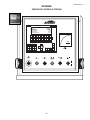
APPENDIX A-1
SCREENS
OPERATOR CONTROLS STATION
R
SUNNEN PRODUCTS CO.
CYCLE STOP
SUNNENGV3
SPINDLE ROTATION . . . . . . . . . . . . . . . . . . . . . . . . . . . . . . . . . . FORWARD
HONING CYCLE TIME . . . . . . . . . . . . . . . . . . . . . . . . . . . . . . 10 MIN 0 SEC
RUNOUT STROKE COUNT . . . . . . . . . . . . . . . . . . . . . . . . . . . . . . . . 0 CNT
ENTER SPINDLE SPEED . . . . . . . . . . . . . . . . . . . . . . . . . . . . . . . . .120 RPM
ENTER RECIPROCATION SPEED . . . . . . . . . . . . . . . . . . . . . . . . . . . 70 FPM
F3
F5
F6
F7
HOME
MACH.
ENG
METRIC
SPINDLE
FWD /
REV
F1
F2
MAIN
MENU
SCREEN
DIR
K1
K2
K3
K4
K5
K6
K7
K8
HYD.
STOP /
START
MAN /
AUTO
MODE
JOG
UP
JOG
DOWN
SPINDLE
JOG
DWELL
OFF /
ON
COOL
MAN. /
AUTO
WITHDRAW
K9
K11
K10
RESET
CNTRS
F4
K12
PULSE
FEED
OFF / ON
WITHDRAW
EXIT
K13
JOG
EXPAND
F8
K15
K14
!
HELP
SHIFT
K16
TOOL
BLOCK
TOOL
AUTO
EXPAND
DWELL
SEL.
TOOL
COL.
+0.00
ESC
8
7
1
9
E
D
5
4
A
2
EMERGENCY
STOP
0
B
ACK
F
6
3
.
C
0
+/-
POWER ON
SHIFT
POWER OFF
INS
DEL
HELP
0
ENTER
SPINDLE LOAD
CYCLE READY
START
CYCLE STOP
UP
DOWN
23
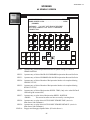
APPENDIX A-2
SCREENS
START-UP SCREEN
SUNNEN PRODUCTS CO.
CYCLE STOP
SUNNENSV3
SPINDLE ROTATION . . . . . . . . . . . . . . . . . . . . . . . . . . . . . . . . FORWARD
HONING CYCLE TIME . . . . . . . . . . . . . . . . . . . . . . . . . . . . . 10 MIN 0 SEC
RUNOUT STROKE COUNT . . . . . . . . . . . . . . . . . . . . . . . . . . . . . . . . 0 CNT
ENTER SPINDLE SPEED .. . . . . . . . . . . . . . . . . . . . . . . . . . . . . . . 120 RPM
ENTER RECIPROCATION SPEED . . . . . . . . . . . . . . . . . . . . . . . . . 70 FPM
F3
F1
F2
MAIN
MENU
SCREEN
DIR
F4
F5
F6
F7
F8
HOME
MACH.
ENG
METRIC
SPINDLE
FWD /
REV
DWELL
SEL.
K1
K2
K3
K4
K5
K6
K7
K8
HYD.
STOP /
START
MAN /
AUTO
MODE
JOG
UP
JOG
DOWN
SPINDLE
JOG
DWELL
OFF /
ON
COOL
MAN. /
AUTO
WITHDRAW
K9
K11
K10
RESET
CNTRS
K13
K12
PULSE
FEED
OFF / ON
WITHDRAW
EXIT
JOG
EXPAND
K15
K14
TOOL
AUTO
EXPAND
!
HELP
SHIFT
K16
TOOL
BLOCK
TOOL
COL.
ESC
8
7
5
4
1
9
E
D
A
2
0
6
B
ACK
F
3
.
C
SHIFT
+/-
INS
DEL
HELP
ENTER
LINE 1:
Operator entry of desired Reciprocation Rate spindle carriage will travel at, during initial
three (3) seconds of INCH FORWARD or INCH REVERSE. Also Reciprocation Rate
spindle carriage will travel at during HOME SERVO.
LINE 2:
Operator entry of desired Reciprocation Rate spindle carriage will travel at, after initial
three (3) seconds of INCH FORWARD.
LINE 3:
Operator entry of desired Reciprocation Rate spindle carriage will travel at, after initial
three (3) seconds of INCH REVERSE.
LINE 4:
Operator entry of desired Tool Retract Time at end of cycle.
LINE 5:
Calibrates Load Meter depending on spindle speed.
When F6 - Calibrate Load Meter is pressed, the following screen will appear:
Spindle will start rotating upon calibration start. Has all tooling been removed
and brake engaged? If so, press F7 to begin calibration. If not, press F8 to
return to system screen.
LINE 6:
Operator entry to select ENGLISH or METRIC Units of Measurement.
LINE 7:
Supervisor entry to reset PASSWORD Required Circuit. (Prevents various password
protected parameters from being altered.)
24
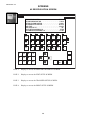
APPENDIX A-3
SCREENS
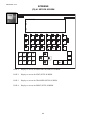
SCREEN DIR SCREEN
02
03
04
05
06
07
RECIPROCATION
SPINDLE
TOOL RESET
TIMER / COUNTER
MAINTENANCE
SETUPS
F3
F1
F2
MAIN
MENU
SCREEN
DIR
F4
F5
F6
F7
F8
HOME
MACH.
ENG
METRIC
SPINDLE
FWD /
REV
DWELL
SEL.
K1
K2
K3
K4
K5
K6
K7
K8
HYD.
STOP /
START
MAN /
AUTO
MODE
JOG
UP
JOG
DOWN
SPINDLE
JOG
DWELL
OFF /
ON
COOL
MAN. /
AUTO
WITHDRAW
K9
K11
K10
RESET
CNTRS
K13
K12
PULSE
FEED
OFF / ON
WITHDRAW
EXIT
JOG
EXPAND
K15
K14
TOOL
AUTO
EXPAND
!
HELP
SHIFT
K16
TOOL
BLOCK
TOOL
COL.
ESC
8
7
5
4
1
9
E
D
A
2
0
6
B
ACK
F
3
.
C
SHIFT
+/-
INS
DEL
HELP
ENTER
LINE 1:
Operator entry current Reciprocation Position of spindle carriage in relation to
HOME POSITION.
LINE 2:
Operator entry of desired BACK-GO-FORWARD Reciprocation Reversal Set Point.
LINE 3:
Operator entry of desired FORWARD-GO-BACK Reciprocation Reversal Set Point.
LINE 4:
Operator entry of desired Number of Reciprocation Strokes to be completed during
HONING CYCLE.
LINE 5:
Operator entry of desired Number of Reciprocation Strokes to be completed during
RUNOUT CYCLE.
LINE 6:
Operator entry of desired Reciprocation DWELL TIME. (Only active when K4 Dwell
Off/On Keypad in turned ON.)
LINE 7:
Operator entry to select desired Reciprocation DWELL POSITION.
<MORE>
This screen has more text lines accessed by cursoring down.
LINE 8:
Operator entry to select desired AUTO SHORT STROKE TIME. (Active in
Main Screen with F8-Button.)
LINE 9:
Operator entry to select desired AUTO SHORT STROKE DISTANCE. (Active in
Main Screen with F8-Button.)
LINE 10:
Engages and disengages Spindle Brake. (F8 in this Screen.)
25
APPENDIX A-4
SCREENS
02 RECIPROCATION SCREEN
RECIPROCATION POSITION . . . . . . . . . . . . . . . . . . . . . . . . . . . . 31.92 IN.
ENTER WITHDRAW POSITION . . . . . . . . . . . . . . . . . . . . . . . . . . 1.00 IN.
ENTER UP-GO-DOWN POSITION . . . . . . . . . . . . . . . . . . . . . . . . . 8.00 IN.
ENTER DOWN-GO-UP POSITION . . . . . . . . . . . . . . . . . . . . . . . . . 44.25 IN.
DWELL TIME . . . . . . . . . . . . . . . . . . . . . . . . . . . . . . . . . . . . . . . . 1.00 SEC
DWELL POSITION - F8 . . . . . . . . . . . . . . . . . . . . . . . . . . . . . . . . . . . . TOP
JOG UP SPEED (PASSWORD) 4-30 . . . . . . . . . . . . . . . . . . . . . . . . 15 FPM
JOG DOWN SPEED (PASSWORD) 4-30 . . . . . . . . . . . . . . . . . . . . . 15 FPM
F3
F1
F2
MAIN
MENU
SCREEN
DIR
F4
F5
F6
F7
F8
HOME
MACH.
ENG
METRIC
SPINDLE
FWD /
REV
DWELL
SEL.
K1
K2
K3
K4
K5
K6
K7
K8
HYD.
STOP /
START
MAN /
AUTO
MODE
JOG
UP
JOG
DOWN
SPINDLE
JOG
DWELL
OFF /
ON
COOL
MAN. /
AUTO
WITHDRAW
K9
K11
K10
RESET
CNTRS
K13
K12
PULSE
FEED
OFF / ON
WITHDRAW
EXIT
JOG
EXPAND
K15
K14
TOOL
AUTO
EXPAND
!
HELP
SHIFT
K16
TOOL
BLOCK
TOOL
COL.
ESC
8
7
E
D
5
4
1
9
A
2
0
B
ACK
F
6
3
.
C
SHIFT
+/-
INS
DEL
LINE 1:
Displays to access the PRINTER PARAMETER SCREEN.
LINE 2:
Displays to access the EDIT SETUP SCREEN.
LINE 3:
Displays to access the TRANSFER SETUP SCREEN.
LINE 4:
Displays to access the PRINT SETUP SCREEN.
26
HELP
ENTER
APPENDIX A-5
SCREENS
03 SPINDLE SCREEN
SPINDLE DIRECTION - F7 . . . . . . . . . . . . . . . . . . . . . . . . . . . . . FORWARD
SPINDLE JOG SPEED 10-300 . . . . . . . . . . . . . . . . . . . . . . . . . . . . 10 RPM
(PASSWORD)
WARNING ! ! DO NOT USE SPINDLE REVERSE
WITH ANY HONING TOOL WITH A THREADED
CONNECTION.
F3
F1
F2
MAIN
MENU
SCREEN
DIR
F4
F5
F6
F7
F8
HOME
MACH.
ENG
METRIC
SPINDLE
FWD /
REV
DWELL
SEL.
!
HELP
K1
K2
K3
K4
K5
K6
K7
K8
HYD.
STOP /
START
MAN /
AUTO
MODE
JOG
UP
JOG
DOWN
SPINDLE
JOG
DWELL
OFF /
ON
COOL
MAN. /
AUTO
WITHDRAW
K9
K11
K10
RESET
CNTRS
K13
K12
PULSE
FEED
OFF / ON
WITHDRAW
EXIT
JOG
EXPAND
K15
K14
TOOL
AUTO
EXPAND
SHIFT
K16
TOOL
BLOCK
TOOL
COL.
ESC
8
7
5
4
1
9
E
D
A
2
0
6
B
ACK
F
3
.
C
SHIFT
+/-
INS
DEL
HELP
ENTER
LINE 1:
Operator entry current Reciprocation Position of spindle carriage in relation to
HOME POSITION.
LINE 2:
Operator entry of desired BACK-GO-FORWARD Reciprocation Reversal Set Point.
LINE 3:
Operator entry of desired FORWARD-GO-BACK Reciprocation Reversal Set Point.
LINE 4:
Operator entry of desired Number of Reciprocation Strokes to be completed during
HONING CYCLE.
LINE 5:
Operator entry of desired Number of Reciprocation Strokes to be completed during
RUNOUT CYCLE.
LINE 6:
Operator entry of desired Reciprocation DWELL TIME. (Only active when K4 Dwell
Off/On Keypad in turned ON.)
LINE 7:
Operator entry to select desired Reciprocation DWELL POSITION.
<MORE>
This screen has more text lines accessed by cursoring down.
LINE 8:
Operator entry to select desired AUTO SHORT STROKE TIME. (Active in
Main Screen with F8-Button.)
LINE 9:
Operator entry to select desired AUTO SHORT STROKE DISTANCE. (Active in
Main Screen with F8-Button.)
LINE 10:
Engages and disengages Spindle Brake. (F8 in this Screen.)
27
APPENDIX A-6
SCREENS
04 TOOL FEED SCREEN
PULSE FEED ON TIME . . . . . . . . . . . . . . . . . . . . . . . . . . . . . . . . . . . 3 SEC
PULSE FEED OFF TIME . . . . . . . . . . . . . . . . . . . . . . . . . . . . . . . . . . 3 SEC
TOOL AUTO COLLAPSE TIME . . . . . . . . . . . . . . . . . . . . . . . . . . . . . 2 SEC
TOOL FEED DIRECTION - F3 . . . . . . . . . . . . . . . . . . . . . . . . . . . NORMAL
(PASSWORD)
AUTO MODE FEED DEFAULT - F4 . . . . . . . . . . . . . . . . . . . . . . . . EXPAND
(PASSWORD)
F3
F1
F2
MAIN
MENU
SCREEN
DIR
F4
F5
F6
F7
F8
HOME
MACH.
ENG
METRIC
SPINDLE
FWD /
REV
DWELL
SEL.
K1
K2
K3
K4
K5
K6
K7
K8
HYD.
STOP /
START
MAN /
AUTO
MODE
JOG
UP
JOG
DOWN
SPINDLE
JOG
DWELL
OFF /
ON
COOL
MAN. /
AUTO
WITHDRAW
K9
K11
K10
RESET
CNTRS
K13
K12
PULSE
FEED
OFF / ON
WITHDRAW
EXIT
JOG
EXPAND
K15
K14
TOOL
AUTO
EXPAND
!
HELP
SHIFT
K16
TOOL
BLOCK
TOOL
COL.
ESC
8
7
5
4
1
9
E
D
A
2
0
6
B
ACK
F
3
.
C
SHIFT
+/-
INS
DEL
LINE 1:
Displays to access the PRINTER PARAMETER SCREEN.
LINE 2:
Displays to access the EDIT SETUP SCREEN.
LINE 3:
Displays to access the TRANSFER SETUP SCREEN.
LINE 4:
Displays to access the PRINT SETUP SCREEN.
28
HELP
ENTER
APPENDIX A-7
SCREENS
05 TIMER / COUNTER SCREEN
ENTER HONING CYCLE TIME . . . . . . . . . . . . . . . . . . . . . . . 10 MIN 0 SEC
ENTER RUNOUT STROKE COUNT . . . . . . . . . . . . . . . . . . . . . . . . . . 0 CNT
F3
F1
F2
MAIN
MENU
SCREEN
DIR
F4
F5
F6
F7
F8
HOME
MACH.
ENG
METRIC
SPINDLE
FWD /
REV
DWELL
SEL.
K1
K2
K3
K4
K5
K6
K7
K8
HYD.
STOP /
START
MAN /
AUTO
MODE
JOG
UP
JOG
DOWN
SPINDLE
JOG
DWELL
OFF /
ON
COOL
MAN. /
AUTO
WITHDRAW
K9
K11
K10
RESET
CNTRS
K13
K12
PULSE
FEED
OFF / ON
WITHDRAW
EXIT
JOG
EXPAND
K15
K14
TOOL
AUTO
EXPAND
!
HELP
SHIFT
K16
TOOL
BLOCK
TOOL
COL.
ESC
8
7
E
D
5
4
1
9
A
2
0
B
ACK
F
6
3
.
C
SHIFT
+/-
INS
DEL
HELP
ENTER
LINE 1:
Operator entry current Reciprocation Position of spindle carriage in relation to
HOME POSITION.
LINE 2:
Operator entry of desired BACK-GO-FORWARD Reciprocation Reversal Set Point.
LINE 3:
Operator entry of desired FORWARD-GO-BACK Reciprocation Reversal Set Point.
LINE 4:
Operator entry of desired Number of Reciprocation Strokes to be completed during
HONING CYCLE.
LINE 5:
Operator entry of desired Number of Reciprocation Strokes to be completed during
RUNOUT CYCLE.
LINE 6:
Operator entry of desired Reciprocation DWELL TIME. (Only active when K4 Dwell
Off/On Keypad in turned ON.)
LINE 7:
Operator entry to select desired Reciprocation DWELL POSITION.
<MORE>
This screen has more text lines accessed by cursoring down.
LINE 8:
Operator entry to select desired AUTO SHORT STROKE TIME. (Active in
Main Screen with F8-Button.)
LINE 9:
Operator entry to select desired AUTO SHORT STROKE DISTANCE. (Active in
Main Screen with F8-Button.)
LINE 10:
Engages and disengages Spindle Brake. (F8 in this Screen.)
29
APPENDIX A-8
SCREENS
06 MAINTENANCE SCREEN
LANGUAGE / CONTRAST . . . . . . . . . . . . . . . . . . . . . . . . . . . . . . . . . . . F3
SECOND WITHDRAW DEFAULT - F4 . . . . . . . . . . . . . . . . . . . . MANUALLY
PASSWORD LOGOUT . . . . . . . . . . . . . . . . . . . . . . . . . . . . . . . . . . . . . . F8
SPINDLE MAXIMUM SPEED 300/500 RPM . . . . . . . . . . . . . . . . . . . . 300
(PULLEY DEPENDENT)(PASSWORD)
F3
F1
F2
MAIN
MENU
SCREEN
DIR
F4
F5
F6
F7
F8
HOME
MACH.
ENG
METRIC
SPINDLE
FWD /
REV
DWELL
SEL.
K1
K2
K3
K4
K5
K6
K7
K8
HYD.
STOP /
START
MAN /
AUTO
MODE
JOG
UP
JOG
DOWN
SPINDLE
JOG
DWELL
OFF /
ON
COOL
MAN. /
AUTO
WITHDRAW
K9
K11
K10
RESET
CNTRS
K13
K12
PULSE
FEED
OFF / ON
WITHDRAW
EXIT
JOG
EXPAND
K15
K14
TOOL
AUTO
EXPAND
!
HELP
SHIFT
K16
TOOL
BLOCK
TOOL
COL.
ESC
8
7
5
4
1
9
E
D
A
2
0
6
B
ACK
F
3
.
C
SHIFT
+/-
INS
DEL
LINE 1:
Displays to access the PRINTER PARAMETER SCREEN.
LINE 2:
Displays to access the EDIT SETUP SCREEN.
LINE 3:
Displays to access the TRANSFER SETUP SCREEN.
LINE 4:
Displays to access the PRINT SETUP SCREEN.
30
HELP
ENTER
APPENDIX A-9
SCREENS
07 SETUPS SCREEN
SELECT SETUP . . . . . . . . . . . . . . . . . . . . . . . . . . . . . . . . . . . . . . . . . . . F3
TRANSFER SETUP ?. . . . . . . . . . . . . . . . . . . . . . . . . . . . . . . . . . . . . . . . F4
F3
F1
F2
MAIN
MENU
SCREEN
DIR
F4
F5
F6
F7
F8
HOME
MACH.
ENG
METRIC
SPINDLE
FWD /
REV
DWELL
SEL.
K1
K2
K3
K4
K5
K6
K7
K8
HYD.
STOP /
START
MAN /
AUTO
MODE
JOG
UP
JOG
DOWN
SPINDLE
JOG
DWELL
OFF /
ON
COOL
MAN. /
AUTO
WITHDRAW
K9
K11
K10
RESET
CNTRS
K13
K12
PULSE
FEED
OFF / ON
WITHDRAW
EXIT
JOG
EXPAND
K15
K14
TOOL
AUTO
EXPAND
!
HELP
SHIFT
K16
TOOL
BLOCK
TOOL
COL.
ESC
8
7
5
4
1
9
E
D
A
2
0
6
B
ACK
F
3
.
C
SHIFT
+/-
INS
DEL
HELP
ENTER
LINE 1:
Operator entry current Reciprocation Position of spindle carriage in relation to
HOME POSITION.
LINE 2:
Operator entry of desired BACK-GO-FORWARD Reciprocation Reversal Set Point.
LINE 3:
Operator entry of desired FORWARD-GO-BACK Reciprocation Reversal Set Point.
LINE 4:
Operator entry of desired Number of Reciprocation Strokes to be completed during
HONING CYCLE.
LINE 5:
Operator entry of desired Number of Reciprocation Strokes to be completed during
RUNOUT CYCLE.
LINE 6:
Operator entry of desired Reciprocation DWELL TIME. (Only active when K4 Dwell
Off/On Keypad in turned ON.)
LINE 7:
Operator entry to select desired Reciprocation DWELL POSITION.
<MORE>
This screen has more text lines accessed by cursoring down.
LINE 8:
Operator entry to select desired AUTO SHORT STROKE TIME. (Active in
Main Screen with F8-Button.)
LINE 9:
Operator entry to select desired AUTO SHORT STROKE DISTANCE. (Active in
Main Screen with F8-Button.)
LINE 10:
Engages and disengages Spindle Brake. (F8 in this Screen.)
31
APPENDIX A-10
SCREENS
01 SETUPS (F3) SCREEN
01 SETUPS
F3
F1
F2
MAIN
MENU
SCREEN
DIR
F4
F5
F6
F7
F8
HOME
MACH.
ENG
METRIC
SPINDLE
FWD /
REV
DWELL
SEL.
K1
K2
K3
K4
K5
K6
K7
K8
HYD.
STOP /
START
MAN /
AUTO
MODE
JOG
UP
JOG
DOWN
SPINDLE
JOG
DWELL
OFF /
ON
COOL
MAN. /
AUTO
WITHDRAW
K9
K11
K10
RESET
CNTRS
K13
K12
PULSE
FEED
OFF / ON
WITHDRAW
EXIT
JOG
EXPAND
K15
K14
TOOL
AUTO
EXPAND
!
HELP
SHIFT
K16
TOOL
BLOCK
TOOL
COL.
ESC
8
7
5
4
1
9
E
D
A
2
0
6
B
ACK
F
3
.
C
SHIFT
+/-
INS
DEL
LINE 1:
Displays to access the PRINTER PARAMETER SCREEN.
LINE 2:
Displays to access the EDIT SETUP SCREEN.
LINE 3:
Displays to access the TRANSFER SETUP SCREEN.
LINE 4:
Displays to access the PRINT SETUP SCREEN.
32
HELP
ENTER
APPENDIX A-11
SCREENS
(F3) 01 SETUPS SCREEN
01 DATA RECORD
02
03
STORED DATA RECORDS
04
LISTED HERE
99
F3
F1
F2
MAIN
MENU
SCREEN
DIR
F4
F5
F6
F7
F8
HOME
MACH.
ENG
METRIC
SPINDLE
FWD /
REV
DWELL
SEL.
K1
K2
K3
K4
K5
K6
K7
K8
HYD.
STOP /
START
MAN /
AUTO
MODE
JOG
UP
JOG
DOWN
SPINDLE
JOG
DWELL
OFF /
ON
COOL
MAN. /
AUTO
WITHDRAW
K9
K11
K10
RESET
CNTRS
K13
K12
PULSE
FEED
OFF / ON
WITHDRAW
EXIT
JOG
EXPAND
K15
K14
TOOL
AUTO
EXPAND
!
HELP
SHIFT
K16
TOOL
BLOCK
TOOL
COL.
ESC
8
7
5
4
1
9
E
D
A
2
0
6
B
ACK
F
3
.
C
SHIFT
+/-
INS
DEL
HELP
ENTER
LINE 1:
Operator entry current Reciprocation Position of spindle carriage in relation to
HOME POSITION.
LINE 2:
Operator entry of desired BACK-GO-FORWARD Reciprocation Reversal Set Point.
LINE 3:
Operator entry of desired FORWARD-GO-BACK Reciprocation Reversal Set Point.
LINE 4:
Operator entry of desired Number of Reciprocation Strokes to be completed during
HONING CYCLE.
LINE 5:
Operator entry of desired Number of Reciprocation Strokes to be completed during
RUNOUT CYCLE.
LINE 6:
Operator entry of desired Reciprocation DWELL TIME. (Only active when K4 Dwell
Off/On Keypad in turned ON.)
LINE 7:
Operator entry to select desired Reciprocation DWELL POSITION.
<MORE>
This screen has more text lines accessed by cursoring down.
LINE 8:
Operator entry to select desired AUTO SHORT STROKE TIME. (Active in
Main Screen with F8-Button.)
LINE 9:
Operator entry to select desired AUTO SHORT STROKE DISTANCE. (Active in
Main Screen with F8-Button.)
LINE 10:
Engages and disengages Spindle Brake. (F8 in this Screen.)
33
APPENDIX A-12
SCREENS
01 DATA RECORD SCREEN (1 of 3)
01 RECIPROCATION SPEED . . . . . . . . . . . . . . . . . . . . . . . . . . . . . . . . 0 FPMM/MIN
02 SPINDLE SPEED . . . . . . . . . . . . . . . . . . . . . . . . . . . . . . . . . . . . 0 RPM
03 WITHDRAW POSITION . . . . . . . . . . . . . . . . . . . . . . . . . . 0.00 IN/MM
04 UP-GO-DOWN POSITION . . . . . . . . . . . . . . . . . . . . . . . . . 0.00 IN/MM
F3
F1
F2
MAIN
MENU
SCREEN
DIR
F4
F5
F6
F7
F8
HOME
MACH.
ENG
METRIC
SPINDLE
FWD /
REV
DWELL
SEL.
K1
K2
K3
K4
K5
K6
K7
K8
HYD.
STOP /
START
MAN /
AUTO
MODE
JOG
UP
JOG
DOWN
SPINDLE
JOG
DWELL
OFF /
ON
COOL
MAN. /
AUTO
WITHDRAW
K9
K11
K10
RESET
CNTRS
K13
K12
PULSE
FEED
OFF / ON
WITHDRAW
EXIT
JOG
EXPAND
K15
K14
TOOL
AUTO
EXPAND
!
HELP
SHIFT
K16
TOOL
BLOCK
TOOL
COL.
ESC
8
7
5
4
1
9
E
D
A
2
0
6
B
ACK
F
3
.
C
SHIFT
+/-
INS
DEL
LINE 1:
Displays to access the PRINTER PARAMETER SCREEN.
LINE 2:
Displays to access the EDIT SETUP SCREEN.
LINE 3:
Displays to access the TRANSFER SETUP SCREEN.
LINE 4:
Displays to access the PRINT SETUP SCREEN.
34
HELP
ENTER
APPENDIX A-13
SCREENS
01 DATA RECORD SCREEN (2 of 3)
05 DOWN-GO-UP POSITION . . . . . . . . . . . . . . . . . . . . . . . . . . 0.00 IN/MM
06 DWELL TIME . . . . . . . . . . . . . . . . . . . . . . . . . . . . . . . . . . . . 0.00 SEC.
07 CYCLE TIME . . . . . . . . . . . . . . . . . . . . . . . . . . . . . . . . . . . . . . . 0 MIN
08 CYCLE TIME . . . . . . . . . . . . . . . . . . . . . . . . . . . . . . . . . . . . . . . 0 SEC.
F3
F1
F2
MAIN
MENU
SCREEN
DIR
F4
F5
F6
F7
F8
HOME
MACH.
ENG
METRIC
SPINDLE
FWD /
REV
DWELL
SEL.
K1
K2
K3
K4
K5
K6
K7
K8
HYD.
STOP /
START
MAN /
AUTO
MODE
JOG
UP
JOG
DOWN
SPINDLE
JOG
DWELL
OFF /
ON
COOL
MAN. /
AUTO
WITHDRAW
K9
K11
K10
RESET
CNTRS
K13
K12
PULSE
FEED
OFF / ON
WITHDRAW
EXIT
JOG
EXPAND
K15
K14
TOOL
AUTO
EXPAND
!
HELP
SHIFT
K16
TOOL
BLOCK
TOOL
COL.
ESC
8
7
5
4
1
9
E
D
A
2
0
6
B
ACK
F
3
.
C
SHIFT
+/-
INS
DEL
HELP
ENTER
LINE 1:
Operator entry current Reciprocation Position of spindle carriage in relation to
HOME POSITION.
LINE 2:
Operator entry of desired BACK-GO-FORWARD Reciprocation Reversal Set Point.
LINE 3:
Operator entry of desired FORWARD-GO-BACK Reciprocation Reversal Set Point.
LINE 4:
Operator entry of desired Number of Reciprocation Strokes to be completed during
HONING CYCLE.
LINE 5:
Operator entry of desired Number of Reciprocation Strokes to be completed during
RUNOUT CYCLE.
LINE 6:
Operator entry of desired Reciprocation DWELL TIME. (Only active when K4 Dwell
Off/On Keypad in turned ON.)
LINE 7:
Operator entry to select desired Reciprocation DWELL POSITION.
<MORE>
This screen has more text lines accessed by cursoring down.
LINE 8:
Operator entry to select desired AUTO SHORT STROKE TIME. (Active in
Main Screen with F8-Button.)
LINE 9:
Operator entry to select desired AUTO SHORT STROKE DISTANCE. (Active in
Main Screen with F8-Button.)
LINE 10:
Engages and disengages Spindle Brake. (F8 in this Screen.)
35
APPENDIX A-14
SCREENS
01 DATA RECORD SCREEN (3 of 3)
08 CYCLE TIME . . . . . . . . . . . . . . . . . . . . . . . . . . . . . . . . . . . . . . 0 SEC.
09 RUNOUT COUNT . . . . . . . . . . . . . . . . . . . . . . . . . . . . . . . . . . 0 CNT.
10 PULSE FEED ON TIME . . . . . . . . . . . . . . . . . . . . . . . . . . . . . . . 0 SEC.
11 PULSE FEED OFF TIME . . . . . . . . . . . . . . . . . . . . . . . . . . . . . . 0 SEC.
F3
F1
F2
MAIN
MENU
SCREEN
DIR
F4
F5
F6
F7
F8
HOME
MACH.
ENG
METRIC
SPINDLE
FWD /
REV
DWELL
SEL.
K1
K2
K3
K4
K5
K6
K7
K8
HYD.
STOP /
START
MAN /
AUTO
MODE
JOG
UP
JOG
DOWN
SPINDLE
JOG
DWELL
OFF /
ON
COOL
MAN. /
AUTO
WITHDRAW
K9
K11
K10
RESET
CNTRS
K13
K12
PULSE
FEED
OFF / ON
WITHDRAW
EXIT
JOG
EXPAND
K15
K14
TOOL
AUTO
EXPAND
!
HELP
SHIFT
K16
TOOL
BLOCK
TOOL
COL.
ESC
8
7
5
4
1
9
E
D
A
2
0
6
B
ACK
F
3
.
C
SHIFT
+/-
INS
DEL
LINE 1:
Displays to access the PRINTER PARAMETER SCREEN.
LINE 2:
Displays to access the EDIT SETUP SCREEN.
LINE 3:
Displays to access the TRANSFER SETUP SCREEN.
LINE 4:
Displays to access the PRINT SETUP SCREEN.
36
HELP
ENTER
APPENDIX A-15
SCREENS
01 DATA RECORD SCREEN
NO: 1
NAME: Data_Record
SAVE DATA RECORD ? Y
F3
F1
F2
MAIN
MENU
SCREEN
DIR
F4
F5
F6
F7
F8
HOME
MACH.
ENG
METRIC
SPINDLE
FWD /
REV
DWELL
SEL.
K1
K2
K3
K4
K5
K6
K7
K8
HYD.
STOP /
START
MAN /
AUTO
MODE
JOG
UP
JOG
DOWN
SPINDLE
JOG
DWELL
OFF /
ON
COOL
MAN. /
AUTO
WITHDRAW
K9
K11
K10
RESET
CNTRS
K13
K12
PULSE
FEED
OFF / ON
WITHDRAW
EXIT
JOG
EXPAND
K15
K14
TOOL
AUTO
EXPAND
!
HELP
SHIFT
K16
TOOL
BLOCK
TOOL
COL.
ESC
8
7
5
4
1
9
E
D
A
2
0
6
B
ACK
F
3
.
C
SHIFT
+/-
INS
DEL
HELP
ENTER
LINE 1:
Operator entry current Reciprocation Position of spindle carriage in relation to
HOME POSITION.
LINE 2:
Operator entry of desired BACK-GO-FORWARD Reciprocation Reversal Set Point.
LINE 3:
Operator entry of desired FORWARD-GO-BACK Reciprocation Reversal Set Point.
LINE 4:
Operator entry of desired Number of Reciprocation Strokes to be completed during
HONING CYCLE.
LINE 5:
Operator entry of desired Number of Reciprocation Strokes to be completed during
RUNOUT CYCLE.
LINE 6:
Operator entry of desired Reciprocation DWELL TIME. (Only active when K4 Dwell
Off/On Keypad in turned ON.)
LINE 7:
Operator entry to select desired Reciprocation DWELL POSITION.
<MORE>
This screen has more text lines accessed by cursoring down.
LINE 8:
Operator entry to select desired AUTO SHORT STROKE TIME. (Active in
Main Screen with F8-Button.)
LINE 9:
Operator entry to select desired AUTO SHORT STROKE DISTANCE. (Active in
Main Screen with F8-Button.)
LINE 10:
Engages and disengages Spindle Brake. (F8 in this Screen.)
37
APPENDIX A-16
SCREENS
01 DATA RECORD SCREEN
No: New Data Record Number Displayed
Name: New Data Name Displayed
Data Record Saved !
F3
F1
F2
MAIN
MENU
SCREEN
DIR
F4
F5
F6
F7
F8
HOME
MACH.
ENG
METRIC
SPINDLE
FWD /
REV
DWELL
SEL.
K1
K2
K3
K4
K5
K6
K7
K8
HYD.
STOP /
START
MAN /
AUTO
MODE
JOG
UP
JOG
DOWN
SPINDLE
JOG
DWELL
OFF /
ON
COOL
MAN. /
AUTO
WITHDRAW
K9
K11
K10
RESET
CNTRS
K13
K12
PULSE
FEED
OFF / ON
WITHDRAW
EXIT
JOG
EXPAND
K15
K14
TOOL
AUTO
EXPAND
!
HELP
SHIFT
K16
TOOL
BLOCK
TOOL
COL.
ESC
8
7
5
4
1
9
E
D
A
2
0
6
B
ACK
F
3
.
C
SHIFT
+/-
INS
DEL
LINE 1:
Displays to access the PRINTER PARAMETER SCREEN.
LINE 2:
Displays to access the EDIT SETUP SCREEN.
LINE 3:
Displays to access the TRANSFER SETUP SCREEN.
LINE 4:
Displays to access the PRINT SETUP SCREEN.
38
HELP
ENTER
APPENDIX A-17
SCREENS
07 SETUPS (F4) SCREEN
01 SETUPS
F3
F1
F2
MAIN
MENU
SCREEN
DIR
F4
F5
F6
F7
F8
HOME
MACH.
ENG
METRIC
SPINDLE
FWD /
REV
DWELL
SEL.
K1
K2
K3
K4
K5
K6
K7
K8
HYD.
STOP /
START
MAN /
AUTO
MODE
JOG
UP
JOG
DOWN
SPINDLE
JOG
DWELL
OFF /
ON
COOL
MAN. /
AUTO
WITHDRAW
K9
K11
K10
RESET
CNTRS
K13
K12
PULSE
FEED
OFF / ON
WITHDRAW
EXIT
JOG
EXPAND
K15
K14
TOOL
AUTO
EXPAND
!
HELP
SHIFT
K16
TOOL
BLOCK
TOOL
COL.
ESC
8
7
5
4
1
9
E
D
A
2
0
6
B
ACK
F
3
.
C
SHIFT
+/-
INS
DEL
HELP
ENTER
LINE 1:
Operator entry current Reciprocation Position of spindle carriage in relation to
HOME POSITION.
LINE 2:
Operator entry of desired BACK-GO-FORWARD Reciprocation Reversal Set Point.
LINE 3:
Operator entry of desired FORWARD-GO-BACK Reciprocation Reversal Set Point.
LINE 4:
Operator entry of desired Number of Reciprocation Strokes to be completed during
HONING CYCLE.
LINE 5:
Operator entry of desired Number of Reciprocation Strokes to be completed during
RUNOUT CYCLE.
LINE 6:
Operator entry of desired Reciprocation DWELL TIME. (Only active when K4 Dwell
Off/On Keypad in turned ON.)
LINE 7:
Operator entry to select desired Reciprocation DWELL POSITION.
<MORE>
This screen has more text lines accessed by cursoring down.
LINE 8:
Operator entry to select desired AUTO SHORT STROKE TIME. (Active in
Main Screen with F8-Button.)
LINE 9:
Operator entry to select desired AUTO SHORT STROKE DISTANCE. (Active in
Main Screen with F8-Button.)
LINE 10:
Engages and disengages Spindle Brake. (F8 in this Screen.)
39
APPENDIX A-18
SCREENS
(F4) 01 SETUPS SCREEN
SOURCE: 0
DEST: 0
ACCEPT
OP: 1
F3
F1
F2
MAIN
MENU
SCREEN
DIR
F4
F5
F6
F7
F8
HOME
MACH.
ENG
METRIC
SPINDLE
FWD /
REV
DWELL
SEL.
K1
K2
K3
K4
K5
K6
K7
K8
HYD.
STOP /
START
MAN /
AUTO
MODE
JOG
UP
JOG
DOWN
SPINDLE
JOG
DWELL
OFF /
ON
COOL
MAN. /
AUTO
WITHDRAW
K9
K11
K10
RESET
CNTRS
K13
K12
PULSE
FEED
OFF / ON
WITHDRAW
EXIT
JOG
EXPAND
K15
K14
TOOL
AUTO
EXPAND
!
HELP
SHIFT
K16
TOOL
BLOCK
TOOL
COL.
ESC
8
7
5
4
1
9
E
D
A
2
0
6
B
ACK
F
3
.
C
SHIFT
+/-
INS
DEL
LINE 1:
Displays to access the PRINTER PARAMETER SCREEN.
LINE 2:
Displays to access the EDIT SETUP SCREEN.
LINE 3:
Displays to access the TRANSFER SETUP SCREEN.
LINE 4:
Displays to access the PRINT SETUP SCREEN.
40
HELP
ENTER
APPENDIX A-19
SCREENS
(F3) 01 SETUPS SCREEN
01 DATA RECORD
02 DELETE RECORDS ?
03
04
99
F3
F1
F2
MAIN
MENU
SCREEN
DIR
F4
F5
F6
F7
F8
HOME
MACH.
ENG
METRIC
SPINDLE
FWD /
REV
DWELL
SEL.
K1
K2
K3
K4
K5
K6
K7
K8
HYD.
STOP /
START
MAN /
AUTO
MODE
JOG
UP
JOG
DOWN
SPINDLE
JOG
DWELL
OFF /
ON
COOL
MAN. /
AUTO
WITHDRAW
K9
K11
K10
RESET
CNTRS
K13
K12
PULSE
FEED
OFF / ON
WITHDRAW
EXIT
JOG
EXPAND
K15
K14
TOOL
AUTO
EXPAND
!
HELP
SHIFT
K16
TOOL
BLOCK
TOOL
COL.
ESC
8
7
5
4
1
9
E
D
A
2
0
6
B
ACK
F
3
.
C
SHIFT
+/-
INS
DEL
HELP
ENTER
LINE 1:
Operator entry current Reciprocation Position of spindle carriage in relation to
HOME POSITION.
LINE 2:
Operator entry of desired BACK-GO-FORWARD Reciprocation Reversal Set Point.
LINE 3:
Operator entry of desired FORWARD-GO-BACK Reciprocation Reversal Set Point.
LINE 4:
Operator entry of desired Number of Reciprocation Strokes to be completed during
HONING CYCLE.
LINE 5:
Operator entry of desired Number of Reciprocation Strokes to be completed during
RUNOUT CYCLE.
LINE 6:
Operator entry of desired Reciprocation DWELL TIME. (Only active when K4 Dwell
Off/On Keypad in turned ON.)
LINE 7:
Operator entry to select desired Reciprocation DWELL POSITION.
<MORE>
This screen has more text lines accessed by cursoring down.
LINE 8:
Operator entry to select desired AUTO SHORT STROKE TIME. (Active in
Main Screen with F8-Button.)
LINE 9:
Operator entry to select desired AUTO SHORT STROKE DISTANCE. (Active in
Main Screen with F8-Button.)
LINE 10:
Engages and disengages Spindle Brake. (F8 in this Screen.)
41
APPENDIX A-20
SCREENS
(F3) 01 SETUPS SCREEN
01 DATA RECORD
02
03
04
99
F3
F1
F2
MAIN
MENU
SCREEN
DIR
F4
F5
F6
F7
F8
HOME
MACH.
ENG
METRIC
SPINDLE
FWD /
REV
DWELL
SEL.
K1
K2
K3
K4
K5
K6
K7
K8
HYD.
STOP /
START
MAN /
AUTO
MODE
JOG
UP
JOG
DOWN
SPINDLE
JOG
DWELL
OFF /
ON
COOL
MAN. /
AUTO
WITHDRAW
K9
K11
K10
RESET
CNTRS
K13
K12
PULSE
FEED
OFF / ON
WITHDRAW
EXIT
JOG
EXPAND
K15
K14
TOOL
AUTO
EXPAND
!
HELP
SHIFT
K16
TOOL
BLOCK
TOOL
COL.
ESC
8
7
5
4
1
9
E
D
A
2
0
6
B
ACK
F
3
.
C
SHIFT
+/-
INS
DEL
LINE 1:
Displays to access the PRINTER PARAMETER SCREEN.
LINE 2:
Displays to access the EDIT SETUP SCREEN.
LINE 3:
Displays to access the TRANSFER SETUP SCREEN.
LINE 4:
Displays to access the PRINT SETUP SCREEN.
42
HELP
ENTER
APPENDIX A-21
SCREENS
(F3) 01 SETUPS SCREEN
NO: 1
NAME:
OVERWRITE ? Y
F3
F1
F2
MAIN
MENU
SCREEN
DIR
F4
F5
F6
F7
F8
HOME
MACH.
ENG
METRIC
SPINDLE
FWD /
REV
DWELL
SEL.
K1
K2
K3
K4
K5
K6
K7
K8
HYD.
STOP /
START
MAN /
AUTO
MODE
JOG
UP
JOG
DOWN
SPINDLE
JOG
DWELL
OFF /
ON
COOL
MAN. /
AUTO
WITHDRAW
K9
K11
K10
RESET
CNTRS
K13
K12
PULSE
FEED
OFF / ON
WITHDRAW
EXIT
JOG
EXPAND
K15
K14
TOOL
AUTO
EXPAND
!
HELP
SHIFT
K16
TOOL
BLOCK
TOOL
COL.
ESC
8
7
E
D
5
4
1
9
A
2
0
B
ACK
F
6
3
.
C
SHIFT
+/-
INS
DEL
HELP
ENTER
LINE 1:
Operator entry current Reciprocation Position of spindle carriage in relation to
HOME POSITION.
LINE 2:
Operator entry of desired BACK-GO-FORWARD Reciprocation Reversal Set Point.
LINE 3:
Operator entry of desired FORWARD-GO-BACK Reciprocation Reversal Set Point.
LINE 4:
Operator entry of desired Number of Reciprocation Strokes to be completed during
HONING CYCLE.
LINE 5:
Operator entry of desired Number of Reciprocation Strokes to be completed during
RUNOUT CYCLE.
LINE 6:
Operator entry of desired Reciprocation DWELL TIME. (Only active when K4 Dwell
Off/On Keypad in turned ON.)
LINE 7:
Operator entry to select desired Reciprocation DWELL POSITION.
<MORE>
This screen has more text lines accessed by cursoring down.
LINE 8:
Operator entry to select desired AUTO SHORT STROKE TIME. (Active in
Main Screen with F8-Button.)
LINE 9:
Operator entry to select desired AUTO SHORT STROKE DISTANCE. (Active in
Main Screen with F8-Button.)
LINE 10:
Engages and disengages Spindle Brake. (F8 in this Screen.)
43
NOTES
44
APPENDIX B
SPEED CONVERSION CHART
PERIPHERAL SFM TO RPM
Bore
Dia.
70
75
0.250
0.375
0.500
0.625
0.750
0.875
1.000
1.125
1.250
1.375
1.500
1.625
1.750
1.875
2.000
2.250
2.500
2.750
3.000
3.250
3.500
3.750
4.000
4.250
4.500
4.750
5.000
5.500
6.000
6.500
7.000
7.500
8.000
8.500
9.000
9.500
10.000
11.000
12.000
13.000
14.000
15.000
16.000
17.000
18.000
19.000
20.000
1067
725
536
428
357
306
267
238
214
195
178
165
153
143
133
119
107
97
89
82
77
71
67
63
60
56
54
49
45
41
38
36
33
32
30
28
27
24
22
21
19
18
17
16
15
14
13
1144
777
574
459
382
328
286
255
230
209
191
176
164
163
143
128
115
104
96
88
82
77
72
68
64
60
57
52
48
43
41
38
36
34
32
30
29
26
24
22
20
19
18
17
16
15
15
80
85
90
95
100
110
Surface Speed in FPM
120 130 140 150
160
1220 1296 1372 1449 1525 1677 1830 1982 2135 2286 2440
828 882 933 985 1035 1140 1245 1347 1452 1555 1658
612 650 689 727 765 842 918 995 1070 1148 1224
490 520 551 581 612 673 734 796 857 918 979
408 433 459 485 510 561
62 663 714 765 816
350 371 393 415 437 481 524 568 612 656 699
305 325 344 363 382 420 458 497 535 573 612
272 289 306 323 340 374 408 442 476 610
249 260 275 291 306 337 367 398 428 459 490
222 236 250 264 278 306 334 361 389 417 445
204 217 230 242 255 281 306 332 358 383 408
188 200 212 223 235 259 282 306 329 353 376
174 185 196 207 218 240 262 283 305 327 349
163 173 184 194 204 224 245 265 287 306 326
153 162 172 182 191 210 229 248 268 287 306
136 145 153 162 170 187 204 221 238 255 272
122 130 138 145 153 168 183 199 214 230 245
111 118 125 132 139 153 167 181 195 209 222
102 108 115 121 128 140 153 166 179 192 204
94 100 106 112 118 129 141 152 165 176 188
88
93 99 104 110 120 131 142 153 164 175
82
88 92
97 102 112 122 133 143 153 163
77
81 86
91 96 105 115 125 134 144 153
72
77 81
86 90 99 108 117 126 135 144
68
72 77
81 85 94 102 111 119 128 136
64
68 72
76 81 89
97 105 113 121 129
61
65 69
73 76 84
92 99 107 114 122
56
59 63
66 70 76
83 90
97 104 111
51
54 57
61 64 70
76 83
89 96 102
47
50 53
56 59 64
70 76
82 87 94
44
46 49
52 55 60
65 71
76 82 87
41
43 46
48 51 56
61 66
71 77 82
38
41 43
45 48 53
57 62
67 72 76
36
38 41
43 45 50
54 59
63 68 72
34
36 38
40 43 47
51 55
60 64 68
32
34 36
38 40 44
48 52
56 60 64
31
32 34
36 38 42
46 50
53 57 61
28
29 31
33 35 38
42 45
49 52 56
26
27 29
30 32 35
38 41
45 48 51
24
25 26
28 29 32
35 38
41 44 47
22
23 25
26 27 30
33 35
38 41 44
20
22 23
24 26 28
31 33
36 38 41
19
20 22
23 24 26
29 31
33 36 38
18
19 20
21 23 25
27 29
32 34 36
17
18 19
20 21 23
25 28
30 32 34
16
17 18
19 20 22
24 26
28 30 32
15
16 17
18 19 21
23 25
27 29 31
45
170
180
190
200
210
220
230
240
2593
1763
1301
1040
867
743
649
578
520
473
435
400
371
347
325
289
260
236
217
200
186
173
163
153
145
137
130
118
108
100
93
87
81
77
72
69
65
59
54
50
46
43
41
38
36
34
32
2745
1868
1377
1102
918
787
687
612
551
500
460
423
392
367
344
306
275
250
230
212
197
184
172
162
153
145
137
125
115
106
98
92
86
81
77
73
69
62
57
53
49
46
43
41
38
36
34
2898
1970
1454
1163
969
830
726
646
581
528
486
447
414
388
363
323
290
264
243
223
208
194
182
171
162
153
145
132
121
111
103
97
91
86
81
77
73
66
61
56
52
48
45
43
40
38
36
3050
2075
1530
1224
1020
874
764
680
612
556
512
470
436
408
382
340
306
278
255
235
219
204
191
180
170
161
152
139
127
117
109
102
96
90
85
81
76
69
64
59
55
51
48
45
42
40
38
3203
2180
1607
1285
1071
918
802
714
643
584
538
494
458
428
402
357
321
292
268
247
230
214
201
189
179
169
160
146
134
123
114
107
100
95
89
85
80
73
67
62
57
54
50
47
45
42
40
3355
2280
1683
1346
1122
961
840
748
673
612
562
517
480
449
420
374
337
306
281
259
241
224
210
198
187
177
168
153
140
129
120
112
105
99
94
89
84
76
70
65
60
56
53
50
47
44
42
3508
2385
1760
1408
1173
1005
878
782
704
639
587
541
501
469
438
391
352
320
293
270
252
235
220
207
196
185
175
160
147
135
125
117
110
104
98
93
88
79
73
68
63
59
55
52
49
46
44
3660
2490
1836
1469
1224
1049
918
816
734
667
614
564
523
490
458
408
367
334
307
282
263
245
230
216
204
193
183
167
153
141
131
122
115
108
102
97
92
83
77
71
66
61
57
54
51
48
46
Bore
Dia.
0.250
0.375
0.500
0.625
0.750
0.875
1.000
1.125
1.250
1.375
1.500
1.625
1.750
1.875
2.000
2.250
2.500
2.750
3.000
3.250
3.500
3.750
4.000
4.250
4.500
4.750
5.000
5.500
6.000
6.500
7.000
7.500
8.000
8.500
9.000
9.500
10.000
11.000
12.000
13.000
14.000
15.000
16.000
17.000
18.000
19.000
20.000
APPENDIX C
COOLANT FLOW DIAGRAM
CENTRIFUGAL PUMP
NOZZLE
TRAY
DRAIN
PUMP
TRAY
INTAKE
COOLANT RESERVOIR
OPTIONAL
MAGNETIC
SEPARATOR
46
FLOW
CONTROL
VALVE
APPENDIX D
PNEUMATIC FLOW DIAGRAM
1 . . . . Filter
2 . . . . Pressure Regulator
3 . . . . Lubricator
4 . . . . Valve
5 . . . . Valve
6 . . . . Carriage Release Cylinder
7 . . . . Air Pressure Switch
8 . . . . Gage
3
4
8
2
2
1
8
SET AT 55 PSI
8
3
2
5
12
6
3
2
SET AT 30 PSI
1
4
8
1
5
14
4
2
7
47
NOTES
48
PURCHASED COMPONENT DATA
GHC DATA PLATE
MODEL - SV3-10-1-E-RH-M
HONING MACHINE - VERTICAL
SIN VOLTS - 460
PH. - 3
MFG. DATE - 11/00
STROKE - 48
S.O.# AMP. - 45
CYCLE - 60
SPINDLE CARRIAGE RPM 300
BALDOR MOTOR
CAT. NO. - IDM3774T
FRAME - 215TC
RPM - 1760
F.L.A. - 25.4/12.7
PH. - 3
CLASS - H
DES. - B
NEMA NOM. EFF. - 91.7%
SER. NO. F498
VOLTS - 230/460
RPM MAX. - 6000
SER. F.- 1.00
SPEC. NO. - 07H658W747Gl
H.P. - 10 TE
MAG. CURR. - 11/5.5
HZ. - 60
BLOWER - BALDOR
SPEC. - EF5000
SER. - 89803
VOLTS - 230/460
PH. - 3
RATING - 40C AMB. CONT.
H.P. - .2
AMPS - .8/.4
HZ. - 60
TE
RPM - 3100
CLASS - F
RATIO 7.1
DATE 12/99
MC- 1369
BREVINI GEAR BOX
TYPE - EM 1010 MN2
SER. NO. - V13156
HYDRAULIC POWER UNIT
THERMAL TRANSFER PRODUCTS INC.
MODEL - AOVH-10
TEMP - 350 DEG. F.
SER. # - C-124316
OPERATING PRESSURE - 300 PSI
COOLING FAN MOTOR - BALDOR
CAT. # - M3460
H.P. - .5 TE
VOLTS - 220/380/460
F.L. AMPS. - 2.1-2/1
CODE - J
NEMA NOM. EFF. - 68%
SER. - W0999
PH. 3
HZ. 60
FRAME - 48
S.F.A.- 2.6-2.4/1.2
P.F. - 63%
SPEC. - 34A51-232
RPM - 3450
SER. FAC. - 1.25
DES. - B
CLASS - B
RATING - 40C-AMB.-CONT.
HYDRAULIC PUMP MOTOR - BALDOR
CAT.# - CM3774T
FRAME - 215TC
PH. - 3
VOLTS CLASS - F
NEMA NOM. EFF. - 89.3%
SPEC. - #07C152W693 Hl
SER. F1099
HZ. 60
208-230/460
DES. - B
P.F. - 73% RATING
49
H.P. - 10 TE
RPM - 1760
S.F. - 1.15
F.L. AMPS. - 28.5-28.4/14.2
CODE - J
40C - AMB. - CONT
RECIPROCATION PUMP - VICKERS
2348662
PVQ40
20
08-K-99-0
B2RA9
C21 12
SS3F
TOOL FEED PUMP - VICKERS
V10 1S2S 11C20
382065-3
K/98/0
RECIPROCATION VALVE - BOSCH
811 404 001
COMPENSATING VALVE - BOSCH
811 401 223
SUBPLATE - DAMAN
AD05HSPS12S
0899
TOOL FEED VALVE - BOSCH
810 231 006
81WV06PlV1004WS
4600 PSI
115/60
D51
CHECK VALVE - BOSCH
FB1 PD HM 101 C 50
9 810 161 087
(9-810-161-171)
4500 PSI
(NEW NUMBER)
REDUCING VALVE - SUN
PBDB-LDN-EBQ
9HM7
RELIEF VALVE - SUN
RPEC-LDN-FBP
9DP6
2 STATION MANIFOLD - DAMAN
AD03PO22S
0598
3 WAY VALVE - WATERMAN
12C31S-Fll5-T4
PILOT CHECK VALVE - KEPNER
2712T12
LUBRICATION PUMP
LUBE USA
SERIAL NO. - JET-11035
CODE NO. - 010961
50
COOLANT SYSTEM
GUSHER PUMPS INC.
MODEL # - 6P3-LONG
IMP. - 6081-A
SER. # - 1224-833
ELECTRIC MOTOR - BALDOR
SPEC. - 34G226-231
SER. - W0100
VOLTS - 208-230/460
RPM - 3450
SER. F. - 1.35
CLASS - B
CODE - L
P.F. - 73%
RATING - 40C AMB. - CONT.
FRAME - 48YZ
H.P. - .25
AMPS. HZ. - 60
PH. - 3
DES. - B
NEMA NOM. EFF. - 5416
S.F.A. - 1.3-1.2/.6
TE
MAGNETIC SEPARATOR - FLOWCON
MODEL - HPS-10
SERIAL - 5816-10
MAGNETIC SEPARATOR MOTOR BALDOR
CAT. NO. - VM3534
FRAME - 56C
H.P. - .33 TE
AMPS. - 1.8/1.6/.8
HZ. - 60
CLASS - B
DES. - B
NEMA NOM. EFF. - 68%
RATING - 40C AMB. - CONT.
SPEC. - 34A63-884
SER. - W398
VOLTS - 208/230/460
RPM - 1725
PH. - 3
SER. FAC. - 1.35
CODE - M
P.F. - 57%
S.F.A. - 1.9/1.8/.9
GEAR REDUCER - WINSMITH
MODEL # - 2MCVD
PART # - B 327 74XOP5
SER. FACT. - 1
RATIO - 750
AGMA LUBE - AGMA 8
DATE - 05-98
INPUT RPM - 1800
INPUT H.P. - .19
OUTPUT TORQUE - 621
FOR TEMP. - 51-110 DEG. F.
51
Setting Record (for FR-A200E-UL series) Part 1
FUNCTION
PART #
0
1
2
3
4
5
6
7
7
8
8
9
10
11
12
13
14
15
16
16
17
18
19
20
21
22
23
23
24
25
26
27
28
29
30
31
32
33
34
35
36
37
38
39
40
41
42
43
44
44
45
45
46
47
48
49
50
NAME
DISPLAY
RANGE
rorous ooost (manuan
Maximum frequency
Minimum frequency
flags frequency
Multi-speed selling (high speed)
Mulli-liveed Boiling (Middle speadl
Multi-ilileed selling (low speed)
Acceleration time
Acceleration time
c"fallon time
Tro Soft
Man F1
Min Fit
WbsodiFl
presetri
PfQs*W2
pfesswIl
Acc.TI
,0 to 300 seconds
Dec TI
0 to 300 seconds
5*4 THM
DC BrF
Dc ar.T
oc ar.v
store F
Load VF
JOG F
JOG T
01030%
0 to 120"z
0 to 120Hz
0 to 400"t
0 to 400"z
0 to 400til
0 to 40011Z
0 to 35M seconded
Electronic thermai OIL relay
DC Infection brake operation frequency
DC injection broke operrallon time
C)C injection broke voltage
Starting frequairmy
Applied land selection
Jog frequency
Jog secoloralionilloceiefallion time
External thermal Orl. relay input
high-speed maximum frequency
8810 frequency voltage V
Accaterstiorildocaletabon reference-freauency
Accolemisonidocelarabon time increments
Stop prevention overnown is"i
Stall prevention operation lovei correction coefficient
at double soe*d
muiwope*d setting (speed 41
Multi-spoiad setting (speed 5)
MulWipsed setting (speed 61
Mulwagood setting (speddl 71
Multil-speed input como9nestion
Acceierattonfil9ceisration oaftern
Exteinni broke radiator selection
Free us ncy jump I A
Frequency iumv 15
Fisquency jump 2A
Frequency lump 20
Frequency pump 3A
Frequency jump 30
Speed display
Automatic torque boost
Automatic torque boost operation starting current
output terminus assignment
1,19-to-froovency sonvilivily
Output frequency detection
Output frequency detection at favors a rotation
Second acceleration/decoldration time
Second acceleration/decoldration time
Second deceleration time
Second deceleration time
Second torque tippet
Second VIF (base frequency)
Second staff Prevention operation current
Second visit prevention operation frequency
Second output frequency daieciton
Note: *I 6% (7.5K or down). 3% (11K or up)
*2 5 seconds (7.5K or down). 15 seconds (111K or up)
*3 Rated inverter output current (A)
Provided that 0.4K 2.6A. 0.75K 4.3A (200V series)
0.4K 1.3A. 0.75K 2.2A (400V series)
52
0 to 36M secondell
0 to 500A
0 to 120"2, 9999
: to 10 so"rids.
0 to 30%
0 to 40tilt
0. 1. 2. 3. 4, 5
.0 to 400111
0 to 3600 soconow
0 to 300 ascends
JOWO"
0.1.2.3
Max.FZ
120 to 400"t
Fbass V 5 to mov. asaa.
AcctOecF
I to 40(Mz
Imr.T
0.1
Btu PVI
0 to 20011A, 9999
31U PV2
Presetirill
pfuletF5
PresotFG'
Prossitil"T
pre.comp 0.1
AcciDecP
er.61A
FWmp IA
Flume 16
Ffump 2A
Flump 20
Flumo 3A
Flump 3a
Disound
A Tr4flot
HoLood 1
Selectoo
SU Range
3stFU FW
0 to 200%, 99"
0 to 401211. 9999
0 to 400tit. 9999
0 to 40tMa. 9999
0 to 400ttt. 9999
0
0.1.2.1
0.1
0 to 400ttz. 9999
0 to 4001ft. 9999
0 to 400HI. 9999
.0 to 400"9. 9999
0 to 400ttZ. 9999
0 to 40ONZ. 9999
2 to 10. 11 to 999111
0to200%
0 to 500A
01091199
0toI00%
0 to 400"a
AcI0scT2
AcI0scT2
Doc r2
Doc r2
Tro.0912
VFbaoeF2
51&112 1
SlaI12 F
SetFU 2
0 to 3800 secondal
0 to 360 seconds
0 to 3000 secondW
0 to 350 seconds.
0 to 30%. 9999
10 to 400"z. 9999
10 to 200%
0 to 400"z
10 to 400hr
SETTING
SET
VALUE
12CIMi
OHR
6011a
10"I
'2
'2
13
311z
0.5 Second a
10
0 5"z
a
Shz
0 3 seconds
0
120"it
9999
SOft
0
150%
Izo
9
9999
9111199
9"9
91HI19
0
0
9999
9999
91111111119
9999
"99
4
0
0
1234
10%
5 **Cando
9999
"so
150%
0
30liz
I
SETTING RECORD (FOR FR-A200E-UL SERIES) Part 2
FUNCTION
PART #
NAME
DISPLAY
RANGE
51
Inverter LEO display data selection
Set LED
I to 14, 17. 10
52
PU main dmolay data selection
set Main
0, 17 to 20. 23. 24
53
PU level display date selection
Sol LvI.
0103.510 14. 17,
53
PU level display date selection
Sol LvI.
1 to 3. 5 to 14, 17,
54
FM terminal function selection
Set FIM
10,21. 101 to 103,
54
FM terminal function selection
Set FIM
10510114, 11T.
54
FM terminal function selection
Set FIM
11 a, 121
55
Frequency monitoring reference
CalbFM F
0 to 400hr
56
Current monitoring reference
4CalbFM 1
0 to 5OOA_
57
Restart coasting time
Rwshilrl
0 to a *Mondrl, OM
58
Restart cushion time
ResUtT2
0 to 5 secondr;
59
Remote setting function selection
Rnd set
0.1,2
60
Intelligent mode selection
InI.Mode
10106
61I
Reference I for intelligent mode
10 to 500A. 99"
62
Rot. I (of intelligent mode accoll
0 to 200%. 9999
63
Rot I for Intelligent made decal
10 to 2001111, 9999
64
Starting I for elevator mode
a to IONZ. 909
65
Retry selection
Retry
0 to 5
66
Stall prevention operation reduction starting frequency Still colf
0 to 40cht
67
Number of raffles at alarm OCCUU6111CS
Retry No
.0 to 10
68
Retry wading time
69
Retry count display erasure
Retry M
0
70
0 to 1511610 to 30%
70
Special regenerative broke dilly
er.Outy
10% (Note a)
71
Applied motor
SolMolor
Ojos .13tale.20
72
PWM frequency selection
PWM F
10.7 to 14.5K"z
73
0 to SV, 0 to I OV selection
74
Reasons* time for analog signal
IplIfter
CIO$
75
React sitiectionIPU disconnection dejection
RES Mode
0.1.2.3
76
Alarm code output selection
Alanin OP
0.1.2.3
77
Parameter write disable selection
Enablowt
0.1.2
78
Reverse rotshon prevention solection
EnableFR 0.1.2
0
79
operation mode selection
Contmode
0108'7
80
Motor capacity
Motor KW
0.4 to 55kW. 9999
81
2, 4 0. 12. 14.10,
81
Number of motor poles
Mpole No
83
Rated motor voltage
Motor V
a to I CGOV
84
Rated motor frequency
Motor 1
5010 120"1
96
Auto tuning sattinglittato
AuloTune,
145
Parameter unit language switching
PU Long
155
RT activated condition
RT set
0,10'
15a
Stall prevent. select at regeneration
Sto ply
01031.100
157
OL signal waiting time
OL delay
99; 25 seconds158
I to 3,5 to 14, 17,
158
AM terminal function selection
AM set
10.21.999
159
PVVM f decrease at low speed
PWM31
0,1.2.3
900
FM terminal calibration
FM Tuns
901
AM terminal calibration
AM Tun*
902
Frequency setting voltage bias
ExtVbtuo
0 to I OV 0 to 40hr
903
Frequency loading voltage gain
Psivool"
0 to I OV It* 40011X
904
Frequency selling current blow
Exilblas
o to 20MA 0 to 60HZ
905
0 0 ZOmA
20mA eOHz
905
Frequency setting current gain
ExIlgain
1 :0 400"t
Note: *4 Inverter output current (A)
*5 The setting range depends on the Inverter capacity: (0.41K to 1. 5K)/(2.2K to 7.5K)I(l 1 K and up)
*5 The factory setting for the FR-A240E-UL (40OV) series is 40OV.
*7 Pr. 79=6 is set. switch-over function is selected.
53
SETTING
1
SET
VALUE
X
1
1
SOME
-4
9999
1.0 second
0
0
99"
9"
99"
"99
0
GONZ
a
/0
a
I
0
0
a
9999
99"
999i;
200 'G
60
0.1-101
0.1 locondle
OV Ohl
5v ectir
4mA 0" It
20
NOTES
54
Like any machinery, this equipment may
be dangerous if used improperly. Be sure
to read and follow instructions for
operation of equipment.
55
FRACTION / DECIMAL / MILLIMETER EQUIVALENTS CHART
INCH
FRACTION
DECIMAL
MILLIMETER
INCH
FRACTION
DECIMAL
MILLIMETER
INCH
FRACTION
DECIMAL
MILLIMETER
....
.003937
0,1000
9/32
.281250
7,1438
21/32
.656250
16,6688
....
.007874
0,2000
19/64
.296875
7,5406
....
.669291
17,0000
....
.011811
0,3000
5/16
.312500
7,9375
43/64
.671875
17,0656
1/64
.015625
0,3969
....
.314961
8,0000
11/16
.687500
17,4625
....
.015748
0,4000
21/64
.328125
8,3344
45/64
.703125
17,8594
....
.019685
0,5000
11/32
.343750
8,7313
....
.708661
18,0000
....
.023622
0,6000
....
.354331
9,0000
23/32
.718750
18,2563
....
.027559
0,7000
23/64
.359375
9,1281
47/64
.734375
18,6531
1/32
.031250
0,7938
3/8
.375000
9,5250
....
.748031
19,0000
....
.031496
0,8000
25/64
.390625
9,9219
3/4
.750000
19,0500
....
.035433
0,9000
....
.393701
10,0000
49/64
.765625
19,4469
....
.039370
1,0000
13/32
.406250
10,3188
25/32
.781250
19,8438
3/64
.046875
1,1906
27/64
.421875
10,7156
....
.787402
20,0000
1/16
.062500
1,5875
....
.433071
11,0000
51/64
.796875
20,2406
5/64
.078125
1,9844
7/16
.437500
11,1125
13/16
.812500
20,6375
....
.078740
2,0000
29/64
.453125
11,5094
....
.826772
21,0000
3/32
.093750
2,3813
15/32
.468750
11,9063
53/64
.828125
21,0344
7/64
.109375
2,7781
....
.472441
12,0000
27/32
.843750
21,4313
....
.118110
3,0000
31/64
.484375
12,3031
55/64
.859375
21,8281
1/8
.125000
3,1750
1/2
.500000
12,7000
....
.866142
22,0000
9/64
.140625
3,5719
....
.511811
13,0000
7/8
.875000
22,2250
5/32
.156250
3,9688
33/64
.515625
13,0969
57/64
.890625
22,6219
....
.157480
4,0000
17/32
.531250
13,4938
....
.905512
23,0000
11/64
.171875
4,3656
35/64
.546875
13,8906
29/32
.906250
23,0188
3/16
.187500
4,7625
....
.551181
14,0000
59/64
.921875
23,4156
....
.196850
5,0000
9/16
.562500
14,2875
15/16
.937500
23,8125
13/64
.203125
5,1594
37/64
.578125
14,6844
....
.944882
24,0000
7/32
.218750
5,5563
....
.590551
15,0000
61/64
.953125
24,2094
15/64
.234375
5,9531
19/32
.593750
15,0813
31/32
.968750
24,6063
....
.236220
6,0000
39/64
.609375
15,4781
....
.984252
25,0000
1/4
.250000
6,3500
5/8
.625000
15,8750
63/64
.984375
25,0031
17/64
.265625
6,7469
....
.629921
16,0000
1
1.000000
25,4000
....
.275591
7,0000
41/64
.640625
16,2719
1-1/16
1.062500
26,9880
FORMULAS:
MULTIPLY
INCHES (in)
FEET (ft)
x
x
BY
25.4
0.3048
=
=
TO GET
MILLIMETERS (mm)
METERS (m)
MULTIPLY
MILLIMETERS (mm)
METERS (m)
x
x
BY
0.03937
3.281
=
=
TO GET
INCHES (in)
FEET (ft)
“SUNNEN, THE SUNNEN LOGO, GENERAL HONE AND THE GENERAL HONE LOGO ARE REGISTERED TRADEMARKS OF SUNNEN PRODUCTS COMPANY.”
Sunnen® reserves the right to change or
revise specifications and product design
in connection with any feature of our
products contained herein. Such changes
do not entitle the buyer to corresponding
changes, improvements, additions, or
replacements for equipment, supplies or
accessories previously sold. Information
contained herein is considered to be
accurate based on available information
at the time of printing. Should any
discrepancy of information arise, Sunnen
recommends that user verify discrepancy
with Sunnen before proceeding.
PRINTED IN U.S.A.
0410
GENERAL HONE CORP (A Sunnen Company)
471 US 250 East, Ashland, OH 44805 U.S.A.
Phone: 419-289-3000
Fax: 419-281-0700
U.S.A. Toll-Free Sales and Service: 1-800-837-1999
SUNNEN PRODUCTS LIMITED
SUNNEN PRODUCTS COMPANY
7910 Manchester Ave., St. Louis, MO 63143 U.S.A.
Phone: 314-781-2100
Fax: 314-781-2268
U.S.A. Toll-Free Sales and Service –
Automotive: 1-800-772-2878 • Industrial: 1-800-325-3670
International Division Fax: 314-781-6128
No. 1 Centro, Maxted Road
Hemel Hempstead, Herts HP2 7EF ENGLAND
Phone: ++ 44 1442 39 39 39
Fax: ++ 44 1442 39 12 12
SUNNEN AG
Fabrikstrasse 1
8586 Ennetaach-Erlen, Switzerland
Phone: ++ 41 71 649 33 33
Fax: ++ 41 71 648 34 34
SHANGHAI SUNNEN MECHANICAL CO., LTD.
889 Kang Qiao East Road, PuDong
Shanghai 201319, P.R. China
Phone: 86 21 5 813 3322
Fax: 86 21 5 813 2299
SUNNEN ITALIA S.R.L.
http://www.sunnen.com
e-mail: [email protected]
Viale Stelvio 12/15
20021 Ospiate di Bollate (MI) Italy
Phone: 39 02 383 417 1
Fax: 39 02 383 417 50
©COPYRIGHT SUNNEN PRODUCTS COMPANY 2004, ALL RIGHTS RESERVED