1
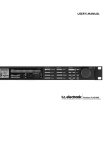
FRONT PANEL
ELECTRONIC POWER
SWITCH
»Easy touch«
Keep pressed for more than
2 seconds to turn device off.
PC CARD SLOT
Presets may be copied
to/from a standard
PCMCIA/PC-CARD
memory card.
INDICATORS
OVERLOAD LED
Lights up if internal overload
occurs.
INPUT SAMPLE RATE
INDICATOR
48000 Hz
44100 Hz
32000 Hz
MIDI IN LED
MIDI or RS485 receive
indicator.
CARD LED
Indicates presence of a valid
memory card.
ACTIVITY LED
Indicates when a calculation is
performed.
EDITED LED
Indicates that the preset has
been edited.
6
DEFINED OVERLOAD
User defined overload LED.
OUTPUT PPM
High resolution meters.
INPUT PPM
CLIP LED
Indicates that Output
is clipped.
EXPANDER
ACTIVE
INDICATORS
GAIN REDUCTION LIMIT
METERS
LEDS
High - Indicating
the max gain
reduction in the two
high freq.bands.
Mid - Indicating the
max gain reduction
in the mid freq.
bands.
Low - Indicating the
max gain reduction
in the two lower
bands.