1
SH7269 CPU Board R0K572690C000BR
4.
Executing the Software
(2) Specify the command batch file before downloading
Execute the script file "fmtool_r0k57269.hdc", consisting of the access timing and the bus control signal setting for the SH7269
CPU Board flash memory before downloading the sample software.
The following script file is assumed to be stored in the sample workspace.
"C:¥WorkSpace¥Sample_software¥sh7269_sample¥fmtool_r0k57269"
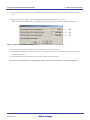
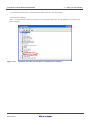
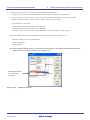
Open [Debug] menu -> [Debug Settings], and select [Options] tab. Check that the items on this tab are set as shown below.
Command batch file load timing (B): Before download of modules
Command line batch processing (L): "$(WORKSPDIR)¥ fmtool_r0k57269¥fmtool_r0k57269.hdc"
Figure 4.1.16
[Debug Settings] Dialog Box
(3) Activate the command line window
When downloading the load module of the sample software, activate the [Command Line] window to check whether the script
file is running.
Select [View] menu -> [Command Line] to check whether [Command Line] window is opened.
Note: If the script file is not executed, downloading the load module into the flash memory cannot be completed.
R20UT0160EJ0100 Rev.1.00
Dec. 08, 2011
4-8