1
As an example of how you might use these two available time blocks, you
could setup Timed Scan time block "A" for the dawn hours from 6 AM to 8 AM,
and block "B" to capture images between 5:30 and 7 PM. No Timed Scan
recording would occur from 8 AM to 5:30 PM, or from 7 PM to 6 AM.
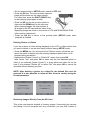
6. After setting Start/Stop times to define Timed Scan block "A" and/or "B",
press OK, then press the UP or DOWN key to select "Interval" and press OK
(Step 6). The Timed Scan "Interval" setting lets you control how often a photo
or video clip is recorded during the block(s) of time you defined with the Start
and Stop settings. Your options are 60 minutes, 30 minutes, 15 minutes, 5
minutes (this is the default), or 1 minute (still photo mode only). Use the
UP/DOWN keys to select your preference, then press OK to save it (Step 7).
Note: for videos, "Interval" is independent of the Length of each video
recording - it’s how often videos are recorded, not how long each one lasts.
7. Here’s an example of how the camera would operate, based on the
following Timed Scan settings:
Timed Scan: On
Timed Scan A:
[Start]: 6:00
[Stop]: 8:00
Timed Scan B:
[Start]: 17:30
[Stop]: 19:00
Interval: 15M
These settings would cause the camera to capture a photo (or video, if the
camera is set to that mode) once every 15 minutes, beginning at 6 AM, until
the Timed Scan "A" recording block stops at 8:00 AM. Later that day, the
camera would again take a photo or video every 15 minutes between 5:30 PM
and 7:00 PM (during Timed Scan time block "B"). The next day, the camera
would again record an image or video once every 15 minutes between 6:00
and 8:00 AM, and between 5:30 and 7:00 PM. No Timed Scan recording would
occur from 8 AM to 5:30 PM, or from 7 PM to 6 AM. Remember, Timed Scan
recording is independent of normal triggers due to animal activity–even if no
animals enter the IR sensor coverage zone, an image or video will still be
captured every 15 minutes during the block(s) of time. If an animal triggers the
camera “in between” the 15 minute intervals, it will be recorded, same as it
would if you had setup the camera with Timed Scan turned Off.
Note: Timed Scan settings of frequent intervals and/or long periods between
14