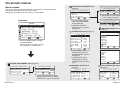
1
POSITION
DETAILED SETUP
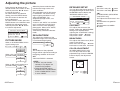
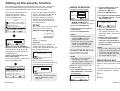
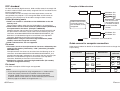
You can adjust the noise and flicker
of the projected images. Press the
ENTER button to display the
“DETAILED SETUP” menu.
When a PC/YPBPR signal is being input
DETAILED SETUP
DOT CLOCK
32
CLOCK PHASE
16
SELECT ENTER RETRN
When an S-VIDEO/VIDEO signal is
being input
Other settings
DETAILED SETUP
STILL MODE
OFF
ADJ
RETRN
Press the F or G button on the
remote control unit to select an item,
and then press the I or H button
to change the setting.
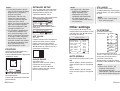
DOT CLOCK
(PC only)
Periodic striped pattern interference
(noise) may occur when a striped
pattern such as the one below is
projected. If this happens, press the
I or H button to adjust so that any
such noise is minimised.
(PC/YPBPR/S-VIDEO/VIDEO only)
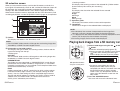
Moves the picture position.
Press the ENTER button to display the
“POSITION” screen.
Press the I or H button to move the
picture horizontally.
Press the F or G button to move the
picture vertically.
48-ENGLISH
(PC/YPBPR only)
Adjust the “DOT CLOCK” setting
first before carrying out this
adjustment. Press the I or H
button to adjust so that the noise
level is least noticeable.
STILL MODE
(S-VIDEO/VIDEO only)
To reduce flickering of still images
(vertical flicker), set “STILL MODE”
to “ON”.
NOTE:
B Set to “OFF” when playing
back moving images.
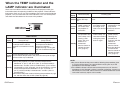
TV-SYSTEM
(S-VIDEO/VIDEO only)
TV-SYSTEM
AUTO
[
NTSC
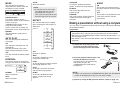
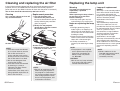
OTHER SETUP
AUTO SIGNAL
ON
TV-SYSTEM
AUTO
FRONT/REAR
FRONT
DESK/CEILING
DESK
HIGHLAND
OFF
LAMP RUNTIME
10H
SXGA MODE
SXGA
CTRL PANEL
VALID
NR
OFF
SELECT ADJ
RETRN
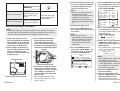
AUTO SIGNAL
CLOCK PHASE
HORIZ.3 2
VERT. 1 6
NOTE:
B If signals with a dot clock
frequency of 100 MHz or
higher are being input,
interference may not be
completely eliminated when
the “DOT CLOCK” and
“CLOCK PHASE” adjustments
are carried out.
This should normally be set to “ON”.
ON
“AUTO SETUP” will be carried out
when the input signal is changed to
“PC”.
OFF
“AUTO SETUP” will not function
when the input signal is changed to
“PC”.
[
NTSC4.43
[
PAL
[
PAL-M
[
PAL-N
[
SECAM
This should normally be set to
“AUTO”. If the signal is of such poor
quality that the correct format
cannot be automatically
distinguished, change the setting
manually to the required TV system.
NOTE:
B When set to “AUTO”, the
projector automatically
distinguishes between
NTSC/NTSC 4.43/PAL/PAL60/
PAL-M/PAL-N/SECAM signals.
ENGLISH-49
Adjustments and settings
NOTE:
B If using this projector in places
such as cafes or hotels to display
programes for a commercial
purpose or for public
presentation, note that if the
aspect ratio (16:9) selection
function is used to change the
aspect ratio of the screen
picture, you may be infringing the
rights of the original copyright
owner for that programe under
copyright protection laws.
B If a 4:3 picture is projected onto
a 16:9 screen, distortion may
occur around the edges of the
picture so that part of the picture
is no longer visible. Programes
which have 4:3 aspect ratios
should be viewed in 4:3 mode to
give proper consideration to the
aims and intentions of the
original programe’s creator.