1
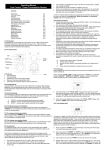
12.0 TARIFF SETTING MODE:
The value of a single unit of kWh (kilo Watt hour) can usually be found on a previous electricity bill.
Please take this figure from a recent bill as costs may have since been updated by the Electricity
Company. If the cost of a kWh cannot be found on the bill, then contact your local Electricity Company
for the price of this unit. The Tariff display may not necessarily be set to zero (as illustrated above). If
there are any preset values that the user has not set themselves, then simply overwrite them when
setting the unit cost of a kWh as follows:
1.
2.
3.
Press and hold the “TARIFF” key (approximately 3 seconds) until the first digit on the right hand
side starts flashing.
Now press either the “POWER” or “COST” keys to set the desired digit. Each press of either
key changes the digits by one. The “POWER” key increases the digits from 0 to 9 and the
“COST” key decreases from 9 to 0.
Once a digit is set, press the “TARIFF” key once to move to the next digit.
25