1
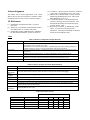
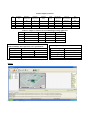
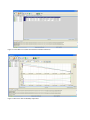
Processor/Radio Module 1 Data Acquisition Board 1 USB Programming Board The specification of each hardware device is shown in the Table 1. The sensor nodes, the base station, USB programming board along with the additional hardware given below were used to set up of the network. Additional hardware includes: Batteries to power the sensor nodes. A laptop computer to connect the base station and used for data collection and analysis. The laptop was also was used to write the programs for the notes as well as upload these programs to the nodes. It should have the following minimum requirements: - 1 GB of free space in the destination drive. - 550 MB of free space in the C drive. USB extension cables to connect the devices to the laptop. 2.3 Software The sensor networking kit includes several software packages that are needed to connect the motes, collect and analyze data, write and compile programs for the nodes, and upload these programs to the nodes. The list of software and their function (that are of importance to this project) are shown in Table 2. MEMSIC provides additional software packages; however, only those listed above were used in our initial implementation and study of the WSN and the implementation of the light and temperature monitoring system. To install the above software (with the exception of XMesh), the laptop needed to be programmed with Windows XP Professional Service Pack 2 (XP-Pro SP2). 3. Initial Network Setup/Data Collection 3.1 Topology Overview and Background XMesh allows the motes to automatically connect in a mesh network topology. A mesh network is a multi-hop network in which all nodes (sensor motes) can communicate with each other to route data to and from a base station. Mesh networks provide multiple routes for data transfer and are highly fault tolerant. They also allow networks to expand over unlimited distances and allow nodes to converse energy. XMesh provides a TrueMesh networking service that is both self-organizing and selfhealing. It can broadcast within a single area of coverage or arbitrarily between any two nodes or cluster. It offers quality of service (QOS) either by link level acknowledgement (best effort) or by end-to-end acknowledgement (guaranteed delivery). XMesh can also be configured in various power modes including high power (HP), low power (LP), and extended low power (ELP). Other features of XMesh include multiple transport services, health diagnostic, time synchronization, and over-the-air programming (OTAP) [3]. Each wireless sensor is programmed to measure humidity, humidity temperature, present temperature, pressure, light, vertical acceleration (y-axis), and horizontal acceleration (x-axis). These nodes have also been programmed to follow XMesh protocol. 3.2 Configuring the Client Tier 3.2.1 Primary Option To set up the network, the necessary software had to be installed on the laptop computer to provide the interface to communicate with the nodes and collect and analyze data. MoteWorks (and all its components) and MoteView (and all its components) were successfully installed on the laptop with the Windows XP SP2 operating system. 3.2.2 Alternate Option Using a preconfigured version of the OS Windows XP SP2 on a virtual machine such as VMware Player or Virtual Box provides a solution to combine the capability of the needed operating system Windows XP SP2 with newer versions of Windows or Linux simultaneously. 3.3 Network Deployment/Configuring the Mote Tier Only four motes were used for the initial setup. The motes were powered up and placed at different locations. The location of the motes and the approximate distance between each and the base station is given in the Table 3. 4. Collecting Live Data With the motes in their desired location, MoteView was opened, and the “Connect to WSN” button was clicked to collect live data. In the “Mode” option the operation, “Acquire Live Data”, was selected from the “Select Operation Mode” options and “Local” was selected from the “Select Acquisition Mode” options. In the “Gateway” option/tab, the interface board MIB520, the serial port COM4, and the baud rate 56700 were all selected from the relevant drop down menus. Next, in the “Sensor Board” option, XMTS400 was selected as the sensor application. The “Done” button was then clicked and this initiated data collection. Once live data collection was started, the behavior of the network was monitored. A snap shot of the network topology, with present temperature selected as the data being collected is shown in Figure 1. (N.B. Initial data collection can be stopped by simply clicking the “Stop XServe” button on the top MoteView interface. Data collection can be restarted by checking the “Live” checkbox, and clicking the “Start XServe” button.).