1
s
ISO Archive InterOperability(AIO) System User’s Manual
issue Error! Reference source not found. revision Error! Reference source not found. -Error! Reference source not found.
page 26 of 32
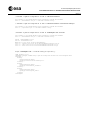
<DESCRIPTION>Search for this DEC given in decimal degrees in the ICRS
coordinate system</DESCRIPTION>
</PARAM>
- <PARAM name="INPUT:ID_TARGET">
<DESCRIPTION>The other way to select a coordinates position. Input the target
name and it will be resolved by the resolver service. (SIMBAD by default).
Compatible with SIZE input</DESCRIPTION>
</PARAM>
- <PARAM name="INPUT:SIZE">
<DESCRIPTION>Size of search region in the RA and DEC
coordinates</DESCRIPTION>
</PARAM>
- <PARAM name="INPUT:FORMAT" value="VOTABLE ">
<DESCRIPTION>Requested format for the output table</DESCRIPTION>
- <VALUES type="legal" invalid="no">
<OPTION>VOTABLE </OPTION>
<OPTION>HTML</OPTION>
<OPTION>TXT</OPTION>
<OPTION>METADATA </OPTION>
</VALUES>
</PARAM>
- <PARAM name="INPUT:OBS_ID">
<DESCRIPTION>Display a certain observation by selecting the observation
number</DESCRIPTION>
</PARAM>
- <PARAM name="INPUT:REVNO">
<DESCRIPTION>Only the observations for this obsno will be
displayed</DESCRIPTION>
</PARAM>
</RESOURCE>
</VOTABLE>