1
Oktopad 2 - Overview
Oktopad utilizes the Launchpads User 2 mode to add 8 additional scenes of functionality to the Launchpad
whilst allowing the default functionality of the other modes to remain.
Each scene either offers an audio effect or a set of controls that can be mapped to parameters within
Ableton, in our template we have mapped many of these as a starting point but you’ll find when consulting
this manual that they are easily modified and configured to your own unique requirements.
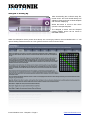
Scene ONE (Shuffler)
Route audio to the Oktopad device and rearrange it on the fly, change the order of the slices and reverse
and mute them to create new patterns.
Scene TWO (Stutters)
This scene gives you progressive filter effects, turntable brake and rewind (of actual audio) and a unique
Beat Repeat style effect where you can choose which 1/8th of the last bar of audio is repeated and at what
rate, glitchy madness in the right hands!
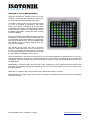
Scene THREE (Buttons)
Ever wish you could edit the Launchpad? With this scene each of the buttons can have it’s lighting
configured and mapped to any parameter within Ableton. Set it’s on and off values and decide whether it acts
as a Toggle or Momentary, finally for advanced use choose how long in time it takes to reach your target
values for example to give the smooth introduction of an effect.
Scene FOUR (To Be Confirmed)
This scene is still under constrution and is planned to be a DJ Utility scene giving relative quantized beat
jumps, clip nudge, and control of the pitch of a clip across all eight tracks within the RedBox
Scene FIVE (Looping)
Traktoresque style looping over the clips playing within the RedBox, set a 1, 2 or 4 bar loop on the fly, halve
and double a set loop by moving the loop start or end point and even shift the loop brace forwards or
backwards by a bar at a time or by the loops length.
Scene SIX (Send/Return)
Choose to take control of a single send across 8 tracks and then switch to control the first 8 macros of a rack
within the corresponding Return track, you can even select on the fly whether the buttons act as momentary
to give short bursts of audio or toggle to sen audio to a Return and then modify the effect within it.
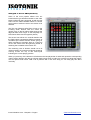
Scene SEVEN (Faders)
We’ve given you 8 banks of faders, mappable to any set of parameters within your set we’ve by default set
the first bank to control volume faders. Yes you can achieve this with the Mixer mode of the Launchpad but
with our device there’s a smooth control so that values rise and fall gradually rather than jumping to an
absolute value, who said you cant mix smoothly with buttons?
Scene EIGHT (Device)
Navigate around your set and take control of the in focus device, now you can use each column of buttons to
control the parameters of the device, you can even move between the banks of parameters and switch
between devices on a track. As with the Fader scene we’ve coded our smoothing functionality to give finer
control over Ableton
Isotonik Studios 2012 - Oktopad 2 - Page 2
www.isotonikstudios.com