1
Table of Contents
Table of Contents
1.
Introduction .......................................................................................................................................................1
About VESR321 Family Serial Servers .................................................................................................................................. 1
VESR321 Family Serial Server Model Numbering ................................................................................................................. 1
VESR321 Family Serial Server Features ............................................................................................................................... 2
Vlinx Manager Configuration Software .................................................................................................................................. 2
2.
Hardware ...........................................................................................................................................................3
Package Checklist ................................................................................................................................................................. 3
VESR321 Enclosures and Mounting...................................................................................................................................... 3
LED Indicators....................................................................................................................................................................... 3
Mode Switch ......................................................................................................................................................................... 3
Ethernet Connector ............................................................................................................................................................... 4
Fiber Optic Connectors ......................................................................................................................................................... 4
Serial Port Connectors .......................................................................................................................................................... 4
Power Connector .................................................................................................................................................................. 6
Mounting Hardware ............................................................................................................................................................... 6
3.
Setup and Connections ....................................................................................................................................7
Connecting the Power Supply ............................................................................................................................................... 7
Connecting VESR321 Family Serial Servers to Serial Devices .............................................................................................. 7
Connecting the VESR321 .......................................................................................................................................... 8
Connecting VESR321 Serial Servers to a Network ................................................................................................................ 8
Network Connection (10BaseT/100BaseTX) .......................................................................................................... 8
Fiber Optic Connection ............................................................................................................................................... 8
VESR321 Family Serial Server Configuration Connections ................................................................................................... 9
Configuring the VESR321 Family Serial Server via the Network Connection .................................................... 9
Configuring the VESR321 Family Serial Server via the Serial Port (Console Mode) ...................................... 11
VESR321 Family Serial Servers Operational Connections .................................................................................................. 11
Using VESR321 Serial Servers in Direct IP Mode ............................................................................................... 12
Using VESR321 Family Serial Servers in Virtual COM Port Mode .................................................................... 12
Using VESR321 Family Serial Servers in Paired Mode ...................................................................................... 12
Initiating a Hardware Reset on the Serial Server ................................................................................................................. 13
Reloading Factory Defaults ................................................................................................................................................. 13
4.
Properties ........................................................................................................................................................ 15
Baud Rate ........................................................................................................................................................................... 15
Character Count .................................................................................................................................................................. 15
Configuration Files .............................................................................................................................................................. 15
Data/Parity/Stop .................................................................................................................................................................. 15
Default Gateway.................................................................................................................................................................. 16
Delimiters ............................................................................................................................................................................ 16
Delimiter 1 .................................................................................................................................................................. 16
Delimiter 2 .................................................................................................................................................................. 16
Delimiter Removal ..................................................................................................................................................... 16
How Delimiters Work ................................................................................................................................................ 16
DHCP.................................................................................................................................................................................. 16
Firmware Version ................................................................................................................................................................ 17
Flow Control ........................................................................................................................................................................ 17
Forced Transmit .................................................................................................................................................................. 17
Hardware Version ............................................................................................................................................................... 17
Inter-character Timeout ....................................................................................................................................................... 17
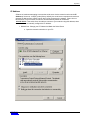
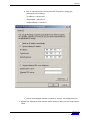
IP Address .......................................................................................................................................................................... 18
Link Status .......................................................................................................................................................................... 20
MAC Address ...................................................................................................................................................................... 20
Model .................................................................................................................................................................................. 21
Network Protocols ............................................................................................................................................................... 21
Network Watchdog .............................................................................................................................................................. 21
www.bb-elec.com
www.bb-europe.com
i