1
Chick Scale 103
User's Manual
The Panel
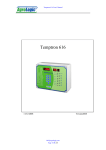
The Chick Scale 103 panel has two displays, nine keys, a USB connector for PC
connection, USB status light, an AC/DC adaptor connector and a CHARGE light. The
four-digit display is for displaying the weight measured and various messages (weight
display). The one-digit display on the right displays the batch number (batch display).
The keys are: ON/TARE, AVR, UNI/GRAPH, OFF, MENU, (Arrow Up)
, (Arrow Down), ENTER and BATCH.
The way a weight is displayed depends on type of units set by the user. When the
Chick Scale 103 is in Kg mode, the weight will be displayed in gram XXXX. When
the Chick Scale 103 is in LB mode, the weight will be displayed in LB XX.XX.
The default display is the current weight display. When a running decimal point
appears on the weight display it indicates that the Chick Scale 103 is ready and the
next bird can be weighed. When a bird is weighed, the display shows its weight and
once the weight is registered, the display blinks with the registered weight. When a
key is pressed, the display exits the weighing display, displays the requested
information and then returns to the weighing display. If an error message appears on
the display (i.e. Err1) it means that a there is a problem and should be resolved.
A summery of the display and error messages appears in Tables 4 and 5 (pages 1415).
To see possible solutions to different problems or errors see the Troubleshooting table
(page 13).
ON/TARE Key
To Tare the scale is the act of removing a known weight of an object, usually a
weighing container, to zero the scale. Performing a tare allows you to display the
weight of the bird on the scales display with the weight of the bird only and not the
weighing container.
The ON/TARE key is a double-function key. When the Chick Scale 103 is off,
pressing on this key turns the Chick Scale 103 on and tares the scale. If the Chick
Scale 103 is already on, pressing on the ON/TARE just tares the scale. Before
pressing the ON/TARE key make sure that there are no birds on the hook. The
display shows “tArE” for a few seconds and then returns to its weighing mode.
AVG Key
Press on the AVR key to display the number of birds weighed in the current batch and
the batch average weight. The number of birds weighed is first displayed and after a
few seconds the average weight (the average weight is displayed with a decimal
point). After a few seconds the display will return to the weighing mode.
Page 4 of 15
www.agrologic.com
AL-2150-A
08-08