1
Chick Scale 103
User's Manual
Viewing the Recorded Weights
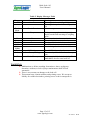
To view the recorded weights when in the weighing display mode, press on the
Arrow Up or the Arrow Down keys. The display shows the weight number, where 1
is the first recorded number and then the weight recorded (when the units are set to
Kg, the weight recorded is displayed in Kg instead of Grams). If the Arrow Up key is
pressed first, the first recorded weight is displayed and if the Arrow Down key is
pressed first, the last recorded weight is displayed first. Any other press on Arrow Up
key displays the next recorded weight and any other press on the Arrow Down key
displays the previously recorded weight. To return to the weighing mode press on one
of these keys: MENU, AVR or UNI/GRAPH.
Uniformity Graph
The Chick Scale 103 memorizes the weight of all the birds in 25-gram steps (in
Pounds in 0.05 Lb steps) in range of ±1000 grams (±2.00 Lb in Pounds) around the
average.
To scroll through the uniformity graph, push on the UNI/GRAPH button twice or
enter the menu or choose the GrAP option from the menu.
The display shows the lowest recorded weight and after a few seconds the number of
birds in this weight (the weight is displayed with a decimal point).
Press on the Arrow Up key to show the next weight step. Press on Arrow Down key
to show the previous weight step. Weight-steps with no weighs are not shown.
When the end of the Uniformity Graph is reached the display shows End.
If the table is empty, the display shows CLr.
To exit, press on the MENU key. The Chick Scale 103 returns to the weighing mode.
Erasing a Batch
There are two ways to erase the stored batch information: through repeated use of
AVR key or through the menu.
Erasing a Batch using the AVR key:
1. Press on the BATCH key until the desired batch number is displayed.
2. Press 4 times on the AVR key. On the second, third and fourth key press
the display shows ErA1, ErA2 and ErA3 correspondingly.
3. Press on ENTER key. The display shows blinking ErAS.
4. Press on the ENTER key again.
The batch data is erased and the display shows CLr. Once the batch has been
erased the display returns to weighing mode.
Page 8 of 15
www.agrologic.com
AL-2150-A
08-08