1
ENGLISH
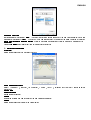
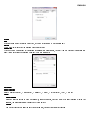
2.2 Double Click Time
Slow” if you want more time in double tapping with the Pen Tip or opposite if you move
Fast” . This setting is the same as Double-click Speed on the page displayed by selecting
Start ► Control Panel ► Mouse ► Buttons. Changing the speed in one place or changing the other in the meanwhile.
2.3 Default
Tap on the Default button to recovery from all the manufacture settings.
Move the Speed Slider toward “
the Speed Slider toward “
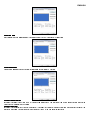
3. Express Keys define page
3.1 Default
Resume the Express Keys to the default settings.
3.2 ReRe-define Express keys
Select
“
Common”
, “
Mouse”
, “
Multimedia”
, “
Other”
, “
Run”
the settings.
3.3 Common
Express key name
Rename the Express Key.
Disable
Disable the Express Key name display on the Pen Tablet control panel.
Default
Resume the Express Key name to the default setting.
, “
Internet”
and “
Hot Key”
tabs to re-define