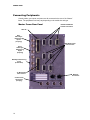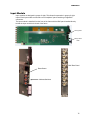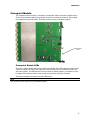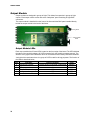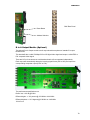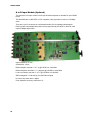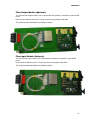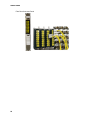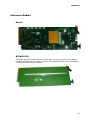
1
SIERRA VIDEO Ponderosa™ 3G Series Routing Switcher Family with MediaNav Software User’s Manual PONDEROSA™ SERIES ROUTING SWITCHER User’s Manual Sierra Video P.O. Box 2462 Grass Valley, CA 95945 Tel: (530) 478-1000 Fax: (530) 478-1105 Email: [email protected] Version 14.0 Publication Date: March 2013 The information contained in this manual is subject to change by Sierra Video Table of Contents Introduction 1 Before You Begin Regulatory Warnings & Safety Information Delivery Damage Inspection Ponderosa™ Series Routing Switcher Ponderosa 6464 Frame Ponderosa 128128 Frame Factors Affecting Quality of Results 1 2 6 7 8 9 10 Installation Introduction Rack Mounting Multi-Frame Connection Connecting To Video Devices Connecting Peripherals Master Frame Rear Panel Reference Sync Input Equalizers Output Reclocking AC Power Connections Redundant Power Supplies Control Processor DIP Switches CPU LEDs Ethernet LEDs GPI Suggested GPI/O Circuitry User Interface Launching and Logging In GUI Layout Configure Overview Users and Groups Users Add a New User Assign Consoles Groups 11 11 11 12 13 14 14 15 15 15 16 17 18 19 20 21 22 23 23 24 25 25 26 26 27 27 27 System Features (right half of page) 27 Operate Checkbox 28 Save and Cancel 28 Edit User 28 Groups 29 Routing Switchers 30 Summary 30 Add Routing Switcher 31 Connection: 31 Selecting the proper mapping: 34 Changing Routing Switcher Configurations 37 General 37 Layers 38 Names 39 Hardware Panels 40 Add Panel 41 Non-Programmable Panels 41 SCP-Programmable Panels 43 Button Configuration 44 Functions 45 Panel Options 46 SCP-112 Panels 47 Panel Options Supported by Each Panel 48 Button Function per Panel 49 Console Design 50 Add Console 50 General 51 Look and Layout 51 Source Buttons 51 Destination Buttons 52 Level Buttons 52 Other Buttons 52 Users and Groups 52 Advanced 52 Salvos 53 Multi-Viewers 54 Add Multi-Viewer 54 Advanced 55 System 55 Network 55 Serial 55 Categories 56 Router Mapping 56 Contents - 1 SIERRA VIDEO Logging Backup and Restore tab Analyze Config Factory Defaults Manage 56 56 56 56 57 Introduction Overview Routing Switchers General Crosspoints Modules Input Settings Output Settings GPI/O LEDs & DIP Switches Hardware Panels Multi-Viewers Advanced Network Logging Software Update System Control Operate 57 57 58 58 59 60 60 61 62 62 63 63 64 64 64 64 65 67 Introduction GUI Console Operation Source based Switching Destination based Switching Level Buttons and Indicator Bulbs Destination-Based Console Indications Source-Based Console Indications Break-away Switching Salvos and Preset Recalls Operation Introduction Control System Overview Serial Control Ports Control Panels (RS-485) Module Overview Introduction Module Layout 6464 Frame 128128 Frame Input Module Crosspoint Module Output Module D to A Output Module (Optional) 67 69 69 69 69 69 70 70 70 71 71 71 72 72 73 73 74 74 74 75 77 78 79 A to D Input Module (Optional) Fiber Output Module (Optional) Fiber Input Module (Optional) Processor Module Power Supply Module Optional Audio Introduction Model Suffix Designations Frame Configurations Ponderosa Analog Audio 6464 Frame Ponderosa Analog Audio 128128 Frame Ponderosa Digital Audio 6464 Frame Ponderosa Digital Audio 128128 Frame Digital Audio Output Accessories Installation Rack Mounting Multi-Frame Connection Rear Panel Connections Connecting to Audio Devices Mono Analog Audio Balanced/Unbalanced Analog Audio Connections Stereo Analog Audio Balanced Digital Audio Unbalanced Digital Audio Audio Module Overview 80 81 81 83 84 85 85 86 86 87 88 89 90 91 92 92 93 94 95 95 95 96 97 102 103 Introduction 103 Analog Audio 104 Input Buffers 104 Crosspoint/ Output Driver Modules 105 Digital Audio 106 Input buffers 106 Module Layout 106 6464 Frame Analog Mono and Digital 106 6464 Frame Analog Stereo 107 128128 Frame Analog Mono and Digital107 128128 Frame Analog Stereo 107 Front Door Fans 108 Specifications 109 Communication Protocol 113 Introduction Commonly Used Switching Commands Warranty 113 120 121 SIERRA VIDEO Chapter 1 Introduction Before You Begin There are several terms and acronyms that you should become familiar with before reading this manual. They are shown below. Term/Acronym Definition Crosspoint The electronic switch that assigns one of the inputs on the matrix crosspoint modules to an output. The output of a routing switcher connected to a device that receives signals from the output of the switcher. Connects the signal to the destination device. The signal that is connected to the input of the routing switcher. Connected to the source that provides the signal to the switcher. An array of the switch modules that connects an input to an output. The command structure used to affect a switch or multiple switches on the routing switcher or to control other functions. Consists of one or more crosspoint modules that switch together, or sometimes independently, to connect the desired signals through the switcher. The 9-pin RS232 connector that allow you to control the switcher using a standard personal computer or other external device. Sends control protocol commands in ASCII. Destination Output Source Input Matrix Protocol Routing Switcher Serial Port 1 SIERRA VIDEO Regulatory Warnings & Safety Information The information in the following section provides important warnings and safety guidelines for both the operator and service personnel. Specific warnings and cautions may be found throughout this manual. Please read and follow the important safety precautions noting especially those instructions relating to risk of fire, electrical shock and injury to persons. Any instructions in this manual that require opening the equipment cover or enclosure are intended for use by qualified service personnel only. To reduce the risk of electrical shock, do not perform any servicing other than what is contained in the operating instructions unless you are qualified. Warnings Heed all warnings on the unit and in the operating instructions. Disconnect AC power before installing or removing device or servicing unit. Do not use this product in or near water. This product is grounded through the grounding conductor of the power cord. To avoid electrical shock, plug the power cord into a properly wired receptacle before connecting inputs or outputs. Route power cords and other cables so that they are not likely to be damaged, or create a hazard. Dangerous voltages exist at several points in this product. To avoid personal injury, do not touch unsafe connections and components when the power is on. To avoid fire hazard, use only the specified type, correct voltage, and current rating of fuse. Always refer fuse replacement to qualified service personnel. Have qualified personnel perform safety checks after any completed service. To reduce risk of electrical shock, be certain to plug each power supply cord into a separate branch circuit employing a separate service ground. If equipped with redundant power, this unit has two power cords. To reduce the risk of electrical shock, disconnect both power cords before servicing. Operate only with covers and enclosure panels in place – Do Not operate this product when covers or enclosure panels are removed. This is an FCC class A product. In a domestic environment, this product may cause radio interference, in which case the user may be required to take necessary measures. Cautions 2 Use the proper AC voltage to supply power to the switcher. When installing equipment, do not attach the power cord to building surfaces. To prevent damage to equipment when replacing fuses, locate and correct the trouble that caused the fuse to blow before applying power. Use only the recommended interconnect cables to connect the switcher to other frames. Follow static precautions at all times when handling the equipment. Power this product only as described in the installation section of this manual. PONDEROSA Cautions (continued) Leave the side, top, and bottom of the frame clear for air convection cooling and to allow room for cabling. Slots and openings in the frame are provided for ventilation and should not be blocked. Only an authorized Sierra Video technician should service the switchers. Any user who makes changes or modifications to the unit without the expressed approval of Sierra Video will void the warranty. If installed in a closed or multi-unit rack assembly, the operating ambient temperature of the rack environment may be greater than the room ambient temperature. Therefore, consideration should be given to installing the equipment in an environment compatible with the manufacturer’s maximum rated ambient temperature (TMRA). Installation of the equipment in a rack should be such that the amount of air flow required for safe operation of the equipment is not compromised. Use a shielded data cable connection between the parallel data ports and peripherals of this equipment. Other connections between peripherals of this equipment may be made with low voltage non-shielded computer data cables. Network connections may consist of non-shielded CAT 5 cable. Do not cover chassis ventilation slots or block enclosure openings. FCC Notice This equipment has been tested and found to comply with the limits for a Class A digital device, pursuant to Part 15 of the FCC rules. These limits are designed to provide reasonable protection against harmful interference when the equipment is operated in a commercial environment. This equipment generates, uses, and can radiate radio frequency energy and, if not installed and used in accordance with the instruction manual, may cause harmful interference to radio communications. Operation of this equipment in a residential area is likely to cause harmful interference in which case the user will be required to correct the interference at the expense of the user. The user may find the following publication prepared by the Federal Communications Commission helpful: “How to Identify and Resolve Radio-TV Interference Problems” (Stock number 004-00000345-4). Available exclusively from the Superintendent of Documents, Government Printing Office, Washington, DC 20402 (telephone 202 512-1800). Warning Changes or modifications not expressly approved by the party responsible for compliance to Part 15 of the FCC Rules could void the user’s authority to operate the equipment. 3 SIERRA VIDEO CE Notice INFORMATION FOR THE USER This equipment has been tested and found to comply with the limits for Class A or Class 1 digital device, pursuant to EN 550022 Rules. These limits are designed to provide reasonable protection against harmful interference when the equipment is operated in a commercial environment. This equipment generates, uses, and can radiate radio frequency energy and, if not installed and used in accordance with the instruction manual, may cause harmful interference to radio communications. Operation of this equipment in a residential area is likely to cause harmful interference in which case the user will be required to correct the interference at the expense of the user. The user may find the following publication prepared by the Federal Communications Commission helpful: “How to Identify and Resolve Radio-TV Interference Problems” (Stock number 004-000-00345-4). Available exclusively from the Superintendent of Documents, Government Printing Office, Washington, DC 20402 (telephone 202 512-1800). Warning Changes or modifications not expressly approved by the party responsible for compliance to EN 55022 Rules could void the user’s authority to operate the equipment. ICAN Class A Digital Equipment This Class A digital apparatus meets all requirements of the Canadian Interference-Causing Equipment Regulations. Cet apparel numérique de la classe A respecte toutes les exigencies due Réglement sur le materiel brouiller du Canada. 4 PONDEROSA Pulver Laboratories Inc. and Sierra Video Inc. hereby certify that the Ponderosa Series router is in compliance with VFG 523/1969, DIN 57871 / VDE 0871 / 09.84, and DIN 5785 Part 1 A2 / 10.90 (product standards) and is RFI suppressed. The marketing and sale of this equipment in Germany has been reported to the German Postal service. They have also been given the right to retest this equipment to verify compliance with product regulations. Compliance with applicable regulations depends on the use of shielded cables. The user is responsible for procuring the appropriate cables. This equipment has been tested concerning compliance with the relevant RFI protection requirements both individually and on a system level (to simulate normal operation conditions). However, it is possible that these RFI requirements are not met under certain unfavorable conditions in other installations. The user is responsible for compliance of his particular installation. Pulver Laboratories Inc. Testing and Certification Laboratories Sierra Video Name of Manufacturer or Importer Bescheinigung des Pulver Laboratories Inc. und Sierra Video hiermit wird bescheinigt, dass die Ponderosa Series router in Űbereinstimmung mit den Bestimmungen der VFG 523/1969, DIN 57871 / VDE 0871 / 09.84, und DIN 57875 Part 1 A2 / 10.90 (Amtsblattvertugung) funk-entstőrt ist. Der deutschen Bundespost wurde das Inverkehrbringen dieses Geräts angezeigt und die Berechtigungen zur Űberprűfung der Serie auf Einhaltung der Bestimmungen eingeräumt. Einhaltung mit betreffenden Bestimmungen kommt darauf an, dass geschirmte Ausfűhrungen gerbraucht warden. Fűr die Beschaffung richtiger Ausfűhrungen ist der Betreiber Verantwortlich. Dieses Gerät wurde sowohl einzeln als auch in einer Anlage, die einen normalen Anwendungsfall nachbildet, auf die Einhaltung der Funk-entstőrbestimmungen unter Ungűnstigen Umständen bei anderen Gerätekombinationen nicht Eingehalten warden. Der Betreiber ist fűr die Einhaltung der funkeutstőrungsbestimmungen seiner gesamten Anlage verantwortlich, in der dieses Gerät betrieben wird. Pulver Laboratories Inc. Testing and Certification Laboratories Sierra Video Name des Herstellers / Importeurs Caution Danger of explosion if battery is incorrectly replaced. Replace only with the same or equivalent type recommended by the manufacturer. Dispose of used batteries according to the manufacturer’s instructions. Attention IL y a danger d’explosion s’il y a replacement incorrect de la batterie, remplacer uniquement avec une batterie du meme type ou d’un type equivalent recommande par le constructer. Mettre au rebut les batteries usages conformement aux instructions du fabricant. 5 SIERRA VIDEO Power Supply Cords Use only power cord(s) supplied with the unit. If power cord(s) were not supplied with the unit, select as follows: For units installed in the USA and Canada: select a flexible, three-conductor power cord that is UL listed and CSA certified, with individual conductor wire size of #18 AWG, and a maximum length of 4.5 meters. The power cord terminations should be NEMA Type 515P (three-prong earthing) at one end and IEC appliance inlet coupler at the other end. Any of the following types of power cords are acceptable; SV, SVE, SVO, SVT, SVTO, SVTOO, S, SE, SO, SOO, ST, STO, STOO, SJ, SJE, SJO, SJOO, SJT, SJTOO, SP-3, G, W. For units installed in all other countries; select only a flexible, three-conductor power cord, approved by the cognizant safety organization of your country. The power cord must be Type HAR (Harmonized), with individual conductor wire size of 0.75 mm². The power cord terminations should be a suitably rated earthing-type plug at one end and IEC appliance inlet coupler at the other end. Both of the power cord terminations must carry the certification label (mark) of the cognizant safety organization of your country. A non-shielded power cord may be used to connect AC power to every component and peripheral of the system. Connect an external 18 AWG wire from earth ground to the chassis of the system as designated by the earth ground symbol. North American Power Supply Cords This equipment is supplied with North American power cords with molded grounded plug (NEMA15P) at one end and molded grounding connector (IEC 320-C13) at the other end. Conductors are CEE color coded, light blue(neutral), brown(line), and green/yellow(ground). Operation of the equipment at voltages exceeding 130VAC will require power supply cords that comply with NEMA configurations. International Power Supply Cords If shipped outside North America, this equipment is supplied with molded ground connector (IEC 320-C13) at one end and stripped connectors (50/5mm) at the other end. Connections are CEE color coded, light blue (neutral), brown(line), and green/yellow(ground). Other IEC 320-C13 type power cords can be used if they comply with safety regulations of the country in which they are installed. EMC Regulatory Notices Federal Communications Commission (FCC) Part 15 Information: This device complies with Part 15 of the FCC standard rules. Operation is subject to the following conditions: This device may not cause harmful interference This device must accept any interference received including interference that may cause undesirable operations. Delivery Damage Inspection Carefully inspect the frame and exterior components to be sure that there has been no shipping damage. Make sure all modules are seated correctly and have not detached during shipment. 6 PONDEROSA Ponderosa™ Series Routing Switcher Introduction The Ponderosa HD/SDI video routing switcher from Sierra Video is top-of-the-line modular routing for those applications requiring worry-free performance and mission critical reliability. The advanced features and performance set it apart from the competition. These include: Modular configurations expandable by 8 input and/or 8 output increments Compact frame size – 4RU (6464 frame) or 8RU (128128 frame). Hot-swappable video I/O boards, CPU boards, and power supplies Optional redundant power supplies and control processors Full range of Sierra control hardware and software components, including remote control panels, IP, and RS-232/422 serial control. Supported by all major third party control systems. Front-door access to hot-swappable video I/O boards allows for field service or matrix reconfiguration. The power supplies are also hot-swappable, guarantee maximum in-service time and minimal interruptions. IP (Ethernet) control via TCP/IP socket connection and RS-232/422 serial control is standard in every model. For applications requiring companion audio, the Ponderosa routing switcher is compatible with our time-tested line of audio routing switchers. Sierra Video’ advanced SCP line of programmable control panels manage the routing system along with our “built in” MediaNav™ router control software featuring the most intuitive router interface in the industry. 7 SIERRA VIDEO Ponderosa 6464 Frame Frame Front Panel Frame Rear Panel Note The Sierra Video models shown here and in the subsequent sections are fully loaded matrices. In some cases, these frames may be configured with less outputs or inputs. Consult the rear panel serial number and model number to verify your order and product. The system you receive is customized for the size & type requested at time of purchase from Sierra Video 8 PONDEROSA Ponderosa 128128 Frame Frame Front Panel Frame Rear Panel Note The Sierra Video models shown here and in the subsequent sections are fully loaded matrices. In some cases, these frames may be configured with less outputs or inputs. Consult the rear panel serial number and model number to verify your order and product. The system you receive is customized for the size & type requested at time of purchase from Sierra Video 9 SIERRA VIDEO Factors Affecting Quality of Results There are many factors affecting the quality of results when signals are transmitted from a source to a destination. Signal cables — Use only the best quality cables to avoid interference, degraded signal quality and elevated noise levels. Sockets and connectors of the sources and destinations — Use only the highest quality, since "zero ohm" connection resistance is the target. Connectors should also match the required impedance (75 ohm in video) to minimize return loss. Amplifying circuitry — Must have quality performance when the desired end result is high linearity, low distortion, and low noise. Distance between sources and destinations — Plays a major role in the final result. For long distances (over 15 meters) between sources and destinations, special measures should be taken to avoid high frequency cable losses. These measures include using higher quality cables and/or adding line cable equalizing amplifiers. Interference from neighboring electrical appliances — These can have an adverse affect on signal quality. Balanced audio lines are less prone to interference, but unbalanced audio should be installed away from any main power lines, electric motors, transmitters, etc. even when the cables are shielded. CAUTION! Only an authorized Sierra Video technician can service the switchers. Any user who makes changes or modifications to the unit without the expressed approval of the manufacturer will void the warranty Use the proper AC voltage to supply power to the switcher. Use only the recommended interconnect cables to connect the switcher to other frames 10 SIERRA VIDEO Chapter 2 Installation Introduction Installation procedures are similar for all frames covered within this manual. Exceptions, if any, have been noted in each of the following paragraphs. Rack Mounting Carefully inspect the frame to ensure that there has been no shipping damage. Make sure all shipping material is removed from the router frame. Each of the routing switchers described in this manual can be rack mounted in a standard 19" (RU) EIA rack assembly and includes rack "ears" at the ends of the front of the frames. None of the switcher models require spacing above or below the unit for ventilation. If ample space exists, a 1RU spacing gap is recommended. To rack mount any of the routing switchers, simply place the unit's rack ears against the rack rails of the rack, and insert proper rack screws through each of the holes in the rack ears. Always rack mount the routing switcher prior to plugging the unit into a power receptacle or attaching any cables. Important: Rear mounting brackets must be installed prior to installation of the router into a rack. The rear mounting brackets are contained in the accessory kit supplied with your router. CAUTION! The operating temperature range of the Ponderosa series router is 0 to 40 °C. Do not exceed the maximum (40 °C) or minimum (0 °C) operating temperature. Rear mounting brackets must be installed prior to installation of the router into a rack. The rear mounting brackets are contained in the accessory kit supplied with your router. If installed in a closed or multi-unit rack assembly, the operating ambient temperature of the rack environment may be greater than the room ambient temperature. Therefore, consideration should be given to installing the equipment in an environment compatible with the manufacturer’s maximum rated ambient temperature (TMRA). Installation of the equipment in a rack should be such that the amount of air flow required for safe operation of the equipment is not compromised. 11 SIERRA VIDEO Multi-Frame Connection The Ponderosa routing switcher can be connected to other SVS routers to work as one system (i.e. audio or other signal formats). Depending on the other frames in the system, connections are either made using the “J1” (25 pin) or “Multi-drop” (9 pin) connector. A system drawing will be included in the shipment if a multi-frame system is ordered. Control panels and serial control connect to the frame containing the master processor. Control Panels, RS-232/422 Serial Control and Ethernet control Connect to This Frame Master Frame See the “Connecting Peripherals” section of this manual for details. J1 Multi-Frame Interconnect Cable Optional Audio Slave Frame J1 12 PONDEROSA Connecting To Video Devices Video sources and output devices (such as monitors, or recorders) may be connected to the routing switchers through the 75 ohm BNC type connectors located on the back of the unit. Keep in mind that the output signal format will be that of the input signal format. Inputs are set for 75 ohm termination. Unused outputs do not need to be terminated. 13 SIERRA VIDEO Connecting Peripherals Control panels, sync inputs, and power are all connected to the rear of the “Master” frame. The peripherals area may vary depending on the model size and type. Master Frame Rear Panel RS-232 and RS-422 Control Connectors GPI- I/O Ref 1 Video Sync Referencing Inputs (Looping) Ref 2 Video Sync Referencing Inputs (Looping) Multi-Drop Frame Inter-connect AES Sync Referencing Input (Future Use) J1 Multi-frame Inter-connect Control Panel Connectors (Looping) 14 Ethernet Connectors PONDEROSA Reference Sync There are three “looped” sets of BNC connectors labeled "VIDEO REF 1"and “VIDEO REF 2”, and “AES REF”. These are "looping" inputs for sync referencing. Status of “VIDEO REF 1" or “VIDEO REF 2” is described in the Manage section of this manual, Connect either composite sync or video with sync to either set of BNCs. If desired, use the second BNC in the set to loop the signal to another device. If the loop is not used, terminate the second BNC with 75 ohms. The set of sync connectors labeled “AES Ref” is for future use and are not connected. If there are two references available the system will operate in redundant reference mode. (Reference 1 will be used if it is detected. Otherwise, reference 2 will be used if available. If no sync is available, the routing switcher will switch at a random point rather than during the vertical interval of the reference signal. The switching standard used will be based on the reference detected. Video Reference NTSC (59.94Hz) PAL (50 Hz) [email protected] Tri-Level Sync 1080i@50Hz Tri-Level Sync [email protected] Tri-Level Sync 720p@50Hz Tri-Level Sync [email protected] Tri-Level Sync Supported video format SD-SDI at 59.94Hz frame rate per SMPTE 259M-C (270Mbps) SD-SDI at 50Hz frame rate per SMPTE 259M-C (270Mbps) HD-SDI @1080i5994 HD-SDI @1080i50 HD-SDI @ 720p5994 HD-SDI @ 720p50 3G-SDI @1080p5994 Note: Reference sync need only be connected to the “Master” frame. The “Master” frame is the frame where the processor is installed in a multi-frame system. Input Equalizers The Ponderosa series routers have the ability to adjust to the input’s cable length. The factory default settings for the input equalizers are “on”. However, they can be manually set (see the installation section of this manual) In the 'ON' mode: The input equalizer is enabled and the routing switcher will automatically adjust to the cable length connected to the input. In the 'OFF' mode: The input equalizer is bypassed, and the routing switcher will not do any cable equalization. Output Reclocking Ponderosa provides intelligent reclocking that analyzes the data rate of incoming signals. If the rates are within range of standard 270Mbps or 3Gbps data rates, Ponderosa will optimize the signal to its target rate. If the data rate of incoming signal is outside typical 270Mbps or 3Gbps data rates, like MPEG-2, Ponderosa will allow the signal to pass without interruption. The factory default settings for the reclockers are automatic. However the reclockers can be manually set (see the installation section of this manual). 15 SIERRA VIDEO AC Power Connections Ponderosa series routing switchers offer redundant power supplies but must be specified prior to order. The power supplies are universal AC inputs. Voltage selection is not necessary because the power supply senses the correct AC input automatically. It is advised to connect each power supply to separate AC circuits. The rear of the frame has two AC connectors labeled Primary and Redundant regardless of if redundant power supplies are installed. For non-redundant power systems only the AC connector “primary” is connected. There are 4 “health monitoring” LEDs on each power supply. The LEDs indicate fan and power status. 16 PONDEROSA Redundant Power Supplies If redundant power supplies are ordered, the frame will contain two complete power supplies with health monitoring LEDs. If a power supply should fail the other power supply will automatically take over. If a non-redundant power supply system is ordered, the redundant power supply slot will contain a power supply frame with only the fan and health monitoring LEDs. This is referred to as a “fan sled”. The “Module power” LED will not be lit on the fan sled. The redundant power AC connection need not be connected for units with non-redundant power supplies. The fan sled will operate from the primary power supply. The “Fault” LED (red) turns on if there is a fan failure. 17 SIERRA VIDEO Control Processor DIP Switches Your switcher has been configured at the factory for the settings you are most likely to need. However, if you want to configure the switcher differently, you can do so by setting the switches located on the processor board. DIP Switches and their action are given in the table that follows. DIP Switches are shown in their factory default settings. DIP Switch Note: Switch position down = ON. 18 PONDEROSA DIP Switch Settings Cont. Action DIP Switch 1 2 3 4 5 6 7 8 S1 Default REDUNDANT CPU On when in a redundant system MASTER CPU Ignored when SW1 is off. Otherwise, on if this board is set to be the master Not currently used. Should always be off FACTORY DEFAULT On when reverting the card to factory defaults. This may cause the system to reboot. No changes to the network settings will be allowed when this switch is on. Other configuration settings will result in an error. Not currently used. Should always be off DISABLE STANDBY TAKEOVER For internal use only. Customers should always have this set to off. Used when debugging a redundant system NETWORK ADDRESS On when reverting the network configuration to defaults. This may cause the system to reboot. No changes to the network settings will be allowed when this switch is on. Not currently used. Should always be off OFF OFF OFF OFF OFF OFF OFF CPU LEDs There are 31 LEDS controlled by the Ponderosa Control Card. They are located as follows: Three LEDs are located on the front edge of the CPU board. They are labeled from top to bottom LED 6, LED 7, and LED 8. Label Name Color LED 6 MASTER Yellow LED 7 POWER Green LED 8 ERROR Red Function If in a redundant system (DIP SW1 on), LED is on if running as master. If not redundant, always on. Indicates power is okay. On if an error in the system is detected (See Note below) Note: The errors that will cause the Error LED to come on are dependent on the system configured. 1. There is no crosspoint board in the system. 2. A power supply is present but off. 3. A power supply is present and its fans are off. 19 SIERRA VIDEO Twenty-six LEDs are located near the front edge of the CPU board. They are labeled from top to bottom. Label LED 1 LED 2 LED 3 LED 4 Name -48V_OC N/A FAN_OC SDIO_ACT Color Red N/A Red Green LED 5 HEARTBEAT Green LED 9 LED 10 LED 11 LED 12 FPGA_LOADED DBG1 DBG2 DBG3 Green N/A N/A N/A LED 13 DBG4 Red LED 14 DBG5 Red LED 15 DBG6 Red LED 16 DBG7 Red LED 17 LED 18 SDIO_OC CP_RX Red Green LED 19 CP_TX Green LED 20 LED 21 LED 22 LED 23 LED 24 LED 25 LED 26 LED 27 LED 28 LED 29 TERM_RX TERM_TX HOST_RX HOST_TX RTR_EXP_RX RTR_EXP_TX MULTI_DRP_RX MULTI_DRP_TX RED_RX RED_TX Green Green Green Green Green Green Green Green Green Green Function On if -48V is over current Not currently used On if fan is over current Indicates read/write activity on SD Card Toggles approximately every second to indicate that the software is running Turned on by FPGA when it is loaded Not currently used Not currently used Not currently used Turned on if reference 1 is configured for use and not locked Turned on if reference 2 is configured for use and not locked Turned on if power supply 1 is present and either a) Off, or b) Fans are off Turned on if power supply 2 is present and either a) Off, or b) Fans are off On if SD card is over current Indicates control panel port receive activity Indicates control panel port transmit activity Indicates CTRL1 receive activity Indicates CTRL1 transmit activity Indicates CTRL2 receive activity Indicates CTRL2 transmit activity Indicates CTRL3 receive activity Indicates CTRL3 transmit activity Indicates Multidrop port receive activity Indicates Multidrop port transmit activity Indicates Redundant receive activity Indicates Redundant transmit activity Ethernet LEDs There are two functional LEDs on the Ethernet Connector defined as follows: Color Green Yellow 20 Function On when a link has been established Blinking when activity is detected PONDEROSA GPI The 25 pin D connector on the rear of the Master CPU frame provides relay contacts under software control that can be used to indicate a failure of router frame power supplies and fans. The female 25 pin D connector on the rear of the CPU frame provides access to 5 relay contact sets (GPI-out 0-4). These contact sets are used to indicate failures in the router frames. The female 25 pin D connector also provides for “GPI inputs” where an external contact closure can cause an “event”. GPI inputs need to be grounded to initiate event. The GPOs are defined to behave as follows: Name GPO-0 GPO-1 GPO-2 GPO-3 GPO-4 Function Open when power supply 1 is on; closed otherwise Open when power supply 2 is on; closed otherwise Open when the fans for power supply 1 are functioning; closed otherwise Open when the fans for power supply 2 are functioning; closed otherwise Open when Error LED is on; closed otherwise (See Note in Section 5.1) GPI/O settings are described in the chart below; Pin # 1 2 3 4 5 6 7 8 9 10 11 12 13 14 15 16 17 18 19 20 21 22 23 24 25 Connection GPI-4 out N/O GPI-4 out Common N/C GPI-2 out N/O GPI-2 out Common N/C GPI-0 out N/O GPI-0 out Common GPI-4 in GPI-3 in GPI-2 in GPI-1 in GPI-0 in N/C GPI-3 out N/O GPI-3 out Common N/C GPI-1 out N/O GPI-1 out Common N/C GND GND GND GND GND Alarm Description * Future Use Not Used Failure- Fan Power Supply # 1 Not Used Failure- Power Supply # 1 * Future Use * Future Use * Future Use * Future Use Close All GPI- out Contacts Not Used Failure- Fan Power Supply # 2 Not Used Failure- Power Supply # 2 Not Used Ground Connection for GPI in Ground Connection for GPI in Ground Connection for GPI in Ground Connection for GPI in Ground Connection for GPI in * Contact the SVS Factory for “Future Use” updates. 21 SIERRA VIDEO Note: GPOs are open when all power to the frame off. All relay contacts are floating relative to any ground in the router or CPU frame. No relay contact should be more than 150VRMS from CPU frame ground. Relay contact ratings are 0.5A @ 125VAC, 2A @ 30VDC. Suggested GPI/O Circuitry CONNECTOR DB25m 13 25 12 24 11 23 10 22 9 21 8 20 7 19 6 18 5 17 4 16 3 15 2 14 1 GPI-0 in GPI-1 in GPI-2 in GPI-3 in GPI-4 in GPI-0 out Common GPI-0 out N/O GPI-1 out Common LED (Alarm 1) SW1 GPI-0 in GPI-1 out N/O GPI-2 out Common GPI-2 out N/O GPI-3 out Common SW2 LED (Alarm 2) GPI-1 in GPI-3 out N/O GPI-4 out Common SW3 GPI-4 out N/O GPI-2 in LED (Alarm 3) SW4 GPI-3 in LED (Alarm 4) SW5 GPI-4 in LED (Alarm 5) VCC 30 Vdc Max 250 mA Max 22 SIERRA VIDEO 3 Chapter User Interface Launching and Logging In The Ponderosa CPU is equipped with MediaNAV configuration and control software. The application is accessed on one of the supported web server platforms using any web browser over a LAN or WiFi connection. In the URL web address field on the browser, enter the IP address of the Routing Switcher, then log in (the default IP address is 192.168.1.200 and admin default password is “password”) as follows: IP Address “admin” “password” Support Clicking the Support button presents contact information for Sierra Video including web address, phone numbers, email address, and shipping address. 23 SIERRA VIDEO GUI Layout The GUI for the MediaNAV application is comprised of three separate sections for primary system features; Configure, Manage, and Operate. Detailed information on these sections is included in the later chapters of this manual. The three primary system feature buttons are located at the top of the page in the title bar. The subsections to the primary system features are accessed by a row of round buttons immediately below the primary section buttons. A set of menus and sub menus that are relevant to the selected system feature and subsection is accessed by the tabs located on the left side of the page. Dark grey indicates a top menu Red indicates a selected top menu Light grey indicates a sub menu indicates a selected sub menu The current user Login is displayed at the right side of the title bar, to the left of the Exit icon. Page management buttons are located at the bottom of the page for functions such as Save, Cancel, Refresh, etc. Primary System Features Feature Subsections Menu Tabs Page Management 24 Exit Logged In As SIERRA VIDEO 4 Chapter Configure Overview This page provides basic information about the current configuration including the name of the controller, model of the controller, MediaNAV application version, and a summary listing the numbers of Users, Groups, Routing Switchers, Hardware Panels, Consoles, Salvos and Multi-Viewers in the current configuration. The MediaNav application will come preconfigured from the factory in accordance with the routing switcher’s configuration as ordered. The following sections refer to the general operation of the MediaNav application. 25 SIERRA VIDEO Users and Groups This subsection of the Configure feature allows the user to create, edit, and archive users and groups. The tabs in the left pane present pages for configuration of Users, Groups and Archives. Users Selecting the Users tab in the pane at the left side of the window provides a Users List of all added and activated users. Links are provided for the following functions: 26 Add a New User Edit User Duplicate User Deactivate and Archive PONDEROSA Add a New User This page allows the addition of a new user with input of user profile information such as Login and password credentials, and personal contact information. The only required profile information is Login and Password. Assign Consoles To allow the user being added to have access to existing control consoles using the Operate feature, select any or all consoles in the Available consoles box under Assign Consoles and click the arrow button pointing to the Allowed access box. The consoles listed in the Allowed access box will be visible to the new user under the Operate button in the title bar at the top of the window. Groups Select any or all groups listed in the Available groups box and move them to the Member of box to enable privileges for access to system features that are assigned to the selected groups. System Features (right half of page) If the Configure checkbox is not checked, then: • When this user logs in, the Configure button in the title bar at the top of the window will not appear. • All of the checkboxes below Configure will be disabled (grayed out) and not checked. 27 SIERRA VIDEO If the Configure checkbox is checked, then: • When this user logs in, the Configure button at the top of the window will appear and the user will have access to the Configure>Overview page. • All of the checkboxes below Configure will be enabled so that the user configuring privileges will be able to check/uncheck each of these independently. If the Manage checkbox is not checked, then: • When this user logs in, the Manage button at the top of the window will not appear. • All of the checkboxes below Manage will be disabled (grayed out) and not checked. If the Manage checkbox is checked, then: • When this user logs in, the Manage button will at the top of the window appear and the user will have access to the Manage->Overview page. • All of the checkboxes below Manage will be enabled so that the user will be able to check/uncheck each of these independently. Operate Checkbox If the Operate checkbox is not checked, then: • When this user logs in, the Operate button at the top of the window will not appear. If the Operate checkbox is checked, then: • When this user logs in, the Operate button at the top of the window will appear and the user will have access to any assigned GUI consoles. Save and Cancel These two buttons are located at the bottom of the page. Selecting Save will save all the current profile and system feature selections and return to the User List page. Selecting Cancel will abandon all changes since entering the user settings page and return to the User List. Edit User This link is active only if a user in the current User List is selected. The link recalls all of the selected user’s profile and system feature privileges that were previously saved. Any of the settings can be changed and saved, returning to the User List. Clicking on Cancel will abandon the changes and return to the User List. Deactivate & Archive This link is active only if a user in the current User List is selected. This link removes the selected user from the User List and puts their profile information in the user archive, which is accessed using the Archive tab in the pane at the left side of the page. 28 PONDEROSA Groups Selecting the Groups tab at the left side of the page presents a list of current user groups in a Groups List. The links on this page are the same as those described for the Users tab, above, and the links have the same function, except for Delete Group instead of Deactivate and Archive User. The Edit Group and Add a New Group buttons open pages that have similar information as the Edit User and Add a New User pages described above. The right half of the page provides settings for system features, all are the same as for the User pages, but apply to the group being added or edited. The left half of the page allows creation of the group name, and has assignment boxes similar to the User page. These are for assignment of Consoles to the group, and assignment of users to the group. The assignment of users to a group is interactive with the Edit User and Add a New User pages, such that changes in either the Group Profile or the User Profile will affect the assignment in the other. 29 SIERRA VIDEO Archive Selecting the Archive Tab will present a page that lists all users that have been deactivated and archived. To reactivate a user, select the user, and then click the Activate button near the top of the page. Routing Switchers The Routing Switchers subsection of the Configure system feature allows configuration of all current Sierra Video routing switchers. Third party routing switcher control is also supported (contact Sierra Video customer support for more information). Summary The Summary tab presents all configured routing switcher’s summarized information including name, model, location, connection type, layer count and status. 30 PONDEROSA Add Routing Switcher This tab starts a wizard like process that allows the user to configure a new external routing switcher. The following procedure would be used to add an external routing switcher such as an audio routing switcher. There are 3 configuration pages and one confirmation page that will be stepped through using the “next” button at the bottom of the pages. There is also a “back” button in case you need to go back to prior pages. Information on these pages is not lost when you step forwards or backwards STEP 1: Add Routing Switcher Properties -Give the routing switcher a name -Select routing switcher model -Router location (opt.) -Router description (opt.) - Define connection type -Select protocol -Set IP address of routing switcher -Set Port of routing switcher -Test the connection -Click Next Connection: The Connection portion of page will be ‘hidden’ if the selected routing switcher model is ‘Virtual Routing Switcher’ • For routing switchers with an Ethernet connection, click the Ethernet button for Connection type. Enter the desired Ethernet address and port number. There is a “Test Connection” button that can be used to verify communication at this point. If selected model is a Sierra Video routing switcher, the protocol will be ‘Sierra Video Host’ and cannot be changed. • If the user selects the “Test Connections” button results will be as follows: 31 SIERRA VIDEO o o Successful: ‘Connection test succeeded.’ Failure: ‘Connection test failed. Check that settings are correct and routing switcher is connected.’ For routing switchers with a serial connection, click the Serial button for Connection type, and make the proper selections for the following parameters. Note There is no “test connection” button for serial control. • Protocol choices will be: o ‘Sierra Video Host’ o Additional protocols available in future releases • Serial Line choices will be: RS-422 RS-232 Note: If “Virtual Routing Switcher” is the model selected, then the Test Connection button will not be shown. The Virtual Routing Switcher selection is for demos or training only. 32 PONDEROSA STEP 2: Add Router Layers The second step in configuring a new routing switcher adds one or more layers to the routing switcher. This step includes creation or selection of the following parameters: • Layer Number • Layer Name • Quantity of Inputs • Quantity of Outputs • Signal Type, • Level and Level Name Multiple layers and levels can be created. Details about this step are as follows: Limits: • Layer number values can range from 1 to 128. • Layer name and level name limited to 20 characters. o The table will be populated with a single layer row. • Delete Layer is disabled when there is only one level in the table. Behaviors: • Read from Router o This button does not appear for a virtual routing switcher or if the connection is serial. o If the read succeeds, the Layer name displayed will be the “Level Name” in Sierra Host protocol. The protocol limits this name to 6 characters. The routing switcher may have a longer level name BUT the protocol will truncate it to 6 characters. • Add Level Name 33 SIERRA VIDEO o Click on this button to add a Level Name. A Level Name must be added in order to select a level, unless one already exists in the configuration. Step 3: Add Router Mapping Default selections for STEP 3: 1. If sources and destinations already exist, the second radio button, “Add the selected levels to existing sources and destinations.” will be selected. Otherwise the first radio button will be selected to create new sources and destinations. 2. When “Add the selected levels to existing sources and destinations.” is selected, “Also add new sources and destinations if needed.” will be checked by default. These selections allow these levels to use previously configured sources and destinations, and if the new level has more sources or destinations than already exist, those are added. Selecting the proper mapping: • 34 Add new sources and destinations for the selected levels. o The Source Name format will be “Src n” where “n” equals the highest Source Number of the current sources, plus one. Numbers continue incrementing by one up to the maximum number of Inputs defined for the new layers. If no sources already exist, the first source will be named “Src 1.” o The Destination Name format will be “Dst n” where n equals the highest Destination Number of the current destinations, plus one. Numbers continue incrementing by one up to the maximum number of Outputs defined for the new layers. If no destinations already exist, the first destination will be named “Dst 1.” PONDEROSA • • Add the selected levels to existing sources and destinations. o This selection will add to the existing sources so that the Source Names in the new levels are the same as the existing Source Names up to the maximum number of existing sources. If the number of new sources exceeds the number of existing sources and they must be included in the new levels, the box for “Also Add new sources and destinations if needed.” must be checked. o This selection will add to the existing destinations so that the Destination Names in the new levels are the same as the existing Destination Names up to the maximum number of existing destinations. If the number of new destinations exceeds the number of existing destinations and they must be included in the new levels, the box for “Also Add new sources and destinations if needed.” must be checked. o Some errors can occur in the following cases: A level is already in use on a source or destination. There are not enough preexisting source or destination values to add the maximums to. No Mapping: This selection will not do any mapping. Manual mapping can be done using menus to be described in following sections of this manual. 35 SIERRA VIDEO STEP 4: Confirm Configuration STEP 4 is the final step allowing review of the selections made in the previous steps. To make changes to the settings, simply click the Back button to the proper page and make the changes before clicking the Finish button. If all of the selections are correct, clicking the Finish button will save the settings for the new routing switcher. A results box will drop down indicating whether the configuration was saved successfully. If successful, a “Reboot” dialog will be displayed. If the user chooses “Reboot Later,” the Manage>Overview page will show that a restart is needed as a reminder. If the Cancel button is clicked a warning dialog warns that the routing switcher configuration will be discarded. 36 PONDEROSA Changing Routing Switcher Configurations On the Configure>Routing Switchers page below the Add Routing Switcher tab on the left are tabs for all routing switchers that have been configured. Clicking on a routing switcher tab reveals sub-tabs that can be selected when making modifications to routing switcher configurations. Note: Internal routers cannot be deleted and their size cannot be changed. General This tab reveals a page that lists various configuration parameters for the selected routing switcher in editable fields. Parameters can be added or changed for the routing switcher Name, Model, Location, Description and Connection settings. The routing switcher can also be deleted from the MediaNAV configuration. 37 SIERRA VIDEO Layers This tab reveals a page that lists various configuration parameters for the selected routing switcher. Clicking on Edit Layer opens a menu with Layer parameters in editable fields. Click on Edit Layer – This page allows modification of layer parameters, including Number, Name, Inputs, Outputs, and Signal Type. Or, click on Add Layer – This page allows a new layer to be added to the selected routing switcher. A new level can be added as well. 38 PONDEROSA Names This tab allows the user to create or modify names for Sources and Destinations, Levels and Categories for the selected level. It’s also possible to add more Categories to the configuration. Warning: Due to display limitations of remote control panels, it is recommended that I/O names do not exceed 8 characters (including spaces). If you are using an SCP-20 remote control panel do not exceed 6 characters. 39 SIERRA VIDEO Hardware Panels The Hardware Panels subsection allows most Sierra Video hardware control panels to be configured. In particular, the SCP panels which are highly programmable with a wide selection of functions that can be assigned to any push-button on the control surface. The non-programmable hardware control panels can be given a name, a location, allowed destinations, and allowed levels. In every case a graphical image of each panel is displayed, which is used for push-button selection for function assignment on the programmable control panels. Summary The Summary tab provides a list of panels connected and the Status of the panel connection. Information about each panel is displayed, including name, ID, model, location, and template name. If the panel is detected but not in the configuration then status will show a hyperlink “Add New” that can be clicked on to start the configuration process. Click on “Refresh” to force the system to check for panels connected to the system. Clicking on “Add New” will take you to the “Add Panel” page. 40 PONDEROSA Add Panel If you have clicked on “Add New” from the summary page, the panel type detected by the system will be displayed. Note: Panels that are not connected to the system may be “pre-configured” from this page. Details are at the end of this section. Non-Programmable Panels While the buttons on the non-programmable cannot be programmed for specific functions or I/Os, the panel can be given a name, a location, allowed destinations, and allowed levels. The following example is for a single bus panel. Note: The Model Number can be found on the serial number tag on the rear of the panel. Enter a panel name. The ID number is set via DIP switches on the panel and may not be changed via software. Enter a location (not required), Warning: Each panel must have its own unique ID number. To change ID number, refer to the specific control panel’s manual. 41 SIERRA VIDEO Once a model is selected, an image of that model will display. If the correct image displays, click on “Apply”. This will take you to a page allowing you to configure the destination (destinations for XY panels), allowed levels, and tally level (which level the button lights will follow). 42 PONDEROSA Select the allowed level or levels. Select the tally level (only 1 level can be selected). Select the destination(s) you want this panel to control. Actions Cancel- will return the page to the default or previously saved settings. Delete Panel- will remove the panel from the system. Save as Template- will save the settings as a template that can be used to configure similar panels in the system. Save- will save your settings for this panel. Send to Panel- will send these settings to the panel Note: Be sure to “Save” before “Send to Panel” SCP-Programmable Panels The SCP panels are highly programmable with a wide selection of functions that can be assigned to any push-button. The following example is for an SCP-240 panel. All SCP panels program in a similar nature with the exception of the SCP-112 which has a “Special Push” function. Details of this function are described at the end of this section. After entering the panel’s model, name and location (optional) as described in the previous section, an image of the panel will be displayed. 43 SIERRA VIDEO If this is the correct image, press “Apply”. From this page the panel my now be programmed. Button Configuration Click on the button to be programmed. Select whether the “function” will be on the normal or shift page. Select the function for the button. Many functions require that a function parameter be selected i.e. when the function “Level” is selected, a specified level must be selected from the “Function Params” dropdown list. 44 PONDEROSA Functions Following is a list of functions that can be applied to the panel buttons. None- This removes any programming from the button. Level- The button will turn on or off the level specified on the Function Params list. Destination- Selecting “Destination” allows you to select a specific destination from the Function Params list. Source- Selecting “Source” allows you to select a specific source from the Function Params list. Category- Selecting “Category” allows you to select a specific category from the Functions Params list (provided a category was entered in the names page). Index- If you are using a category naming method, categories are normally followed with an index (i.e. 1,2,3…..or A,B,C…..) enter an index number in the Function Params window. Take- Initiates command Select- Moves cursor Shift- The shift function similar to a standard computer keyboard, allowing you to program another set of functions, names, or actions. Select/Shift- “Select/Shift” is a dual mode function. Pressing once is the “Select” function (moves cursor). Holding down the button is the “Shift” function similar to a standard computer keyboard. Scroll Back- Causes lists to display from higher number to lower. Scroll Forward- Causes lists to display from lower number to higher. Clear- Clears current entry. Backspace- Causes cursor to move back one character space. 45 SIERRA VIDEO Page- Changes display to next page. If there are more levels than show in LCD display, Page will display next set of levels. Dest Lock- Locks current destination from changing to another source. Salvo Menu- The “Salvo Menu” function will display the list of Salvos in the LCD of the panel for selection. Salvo- Selecting “Salvo” allows you to select a specific salvo from the Function Params list. Select All Levels- Enables all levels Note; all levels are enabled as a default. This function restores all levels to enable if the previous switch was other than all levels. Clear Dest- Clears destination entry and places the cursor in the destination field. Clear Source- Clears source entry and places the cursor in the source field. Name vs Number- Toggles between Alpha and Numeric sort. Panel Options Single Destination Only- Any control panel can be a single destination panel if desired. If the panel is to be a “Single Bus” (only controls 1 output), place a check in the “Single Destination Only” box. Placing a check in the “Single Bus” box will cause the panel to only access and switch the single selected output. If there is no check in the box and only one output is selected for the panel to control, the panel can status the blocked outputs but only switch the selected output. Show UnMapped Levels- Levels that are unmapped will be displayed in status. Unchecked will hide unmapped levels. Enable Auto Take- If this box is checked, router will “Take” when source is selected. Unchecked will require a “Take” button to be pressed to initiate switch. Enable Numeric Sort- If this box is checked, inputs and outputs will be sorted by number rather than by name. Sorting by name is alphabetic. Display Brightness- Changes the brightness of the LCD display. Select Holddown Mode- There are 3 choices of the “Holddown” mode. When level button is held down for 3 seconds it will cycle through a series of enabled and disabled. In the 2-Way Cycle mode, holding down the level button toggles between all on to only the selected on. 3-Way Cycle Mode, holding down the level button toggles between selected on, all on, and selected off others on. Disable toggles the level on or off. 46 PONDEROSA Select the allowed level or levels. Select the destination(s) you want this panel to control. Actions Cancel- will return the page to the default or previously saved settings. Delete Panel- will remove the panel from the system. Save as Template- will save the settings as a template that can be used to configure similar panels in the system. Save- will save your settings for this panel. Send to Panel- will send these settings to the panel Note: Be sure to “Save” before “Send to Panel” SCP-112 Panels The SCP-112 control panel programs similar to the other SCP panels but with the added function “Special Push” option. The SCP-112 has a “Special Push Page” that can be enabled to increase the functionality options (see the Panel Properties section). Factory default is “Special Push” enabled. The “Special Push” row is ideal for category names. *If “Special Push” is enabled the action of the button becomes the first push command with the “First Push” row of buttons becoming the subsequent commands until “Take”, “Select”, or “Clear” is pushed. These panels were designed to allow for maximum flexibility in the categorization of buttons. A button can have multiple functions depending how it is programmed and where the user is in the sequence of pushes. As an example, the first push on a button could write “VTR” on the display. The second push on the same button could add a “1” to “VTR” as a suffix so we would see “VTR1” on the display. The Second Push row would remain enabled until either the “Shift”, “Clear”, or the “Take” button were selected and would force the panel into a different set of actions. 47 SIERRA VIDEO Panel Options Supported by Each Panel The following table lists Panel Options allowed for each panel configuration in MediaNAV. Function SCP-20 SCP-112 SCP-132 SCP-150 SCP-224 SCP-240 SCW-116 804xxx Allowed Destinations √ √ √ √ √ √ √ √ Allowed Levels √ √ √ √ √ √ √ √ Display Brightness √ Numeric Sort √ √ √ Holddown Mode √ √ √ Show Unmapped Levels √ √ √ Single Dest Only √ √ √ Auto Take √ √ √ Special Push* √ √ √ √ √ √ √ √ √ √ √ √ √ √ √ √ Tally Level** *Special Push is only available on the SCP-112. The factory default has Special Push enabled. With Special Push enabled, the first button press in the row selects the assigned Category. The next button presses will call the Normal function, until Take, Select or Clear is pushed. **Tally Level selects which level a Pushbutton panel’s lamps will follow. 48 √ √ PONDEROSA Button Function per Panel The functions in the following table are selected under Button Configuration. This only applies to SCP programmable control panels. Function SCP-20, -112, -132, -224, -240 SCP-150 Function Params None Level √ √ √ √ Destination √ √ Source √ √ Category √ List of configured categories Index √ 8 Character ASCII Take Select* Shift* Select/Shift* Scroll Back Scroll Forward Clear Backspace Page √ √ √ √ √ √ √ √ √ Dest Lock √ √ List of created PINs Salvo Menu Salvo Select All Levels Clear Dst Clear Source Name vs Number √ √ √ Salvo number √ √ Comments Level number Destination number Source number √ √ Src/Dst name or number Applies to all shift lvls Applies to all shift lvls Applies to all shift lvls Applies to all shift lvls LED Display function LED Display function LED Display function LED Display function LED Display function Global password (PIN) = 9999 LED Display function √ √ LED Display function LED Display function √ LED Display function *Select toggles between fields in the display with a press and release. Shift changes button functions to shifted modes with a press and hold. 49 SIERRA VIDEO Console Design The Console Design subsection of the MediaNAV interface provides tools for creating a variety of GUI control consoles that run on MediaNAV. The initial page shown will be the add console page if no consoles exist. If consoles do exist it will show the general page of the first console shown in the tabs. Add Console The initial page accepts preliminary settings including the console name, allowing selection of a New configuration, or one that is a Copy from Existing console. After selecting the remaining preliminary settings, click Apply to reveal the additional console configuration selections: 50 PONDEROSA The various settings used to configure the GUI consoles are accessed with several tabs: General o Description o Status Only o Enable Auto-Take Look and Layout o o Theme Lake Blue Quartz Granite Labels and text for Sources, Destinations, Levels, and Other buttons o “Other” buttons are typically salvos and multi-viewer layout recalls. Levels Breakaway settings Show “All Levels” button Show “Clear Levels” Button Levels button text Take button text Source Buttons o Add or delete source buttons in the console o Create “Display Text” to be displayed on each source button 51 SIERRA VIDEO Destination Buttons o Add or delete destination buttons in the console o Create “Display Text” to be displayed on each destination button Level Buttons o Add or delete level buttons in the console o Create “Display Text” to be displayed on each level button Other Buttons o Add “Lock dest”, salvo, blank, or layout-recall buttons to the “Other Buttons” area of the console o There must be salvos created and saved in the system available for selection. Create “Display Text” to be displayed on each button in the “Other Buttons” area of the console. Users and Groups o Add or delete Users and Groups allowed access to the console being configured. Advanced o 52 Enable Source Based switching PONDEROSA Salvos The Salvos subsection of the Configure system feature provides the tools required to create salvos and recalls of preset configurations on various devices such as multi-viewer layouts. The Summary tab provides a list of salvos saved on the system. The New Salvo tab reveals text fields and selections for building and saving salvos. New Salvo The parameters and settings for creating salvos are as follows: o o o Salvo Name Salvo Number Action Type Take Take All Levels Destination Lock Destination Unlock Recall o Recall presets such as mutli-viewer layouts o Multi-viewer to be preset o Multi-viewer layout to be recalled 53 SIERRA VIDEO Multi-Viewers The Multi-Viewers subsection of the Configure system feature allows configuration of properties like Name, Model, Location and Ethernet Connection. The Summary tab provides a list of multi-viewers configured and saved on the system. Add Multi-Viewer Multi-viewers on an Ethernet network can be accessed and controlled from the MediaNAV GUI. The connection to a multi-viewer can be established on the Add Multiviewer page. When a connection to a multi-viewer is established, MediaNAV provides a link to the multi-viewer configuration webpage that resides on the multi-viewer. The multi-viewer configuration page will open on another tab of your browser. 54 PONDEROSA Advanced The Advanced subsection of the Configure system feature provides several tabs for configuring various system parameters including Network and Serial connections, Categories, Router Mapping, Logging, Factory Defaults, and the ability to analyze the system configuration. System This tab displays the MediaNAV Controller name, the model of the controller, the software release version, System time and date, and the controller serial number. Network Provides settings to disable the network connections, enable DHCP, or manually set the IP address of the connections. Serial This tab is for setup of CTRL 1, CTRL 2, or CTRL 3 for serial control of peripheral devices with serial interfaces. Note that the settings on this page can’t be changed for ports that are being used by a routing switcher. 55 SIERRA VIDEO Categories Categories can be created to filter sources, destinations, or more specific source or destination categories to assist in filtering of specific kinds of devices on inputs or outputs of a routing switcher. Router Mapping • • • Levels o Assign levels and create new levels Sources o Source mapping allowing assignment of sources to a layer and a level. Destinations o Destination mapping allowing assignment of destinations to a layer and a level. Logging The logging features of MediaNAV allow for several levels of detail, for several different perspectives which include devices, hardware panels, users, interfaces, and others. The levels of detail for each of these perspectives are as follows: • • • • • • Errors Warnings System Events Transactions Communications Events Debug Each of these levels is cumulative, such that Warnings includes Errors, System Events includes Errors and Warnings, etcetera. Backup and Restore tab This valuable feature helps prevent the need to rebuild all configurations in the event of corruption or loss of data. It’s also useful for creating various configurations for systems that may be used in different venues or for various applications, such as for staging and rentals. The Backup function allows the entire configuration to be saved in a file on any storage media available to the browsing computer. The Restore function, of course, loads the desired backup file to the current system configuration. Analyze Config This tab runs a useful diagnostic and provides a list of potential issues related to the current system configuration. Factory Defaults This tab provides access to a button that will reset the configuration of the system to factory defaults. Clicking on Restore factory default configuration will cancel any changes to the configuration and reboot the controller. Warning! Clicking Restore factory default configuration will delete all devices, consoles, added users, added groups, and restore default IP and serial communication settings. 56 SIERRA VIDEO 5 Chapter Manage Introduction The Manage system feature provides a more limited access to device configurations than are available in the Configure feature pages. The Manage features are used primarily for checking status of devices on the system and includes some basic control functions. It also provides the ability to update MediaNAV or control panel software. The subsections of the Manage system feature are Overview, Routing Switchers, Hardware Panels, Multi-viewers, and Advanced. Overview The Overview subsection of the Manage system feature primarily provides system status. This webpage includes a Device Summary, which lists all of the types of devices in the system. The Number Configured, Number Present, and the general Status of the devices are listed. At times an action will be needed on the MediaNAV system. When this situation occurs, the Action Needed section will appear with the required action specified on a button in that section. If the Action Needed button (labeled Reboot System in the example below) is pressed, an Are you sure message will appear. If the user answers yes, then the action will be taken. Note that the Action Needed button will be grayed out if the user does not have Manage->Advanced permissions. 57 SIERRA VIDEO Routing Switchers The Routing Switchers subsection of the Manage system feature provides a list of configured routing switchers, and displays their current status when the Summary tab is selected When a routing switcher tab is selected several sub-tabs are revealed, General and Crosspoints. The General tab provides a list of parameters related to the selected routing switcher, which includes Overall Status, Model, Connection Type and Software Version. Select the Routing Switcher you want to manage from the left column. General Selecting the router will take you to the “General” window. The General window displays the router status. 58 PONDEROSA Crosspoints When the Crosspoints sub-tab is selected, a set of crosspoint controls are revealed. These controls allow switching of individual inputs to outputs, taking a range of inputs to an output, diagonal takes of same input number to same output number, and reverse diagonal takes of highest input number to lowest output, second highest input to second lowest output, etc. The diagonal and reverse diagonal also allow an offset to be entered. 59 SIERRA VIDEO Modules The “Modules” tab displays the type, software version, and status of the modules installed in the system. Input Settings The input settings tab allows you to set the input equalizers. 60 PONDEROSA Select from the drop down list the equalizer settings desired. Output Settings The output settings tab allows you to set the output reclocker modes. Note: Slew rate: If the reclocker is set to “bypass”, the user can set the Slew Rate to “SD” or “HD”. Otherwise, the slew rate will always be “auto”. The reclocker state is read only. The states are “unknown”, “bypass”, “locked-SD”, “locked-HD”, “locked-3G” and “not locked”. Note that when the reclocker is set to “SD” or “HD”, the Ponderosa will always return a reclocker state of “unknown”. 61 SIERRA VIDEO GPI/O The GPI/O tab displays the current status of the general purpose inputs and outputs. This is a “read only” window. LEDs & DIP Switches The LEDs and DIP Switches tab displays the status of the CPUs DIP switches and LEDs. This is a “read only” window. 62 PONDEROSA Hardware Panels The Hardware Panels subsection of the Manage system feature has a single menu tab, Summary, revealing a page with the Panel Summary, which includes a link to update panel software, and a list of all of the panels configured on the MediaNAV control system. The parameters included for each panel are Panel Name, ID Number, Model, Location, Software Version, and Status. Multi-Viewers The Multi-Viewers subsection of the Manage system feature has a single menu tab, Summary, revealing a page with the Multi-Viewer List, which includes a list of all of the multi-viewers configured on the MediaNAV control system. The parameters included for each multi-viewer are Name, Model, IP Address, Software Version, and Status. 63 SIERRA VIDEO Advanced The Advanced subsection of the Manage system feature contains management features that are more specific to the control system and software updates. The menu tabs on the left side of the page are Network, Logging, Software Update, and System Control. Network The Network tab includes parameters and status of the network and includes network host information: Name, Mode, IP Address, Subnet mask, Gateway, Speed, and Status. Logging This tab includes just two buttons, one to download the logs, and another to delete the logs. Clicking Download Logs immediately downloads a ZIP folder of text files containing logged data. Warning! Clicking Delete Logs immediately deletes all logs. Software Update This tab reveals tabs for sub-menus, MediaNAV and Hardware Panels, which reveal menus that can be used to update the software for the MediaNAV controller and for the Sierra Video programmable SCP hardware control panels. 64 PONDEROSA System Control The System Control tab presents a page with controls for managing certain system functions. Clicking on the proper button allows the user to shutdown or reboot the system, restart the application or restart all hardware panels. 65 SIERRA VIDEO 6 Chapter Operate Introduction The Operate system feature accesses all of the MediaNAV GUI consoles that are allowed by the user’s permissions. The GUI consoles can be configured to control routing switchers and recall presets such as multi-viewer layouts. The interface allows the user to switch any of the sources to any of the destinations. Any source can be connected to any or all destinations but each destination can only be connected to a single source. The web page GUI console empowers full control of the routing switcher. There are currently three different styles, or “skins,” that can be selected for console configurations, Lake Blue, Quartz, and Granite, as shown in the following examples: Lake Blue 67 SIERRA VIDEO Quartz Granite 68 PONDEROSA GUI Console Operation Source Based vs. Destination Based Switching One source can be routed to multiple different destinations, but any destination can only route from a single source. Both a source and a destination can route multiple levels together, such as video plus two channels of stereo audio, each on its own level. There are two different modes of operation allowed that allow these routing schemes. One, called source-based switching, allows the user to first select a source and desired levels, and then select one or more destinations for that source and its enabled levels. The other mode, called destination based switching, allows the user to select the destination and the desired levels, and a source to be routed. The instructions for setting one or the other switching mode are included in the Configure chapter earlier in this manual. Source based Switching 1. Select a source 2. Select level(s) to be switched 3. Select one or more destinations (In auto take mode, the switch will occur immediately) 4. If Auto-Take mode is not enabled the Take button will be red – press take to initiate the switch. All selected destinations will be switched to the selected source when take is pressed. Destination based Switching 1. Select a destination 2. Select the level(s) to be switched 3. Select a source (In auto take mode, the switch will occur immediately.) 4. If Auto-Take mode is not enabled the Take button will be red – press Take to initiate the switch. Level Buttons and Indicator Bulbs The Level buttons are located on the top right side of the console. Only the levels that are enabled for each console are visible and selectable. The levels are color coded in small indicator “bulbs” allowing identification of which levels are present and selected on the Source and Destination buttons. Destination-Based Console Indications On a console configured for destination-based switching, if a source is not assigned to a level in the Configure pages the “bulb” will be clear, or if the level is not selected on the console for that 69 SIERRA VIDEO source (see Breakaway below), the “bulb” will be clear, allowing the button color behind to show through. For destinations on a destination-based console, if a destination is not assigned to a level in the Configure pages, the level bulb will be grey. Source Destination Level not configured clear grey Level not selected clear N/A Level configured and selected color of level color of level Source-Based Console Indications On a console configured for source-based switching, if a source is not assigned to a level in the Configure pages, the bulb will be grey. For destinations on a source-based console, if the destination is not assigned to a level in the Configure pages, or if a level on the selected source is not enabled, the bulb will be clear, allowing the button color behind to show through. Source Destination Level not configured grey clear Level not selected N/A clear Level configured and selected color of level color of level The common rule for both cases is that unassigned or unselected level bulbs are grey for the sources when in source-based mode, and for the destinations when in destination-based mode. Break-away Switching Before making a selection that will result in a take of the selected source and destination(s), ensure that the Level buttons in the top right side of the console are properly enabled. Some consoles may not have any level buttons, as in the case of a single-destination console. For example, if only a video switch is desired when there are also two audio levels, deselect the audio levels as shown below: The All Levels button (if present) will enable all levels. The Clear Levels button (if present) will disable all levels. Salvos and Preset Recalls Salvos and Recalls are programmed as described in Configure>Salvos earlier in this manual. Salvos and Recalls are assigned to each console as described in Configure>Console Design>Other Buttons earlier in this manual. To fire a Salvo, click on the desired salvo or recall button. The salvo or recall will fire when the button is pressed. Salvos in the MediaNAV GUI consoles operate like salvos on the Sierra Video SCP control panels, in an auto-take mode without the need to press the Take button. 70 SIERRA VIDEO Chapter 7 Operation Introduction The purpose of a routing switcher is to switch any of the inputs (source) to any of the outputs (destination). Any input can be connected to any or all outputs but each output can only be connected to a single input. Control remains the most important component of your new system. Control System Overview The Ponderosa Family’s control system incorporates many powerful features, while retaining control compatibility with many leading third party control systems. The control system uses an intuitive interface for routing switcher control and configuration, salvo setup, multiple input/output configuration and name configuration. Up to 64 control panels can be linked at any one time, daisy-chained on a single RS-485 network. A variety of programmable control panel styles are available. Connectors associated with the system are located on the rear of the routing switcher frames. Only one frame in a multi-frame system will have a master control module installed. The following pertains to the frame that contains the master control CPU processor. 71 SIERRA VIDEO Serial Control Ports The system has three serial ports for Host protocol control. These three serial ports are used for local or networked PC computer control, and control panel network operation. The three serial ports are shipped with a factory default as described below; Ctrl Port Data Stop Protocol Baud Rate Parity Emulation # Bits Bits 1 Host 115.2K 8 None 1 ANSI 2 Host 115.2K 8 None 1 ANSI 3 Host 115.2K 8 None 1 ANSI Connections to the 9-pin can be made using a standard one- to-one cable. Pin functions are described below. Host Port Installation Pin RS-232 RS-422 1 2 3 4 5 6 7 8 9 Ground Transmit Receive Not used Ground Not used Not used Not used Ground Ground Transmit (-) Receive (+) Not used Not used Not used Transmit (+) Receive (-) Ground Control Panels (RS-485) Ponderosa Family video routing switcher frames have four male 3-pin connectors labeled “Control Panels” on the rear. These connectors are “looped” together. The maximum system cable length is 2,000 feet (310m) when the RS-485 network operates at the higher speed of 31.25K baud. The maximum system cable length is 5,000 feet (1,524m) when operated at 9600 baud. Consult your Control Panel Manual for more detailed information. If you make your own interconnect cables, Pin 2 is Ground. Pin 1 and 3 connect pin for pin. RS-485 Interconnect Cable 72 SIERRA VIDEO Chapter 8 Module Overview Introduction The Ponderosa routing switcher is based upon a modular architecture of an integrated frame, motherboard and backplane. Common input, output, and crosspoint modules are used. There are five basic modules: Input Module Crosspoint Module Output Module Processor Module Power Supply Module All modules are front extractable and “hot-swappable”. The frame is force air cooled using internal cooling fans contained within the power supply module. Power supply modules are removable from the front of the frame. Note: Although modules are “hot-swappable” it is advised that power be removed when removing or inserting modules when possible. 73 SIERRA VIDEO Module Layout For the routing system to function properly, every module must have its address switches set to the values shown. Your system will be clearly labeled on your frame. 6464 Frame 128128 Frame Note The Sierra Video model shown here is a fully loaded matrix. In some cases, these frames may be configured with less outputs or inputs. Consult the rear panel serial number and model number to verify your order and product. The system you receive is customized for the size & type requested at time of purchase from Sierra Video 74 PONDEROSA Input Module Input modules are designed in groups of eight. This allows for expansion in groups of eight inputs. Each input module comes with a rear “backplane” panel consisting of eight BNC connectors. The input module is installed from the front of the frame with the BNC panel installed directly behind the input module in the back of the frame. De-bug LEDs Voltage Status LEDs BNC Rear Panel Reset Button Address Switches 75 SIERRA VIDEO Input Module LEDs Each input module has 5 Green LEDs located on the front edge of the board. The LEDs indicate the status of the module’s voltage. All 5 LEDs must be lit for the module to operate properly. The absence of any lighted LED indicates a failure of the module and the factory should be contacted. Just behind the reset button there is a group of 6 LEDs used for de-bug purposes. The function of the LEDs are described below. LED 1 2 3 4 5 6 76 Indication Transmit in progress Application has run Boot program has run Temperature out of range Voltage out of range Not used Normal condition Flickers On/OFF when data is transferred ON ON OFF OFF OFF Color GREEN GREEN GREEN RED RED RED PONDEROSA Crosspoint Module The crosspoint module contains 1 crosspoint IC arranged to make a complete crosspoint array. These ICs are located under the large metal heat sink in the middle of the board. Surrounding the crosspoint array are IO buffers, the board control processor, and power supplies. Voltage Status LEDs Crosspoint Module LEDs There are 4 voltage status LEDs on the left side of the board. The LEDs indicate the status of the module’s voltage. The LEDs on the right side of the board indicate CPU function and may vary with code versions. All LEDs must be lit for the module to operate properly. The absence of any lit voltage LED indicates a failure of the module and the factory should be contacted. The factory should be contacted if any fault LEDs are lit. Note: The number of LEDs may vary in de-populated systems. 77 SIERRA VIDEO Output Module Output modules are designed in groups of eight. This allows for expansion in groups of eight outputs. Each output module comes with a rear “backplane” panel consisting of eight BNC connectors. The output module is installed from the front of the frame with the BNC panel installed directly behind the output module in the back of the frame. De-bug LEDs Voltage Status LEDs Output Module LEDs Each output module has 5 Green LEDs located on the front edge of the board. The LEDs indicate the status of the module’s voltage. All 5 LEDs must be lit for the module to operate properly. The absence of any lighted LED indicates a failure of the module and the factory should be contacted. Just behind the reset button there is a group of 6 LEDs used for de-bug purposes. The function of the LEDs is described below. LED 1 2 3 4 5 6 78 Indication Transmit in progress Application has run Boot program has run Temperature out of range Voltage out of range Not used Normal condition Flickers On/OFF when data is transferred ON ON OFF OFF OFF Color GREEN GREEN GREEN RED RED RED PONDEROSA BNC Rear Panel Reset Button Address Switches D to A Output Module (Optional) The optional D to A Output module is an 8 output board that replaces a “standard” 8 output HD/SD board. This board will take a valid 270 Mbps 525 or 625 digital video signal and output a valid NTSC or PAL composite video signal. There are 8 D to A converters on each board and each of them operates independently. Each output will automatically detect the incoming signal format (525 or 625) and output the corresponding composite output (NTSC or PAL). The performance specifications are: Return loss: <-30 db @ 5 MHz Differential gain: +/- 0.3 percent @ 3.58 MHz or 4.443 MHz Differential phase: +/- 0.5 degrees @ 3.58 MHz or 4.443 MHz 10 bit D to A 79 SIERRA VIDEO A to D Input Module (Optional) The optional A to D Input module is an 8 input board that replaces a “standard” 8 input HD/SD board. This board will take a valid NTSC or PAL composite video signal and convert it to 270 Mbps video. There are 8 A to D converters on each board and each of them operates independently. Each input will automatically detect the incoming signal format (525 NTSC or 625 PAL) and output 270Mbps digital video. Input Impedance: 75 ohm Quantization: 10 bits Differential gain: less than +/- 0.7 % @ 3.58 MHz or 4.443 MHz Differential phase: less than +/- 0.7 degrees @ 3.58 MHz or 4.443 MHz Luma non-linearity: less than +/- 0.7% @ 3.58 MHz or 4.443 MHz SNR unweighted: > 54 db using Luma flat field test signal Hue Accuracy: better than 1 degree Color Saturation Accuracy: better than 1% 80 PONDEROSA Fiber Output Module (Optional) The optional Fiber Output module is an 8 output board that replaces a “standard” 8 output HD/SD board. Each module handles 8 outputs on LC style connectors using single-mode cable. This module provides bandwidth from 50Mbps to 3Gbps. Fiber Input Module (Optional) The optional Fiber Input module is an 8 input board that replaces a “standard” 8 input HD/SD board. Each module handles 8 inputs on LC style connectors using single-mode cable. This module provides bandwidth from 50Mbps to 3Gbps. 81 SIERRA VIDEO Fiber Rear Connector Panel 82 PONDEROSA Processor Module Master BYPASS CPU The Bypass processor module contains no components. The purpose of the PCB is to transfer switching commands from the “Master” processor to the crosspoint boards and must be installed in order for the slave frame(s) to operate. 83 SIERRA VIDEO Power Supply Module Power supply modules “auto senses” input voltages 90 to 250VAC. The fuse is located behind the removable panel just above the AC connector on the rear of the frame. The fuse sizes are 5A/250V. 84 SIERRA VIDEO 9 Chapter Optional Audio Introduction The Ponderosa Series Audio routing switchers from Sierra Video are modular for those applications requiring worry-free performance and mission critical reliability. The advanced features and performance set it apart from the competition. These include: Modular configurations expandable by 32 input and/or 32 output increments Compact frame size – 3RU (6464 frame) or 5RU (128128 frame). Hot-swappable I/O boards. Standard redundant power supplies. Front-door access to hot-swappable I/O boards allows for field service or matrix reconfiguration. Serial control is standard in every model. The Ponderosa analog audio frames populate in increments of 32 on both the inputs and outputs, and come in two compact sizes: 3RU and 5RU. These frames can be configured to be either mono or stereo and are set at the factory. For example, the 3RU frame can be ordered to be either a 64x64 mono or 32x32 stereo audio router. When in the stereo mode, each channel is independently switchable. 85 SIERRA VIDEO Model Suffix Designations This User's Guide provides installation and operational information for Ponderosa Audio Routing Switchers. Front and Rear panel illustrations are provided in the following subsections for each switcher model. Model Suffix Designations A E Analog Audio AES/EBU Digital Audio Frame Configurations Ponderosa Audio frames can be ordered in a “mono” or “stereo” mode. Configuration is done at the factory or can be changed in the field (see section on “stereo mode” operation). Mono Configurations 128128 A/E Frame 32x32 32x64 64x32 64x64 32x96 96x32 64x96 96x64 96x96 32x128 64x128 128x64 96x128 128x96 128x128 6464 A/E Frame 32x32 32x64 64x32 64x64 Stereo Configurations 128128 A/E Frame 16x16 16x32 32x16 32x32 16x48 48x16 32x48 48x32 48x48 16x64 32x64 64x32 48x64 64x48 64x64 86 6464 A/E Frame 16x16 16x32 32x16 32x32 PONDEROSA Ponderosa Analog Audio 6464 Frame Model 6464A Frame Front Panel Frame Rear Panel Note The Sierra Video models shown here and in the subsequent sections are fully loaded matrices. In some cases, these frames may be configured with less outputs or inputs. Consult the rear panel serial number and model number to verify your order and product. The system you receive is customized for the size & type requested at time of purchase from Sierra Video 87 SIERRA VIDEO Ponderosa Analog Audio 128128 Frame Model 128128A Frame Front Panel Frame Rear Panel 88 PONDEROSA Ponderosa Digital Audio 6464 Frame Model 6464E Frame Front Panel Frame Rear Panel Note The Sierra Video models shown here and in the subsequent sections are fully loaded matrices. In some cases, these frames may be configured with less outputs or inputs. Consult the rear panel serial number and model number to verify your order and product. The system you receive is customized for the size & type requested at time of purchase from Sierra Video 89 SIERRA VIDEO Ponderosa Digital Audio 128128 Frame Model 128128E Frame Front Panel Frame Rear Panel 90 PONDEROSA Digital Audio Output Accessories 75 ohm Unbalanced Digital Audio By using BNC adapter panels, each of the 110 ohm balanced inputs is converted to 75 ohm unbalanced 1 V P-P nominal input level. The BNC conversion / adapter panel option for the outputs converts each output to BNC connectors with 75 ohm source impedance and nominal 1 V P-P output level. The adapter panels require more space than the routing switcher. They are separate rack mount panels which interconnect to the 25 in D connectors with short cables that we provide with the adapter panels. 110 ohm Balanced Digital Audio All inputs are internally terminated with 110 ohms in the Ponderosa digital audio routing switchers. Likewise, all outputs are source-terminated with 110 ohms (55 ohms per line). 91 SIERRA VIDEO Installation Installation procedures are similar for all frames covered within this manual. Exceptions, if any, have been noted in each of the following paragraphs. Rack Mounting Carefully inspect the frame to ensure that there has been no shipping damage. Make sure all shipping material is removed from the router frame. Each of the routing switchers described in this manual can be rack mounted in a standard 19" (RU) EIA rack assembly and includes rack "ears" at the ends of the front of the frames. None of the switcher models require spacing above or below the unit for ventilation. If ample space exists, a 1RU spacing gap is recommended. To rack mount any of the routing switchers, simply place the unit's rack ears against the rack rails of the rack, and insert proper rack screws through each of the holes in the rack ears. Always rack mount the routing switcher prior to plugging the unit into a power receptacle or attaching any cables. Important: Rear mounting brackets must be installed prior to installation of the router into a rack. The rear mounting brackets are contained in the accessory kit supplied with your router. CAUTION! The operating temperature range of the Ponderosa series router is 0 to 40 °C. Do not exceed the maximum (40 °C) or minimum (0 °C) operating temperature. Rear mounting brackets must be installed prior to installation of the router into a rack. The rear mounting brackets are contained in the accessory kit supplied with your router. If installed in a closed or multi-unit rack assembly, the operating ambient temperature of the rack environment may be greater than the room ambient temperature. Therefore, consideration should be given to installing the equipment in an environment compatible with the manufacturer’s maximum rated ambient temperature (TMRA). Installation of the equipment in a rack should be such that the amount of air flow required for safe operation of the equipment is not compromised. 92 PONDEROSA Multi-Frame Connection The Ponderosa Audio routing switcher is connected to the Ponderosa video router to work as one system. Depending on the other frames in the system, connections are either made using the “J1” (25 pin) or “Multi-drop” (9 pin) connector. A system drawing will be included in the shipment if a multiframe system is ordered. Control panels and serial control connect to the frame containing the master processor. Control Panels, RS-232/422 Serial Control, IP, and Ethernet control Connect to this Frame Ponderosa Video Master Frame Multi Drop 1 or J1 Ponderosa Audio Slave Frame(s) Multi-Frame Interconnect Cable Multi Drop or J1 Note: The 9 pin Multi-drop connection is not a serial connection. 93 SIERRA VIDEO Rear Panel Connections The Ponderosa Audio frame(s) are used in other Sierra Video audio applications and models. Therefore there are several unused connectors on the rear of the unit. Unused connectors; Control Panels. 9 pin Serial Ports (port 1 and port 2). REF Input. Only the J1 and multi-drop connectors are used in the Ponderosa Audio models. The multi-drop connectors do not exist on the digital audio (E) models. A system drawing will be sent with your order indicating the proper connections. 94 PONDEROSA Connecting to Audio Devices Mono Analog Audio Audio sources and destination devices (such as amplifiers or recorders) may be connected to the switchers via a 5-pin latching, removable, terminal block style connectors located at the back of the switchers. Balanced/Unbalanced Analog Audio Connections All audio sources from the routing switcher are balanced audio. Connect the balanced audio to the balanced input of your destination device(s). To convert balanced to unbalanced audio signals, ground the negative (-) side and use the positive (+) side for both inputs and outputs. Grounding the negative side of the output drive adds +6dB of audio gain. The audio pin outs for balanced and unbalanced audio are described in the tables below: 95 SIERRA VIDEO Stereo Analog Audio Ponderosa Audio frames can be ordered in a “mono” or “stereo” mode and are pre-configured at the factory. Input and output connections differ when the unit is in the stereo mode. In the mono mode connectors are wired as silk screened on the rear of the router. However, when ordered in the stereo mode, the input or output is wired as indicated below; I/O # 1 2 3 4 5 6 7 8 9 10 11 12 13 14 15 16 96 Connector # Left Right 1 2 3 4 5 6 7 8 9 10 11 12 13 14 15 16 17 18 19 20 21 22 23 24 25 26 27 28 29 30 31 32 I/O # 17 18 19 20 21 22 23 24 25 26 27 28 29 30 31 32 Stereo Audio Wiring Connector # Connector # Left Right I/O # Left Right 33 34 33 65 66 35 36 34 67 68 37 38 35 69 70 39 40 36 71 72 41 42 37 73 74 43 44 38 75 76 45 46 39 77 78 47 48 40 79 80 49 50 41 81 82 51 52 42 83 84 53 54 43 85 86 55 56 44 87 88 57 58 45 89 90 59 60 46 91 92 61 62 47 93 94 63 64 48 95 96 I/O # 49 50 51 52 53 54 55 56 57 58 59 60 61 62 63 64 Connector # Left Right 97 98 99 100 101 102 103 104 105 106 107 108 109 110 111 112 113 114 115 116 117 118 119 120 121 122 123 124 125 126 127 128 PONDEROSA Balanced Digital Audio Ponderosa digital audio routers use 25-pin “D” connectors for input and output connection.. All inputs are internally terminated with 110 ohms in the digital audio routing switchers. Likewise, all outputs are source-terminated with 110 ohms (55 ohms per line). When balanced digital audio is ordered, Sierra Video supplies a removable screw terminal adapter. Use of the adapter is optional. Each adapter panel connects to 4 of the 25-pin “D” connectors. This connects a total of 32 inputs or outputs. The 25-pin “D” connectors each support a group of 4 inputs or outputs and the screw terminals are in groups of 4 containing 2 inputs or outputs each. Example: If an adapter panel is connected to the top row of 25-pin “D” connectors on the back of the frame, the screw terminals will be configured as below; Rear of Frame I/O 25-32 25-26 27-28 29-30 31-32 I/O 17-24 17-18 I/O 9-16 19-20 21-22 23-24 9-10 11-12 13-14 15-16 I/O 1-8 1-2 3-4 5-6 7-8 97 SIERRA VIDEO Use of the screw terminal adaptable is optional. If it is preferred to wire directly to the 26-pin “D” connectors using a male 25-pin “D” connector, the pinout connections are as follows; Inputs & Outputs 1 - 32 Audio Pin Connections – I/Os 1 - 32 Pin # 98 1-8 9-16 17-24 25-32 Pin #1 8 (+) 16 (+) 24 (+) 32 (+) Pin #14 8 (-) 16 (-) 24 (-) 32 (-) Pin #2 Ground Ground Ground Ground Ground Ground Ground Ground Pin #15 7 (+) 15 (+) 23 (+) 31 (+) Pin #3 7 (-) 15 (-) 23 (-) 31 (-) Pin #16 Ground Ground Ground Ground Ground Ground Ground Ground Pin #4 6 (+) 14 (+) 22 (+) 30 (+) Pin#17 6 (-) 14 (-) 22 (-) 30 (-) Pin #5 Ground Ground Ground Ground Ground Ground Ground Ground Pin #18 5 (+) 13 (+) 21 (+) 29 (+) Pin #6 5 (-) 13 (-) 21 (-) 29 (-) Pin #19 Ground Ground Ground Ground Ground Ground Ground Ground Pin #7 Ground Ground Ground Ground Ground Ground Ground Ground Pin #20 Ground Ground Ground Ground Ground Ground Ground Ground Pin #8 4 (+) 12 (+) 20 (+) 28 (+) Pin #21 4 (-) 12 (-) 20 (-) 28 (-) Pin #9 Ground Ground Ground Ground Ground Ground Ground Ground Pin #22 3 (+) 11 (+) 19 (+) 27 (+) Pin #10 3 (-) 11 (-) 19 (-) 27 (-) Pin #23 Ground Ground Ground Ground Ground Ground Ground Ground Pin #11 2 (+) 10 (+) 18 (+) 26 (+) Pin #24 2 (-) 10 (-) 18 (-) 26 (-) Pin #12 Ground Ground Ground Ground Ground Ground Ground Ground Pin #25 1 (+) 9 (+) 17 (+) 25 (+) Pin #13 1 (-) 9 (-) 17 (-) 25 (-) PONDEROSA Inputs & Outputs 33 - 64 Audio Pin Connections – I/Os 33 -64 Pin # 33-40 41-48 49-56 57-64 Pin #1 40 (+) 48 (+) 56 (+) 64 (+) Pin #14 40 (-) 48 (-) 56 (-) 64 (-) Pin #2 Ground Ground Ground Ground Ground Ground Ground Ground Pin #15 39 (+) 47 (+) 55 (+) 63 (+) Pin #3 39 (-) 47 (-) 55 (-) 63 (-) Pin #16 Ground Ground Ground Ground Ground Ground Ground Ground Pin #4 38 (+) 46 (+) 54 (+) 62 (+) Pin#17 38 (-) 46 (-) 54 (-) 62 (-) Pin #5 Ground Ground Ground Ground Ground Ground Ground Ground Pin #18 37 (+) 45 (+) 53 (+) 61 (+) Pin #6 37 (-) 45 (-) 53 (-) 61 (-) Pin #19 Ground Ground Ground Ground Ground Ground Ground Ground Pin #7 Ground Ground Ground Ground Ground Ground Ground Ground Pin #20 Ground Ground Ground Ground Ground Ground Ground Ground Pin #8 36 (+) 44 (+) 52 (+) 60 (+) Pin #21 36 (-) 44 (-) 52 (-) 60 (-) Pin #9 Ground Ground Ground Ground Ground Ground Ground Ground Pin #22 35 (+) 43 (+) 51 (+) 59 (+) Pin #10 35 (-) 43 (-) 51 (-) 59 (-) Pin #23 Ground Ground Ground Ground Ground Ground Ground Ground Pin #11 34 (+) 42 (+) 50 (+) 58 (+) Pin #24 34 (-) 42 (-) 50 (-) 58 (-) Pin #12 Ground Ground Ground Ground Ground Ground Ground Ground Pin #25 33 (+) 41 (+) 49 (+) 57 (+) Pin #13 33 (-) 41 (-) 49 (-) 57 (-) 99 SIERRA VIDEO Inputs & Outputs 65 - 96 Audio Pin Connections – I/Os 65-96 Pin # 100 65-72 73-80 81-88 89-96 Pin #1 72 (+) 80 (+) 88 (+) 96 (+) Pin #14 72 (-) 80 (-) 88 (-) 96 (-) Pin #2 Ground Ground Ground Ground Ground Ground Ground Ground Pin #15 71 (+) 79 (+) 87 (+) 95 (+) Pin #3 71 (-) 79 (-) 87 (-) 95 (-) Pin #16 Ground Ground Ground Ground Ground Ground Ground Ground Pin #4 70 (+) 78 (+) 86 (+) 94 (+) Pin#17 70 (-) 78 (-) 86 (-) 94 (-) Pin #5 Ground Ground Ground Ground Ground Ground Ground Ground Pin #18 69 (+) 77 (+) 85 (+) 93 (+) Pin #6 69 (-) 77 (-) 85 (-) 93 (-) Pin #19 Ground Ground Ground Ground Ground Ground Ground Ground Pin #7 Ground Ground Ground Ground Ground Ground Ground Ground Pin #20 Ground Ground Ground Ground Ground Ground Ground Ground Pin #8 68 (+) 76 (+) 84 (+) 92 (+) Pin #21 68 (-) 76 (-) 84 (-) 92 (-) Pin #9 Ground Ground Ground Ground Ground Ground Ground Ground Pin #22 67 (+) 75 (+) 83 (+) 91 (+) Pin #10 67 (-) 75 (-) 83 (-) 91 (-) Pin #23 Ground Ground Ground Ground Ground Ground Ground Ground Pin #11 66 (+) 74 (+) 82 (+) 90 (+) Pin #24 66 (-) 74 (-) 82 (-) 90 (-) Pin #12 Ground Ground Ground Ground Ground Ground Ground Ground Pin #25 65 (+) 73 (+) 81 (+) 89 (+) Pin #13 65 (-) 73 (-) 81 (-) 89 (-) PONDEROSA Inputs & Outputs 97 - 128 Audio Pin Connections – I/Os 97-128 Pin # 97-104 105-112 113-120 121-128 Pin #1 104 (+) 112 (+) 120 (+) 128 (+) Pin #14 104 (-) 112 (-) 120 (-) 128 (-) Pin #2 Ground Ground Ground Ground Ground Ground Ground Ground Pin #15 103 (+) 111 (+) 119 (+) 127 (+) Pin #3 103 (-) 111 (-1) 119 (-) 127 (-) Pin #16 Ground Ground Ground Ground Ground Ground Ground Ground Pin #4 102 (+) 110 (+) 118 (+) 126 (+) Pin#17 102 (-) 110 (-) 118 (-) 126 (-) Pin #5 Ground Ground Ground Ground Ground Ground Ground Ground Pin #18 101 (+) 109 (+) 117 (+) 125 (+) Pin #6 101 (-) 109 (-) 117 (-) 125 (-) Pin #19 Ground Ground Ground Ground Ground Ground Ground Ground Pin #7 Ground Ground Ground Ground Ground Ground Ground Ground Pin #20 Ground Ground Ground Ground Ground Ground Ground Ground Pin #8 100 (+) 108 (+) 116 (+) 124 (+) Pin #21 100 (-) 108 (-) 116 (-) 124 (-) Pin #9 Ground Ground Ground Ground Ground Ground Ground Ground Pin #22 99 (+) 107 (+) 115 (+) 123 (+) Pin #10 99 (-) 107 (-) 115 (-) 123 (-) Pin #23 Ground Ground Ground Ground Ground Ground Ground Ground Pin #11 98 (+) 106 (+) 114 (+) 122 (+) Pin #24 98 (-) 106 (-) 114 (-) 122 (-) Pin #12 Ground Ground Ground Ground Ground Ground Ground Ground Pin #25 97 (+) 105 (+) 113 (+) 121 (+) Pin #13 97 (-) 105 (-) 113 (-) 121 (-) Unbalanced Audio Pin Out Example Pin # 1-8 9-16 17-24 25-32 Pin #1 8 (+) 16 (+) 24 (+) 32 (+) Pin #14 Ground Ground Ground Ground Ground Ground Ground Ground Pin #2 Ground Ground Ground Ground Ground Ground Ground Ground 101 SIERRA VIDEO Unbalanced Digital Audio Since all audio sources and destinations in the routing switcher are balanced, Sierra Video supplies BNC adapter panels when you order unbalanced digital audio. By using BNC adapter panels, each of the 110 ohm balanced inputs is converted to 75 ohm unbalanced 1 V P-P nominal input level. The BNC conversion / adapter panel option for the outputs converts each output to BNC connectors with 75 ohm source impedance and nominal 1 V P-P output level. The adapter panels require more space than the routing switcher. They are separate rack mount panels which interconnect to the 25 in D connectors with short cables that we provide with the adapter panels. Each panel accommodates 4 of the 25-pin “D” connectors. Input BNC adapter panels are “active” and come with an external power supply. Output BNC adapter panels are passive and do not require power to operate. 102 SIERRA VIDEO Chapter 10 Audio Module Overview Introduction The Ponderosa Audio routing switcher is based upon a modular architecture of an integrated frame, motherboard and backplane. Common input and crosspoint modules are used. The same two types of modules are used for both frame sizes: 64x64 and 128x128. There are two basic modules: Input Buffer Module Crosspoint/ Output driver Module The 64x64 frame has positions for two 32-channel input buffer and two crosspoint/output driver modules; and the 128x128 frame has positions for four 32-channel buffer modules and four crosspoint/output driver modules. All modules are front extractable and “hot-swappable”. The frame is force air cooled using internal cooling fans contained within the front panel. Note: Although modules are “hot-swappable” it is advised that power be removed when removing or inserting modules when possible. 103 SIERRA VIDEO Analog Audio Input Buffers Each input buffer module has 32 identical circuits. Ponderosa Audio routers are designed to work in broadcast and production facilities, and are compatible with balanced interconnections. The buffers have multiple purposes: 1. Present a high impedance to the incoming signal. 2. Remove unwanted common mode IE Hum signal. 3. Convert the signal to the level and impedance needed by the switching matrix that follows. The output of the input buffer circuits are connected to the switching matrix via the internal motherboard. The 64x64 frame has positions for two 32-channel buffer modules; and the 128x128 frame has positions for four 32-channel buffer modules. 104 PONDEROSA Crosspoint/ Output Driver Modules The analog audio crosspoint module used in Ponderosa Audio is a 128x32 module. The switching integrated circuit (IC) is a HCMOS 16x8 array. Thirty-two of these switching IC’s are arranged to form a 128x32 matrix. Each output bus from the switching matrix feeds a differential output. The output driver provides a symmetrical low impedance output signal. The 64x64 frame has positions for two 128x32 / 32-channel output driver modules; the 128x128 frame has positions for four 128x32 / 32-channel output driver modules. Grounding the negative side of the output drive adds +6dB of audio gain. 105 SIERRA VIDEO Digital Audio As with analog audio systems described above, the digital audio routing switchers use digital modules with the same form factor. These audio AES/EBU compatible routers use high-frequency digital 110 ohm balanced line receivers. They can also be ordered to support S/PDIF single-ended signals with an input/output impedance of 75 ohm. Input buffers The basic digital audio input buffer module has thirty-two balanced 110 ohm AES/EBU audio line receiver circuits that in turn connect their outputs via the motherboard to the crosspoint modules. Module Layout For the routing system to function properly, every module must be placed in the proper slot. Access to the modules is made by removing the front door containing the fans and unplugging the fan harness. Warning: The unit must not be operated with the front fans removed or damage could be caused to the modules. Although modules are “hot-swappable” it is advised that power be removed when removing or inserting modules when possible. 6464 Frame Analog Mono and Digital The 3RU 6464 has 5 slots for modules with the bottom slot unused. Inputs 1-32 mono or stereo 1-16 Inputs 33-64 mono or stereo 17-32 Outputs 1-32 mono or stereo 1-16 Outputs 33-64 mono or stereo 17-32 The top slot in both the analog and digital frame contains the input buffer module for inputs 1-32. The next (2nd) slot down contains the crosspoint/output driver module for outputs 1-32. The 3rd slot from the top contains another crosspoint/output driver module for the outputs 33-64. The 4th slot from the top contains an input buffer module for inputs 33-64. *The bottom slot (slot 5) is not used. Note: If the frame is configured as a 32x32 mono router, only the top 2 slots are loaded with modules. 106 PONDEROSA 6464 Frame Analog Stereo Modules are arraigned the same in the stereo mode as the mono mode with the exception of which inputs and outputs the module controls. The top slot controls stereo (left and right) inputs 1-16. The next (2nd) slot down controls stereo outputs 1-16. The 3rd slot from the top controls stereo outputs 17-32. The 4th slot from the top control stereo inputs 17-32. *The bottom slot (slot 5) is not used. 128128 Frame Analog Mono and Digital The 5RU 128128 is similar to the 6464 frame except it has 9 slots for modules with the bottom slot unused. The top slot in both the analog and digital frame contains the input buffer module for inputs 1-32. The next (2nd) slot down contains the input buffer module for inputs 33-64. The 3rd slot from the top contains a crosspoint/output driver module for the outputs 1-32. The 4th slot from the top contains a crosspoint/output driver module for the outputs 33-64. The 5th slot from the top contains a crosspoint/output driver module for the outputs 65-96. The 6th slot from the top contains a crosspoint/output driver module for the outputs 97128. The 7th slot down contains the input buffer module for inputs 65-96. The 8th slot down contains the input buffer module for inputs 97-128. *The bottom slot (slot 9) is not used. 128128 Frame Analog Stereo Modules are arraigned the same in the stereo mode as the mono mode with the exception of which inputs and outputs the module controls. The top slot controls stereo (left and right) inputs 1-16. The 2nd slot from the top controls stereo inputs 17-32. The 3rd slot down controls stereo outputs 1-16. The 4th slot from the top controls stereo outputs 17-32. The 5th slot from the top controls stereo outputs 33-48. The 6th slot from the top contains stereo outputs 49-64. The 7th slot from the top contains stereo inputs 33-48. The 8th slot down contains stereo inputs 49-64. *The bottom slot is not used. 107 SIERRA VIDEO Front Door Fans Three 12VDC cooling fans are mounted on the front door and plugged into the frame’s power supply. The unit should not be operated without the front door with fans operating as this could cause failure of the modules. 108 SIERRA VIDEO Chapter 11 Specifications HD Video Specifications Video Data Rates Data Types Jitter Video Level Connector Type Impedance Return Loss Cable Equalization Video Level Connector Type Impedance Return Loss Rise/Fall Times Return Loss Differential Gain Differential Phase 19Mbps – 2.97Gbps SMPTE 424, 372M, 310M, 259, 344M, 292M, DVB-ASI, ITU-R BT.601 < 0.2 UI INPUT 800mV p-p +/-10% BNC 75 Ohm <-20dB up to 2.97 GHz 0 – 100 meters for SMPTE 292, 424 or 372M, Belden 1694A 0 – 300 meters for all other standards, Belden 1694A OUTPUT 800mV p-p +/-10% BNC 75 Ohm <-20dB up to 2.97 GHz < 0.4 nsec for 270 Mbps SDI and < 135 psec for HD-SDI Optional D to A Output Module <-30db @ 5 MHz +/- 0.3 % @ 3.58 MHz or 4.443 MHz +/- 0.5 Deg @ 3.58 MHz or 4.443 MHz 109 SIERRA VIDEO Fiber Option Input/Output Connector Type Fiber Type Wavelength Data Rates Min. Optical Input/Output Power Max. Distance @ 3Gbps Modules accept 8 fiber optical connectors LC Single Mode 1310 (nm) 50Mbps – 3Gbps -5dBm 10km Control Serial Serial Protocols Ethernet Ethernet Protocols Web Server Redundant Control Processor Control Panels GPI/GPO 3 General purpose 9-pin D. Each switchable RS-232 or RS422 9600, 38.4K, 115.2K baud SVS Host 10/100 Base-T, full duplex, RJ-45 connector ARP, ICMP, TCP/IP, Telnet, HTTP For control Optional Supports full line of Sierra Video SCP remote control panels 5 inputs/ 5 outputs General Rack Unit/ Frame Size Dimensions Power Redundant Power Supply Storage Temperature Operating Temperature Humidity 110 4RU-6464 Frame & 8RU-128128 Frame 6464 Frame-19” W x 7” H x 20 ⅜” D 128128 Frame 14” H x 20 ⅜” D Mounts in Standard 19” rack Depth measurements do not include front panel hardware or rear cabling 90VAC to > 240VAC Auto-detecting <150Watts for 6464 Frame <300Watts for 128128 Frame Optional -40° to +150° F 30° to 100° F Ambient 10% to 90% Non-condensing PONDEROSA Analog Audio Specifications Gain Frequency Response: 20 Hz to 20 KHz Max I/O Level- Balanced Max I/O Level- Unbalanced Noise (20 Hz to 20 KHz) Crosstalk: 1 KHz Crosstalk: 10 KHz THD+N (20 Hz to 20 KHz @ +4 dBu) IM (20 Hz to 20 KHz @ +4 dBu +/- 0.5 dB +/- 0.5 dB +21 dB +15 dB -79 dBu < -90 dB < -70 dB < 0.025% < 0.025% Digital Audio Specifications I/O connections Input/Output impedance Return Loss Output Voltage DC Offset Rise/Fall Time Intrinsic Jitter Min Input Voltage Data Rates AES 3 AES 3-id 110 ohm balanced/shielded cable 75 ohm BNC 110 ohm +/- 20% 75 ohm < -15 db < -15 db 2 V p-p Min 1 V p-p +/- 20% N/A < 50 mv 5 to 30 ns 30 to 44 ns < 0.025 UI using intrinsic-jitter filter < 0.025 UI using intrinsic-jitter filter 200 mv p-p 320 mv p-p 32 KHz to 96 KHz Sampling Rate 2.048 Mbps to 6.144 Mbps Data Rates Meets all above specifications with 32 KHz, 44.1 KHz, 48 KHz, and 96 KHz Sampling Rates General Rack Unit/ Frame Size Dimensions Power Redundant Power Supply Storage Temperature Operating Temperature Humidity 3RU-6464 Frame & 5RU-128128 Frame 6464 Frame-19” W x 5 1/4” H x 20 1/2” D 128128 Frame 8 3/4” H x 20 1/2” D Mounts in Standard 19” rack Depth measurements do not include rear cabling 90VAC to > 240VAC Auto-detecting <150Watts for 6464 Frame <300Watts for 128128 Frame Standard -40° to +150° F 30° to 100° F Ambient 10% to 90% Non-condensing 111 SIERRA VIDEO Chapter 12 Communication Protocol Introduction This section of this manual contains the most common Host Protocol commands. For a more detailed list of Protocol commands contact the Sierra Video factory. The protocol uses the 7-bit ASCII character set. The protocol is compact, with few characters required to cause switch changes to occur. It is also human-readable and thus easy to understand and use. All input, output, and level numbers begin at number 1, not 0. Note: When writing commands for a “third party” controller, pay careful attention to the levels of control. Commands are sent to a routing switcher in a group called a command string. A command string consists of a leader string of asterisk characters (**), zero, or more commands, and a trailer string of exclamation marks (!!). When a command string is received, it is not acted upon until the final trailer character (!) of the command string is received. Within the command string, certain ASCII characters may be present and are ignored: any ASCII character whose code is less than the SPACE character (includes all control characters and the SPACE character) and the DEL (ASCII 7F) character. Alphabetic characters within the command string may be in either upper-case or lower-case letters. The routing switcher always sends upper case characters, except for character strings such as input, output, and level names, which may have lower case characters in them. When sending commands to the routing switcher, SPACE characters are optional. SPACES may also appear in character strings, such as input, output, and level names. Certain commands have character strings that appear as arguments and use a ~ (tilda) character to delimit the character strings. The use of the tilda varies and will be defined in the individual commands. After the command string has been executed, the routing switcher sends the following to the host. 113 SIERRA VIDEO **OK!! This indicates that the command has executed successfully. The simplest possible command string would be:**!! which consists of the leader and trailer characters. This command string would generate the response: ** OK !! This can be useful for verifying that the communication to the routing switcher is operational. If an error occurs within a command string, the remainder of the command string is ignored and the routing switcher returns the string “ ERROR ", followed by an optional descriptive string followed by a string of trailer characters, to the host. The simplest error response is one with no optional descriptive string. For example, this command string: ** XXX !! might generate this response from the routing switcher: ** ERROR Syntax: No Number:XX !! 114 PONDEROSA Command Summary The following is the set of commands available for sending to the routing switcher. Syntax Example Description I Q I Q L L N O S U {0 1} V out,in,in… X out,in,lvl Y out,in T {1-16} G N O5 S U0 V3,1,2,2 X12,9,2 Y1,7 T1 G SRC_NAMES,1,0~ Capabilities Inquiry Model Name and Software Version Inquiry Routing Switcher Size and Level Names Inquiry Source Status Output Status inquiry Status inquiry Update request on/off Connect levels Connect crosspoint Connect AFV Trigger a Salvo Connect sequence The command “G” is used to query or modify a routing switcher configuration parameter or parameters. “RESET”: Routing switcher Reset When the routing switcher is powered up, the following will be sent on the serial port. **RESET!! “I”: Capabilities Inquiry The command "I" requests that command capability information be returned to the host. The information is sent as a string of characters. The first characters are a space followed by "I", the next characters are the letters of the commands that are implemented and available in this routing switcher, and the last character is "~" (tilde). Do not count on the characters being in any specific order. Search all characters for a particular one. For example, the command: **I!! might return the following string: ** ILSX~ OK !! indicating that the routing switcher supports the I, L, S, and X commands from the host. “Q”: Model Name and Software Version Inquiry The command "Q" requests that the routing switcher model name and software version number string be returned to the host. The information is sent as a string of characters. The first characters are a space followed by "Q", the next characters are the routing switcher model name, terminated by a "~" (tilde). Following this are the characters of the software version number string, again terminated by a "~" (tilde). For example, the command: 115 SIERRA VIDEO **Q!! might return the following string: ** QSmall~V2.1~ OK !!<CR> indicating that the routing switcher model name is "Small" and the software version number is "V2.1". “L”: Routing Switcher Size and Level Names Inquiry The command "L" requests that routing switcher size and level name information be returned to the host. The information is sent as a string of characters. The first characters are a space followed by "L", some optional values described below, then the number of outputs, a comma, the number of levels, a comma, the number of inputs, a comma, and then the level names, each terminated by a "~" (tilde), and the last followed by two tildes. For example, the command: **L!! might return the following string: ** L64,3,32,VIDEO~AudioL~AudioR~~ OK !! indicating that the routing switcher has 64 outputs, 3 levels, and 32 inputs, and the levels are named "VIDEO", "Audio L", and "Audio R". “N”: Source Status Inquiry The command "N" requests that status information for a single source be returned to the host. The status information is sent as one or more "Y" and/or "X" commands. For example, the command: **N4!! to a router might have the following commands as its response: ** X12,4,1 X12,4,2 X12,4,3 X13,4,4 Y23,4 !! showing that source 4 connects to destination 12 on levels 1-3, destination 13 on level 4, and destination 23 on all levels. “O”: Output Status Inquiry The command "O" requests that the status information for a single output be returned to the host. The status information is sent as a “Y” command or a “V” command or as a sequence of L “X” commands, where L=number of levels. For example, the command: **O5!! to a 3-level routing switcher might have the following three commands as its response: ** X65,23,1 X5,-,2 X5,0,3 !! 116 PONDEROSA Note the dash, indicating that on level 2, output 65 is not connected to an input. Also note the 0, indicating that the connection on level 3 is either unknown or that output 65 doesn’t exist or isn’t mapped on level 3. Or, a 3-level routing switcher might have the following single command as its response: ** V65,23,-,0 !! which has the same information as the three X commands in the previous example. If the routing switcher has only one level, or if all levels are connected the same, the routing switcher might instead use the Y command. For example: ** Y65,23 !! “S”: Status Inquiry Use command “S” to request that status information be returned to the host. The status information is sent as a series of strings. For example, the command: **S!! might have the following two strings at the beginning of its response: **V1, 12!! **V2, 2!! This indicates that output 1 is connected to input 12 on level 1, and that output 2 is connected to input 2 on level 1. “U”: Update Request on/off The command "U" turns on or off the automatic sending of output change reports. The current mode can be queried with the command ** U !!. To change the setting, the command letter must be followed by either a number 0,1 or 2 to specify the new automatic change report state, as follows: 0: Automatic output change reporting is turned off. 1: Automatic output change reporting is turned on. Crosspoint change commands do not immediately report changed status, but instead, the report comes up to a few seconds after the crosspoint change command is received. The Aspen will send X commands when crosspoints change. 2: Automatic output change reporting is turned on, and crosspoint change commands immediately report changed status as part of the response to the command. The Aspen will send X commands when crosspoints change. 3: Same as mode 1 except the Aspen will send V commands when crosspoints change. 4: Same as mode 2 except the Aspen will send V commands when crosspoints change. Output change reports are automatic messages sent to the host whenever an output is crosspoint status (i.e. connected source) is changed. For example, the command: **U1!! 117 SIERRA VIDEO turns on automatic output change reporting. When a crosspoint is changed, the “X” command will be sent to report the change. For example: ** X5,12,2 !! indicating that output 5 is now connected to input 17 on level 1, to input 12 on level 2, and does not exist or is not available on level 3. To turn off output change reporting, use the command: **U0!! For example, suppose the routing switcher sends the following crosspoint connect commands in a single command sequence: ** Y1,18!! If U1 is in effect, the response to this command will be: ** OK !! and then sometime later, the crosspoint change report will be sent ** X1,18 !! “V”: Connect Levels The command "V" is used to request that a connection be made. It must be followed by an output number, a comma, and a comma-separated list of input numbers, one for each level. Fewer than the number of levels in the routing switchermay be specified if desired, and the remaining levels will be left unchanged. For example, the command: **V12,7,8,9!! says that connections are to be made to output 12: from input 7 on level 1, input 8 on level 2, and input 9 on level 3. An input number of 0 means the output connection is to be left unchanged. An input number of *-* (dash) means the output is to be disconnected. If the routing switcher does not support disconnected outputs, the output connection will be left unchanged. “X”: Connect Crosspoint Use command X to request that a connection be made. It must be followed by an output number, a comma, an input number, a comma, and a level number. For example: **X8, 3, 2!! This string says that a connection is to be made between output 8 and input 3 on level 2. If the level number is specified as “0”, this means that the connection is to be made on all levels (AFV). “Y”: Connect AFV Use command Y to request that a connection be made on all levels (AFV). It must be followed by an output number, a comma, and an input number. For example, the command: **Y2, 8!! This string says that input 8 is to be connected to output 2 on all levels. 118 PONDEROSA “T”: Trigger a Salvo The command "T" is used to trigger a previously set up salvo. It must be followed by a register number from 1 to 32 giving the register to be triggered. For example, the command: ** T2 !! says to trigger salvo register 2. If a salvo is triggered and it fails for some reason, the salvo trigger operation is aborted, and an error is reported: For example: “ERROR Salvo Has Locked Xpts”. “G” Command Details of the “G” command can be found on our website or by contacting the factory. 119 SIERRA VIDEO Commonly Used Switching Commands This section contains the most commonly used switching commands. These commands are explained in detail in the proceeding. “Y” Command- All Levels The “Y” command switches all levels (i.e. video and audio). For example; **Y2,8!! This requests that input 8 be connected to output 2 on all levels. “X” Command- Specify Levels Using the “X” command requires that a level is specified. For example; **X8, 3, 2!! This requests that a connection is to be made between output 8 and input 3 on level 2. If a level number of “0” is used, all levels are switched. “V” Command- Connect Levels The “V” command is followed by an output number, a comma, and an input number for each level, up to the number of levels on the routing switcher. For example; **V12, 7, 8, 9!! This requests that connections are to be made to output 12 from input 7 on level 1, input 8 on level 2, and input 9 on level 3. 120 SIERRA VIDEO Chapter 13 Warranty A. General Buyer assumes all responsibility for ascertaining the suitability of Sierra Video (hereinafter "SVS") products for Buyer's intended use. No product sold by SVS is designed or manufactured for use in any manner or under any conditions other than those described in SVS's instruction manuals and other printed material for each particular product. If any product is used or applied in a manner or under conditions not specifically authorized by such written materials or if any product is used by unqualified or improperly trained personnel, Buyer agrees that SVS shall have no liability of any kind arising from such use, and Buyer agrees to indemnify and hold SVS harmless from any claims of third parties arising from such use, and Buyer shall provide SVS with counsel of SVS's choice to defend against such claims. B. Limited Warranty 1. This warranty applies only to the original purchaser and is non-transferable. This warranty begins on the date of purchase and will be in effect for seven (7) years for new equipment or and for three (3) years for "Factory Refurbished" equipment. Buyer must obtain a Return Material Authorization ("RMA") number from SVS prior to returning a product for repair. If, in SVS' sole discretion, the product is found to be defective during the term of this warranty, SVS will at its option: (a) provide free replacement parts, and/or (b) repair the unit at an SVS facility. During the warranty period, SVS will make every reasonable effort to support critical emergencies by supplying no-cost loan equipment while the defective unit is being repaired. SVS will provide replacement parts and/or factory service at no charge. Buyer bears the cost of shipping products returned to SVS under this warranty. SVS will bear the cost of shipping repaired products or replacement parts to the Buyer. This limited warranty shall not apply to any of SVS's goods which have been altered or which shall have been subjected to misuse, mishandling, improper storage or negligence. The aforementioned provisions do not extend the original warranty period of any goods which have been replaced by SVS. This limited warranty shall not apply to any goods not of SVS's manufacture, Buyer to be entitled only to the warranty set forth in the original manufacturer's limited warranty. 121 THIS LIMITED WARRANTY IS EXPRESSED IN LIEU OF ALL OTHER WARRANTIES, EXPRESS, IMPLIED OR STATUTORY, INCLUDING WITHOUT LIMITATION THE IMPLIED WARRANTIES OF MERCHANTABILITY AND OF FITNESS FOR A PARTICULAR PURPOSE, AND ALL OTHER OBLIGATIONS OR LIABILITIES ON SVS'S PART. SVS neither assumes nor authorizes any other person to assume for SVS any other liabilities in connection with the sale of products of its own manufacture. 2. SVS's liability hereunder on any claim of any kind, except as set forth herein for any loss, injury to person or property or damage, shall in no case exceed the price allocable to the goods which give rise to such claim. 3. In no event shall SVS be liable for any damages or injuries to person or property if any goods do not meet the above limited warranty, including, without limitation, incidental expenses or consequential or special damages, except as set forth in such limited warranty. The foregoing states the exclusive remedy of Buyer and the exclusive liability of SVS for any breach of the foregoing limited warranty. C. Cancellation Except as provided in paragraph B immediately above, all sales are final, and Buyer may cancel this order or return products only upon written consent of SVS. D. General A. In the event of a breach of any of the terms hereof, the non-breaching party shall be entitled to recover all of its costs, fees, and expenses, including, without limitation, reasonable attorney's fees, from the breach party incurred as a result of such breach, regardless of whether or not a suit is actually filed to enforce the terms hereof. B. The provision hereof shall be governed by the laws of the State of California (excluding its choice of law provisions). C. The headings are for convenience only and do not limit or amplify the terms and provisions hereof. D. In case any one or more of the provisions set forth herein shall be held to be invalid, illegal, or unenforceable in any respect, the validity, legality, and enforceability of the remaining provisions contained herein shall not in any way be affected or impaired thereby. E. No waiver, alteration, or modification of any of the provisions hereof shall be binding unless in writing and signed by an authorized Officer of SVS. NOTE: All products returned to SVS for service must have prior approval. Return authorization requests may be obtained from your SVS dealer. 122