1
8
English
Contouring without comb
You can use the appliance without comb to trim hair very close to the skin
(0.5mm) or to contour the neckline and the area around the ears.
Be careful when you clip without comb because the cutting
element removes every hair it touches.
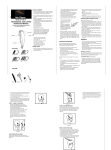
1Press the setting selector and slide the comb up, to remove the
comb off the appliance.
2Before you start to contour the hairline around the ears, comb the
hair ends over the ears.
3Press the on/off button to switch on the appliance.
Note: During trimming, you can use the turbo function for extra suction power
and trimming speed (see section ‘Turbo function’ below).
4Tilt the appliance in such a way that only one edge of the cutting
element touches the hair ends when you shape the contours around
the ears.
Only cut the hair ends. The hairline should be close to the ear.
5To contour the neckline and sideburns, turn the appliance and make
downward strokes.
Move the appliance slowly and smoothly. Follow the natural hairline.
Turbo function
You can use the turbo function to increase the cutting speed.
1Switch on the appliance.
2Press the turbo button.
When you switch off the appliance, the turbo function is deactivated
automatically.