1
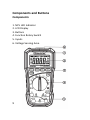
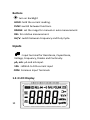
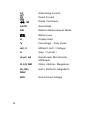
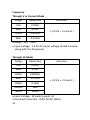
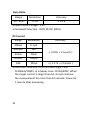
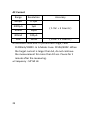
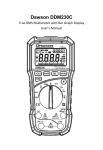
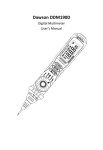
Dawson DDM230A Digital Multimeter with NCV User’s Manual Table of Contents LIMITED WARRANTY AND LIMITATION OF LIABILITY ................................................... 3 Out of the Box............................................. 3 Accessories ................................................. 4 Safety Information...................................... 4 Certification ................................................ 8 INTRODUCTION ........................................... 8 Overview ..................................................... 8 Components and Buttons ........................... 9 Components ............................................ 9 Buttons.................................................. 10 Inputs .................................................... 10 1.2.3 LCD Display .................................. 10 USING THE METER ..................................... 12 Display Hold .............................................. 12 Manual Range Mode ................................ 12 Relative Measurement ............................. 12 1 Switch between Functions ........................ 13 Backlight ................................................... 13 Auto Off .................................................... 13 NCV (Non-Contact Voltage Detector) ....... 13 DC/AC Voltage Measurement .................. 14 Resistance Measurement ..................... 15 Diode Measurement ................................. 15 Continuity Measurement .......................... 15 Capacitance Measurement ...................... 15 Frequency and Duty Ratio Measurement . 16 DC/AC Current Measurement ................... 16 SPECIFICATIONS ........................................ 17 General Specifications .............................. 17 Technical Specifications ............................ 18 MAINTENANCE AND REPAIR ..................... 24 Battery Replacement ................................ 24 Test Leads Replacement ........................... 25 CONTACT DAWSON ................................... 25 FEATURES ...................................... Back Page 2 LIMITED WARRANTY AND LIMITATION OF LIABILITY This instrument from Dawson Tools Inc. will be free from defects in workmanship and material for three years from the date of original purchase. This warranty does not cover defects resulting from damage caused by the user such as drops, neglect, misuse, unauthorized alteration, usage outside of specified conditions, contamination, or improper repair/maintenance. To receive service on the instrument if it becomes necessary during the warranty period, contact your nearest Dawson authorized service center at (800) 898-6991 or visit www.DawsonTools.com to obtain a return authorization (within the US only). A return authorization is necessary before returning any instrument to Dawson; no service will be provided without a return authorization. The user is responsible for properly packing the unit and charges such as shipping, freight and insurance charges. The extent of Dawson's liability is limited solely to the repair/replacement of the instrument. The above warranty in its entirety is inclusive and no other warranties, written or oral, are expressed or implied. Out of the Box Check the Meter and accessories thoroughly before using the Meter. Contact your local distributor if the Meter or any components are damaged or malfunction. 3 Accessories Test Leads 9V Battery User’s Manual 1 pair 1pc 1pc Safety Information WARNING TO REDUCE THE RISK OF FIRE, ELECTRICAL SHOCK, PRODUCT DAMAGE OR PERSONAL INJURY, PLEASE FOLLOW THE SAFETY INSTRUCTIONS DESCRIBED IN THE USER MANUAL. READ THE USER MANUALS BEFORE USING THE METER. WARNING TO ENSURE SAFE OPERATION AND LIFE OF THE METER, DO NOT PLACE THE METER IN ANY ENVIRONMENT WITH HIGH PRESSURE, HIGH TEMPERATURE, DUST, EXPLOSIVE GAS OR VAPOR. 4 Avoid shaking, dropping or any kind of impacts when using or transporting the Meter. 5 To avoid electric shock or personal injury, repairs or servicing not covered in this manual should be performed only by qualified personnel. Avoid direct exposure to sunlight to ensure extended life of the Meter. Do not place Meter in a strong magnetic field; this may cause false readings. Use only the batteries indicated in the Technical Spec. Avoid exposing batteries to humidity. Replace batteries as soon as the low battery indicator appears. Please keep the original packing for future shipping purposes (ex. Calibration) After opening the box, check for any damage during delivery. Check the terminals every time before operating the Meter. Do not operate the Meter if the terminals are damaged or one or more functions are not working properly. Check the test leads before operation. Leads must be in good condition; check if leads are well covered by insulator, and if wires are not exposed. Use the original test leads included in the package for best performance and safety. If necessary, use the compatible leads with same specifications of the originals’. Safety Symbols on the Meter Important safety information, please refer to the user’s manual Earth ground Indicates compliance with requirements for double insulation Important Safety Information 6 Never use the Meter to measure voltages that might exceed 600V DC/AC above earth ground. In Manual Mode, if the circuit value is unknown, start the Meter at the maximum range and then adjust accordingly. Always be careful when working with voltages above 60V DC or 30V AC RMS. Keep fingers behind the probe barriers while measuring. 7 Never connect the Meter leads across a voltage source while the rotary switch is in the resistance, diode or continuity mode. Doing so can damage the Meter. Inspect test leads and probes for cracks, breaks or crazes on the insulation before using the Meter. Remove the leads from the circuit first before switching between functions. Do not power on the circuit when measuring resistance, capacitance or diodes. Do not measure the capacitance before the capacitors are discharged. Do not operate the Meter near explosive gas, vapor or under dust. Stop the operation if the Meter or test leads appeared damaged or do not function properly. Unless the battery cover and the Meter case are firmly closed, do not use the Meter. Repair or maintenance should be implemented by trained personnel. Certification CAT IV: This meter has meet IEC1010-1 standard with an overvoltage category (600V CAT IV) and pollution degree 2. The Meter is compiled to EMC requirements. Introduction Overview Dawson DDM230A is a portable, hand-held yet professional meter that features AC/DC current, AC/DC voltage, Frequency, Duty Cycle, Capacitance, Resistance, Continuity and Diode Testing, as well as a Non-Contact Voltage detector. This Meter is easy to use even with one hand, suitable for professional users or amateurs, and ideal for school or home use. 8 Components and Buttons Components 1. NCV LED Indicator 2. LCD Display 3. Buttons 4. Function Rotary Switch 5. Inputs 6. Voltage Sensing Area. 9 Buttons : turn on backlight HOLD: hold the current reading. FUNC: switch between functions. RANGE: set the range for manual or auto measurement. REL: for relative measurement. Hz/%: switch between Frequency and Duty Cycle. Inputs : Input terminal for Resistance, Capacitance, Voltage, Frequency, Diodes and Continuity. μA, mA: μA and mA input. 10A : 600mA to 10A current input COM: Common Input Terminals. 1.2.3 LCD Display 10 AC Alternating Current DC Direct Current , Diode, Continuity AUTO Auto Mode REL Relative Measurement Mode Battery Low 11 H Display Hold % Percentage(Duty Cycle) mV, V Millivolt, Volt(Voltage) A Amp(Current) nF,μF, mF Nanofarads, Microfarads, Millfarads Ω, kΩ, MΩ Ohms, Kilohms, Megaohms Hz, kHz, MHZ Hertz, Kilohertz, Megahertz NCV Non-Contact Voltage Using the Meter Display Hold During measurement, press “HOLD” to hold the current reading on the display. Press “HOLD” again to unlock the reading. Manual Range Mode When using the rotary switch to switch between current, voltage, capacitance and frequency mode, the default range type is Auto. Press “RANGE” to enter Manual mode. Each press increases the measuring range and will return to minimum range after maximum has been reached. Hold “RANGE” for 1 second to switch back to Auto mode. Note: Manual mode is not allowed in frequency measurement. Relative Measurement Press “REL” to enter Relative Measurement Mode. Reading = (current measurement – measurement when “REL” is pressed) Press again to return to normal mode. 12 Switch between Functions During Voltage or Current measuring, press “FUNC” to switch between AC and DC measurements. When measuring Resistance, Diode or Continuity, pressing “FUNC” will switch between these modes. Backlight Press “ ” to turn on/off the display backlight. Auto Off If the Meter is not in use for 30 minutes, the Meter turns off automatically to conserve power. Press any button to turn the Meter back on. To disable Auto Off, hold “ FUNC” button when turning on the Meter. NCV (Non-Contact Voltage Detector) Turn the rotary switch to NCV mode, move the top of the Meter close to target. The Voltage sensing indicator will flash and buzz if the Meter senses a voltage greater then 110V AC. 13 WARNING EVEN THOUGH THERE IS NO INDICATION, VOLTAGE MAY STILL EXIST. THE MEASUREMENT MAY BE AFFECTED BY THE DESIGN OF THE OUTLET, TYPE OF INSULATION AND OTHER EXTERNAL FACTORS. NOTE: The voltage sensing indicator may turn on when a voltage is fed to the Meter. Other external interferences (ex. Flashlight, motor) may trigger the NCV sensor. DC/AC Voltage Measurement Turn the rotary switch to Mode; connect the black lead to COM and the red lead to V input. Use the two leads to test the target. Press “FUNC” to switch between AC and DC measurements. Measurement is shown on the display. In DC mode, the Meter also displays the polarity of red lead side input. Press “FUNC” to switch between AC and DC voltage measuring. 14 Resistance Measurement Turn the rotary switch to . Connect the black lead to input COM and the red lead to . Use both leads to test the target resistance and read the measurement from the display. Diode Measurement Press “FUNC” during resistance test to switch to diode test. Connect the black lead to input COM and the red lead to . Connect red lead to anode (+) and black to cathode (-); the Meter shows forward biased voltage. Continuity Measurement Press “FUNC” during diode measurement to switch to continuity test. Connect the black lead to input COM and the red lead to . Use both leads to test the target resistance; the Meter will buzz if the resistance is less than 50 ohms. Capacitance Measurement Turn the rotary switch to .Connect the black lead to COM and the red lead to . Use both leads to test the target capacitor and read off the capacitance from the meter. 15 Frequency and Duty Ratio Measurement Turn the rotary switch to “Hz%”. Connect the black lead to COM and the red lead to Hz. Use both leads to test the target and read off both values from the Meter. Press “Hz%” to switch between frequency and duty ratio (%). DC/AC Current Measurement Disconnect the target circuit from power source and discharge the circuit. Turn the rotary switch to appropriate mode (µA, mA or A). Connect the black lead to COM and the red lead to µA mA if the target current is less than 600mA; connect to 10A if the target current is between 600mA to 10A. Break the circuit and connect the leads across the broken circuit (Red to higher voltage, black to the lower). Power the circuit and read the measurement from the display. Press “FUNC” to switch between AC and DC measurements. If the Meter displays “OL” (overload) switch the rotary switch to a higher range. 16 Specifications General Specifications Full time surge protection. Maximum Voltage range between target and ground: 600V DC or AC. Maximum working height: 2000m. Maximum display number: 3999. Auto Polarity Indication, ‘-’indicates negative. Overload Indication: ‘0L’or ‘-0L’. Sampling Time: 0.4 seconds. 1 second on current measurement. Units Display: Display functions and units. Auto Power Off: 30 minutes Input Power: 9V DC Battery Type: 6F22 Low Battery Indication: LCD display Working Environment Temp: 32°F~104°F (0°C~40°C) Storage Temperature: 14°F ~122°F (-10°C~50°C) Size: 7 x 3.4 x 2 in (180×86×52mm) Weight: 8.8oz (~250g) excluding battery 17 Technical Specifications Environmental Temperature: 749°F, relative humidity: <75% DC Voltage Range Resolution Accuracy 400mV 0.1mV ( 0.8% + 3 Counts ) 4.0V 0.001V 40V 0.01V 400V 0.1V 600V 1V ( 0.5% + 5 Counts ) Input Resistance : 10M Overload Protection: In 400mV Range : 250V DC/AC. In 4.0V to 600V Range : 600V DC/AC Maximum Input Voltage : 600V DC AC Voltage Range Resolution Accuracy 400mV 0.1mV ( 1.0% + 5 Counts ) 4.0V 0.001V ( 0.8% + 5 Counts ) 40V 0.01V 400V 0.1V 600V 1V 18 ( 1.2% + 3 Counts ) Input Resistance : 10M Maximum Input Voltage : 600V AC (RMS) Frequency : 50~60 Hz Resistance Range Resolution 400 0.1 4.0k 0.001k 40k 0.01k 400k 0.1k 4M 0.001Mk 10M 0.1M Accuracy ( 1.0% + 5 Counts) ( 1.2% + 15 Counts ) Open Circuit Voltage : ~0.4V Overload Protection : 250V DC/AC (RMS) Diode Resolution 0.001V Function Displays approx. forward biased voltage Forward Biased Current : ~1mA Reversed Biased Voltage : ~3.3V Overload Protection : 250V DC/AC (RMS) 19 Capacitance Range Resolution 40nF 0.01nF 400nF 0.1nF 4.0F 0.01F 40F 0.01F 100F 0.1F Accuracy ( 3% + 5 Counts ) Overload Protection : 250V DC/AC (RMS) Continuity Resolution 0. 1 Function The Meter buzz when the target resistance is smaller than 50 Open Circuit Voltage : ~1.2V Overload Protection : 250V DC/AC (RMS) 20 Frequency Through V or Current Mode Range Resolution 5Hz 0.01Hz 50Hz 0.1Hz 500Hz 0.001kHz 5kHz 0.01kHz Accuracy ( 0.5% + 2 Counts ) Range : 5Hz ~ 5kHz Input Voltage : ≥ 0.2V AC (Input voltage should increase along with the frequency) Through Hz Mode Range Resolution 5Hz 0.01Hz 50Hz 0.1Hz 500Hz 0.001kHz 5kHz 0.01kHz 50kHz 0.1kHz 500kHz 1kHz 5MHz 10kHz Accuracy ( 0.5% + 2 Counts ) Input Voltage : 3V peak to peak AC Overload Protection : 250V DC/AC (RMS) 21 Duty Ratio Range Resolution Accuracy 10 - 95% 0.1% 2.0% Open Circuit Voltage : 1.2V Overload Protection : 250V DC/AC (RMS) DC Current Range Resolution 400A 0.1A 4000A 1A 40mA 10A 400mA 100A 10A 10mA Accuracy ( 0.8% + 2 Counts ) ( 1.2 % + 2 Counts ) Overload Protection: In A and mA range, Fuse: FF400mA/1000V. In A Mode: Fuse: FF10A/500V. When the target current is larger than 5A, do not continue the measurement for more than 10 seconds. Pause for 1 minute after measuring. 22 AC Current Range Resolution 400A 0.1A 4000A 1A 40mA 10A 400mA 100A 10A 10mA Accuracy ( 1.5% + 5 Counts ) ( 3.0% + 5 Counts ) Overload Protection: In A and mA range, Fuse: FF400mA/1000V. In A Mode: Fuse: FF10A/500V. When the target current is larger than 5A, do not continue the measurement for more than 10 sec. Pause for 1 minute after the measuring. Frequency : 50~60 Hz 23 Maintenance and Repair Battery Replacement WARNING TO AVOID ELECTRICAL SHOCK, PRODUCT DAMAGE OR PERSONAL INJURY, REMOVE TEST LEADS BEFORE OPENNING BATTERY COVER. Replace batteries when the battery indicator“ ”is on. Remove the battery cover and replace the battery. 24 Test Leads Replacement WARNING REPLACE TEST LEADS WITH IDENTICAL OR COMPATIBLE LEADS. LEAD SPEC:1000V 10A. Replace test leads if the current leads worn. Contact Dawson Dawson Tools, Inc. 1142 S. Diamond Bar Blvd., #858 Diamond Bar, CA 91765 Phone: (310) 728-6220 www.DawsonTools.com Do not recycle 25 (Back Page) Features 26 LCD Display Auto Ranging Relative Measurement Non-Contact Voltage Detector Diode Test Continuity Buzzer Data Hold Auto Power Off Low Battery Indicator Back Light