1
!
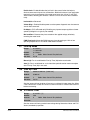
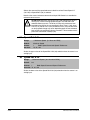
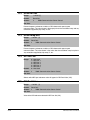
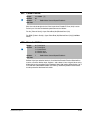
ATTENTION: Changing parameter 89 to Terminal Blk or Network
while Start At PowerUp is enabled may start the drive if a start
command is on from the newly selected logic source.
When Start At PowerUp is enabled, the user must ensure that
automatic start up of the driven equipment will not cause injury to
operating personnel or damage to the driven equipment. In addition,
the user is responsible for providing suitable audible or visual alarms or
other devices to indicate that this function is enabled and the drive may
start at any moment. Failure to observe this precaution could result in
severe bodily injury or loss of life.
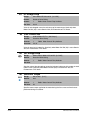
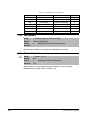
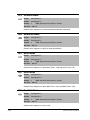
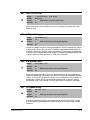
ATTENTION: Removing and replacing the LCD HIM while the drive is
running may cause an abrupt speed change if the LCD HIM is the
selected reference source, but is not the selected control source. The
drive will ramp to the reference level provided by the HIM at the rate
specified in Accel Time 1 (140), Accel Time 2 (141), Decel Time 1
(142) and Decel Time 2 (143). Be aware that an abrupt speed change
may occur depending upon the new reference level and the rate
specified in these parameters. Failure to observe this precaution could
result in bodily injury.
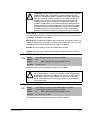
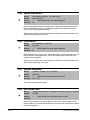
Important: Asserting an HIM Control digital input or acquiring Manual with Save HIM
Ref (192) bit 1 (Manual Mode) True (1) will override this parameter’s
selection.
90
Parameter Descriptions
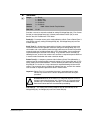
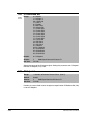
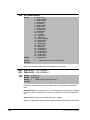
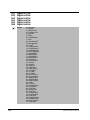
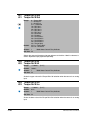
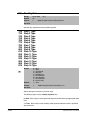
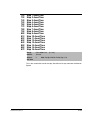
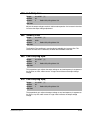
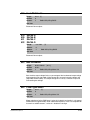
Speed Ref A Sel
Range:
1 = Analog In 1
2 = Analog In 2
3-6 = Reserved
7 = Pulse In
8 = Encoder
9 = MOP Level
10 = Reserved
11 = Preset Spd 1
12 = Preset Spd 2
13 = Preset Spd 3
14 = Preset Spd 4
15 = Preset Spd 5
16 = Preset Spd 6
17 = Preset Spd 7
18 = Local HIM
19 = DPI Port 2
20 = DPI Port 3
21 = DPI Port 4
22 = Network
23-24 = Reserved
25 = Scale Block 1
26 = Scale Block 2
27 = Scale Block 3
28 = Scale Block 4
Default:
18 = Local HIM
Access:
0
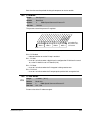
See also:
2, 91-93, 101-107, 117-120, 192-194, 213, 272, 273, 320, 361-366
Path: Speed Command>Speed References
Speed Command>Control Src Select
3-21