1
NUT 012 . Ed. 6
June 2010
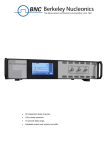
User s manual
Model 1120
1pS Time Interval Meter
Two Channels (Start, Stop),
< 1 ps one-shot resolution,
< 10 ps rms jitter,
± 1s time measurement range,
Rack 19", 1U,
Ethernet interface.
Total sheets: 36
1.
NUT 012 Ed. 6
Model 1120 - 1pS Time Interval Counter
Date : 18/01/2011
CONTENT
1.
GENERAL INFORMATION...................................................................................................................................5
1.1.
1.2.
1.3.
1.4.
POWER INSTALLATION ..........................................................................................................................................6
OPERATING TEMPERATURE ..................................................................................................................................6
RACK MOUNTING INFORMATION ..........................................................................................................................6
SELF-TEST .............................................................................................................................................................6
2.
SPECIFICATIONS....................................................................................................................................................7
3.
OPERATING INFORMATION ..............................................................................................................................9
3.1. PRINCIPLE: ............................................................................................................................................................9
3.1.1.
block diagram ..............................................................................................................................................9
3.1.2.
Time interval mode ......................................................................................................................................9
3.1.3.
Event mode.................................................................................................................................................10
3.1.4.
Auto-calibration.........................................................................................................................................10
3.1.5.
10 MHz Time base .....................................................................................................................................10
3.1.6.
Arming mode..............................................................................................................................................11
3.2. FRONT PANEL OPERATION ..................................................................................................................................12
3.2.1.
Interface .....................................................................................................................................................12
3.2.2.
Display menu .............................................................................................................................................13
3.2.3.
IP adress ....................................................................................................................................................15
3.2.4.
Default value..............................................................................................................................................16
3.3. REAR PANEL OPÉRATION ....................................................................................................................................16
4.
CONNECTING TO THE INSTRUMENT VIA ETHERNET ...........................................................................17
4.1. COMMAND STRUCTURE ......................................................................................................................................17
*IDN? .........................................................................................................................................................................17
ARM............................................................................................................................................................................17
CAL.............................................................................................................................................................................18
COUNT.......................................................................................................................................................................18
DELAY........................................................................................................................................................................18
DFORMAT .................................................................................................................................................................19
JITTER .......................................................................................................................................................................19
LEVEL ........................................................................................................................................................................20
MODE ........................................................................................................................................................................20
POL ............................................................................................................................................................................21
RESULTS....................................................................................................................................................................22
RUN ............................................................................................................................................................................23
SAMPLES...................................................................................................................................................................23
STAT ...........................................................................................................................................................................24
STOP ..........................................................................................................................................................................25
TRIG ...........................................................................................................................................................................25
4.2. REMOTE CONTROLE VIA INTERNET (WEB PAGE) ................................................................................................26
4.2.1.
Results web page........................................................................................................................................26
4.2.2.
Set up web page .........................................................................................................................................27
4.2.3.
Status web page .........................................................................................................................................28
4.3. REMOTE CONTRÔLE VIA ETHERNET ...................................................................................................................28
5.
OPERATION EXAMPLES....................................................................................................................................29
5.1.
5.2.
6.
EXAMPLE 1 .........................................................................................................................................................29
EXAMPLE N°2 .....................................................................................................................................................30
ANNEXE : OPTION 1 OPTICAL MESSAGE ....................................................................................................31
6.1. FRONT PANEL OPERATION ..................................................................................................................................31
6.1.1.
Display menu .............................................................................................................................................31
BERKELEY NUCLEONICS
Page - 2 / 36-
Model 1120 - 1pS Time Interval Counter
NUT 012 Ed. 6
Date : 18/01/2011
6.1.2.
IP adress ....................................................................................................................................................34
6.1.3.
Command structure ...................................................................................................................................35
STAT ...........................................................................................................................................................................35
SYNC ..........................................................................................................................................................................36
TRIG ...........................................................................................................................................................................36
BERKELEY NUCLEONICS
Page -3 / 36 -
1.
NUT 012 Ed. 6
Model 1120 - 1pS Time Interval Counter
Date : 18/01/2011
EDITION
Ed.
Date
1 4
18/01/2011
Creation
5
12/12/2008
Update the document to correct some bugs
6
08/06/2010
Command STAT SCAN
BERKELEY NUCLEONICS
Description
Page - 4 / 36-
Model 1120 - 1pS Time Interval Counter
1.
NUT 012 Ed. 6
Date : 18/01/2011
GENERAL INFORMATION
The BNC 1120
1pS Time Interval Counter measures time interval, frequency and events.
The single-shot resolution and low jitter of the instrument make it the ideal for many test and
measure application.
Time intervals are measured with 1 ps resolution. Frequency and events are measured up to
10 MHz
Trigger level and slope are adjustable on each input. The instrument uses a linear interpolation
technique and an internal calibration to obtain very high accuracy.
All the BNC 1120 parameters may be local controlled (over the front panel keys and LCD
display) and remote controlled via an Ethernet interface.
Instrument Option:
Option 1: Optical triggered,
In timing system mode the module could be triggered by BNC 575 Digital Delay and
Pulse Generator via an optical signal.
Technical support
For more information about
[email protected].
operating
the
BNC
1120,
send
an
email
to
Package contents
The box you receive should contain the following:
BNC 1120 instrument,
User s manual,
Power cord,
CD contains pdf user manual.
BERKELEY NUCLEONICS
Page -5 / 36 -
Model 1120 - 1pS Time Interval Counter
1.1.
NUT 012 Ed. 6
Date : 18/01/2011
Power installation
Power source
The BNC 1120 can be operated from 110 VAC to 220 VAC nominal supply source.
The maximum power consumption of the BNC 1120 is 45 W.
Power cord
The BNC 1120 comes with a removable power cord for European usage. It has a three contact
plug for connection to both the power source and protective ground.
1.2.
Operating temperature
The instrument can be operated where the ambient air temperature is 0°C to 35°C and can be
stored in ambient temperature from -10°C to +60°C.
The BNC 1120 is cooled by air circulation. To prevent instrument damage a clearance of 2 inches
on the side and 1 inch on the rear must be maintained for proper cooling.
1.3.
Rack mounting information
The BNC 1120 will fit a 19 inch rack.
1.4.
Self-test
The BNC 1120 is automatically tested after power on (power supply and temperature).
If the power supply is not ok, the BNC 1120 indicate power failure.
BERKELEY NUCLEONICS
Page -6 / 36 -
Model 1120 - 1pS Time Interval Counter
2.
NUT 012 Ed. 6
Date : 18/01/2011
SPECIFICATIONS
Inputs start or stop
Threshold
-5 to +5 V
Slope
Rising or falling edge
Input gate
Threshold
+1.5 V (fixed)
Trigger rate
0 to 20 KHz
Time interval
Range
-1 to + 1 second
Trigger rate
0 to 20 kHz
Resolution
< 1ps, single shot
Error
< 250 ps + time interval x 10-9
RMS jitter
10 ps
Arming mode
On start, on stop, on gate
Event counting
Range
0 to 10 000 000
Count rate
0 to 10 MHz
Gate
Internal 1 s, external on input gate
Calibration
Internal
Functions
Time interval, event counting
System
Output 10 MHz
Signal
Square wave, 2.5 V pp, ac coupling
Input 10 MHz
Signal
BERKELEY NUCLEONICS
1 V nominal (automatic detection)
Page -7 / 36 -
Model 1120 - 1pS Time Interval Counter
NUT 012 Ed. 6
Date : 18/01/2011
Clock
Time base
10 MHz ovenized
Stability
+/- 0.05 ppm
Accuracy
10-9
Interface
Front panel, Ethernet 10/100
Mb/s, Internet (Web page)
General
Power required
90
Weight
< 10 Kg
Dimensions
19 , 1 U, 300 mm
BERKELEY NUCLEONICS
220 V / 50
60 Hz
Page -8 / 36 -
Model 1120 - 1pS Time Interval Counter
3.
NUT 012 Ed. 6
Date : 18/01/2011
OPERATING INFORMATION
3.1.
Principle:
3.1.1. block diagram
Clock
converter
10 MHz
155 MHz
Clock
Calibrator
Timing
controller
Time counter
Cal
Gate
Linear
interpolator
Start
Linear
interpolator
Stop
Keyboard
display
Input
control
Interface Controller
Ethernet
3.1.2. Time interval mode
In timing interval mode the BNC 1120 measures the time between a Start and Stop
pulse. The timing information is obtained by a processing that combines the two following
information:
Coarse information provided by a wide range Time counter running at 155.52 MHz
(6.43 ns resolution),
And fine information provided by the two linear interpolators started by the event
on the Start and Stop inputs.
A gate input can be used to enable or disable all Start and Stop events as desired.
The BNC 1120 can make positive or negative time measurements. The start pulse can
occur before or after the stop pulse.
The number of sequence measurement can be controlled by the sequence command
single/repetitive. In repetitive sequence the number of measurement is controlled by the
value write in sample command.
BERKELEY NUCLEONICS
Page -9 / 36 -
Model 1120 - 1pS Time Interval Counter
NUT 012 Ed. 6
Date : 18/01/2011
3.1.3. Event mode
In this mode the BNC 1120 counts events at Start and at Stop inputs.
Event counting can be gated:
Internally with a gate ranging of 1 second,
Externally through the duration of input gate.
The trigger level and slope for a transition event are adjustable on both the Start and
Stop inputs.
Event rate up to 10MHz can be counted with a maximum of 10 000 000 digits.
3.1.4. Auto-calibration
The BNC 1120 has a powerful built-in auto-calibration routine that compensates the
nonlinearities in time to digital converter. The auto-calibration is done through a software
command and takes about 30 seconds to be performed.
To calibrate the BNC 1120, send an Ethernet command or send CALIBRATE with the
front panel.
3.1.5. 10 MHz Time base
The accuracy of the BNC 1120 depends of the quality of the selected time base.
The internal 10MHz standard time base is an ovenized oscillator with stability of
±0.005 ppm.
A rear panel input allows you to connect an external 10MHz source as a time base.
BERKELEY NUCLEONICS
Page -10 / 36 -
1.
Model 1120 - 1pS Time Interval Counter
NUT 012 Ed. 6
Date : 18/01/2011
3.1.6. Arming mode
The BNC 1120 has 3 arming modes:
ARM ON START,
START
pulse
STOP
pulse
Time
Measurement
time
ARM ON STOP,
START
pulse
STOP
pulse
Time
Measurement
time
ARM ON GATE.
GATE
pulse
START
pulse
STOP
pulse
Time
Measurement
BERKELEY NUCLEONICS
time
Page - 11 / 36-
Model 1120 - 1pS Time Interval Counter
3.2.
NUT 012 Ed. 6
Date : 18/01/2011
Front panel operation
3.2.1. Interface
The front panel consists of:
L.E.D. s,
Keyboard and LCD display that form the dialogue components in local mode
3.2.1.1. Leds
The 4 leds displays following information:
PWR BNC 1120 ON/OFF
BUSY
F1
CALCUL
F2
OPTICAL MESSAGE
3.2.1.2.
Front panel connectors
Start: BNC connector for application of the start events.
Stop: BNC connector for application of the stop events.
Gate: BNC connector for enabling Start and Stop events.
3.2.1.3. LCD display
The 2 X 20 characters LCD display is the user interface for the front panel programming
operation in local mode.
3.2.1.4. Keyboard
Six keys select the function
will allow user to select display line or if you are in cursor mode you can
increment or decrement digit selected by the cursor.
< , > will allow user to move the cursor position
OK set cursor mode or if you are already in cursor mode store the current value
and clear the cursor mode. Start the measure in repetitive or single shot mode.
Esc clear cursor mode without storing the current value. Stop the measure in
repetitive mode.
BERKELEY NUCLEONICS
Page -12 / 36 -
Model 1120 - 1pS Time Interval Counter
NUT 012 Ed. 6
Date : 18/01/2011
3.2.2. Display menu
G
F
T
2
0
0
2
2
I
8
N
.
T
1
E
R
°
N
C
A
L
S
S
T
T
A
O
R
P
E
E
X
X
T
T
S
S
T
A
R
T
1
O
M
0
N
0
e
r
s
n
1
0
1
V
1
0
M
H
z
1
1
.
.
5
5
0
0
N
R
G
T
L
E
I
N
I
E
H
N
X
.
5
0
1
.
1
.
2
I
R
R
T
N
N
E
A
A
D
L
L
I
R
R
T
N
N
E
A
A
D
L
L
-
I
A
V
V
+
+
3.2.2.1. Start
S
T
T
r
A
i
R
g
T
g
S
L
T
e
A
v
R
e
T
l
S
P
T
o
A
l
R
a
T
r
=
1
i
t
e
r
y
I
T
T
B
E
E
V
+
-
3.2.2.2. Stop
S
T
T
r
O
i
P
g
g
S
L
T
e
O
v
P
e
l
S
P
T
o
O
l
P
a
r
=
1
i
t
y
I
N
I
E
H
N
X
.
5
0
I
T
T
B
E
E
V
+
-
3.2.2.1. Sequence measurement
S
a
m
p
l
e
s
1
BERKELEY NUCLEONICS
0
0
0
Page -13 / 36 -
Model 1120 - 1pS Time Interval Counter
S
S
R
e
i
e
q
n
p
u
g
e
e
l
t
NUT 012 Ed. 6
n
e
i
c
e
t
i
v
e
m
S
S
G
o
T
T
A
d
A
O
T
Date : 18/01/2011
3.2.2.2. Arming mode
A
A
A
A
r
R
R
R
m
M
M
M
i
n
O
O
O
g
N
N
N
e
R
P
E
T
3.2.2.3. Measurement result
Maximum / Minimum
X
/
M x =
Y
M n =
With X: umber of samples measured and Y: number of samples
Mean delay / Jitter
D
J
t
=
=
0
0
.
p
0
s
c
p
s
Frequency
F
0
r
Number of event
C o
0
e
H
q
z
u
e
.
n
u
n
t
e
.
r
BERKELEY NUCLEONICS
y
Page -14 / 36 -
Model 1120 - 1pS Time Interval Counter
NUT 012 Ed. 6
Date : 18/01/2011
3.2.3. IP adress
G
F
T
2
0
0
2
s
n
1
0
1
A
9
D
.
R
0
E
0
5
M
.
A
0
E
9
W
.
D
v
1
S
0
S
.
0
0
0
.
1
2
3
S
0
K
0
.
0
0
0
.
0
0
0
A
0
Y
0
0
A
.
D
0
R
0
E
0
S
.
S
1
2
3
H
C
P
.
4
.
5
N
O
Press OK and OK
I
P
0
Press
N
E
2
Press
G
A
0
Press
U
S
Press
S
Y
Press
L
A
9
(UP)
T
5
(UP)
T
9
(UP)
E
(UP)
N
C
W
O
R
D
C
P
a
R
Press
R
M
5
(UP)
N
G
U
A
G
E
E
Press
3
n
g
l
i
s
M
A
I
N
h
(UP)
l
E
i
S
b
S
r
a
O
T
N
U
U
R
N
t
K
e
(UP)
E
E
T
O
Press (UP) to go IP menu
Press OK to go BNC 1120 menu
BERKELEY NUCLEONICS
Page -15 / 36 -
Model 1120 - 1pS Time Interval Counter
NUT 012 Ed. 6
Date : 18/01/2011
3.2.4. Default value
The default values are the following:
At factory:
@IP: 99.0.0.18,
@GW: 99.0.0.1,
Mask: 255.0.0.0,
At start up:
START: OFF,
STOP: OFF,
Level: 0.5 V,
3.3.
Rear panel operation
3.3.1.1. Rear panel connectors
10MHZ input (BNC type): When the Rack is in external clock mode the internal oscillator
will phase lock to a 10MHz signal applied to this connector
10MHZ output (BNC type): This signal is a 10 MHz square wave. It is a copy of the
internal oscillator and can be used to verify the frequency or to drive another BNC 1120,
which are operating, in external mode.
Option: Optical input (SC/PC type): This optical input is compliant to GFT3001 for
timing system measurement. In that mode the BNC 1120 use the clock and the
triggers provided by the optical network connected to GFT3001.
Power source: For 110 to 220 Voltages AC line.
3.3.1.2. Rear panel control
Power switch: Turns AC power on.
BERKELEY NUCLEONICS
Page -16 / 36 -
Model 1120 - 1pS Time Interval Counter
4.
NUT 012 Ed. 6
Date : 18/01/2011
CONNECTING TO THE INSTRUMENT VIA ETHERNET
4.1.
Command structure
*IDN?
Syntax:
*IDN?
Form:
Query
Description:
Queries instrument identification. Response gives instrument
model, serial number and firmware version.
Parameter:
-
Example:
GFTy/MIPSI,BNC 1120,SN101/000000,V1.0
Instrument model: BNC 1120
Serial number: 101,
Firmware version: 1.1
ARM
Syntax:
ARM START|STOP
ARM?
Form:
Set & Query
Description:
Define the arming mode or ask for current arming mode.
Command
Parameter:
START arm on start
STOP arm on stop
Query response
:ARM START arming on start
:ARM STOP arming on stop
Example:
ARM START
ARM? => :ARM START
BERKELEY NUCLEONICS
Page -17 / 36 -
Model 1120 - 1pS Time Interval Counter
NUT 012 Ed. 6
Date : 18/01/2011
CAL
Syntax:
CAL
Form:
Set
Description:
Start an auto calibration sequence.
Command
Parameter:
-
Query response
-
Example:
CAL
COUNT
Syntax:
COUNT?
Form:
Query
Description:
Query the counter or frequency measurement.
Query
Parameter:
-
Example:
COUNT? => :COUNT 32456123
DELAY
Syntax:
DELAY? [MEAN|MIN|MAX]
Form:
Query
Description:
Query the delay measurement in picoseconds.
Query
Parameter:
MEAN return the mean value of the samples
MIN return the minimum value of the samples
MAX return the maximum value of the samples
Example:
DELAY? MEAN => :DELAY MIN, 145
DELAY ? => :DELAY 141,145,148
BERKELEY NUCLEONICS
Page -18 / 36 -
Model 1120 - 1pS Time Interval Counter
NUT 012 Ed. 6
Date : 18/01/2011
DFORMAT
Syntax:
DFORMAT ASC|XML
Form:
Set and Query
Description:
Set or query the response format.
Command
Parameter:
ASC set the format to simple ascii
XML set the format to XML
Example:
DFORMAT ASC
DFORMAT? => :DFORMAT ASC
JITTER
Syntax:
JITTER? PP|RMS
Form:
Query
Description:
Query the jitter measurement in picosecond.
Query
Parameter:
PP return the peak to peak jitter of the samples
RMS return the RMS jitter of the samples
Example:
BERKELEY NUCLEONICS
JITTER? PP => :JITTER 245
Page -19 / 36 -
Model 1120 - 1pS Time Interval Counter
NUT 012 Ed. 6
Date : 18/01/2011
LEVEL
Syntax:
LEVEL START|STOP,<level>
LEVEL? START|STOP
Form:
Set & Query
Description:
Set or query channel trigger level.
Command
Parameter:
START set level for START channel
STOP set level for STOP channel
<level> level between 0.5 and 5.0 volts
Specified limit
0.5V <= level <= 5.0V
Example:
LEVEL START,2.8
LEVEL? START=> :LEVEL START,2.8
MODE
Syntax:
MODE SING|REP
MODE?
Form:
Set & Query
Description:
Set or query mode.
Command
Parameter:
SING set single measurement
REP set repetitive measurement
Query response
:MODE SING single measurement
:MODE REP repetitive measurement
Example:
MODE SING
MODE? => :MODE SING
BERKELEY NUCLEONICS
Page -20 / 36 -
Model 1120 - 1pS Time Interval Counter
NUT 012 Ed. 6
Date : 18/01/2011
POL
Syntax:
POL START|STOP,+|POL? START|STOP
Form:
Set & Query
Description:
Set or query channel trigger polarity.
Command
Parameter:
START set polarity for START channel
STOP set polarity for STOP channel
+ set polarity to positive
- set polarity to negative
Example:
POL START,+
POL? START=> :POL START,+
BERKELEY NUCLEONICS
Page -21 / 36 -
Model 1120 - 1pS Time Interval Counter
NUT 012 Ed. 6
Date : 18/01/2011
RESULTS
Syntax:
RESULTS? FLOAT,<offset>
Form:
Query
Description:
Query the samples measurement results.
The FLOAT query always returns real computed values.
As the query response for all samples can be very long, the query
only returns 100 sample values starting at the offset specified in
the query
Query
Parameter:
FLOAT returns the translated values of the samples
<offset> starting position for the 100 samples returned
Example:
BERKELEY NUCLEONICS
RESULTS? FLOAT,0 => RESULTS 0,12345,12346,12343,
Page -22 / 36 -
Model 1120 - 1pS Time Interval Counter
NUT 012 Ed. 6
Date : 18/01/2011
RUN
Syntax:
RUN DELAY|FREQ|COUNT
RUN?
Form:
Set & Query
Description:
Start measure or ask if measuring.
Command
Parameter:
DELAY start a delay measurement
FREQ start a frequency measurement
COUNT start a count measurement
Query response
:RUN YES measurement running
:RUN CAL calibration running
:RUN NO no measurement running
Example:
RUN DELAY
RUN? => :RUN YES
SAMPLES
Syntax:
SAMPLES <samples>
SAMPLES?
Form:
Set & Query
Description:
Set or query the measurement samples.
Command
Parameter:
<samples> number of samples
Specified limit
1 <= samples <= 1000
Example:
SAMPLES 500
SAMPLES? => :SAMPLES 500
BERKELEY NUCLEONICS
Page -23 / 36 -
Model 1120 - 1pS Time Interval Counter
NUT 012 Ed. 6
Date : 18/01/2011
STAT
Syntax:
STAT CLEAR
STAT? POW|TRIG|CLK|TEMP|SCAN
Form:
Set & Query
Description:
Clear or query the status.
Command
Parameter:
CLEAR clear the trig status
SCAN, this command measure all analog values, convert analog
value in digital value, save the digital value in the interface
controller and refresh the value in the front panel
Query
Parameter
POW return the power levels (+6V, -6V, +3.3V, +1.8V, +12V)
TRIG return the trigger status
CLK return the clock status
TEMP return the equipment temperature
Example:
STAT CLEAR
STAT SCAN
STAT? POW => :STAT POW,6.00,-6.00,3.30,1.80,12.00
STAT? TRIG => :STAT TRIG,1,1
STAT? CLK => :STAT CLK,INTERNAL
STAT? TEMP => :STAT TEMP,45.27
BERKELEY NUCLEONICS
Page -24 / 36 -
Model 1120 - 1pS Time Interval Counter
NUT 012 Ed. 6
Date : 18/01/2011
STOP
Syntax:
STOP
Form:
Set
Description:
Stop active measurement.
Command
Parameter:
-
Query response
-
Example:
STOP
TRIG
Syntax:
TRIG START|STOP,INH|INT|EXT
TRIG? START|STOP
Form:
Set & Query
Description:
Set or query channel trigger mode.
Command
Parameter:
START set trigger for START channel
STOP set trigger for STOP channel
INH trigger inhibited
INT internal trigger (1 kHz)
EXT external trigger
Example:
TRIG START,EXT
TRIG? START => :TRIG START,EXT
BERKELEY NUCLEONICS
Page -25 / 36 -
Model 1120 - 1pS Time Interval Counter
4.2.
NUT 012 Ed. 6
Date : 18/01/2011
Remote control via Internet (web page)
BNC 1120 is controlled by 3 web pages:
result: this page controls the instrument and displays results,
setup: this page is to modify the setup,
status: this page is to display some internal values and states for service people.
4.2.1. Results web page
Figure 4-1 Web page: Results
BERKELEY NUCLEONICS
Page -26 / 36 -
Model 1120 - 1pS Time Interval Counter
NUT 012 Ed. 6
Date : 18/01/2011
4.2.2. Set up web page
Figure 4-2 Web page: Select trigger for START and STOP
BERKELEY NUCLEONICS
Page -27 / 36 -
Model 1120 - 1pS Time Interval Counter
NUT 012 Ed. 6
Date : 18/01/2011
4.2.3. Status web page
Figure 4-3 Web page: Temperature, power supply,
4.3.
Remote control via Ethernet
Launch telnet.
Send the command: open ip.address 4000 if you want to dialogue with your equipment.
Send the command: open ip.address 4001 if you want to stop the connexion at the port = 4000.
Send the command: open ip.address 4002 if you want to reboot your equipment.
BERKELEY NUCLEONICS
Page -28 / 36 -
Model 1120 - 1pS Time Interval Counter
5.
NUT 012 Ed. 6
Date : 18/01/2011
OPERATION EXAMPLES
5.1.
Example 1
Realize in local mode a repetitive Time interval measurement.
Initial setup
Turn on the BNC 1120 with switch located on the rear panel
After few second the first line of the menu, BNC 1120 is displayed
The instrument must warm-up at least 20 minutes for maximum accuracy
Test signal
The operation example is performed using a test signal with following characteristics (Pulse
generator):
Duration:
Rise time
Level:
Repetition time :
1000 ns,
5 ns,
3 V,
100 Hz,
This signal must be coupled with 50 divider then connected to start and stop input of BNC 1120
The length of the START cable = 1 m. T
Setting up the instrument
Use the front panel keyboard to reset the Setup menu as follows
Start trigger
Start level
Start polarity
Stop trigger
Stop level
Stop polarity
Samples
Sequence
Arming mode
External
1.50 V
+
External
1.50 V
+
1000
repetitive
on start
Start the measurement
Display the result line Mean delay / jitter, and press the OK keys to start the measurement
The front panel leds busy must be on and tilt each second
Result must be
Delay = 5 200 ns
Jitter = 8 ps rms
For stopping the measurement press the ESC key
BERKELEY NUCLEONICS
Page -29 / 36 -
Model 1120 - 1pS Time Interval Counter
5.2.
NUT 012 Ed. 6
Date : 18/01/2011
Example 2
Realize in local mode a frequency measurement on start input
Same initial set-up and test signal as for example n°1
Setting up the instrument
Use the front panel keyboard to reset the Setup menu as follows
Start trigger
Start level
Start polarity
External
1.50 V
+
Start the measurement
Display the result line frequency, and press the OK keys to start the measurement
The front panel leds busy must be on and tilt each second
Result must be
Frequency = 100 Hz
For stopping the measurement press the OK key
BERKELEY NUCLEONICS
Page -30 / 36 -
Model 1120 - 1pS Time Interval Counter
6.
NUT 012 Ed. 6
Date : 18/01/2011
ANNEXE : OPTION 1 OPTICAL MESSAGE
6.1.
Front panel operation
6.1.1. Display menu
G
F
T
2
0
0
2
2
I
8
N
.
T
1
E
R
°
N
C
A
L
S
S
T
T
A
O
R
P
E
E
X
X
T
T
A
R
M
S
S
T
BERKELEY NUCLEONICS
T
1
O
0
N
0
s
n
1
0
1
-
5
1
6
0
.
M
8
H
z
1
1
.
.
5
5
0
0
N
R
G
T
L
E
I
A
V
1
.
d
B
m
V
V
1
.
2
+
+
Page -31 / 36 -
Model 1120 - 1pS Time Interval Counter
NUT 012 Ed. 6
Date : 18/01/2011
6.1.1.1. Start
S
T
T
r
A
i
R
g
T
g
S
L
T
e
A
v
R
e
T
l
S
P
T
o
A
l
R
a
T
r
e
r
=
I
1
i
t
e
r
.
N
I
E
H
N
X
S
S
I
I
5
0
y
I
T
T
R
R
R
N
N
B
E
E
E
E
E
G
G
I
R
R
P
P
P
L
L
T
N
N
I
R
R
P
P
P
L
L
T
N
N
E
A
A
F
F
F
D
L
L
1
2
3
1
2
E
A
A
F
F
F
D
L
L
3
2
3
1
2
E
E
V
+
-
6.1.1.2. Stop
S
T
T
r
O
i
P
g
g
S
L
T
e
O
v
P
e
l
S
P
T
o
O
l
P
a
r
=
I
1
i
t
y
.
N
I
E
H
N
X
S
S
I
I
5
0
I
T
T
R
R
R
N
N
B
E
E
E
E
E
G
G
E
E
V
+
-
6.1.1.3. Sequence measurement
S
a
m
p
l
e
s
1
BERKELEY NUCLEONICS
0
0
0
Page -32 / 36 -
Model 1120 - 1pS Time Interval Counter
S
S
R
e
i
e
q
n
p
u
g
e
e
l
t
NUT 012 Ed. 6
n
e
i
c
e
t
i
v
e
m
S
S
G
o
T
T
A
d
A
O
T
Date : 18/01/2011
6.1.1.4. Arming mode
A
A
A
A
r
R
R
R
m
M
M
M
i
n
O
O
O
g
N
N
N
e
R
P
E
T
6.1.1.5. Measurement result
Maximum / Minimum
X
/
M x =
Y
M n =
With X: umber of samples measured and Y: number of samples
Mean delay / Jitter
D
J
t
=
=
0
0
.
p
0
s
c
p
s
Frequency
F
0
r
Number of event
C o
0
e
H
q
z
u
e
.
n
u
n
t
e
.
r
y
6.1.1.6. Historical command
G
R
O
U
P
.
BERKELEY NUCLEONICS
1
Page -33 / 36 -
Model 1120 - 1pS Time Interval Counter
NUT 012 Ed. 6
Date : 18/01/2011
6.1.2. IP adress
G
F
T
2
0
0
2
s
n
1
0
1
A
9
D
.
R
0
E
0
5
M
.
A
0
E
9
W
.
D
v
1
S
0
S
.
0
0
0
.
1
2
3
S
0
K
0
.
0
0
0
.
0
0
0
A
0
Y
0
0
A
.
D
0
R
0
E
0
S
.
S
1
2
3
H
C
P
.
4
.
5
N
O
Press OK and OK
I
P
0
Press
N
E
2
Press
G
A
0
Press
U
S
Press
S
Y
Press
L
A
9
(UP)
T
5
(UP)
T
9
(UP)
E
(UP)
N
C
W
O
R
D
C
P
a
R
Press
R
M
5
(UP)
N
G
U
A
G
E
E
Press
3
n
g
l
i
s
M
A
I
N
h
(UP)
l
E
i
S
b
S
r
a
O
T
N
U
U
R
N
t
K
e
(UP)
E
E
T
O
Press (UP) to go IP menu
Press OK to go BNC 1120 menu
BERKELEY NUCLEONICS
Page -34 / 36 -
Model 1120 - 1pS Time Interval Counter
NUT 012 Ed. 6
Date : 18/01/2011
6.1.3. Command structure
STAT
Syntax:
STAT CLEAR
STAT? POW|TRIG|CLK|TEMP|POPT|SYN
Form:
Set & Query
Description:
Clear or query the status.
Command
Parameter:
CLEAR: clear the trig status
Query
Parameter
SYN return the synthesis word
01 power fault
02 sync error
04 inhibited
POW return the power levels (+6V, -6V, +3.3V, +1.8V, +12V)
TRIG return the trigger status
CLK return the clock status
TEMP return the equipment temperature
POPT return the optical received power
Example:
STAT CLEAR
STAT? SYN => :STAT SYN,#H0001
STAT? POW => :STAT POW,6.00,-6.00,3.30,1.80,12.00
STAT? TRIG => :STAT TRIG,1,1
STAT? CLK => :STAT CLK,INTERNAL
STAT? POPT => :STAT POPT,4.54
STAT? TEMP => :STAT TEMP,45.27
BERKELEY NUCLEONICS
Page -35 / 36 -
Model 1120 - 1pS Time Interval Counter
NUT 012 Ed. 6
Date : 18/01/2011
SYNC
Syntax:
SYNC <syncword>
SYNC?
Form:
Set & Query
Description:
Set or query the sync word for optical channel.
Command
Parameter:
<sync> sync word (format #Hxx)
Example:
SYNC #H35
SYNC? => :SYNC #H35
TRIG
Syntax:
TRIG START|STOP,INH|INT|EXT|F1|F2|F3|SS1|SS2
TRIG? START|STOP
Form:
Set & Query
Description:
Set or query channel trigger mode.
Command
Parameter:
START set trigger for START channel
STOP set trigger for STOP channel
INH trigger inhibited
INT internal trigger (1 kHz)
EXT external trigger
F1,F2,F3 trigger on frequency 1, 2 or 3
SS1 trigger on SS1 signal
SS2 trigger on SS2 signal
Example:
TRIG START,EXT
TRIG? START => :TRIG START,EXT
BERKELEY NUCLEONICS
Page -36 / 36 -