1
10/7/2005
9:54 AM
Page 4
5224TA
tm270.0905.qxp
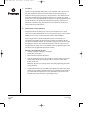
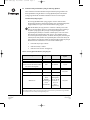
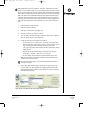
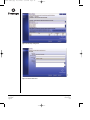
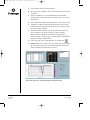
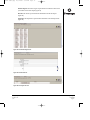
Figure 1. The “View Protocol” tab in the Library module.
1.
Launch the iCycler iQ™ software.
2.
Select the Library module.
3.
Select the “View Protocol” tab (Figure 1).
4.
Select “Create a new protocol”.
5.
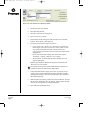
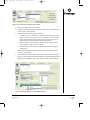
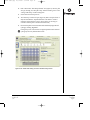
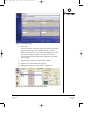
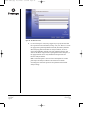
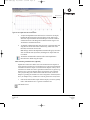
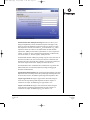
The Workshop module will appear. Select the “Melt Curve” checkbox
from the “Show options:” panel (Figure 2).
6.
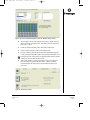
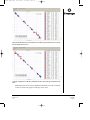
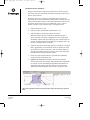
Create the protocol shown in Figure 2 as follows:
•
Use the “Insert Cycle”, “Delete Cycle”, “Insert Step” and “Delete Step”
buttons (Figure 2) to create a new protocol. To insert or delete a cycle or
step, select the appropriate button then select the position of the
cycle/step in the protocol table. Deselect the active button before directly
editing the cells.
•
Directly edit cells by double-clicking on the desired cells (“Repeat”,
“Dwell Time”, “Setpoint”, “Melt Curve” and “+Temp”).
•
The “Dwell Time” for the final melt step must be 00:08s per dye used
(Figure2, bottom panel).
Note: The repeat number for the final melt step must be entered before the
“Melt Curve” box can be checked.
!
If an external well factor plate is used, the initial denaturation time must be
extended to 2 minutes. See Section IX.G for further details.
7.
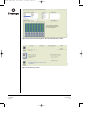
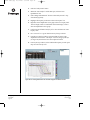
In the “Select data collection step(s)” panel, select “Cycle 2, Step 2” and
“Cycle 3, Step 1” for data collection (if not already indicated) by doubleclicking the desired Step (a camera icon indicates that a step is selected for
data collection; Figure 2).
8.
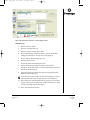
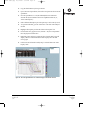
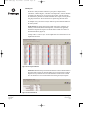
Name the protocol by entering a name in the “Protocol Filename” box. Save
the protocol by selecting the “Save this protocol” button and then selecting
“Save” in the “Saving a Protocol” window that appears.
9.
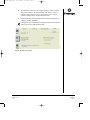
Select “Run with selected plate setup”.
Promega Corporation · 2800 Woods Hollow Road · Madison, WI 53711-5399 USA · Toll Free in USA 800-356-9526 · Phone 608-274-4330 · Fax 608-277-2516 · www.promega.com
Part# TM270
Page 4
Printed in USA.
9/05