1
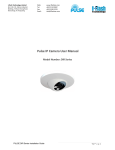
IP camera User Manual
Safety Instructions
These instructions are intended to assist users with the operation of the IP camera and also to
instruct on how to avoid dangerous situations or damage to the device.
Warnings: Serious injury or death may be caused if any of the warnings below are neglected.
Cautions: Injury or damage to the equipment may occur if any of the following caution
messages are neglected.
Warnings Follow these safeguards to prevent
serious injury or death.
Cautions Follow these precautions to
prevent potential injury or material
damage.
Warnings:
Input voltage should meet both the SELV (Safety Extra Low Voltage) and the Limited Power
Source with DC 12V according to the IEC60950-1 standard. Please refer to the technical
specifications for more details.
Do not use a third-party power adapter or power cord
When the device is installed on the wall or ceiling, make sure that it is firmly attached.
Notice:
Make sure that the power supply voltage is correct before using the camera.
Do not drop the device or expose it to physical shock.
Do not expose the device to temperatures outside the range of -10 oC to +60oC when the
device is in operation.
Do not expose the device to damp/wet conditions or high electromagnetism radiation.
To avoid heat accumulation, make sure that your operating environment has proper
ventilation.
Do not attempt to open, disassemble, or modify the device
A few parts (e.g. electrolytic capacitor) of the equipment shall be replaced regularly according
to their average life time. The average life time varies from the differences between operating
environments and usage history. Regular maintenance checks are recommended for all
users. Please contact your dealer for more details.
Contents
Welcome .....................................................................................................................................................4
Minimum Recommended System Requirement ................................................................................5
Connect your IP camera ......................................................................................................................5
Configuring the IP camera via Web Browser ..............................................................................................6
Connect to the Camera using Static IP. ..............................................................................................6
IP camera Home Web Page .................................................................................................................7
IP camera System Page .......................................................................................................................8
IP camera Video & Audio Page...........................................................................................................9
IP camera Networking Page – Assign an IP to IP camera ...................................................................11
IP camera Wifi Page – IP camera supports WIFI via wireless dongles. ..............................................12
IP camera DDNS Page ........................................................................................................................12
IP camera SIP Page .............................................................................................................................13
IP camera Status Page .........................................................................................................................15
IP camera User Management Page......................................................................................................16
IP camera Maintenance Page ..............................................................................................................16
IP camera SMTP Page .........................................................................................................................17
IP camera FTP Page ............................................................................................................................18
IP camera Motion Detection................................................................................................................18
IP camera System Log..........................................................................................................................21
Welcome
The IP camera is a next generation IP camera for remote monitoring and surveillance over
your LAN or internet.
The IP camera combines best in class IP video technology and SIP protocols for a robust IP
surveillance solution. The product features H.264 video streams with up to 30 frames per
second in full D1, delivering rich image clarity at rapid transmission rates. Integrated SIP can
pass alarms to the PSTN, mobile phones, SIP IP phones, SIP videophones and enables
2-way VoIP communication.
The IP camera ensures ease of use, integration and deployment with a multilingual graphical
user interface. The IP camera can be quickly installed and connected to your network and
accessed from anywhere over the internet. flexible video management software enables
users to monitor multiple environments in one easy to use application. The intuitive web
interface lets users easily access, manage, view and record live video streams from the
device.
The IP camera is a powerful solution for small to medium sized offices, homes and storage
facilities looking to safeguard their valuables.
Installation Guide
Minimum Recommended System Requirement
•
Windows 2000 Server Professional, Windows XP, Windows Vista.
•
•
•
CPU: Intel Pentium 4 or higher, 2 GHz.
RAM: 1 GB (4 GB recommended for larger systems).
Support for DirectX 8.0 and above.
.
Connect your IP camera
Using the Power adapter as power supply
•
•
•
NOTE:
Connect an RJ-45 cable to the NETWORK port of the IP camera.
Connect the other end of the RJ-45 cable to your network or PC.
Connect the power supply to the DC 12V power jack on the back of the IP camera.
If you are going to connect the device to a hub/switch/router, please use a
straight-through cable. A cross over cable should be used if you are going to connect the
device directly to a PC.
Configuring the IP camera via Web Browser
The IP camera‟s embedded Web server responds to HTTP/HTTPS GET/POST requests.
Embedded HTML pages allow you to configure your IP camera through Microsoft Internet
Explorer.
Connect to the Camera using Static IP.
If the camera does not get response from DHCP server after 3 minutes, it can be accessed by
the default IP 192.168.1.168.
1. Connect your PC to the same network as the IP camera.
2. Configure the IP address of your PC to: 192.168.1.XXX (1<XXX<255) and configure
the subnet mask to 255.255.255.0.
3.
4.
5.
6.
Make sure that the device is turned on and connected to the network.
Start Internet Explorer on your computer.
Enter 192.168.1.168 in the address bar of the browser.
Enter the administrator user name and password to access the Web Configuration
Interface
7. The default user name and password are both set to admin.
8. IE will indicate that “This website wants to install the following add-on:
Install this add-on by following the instructions in IE.
9. You will see the home page.
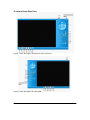
IP camera Home Web Page
Figure2: Home web page of IP camera-N and IP camera-LL
Figure3: Home web page of IP camera-HD
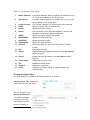
Items on IP camera Home Page
1
Motion Detection
If the motion detection alarm is triggered, the indicator will flash
red. Click on the indicator to turn off the alarm.
2
Alarm Event
If an alarm event is triggered, the indicator will flash red. Click
on the indicator to turn off the alarm.
3
4
5
6
Control Console
ZOOM
FOCUS
Default
PTZ Console controller. PTZ device needs to be connected.
NOTE: IP camera does not support zoom
Adjusts the focus of images.
Click this option to reset the video brightness, contrast, and
saturation to their factory default configuration.
7
SPEED
Adjusts the rotation speed of the console.
8
9
BRIGHTNESS
CONTRAST
Adjusts the image brightness.
Adjusts the image contrast.
10
11
SATURATION
View Size
Adjusts the image saturation.
Resize the image to fit into the window panel in the home
scream.
12
13
Play
Capture
Plays/Stops the video.
Captures the image displayed and saves it to C:\GS_Capture
14
Record
15
16
Sound Off/On
Talk
(default directory).
Records the video and saves it to C:\GS_Record (default
directory).
Toggles the sound On or Off.
Establishes two-way audio.
17
Playback
Replays the saved video.
18
Config
Configures the Save Location for captured images and
recorded videos.
IP camera System Page
This page allows you to configure the system settings on IP camera.
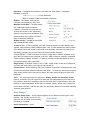
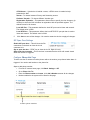
Current System Time - displays the
current date and time (24h clock).
Set the System Time
Update via NTP Server
- the camera will obtain
the time from an NTP
server Specify the NTP
server's IP address or
Page 16 of 36
host name. And you can select your time zone from the drop-down list or define your own
time zone setting.
NOTE: If using a host name for the NTP server, a DNS server must be configured under
Basic Settings -> Networking.
Synchronize with Local Computer - sets the time from the clock on your computer.
Set the Time Manually - this option allows you to manually set the time and date.
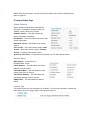
OSD Date Format - set the format of date
on OSD
Device Name Setting -This
field lets you configure the name
of the IP camera, which helps
GSurf and GS_NVR to indentify the device when using GS_Search to search all network
cameras or digit video cameras in the same subnet.
DI and DO - Digital
input and digital output
Normal open: the circuit is by default open
unless an event triggers the device to close
the circuit.
Normal close: the circuit is by default closed
unless and event triggers the device to open the circuit
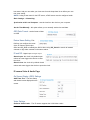
IP camera Video & Audio Page
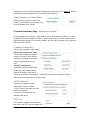
On Screen Display (OSD) Settings
OSD Time/ Text – The time stamp
and channel name displayed on the
screen.
Video Settings
Preferred Video Codec – The IP camera supports the H.264 video codec.
Resolution – The higher the resolution is, the better the video quality is, and higher
bandwidth is required.
Low -----------------------Æ High Resolution
480x272, 800x480, 1280x720,1280x960,1920x1080
Bit Rate – The number of bits that are
conveyed or processed per unit of time.
Maximum Frame Rate – The video frame
rate is adjustable based on network
conditions. Increasing the frame rate will
increase the amount of data significantly
therefore consuming more bandwidth. Video
will be impaired due to packet loss when
there is insufficient bandwidth.
Bit Rate Control – Variable Bit rate (VBR)
and Constant Bit Rate (CBR).
Variable Bit Rate - If VBR is selected, the codec varies the amount of output data per time
segment. VBR produces a better quality-to-space ratio. The bits available are used to enable
more flexibly and encode sound or video data more accurately, with fewer bits used in less
demanding passages and more bits used in difficult-to-encode passages.
Constant Bit Rate - If CBR is selected, the codec‟s output data is constant regardless of the
input data. The output bit rate is defined in “Bit rate”. CBR is useful for streaming multimedia
content on limited capacity channels. It is easier to calculate required bandwidth as well as
the required storage space using CBR.
Image Quality – If „Bit Rate Control‟ is set to “VBR”, “Image quality” needs to be configured.
The better the video quality is, the higher the bit rate will be.
I-frame Interval – While streaming video over a network, compression technologies are used
to show the incremental difference between each frame. I-frames are used to help keep the
video looking normal. When intervals are shorter, the video quality is higher but uses more
bandwidth.
NOTE: The users might need to configure the Primary Stream and Secondary Stream
properly. Sometimes, the user might like to watch the live video stream from the web GUI in
low resolution mode while recording a copy via GSurf/GS_NVR in high resolution due to the
limitation of internet bandwidth. In this case, for example, primary stream can be configured
to have better resolution, and then the users can use primary stream to record while watching
secondary video streams.
Audio Settings
Preferred Audio Codec – The IP camera supports up to 3 different Vocoder types, a-law
(PCMA), u-law (PCMU) and G.726. The
audio can also be turned off by switching
the setting to “Disabled”
Audio Compression – Audio
Page 18 of 36
compression is a form of data compression designed to reduce the size of audio files. Usually,
the higher the audio compression is, the better the audio quality is.
Power Frequency - this setting should
match the power frequency used in the
country to avoid flickering in the image. And
it is only available for IP camera
IP camera Networking Page – Assign an IP to IP camera
IP camera supports IP version 4. The IP address can set automatically via DHCP, or a static
IP address can be set manually. To make IP camera work properly, the user needs to set the
DNS configuration properly. For security purposes, the user can also assign the IP camera an
HTTP Port other than 80.
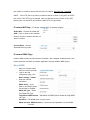
IP Address Configuration
The IP camera operates in two modes:
Dynamically Assigned via DHCP
– all the field values for the Static IP
mode are not used. The IP camera
acquires its IP address from the first
DHCP server it discovers on its
LAN.
Statically Configured as –
configures all of the following fields:
IP address, Subnet Mask, Default
Gateway IP address, DNS Server 1
(primary), DNS Server 2 (secondary). These fields are set to zero by default. Static IP
addresses are recommended for the IP camera
DNS Configuration
There are two methods of DNS
configuration on the IP camera:
1. The IP camera can obtain the DNS
server automatically
2. Users can configure their own
preferred DNS server
HTTP Port
The IP camera supports user configured
http ports. If the HTTP port is changed, the
port number is needed to access the web GUI, for instance: http://192.168.1.168:8080.
NOTE: If the HTTP Port is 80, when you add this device to GSurf or GS_NVR, the RTSP
port is 554. If the HTTP Port is changed, when you add this device to GSurf or GS_NVR,
please make sure the RTSP port number equals HTTP Port plus 2000.
IP camera Wifi Page – IP camera supports WIFI via wireless dongles.
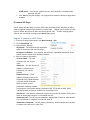
Enable Wifi – Checked to enable Wifi
SSID – Click on Scan to view available
network. Choose a network and Click on
Select to confirm.
Security Mode – Choose
associated Security mode.
IP camera DDNS Page
Dynamic DNS provides devices that have a variable, often changing IP address with a well
known hostname resolvable by network applications through standard DNS queries.
Set up DDNS
1. Apply for a domain name
from your service provider.
2. Login to the web
configuration page, click
Basic Settings > DDNS.
3. Enter the required
information
DDNS Active – If you
want to use DDNS, please
set this field to “Enabled” .
DDNS ISP Type – Select
your DDNS ISP Type.
Self-Define DDNS Address – Self-define the DDNS server instead of using DDNS
ISP Type.
Site Name – The DDNS name for your device.
DDNS Account/ DDNS Password – The account and password from the DDNS
Provider.
STUN Server – If the device is behind a router, a STUN server is needed to help
penetrate the NAT.
4. Click Save to save the changes. You might need to reboot the device to apply all the
changes.
IP camera SIP Page
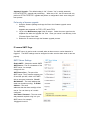
The IP camera has the ability to receive phone calls and make phone calls when an alarm
event is triggered through motion detection or alarm input. Register the IP camera to a SIP
server to enable the product to make and receive phone calls. To make outgoing phone
calls out, the user needs to configure the Phone List properly.
Register IP camera to a SIP Server
1.
2.
3.
From the IP camera home page, click Basic Settings > SIP.
Go to SIP Settings Tab.
General Phone Settings.
Registered – The field shows the registration
status of the account with the SIP server.
4.
Unregister On Reboot – If it‟s checked, the SIP user‟s registration information will be
cleared from the server when the phone reboots.
Enter the required information.
Account Name – The field
configures the SIP account
name.
SIP Server – The SIP Server‟s IP
address or Domain name
provided by your service
provider.
Outbound Proxy – The IP
address or Domain name of the
Outbound Proxy, Media Gateway,
or Session Border Controller.
Used for firewall or NAT
penetration in different network
environments. If the system detects a symmetric NAT, STUN will not work. ONLY
outbound proxies can provide a solution for a symmetric NAT.
SIP User ID – User account information provided by your service provider (ITSP); this is
either an actual phone number or is formatted like one.
Authenticate ID – The SIP service subscriber‟s Authenticate ID used for authentication.
It can be identical to or different from the SIP User ID.
Authenticate Password – The SIP service subscriber‟s account password for the GXV
to register to the SIP server of the ITSP.
STUN Server – If the device is behind a router, a STUN server is needed to help
penetrate the NAT.
Stream – To choose between Primary and Secondary stream.
Preferred Vocoder – To choose different Vocoder type.
Registration Expiration – This parameter allows users to specify the time frequency (in
minutes) in which the GXV refreshes its registration with the specified registrar. The
default interval is 60 minutes.
Local SIP Port – This parameter defines the local SIP port used to listen and transmit.
The default value is 5060.
5.
Local RTP Port – This parameter defines the local RTP-RTCP port pair that is used to
listen and transmit. The default value is 5004.
Click Save to save all the changes. You need to restart the device to apply all changes.
SIP Open Door Settings
Enable SIP open door – This will close the DO
connections in the back to close the circuit
connected to it.
Key to open the door – DTMF key to close the circuit. Digits 0-9 only.
Delay lock time (seconds) – This is the time in seconds that the circuit will remain closed
when this function is triggered
Configure Phone List Page
To make sure the IP camera can make phone calls to the number you preferred when alarm is
triggered. You need to add number to the phone list.
Steps to add phone number:
1. From the IP camera home page, click Basic Settings > SIP.
2. Go to Phone List Tab.
3. Enter the Phone number and name, click Add a Number to save all the changes.
4. Numbers added to the system will be listed in this page.
Available phone numbers
NOTE: With current firmware, only the first phone number in the list will be called when an
alarm is triggered.
IP camera Status Page
System Statistics
System Statistics lists hardware and software
information, for example, the part number, the
software version, about the IP camera.
Hardware Version – This field contains the
product‟s hardware information.
Part Number – This field contains the product part
number information.
Bootloader Version – Bootloader code version
number.
Core Version – Core code version number. Base
Version – Base code version number. Firmware
Version – Firmware code version number.
System Up Time Since – This field shows the system up time since the last reboot.
Network Status
MAC Address – The device ID, in
HEXADECIMAL format.
LAN IP Address – This field shows the LAN IP
address of the IP camera.
LAN Subnet Mask – This field shows the LAN
subnet mask of the IP camera.
LAN Default Gateway – This field shows the
LAN default gateway of the IP camera.
DDNS Status – This field shows the status of
DDNS.
Camera Type
This section shows the Lens information of IP camera. The Lens type information contains the
brand name, the size of image sensor, the resolution and so on.
IP camera User Management Page
All current users will be list in the User List section of this page. You can also add and remove
users here.
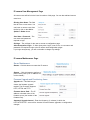
Existing User Name –The field
lists all of the current users. You
can insert or remove users from
the list by click on the Add or
Update or Delete button.
User Name / Password – The
user name and password
required to login.
Privilege – The privilege for the user to access to configuration page.
Allow Anonymous Login – If „Allow Anonymous Login‟ is set to Yes, no user name and
password are required to login to the IP camera web configuration pages.
If you login anonymously, you will not be able to change any settings.
IP camera Maintenance Page
Server Maintenance
Restart – Click this button to restart the IP camera.
Restore – Click this button to perform a
partial factory reset (The IP address will
not be cleared) .
Firmware Upgrade and Provisioning Items
Upgrade via – This field lets you
choose the firmware upgrade
method. The IP camera supports
HTTP, HTTPS and TFTP.
Firmware Server Path – The IP
address or domain name of the
firmware server (the location of the
firmware files) .
Automatic Upgrade Interval – Enter the frequency (in minutes) in which the
HTTP/HTTPS/TFTP server will be checked for new firmware upgrades or configuration
changes.
Automatic Upgrade – The default setting is “No.” Choose “Yes” to enable automatic.
HTTP/HTTPS/TFTP upgrade and provisioning. When set to “No”, the IP Camera will only
perform a HTTP/HTTPS/TFTP upgrade and perform a configuration check once during the
boot process.
Performing a firmware upgrade:
1. Unzip the firmware package and copy the files to the firmware upgrade server
directory.
Upgrades are supported via TFTP, HTTP and HTTPS.
2. Log in to the Maintenance page of the IP camera. Select the server type from the
dropdown list under the “Upgrade Via” field. Enter your server‟s root directory in the
“Firmware Server Path” field.
3. Reboot the IP camera to begin the firmware upgrade process.
IP camera SMTP Page
The SMTP server is used to send out emails when an alarm event or motion detection is
triggered.
properly.
The SMTP settings must be configured to make sure the alarm email is sent out
SMTP Server Settings
Enable SMTP – Checked to enable SMTP
SMTP Server – The IP or hostname of the
SMTP server, for example,
smtp.gmail.com.
SMTP Server Port – The port of the
SMTP server. The IP camera supports port
25 and SSL port 465, which is for SMTP
with an encrypted connection. From EMail Address – The email address that
sends out the alarm email(s). To E-Mail
Address – The email
addresses that the alarm email(s) will be
sent to. You can have up to 3 emails
configured.
User Name/ Password – The user name
and password required to log in to your
SMTP server, for example,
[email protected]/123.
SSL – Checked if the SMTP server requires a secure connection.
Test Email Account Settings – Click the Test button to send a test email from the From
E-Mail to the To E-Mail to make sure that SMTP is configured properly. If the receiver can get
the test email, then the SMTP settings are ready to go.
IP camera FTP Page
The FTP server is used to store video files if you configure the IP camera to record video and
upload it to the FTP server when an alarm event or motion detection is triggered.
FTP Settings
Enable FTP – The default setting is “No,” if you want the IP camera to upload the recorded
video to the FTP server when an alarm is triggered, set this field to “Yes.”
FTP Server – The IP address or hostname
of the SMTP server, ie. ftp.myserver.com.
FTP Server Port – The port that your FTP
server is using.
User Name / Password – The user name
and password required to log into your
FTP server
Path – The directory in the FTP server
where recorded video will be uploaded.
Test FTP Account Settings – Click the
Test button to upload a sample file to make
sure that FTP is properly configured.
IP camera Motion Detection Page
The IP camera supports Motion Detection. To utilize this feature, please follow the below
steps:
1. Setup the motion detection monitored area.
2. Configure the motion detection time schedule.
3. Configure alarm action properly.
Setup Motion Detection Monitored Area
Enable Motion Detection – If this option is selected, motion detection will be enabled. If
something/somebody moves in the motion detection region, an alarm will be triggered.
Show Motion Detection Regions – If this option is selected, the motion detection regions will be displayed
on the screen with a white border. The white border for Motion Detection Regions
NOTE:
If Upload to Alarm center is checked for Alarm Actions, the white border will flash red
when a motion detection alarm is triggered
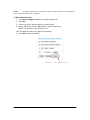
To Edit a Monitored Area
1. In the Select a Region dropdown list, select the region ID.
2. Click Edit.
3. Click on the video, drag and draw you preferred area.
4. Set the Sensitivity. Click the Save button to save the sensitivity.
NOTE: The Sensitivity value varies from 0 to
100. The larger the value is, the higher the sensitivity.
5. Click Save to save the settings.
Button to
save
sensitivity only
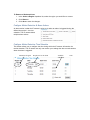
To Remove a Monitored Area
1. In the Select a Region dropdown list, select the region you would like to remove.
2. Click Remove.
3. Click Save to save the changes.
Configure Motion Detection & Alarm Actions
An alarm action is what the IP camera is going to do when an alarm is triggered during the
defined time period – the time
schedule. The IP camera allows
multiple alarm actions.
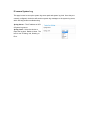
Configure Motion Detection Time Schedule
This section allows you to configure the time during which the IP camera will monitor the
motion detection. The IP camera not only can monitor your settings but also can take actions
when the alarm is triggered.
Monitored region
Dropdown list for date
Available
schedules
time
IP camera System Log
This page is used to set up the system log server path and system log level. Once they are
correctly configured, the device will send out system log messages to the system log server,
which will help perform troubleshooting.
Syslog Server – The IP address or URL
of System log server.
Syslog Level – Select the device to
report the log level. Default is None. The
level is one of Debug, Info, Warning or
Error.