1
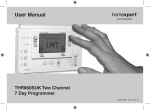
User Manual
homexperttm by Honeywell THR850SUK 7 Day Timeswitch
QUICK START GUIDE
Quick reference
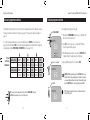
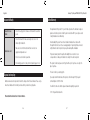
Your new timeswitch is factory set and ready to go. Just check the steps below and change
settings if needed:
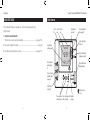
Current
time
Line of text Current
area
day
Operating modes
(see page 9)
1 Install and set up the timeswitch
(if this has not been done by a professional installer)........................................................... See pages 16-24
2 Check and reset day/time if necessary........................................................................................ See page 8
3 Customise heating on/off periods if necessary.................................................................... See pages 10-11
Daily programme
periods (see page 10)
Press to extend heating
time (see page 13)
Light is on when heating
system is on
mon tue wed thu fri sat sun
19/06/2010
12:34
on 1
off 1
Press to programme
next day (see page
11)
Press to override heating
programme (see page 12)
PM
on 2 on 3
off 2 off 3
cont
once
auto
off
Slider (set to RUN except
during programming)
Press to copy a daily
programme schedule
(see page 11)
“Holiday” button
(see page 14)
Remove cover to use
controls
Press to change time
or advance in menus
6
Press to save changes and
advance to next step
7
Mode button
(see page 9)