1
Update the Setting of Server
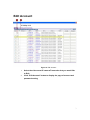
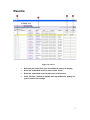
Figure 7. Update the Setting of Server
1.
Click the “Edit” button, the “Hostname” “LAN IP” “WAN IP”
settings of selected servers will be changeable.
2.
Edit the textbox of hostname of the device.
3.
Edit the textbox of LAN IP of the device.
4.
Edit the textbox of WAN IP of device.
5.
Click the “Update” button, your setting data for selected devices
will be updated. These settings will take effect and after 40secs
for those devices to reboot.
NOTE: Before sending setting data to the server, make sure you use
authorized accounts and passwords and choose the correct type of IP for your
device.
6