1
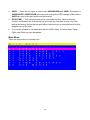
ACCESS LIST
Only SUPERVISOR can configure the ACCESS LIST. The first column is the port number,
following the server/computer name list. The last 8 columns are the access right of each
user. Use the Enter key or left button of mouse to active/deactivate the access right of each
port. “X” means to disable access and “O” means to enable access.
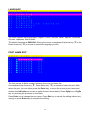
HOTKEY
Some keyboard may not equip with all the special keys. Make sure the key you select is
available in your keyboard.
19