1
DIGITAL VIDEO MEMO w/ FRIDGE MAGNET
USER MANUAL
PREFACE
BUTONS & INTERFACE
We express our sincere thanks for purchasing this Digital Video
Memo (DVM)!
HF-Z018VM
Before operating this DVM, be sure to read this user manual
carefully. After reading it, please keep it in a safe place for future
reference.
We reserve the right to make changes to this DVM, Software
and/or this User Manual without notice. Please visit our support
website www.hittusa.com for additional product information and/or
updates.
NOTE: The pictures, diagrams and certain functions described in
this manual may differ from the actual product due to different
models.
PRECAUTIONS
Before operating this DVM, please read the following
precautions carefully:
• Do not operate this DVM in extremely cold, hot, dusty or
damp environment
• Avoid putting this DVM under direct sunlight
• Do not scrub this DVM with a hard thing; it may result in
scratches on the screen and/or damage to the hardware
• Keep this DVM and all accessories out of reach of children
under the age of 3 years.
The pictures, diagrams, and certain functions
described in this manual may differ from the actual
product due to different models
Visit www.hittusa.com for a revised user manual or
troubleshooting tips
Rev. VM-10/08 GT-21649-3
P.1
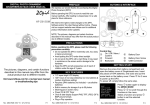
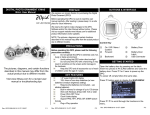
KEY FEATURES
1
Speaker
5
2
Battery
Compartment
Message
Indicator
Camera
6
3
4
7
8
Power / Play
Button
Record / Delete
Button
Microphone
Magnet
GETTING START
Open the battery compartment by pressing on the latch.
Insert two pieces of AAA (LR03) batteries and close the
battery compartment. NOTE: Use alkaline batteries for long
battery-life.
Press 5 for 2 seconds to power up the video memo (VM).
Once power up, the VM will be in VIEW FINDING MODE.
To power off, simply press 5 again for 2 seconds.
•
•
•
•
•
•
•
1.8" LCD Display
Video/Audio recording and playback
Built-in storage for 80 seconds recording time
Multi-message recording (max. 15 clips)
Built-in speaker and magnet
Long battery life (up to 30 days in standby mode)
Requires 2 AAA batteries (not included – use alkaline
batteries)
• Auto power save mode
Rev. VM-10/08 GT-21649-3
Control Key
VIDEO RECORDING
While in VIEW FINDING MODE, face
the camera 4 on the front of the VM
and press the record button 6 to start
recording a video message. For best
result, position yourself about 30cm (12in) from the
microphone 7.
P.2
Rev. VM-10/08 GT-21649-3
P.3
While in RECORDING MODE, a
flashing REC icon will appear on
screen. Press the record button 6
again to stop recording. Recording will
be stopped automatically if the video
length has reached 80 seconds.
The video message will be played back instantly for your
review. The on-screen counter indicates the total number of
recorded messages. After instant playback, the VM will go
back to VIEW FINDING MODE, and is ready for recording
another message or playback of previously recorded
messages.
MEMORY FULL
A maximum of 15 recordings or 80
seconds can be stored on the VM.
When memory is full, user must
delete old messages before new
recordings can be done.
VIDEO PLAYBACK
While in VIEW FINDING MODE,
press the play button 5 to view
recorded messages. During playback,
the on-screen counter shows the
current message number.. To view
the next message, press the play
button 5 while in PLAYBACK MODE.
BATTERIES LOW
Change batteries when the screen flashes continuously.
Use major brand alkaline batteries only.
AUTO OFF
The VM will switch to power save mode automatically if
there is no activity in VIEW FINDING MODE for more than
30 seconds.
FACTORY RESET
Press 6 for 5s, then press5 and 6 together for 30s to
perform a factory reset. Do not release the buttons during
the factory-reset sequence.
TROUBLESHOOTING TIPS
Video and Audio
quality is not good.
Frame does not
power on
Batteries do not last
too long
Make sure the DVM is
placed in a well lighted
place and speak in
loud voice while memo
recording.
Make sure you are
using new set of
batteries & batteries
are installed properly.
Make sure to use
alkaline batteries for
long battery life
DELETE MESSAGE
LIMITED 90-DAY WARRANTY
While in VIDEO PLAYBACK mode,
press the delete button 6 to delete
the current message, press the delete Coverage: Hi-Tech Trading (USA), Inc. (“HiTT”) warrants this
button 6 again to confirm or press
product (“product”) against defects in materials and
the play button 5 to cancel.
workmanship under normal consumer use for 90 days from the
date of purchase. HiTT, at its option, will at no charge repair,
replace or refund the purchase price of this product should it
MESSAGE INDICATOR
not conform to this warranty. This limited warranty is a
When there are new messages, a
Ellipses icon will appear on screen in consumer’s exclusive remedy, extends only to the first
consumer purchaser, is not transferable and is valid only on
VIEW FINDING MODE, or the
products purchased by consumers in the United States or
message indicator 3 will flash if the
Canada.
VM is turned off.
Rev. VM-10/08 GT-21649-3
P.4
Rev. VM-10/08 GT-21649-3
P.5
EXCLUSIONS:
Normal Wear and Tear: Periodic maintenance, repair and
replacement of parts due to normal wear and tear are excluded
from coverage.
Miscellaneous: This warranty does NOT cover defects or
damage that result from: (a) improper operation, storage,
misuse or abuse, accident or neglect, such as physical damage
(cracks, scratches, etc.) to the surface of the Product resulting
from misuse; (b) contact with liquid, water, rain, extreme
humidity or heavy perspiration, sand, dirt or the like, extreme
heat, or food; (c) use of the Product for commercial purposes or
subjecting the Product to abnormal usage or conditions; (d)
service, installation, alteration, or modification in any way by
someone other than HiTT and, (e) other acts which are not the
fault of HiTT.
Obtaining Service: To obtain service or information, please send
email to [email protected]. You will receive instructions on how
to ship the product, at your expense, to a HiTT Service Center. To
obtain service, you must include a copy of your receipt, receipt is
not required if you registered your product on our website
www.hittusa.com within 30 days of purchase date.
COMPANY & CONTACT INFORMATION
Hi-Tech Trading USA Inc
P.O. Box 179
Woodbury, NY 11797 U.S.A.
Web: www.hittusa.com
Email: [email protected]
ZOpid and the Stylized Logo are registered in the US Patent &
Trademark Office. All other product or service names are the
property of their respective owners.
© 2010 Hi-Tech Trading USA Inc
The information contained in this User Manual is believed to be
correct at the time of printing. HiTT reserves the right to change or
modify any information or specifications without notice. The
contents of this User Manual are provided “as is.” Except as
required by applicable law, no warranties of any kind, either
express or implied, including, but not limited to, the implied
warranties of merchantability and fitness for a particular purpose,
are made in relation to the accuracy, reliability, or contents of this
guide
Rev. VM-10/08 GT-21649-3
P.6