1
Section 6: Other Mini Maxx Features
This section describes all the customizing features of the Mini Maxx.
Gauge Setup
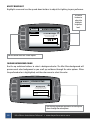
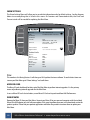
Enter to change the vehicle parameters displayed on the four gauge locations in the Main Screen. This is
also where you can see all of the most up-to-date vehicle parameters available to your vehicle make and
model after running an internet upgrade.
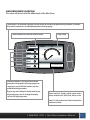
Selecting a vehicle parameter to display in a particular location is done by highlighting the gauge location and
then highlighting the desired vehicle parameter.
Once the correct vehicle parameter for a gauge location has been highlighted, you do not need to press another
button to select that vehicle parameter. Simply highlighting the vehicle parameter makes it active in that location.
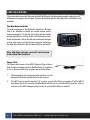
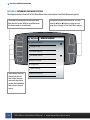
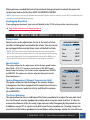
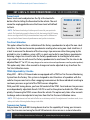
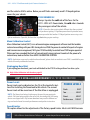
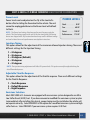
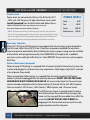
Notice that upon entering the gauge setup menu that, Set Gauge 1, is highlighted in black. When a gauge
location is selected it is highlighted in black on the left and it also appears above the vehicle parameter
selection box.
Go
Back
to Main Menu
GAUGE SETUP
Set Gauge 1
Gauge 1
Speed
Set Gauge 2
Use the Up and Down Arrows
to Change the Gauge Function
RPM
Set Gauge 3
Throttle
Pyro 2
Speed
Boost
Set Gauge 4
Coolant
To highlight a different gauge location press the
selection button that coincides with that gauge
location. So to select gauge location 1, press the
second button down on the left hand side of the
Mini Maxx. To select the 4th gauge location press
the bottom button or the 5th button down on
the left side.
Use the large Up Down Buttons to highlight
a particular vehicle parameter for any of the
gauge locations.
1-888-628-1730 • Mini Maxx Installation Manual
21