1
is drawn in the score. The users can utilize any of
the OpenGL functions provided by LispWorks. There
are also some special graphical primitives provided by
ENP that can be used to draw, for example, lines, polygons, circles, etc. The following list gives the complete
set of graphical primitives currently available: draw-2Darrow, draw-2D-box, draw-2D-bracket, draw-2D-circle,
draw-2D-line, draw-2D-lines, draw-2D-point, draw-2Dpolygon, draw-2D-quads, draw-2D-shape, draw-2D-text,
draw-2D-texture, and draw-2D-triangles. 1
There are also some special variables that can be referred to in the code. The following variables contain
some useful properties of the expressions:
(1) x and y give the absolute position of the expression. They are calculated according to the position of
the associated notation object and other constraints.
These values are an aggregate of the default position
(calculated according to the print position) and the
user definable offset discussed above (see Subsection
3.2).
(2) width gives the horizontal distance from the current
notation object to the next one.
(3) print-symbol contains the string or character defined by the user in the properties view.
(4) font gives the font name as a keyword. Currently,
the value of this variable is either :times (for readable text) or :musical-symbols (for music notation).
(5) instrument variable contains an ENP instrument
object that, in turn, contains information about the
name, range, etc.
(6) expression is the current ENP expression object
that is being drawn. This object can also be queried
about extra information such as any user definable
data stored in the expression.
(7) self, in this case, refers to the notational object the
expression is associated with (i.e., a note or a chord).
Different properties of the notational object, including
pitch, start-time and duration, can also be used in the
expression code.
3.4
4
Some Expression Designer Examples
In this Section we give two examples on how the ED can
be used to create new expressions. In the first example,
wirebrush, we build a simple percussion mallet symbol
[5]. This example demonstrates the use of some of the
graphical primitives. In the second example, in turn, we
create an expression that uses the knowledge about the
spacing of the associated notational objects to fill a given
space in the score.
Due to space limitations the examples are given without any detailed explanation. The key points, however, are
discussed along each example. Some knowledge about
Lisp is beneficial to thoroughly understanding the provided code examples.
4.1
A Percussion Mallet Symbol:
brush
Wire-
As our first exercise we create a simple percussion mallet
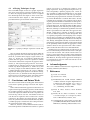
symbol denoting a wirebrush (see Figure 4).
We begin the expression definition by providing a
unique class name, ’wirebrush’ (1). In this case there
is no need for any additional inheritance other than the
basic expression behavior. Thus the default value (’expression’) displayed in the superclass menu is sufficient
for our purposes (2). The menu category is chosen to be
’User’ (3). Print symbol and font typeface, in this example, do not have any use since the expression in question
is purely graphical (4). In music notation these kinds of
instructions are usually written above the staff [4] and the
print position is selected accordingly (5). In code view
there are three lines containing some drawing instructions
(6). Finally, the graphical representation of the expression
can be seen in the preview score (7). The second note in
this example is added to demonstrate how the user-defined
expression behaves when the associated notational object
is transposed. Note, how the expression avoids colliding
with music notation.
Preview score
The preview score displays the user defined expression as
it would appear in a regular ENP score. The preview score
is also fully editable so the user can observe how the expression behaves, for example, when the music is transposed, etc. The score can also be panned and zoomed
freely so that the expressions can be examined and aligned
in great detail.
There is one additional feature to this view. As described above, the default expression position is calculated
according to the selected print position and an additional
user definable offset. This offset can be adjusted in the
preview score by dragging the expression with the mouse.
1
The list of the graphical primitives is quite self explanatory and it is
not further discussed in this paper.
Figure 4. The wirebrush mallet symbol created with ED.