1
3
3.1
Software
The LCD Display
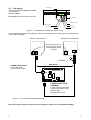
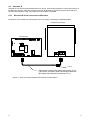
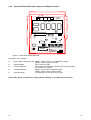
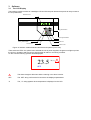
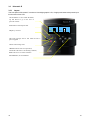
The interface module consists of a backlight LCD and of three push buttons that permit an easy access to
the unit parameters.
Backlit LCD
23.0
Up-push-button
Down-push-button
Enter push-button
Red Led
Green Led
Yellow Led
Figure 13 Interface module between Microface and operator (front view).
There are three LED’s: the yellow Led to indicate the unit is power supplied, the green one lights up when
the unit is in operation and the red one signals either an alarm or a warning condition.
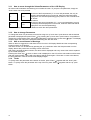
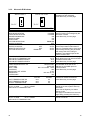
On the LCD the following symbols will be displayed:
23.5
°C(%)
!
SET
!
The alarm triangle is ON when either a warning or an alarm is active.
SET
The ‘SET’ string confirms the full access to the displayed parameters.
°C
The „°C“ string appears when temperature is displayed on the LCD.