1
AH21Bi/01
R.Espinar S.L.
8.2 Starting a sterilization cycle
start
To run any cycle, press
stop
and select the needed program with the keys
if necessary. Two counters are shown in the screen:
■ Number of cycles already done and finished OK
■ Number of started cycles.
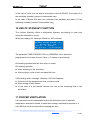
N.Cycles 00231/00235
Cycle to execute:
P1: POROUS-134ºC
start
To start the sterilization cycle, press again
stop
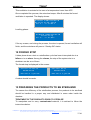
. If the door is not closed, the
following message is displayed during 5 seconds:
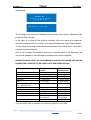
Close the door,
Please.
Cycle to execute:
P1: POROUS-134ºC
If during these 5 seconds, the door is closed by the user, the sterilization cycle will
start automatically.
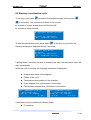
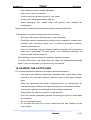
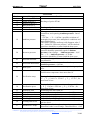
While the cycle is running, the following information is displayed:
■ Number and name of the program.
■ Phase of the cycle.
■ Temperature and pressure in the chamber.
■ Cycle elapsed time, right bottom in the screen
■ Partial phase elapsed time, left bottom in the screen.
P1: POROUS-134ºC
Pre-heating
38.0º
0.01bar
0'02”
P1: POROUS-134ºC
Sterilization
134.3º
2.11bar
2’59”
15'32”
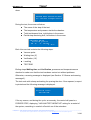
A sterilization cycle includes the following steps:
■ Pre-heating
______________________________________________________________________________________________________
R. Espinar, S.L.. Avda. del Vallès, 322. Políg. Ind. “Els bellots” – 08227 Terrassa (Barcelona) España
Tel (+34) 93 783 07 20 / (+34) 93 783 03 44 - Fax (+34) 93 731 37 17 e-mail; [email protected] / web site.http://www.raypa.com
21/48