1
USER MANUAL AND REFERENCE HANDBOOK
Revision: 1.5
Date: Jul 5, 11
Contents
Contents .............................................................................................................................................2
1. Introduction ................................................................................................................................4
1.1. Identification .............................................................................................................................. 4
1.2. Care ............................................................................................................................................. 4
1.3. Environment and Environmental Tolerance ......................................................................... 5
1.4. Cleaning ...................................................................................................................................... 5
2. Overview ....................................................................................................................................6
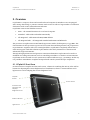
2.1. CCpilot XS Front Face ............................................................................................................... 6
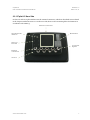
2.2. CCpilot XS Rear Side ................................................................................................................. 7
3. Set-up and configuration .........................................................................................................8
3.1. Preliminary configuration ......................................................................................................... 8
4. Basic operations ........................................................................................................................9
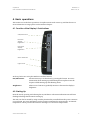
4.1. Function of the Display’s Push-buttons .................................................................................. 9
4.2. Starting Up................................................................................................................................... 9
4.3. Status indicating function ...................................................................................................... 10
4.4. Touch screen ............................................................................................................................ 10
4.5. Shutting-Down .......................................................................................................................... 10
4.6. Reset of the unit ....................................................................................................................... 11
4.7. Storage memory ...................................................................................................................... 12
4.8. CAN ............................................................................................................................................ 13
4.9. Ethernet ..................................................................................................................................... 13
4.10.
USB ...................................................................................................................................... 13
4.11.
COM ................................................................................................................................... 13
4.12.
Digital Inputs ..................................................................................................................... 13
4.13.
Audio.................................................................................................................................. 14
4.14.
Video.................................................................................................................................. 14
4.15.
GPS ..................................................................................................................................... 14
4.16.
Bluetooth ........................................................................................................................... 14
4.17.
GPRS/GSM ........................................................................................................................ 14
4.18.
WLAN ................................................................................................................................. 14
5. Connectors ...............................................................................................................................15
5.1. Connectors ............................................................................................................................... 15
6. Installation ................................................................................................................................21
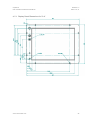
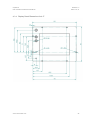
6.1. Placing and installing of the unit and peripherals ............................................................ 21
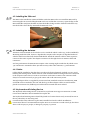
6.2. Installing the SIM card............................................................................................................. 25
6.3. Installing the Antenna ............................................................................................................. 25
6.4. Cables ....................................................................................................................................... 25
6.5. Keyboard and Pointing Device ............................................................................................ 25
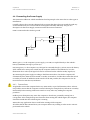
6.6. Connecting the Power Supply .............................................................................................. 26
7. Software ....................................................................................................................................27
7.1. Operating System .................................................................................................................... 27
7.2. Getting Started with Windows CE ........................................................................................ 27
www.crosscontrol.com
2