1
appendix
Product Specifications
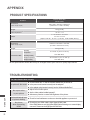
Wireless Media Box
(AN-WL100W)
MODELS
Dimensions
326.0 mm x 42.8 mm x 226.0 mm
(12.8 inch x 1.7 inch x 8.9 inch)
(Width x Height x Depth)
Weight
1.5 kg (3.3 lb)
Power requirement
DC 12 V 1.1 A
In : AC 100-240 V~ 50 / 60 Hz
Out : DC 12 V 2.5A
(Adapter model No. : PA-1031-1 ( LITE-ON) , EADP-30PB B (DELTA) )
Adapter
MODELS
Wireless Ready Dongle
Dimensions
148.0 mm x 23.0 mm x 78.0 mm
(5.8 inch x 0.9 inch x 3.1 inch)
(Width x Height x Depth)
Weight
0.2 kg (0.4 lb)
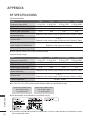
Operating
Temperature
Environment condition
Operating Humidity
Storage Temperature
Storage Humidity
0 °C to 40 °C (32 °F to 104 °F)
Less than 80 %
-20 °C to 60 °C (-4 °F to 140 °F)
Less than 85 %
■ The specifications shown above may be changed without prior notice for quality improvement.
Troubleshooting
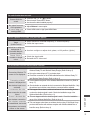
The video function does not work.
■■ Check whether the TV and the Wireless Media Box are turned on.
No picture & No sound ■■ Is the power cord inserted correctly into the adapter?
No or poor color
or poor picture
appendix
22
Horizontal/vertical bars
or picture shaking
No picture
when connecting
HDMI
■■ Is the adapter plug inserted correctly into the Wireless Media Box?
■■ Adjust Color in menu option.
■■ Are the video cables installed properly?
■■ Activate any function to restore the brightness of the picture.
■■ Check for local interference such as an electrical appliance or power tool.
■■ Check that your HDMI cable is High Speed HDMI Cable.
If the HDMI cables are not High Speed HDMI Cable, flickering or no screen display
can result. Please use the High Speed HDMI Cable.