1
preparation
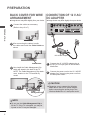
Back Cover for Wire
Arrangement
■ Image shown may differ slightly from your device.
1
Connection of 12 V AC/
DC Adapter
■ Image shown may differ slightly from your device.
Connect the cables as necessary.
(Refer to the p.6 to 7)
A
LR
VIDEO
L(MONO) AUDIO R
LR
B
VIDEO
preparation
3
DC IN 12V
OPTICAL DIGITAL
AUDIO OUT
L(MONO) AUDIO R
2
1
2
After connecting the cables, bundle
the cables and install the Cable Holder as
shown.
2
12V AC/DC Adapter
Cable Holder
3
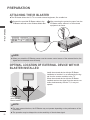
Now install the Cable Management Clip
which will attach to the back of the TV.
NOTE: The Cable Management Clip attachment location on the TV can differ by
model.
1
Connect the 12 V AC/DC adapter plug to
the DC IN 12V input jack on the Wireless
Media Box.
2
onnect the power cord to the 12 V AC/DC
C
adapter first, then plug the power cord into
the wall power outlet.
CAUTION
Cable
Management Clip
NOTE
►Do
► not use the Cable Management Clip to
lift the TV. If the TV is dropped, you may be
injured or the TV may be damaged.
8
A
1
/ DVI IN
SERVICE ONLY
A COM
B COM
►Please
►
be sure to connect the Wireless
Media Box to the AC/DC power adapter
before connecting the power plug of the
Wireless Media Box to a wall power outlet.
RGB IN (PC)
R