1
PowerMonitor 1000 Overview
Chapter 1
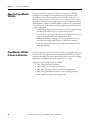
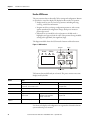
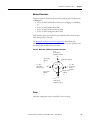
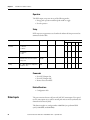
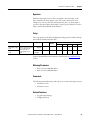
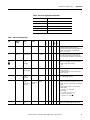
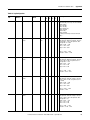
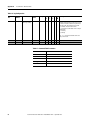
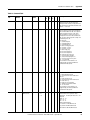
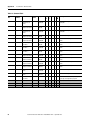
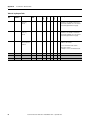
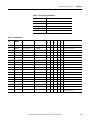
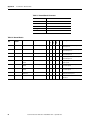
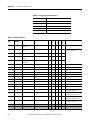
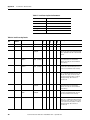
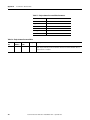
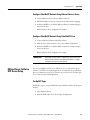
This diagram shows how to navigate in the display and configuration menu.
Figure 2 - Menu Navigation
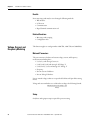
Chart Key
Default
Screen
Level 1
Next Item
(within current level)
Level 2
Level 3
Previous Item
(within current level)
Level 4
Select
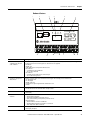
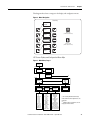
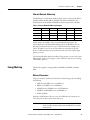
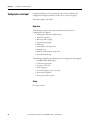
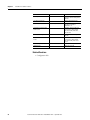
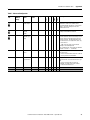
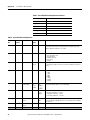
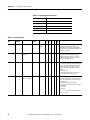
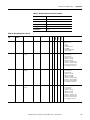
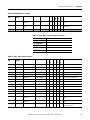
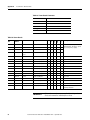
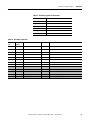
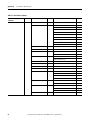
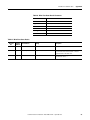
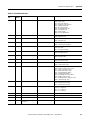
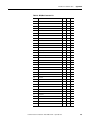
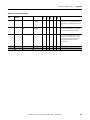
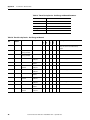
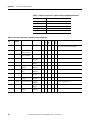
LCD Screen Display and Configuration Menu Map
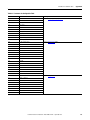
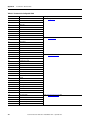
Figure 3 - Main Menu, Page 1
Default
Screen?
Level 1
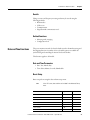
Display
Program
Password?
Level 2
Display
Config
Setup
Display
Metering
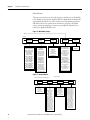
Level 3
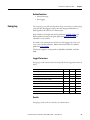
Metering Volts
Amps
Frequency(1)
Metering
Power(1)(2)
Metering
Energy(1)
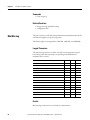
PF 1
PF 2
PF 3
PF Total
KW 1
KW 2
KW 3
KW Total
KVAR 1
KVAR 2
KVAR 3
KVAR Total
KVA 1
KVA 2
KVA 3
KVA Total
Status 1 Cnt
Status 2 Cnt
kWH Fwd
kWH Rev
kWH
kVARH Fwd
kVARH Rev
kVARH
kVAH
kW Demand
kVAR Demand
kVA Demand
PF Demand
kW Proj Demand
kVAR Proj Demand
kVA Proj Demand
See Setup
Submenu
Level 4
I1
I2
I3
I Average
V LN1
V LN2
V LN3
V L12
V L23
V L31
V LN Avg
V LL Avg
Frequency
Unbalance V
Unbalance I
(1) The Catalog Number and Voltage
mode determine which parameters are
displayed.
(2) Individual phase parameters are not
displayed in Delta modes.
Rockwell Automation Publication 1408-UM001D-EN-P - September 2013
17