1
User Manual E-LAB UPP2-X Programmer
UPP2-X
with AES encryption
Portable Programmer
© Copyright 1998-2015 by E-LAB Computers
WEB: www.e-lab.de Tel: 07268/9124-0 Fax: 07268/9124-24
UPP2-X Portable in Circuit Programmer with GLCD
Table of Contents
OVERVIEW..........................................................................................................................................................3
FEATURES ..........................................................................................................................................................3
CONNECTIONS ..................................................................................................................................................3
SOFTWARE ........................................................................................................................................................5
AVRProg .....................................................................................................................................................5
USB power supply .................................................................................................................................7
Call options / Command Line Parameters.............................................................................................8
Button-Bar ...........................................................................................................................................10
Functions of Buttons and Menus .........................................................................................................11
AES PAC files......................................................................................................................................25
Interactive Programming .....................................................................................................................26
Building Project Files ...........................................................................................................................26
Programming using the SD card .........................................................................................................27
States, Error Display and Problems ....................................................................................................28
PackProg ..................................................................................................................................................29
Buttons and Menus..............................................................................................................................29
Command line parameters ..................................................................................................................33
Return Codes ......................................................................................................................................33
Telnet Interface ...................................................................................................................................34
Working Stand Alone...........................................................................................................................36
EXTERNAL HARDWARE .................................................................................................................................40
Protection of the programmer..............................................................................................................40
Miscellaneous Adaptors ......................................................................................................................40
MULTILE PROGRAMMERS .............................................................................................................................41
Battery Operation.............................................................................................................................................41
TARGET POWER SUPPLY ..............................................................................................................................41
USB DRIVER .....................................................................................................................................................42
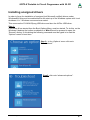
Installing unsigned drivers .....................................................................................................................43
FIRMWARE UPDATE .......................................................................................................................................46
ADDENDUM ......................................................................................................................................................48
XMega .......................................................................................................................................................48
TINY4-5-9-10-20........................................................................................................................................48
Chipcon ....................................................................................................................................................49
Chipcon Evaluation Boards .................................................................................................................51
AT89LPxx .................................................................................................................................................52
Serial Flash (SPI-Flash) ...........................................................................................................................53
Other E-LAB Programmers .............................................................................................................................54
2 · Table of Contents
E-LAB Computers
UPP2-X Portable in Circuit Programmer with GLCD
OVERVIEW
In-Circuit Programming (ISP or JTAG) is the technology of the future, at least for small and medium series of
electronic components with embedded processors. With SMD parts there is a problem with programming
because many expensive and specialized socket adapters are required. An additional advantage of ISP/JTAG
is the practically unlimited reprogrammability of the CPUs .
This UPP-Programmer emphasizes minimum size, extensive software and ease of use. This manual is only
valid for the UPP2-X version of programmers.
FEATURES
· Connection to the PC through a USB port. USB2, USB1 and Hubs supported
· No power supply necessary. The unit is powered by the internal rechargeable battery, directly from PC
interface (USB) or by the target.
· Adapts automatically to the target’s voltage (1.8-5.5Volt)
· Power consumption 50..70mA if powered from the target system
· Easy and extensive software. Up to 63 projects can be stored on the included micro-SD card
· Software runs under Windows XP, Vista and Windows7,8 / 32 and 64bit
· Small, lightweight and handy unit - 110x55x20mm
· Supports all SPI, JTAG, PDI and TPI programmable AVRs
· Supports the SPI programmable AT89Sxx types
· Supports the Atmel AT89LPxx family
· Supports the ChipCon CC1110, CC2510 und CC2430 family
· Supports the serial flash (SPI-Flash) families AT25DFxxx, S25FLxxx and SST25VFxxx
· Programmable supply voltage (source) for the target system 30mA..300mA 1.8..5.5Volt
· Extremely fast - programs a full Mega128 in 3sec (JTAG) and a Tiny44 in 1sec (16MHz)
· Self update feature via the PC
· Very well suited for production programming by using highly secure AES encryption
· Also processes AES encrypted project files (PAC) onboard
· Supports programming cycles limitation with AES-PAC files
· Comprehensive and convenient graphical menu system on the programmer’s display. Showing projects,
directories (folders), project properties and actual target parameters.
· micro-SD card included. FAT16 up to 2GB and FAT32 up to 32GB and SDHC are supported
· External mini power supply for USB jack with 5Volt/1000mA included
· Car adapter for cigarette lighter included
· Internal Battery Pack 3,7V/700mAh included. Option 3,7V/1500mA available
· Option adapter from Atmel 6pol SPI to Atmel 10pol programming connector (not included)
· Option adapter from E-LAB JTAG to Atmel JTAG programming connector (not included)
· Option adaptor from E-LAB UPP2-X to ChipCon CC2430 Evaluation Board (not included)
· Option adaptor from E-LAB UPP2-X to ChipCon SOC_BB Evaluation Board (not included)
· Optimally suited for production and service purposes
CONNECTIONS
Windows-XP, Vista or Windows7/8 is required. An USB1 or USB-2 port is required. With a USB-1 port the
programming time will be increased somewhat.
E-LAB Computers
Overview and Features · 3
UPP2-X Portable in Circuit Programmer with GLCD
The included USB cable must be connected to a free USB connector of the PC. The USB drivers must be
installed once in order to work properly. See the USB section at the end of this manual.
The internal voltage is 3.3Volt. Don’t apply high loads at the target pins used for programming. No capacitors
are allowed at these pins. Capacitance at the RESET pin must not exceed 100nF.
With XMegas there must be no capacitor connected to the Reset pin. Pullup minimum 100kOhm.
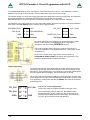
The definition of the 6-pin target plug (0.1 inch pitch male header, dual inline) conforms to a recommendation
from Atmel. The TOP VIEW onto the connector of the Target is below:
CPU MISO(TxD)
o1 2o
VCC
CPU SCLK
o3 4o
CPU MOSI(RxD)
o5 6o
GND
/RES
PDI_DAT
VCC (3.3V)
o3 4o
RESET/PDI_CLK
Top View AVR SPI header
o1 2o
o5 6o
GND
Top View XMEGA PDI header
Pin1 of the 6pin plug of the programmer can be located by a small
triangle on the front of it. A misalignment of the plug leads to
malfunction and can possibly DESTROY the unit.
The working voltage of the Target CPU must be in the range of
1.8V..5.5V. XMegas must be supplied with max. 3.6V and the TINYs
not below 5.0V.
None of the 4 control lines of the device must be shorted. A
continuous short circuit can destroy the programmer. Only
electrically tested boards should be connected.
JTAG programming
For JTAG programming of the target CPU the 6-wire ribbon cable must be
replaced by 10-wire type. Because the UPP2-X uses the same plug for ISP
and also for JTAG programming, the JTAG plug on the target system differs
from the original Atmel JTAG plug. See the schematic on the left.
On the left is the recommended E-LAB plug connection which must be used
for the target system if the JTAG interface of the target AVR is to be be used
for programming. Please note that also the /RESET line must be connected
to the target CPU.
TPI_DAT
1 2
TPI_CLK
3 4
/RES
5 6
4 · Connections
VCC (5V)
Tiny 4, 5, 9, 10, 20 programming
These Tinys must be programmed with 5V through 3 pins.
GND
The programming mode is called TPI. Because the same
programming plug is also used by the SPI mode the plug on
the target system differs from the Atmel plug. The load on the
TPI_DAT pin must not be lower than 80kOhm.
E-LAB Computers
UPP2-X Portable in Circuit Programmer with GLCD
SOFTWARE
There are two supplied programs that can be used to control the UPP2-X programmer. The first is
AVRProg.exe which is the more extensive program that can be used for creating a project, editing/viewing the
data and selecting fuse, lock and programmer setup options, such as power supply, programming and
verifying the target and creating packed or encrypted programming files for use elsewhere.
The second program is PackProg.exe and it can only be used for programming or verifying using a packed or
encrypted file that has been previously created by AVRProg. It is the most suitable program for production use
and is described later in this manual.
The UPP2 can also be used in Stand Alone mode (ie without a PC attached) which is described later.
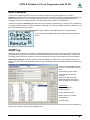
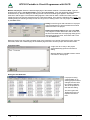
The programmer will display this screen while being controlled from
the PC.
AVRProg
AVRProg can be executed from within the AVRCo IDE (PED32) and in this mode all the project settings are
passed directly from the IDE. It can also be executed directly from a shortcut or the Start Menu. In this mode
an existing project has to be opened or a new one created so the project select dialog is opened on startup.
Open Existing Project: A project can be opened and loaded by a double click on the desired entry or by a
single click on the entry and an additional click on the Load button. All project related parameters and files are
loaded.
Details of the highlighted project
from the select window with CPU
type.
Accompanying project path.
The Flash Hexfile with file
extension.
EEprom file with extension
XMega UserRow with extens
Store changed or new project.
Commands
Build a new project
Delete a project
Edit an existing project
Search project on network
Load a project
Exit this dialog.
With each project it is possible to
store a text comment. See ‘Comment’ dialog below.
E-LAB Computers
AVRProg Software · 5
UPP2-X Portable in Circuit Programmer with GLCD
Build a new project: Select the desired target page of the tabbed notebook. Click button New. Type the
desired name into the field Project Name. Click to the field Directory. From the appearing dialog select the
desired directory. Now the dialog for selecting the file extensions and file types appears. Select/edit
extensions and file types. The Flash file dialog appears. Select the file which contains the Flash contents.
Finally the CPU type must be selected from the CPU-Select dialog. Up to here the selections are a must. The
following dialog for selecting an EEprom file can be ignored, if nothing exists. The new project must be stored
by the Save button.
Dialog for the file types and extensions of a project.
These parameters are project related and must be
defined for each new project.
Editing an existing project: Click the button Edit.
The program is now in edit mode. With a click onto
the items and fields the accompanying dialog opens.
After all changes are done, store them with a click
onto the Save button.
Moving a project from one page to another page of the notebook is very simple. Select the project, enter the
edit mode, switch the notebook page to the desired page and then store the project with the save button.
Comment Editor
A right click to an entry in the project
select/load dialog opens this Comment
dialog.
With this dialog it’s possible to add or view a
comment for each project.
Dialog for CPU Selection
If a project is being
created initially or an
existing project must be
changed, first the CPU
type must be defined.
This is the purpose of
this selection dialog.
The CPU types LPC,
TMS and PIC are not
implemented at this
time.
.
6 · AVRProg Software
E-LAB Computers
UPP2-X Portable in Circuit Programmer with GLCD
Device state dialog
After selecting the CPU the clock-frequency of the target must be set. To do this, the button opens the
Device State Dialog. The dialog shows the parameters of the PC-loaded project and the parameters of
the hex-files loaded.
Editable parameters are
located in the Environment
group.
The clock defines the SPI
speed for ISP programming
and can be changed every
time. If this value is too high,
the programming can fail.
For JTAG, TPI, PDI
programming mode this value
has no meaning. But this
parameter should have always
the correct value.
The voltage field on the right of
it reflects the current voltage
value which the ISP
programmer measures on the
target board, if connected.
The current field selects the maximum allowed current to supply. 0.0mA sets the internal supply to the off
state. The other values enable the ISP-internal supply. If a current > 0mA is selected the desired supply
voltage can be selected in the voltage field. If enabled the UPP2-X programmer supplies the selected voltage
to the target system (only in programming state). The current will be limited to the selected value.
With XMegas the maximum supply voltage is limited to 3.6V
With some TINYs the minimum supply voltage is limited to 5.0V
The Application group shows the actual loaded project in the PC.
The Programmer group shows the information about the connected programmer device: programmer type,
serial number, date of production, firmware revision and the last firmware update. The last item is important
because all update files start with their date-of-build yy-mm-dd. In the dialog above this is 2011, Feb, 21.
So you can easily find out whether a new downloaded file from the WEB is the same or newer than the one
already downloaded in the ISP.
The download of an update into the ISP is described below in the section Firmware Update at the end of this
manual.
USB power supply
For powering the target board the UPP2-X has an internal step-up voltage converter which generates a
voltage of about 5.6V from the USB voltage (4..4.8V). So an external power supply is not necessary provided
that the target load is less than what can be provided by the USB port / hub or the internal battery.
See the section Target Power Supply below for more discussion on power supplies.
E-LAB Computers
AVRProg Software · 7
UPP2-X Portable in Circuit Programmer with GLCD
Call options / Command Line Parameters
Start with the Windows Explorer
If you make a link in the Windows Explorer from the file-extension *.ispe to AVRprog.exe, a double click to
a project-inifile xxx.ispe in the Explorer automatically invokes AVRprog.exe, which by itself reads the ini-file
and loads the complete project.
Start within the E-LAB IDE PED32
The program start is already implemented into the IDE.
Command line parameters
With all calls of AVRprog command line switches can be appended. These are:
-USB2 Only search for devices with USB2
-e Automatic Device erase
-p Automatic Programming Start
-r Automatic Target Run
-c Program exit
-s No visual error messages are generated. Instead the errors are written into the file ‘ICPISP.err‘.
This file then can be found in the project path or in the program directory of no parameter specifies
the project path.
-u0 A standard Pack File will be build
-u1 An encrypted Pack File will be build
-gProgSerNum If more than one Programmer is found then the Programmer with the serial number
ProgSerNum is used.
The order of the switches in the command line doesn’t matter. The internal processing is always done in the
above order. The switches must be separated by spaces. A switch must not contain spaces.
Example:
C:\pppp\AVRProg.exe ProjectName –USB2 –p –c
If the switch –p is active, a previous erase (-e) is not necessary because a programming process always first
erases the target.
If the switch –c is active, a previous Target RUN is not necessary because a program exit also releases the
target.
With the parameter ProjectName there are 2 possibilities. You can pass the complete path and name of the
desired control file like: ‘C:files\hex\myprog.ispe’. Or only the name of the project is supplied like: ‘myprog’
8 · AVRProg Software
E-LAB Computers
UPP2-X Portable in Circuit Programmer with GLCD
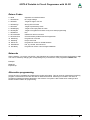
Return Codes
0 dsOk
1 dsPwrDown
2 dsPwrErr
3 dsFalseTyp
4 dsProtect
5 dsNotEmpty
6 dsVerifyErr
7 dsFileError
8 dsTimeOutErr
9 dsCommError
10 dsNoProg
11 dsNoProj
12 dsFwLost
13 dsNotfound
14 dsCalReq
Operation successful finished
No Target voltage
Target too high or too low
Wrong CPU ID found
Target is protected by fuses
Target is not empty after an erase
Target or Programmer found a Verify error while programming
N.A.
USB driver returns a timeout
Communication problem with the Programmer
Programmer not found
Project not found
Programmer returna an invalid firmware
File, eg. Hexfile, was not found
Programmer returns a lost or illegal calibration
Networks
Some networks, e.g. Novell, use DOS 8.1 style filenames and cannot handle the Project File Extension .ispe
This can be solved by changing the corresponding entry in the INI-File of the programmer ISPISP-3.ini
Example:
[Settings]
ProjExt=.isp
Alternative programming
A Pack file can be created that conatins all the project information. This can then be used with the PackProg
program or transferred to the UPP SD card for Stand Alone Mode. PackProg is included in the UPP2-X
programmer package and described later in this manual. This option is also useful when creating a file to
send to another location for programming.
E-LAB Computers
AVRProg Software · 9
UPP2-X Portable in Circuit Programmer with GLCD
Button-Bar
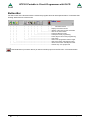
For fast access of the functions with the mouse the program has a bar with speed-buttons. These allow fast
working without the use of the menus.
|
| |
|
| |
| |
|
| |
Ý
|
| |
|
| |
| |
|
| |
Firmware-revision ---|
| |
|
| |
| |
|
| -display of the actual action
|
| |
|
| |
| |
|
--- release of the reset of CPU and restart
|
| |
|
| |
| |
----------- abort of the actual action
|
| |
|
| |
| --------------- Flash and EEprom Verify
|
| |
|
| |
------------------ subsequent Fuse programming
|
| |
|
| ---------------------- Flash, EEprom and Fuses programming
|
| |
|
------------------------- Chip erase
|
| |
----------------------------- State of the programmer and the target
|
| -------------------------------------- flush of the Flash- and EEprom buffer
|
----------------------------------------- reload of the Flash- and EEprom buffer
--------------------------------------------- another resp. new project load
Download button (not shown above) is used to transfer projects to the SD card – see section below.
10 · AVRProg Software
E-LAB Computers
UPP2-X Portable in Circuit Programmer with GLCD
Functions of Buttons and Menus
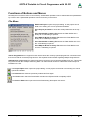
Normally the use of the menus is not necessary. All standard operations can be started with the speedbuttons
by a mouse click. Specialized operations can be found only in the menus.
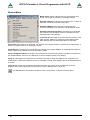
File Menu
Edit/Load Project opens the project dialog. A new project can be
build or an existing one can be opened and loaded.
Save Project parameters stores the actual parameters to the isp –
file.
Save Flash Buffer to binary File stores the Flash-Buffer into a
binary file. A File-Dialog is opened..
Save EEprom Buffer to binary File stores the Flash-Buffer into a
binary file. A FileDialog is opened..
Save Flash Buffer to binary File stores the Flash-Buffer into a hex
file. A File-Dialog is opened..
Save EEprom Buffer to binary File stores the Flash-Buffer into a
hex file. A FileDialog is opened.
Search Programmers is a support function which closes the currently opened programmer connections and
then tries to find all connected programmers. See separate section below regarding Multiple Programmers.
USB2 devices only disables the global programmer searching and enumerates USB2 types only. This avoids
long timeouts with the COMport searching which can take several minutes if a Bluetooth virtual Comport is
installed on the PC.
The Project-Open button opens the project dialog. A new project can be built or an existing one can be
opened and loaded.
The Reload button loads the previously loaded Hex-Files again.
The Flush button clears the Flash-Buffer and also the EEprom-Buffer completely to $FF
The Device State button opens the Device State dialog. Description see above.
E-LAB Computers
AVRProg Software · 11
UPP2-X Portable in Circuit Programmer with GLCD
Device Menu
Blank Check tests the target (CPU) for unprogrammed ie
empty. If the target is protected, a message is raised.
Read back Flash if the target is not protected, the contents of
the Flash is read back into the Flash buffer.
Read back EEprom if the target is not protected, the
contents of the EEprom is read back into the EEprom buffer.
Read back UserSignatureRow if the target is not protected,
the contents of the UserRow memory is read back into the
UserRow-buffer. Only XMega.
read back All if the target is not protected, the contents of the
Flash and the EEprom is read back into the related buffer.
With XMegas also the UserSignatureRow is read back.
Verify Flash if the target is not protected, the contents of the target’s Flash is compared to the Flash buffer. If
there is any difference an error message is raised.
Verify EEprom if the target is not protected, the contents of the target’s EEprom is compared to the EEprom
buffer. If there is any difference an error message is raised.
Verify UserSignatureRow if the target is not protected, the contents of the target’s UserRow is compared to
the UserRow-Buffer. If there is any difference an error message is raised. Only XMega.
Verify all if the target is not protected, the contents of the target’s Flash and EEprom are compared to the
related buffer. If there is any difference an error message is raised. With XMegas also the UserSignatureRow
is verified.
check device checks the programmer and also the target. If any there are any problems they will be
displayed. If the CPU is protected only the device ID can be displayed (ID = 00 01 02).
The check button has the same result as the item ‘check Device’ in the Device Menu above.
12 · AVRProg Software
E-LAB Computers
UPP2-X Portable in Circuit Programmer with GLCD
Program Menu
program all programs the Flash, the EEprom and also the fuse and
lock bits in the manner defined at Options.
program flash programs the Flash only
program EEprom programs the EEprom only (not in JTAG mode)
program UserSignaturRow programs the UserRow (XMega)
program Fuses programs the fuse bits as defined at Options.
program Lockbits programs the lockbits only
erase Device erases the entire device, but not the fuse bits
erase EEprom erases the entire EEprom (not in JTAG mode)
erase UserSignaturRow erases the UserRow to $FF. (XMega)
A click on the Erase button erases the entire chip inclusive the lock bits. Please note that the fuse bits
are not erased or changed.
The Program button erases the chip completely including the lock bits, then the chip is reprogrammed.
The fuse and lock bits are treated as set in Options.
The Security button writes the lock bits which are defined in Options. It is required that the chip is not
protected until this time
The Verify button starts a verify of the target with the buffers. Only possible on an unprotected device.
The Stop button aborts the current action.
After programming a device the reset stays active. The target can be released by a click on the Run
button or again reset without disconnecting the programmer from the target.
If the option autorelease target is enabled in the option dialog, the reset is always removed after
a programming cycle.
Options Menu
All of the fuse bits and lock bits, Reset polarity etc. and also the whole behaviour of the programmer and it’s
additional options must be setup at least once for a project. To do this there a two dialogs: the Options Dialog
and the Target Options Dialog. These are called with the menu below.
Programmer options starts the Options Dialog where the Fuse and Lock bits
can/must be defined and also some other functions.
Target options starts the Target Options dialog where powerful extra
functions can be enabled and setup.
DownLoad new Firmware starts a firmware update of the programmer. For
more information take a look into the chapter Firmware Update at the end of
this manual.
Supported are SD cards with size 2..32 GByte. Also SDHC cards. Please use only Speed Grade 4 or above!
For high speed cluster size is important. Good values are for SD Card size:
up to 4GB -> 4kB, 16GB -> 16kB, 32GB -> 32kB
E-LAB Computers
AVRProg Software · 13
UPP2-X Portable in Circuit Programmer with GLCD
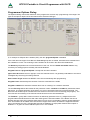
Programmer Options Dialog
The Options-Dialog controls the behaviour of the programmer at erase resp. programming of the target. The
types of the options depend of the Hex-files and the selected CPU-type..
If, for example no EEprom-file is loaded (.EEP), the item program EEprom is disabled.
If the CPU does not support ‘Fuse Bits’ the Fuse bits groups are not visible, otherwise the accessible fuses
are enabled for access. The meaning of the Fuse Bits can be found in the Atmel CPU datasheets.
The General group defines the common behaviour of the unit. The item blank check after erase is only
necessary for testing purpose. Normally it should be disabled.
Program Flash and program EEprom normally both should be enabled
Ignore false ID disables the error popup in case of a false Device-ID. It is generally unadvisable to check this.
Investigate why the wrong ID is being returned.
Auto release Target releases the RESET of the CPU automatically after programming.
Program Fuses should always be checked. Fuses are essential for the AVRs.
Program Lockbits also should be checked. But it has no meaning if no Lockbit is activated.
The item Security defines the lockbits for the protection modes. Lockbit0 or Lockbit1 by themselves make
little sense. A complete protection of the device can only be achieved if both bits are active/checked. The
BootLock bits should only be activated if the boot section in the AVR is used for booting (self program). The
exact function and meaning of the fuses should be observed in the CPU datasheets.
The Fusebits… group define various functions as defined by particular CPUs. e.g. Mega128, the fuse
programmable internal Reset time. With other CPU types the internal oscillator or the Brown-Out can be
defined. Because each CPU interprets these bits in its own way it’s impossible to make a general statement
here. Some fields can be hidden if the CPU doesn’t support some fuses, otherwise the supported fuse bits
can be changed by the user. Unsupported fuse bits are disabled. An empty field means that this option is
disabled = 1. A green ok means that this option is set = 0 ie enabled.
14 · AVRProg Software
E-LAB Computers
UPP2-X Portable in Circuit Programmer with GLCD
Attention: within the fusebit groups some CPUs have a SPIEN fuse. This fuse normally is ‘don’t care’ with
SPI-Low-Voltage programming. But there are exceptions, the Tiny12 for example. In this case the SPIEN fuse
must be activated. Otherwise the chip is not accessible any more.
The SPIEN fuse is always programmable in the JTAG Mode. If SPIEN and JTAGEN are disabled this CPU is
also not accessible any more. Note that JTAG mode commandeers some I/O pins from normal use.
Sometimes it is more readable for the designer if the binary values of the fuses are shown instead of the
boolean values. This can be accomplished with this button.
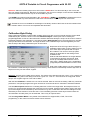
Calibration Byte Dialog
Some CPUs which feature an internal RC-oscillator often have also up to four special read-only fuses called
‘Calibration bytes’, which are shown in the field Calibration Bytes. These bytes can be used by the
program/application to fine tune the internal RC-oscillator. Because this byte is unique in each CPU it must be
individually passed to the application. A checked checkbox WriteCal Byte forces the programmer to read this
fuse byte and store it into the Flash. The target location of this calibration byte must be supplied by the user
with the help of the dialog ‘Calibration bytes’ shown below.
Dependent of the CPU type there are up to 4
Calibration Bytes which must be read out of the
CPU. Each byte corresponds with a unique
RC-oscillator. The choice of this byte (radio
buttons) is dependent on the settings of the
CLKSEL-fuses.
With the edit field ‘address’ the target address
in the Flash for this byte must be set. With
CPUs up to 64kByte Flash size this can be
each value > $0000. With CPUs > 64kB Flash
(mega128) the selected address must be even.
With newer AVRs and the use of the standard
RC-oscillator a Calibration Byte handling is not necessary. These devices automatically read this byte from its
EEprom memory into the OSCAL register.
Attention: All Fuse and Lockbits are low active. This means if the data sheet shows a zero ‘0’ for a specific bit
the corresponding field in this dialog must show a green ‘ok’. Then a ‘1’ bit must show an empty field. Atmel
always uses negative logic for Fuse and Lockbits!
With the field ComPort the interface to use can be selected. With an UPP2-X the setting ‘USB only’ should be
preferred. If V24 (serial) programmer types can also be connected to this PC ‘automatic’ should be selected.
The field Reset options defines the controlling behaviour of ISP to the target CPU. Normally all 3 items are
inactive. For special target hardware the reset level can be inverted. Push/Pull reset makes sense if the reset
input of the target CPU is burdened by other electronics e.g. R/C combination. But here the loadings must be
reduced by a series resistor of a few kilo ohms. The reset-delay (the time a reset stays inactive before the
next activation can take place) can be extended. This is only for special cases.
The field Programmer Mode is only visible if the selected CPU supports SPI, JTAG, TPI or PDI
programming. In this case one of these modes can be selected.
E-LAB Computers
AVRProg Software · 15
UPP2-X Portable in Circuit Programmer with GLCD
XMega Options Dialog
With the XMegas some options are impossible or make no sense. The dialog above is typical for an XMega.
Please note that there is the checkbox program UserRow. It can only be checked when a hex file for the
UserRow is present. (xxx.usr)
The fuse JTAGEN can always be unprogrammed because the JTAG interface is never used here. Instead the
PDI interface is always used.
Some combinations in the Fusebits1, Fusebits2 and Fusebits5 can be illegal and should be avoided.
Otherwise an unexpected behaviour of the CPU can result.
Please note that the voltage supply is limited to 3.6V for XMegas.
16 · AVRProg Software
E-LAB Computers
UPP2-X Portable in Circuit Programmer with GLCD
Power Supply
The Power Supply group selects the maximum allowed current to supply. 0.0mA sets the internal supply to
the off state. The other values enable the ISP-internal supply. If a current > 0mA is selected the desired
supply voltage can be selected in the voltage field. If enabled the ISP programmer supplies the selected
voltage to the target system. The current limiter can be set between 30mA and 300mA. The current will be
limited to the selected value.
Basically this power supply is switched off after the programming cycle. If the supply shall continuously supply
the target so the checkbox stay active must be checked. If in addition the auto release target is activated the
target system starts up and can be tested at runtime.
The editable fuse- and lock bits are displayed on the right side in the Write column and here they can be
edited. The Read columns can always be updated with the Refresh button. To do this the actual fuse and
lock bits are read out of the target as far as possible.
The button program Fuses is very useful for erasing of illegal FuseBits, which may be activated by an
accidential programming.
One can try with ‘program Fuses’ to set all fuses to the desired value. Some possible error messages can be
ignored in this case. In most cases the CPU then shows a ‘normal’ behaviour as expected.
Attention (SPI mode):
Some CPU types have an internal RC-Oscillator or the feature to connect an external RC-Oscillator.
These options must be selected by some fuse-bits. Sometimes it’s also possible to select an external
low-frequency quartz crystal. With selecting such an oscillator one must be very careful:
1. Internal RC-oscillator.
With this option selected the standard frequency is typical 1MHz. Because of this the programmer’s
frequency selector must also be set to 1MHz, otherwise there will be errors with accessing the target
CPU. The nominal frequency is 1MHz. With a CPU-voltage of 3Volt the frequency drops to 500kHz.
2. External RC-oscillator.
If this mode is activated, there must be a proper external circuit connected. Otherwise the target CPU
will be never accessible.
3. Low Frequency Crystal.
If this mode is activated, a 32kHz watch quartz must be connected to the target. Otherwise the target
CPU will be never accessible.
Please note in addition, that while programming, the actual fuses in the CPU are relevant. The new
programmed fuses become valid the first time after a reset. Some fuses become valid the first time after a
power down.
With accidentally wrongly programmed oscillator fuses it’s possible that after that the external oscillator circuit
must be changed to again get access to the target CPU.
The above restrictions and warnings are not relevant for JTAG, TPI and PDI programming. Here the CPU
must simply be supplied with voltage/current. A working oscillator is not necessary and is ignored. But then
never disable the JTAGEN fuse in JTAG mode.
The settings of the Lockbits (protected/unprotected) and the voltage supply of the target by the ISP are also
displayed in the main program by two symbols.
The padlock means that the target will be locked/protected by the lockbits. The mains or
battery symbol means that ISP must supply the target system. Both symbols belong to the
actual loaded project in the PC program.
E-LAB Computers
AVRProg Software · 17
UPP2-X Portable in Circuit Programmer with GLCD
Target Options Dialog
This dialog has two jobs:
1. Store/program of additional data into the Flash of the target.
2. Serial number administration.
The caption shows the name of the project present in the PC.
If a project name is programmed into the target and it is
readable, it is displayed in this panel. The check button write
Name shows the state of this option.
Serial number in target shows the read back serial number
from the target, if any. The check-button write Number shows
the state of this option
Serial number in UPP/ISP shows the serial number in the ISP
and PC. It’s incremented after every programming
With Preserve Serial Number the number in the Target is
read back and used for the next programming cycle.
Reset all resets all options, also the serial number.
ISP options enables or disables all options.
CheckSum in target shows the flash check sum in the target,
if present. The check-button write ChkSum shows the state of
this option.
CheckSum in UPP/ISP shows the flash check sum present in
the ISP and PC.
Storing Parameters into the target
If there is enough space in the flash memory of the target CPU additional parameters and information can be
placed at the end of the flash memory. With the option switches (checkboxes) of the dialog above each option
can be individually enabled or disabled.
A change gets saved immediately. Also these options are stored into the project’s INI-file as usual. The
options, if any, are programmed at the end of a programming cycle into the last bytes of the target’s flash.
At each invocation of this dialog there is a try to read the actual-parameters from the target. This operation
only works, if the target is present, powered and not protected, of course. The firmware in the target CPU
always has access to this data.
Project Name into Flash
If the checkbox write Name is activated, the ISP is enforced to write the project’s name into the flash. This is
done at the end of a programming cycle.
Serial Number into Flash
Activating the checkbox write Number instructs the ISP to burn a serial number into the flash. The integer
part of this number is then incremented. The serial number consists of 2 parts:
1. Two arbitrary characters from the field Serial Number in ICP/ISP. This part stays unchanged.
2. A number in the right field. This number can be zeroed with the button Reset Number or preset with
a number and the Preset button.
The count of the programmed targets up to now can be found here.
18 · AVRProg Software
E-LAB Computers
UPP2-X Portable in Circuit Programmer with GLCD
Preserve Serial Number
If the serial number is enabled then this option prevents writing a new/different number into the flash. If the
target is not protected the internal number in the target is read out and is used for reprogramming the flash.
This ensures that the number stays unchanged and the old one is re-used, despite of a new programming of
the chip.
Checksum into Flash
While downloading the flash file, a 16bit checksum is generated over this data. This number is displayed in
the field Checksum in ICP/ISP. This value can be written into the flash by checking the checkbox write
Checksum. This is done after every programming cycle. Note that the checksum contains only values from
the original Flash-Hex file. Additional parameters programmed at the end of the flash by the ISP itself are not
recognized. Also empty (not addressed) parts in the hex file are discarded.
Reset All
This button resets all values and options.
Note: all changes are immediately stored. But they are only recognized at the next programming cycle.
The application/firmware always has access to this parameters. The parameters are stored into the last 16
resp. 32 bytes of the flash. The project name has a lead-in of ‘proj’. The serial number has a preamble of
‘ser#’. The number is always the fourth and third last byte. The checksum, if present, always can be found in
the last 2 Bytes of the flash. The order of the serial number and the checksum is loByte/hiByte. Sample:
LSB MSB
ser number
LSB MSB
checksum
Attention:
with programming from out of the flash card each successful programming cycle writes the serial number to
the card. This means stress to the flash card and may cause early failures. To avoid this you should use
newer and better cards with the x80 (or better) speed grade. These guarantee a 10 year life cycle for write
cycles.
E-LAB Computers
AVRProg Software · 19
UPP2-X Portable in Circuit Programmer with GLCD
Project Download
The UPP programmer offers several modes. While in PC-direct mode a MMC flash card is not necessary. all
other modes need a project loaded onto the MMC card. There are several possibilities to write projects to the
MMC card.
Flash card Reader/Writer
On the PC the UPP is visible as an additional drive.
The software creates a packed or encrypted project file by loading the project. Then open the Encrypt Menu
and select pack Project or Standard encrypt. This opens a dialogue to store the files.
For the ISP3-X, UPP1-X and UPP2-X one should only use
pack Project [ISP3+UPP1/2] or AES pack for ISP3-X ...
After selecting the MMC drive (Reader/Writer) Windows
stores the packed file to the card.
Alternatively the file can also be stored to another media (e.g. Floppy Disk Drive) or it can be attached to an
Email.
Please note: for the programmer in direct mode the Encypt modes are not available. Encrypted files can only
be accessed with the PackProg.exe software.
With packed files or projects there is a medium protection. All Hex files and also the programming control,
fuses etc. are written into a binary file so the recipient does not need to have great programming knowledge
and it is also impossible to change any setups, fuses or file contents.
The encryption enhances a packed file in such a way that programming files can be sent to every place in
the world and the recipient or others are unable to disassemble them or do any ‘reverse engineering’.
Furthermore there is the additional feature to include a password into the encryption so only the right UPP2-X
programmer can use this file. This is an additional protection against illegal copies.
Deep
encrypted files can only be used with the program PackProg.exe
Standard
encrypted files can be loaded into the UPP programmer types. But for use with the UPP2-X the
utility program PackProg is absolutely necessary.
Packed
files can be loaded into the UPP programmer types. But for use with the UPP2-X the utility
program PackProg is absolutely necessary.
AES pack
files can be loaded into the UPP programmer types. But for use with the UPP2-X the utility
program PackProg is absolutely necessary.
20 · AVRProg Software
E-LAB Computers
UPP2-X Portable in Circuit Programmer with GLCD
Deep encrypt Mode
This option builds a packed and deep encrypted project which only can be processed with the program
PackProg.exe in conjunction with an UPP2-X programmer type. As an option a password can be included so
that processing this file is only possibly by this programmer which generated and supplied it.
This encryption prevents to disassemble the files or use any kind of "Re-Engineering" so they can shipped
around the world. The encrypted file (*.enu or *.en#) contains the serial number of a specific destination UPP
device. This ensures that only this specific programmer is able to handle the file.
To generate an encrypted file the serial number of the destination device must be known to the creator.
If the destination programmer is connect to the PC the serial number can be read by clicking the Read Key
button. The serial number appears in the edit Password field. You can add the to the list with Add Key.
If the serial number of the destination device is unknown, the owner of the device must use PackProg to read
it. This number is shown in the setup - request password dialogue in PackProg. The author of the
destination file must enter this serial number in the edit Password field and add it to the list.
To create and store the encrypted file select the destination programmer from the list use Encrypt with PWD.
The button Encrypt w/o PWD creates and stores an encrypted file that is not bound to a specific
programmer. Is is encrypted but has no password.
Depending on the selected file extension the encrypted file becomes the extension *.enu or *.en0, *.en1, ...
The menu item opens the dialog shown below:
New passwords can be appended with the Add KEY button.
Existing ones can be deleted with the Del KEY button.
The Encrypt with PWD button builds a file with password
protection. A password protection absolutely binds the
generated file to this specific programmer which supplied
this password!
With the Encrypt w/o PWD button generates an encrypted
file without a password protection.
The building of an UPP2-X password is completely
described in the paragraph about PackProg.exe below.
If the target programmer is already connected to this PC
then the necessary password can be found with the button
Read KEY.
Projects encrypted in this way only be processed with PackProg.exe.
E-LAB Computers
AVRProg Software · 21
UPP2-X Portable in Circuit Programmer with GLCD
Standard encrypt Mode
This option builds a packed and well encrypted project which only can be processed with the PackProg
program in conjunction with an ISP-3 programmer type. But also a UPP programmer can directly load (using
its memory card) and process such a file. As an option, a password can be included so that processing this
file is only possibly by the programmer which generated the password. The menu item opens the dialog
shown below:
The dialog serves to set the file extension. The extension can
include a number, en0..en9 for a better handling with the UPP
programmer or a simple *.enu. The choice must be done with one
of the file number buttons.
The checkbox Dock or DLL selects no/more then 10 possible
projects on the flash card.
This dialog mainly serves to decide whether a password must be
included or not. A password exclusively binds this file to this
specific programmer which supplied it. If a password is necessary
then it must be selected from the list field.
This option must be selected by the button Encrypt with PWD or
disabled with the button Encrypt w/o PWD.
If the target programmer is already connected to this PC the
password can be requested. With the button Read KEY the
password is read out of the programmer and displayed. With the
button Add Key the new password can be appended to the
password pool.
This file type can be processed with the program PackProg.exe and also with all UPP programmer types.
22 · AVRProg Software
E-LAB Computers
UPP2-X Portable in Circuit Programmer with GLCD
pack Project Mode
This option builds a packed but not encrypted project which only can be processed with the PackProg
program and an ISP3-USB programmer. Also the UPP programmer are able to load and process these files
but without a password or a connection to a specific destination programmer.
The menu item opens this dialog.
The dialog serves to set the file extension. The extension can
include a number, pk0..pk9 for a better handling with the UPP
programmer or a simple *.pac. The choice must be done with
one of the file number buttons.
The checkbox Dock or DLL selects availability of no/more than
10 projects on the MMC card
Dialogue when the Dock Option is selected.
The UPP version „D“ with Docking Station stores and handles
more than 10 projects.
These file types can be processed with the program
PackProg.exe and also with all UPP programmer types.
The Checkbox UPP2 special allows to build nearly any file
extensions, for example. *.axL oder *.3zL.
But then these files can only be used in conjunction with the
UPP2-X programmer.
Common Procedure
1. Create a project as usual or load an existing project.
2. Select the proper setups and properties for this project as usual.
3. Select one of the three file modes, heavy encrypted, encrypted or packed.
4. The two encrypted types provide a password protection so that only this programmer which supplied
the password can process it.
5. Click the button ‘Encrypt’ or one of the file number buttons.
6. Copy the generated file to a storage media.
7. If the receiver doesn’t own the program ‘PackProg.exe’, also copy this tool and this manual onto the
media.
8. Ship the media to the receiver.
E-LAB Computers
AVRProg Software · 23
UPP2-X Portable in Circuit Programmer with GLCD
Shipping this file(s) via email is also possible. In this case it’s a good idea to ‘zip’ all files for secure internet
transport.
Encryption
The encryption feature uses a secure algorithm. Unfortunately up to now there is no absolutely secure
(uncrackable) encryption. But the time investment to decrypt the file is so high and expensive, it’s cheaper and
faster to completely start an new program from scratch J
Password
The program ‘PackProg.exe’ on demand reads out the internal password of a connected ISP-3 programmer.
This password is only valid for this programmer and is not portable to other programmers. Because of this it’s
assured that programmer files containing this password can only be programmed with this programmer.
Password creation
1. The chip or board programmer must install the program PackProg on the computer which will be used
for the chip programming. To do so the file ‘PackProg.exe’ must be copied into the desired directory.
2. The program ‘PackProg.exe’ must be started.
3. The UPP2-X programmer must be connected to this PC.
4. The password (displayed with the menu item ‘Setup/request Password’) must be passed to the
creator of the programming files (packed or encrypted projects).
5. The creator then inserts the password in the program ‘AVRprog.exe’ into his system:
a. Start of ‘AVRprog.exe’
b. Open the Encrypt/Pack dialog with the menu item ‘Encrypt/PackProg Encrypt’.
c. Click the button ‘Add’.
d. Add any comment or name into the comment field.
e. Insert the password into the password field.
f. Store all with the button ‘Add’
6. With files which are sent to this recipient with a password it must be clear that only the correct
password must be used for the file generation. An alternative is item 7
7. With the button ‘Public’ there is no password included and all recipients who have the program
‘PackProg.exe’ can process this file.
Depending on the selection the created file has a file extension *.enu or *.en0, *.en1, ...
Programming Devices
the "PackProg.exe" software supports all programmer types ISP3-USB, UPP1 and UPP2.
See the chapter PackProg Software for more information. Also the receiver of the files should own this
manual.
24 · AVRProg Software
E-LAB Computers
UPP2-X Portable in Circuit Programmer with GLCD
AES PAC files
If absolutely secure PAC files are needed for the types ISP3-X, UPP1-X or UPP2-X (‘X’ programmer) they
must be created with AES encryption. AES is an absolutely secure encryption which can’t be ‘hacked’.
Because the encryption can only be done in the ‘X’ programmer types, listening (sniffing) on the USB lines
results in unusable data.
Furthermore the AES mode has the advantage to create a PAC file for a specific programmer using its serial
number so this file can’t be used on any other programmer. As an additional feature the Quantity limitation
can be used. So hidden ‘black’ productions are absolute impossible.
So it makes sense to use the AES encryption at least for external production. With in-house production the
‘standard’ PAC file is sufficient.
Standard PAC file
AES PAC file
To create an AES PAC it is mandatory to have an ‘X’
programmer connected to the PC.
The dialog for creating of an AES PAC file provides three
different modes.
A. Standard Encryption (only AES used)
B. Encryption with password (Sernum used). Here the
serial number of the target programmer is needed. It
will then be integrated into the encryption and checked
by the target programmer. The target programmer is
not needed here, only its serial number.
C. Quantity limitation (Sernum+Quantity used). Also here
the serial number of the target programmer is
necessary. Furthermore the maximum allowed
programming cycles are preset. If this number is
reached/exceeded the programmer ignores further
programming attempts.
The AES properties of a PAC file can be requested with
the tool PackProg by ‘File Info’ from the target
programmer.
Attention:
AES encrypted PAC files can be processed by every ‘old’
programmer type (ISP3-USB, UPP1-USB, UPP2-USB) but
because they are unable to decrypt such files only
nonsense will be programmed.
E-LAB Computers
AVRProg Software · 25
UPP2-X Portable in Circuit Programmer with GLCD
Interactive Programming
This button starts interactive programming from out of the user interface.
The behaviour of the UPP programmer is like the smaller ISP3-USB. The whole Chip is erased incl. the
LockBits and a new programming cycle is performed. Fuse and Lock Bits settings are done according the
settings in Options.
As the PC and the controlling program owns all data the MMC card is not necessary and not accessed.
Building Project Files
The previous pages introduced two ways that UPP Project files can be created. Either by direct download into
the SD card in the UPP or through a Flash drive of the PC.
There was a notice that the standard UPP version can only use one project in the portable mode because
there is no way to select a project with the UPP itself.
Because of this there are the Version S and Version D of the UPP1, where the version „S“ has a rotary
switch on its back side which supports the selection of one project out of 10 stored projects.
The version „D“ in combination with its Docking Station also supports selecting one out of 10 projects.
With selecting a project in these ways there is the problem that the relation of projects on the SD card to the
position of the switch is not static. It absolutely depends on the order of the FAT16 directory entries on the SD
card. If a card becomes completely erased and then projects are stored sequential onto the card the order of
the storing absolutely corresponds to the switch positions.
But if then files are deleted, rewritten or updated this relation can change dramatically. As a consequence of
this after each SD content alteration the resulting new file order must be copied from the UPP File-Dialog of
the PC program. Without taking care of this there can be strange problems with portable programming.
In order to avoid all these hazzles both download functions provide the option to set an absolute relation
between a file/project and the switch position of the UPP1.
Basically all UPP Pack Files have the file extension *.pac and the encrypted types have the extension *.enu.
To set a fixed relation between such a project and the selection switch a number between 0 and 9 can be
appended to the extension which forces the UPP to fix this project to a switch position.
When a PAC or ENU files must be created one of these dialogs opens:
26 · Arbeiten mit dem UPP
E-LAB Computers
UPP2-X Portable in Circuit Programmer with GLCD
If the button no Filenumber is pressed a standard *.pac or *.enu project will be build. If the button set
Filenumber is pressed an encrypted file gets the extension *.en0 and a packed file gets the extension *.pk0.
The activated radio check defines the last character of the extension and this character now absolutely
defines the position of this file in the internal file list of the UPP which furthermore defines its relation to the
rotary switch.
The UPP rejects files with extension numbers when there is already a file on the SD which has the same
extension number. These file types can co-exist:
DDS10.pac
DDS10.enu
DDS10.pk0
DDS10.en1
etc.
Programming using the SD card
There is the additional possibility to use the PC for programming by using one of the projects which are stored
on the SD card of the UPP.
To do this the download dialog below must be opened with the download button.
The project stored in the SD card must be selected by a
click onto the entry in the list box. Now the erase, verify
and prog buttons are enabled.
The programming can be started with the prog Chip
button.
If the chip is not protected it can optionally be verified
with the verify Chip button.
The current file list in the SD can be printed out as a
hardcopy with the Print button.
The file info button shows some relevant programming
parameters of the loaded project.
E-LAB Computers
Arbeiten mit dem UPP · 27
UPP2-X Portable in Circuit Programmer with GLCD
States, Error Display and Problems
Possible error messages of the programming system (AVRprog - PC):
Programmer not found
a. The programmer is not plugged into the PC’s COM port (or USB port).
b. The COM ports of the PC are all used by other devices (N/A for USB).
c. The connection is missing some lines in the cable (N/A for USB)
Please observe the paragraph Connection
Target Power down
a. The 6 pin plug is not connected to the target
b. The target is without power or the voltage is too low ( < 3Volt)
c. The project setup expects that the ISP powers the target, but the power supply of the ISP is not
connected or the current consumption of the target is too high.
Device not responding
a. The voltage of the target is too high or too low (see below)
b. Target has no clock (SPI Mode).
c. Chip defective
d. Reset is not connected to the target CPU
Wrong Device ID
a. The voltage of the target is too high or too low (see below)
b. Wrong device selected
c. Chip defective
It is possible that a device ID in the target is permanently destroyed, but the device works correct
If it is the correct CPU-type the programming can be continued.
All the above problems can also be a problem of a defective programmer. In many cases the Reset Pin is
loaded with Rs and/or Cs. In this case activating Push-Pull Reset can help.
If a CPU shows a wrong device ID at programming, nevertheless one can continue with programming.
Bluetooth Interfaces
many of these interfaces emulate a virtual COMport in the PC. If the programmer software in Programmer
Options sets the interface to automatic then in addition to the USB drivers also all COMports are scanned
This can lead to unexpected long wait times until the Bluetooth returns with a timeout regardless whether any
programmer is connected or not. In this case the programmer port selection must be set to USB only.
State messages in Stand Alone mode
without a PC connected the UPP programmer works only with its MMC flash card. The state is displayed
optically (Display and LED) and by beeps. See above.
Hard Reset
in all modes the simultaneous pressing of both arrow keys resets the programmer. The UPP2-X has also a
reset button at the case.
Wake-up of the UPP2-X
A short click onto the the RESET button the devices starts up.
Battery state
In the idle state oft he device the battery state can be displayed by pressing the C button.
Shutdown
Simultanously pressing the S and the C button switches the device off.
28 · Arbeiten mit dem UPP
E-LAB Computers
UPP2-X Portable in Circuit Programmer with GLCD
PackProg
The main program of the E-LAB programming system, the AVRprog.exe, described in the preceding
sections, can be used for all kinds of work:
1. for creating projects with Fuse and Lockbits, defining/editting of the Flash and EEprom files etc
2. for direct In Circuit programming of the Chips with all types of programmers
3. for indirect In Circuit programming (via Flash Card) with the UPP programmer types
4. for creating of packed or encrypted projects
5. for the download of packed projects into the flash card of the UPP programmer types
6. for storing of packed projects onto the flash card in the Flash Drive of the PC.
Most of these functions are not necessarily desired in the production and service area. And furthermore, they
distract and can be possible sources for handling errors.
To avoid this there is the pure programming tool PackProg.exe for the programmer types ISP3, UPP1 and
UPP2. This tool only supports programming of the Chips and with the UPP types the download of packed
projects into the programmer. In addition this is the only tool which can process the ‘deep encrypted’ projects.
Buttons and Menus
Project Import
PackProg works with a
Project Pool similar to the
main program AVRprog. But
only packed or encrypted
projects that have been
previously created with
AVRProg can be imported.
This means that a new
project must be registered
first in order to work with it.
New projects must be
registered by the project
administration dialog opened
by the menu item open
or the File
button
This opens the following project dialog:
E-LAB Computers
PackProg Software · 29
UPP2-X Portable in Circuit Programmer with GLCD
With the Add button a new project
can be included into the pool.
With the Delete button an existing
project can be removed from the
pool.
With the Load button or a double
click onto a list entry the selected
project is loaded.
Searching for Programmer
Before one can work with the selected and
loaded project the programmer must be
searched for. This must be done
with the Check-USB button.
If a programmer was found this
is displayed in the main window.
If more than one programmer is connected
and found then this dialog is raised.
Because only one programmer at a time
can be used the desired one must be
selected from the list.
Project Check
With the Info button the most important
parameters and properties of the actual loaded
project can be displayed.
Two items of project information are also displayed in the
main window:
The Battery symbol is visible if the
programmer must supply the target
with a voltage/current.
The lock symbol is displayed if the programmer must
lock/protect the target.
30 · PackProg Software
E-LAB Computers
UPP2-X Portable in Circuit Programmer with GLCD
Programming in direct Mode
This transparent mode controls the UPP-2 from the PC und supplies all data without the need of a lash card.
Device Check. With this button a check is done of the programmer and the target device. A check of
the target’s supply voltage and reading and checking the device ID of target is included, if possible.
Program Chip. These buttons start a complete programming cycle of the chip. This
includes the Flash, EEprom, Fusebits, Lockbits and eventually a serial number.
Which of these operations are executed is controlled by the content of the packed or encrypted file (Project).
Because the control program knows and has access to all relevant data, the SD card is not necessary and is
not used.
Verify Chip. Verify the contents of the Flash and EEPROM. Of course this is only possible if the chip
is not protected.
If the programming of the serial number was enabled at the project creation time (packed or encrypted file)
then the actual number is displayed. With a double click onto this field it becomes editable. At programming
time this number is stored into the Flash and after that it is incremented.
Programming from SD Card
the Download Button reads the SD card an opens the menu below:
Deep encrypted projects can not be stored on the flash card. They must be used in direct mode.
the blue header on the top shows the actual
loaded project.
Any projects contained on the MMC/SD card
are shown in the list.
check file and file Info allows to check the
downloads on the SD card
E-LAB Computers
PackProg Software · 31
UPP2-X Portable in Circuit Programmer with GLCD
A click in the list field selects a project. This enables the erase, verify und prog buttons.
With prog CHIP button the CPU can now be programmed.
If the chip is not protected the verify CHIP button tests the CPU.
The Print Button outputs a hard copy of the actual file list to the printer,
.
The file Info button displays important parameters of
the selected project
A test with the check File button should always show
an OK
Setup
If encrypted or deep encrypted projects are to be built using AVRProg then the password of the target
programmer must be supplied to the file creator. To find the password of the connected programmer
request Password must be used in the Setup Menu.
The download of a new Firmware for the programmer is started and executed as described below.
If the option auto search programmer is enabled a programmer search is automatically started the program
PackProg is run. The system is then scanned for any connected and active ISP3 or UPP programmer. If a
programmer is found it is displayed here:
32 · PackProg Software
E-LAB Computers
UPP2-X Portable in Circuit Programmer with GLCD
Command line parameters
In principle with all calls of PackProg switches can be appended. These are:
-p Automatic programming start
-v Verify target
-f Verify flash only
-u Check programmer
-t Enable Telnet server
-c Program exit
-s No visual error messages are generated
Instead the errors are written into the file ‘ISP_UPP.err’ in the program directory.
‘Filename’ automatically opens and loads the PackFile defined with ‘Filename’.
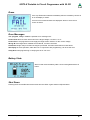
The order of the switches in the command line doesn’t matter. The switches must be separated by spaces. A
switch must not contain spaces.
Example: C:\pppp\PackProg.exe ‘abc.pac’ –d12345678 –p –c
Return Codes
These return codes can be used by a batch file to control its flow.
0 dsOk
1 dsPwrDown
2 dsPwrErr
3 dsFalseTyp
4 dsProtect
5 dsNotEmpty
6 dsVerifyErr
7 dsFileError
8 dsTimeOutErr
9 dsCommError
10 dsNoProg
11 dsNoProj
12 dsFwLost
13 dsNotfound
14 dsCalReq
E-LAB Computers
Operation successful finished
No Target voltage
Target too high or too low
Wrong CPU ID found
Target is protected by fuses
Target is not empty after an erase
Target or Programmer found a Verify error while programming
N.A.
USB driver returns a timeout
Communication problem with the Programmer
Programmer not found
Project not found
Programmer returna an invalid firmware
File, eg. Hexfile, was not found
Programmer returns a lost or illegal calibration
PackProg Software · 33
UPP2-X Portable in Circuit Programmer with GLCD
Telnet Interface
There is an easy to use remote control interface in PackProg. To simplify this remote control the Telnet
protocol is used. So other applications and also other PCs can remotely control a programmer via Telnet
command strings.
This menu item enables and disables the
PackProg Telnet Server.
The active Telnet Server is displayed in the
main window:
Telnet config
The Telnet Server needs an USER ID and a password. If a Telnet Client (another application) connects to the
Server this Client must provide the correct ID and password. This disables unauthorized Telnet Clients so they
can’t take control of the Server or influence it.
An invalid request made with a Telnet tool looks like this:
In Telnet mode PackProg uses Transparent Mode!
34 · PackProg Software
E-LAB Computers
UPP2-X Portable in Circuit Programmer with GLCD
The menu item Telnet info shows the Telnet command list.
Possible error messages are
1. PowerDown
Target has no power
2. Voltage
Target voltage too high or too low
3. 'FalseTyp
Target has the wrong ID or ID not
readable
4. Protected
With a Verify operation
5. notEmpty
With a programming cycle
6. Verify
Verify Error while programming
7. File
File not found, command $F
8. TimeOut
Communication timeout
9. Comm
Communication problem
10. noProg
Programmer not found
11. noProj
No project selected
12. Firmware
Programmer lost Firmware
E-LAB Computers
PackProg Software · 35
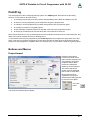
UPP2-X Portable in Circuit Programmer with GLCD
Working Stand Alone
The device provides four keys, up, down, select (S) and clear (C). A graphic display leads the user through
the dialogs and operations. After the power-on the main screen appears on the display.
The flash card symbol with the ?
means that there is no card
inserted or the card found is
defective. When the select key is
pressed the device requests a valid
flash card..
Setup
The flash card symbol now shows
a valid card. With the up or down
key the arrow can be placed to
Setup und this option can be
started with the select key.
With the select key the System
Check can be executed.
This checks the device
calibration, the flash card and
also all files on the card.
With the select key the contrast
or Backlight can be selected
and then can be changed with
the up or down key.
The changed values then can be
stored with the select key or
discarded with the clear key.
With the programmer type UPP2-X the start screen looks somewhat different:
36 · Stand Alone Mode
E-LAB Computers
UPP2-X Portable in Circuit Programmer with GLCD
Reset
Simultaneously pressing the up and down key executes a hardware reset in the programmer.
Start-Up
Because the UPP2-X is equipped with an internal battery, the bettery state is always checked at power-up in
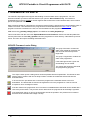
stand-alone mode Iif the ba ttery state is too low then this display raises:
If so, then the battery should be charged through PC or one of the contained
charging devices.
Projects
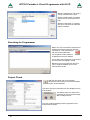
If the dialog Projects was selected and started in the main menu with the select key a short memory test is
executed and the project select dialog below is shown.
As the picture shows there can be several directories (folders). But at
least the ROOT folder exists. Within these folders there a the stored
projects. If the arrow points to a folder, this folder can be opened with the
select key and the included projects are listed.
An open folder can be closed with the clear key. The number right of the
folder shows the project count in this folder. If there are more than 5
folders the list can be scrolled with the up/down keys.
The UPP2 programmer can use only one directory level. This means that sub-directories in these folders are
not allowed. A total count of up to 64 projects and folders can be present and used.
If a folder has been opened with the select key, a dialog like the left one
is shown. With the up/down keys the arrow can be moved up or down..
If there are more than 4 projects stored in this folder the list can also be
scrolled with the up/down keys.
The clear key closes the opened folder.
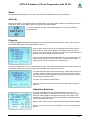
With the select key this one project becomes loaded where the arrow
points to.
Operation Selection
The main parameters of the actually loaded des project then are
displayed in this dialog. On the top there is the file name. On the right
below the actual voltage of the target is displayed if connected. If the
programmer must supply the target and the target is connected also its
current consumption is shown.
With the clear key the program returns into the project selection dialog.
With the select key one out of four operations can be executed for this
project.
E-LAB Computers
Stand Alone Mode · 37
UPP2-X Portable in Circuit Programmer with GLCD
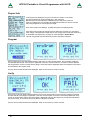
Project Info
In the project info dialog the project or file name is shown. In the same
line the programming mode is displayed, in this case PDI.
Below there is the info about the CPU/Device type and which parts of it
must be programmed. On the right the voltage and maximum current is shown
which the programmer must supply the target.
Here some options are displaye, eg AES encryption and quantity limits.
If the UPP2 must supply the target so these values are checked. For example it
must supply 4.0Volts and the target has its own supply with 5.0Volt then a warning
is raised with a programming, verifying or erase operation: Power Error.
This can be ignored with the select key and the operation continues.
Program
If the programming cycle was started with the select key so some checks follow. The necessary voltage is
checked and also the ID of the target, if applicable. Then the communication is checked. If all tests passed
the programming screen is shown with a gauge. At first the flash is displayed and then the EEprom if present
and activated in the project setup.
If errors are encountered these are displayed. With no errors the ok screen is shown.
Verify
If the verify cycle was started with the select key so some checks follow. The necessary voltage is checked
and also the ID of the target, if applicable. Then the communication is checked. If all tests passed the verify
screen is shown with a gauge. At first the flash is displayed and then the EEprom if present and activated in
the project setup. Of course a verify must fail if the target is protected.
If errors are encountered these are displayed. With no errors the ok screen is shown.
38 · Stand Alone Mode
E-LAB Computers
UPP2-X Portable in Circuit Programmer with GLCD
Erase
If the chip Erase was selected immediately after the mandatory checks an
ok or fail display is shown.
If errors are encountered these are displayed. With no errors the ok
screen is shown.
Error Messages
With program, verify or erase the possible error messages are:
Power Down the first check at all looks for the target voltage. It must be > 2.7V
Power Error if the programmer must supply the target it also checks it for the correct voltage
Wrong ID if the target has a readable and usable ID, it must be checked.
Protected a single verify must fail if the target is protected. Can also raised after an erase failure.
Not Empty an erase operation, either direct or in conjunction with programming, can show this error
Verify Error with programming or verifying this error can occur.
Battery State
When in idle mode the battery state can be interrogated with the C
button.
Shut Down
Pressing the C and the S button at the same time the UPP2-X gets switched off/powerdown.
E-LAB Computers
Stand Alone Mode · 39
UPP2-X Portable in Circuit Programmer with GLCD
EXTERNAL HARDWARE
Protection of the programmer
against external short-circuits and over-voltage
All newer programmer types are protected against continuous short circuit. The overvoltage protection must
be somewhat limited by such a device and is only allowable for a very short time and low voltages.
The protection consists of a resistor-zener diode combination for each control line. The resistor is 220 Ohm
and is connected between the 10 pin ribbon cable header and the internal AVR CPU. The diodes are a high
speed protection diode array of 6 Volt types. Each diode is connected to the junction between the resistor and
the CPU pin, the other side is connected to ground. Because of this wiring there can be problems with
programming parts if the target system loads the control lines with low ohm resistance. Also dynamic loads
caused by capacitors can lead to problems.
So it’s a good idea to design system with less or no loads on the programming lines. Resistance below 2k
Ohm and capacitors larger than 100pF should be avoided in conjunction with the programming lines. This is
true for both SPI-programming and also for JTAG-programming.
Miscellaneous Adaptors
These adapters are useful if your target board has connectors with Atmel standard pinouts.
As an option an adaptor
is available from E-LAB
6 pin SPI to Atmel 10
pin SPI #2125
40 · External Hardware
As an option an adaptor is
available from E-LAB
10pin JTAG to Atmel 10pin
JTAG
#2127
E-LAB Computers
UPP2-X Portable in Circuit Programmer with GLCD
MULTILE PROGRAMMERS
If the PC control program AVRprog.exe or PackProg.exe
finds several USB programmers or at least one serial and
one USB type are present, the programmer must be
selected from this dialog.
Basically only one serial type is searched. If one is found,
the search for these types is aborted.
Regardless of how many programmers have been found
only one can be used for working at a time. Gang
programming is not possible.
If additional programmers are connected or disconnected it is possible to
detect the currently connected programmers with the menu item
File/search programmers.
Battery Operation
The programmer contains a rechargeable battery pack with 3,7V/700mAh. When the device is portable
operated and programming a target without an own power supply or the target’s power supply is to weak to
also supply the programmer this battery is used. An internal battery with 3,7V/1500mAh is available as an
option.
An internal step-up regulator provides the selected target voltage.
The internal battery is recharged whenever the programmer is connected to an powered USB port.
Contained in the USB2-X package is also a mini AC to USB power supply as well as a car converter (for
cigarette lighter 12V to 5V USB)
TARGET POWER SUPPLY
All USB programmers have the feature to supply the target CPU with a selectable voltage/current.
Because a USB-port of the PC or HUB also can supply at least 100mA/5Volts this can be used as an
alternative to a separate power supply. Please note that the official (nominal) 5V in many cases is not 5V but
maybe 4.8V or less for example. Furthermore the device internal voltage regulator also has a drop out voltage
of approximately 0.2Volt. To reach a 5V output the programmer has a built-in step-up regulator so the >=5V
are always achievable.
E-LAB Computers
Multiple Programmers · 41
UPP2-X Portable in Circuit Programmer with GLCD
As an option an external power supply with 5 Volt can be connected to the USB jack. This supply is included.
Because of the internal battery the programmer can always deliver up to 300mA to the target if the internal
battery is full or nearly full. Whether there is an external power supply connected or not..
o1 2o
o3 4o
The programming connector of the UPP1-X device also provides a pin for an external power
supply. It can be connected to a power supply which can supply 5..9V/DC up to 500mA.
o5 6o
Pin6 Ground
o7 8o
o910o
Pin10 can be used as the external positive supply input.
USB DRIVER
Windows compatibility
For a reliable working with a USB Programmer and a Windows system at least Win98SE is necessary.
Win95, NT3/4 and standard Win98 don’t support USB. Also with Win98SE one must be careful. Not all
versions can handle USB in a reliable way. Because of this E-LAB can not guarantee the functionality of the
USB programmer with Win98SE. So for the USB versions only XP, Vista or Windows7 should be used.
Basically hard and/or software development systems should only be operated with XP or newer. These
systems are very stable now and don’t show the previous problems of restricted resources and handle count
like their predecessors.
Driver locations
E-LAB programmers with USB-interface (like all other non-standard USB devices) need a special USB driver.
This driver is included in the installation.
All USB-2 types have a common special driver set which resides in a separate sub directory of the installation
directory:
..\USB2_Driver\*.*
driver set for all ISP3-USB, UPP-1 and UPP-2 types
In the AVRco compiler installation these drivers can be found in their subdirectories below the directory
..\AVRco\..Driver installation
The necessary installation of the driver onto a PC is relative simple and without any problems. With the
installation of the programmer package the necessary USB drivers are automatically installed.
But one must proceed in fixed procedure.
1.
2.
3.
4.
5.
6.
7.
Disconnect any programmer devices from the PC
Startup the computer and wait until the system is ready for working.
The execute the included programmer install program “ISP_ICPinst.exe”. (not for AVRco)
The following Windows dialogs concerning the USB driver must be answered with yes
Plug the USB programmer into a free USB-port of the PC.
Windows now recognizes a new unknown USB device and registers it.
The programmer software is now ready to work.
42 · USB Driver
E-LAB Computers
UPP2-X Portable in Circuit Programmer with GLCD
Installing unsigned drivers
In order to force the installation of unsigned (not Microsoft certified) drivers under
Windows8/64 this must be enabled before the start-up of the Windows system with “cmd
shutdown /r /o“. Windows now executes a restart.
This concerns the E-LAB AVRprog USB driver and also the AVRco USB driver.
Step 1:
If Windows 8 has started then the Boot-Options-Menu must be started. To do this, on the
Windows 8 desktop the button combination of Win+R must be pressed to open the
“Execute”-dialog. In this dialog the following command must be typed in to start the
“Options”-menu at boot time:
Step 2: In the „Options“-menu click onto
”Troubleshoot”.
Step3: click onto “advanced options”.
E-LAB Computers
USB Driver · 43
UPP2-X Portable in Circuit Programmer with GLCD
Step4: click onto “Startup Settings”
Step5:
click onto “Disable
driver signature
enforcement”
and "Restart"
Step6: Choose Disable Driver Signature Enforcement and Enter key to start Windows
Now the AVRco or AVRprog
driver can be installed without any
error message.
Please note that the included
EXEs must be started in WIN7 mode.
44 · USB Driver
E-LAB Computers
UPP2-X Portable in Circuit Programmer with GLCD
Installing multiple programmers
The E-LAB programmers are individually registered by Windows. If the very first USB programmer becomes
registered now Windows at least knows this version/type of (ISP-3 or UPP) of programmer.
Further new devices normally show this dialog at the
first plug-in and then automatically become registered.
But with some system environment it’s also possible
that Windows requests the location/path where the
driver is located.
De-installing programmer drivers
Basically it makes no sense to de-install drivers for the E-LAB USB programmers because these drivers are
only loaded temporarily if a device gets connected. So the system is not loaded if no device is connected. But
if it becomes necessary to de-install USB drivers this must not be done manually.
Only this driver where the related hardware is connected, can be de-installed. To start de-installation at first
open the device manager of Windows. With the help of this tool the driver can be de-installed. Other
Windows utilities offer a so called deactivating of drivers which has nothing to do with de-installation.
E-LAB Computers
USB Driver · 45
UPP2-X Portable in Circuit Programmer with GLCD
FIRMWARE UPDATE
The latest E-LAB programmers support downloading of new firmware into the programmer. You can
determine whether your device has this feature if you open the Device Status dialog. If this device is
updateable then in the line Update a number appears which shows the current firmware date, which is also a
part of the update file name.
With a firmware update of a programmer the entire program (Flash) is erased except a small partition which is
called “boot sector’. New firmware for the programmers can be downloaded from www.e-lab.de. These
programs cannot be executed on the PC, but must be loaded into the programmer.
USB version file: yymmdd_UPP2_X.pupd or from WEB in file: UPP2_Xupdate.zip
This must be done with the menu item Options/Download new Firmware. Please note that all update files
must be placed into the folder ISP_Updates below the programmer’s home directory. Otherwise they will not
found. The menu item opens the dialog described below.
ISP/UPP Firmware Loader Dialog
The group “File state“ contains the
state of the loaded file: filename, file
size and info about the expected
target CPU.
The group “Target state“ contains the
state of the programmer.
If the traffic light shows a green the
downloading can be started.
The vertical bar shows the download
and programming progress.
The “Open“ button opens a dialog which shows all possible firmware update files. The filenames start
with the date of creation and can be easily located. A double click loads the selected file into the
download buffer.
A click to the Com port button then connects the programmer’s download section to the PC’s
downloader. The downloader checks the file against the info in the programmer. If the file can’t be
accepted an error messages is raised.
If the file matches the programmer and a connection is established the download can be started with a
click to the phone button. This process can be observed in the progress bar at the dialog’s right side.
If the downloads “hangs“ a click to the stop button aborts the operation. On problems an increase or
decrease of the external UPP voltage can help.
46 · Firmware Update
E-LAB Computers
UPP2-X Portable in Circuit Programmer with GLCD
An incomplete download/programming normally is detected at reset or power up of the programmer. If so, the
programmer immediately enters the download state and reclaims a new download.
It is also possible to force a firmware download.
1. USB and power supply jack
2. Micro-SD card slot
3. RESET button
This RESET button has two functions:
1. a short click to this button executes a Hardware Reset.
2. a longer click to this button (>1sec) also executes a Hardware Reset and in addition it forces the
device to enter the forced Download state like described above.
E-LAB Computers
Firmware Update · 47
UPP2-X Portable in Circuit Programmer with GLCD
ADDENDUM
XMega
Attention:
The RESET line on the target must never be loaded with capacitors because the PDI-CLK is fed here with >
1MHz. A jumper which disconnects RESET condenser at programming time can help.
With older XMegas, for example XMega128A1, or long programming cables
some errors maybe raised. Here Atmel recommends that the clock rate of the
PDI interface should be reduced. This can be done in “Options/Programmer
options“.
TINY4-5-9-10-20
These Tinys must be programmed with 5V through 3 pins.
The programming mode is called TPI. Because the same programming plug is also used by the SPI mode the
plug on the target system differs from the Atmel plug. The load on the
TPI_DAT pin must not be lower than 80kOhm.
This is the connection of the programmer cable to a TPI Tiny.
Because the RESET pin of these TINYs can be disabled by a fuse a normal
re-programming of these devices is not possible. Then the high-voltage
programming mode must be used. Fortunately the programming scheme is the same but only the RESET line
must be set to 12V.
Here is a simple schematic where the RESET output of the programmer is used to switch a 12V source:
48 · Addenum XMega, Tiny4-5 -9 – 10 -20
E-LAB Computers
UPP2-X Portable in Circuit Programmer with GLCD
Chipcon
Basics
The UPP2-X firmware also supports the in-Circuit programmable ZigBee Chip family CC1110, CC2510 and
CC2430 from TI-Chipcon. .
With the creation of a new project for the CC2430 in addition to an existing Flash hexfile also the correct CPU
must be selected (CC2430-F32, CC2430-F64 or CC2430-F128).
The generated supply voltage for the target can be set between 2.7V and 3.6V if the programmer has to
supply the target. A valid CPU clock must be selected, either 16MHz or 32MHz.
There are no fuse bits but a lock bit block. The meaning of these lock bits can be found in the datasheet of the
CC2430.
IEEE Address
Because the CC2430 is a ZigBee device the
controller must have a fixed and unique address
(IEEE) similar to a MAC address with Ethernet.
Chipcon defined that this address (8 bytes) must
reside in the upper most and last 8 bytes of the flash
memory. With the F128 this is $1FFF8..$1FFFF.
The order is MSB at the lower address and LSB on
the upper most address.
The programming software supports the address
handling so that this address can be preset and
becomes auto incremented after each programming
cycle.
With Preserve Serial Number the number in the
Target is read back and used for the next
programming cycle, provided that the chip is not
protected
With LSB Serial Number Order the serial number will be stored beginning with the LSB and ascending in the
Flash, otherwise beginning with the MSB.
These options can be set and edited in the dialog Options/Target Options
Connectors
The included 6 wire ribbon cable must be used. The connections of the receptable/header on the target board
must be done in a way like the schematic below shows it..
N.C
o1 2o
VCC
(P2_2) CLK
o3 4o
DATA (P2_1)
/RESET
o5 6o
GND
TopView header on the Target
E-LAB Computers
Attention!
The PIN2 must be connected with the positive
Target supply (VCC). PIN6 must be connected
to the ground of the Target. Connect PIN5 to the
RESET PIN, PIN3 to the Debug Clock (P2_2)
and PIN4 to the DATA PIN (P2_1) of the
CC2430.
Addenum Chipcon · 49
UPP2-X Portable in Circuit Programmer with GLCD
Verify
While programming the target which is done with 1kB blocks, a verify of the current block is automatically
executed after finishing the programming of this block. In case of a verify error the operation becomes aborted
and an appropriate message rises.
Chip internal ID
This ID number is read out of the current
connected chip and is displayed here.
The first byte is always zero and has no
meaning. The second one represents the
CPU revision ($01) and the third byte
shows the Chip-ID, $85 for the CC2430
family.
Attention
Please note that a wrong chip-ID is always
a result of a defect programmer, cable or
board connection. Of course a defect chip
can also be the reason for it.
A false chip ID should never be ignored
But the reasons for it should be carefully
researched.
50 · Addenum Chipcon
E-LAB Computers
UPP2-X Portable in Circuit Programmer with GLCD
Chipcon Evaluation Boards
CC2430DB
This board has two 6pin headers which provide an access for external programmers. But the UPP
programmer can not directly plugged into the board. In order support programming of this board by the UPP
there is an optional accessory for the UPP which consists of a small adaptor board. This is not included but
must be ordered separately. (ord #2109)
The adaptor must be connected to the evaluation board like the pictures below show.
SOC-BB
his board has one 10pin header which provides an access for external programmers. But the UPP
programmer can not directly plugged into the board. In order support programming of this board by the UPP
there is an optional accessory for the UPP which consists of the small board SOC-BB Adaptor. This is not
included but must be ordered separately. (ord #2123)
The adaptor must be connected to the evaluation board like the pictures below show.
E-LAB Computers
Addenum Chipcon · 51
UPP2-X Portable in Circuit Programmer with GLCD
AT89LPxx
Basics
The UPP2-X firmware also supports the in-Circuit programmable Atmel Chip family AT89LP2052 und 4052.
The difference to the AVRs and 89Sxx types consists of programming connections of the CPU with in-circuit
programming.
Connectors
The included 10 wire ribbon cable must be used. The connections of the receptable/header on the target
board must be done in a way like the schematic below shows it..
MISO
o1 2o
VCC
SCLK
o3 4o
MOSI
/RESET
o5 6o
GND
SS
o7 8o
N.C.
N.C.
o910o
N.C.
TopView header on the Target
Attention!
The PIN2 must be connected with the positive
Target supply (VCC). PIN6 must be connected
to the ground of the Target. Connect PIN5 to the
RESET pin, PIN3 to the SCLK, PIN4 to the
MOSI pin, PIN1 to the MISO pin and PIN7 to the
SS pin of the target..
52 · Addenum AT89LPxx
E-LAB Computers
UPP2-X Portable in Circuit Programmer with GLCD
Serial Flash (SPI-Flash)
Basics
The UPP1-P/R firmware also supports the in-Circuit programmable SPI-Flash chips of the types
AT25DFxxx, S25FLxxx and SST25VFxxx.
Connectors
The included 6pin cable must be used. The connections of the receptable/header on the target board must be
done in a way like the schematic below shows it..
MISO/SO
o1 2o
VCC (3.3V)
SCLK
o3 4o
MOSI/SI
/CS-SELECT
o5 6o
GND
TopView header on the Target
E-LAB Computers
Addenum Serial Flash (SPI Flash) · 53
UPP2-X Portable in Circuit Programmer with GLCD
Other E-LAB Programmers
ISP3-X
The ISP3-X programmer always needs a PC and
hence is not portable.
It is the cheapest device of the E-LAB programmer
family.
The connection to the PC is via USB2.
UPP1-X
The programmer UPP1-X can be operated by
the PC or independently of the PC (portable). In
the portable mode the projects are stored on its
microSD flash card.
The device is internally Li-Po battery powered in
portable mode.
The connection to the PC is via USB2.
UPP1-XS
The programmer UPP1-XS can be operated by
the PC or independently of the PC (portable). In
the portable mode upto 10 projects are stored on
its microSD flash card.
The project selection is done with the Up/Down
buttons with the help of the LED display. The
selected project name can be displayed on the
display in a marquee mode.
The device is internally Li-Po battery powered in
portable mode.
The connection to the PC is via USB2.
54 · Other E-LAB Programmers
E-LAB Computers
UPP2-X Portable in Circuit Programmer with GLCD
UPP1-P and UPP1-PR
The productions implementation of the
UPP1-X.
In top hat (DIN) rail case. Can be
controlled by a PC with USB or
Remote controlled by our DLL version P or
with wire control version PR
E-LAB Computers
Other E-LAB Programmers · 55
NOTES
NOTES
NOTES
NOTES
Ó1998-2015 E-LAB Computers
Grombacherstr. 27
D74906 Bad Rappenau
Tel. 07268/9124-0
Fax. 07268/9124-24
Internet: www.e-lab.de
e-mail: [email protected]