1
Critical Assessment Document: V-IR-Bull’s Convolution Reverberation
For capture and playback purposes, a Bose Speaker is
housed into the front panel of this system, and offers easy
access to control the gain of the output signal. This is
especially essential in the capture stage, as between 85dB and
90dB must be present at the microphone during capture (as
determined by Lucas Film, Ltd. and the industry standards in
evaluating speaker performance). A cubby for SPL Meter has
also been incorporated into the prototype to be clipped to the
mic stand for monitoring the sound pressure level present at
the microphone.
2. Prototype Configuration
This prototype is featured in its current stage in Figure 4,
and is nearing completion proportionate to funding available.
The front panel features cutouts for the pushbutton and LCD
control networks, and laser etched labeling. The Bose speaker
is situated into this panel as well, with its gain knob readily
accessible. The holes 3.5mm audio output connectors are also
drilled and labeled.
The rear panel features placement for power converter and
master power switch. Also ready to install is a cutout for the
fan, with independent power control for deactivation during
capture. Also prepared for install are slots for USB and HDMI
access into the Raspberry Pi network.
Also incorporated into the prototype is an XLR Female
throughput connector on a side panel (which is connected to
the rails on the phantom power box, supplying 48v across the
capacitive plates in the condenser mic, and outputs zero bias to
the LM4562 Mic preamplifier) as well as the cubbies for the
placement of the microphone and SPL meter on the top panel.
CONTROLS HARDWARE AND FUNCTIONS
Wolfson Network Sub-System
1. Wolfson Audio Card
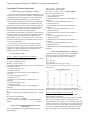
This card (see Figure 5) hosts high fidelity I/O functions to
and from both analog and digital outputs and inputs. This is
due to the ADAC (analog to digital conversions and vice
versa) function it performs, which is easily programmed for
recording and playback in a variety of resolution bit sizes and
sampling frequencies. For this stage of prototyping, we have
programmed the card to run I/O at CD fidelity: 16bit
resolution and 44.1kHz sampling rate. The architecture of the
main audio functions can be seen in Figure 6, supplied by the
Wolfson user manual [3], featuring the signal flow and pin
outs of the WM5102 and WM8804 chips.
The Wolfson Audio card communicates to the Raspberry Pi
through p5 pads and GPIO pins. The Raspberry Pi is where
the Wolfson modified Raspian Linux operating system is run
to maximize utilization of card's feature, which we imaged to
16GB Class 10 SD card.
2
2. I/Os and Prototypes
Both prototypes use the analog 3-pole line-level input jack,
the analog 3-pole line-level output jack and the small signal 4pole headset jack on the Wolfson Card. The professional
system inputs to the 3-pole line-in directly from the mixer
through front panel connectors, using an instrument cable
pulled from the alt-out, fixed with a 1/4 inch to 1/8 inch
adaptor. The consumer system inputs to the 3-pole line-in
internally, pulling the signal direct from internal Mic Preamp
(which is fed from the ST-MPA48, which inputs the signal
from the female XLR connector on side panel). Both systems
output through either the line-out or headphones jacks via the
front panels, which are readily accessible for hookup into
user’s mixer, DAW or stereo system. (Note: the consumer
system utilizes a splitter internally, splitting the line-out signal
between the Bose speaker and the 3.5mm jack on the front
panel.)
3. Capture Signal Flow
1. A 10s 1kHz test tone is used to establish 85-90dB at the
microphone capsule, using an SPL meter to measure.
2. A 16 bit 10ms pink noise chirp track is played out of the LX
Music player from the Wolfson Raspberry Pi sub-system, and
is emitted by the speaker.
3. The microphone captures a 10ms chirp and the reverberated
copies and reflections of the chirp from the room, thus
providing the frequency and timing information necessary to
define the acoustic characteristics of the room.
4. The captured audio signal is sent from the mic through a
mic cable with an XLR connector, into a microphone preamp,
which amplifies the signal by about 40dB and into the analog
line-in jack on the Wolfson audio card.
5. This sound-card uses its onboard ADAC to convert the
analog electrical signal to digital data, ready for manipulation
by a digital audio workstation (DAW) installed on the RPi
(Note: Audacity currently acts as the DAW for the consumer
system, for which step by step guide has been written and
would be included in the literature with the product).
6. After proper editing is performed in the DAW on the
capture, it is then exported as a .wav file.
7. The Wolfson RPi system then sends this capture.wav file to
the Convolution Raspberry Pi sub-system, which performs
FFT analysis to produce an impulse response map of the room.
8. This is impulse response then convolved with a music track
of the users choosing in the modified SciPy program.
9. When the convolution stage is completed, the convolution
Pi network sends the convolved .wav file back to the Wolfson
Pi, which can then either be played back through the line-out
or headphone out as-is in .wav format using LX music, or can
be run on through a conversion program to compress the file
into mp3, mp4, or AAC (& etc) file formats size-friendly to
personal listening devices.
Note: Also an option, the Convolution Pi offers USB access to
the SD memory, such that the user can save their new music
tracks onto their USB flash drive for use in other applications,
such as mixing.