1
11
8.
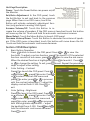
Menu Adjustment
Press
to launch the OSD panel. Press
or
to select
, press
to enter.
Press
or
to select sub-menu, press
to enter, press or
to adjust.
OST Timer → adjust OSD time
Language → select language
Reset → restore to factory settings
Version → factory version
Press
to exit.
9.
Signal Selection
Press
to launch the OSD panel. Press
or
to select
, press
to enter.
Press
or
to select sub-menu, press
to enter, press
or
to select input
source, which are :
VGA → select analog signal as source of input
HDMI → select digital signal as source of input
Auto Search → auto search for input signal.
Press
to exit.
Section 3 Low Power Protection Warning
If the volume setting is too high, the power requirement may be greater than
the power provided by computer or external 5V DC Charger. At this time, the
Low Power Protection Warning will appear. Please reduce the volume immediately. Connect the two USB connectors of Micro USB Touch Output and Power
Cable to the two USB ports on computer. If the volume is not reduced in time,
the Monitor will decrease the volume and brightness automatically.
Fig.: Low voltage warning shown at upper right corner on screen.
Chapter 5 Specification
Section 1 Plug and Play
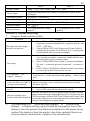
The On-Lap Monitor conforms to VESA DDC standard and supports VESA
DDC2. DDC2B is a bi-directional data channel based on I2C protocol. The host
can request EDID information over the DDC2B channel. The On-Lap Monitor is
able to inform the host system of its identity, and depending on the level of
DDC used, communicate additional information about its display capabilities.
Section 2 Pin Assignment
1.
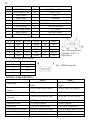
HDMI Connector Pinout
Fig.: HDMI-A Connector (Connect to
HDMI port)