1
Send a Video Conference Source to the Far End
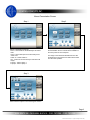
Step 1
Select Video Conference Sources.
• DVD - Load a DVD into the DVD Player and select
DVD.
• VCR - Load a VHS tape into the VHS Player and
select VCR.
• Cable TV - Select Cable TV.
• CD - Load a CD into the CD Player and select CD
Player.
• Laptop 1 - Select Laptop 1.
• Laptop 2 - Select Laptop 2.
• Camera 1 - Select Camera 1.
• Camera 2 - Select Camera 2.
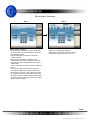
Step 2
Note: Camera 1 was selected as an example. If
applicable, the Video Conference Source controls will
be available on the lower portion of the touchpanel.
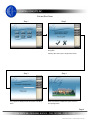
The image of the selected Video Conference Source
will be displayed at the far end. The Far End will be
displayed on the Projector.
Page 6
© 2007 Control Concepts, Inc. (subject to change without notice)